
Last updated:
2026 ATS Pricing: Monthly & Year 1 Costs for Small to Enterprise Buyers

Innovations

The Recruitify Team
2026 ATS Pricing: Monthly & Year 1 Costs for Small to Enterprise Buyers
Small teams typically pay between a few hundred and a few thousand dollars a year for an applicant tracking system. Mid-market organizations land in the several-thousand to low-five-figure range annually. Enterprise buyers, once implementation and modules get added in, often see total costs from $0 for free tiers to $125,000 or more a year. Vendors price this through five common models: flat fee, per-user, per-vacancy, per-employee, and per-module.
TL;DR:
Most organizations pay significant additional costs beyond license fees, including implementation, integrations, training, and support, which can double or triple the initial budget.
Large enterprises or multi-module setups often face first-year costs reaching six figures, with enterprise implementation alone potentially exceeding the license fee.
Matching the pricing model to your hiring volume is crucial; high-volume teams benefit from flat or per-user plans, while low-volume organizations save with per-vacancy pricing.
Negotiating renewal caps and requesting detailed line-item quotes for all costs can significantly reduce long-term expenses and improve ROI.
Recruitify offers an all-in-one platform with transparent tiered pricing that includes core tools and integrated automation, minimizing hidden costs and shortening the hiring cycle.
Table of Contents
What Does ATS Pricing Look Like by Organization Size?
How Do the Different ATS Pricing Models Work?
What Do ATS Implementation and Hidden Costs Add Up To?
How Should You Negotiate ATS Pricing and Calculate ROI?
Where Buyers Get ATS Pricing Wrong
Why Recruitify Simplifies the ATS Pricing Question
Sources
What Does ATS Pricing Look Like by Organization Size?
The single biggest driver of your ATS cost isn’t the vendor you pick. It’s how many recruiters and hiring managers need seats, and how many roles you’re filling in a given year. Vendors know this, which is why almost every pricing model on the market scales off headcount or hiring volume in some form.
Here’s how the bands typically break down:
Small teams (1 to 5 recruiters, under 50 hires a year): Expect $75 to $900 per year for lightweight, self-serve platforms, or up to a few thousand dollars annually if you want CRM features or multi-channel job posting bundled in.
Mid-market (5 to 25 recruiters, agencies or growing HR departments): Budget several thousand to somewhere in the low five figures per year, usually billed monthly per user.
Enterprise (25+ seats, complex workflows, multiple business units): Annual license costs alone often reach five to six figures, and that’s before implementation.
The per-user math matters more than the sticker price on a vendor’s homepage. Full-featured plans commonly run $50 to $150 per user per month, though the real spread across the market stretches from roughly $15 on the low end to $300 or more per user per month depending on how much AI scoring, CRM, and analytics the vendor bundles in.
Pro Tip: Ask any vendor for their price per active recruiter seat per month, not their advertised “starting at” figure. Most published pricing pages show the cheapest configuration, not the one you’ll actually need.
One thing that trips up a lot of buyers: a low-hire agency and a high-volume internal HR team can pay wildly different amounts for the identical feature set, simply because their pricing model doesn’t match their hiring rhythm. That mismatch is where most of the wasted spend on the market actually comes from.
How Do the Different ATS Pricing Models Work?
Vendors rarely stick to one pricing model. Most mix elements, which is why side-by-side quotes can look impossible to compare until you translate them into the same units. Here’s what each one actually means for your budget:
Flat fee. One price covers unlimited users and hires, usually at a set tier. Best for agencies with volatile headcount who don’t want cost to swing month to month.
Per-user (per-recruiter). You pay for each seat that logs in. A shop with 3 recruiters at $100 per user per month pays $3,600 a year. Simple, but costs climb the moment you hire another recruiter.
Per-vacancy (per-job). You pay per open role posted, not per person using the tool. This fits organizations with low, sporadic hiring volume far better than a per-user plan, since an inactive month costs almost nothing.
Per-employee. Priced against your total company headcount rather than recruiter seats. Common in HRIS-adjacent platforms and enterprise suites, where the ATS is one module of a bigger system.
Per-module / add-on. A base platform fee plus separate charges for CRM, background checks, assessments, or analytics. Cheap to start, but the line items add up fast if you need several modules.
Pro Tip: Match the model to your hiring cadence before you match it to price. Teams that hire year-round almost always come out ahead on flat or per-user pricing; teams with a handful of roles a quarter save more on per-vacancy plans, even when the headline number looks higher per job.
What Do ATS Implementation and Hidden Costs Add Up To?
The license fee is rarely the number that determines your real budget. Implementation, integrations, and add-ons routinely rewrite the total, and they’re the part most buyers underestimate.
Implementation timelines and costs scale sharply with company size. Self-serve small-business tools often carry $0 to $2,000 in setup costs and can go live in days. Enterprise deployments, particularly HRIS-integrated platforms, can run from tens of thousands of dollars up to $250,000 or more, with rollouts spanning several months.
That gap isn’t an anomaly. Enterprise buyers typically budget professional services equal to 100 to 150 percent of their year-one license fee, meaning implementation can cost as much as, or more than, the software itself in year one.
Beyond setup, watch for these recurring charges that rarely show up on a vendor’s pricing page:
Integration fees for connecting background-check vendors, assessment tools, or your existing HRIS.
Per-job-board posting costs if multi-channel distribution isn’t bundled into your plan.
Training and onboarding fees billed separately from the implementation quote.
Renewal escalations, which commonly run 5 to 15 percent unless you negotiate a cap up front.
Many vendors simply don’t lead with these figures. Published pricing frequently omits integration, migration, and module costs entirely, which is exactly why a line-item quote request should be step one in any procurement process, not an afterthought.
How Should You Negotiate ATS Pricing and Calculate ROI?
Before you sign anything, run every finalist through the same checklist. It forces vendors to quote comparable numbers instead of comparable-sounding marketing.
Request a full line-item quote separating license, implementation, integrations, training, and support.
Ask directly about renewal terms: is there an escalation cap, or does the price reset to “current market rate”?
Negotiate a headcount buffer of 10 to 15 percent so a few new hires don’t trigger a new pricing tier mid-contract.
Confirm who owns data migration and custom configuration work, and get that scope in writing.
Ask what exit terms look like, including data export rights and notice periods.
On negotiation itself, most vendors have more room to move than their published pricing suggests, particularly on implementation fees and first-year discounts. Renewal caps are one of the easier concessions to win, since they cost the vendor little upfront but protect you for years.
Pro Tip: Calculate ROI using time-to-fill and cost-per-hire before and after adoption, not just subscription cost. Reported payback periods across buyer surveys commonly fall between 9 and 14 months, depending on hiring volume and how much manual screening the platform actually automates. If your recruiters aren’t saving hours per hire, the ATS isn’t paying for itself yet, regardless of what it costs.

Where Buyers Get ATS Pricing Wrong
Most pricing guides treat the license fee as the whole story, and that’s the biggest blind spot in this market. The real number that determines whether a purchase was smart is total cost of ownership across year one, including implementation, and whether the automation actually reduced time-per-hire.
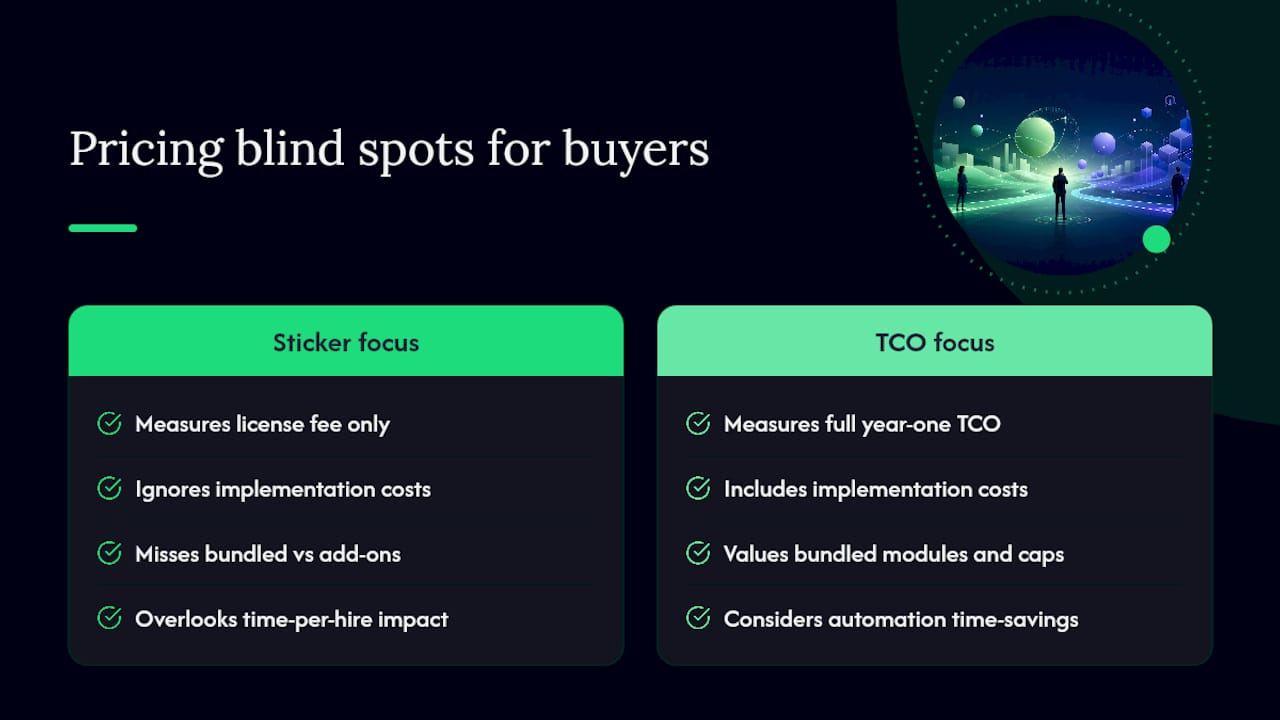
The conventional advice to “compare per-user pricing across vendors” is incomplete on its own. Two platforms at $80 per user per month can produce wildly different first-year totals once one bundles AI scoring, CRM, and multiposting and the other charges separately for each.
Prioritize the negotiation checklist over the sticker price. A vendor with a slightly higher license fee but a capped renewal and bundled modules will almost always beat a cheaper quote that nickels and dimes you on integrations for three years straight.
— Recruitify Team
Why Recruitify Simplifies the ATS Pricing Question
Recruitify runs on a straightforward tiered subscription, billed monthly or annually per user, with candidate management, CRM, and sales pipeline tools built into the same platform instead of sold as separate add-ons. That structure directly targets the biggest cost trap covered above: the module fees and integration charges that inflate a first-year budget past the license quote you were originally shown.

Because candidate scoring, CV parsing, and workflow automation sit inside the core platform, teams typically avoid the separate assessment and CRM contracts that push mid-market budgets into unpredictable territory. Migration support during onboarding also cuts into the implementation friction that eats up so much of an enterprise buyer’s first-year spend. Over 250 companies currently run their hiring on Recruitify’s integrated approach, which speeds up the recruitment cycle by up to five times compared to piecing together separate tools.
If you’re mapping out your own ATS budget for next year, start a Recruitify trial or request a demo to get a line-item quote built around your actual hiring volume, not a generic tier.
Sources
How Much Does an Applicant Tracking System Cost? Price Guide - Toggl
Applicant Tracking Systems Pricing: Insights Based on G2 Data - G2 Learn
Recommended


News & Updates
Stay up-to-date with the latest innovations, features, and tips about Recruitify!
By providing your email address within the newsletter sign-up form, you confirm its processing to send marketing information regarding the Administrator’s products and services. The Administrator of your personal data processed for the abovementioned purposes is Recruitify Spółka z o.o., based in Warsaw, Poland (KRS 0000709889). For more information on the principles of personal data processing and the rights of data subjects, please check the Privacy Policy.

Last updated:
2026 ATS Pricing: Monthly & Year 1 Costs for Small to Enterprise Buyers
Innovations
The Recruitify Team
2026 ATS Pricing: Monthly & Year 1 Costs for Small to Enterprise Buyers
Small teams typically pay between a few hundred and a few thousand dollars a year for an applicant tracking system. Mid-market organizations land in the several-thousand to low-five-figure range annually. Enterprise buyers, once implementation and modules get added in, often see total costs from $0 for free tiers to $125,000 or more a year. Vendors price this through five common models: flat fee, per-user, per-vacancy, per-employee, and per-module.
TL;DR:
Most organizations pay significant additional costs beyond license fees, including implementation, integrations, training, and support, which can double or triple the initial budget.
Large enterprises or multi-module setups often face first-year costs reaching six figures, with enterprise implementation alone potentially exceeding the license fee.
Matching the pricing model to your hiring volume is crucial; high-volume teams benefit from flat or per-user plans, while low-volume organizations save with per-vacancy pricing.
Negotiating renewal caps and requesting detailed line-item quotes for all costs can significantly reduce long-term expenses and improve ROI.
Recruitify offers an all-in-one platform with transparent tiered pricing that includes core tools and integrated automation, minimizing hidden costs and shortening the hiring cycle.
Table of Contents
What Does ATS Pricing Look Like by Organization Size?
How Do the Different ATS Pricing Models Work?
What Do ATS Implementation and Hidden Costs Add Up To?
How Should You Negotiate ATS Pricing and Calculate ROI?
Where Buyers Get ATS Pricing Wrong
Why Recruitify Simplifies the ATS Pricing Question
Sources
What Does ATS Pricing Look Like by Organization Size?
The single biggest driver of your ATS cost isn’t the vendor you pick. It’s how many recruiters and hiring managers need seats, and how many roles you’re filling in a given year. Vendors know this, which is why almost every pricing model on the market scales off headcount or hiring volume in some form.
Here’s how the bands typically break down:
Small teams (1 to 5 recruiters, under 50 hires a year): Expect $75 to $900 per year for lightweight, self-serve platforms, or up to a few thousand dollars annually if you want CRM features or multi-channel job posting bundled in.
Mid-market (5 to 25 recruiters, agencies or growing HR departments): Budget several thousand to somewhere in the low five figures per year, usually billed monthly per user.
Enterprise (25+ seats, complex workflows, multiple business units): Annual license costs alone often reach five to six figures, and that’s before implementation.
The per-user math matters more than the sticker price on a vendor’s homepage. Full-featured plans commonly run $50 to $150 per user per month, though the real spread across the market stretches from roughly $15 on the low end to $300 or more per user per month depending on how much AI scoring, CRM, and analytics the vendor bundles in.
Pro Tip: Ask any vendor for their price per active recruiter seat per month, not their advertised “starting at” figure. Most published pricing pages show the cheapest configuration, not the one you’ll actually need.
One thing that trips up a lot of buyers: a low-hire agency and a high-volume internal HR team can pay wildly different amounts for the identical feature set, simply because their pricing model doesn’t match their hiring rhythm. That mismatch is where most of the wasted spend on the market actually comes from.
How Do the Different ATS Pricing Models Work?
Vendors rarely stick to one pricing model. Most mix elements, which is why side-by-side quotes can look impossible to compare until you translate them into the same units. Here’s what each one actually means for your budget:
Flat fee. One price covers unlimited users and hires, usually at a set tier. Best for agencies with volatile headcount who don’t want cost to swing month to month.
Per-user (per-recruiter). You pay for each seat that logs in. A shop with 3 recruiters at $100 per user per month pays $3,600 a year. Simple, but costs climb the moment you hire another recruiter.
Per-vacancy (per-job). You pay per open role posted, not per person using the tool. This fits organizations with low, sporadic hiring volume far better than a per-user plan, since an inactive month costs almost nothing.
Per-employee. Priced against your total company headcount rather than recruiter seats. Common in HRIS-adjacent platforms and enterprise suites, where the ATS is one module of a bigger system.
Per-module / add-on. A base platform fee plus separate charges for CRM, background checks, assessments, or analytics. Cheap to start, but the line items add up fast if you need several modules.
Pro Tip: Match the model to your hiring cadence before you match it to price. Teams that hire year-round almost always come out ahead on flat or per-user pricing; teams with a handful of roles a quarter save more on per-vacancy plans, even when the headline number looks higher per job.
What Do ATS Implementation and Hidden Costs Add Up To?
The license fee is rarely the number that determines your real budget. Implementation, integrations, and add-ons routinely rewrite the total, and they’re the part most buyers underestimate.
Implementation timelines and costs scale sharply with company size. Self-serve small-business tools often carry $0 to $2,000 in setup costs and can go live in days. Enterprise deployments, particularly HRIS-integrated platforms, can run from tens of thousands of dollars up to $250,000 or more, with rollouts spanning several months.
That gap isn’t an anomaly. Enterprise buyers typically budget professional services equal to 100 to 150 percent of their year-one license fee, meaning implementation can cost as much as, or more than, the software itself in year one.
Beyond setup, watch for these recurring charges that rarely show up on a vendor’s pricing page:
Integration fees for connecting background-check vendors, assessment tools, or your existing HRIS.
Per-job-board posting costs if multi-channel distribution isn’t bundled into your plan.
Training and onboarding fees billed separately from the implementation quote.
Renewal escalations, which commonly run 5 to 15 percent unless you negotiate a cap up front.
Many vendors simply don’t lead with these figures. Published pricing frequently omits integration, migration, and module costs entirely, which is exactly why a line-item quote request should be step one in any procurement process, not an afterthought.
How Should You Negotiate ATS Pricing and Calculate ROI?
Before you sign anything, run every finalist through the same checklist. It forces vendors to quote comparable numbers instead of comparable-sounding marketing.
Request a full line-item quote separating license, implementation, integrations, training, and support.
Ask directly about renewal terms: is there an escalation cap, or does the price reset to “current market rate”?
Negotiate a headcount buffer of 10 to 15 percent so a few new hires don’t trigger a new pricing tier mid-contract.
Confirm who owns data migration and custom configuration work, and get that scope in writing.
Ask what exit terms look like, including data export rights and notice periods.
On negotiation itself, most vendors have more room to move than their published pricing suggests, particularly on implementation fees and first-year discounts. Renewal caps are one of the easier concessions to win, since they cost the vendor little upfront but protect you for years.
Pro Tip: Calculate ROI using time-to-fill and cost-per-hire before and after adoption, not just subscription cost. Reported payback periods across buyer surveys commonly fall between 9 and 14 months, depending on hiring volume and how much manual screening the platform actually automates. If your recruiters aren’t saving hours per hire, the ATS isn’t paying for itself yet, regardless of what it costs.
Where Buyers Get ATS Pricing Wrong
Most pricing guides treat the license fee as the whole story, and that’s the biggest blind spot in this market. The real number that determines whether a purchase was smart is total cost of ownership across year one, including implementation, and whether the automation actually reduced time-per-hire.
The conventional advice to “compare per-user pricing across vendors” is incomplete on its own. Two platforms at $80 per user per month can produce wildly different first-year totals once one bundles AI scoring, CRM, and multiposting and the other charges separately for each.
Prioritize the negotiation checklist over the sticker price. A vendor with a slightly higher license fee but a capped renewal and bundled modules will almost always beat a cheaper quote that nickels and dimes you on integrations for three years straight.
— Recruitify Team
Why Recruitify Simplifies the ATS Pricing Question
Recruitify runs on a straightforward tiered subscription, billed monthly or annually per user, with candidate management, CRM, and sales pipeline tools built into the same platform instead of sold as separate add-ons. That structure directly targets the biggest cost trap covered above: the module fees and integration charges that inflate a first-year budget past the license quote you were originally shown.
Because candidate scoring, CV parsing, and workflow automation sit inside the core platform, teams typically avoid the separate assessment and CRM contracts that push mid-market budgets into unpredictable territory. Migration support during onboarding also cuts into the implementation friction that eats up so much of an enterprise buyer’s first-year spend. Over 250 companies currently run their hiring on Recruitify’s integrated approach, which speeds up the recruitment cycle by up to five times compared to piecing together separate tools.
If you’re mapping out your own ATS budget for next year, start a Recruitify trial or request a demo to get a line-item quote built around your actual hiring volume, not a generic tier.
Sources
How Much Does an Applicant Tracking System Cost? Price Guide - Toggl
Applicant Tracking Systems Pricing: Insights Based on G2 Data - G2 Learn
Recommended
News & Updates
Stay up-to-date with the latest innovations, features, and tips about Recruitify!
By providing your email address within the newsletter sign-up form, you confirm its processing to send marketing information regarding the Administrator’s products and services. The Administrator of your personal data processed for the abovementioned purposes is Recruitify Spółka z o.o., based in Warsaw, Poland (KRS 0000709889). For more information on the principles of personal data processing and the rights of data subjects, please check the Privacy Policy.
Last updated:
2026 ATS Pricing: Monthly & Year 1 Costs for Small to Enterprise Buyers
Innovations
The Recruitify Team
2026 ATS Pricing: Monthly & Year 1 Costs for Small to Enterprise Buyers
Small teams typically pay between a few hundred and a few thousand dollars a year for an applicant tracking system. Mid-market organizations land in the several-thousand to low-five-figure range annually. Enterprise buyers, once implementation and modules get added in, often see total costs from $0 for free tiers to $125,000 or more a year. Vendors price this through five common models: flat fee, per-user, per-vacancy, per-employee, and per-module.
TL;DR:
Most organizations pay significant additional costs beyond license fees, including implementation, integrations, training, and support, which can double or triple the initial budget.
Large enterprises or multi-module setups often face first-year costs reaching six figures, with enterprise implementation alone potentially exceeding the license fee.
Matching the pricing model to your hiring volume is crucial; high-volume teams benefit from flat or per-user plans, while low-volume organizations save with per-vacancy pricing.
Negotiating renewal caps and requesting detailed line-item quotes for all costs can significantly reduce long-term expenses and improve ROI.
Recruitify offers an all-in-one platform with transparent tiered pricing that includes core tools and integrated automation, minimizing hidden costs and shortening the hiring cycle.
Table of Contents
What Does ATS Pricing Look Like by Organization Size?
How Do the Different ATS Pricing Models Work?
What Do ATS Implementation and Hidden Costs Add Up To?
How Should You Negotiate ATS Pricing and Calculate ROI?
Where Buyers Get ATS Pricing Wrong
Why Recruitify Simplifies the ATS Pricing Question
Sources
What Does ATS Pricing Look Like by Organization Size?
The single biggest driver of your ATS cost isn’t the vendor you pick. It’s how many recruiters and hiring managers need seats, and how many roles you’re filling in a given year. Vendors know this, which is why almost every pricing model on the market scales off headcount or hiring volume in some form.
Here’s how the bands typically break down:
Small teams (1 to 5 recruiters, under 50 hires a year): Expect $75 to $900 per year for lightweight, self-serve platforms, or up to a few thousand dollars annually if you want CRM features or multi-channel job posting bundled in.
Mid-market (5 to 25 recruiters, agencies or growing HR departments): Budget several thousand to somewhere in the low five figures per year, usually billed monthly per user.
Enterprise (25+ seats, complex workflows, multiple business units): Annual license costs alone often reach five to six figures, and that’s before implementation.
The per-user math matters more than the sticker price on a vendor’s homepage. Full-featured plans commonly run $50 to $150 per user per month, though the real spread across the market stretches from roughly $15 on the low end to $300 or more per user per month depending on how much AI scoring, CRM, and analytics the vendor bundles in.
Pro Tip: Ask any vendor for their price per active recruiter seat per month, not their advertised “starting at” figure. Most published pricing pages show the cheapest configuration, not the one you’ll actually need.
One thing that trips up a lot of buyers: a low-hire agency and a high-volume internal HR team can pay wildly different amounts for the identical feature set, simply because their pricing model doesn’t match their hiring rhythm. That mismatch is where most of the wasted spend on the market actually comes from.
How Do the Different ATS Pricing Models Work?
Vendors rarely stick to one pricing model. Most mix elements, which is why side-by-side quotes can look impossible to compare until you translate them into the same units. Here’s what each one actually means for your budget:
Flat fee. One price covers unlimited users and hires, usually at a set tier. Best for agencies with volatile headcount who don’t want cost to swing month to month.
Per-user (per-recruiter). You pay for each seat that logs in. A shop with 3 recruiters at $100 per user per month pays $3,600 a year. Simple, but costs climb the moment you hire another recruiter.
Per-vacancy (per-job). You pay per open role posted, not per person using the tool. This fits organizations with low, sporadic hiring volume far better than a per-user plan, since an inactive month costs almost nothing.
Per-employee. Priced against your total company headcount rather than recruiter seats. Common in HRIS-adjacent platforms and enterprise suites, where the ATS is one module of a bigger system.
Per-module / add-on. A base platform fee plus separate charges for CRM, background checks, assessments, or analytics. Cheap to start, but the line items add up fast if you need several modules.
Pro Tip: Match the model to your hiring cadence before you match it to price. Teams that hire year-round almost always come out ahead on flat or per-user pricing; teams with a handful of roles a quarter save more on per-vacancy plans, even when the headline number looks higher per job.
What Do ATS Implementation and Hidden Costs Add Up To?
The license fee is rarely the number that determines your real budget. Implementation, integrations, and add-ons routinely rewrite the total, and they’re the part most buyers underestimate.
Implementation timelines and costs scale sharply with company size. Self-serve small-business tools often carry $0 to $2,000 in setup costs and can go live in days. Enterprise deployments, particularly HRIS-integrated platforms, can run from tens of thousands of dollars up to $250,000 or more, with rollouts spanning several months.
That gap isn’t an anomaly. Enterprise buyers typically budget professional services equal to 100 to 150 percent of their year-one license fee, meaning implementation can cost as much as, or more than, the software itself in year one.
Beyond setup, watch for these recurring charges that rarely show up on a vendor’s pricing page:
Integration fees for connecting background-check vendors, assessment tools, or your existing HRIS.
Per-job-board posting costs if multi-channel distribution isn’t bundled into your plan.
Training and onboarding fees billed separately from the implementation quote.
Renewal escalations, which commonly run 5 to 15 percent unless you negotiate a cap up front.
Many vendors simply don’t lead with these figures. Published pricing frequently omits integration, migration, and module costs entirely, which is exactly why a line-item quote request should be step one in any procurement process, not an afterthought.
How Should You Negotiate ATS Pricing and Calculate ROI?
Before you sign anything, run every finalist through the same checklist. It forces vendors to quote comparable numbers instead of comparable-sounding marketing.
Request a full line-item quote separating license, implementation, integrations, training, and support.
Ask directly about renewal terms: is there an escalation cap, or does the price reset to “current market rate”?
Negotiate a headcount buffer of 10 to 15 percent so a few new hires don’t trigger a new pricing tier mid-contract.
Confirm who owns data migration and custom configuration work, and get that scope in writing.
Ask what exit terms look like, including data export rights and notice periods.
On negotiation itself, most vendors have more room to move than their published pricing suggests, particularly on implementation fees and first-year discounts. Renewal caps are one of the easier concessions to win, since they cost the vendor little upfront but protect you for years.
Pro Tip: Calculate ROI using time-to-fill and cost-per-hire before and after adoption, not just subscription cost. Reported payback periods across buyer surveys commonly fall between 9 and 14 months, depending on hiring volume and how much manual screening the platform actually automates. If your recruiters aren’t saving hours per hire, the ATS isn’t paying for itself yet, regardless of what it costs.
Where Buyers Get ATS Pricing Wrong
Most pricing guides treat the license fee as the whole story, and that’s the biggest blind spot in this market. The real number that determines whether a purchase was smart is total cost of ownership across year one, including implementation, and whether the automation actually reduced time-per-hire.
The conventional advice to “compare per-user pricing across vendors” is incomplete on its own. Two platforms at $80 per user per month can produce wildly different first-year totals once one bundles AI scoring, CRM, and multiposting and the other charges separately for each.
Prioritize the negotiation checklist over the sticker price. A vendor with a slightly higher license fee but a capped renewal and bundled modules will almost always beat a cheaper quote that nickels and dimes you on integrations for three years straight.
— Recruitify Team
Why Recruitify Simplifies the ATS Pricing Question
Recruitify runs on a straightforward tiered subscription, billed monthly or annually per user, with candidate management, CRM, and sales pipeline tools built into the same platform instead of sold as separate add-ons. That structure directly targets the biggest cost trap covered above: the module fees and integration charges that inflate a first-year budget past the license quote you were originally shown.
Because candidate scoring, CV parsing, and workflow automation sit inside the core platform, teams typically avoid the separate assessment and CRM contracts that push mid-market budgets into unpredictable territory. Migration support during onboarding also cuts into the implementation friction that eats up so much of an enterprise buyer’s first-year spend. Over 250 companies currently run their hiring on Recruitify’s integrated approach, which speeds up the recruitment cycle by up to five times compared to piecing together separate tools.
If you’re mapping out your own ATS budget for next year, start a Recruitify trial or request a demo to get a line-item quote built around your actual hiring volume, not a generic tier.
Sources
How Much Does an Applicant Tracking System Cost? Price Guide - Toggl
Applicant Tracking Systems Pricing: Insights Based on G2 Data - G2 Learn
Recommended
News & Updates
Stay up-to-date with the latest innovations, features, and tips about Recruitify!
By providing your email address within the newsletter sign-up form, you confirm its processing to send marketing information regarding the Administrator’s products and services. The Administrator of your personal data processed for the abovementioned purposes is Recruitify Spółka z o.o., based in Warsaw, Poland (KRS 0000709889). For more information on the principles of personal data processing and the rights of data subjects, please check the Privacy Policy.

Discover More

Recruitment Process
Rate Card Staffing: How to Build, Price and Manage One
A practical guide to staffing rate cards: how bill rates are built from pay rates, which methodology to use, how to review rates, and how to manage them.
25 Oct 2026
Discover More

Innovations
Application Conversion Rate: Formula, Benchmarks, Fixes
Application conversion rate explained for recruiters: the formula, stage-by-stage math, real benchmarks, and the fixes that move the number. Includes app-store rates.
24 Oct 2026
Discover More

Recruitment Process
GDPR-Compliant Analytics for Recruitment Teams
What makes analytics GDPR compliant, from cookies to candidate data: a practical framework for recruitment agencies and HR teams, including US firms hiring in the EU.
23 Oct 2026
Discover More
Recruitment Process
Rate Card Staffing: How to Build, Price and Manage One
A practical guide to staffing rate cards: how bill rates are built from pay rates, which methodology to use, how to review rates, and how to manage them.
25 Oct 2026
Discover More
Innovations
Application Conversion Rate: Formula, Benchmarks, Fixes
Application conversion rate explained for recruiters: the formula, stage-by-stage math, real benchmarks, and the fixes that move the number. Includes app-store rates.
24 Oct 2026
Discover More

