
Last updated:
Hit 80+ Scores: Automated Resume Screening for HR & Job Seekers

Applicant Tracking System

The Recruitify Team
Automated resume screening uses software to parse, categorize, and rank job applications against a set of criteria before a human ever opens them. Recruiters get the most value by defining clear must-have criteria and keeping a human reviewer in the loop for borderline cases. Job seekers get the most value by writing resumes that parse cleanly, since checker scores above 80 signal a strong position and scores near 90 tend to push candidates toward the interview stage.
Resumes in DOCX or simple PDF formats with standard headings and consistent date formats improve parsing accuracy and candidate score reliability.
Scores above 80 are generally competitive, while 90 or higher significantly increase chances of interview invites, especially in Fortune 500 recruiting processes.
Poor parsing often results from image-based PDFs, multi-column layouts, and placing contact info in headers or footers, so testing resumes beforehand is essential.
Automated systems work best for volume screening and should be calibrated regularly against actual hiring outcomes to avoid missing qualified candidates.
Legal regulations in the US and certain cities require bias audits and candidate disclosures, making transparent, bias-aware automation practices mandatory.
RecruitifyScreen Candidates With More ContextRecruitify.ai combines AI resume parsing, contextual matching, and scoring to help IT recruitment agencies build ready-made candidate shortlists.Explore Recruitify.ai
Table of Contents
How Does Automated Resume Screening Actually Work?
What Should You Fix First on an ATS-Friendly Resume?
What Do Resume Checker Scores Actually Mean?
When Should You Trust Automation Over Human Judgment?
Why Do Some Resumes Fail to Parse Correctly?
How Do You Keep Automated Screening Fair and Compliant?
What Does Responsible Screening Look Like in Practice?
Our Take: Stop Treating the Resume and the System as Separate Problems
Ready to Screen Smarter, Not Just Faster?
Sources
FAQ
How Does Automated Resume Screening Actually Work?
Every automated resume screening system starts with parsing: software extracts text from a resume file and sorts it into fields like work history, education, and skills. Optical character recognition (OCR) handles scanned or image-based files, converting pixels into readable text. This step is where most trouble starts. A resume built with text boxes, columns, or embedded images can confuse the parser, scrambling dates or dropping entire sections before the scoring engine ever sees them.
Once the text is structured, the system compares it against a job requisition using one of two approaches. Basic tools run keyword filters, checking for exact matches like “Python” or “project management.” More advanced platforms use semantic matching, which interprets meaning and context. A semantic matcher recognizes that “led a cross-functional engineering team” relates to leadership experience even without the word “manager” appearing anywhere on the page.
The output is typically a fit score between 0 and 100, often paired with confidence flags and a list of matched evidence pulled directly from the resume text.
Parsing accuracy drops sharply on scanned PDFs and image files, which is why OCR-based tools flag low confidence on those formats.
Keyword filters miss synonyms and adjacent skills that semantic engines catch.
Confidence flags tell recruiters when a score should be double-checked rather than trusted outright.
Matched-evidence outputs show which lines of the resume triggered each score component, so recruiters can validate results instead of guessing.
Good screening platforms let recruiters view the parsed fields directly, side by side with the original document. That transparency is what separates a defensible automated applicant screening process from a black box.
What Should You Fix First on an ATS-Friendly Resume?
Small formatting choices decide whether a resume gets parsed correctly or disappears into a scoring error. Indeed’s editorial guidance on automated screening centers on a few repeatable fixes, and they apply whether you’re a first-time applicant or a recruiter auditing your own careers page template.
Use canonical section headings. Label sections “Work Experience,” “Education,” and “Skills” exactly, since parsers are trained to recognize standard labels, not creative alternatives like “My Journey” or “What I Bring.”
Put keywords in context, not in a list. Instead of dropping “SQL, Python, Tableau” at the bottom of the page, write “Built SQL queries to automate Tableau dashboards, cutting reporting time by 40%.” Context and metrics both help human reviewers and parsing engines read intent, not just vocabulary.
Choose a parseable file type. DOCX and simple, text-based PDFs parse most reliably. Avoid image exports, scanned copies, and design-heavy templates with columns or tables.
Keep contact information in the body text, not the header or footer. Many parsers skip header and footer zones entirely, which means a phone number or email address placed there may never reach the candidate record.
Format dates consistently. Use a single format (“March 2023 to Present”) throughout rather than mixing formats across jobs, which can break date-range parsing logic.
Pro Tip: Run your resume through a parse-test tool before submitting it, and check whether your job titles, dates, and skills show up in the exact fields you intended. If a field is empty or garbled, the employer’s system likely saw the same blank spot.
Recruiters building the intake side of this process face a mirror-image task. Defining a small number of true must-haves, clear knockout questions, and a documented review rule for borderline scores reduces false negatives dramatically. A knockout question should filter for something genuinely disqualifying, like a required certification or work authorization, rather than a nice-to-have skill that a qualified candidate might just phrase differently. Loose, overly broad knockout rules are the single biggest cause of good candidates disappearing before a human ever sees them.
What Do Resume Checker Scores Actually Mean?
A public resume checker and an employer’s internal ATS are not the same tool, even though both produce a score. Public checkers, like the ones described in Enhancv’s resume-checker methodology, combine a parse-rate check with a content-quality assessment, essentially asking “did this parse cleanly?” and “does this read well?” separately. An employer’s ATS instead ranks candidates against a specific requisition’s criteria, weighting factors the public tool has no visibility into.
Score thresholds vary by platform, but a rough benchmark holds across most tools: scores above 80 put a candidate in a competitive range, while scores of 90 or higher meaningfully increase interview odds. That benchmark matters given that Applicant Tracking Systems are widely used among Fortune 500 hiring pipelines, making resume-side optimization a near-universal necessity rather than a niche tactic.
Match reports typically include:
A percentage match score against the target role
A list of matched skills and a separate list of missing skills
A parse-rate indicator showing how cleanly the file was read
Confidence flags on fields the system couldn’t parse with certainty
Scores lose reliability on scanned resumes, unusually formatted documents, or resumes written in nonstandard phrasing. When a score conflicts sharply with a recruiter’s own read of a candidate, that’s usually a parsing problem, not a candidate problem, and it’s worth a manual check of the parsed fields before making a final call.
When Should You Trust Automation Over Human Judgment?
Automated applicant screening earns its keep at volume: gating large applicant pools and applying consistent initial scoring across hundreds of resumes a human could never review with equal attention. Human review earns its keep at the margins: borderline scores, senior roles, and any position where a wrong rejection carries real cost. SHRM’s research on recruitment costs makes clear why speed matters here, but speed without judgment just moves the risk of a bad hire earlier in the funnel rather than removing it.
The strongest hybrid workflows share a few habits:
Automation produces ranked shortlists; humans make the final call on anyone near a threshold.
Hard knockouts get a manual audit sample, not blind trust, since a poorly worded knockout rule can silently filter out qualified people.
Recruiters periodically pull a random batch of rejected resumes to check for scoring drift.
Pro Tip: Calibrate your thresholds quarterly by comparing scored candidates against who actually got hired. If your top-scored applicants aren’t the ones landing offers, the threshold needs adjusting, not the candidate pool.
Why Do Some Resumes Fail to Parse Correctly?
Image-only PDFs and scanned documents are the most common parsing failure, since OCR has to guess at text rather than reading it directly, which lowers confidence scores across every field. DOCX files generally parse more reliably than PDFs, though a clean, text-based PDF exported straight from a word processor works nearly as well.
Avoid multi-column layouts, tables, and text boxes, which scramble reading order.
Skip headers and footers for anything critical, including contact details.
Stick to standard fonts and avoid special characters or unusual bullet styles.
Before rejecting a low-scoring resume, run a quick parse test or view the parsed fields directly to rule out a formatting failure rather than a genuine skills gap.
How Do You Keep Automated Screening Fair and Compliant?
Automated resume screening carries real regulatory exposure. In the United States, disparate-impact standards under EEOC guidance apply to automated tools just as they apply to human decisions, and jurisdictions have started layering on specific disclosure rules, such as New York City’s Local Law 144, which requires bias audits and candidate notice for automated employment decision tools.
Platforms that build in bias audits, consent-first workflows, and transparent scoring reasons give recruiters a defensible position when a rejected candidate asks why. The core practices worth documenting:
Run periodic bias audits and exclude protected attributes (age, gender, race) from scoring inputs entirely.
Use blind-CV techniques that anonymize identifying details before human review.
Log consent and disclosure records so every automated decision has a traceable audit trail.
Document your criteria definitions and threshold rationale, and revisit both on a fixed cadence rather than only after a complaint.
What Does Responsible Screening Look Like in Practice?
Recruitify’s Contextual Matching AI generates percentage match scores and ready-made shortlists rather than a black-box rejection. The AI CV Parser with OCR reads PDFs, scans, and photos in seconds, flags duplicates, and a built-in GDPR consent module keeps every scoring decision inside a documented audit trail.
Our Take: Stop Treating the Resume and the System as Separate Problems
Most advice on this topic splits cleanly into two camps: job seekers obsessing over keyword density, and recruiters obsessing over vendor selection. Both miss the actual leverage point. A perfectly optimized resume still fails against a poorly configured ATS with sloppy knockout rules, and a well-calibrated screening system still misses good candidates if nobody tells them their headings need to say “Work Experience” instead of something clever.
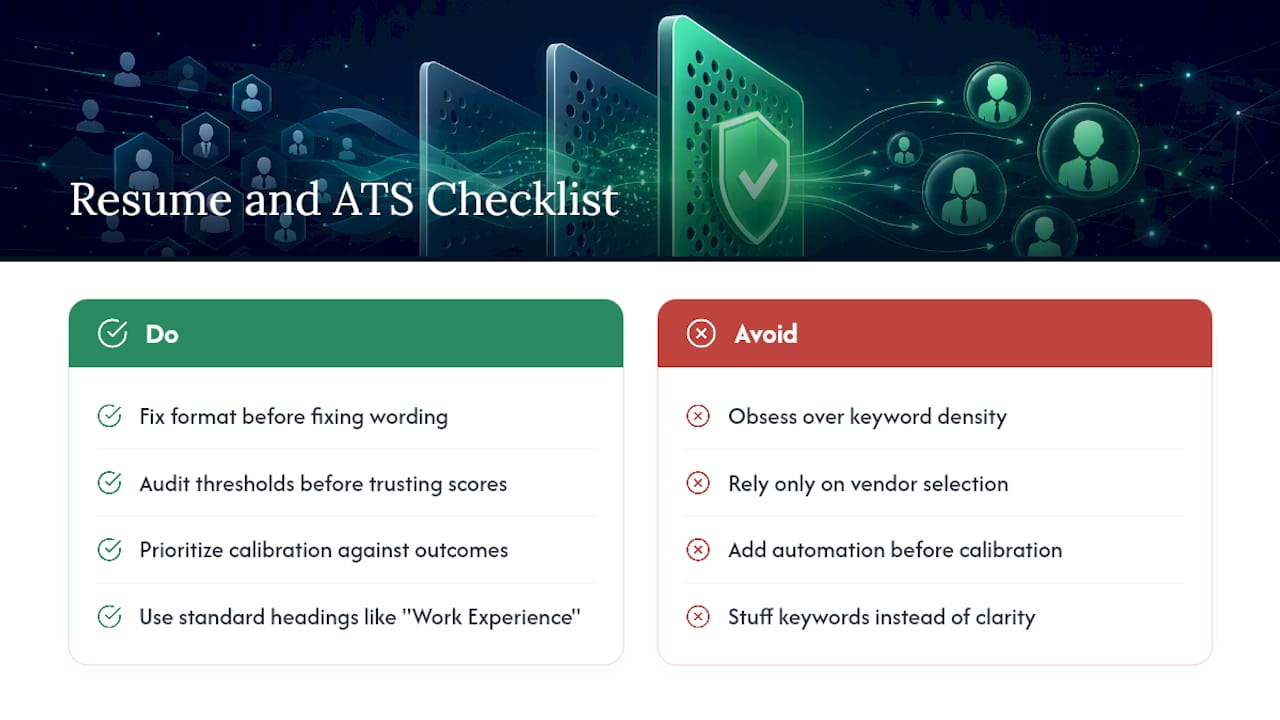
The conventional wisdom oversells keyword stuffing and undersells parsing hygiene. A resume crammed with every synonym for “leadership” scores worse on a semantic matcher than one clean sentence describing what someone actually led. Recruiters should prioritize threshold calibration against real hiring outcomes before they add more automation, not after. A screening system that filters fast but filters wrong just moves bad hiring decisions earlier and hides them better.
If you take one thing from this guide, take this: fix the format before you fix the wording, and audit the thresholds before you trust the score.
- Recruitify Team
Ready to Screen Smarter, Not Just Faster?
Recruitify replaces guesswork with a documented, defensible screening process: Contextual Matching AI delivers percentage match scores and recruiter-ready shortlists, the AI CV Parser reads PDFs, scans, and photos in seconds, and a built-in GDPR consent module keeps every decision inside a traceable audit trail.

For agencies drowning in applicant volume without the headcount to review it all manually, that combination means fewer qualified candidates slipping through a badly worded knockout rule and fewer hours spent reconciling spreadsheets between sales and recruiting pipelines. If you’re evaluating whether automation or a stronger hybrid workflow fits your hiring volume, start by requesting a walkthrough of Recruitify’s recruitment automation tools and running a real requisition through it before you commit to a platform change.
Sources
ATS-Friendly Resume: 18 Tips to Pass Applicant Tracking Systems - Indeed
Resume screening software: AI candidate screening - Prescreener
FAQ
How Can You Pass Automated Resume Screening?
Match the exact language in the job posting, use standard section headings, and submit a clean DOCX or text-based PDF. Resumes that parse correctly and show matched keywords in context, not lists, tend to score highest.
What Are the Top ATS Score Benchmarks to Aim For?
A score above 80 puts a candidate in a strong competitive position, and scores of 90 or higher meaningfully increase interview odds. Scores below 80 often signal a parsing or keyword-matching problem worth fixing before resubmitting.
How Do You Get Through Automated Applicant Screening?
Focus on parsability first: avoid columns, tables, and headers for contact information, since those elements commonly cause parsing failures regardless of how strong the content is. Then verify your resume includes the specific skills and qualifications named in the posting.
What Does an ATS Match Report Usually Show?
Most reports list a percentage match score, matched and missing skills, a parse-rate indicator, and confidence flags on any field the system couldn’t read with certainty. These reports come from public checkers and differ from an employer’s internal ATS parsing rules.
Is Automated Resume Screening Legally Regulated?
Yes, in certain jurisdictions. EEOC disparate-impact standards apply to automated hiring tools in the United States, and specific laws like New York City’s Local Law 144 require bias audits and candidate disclosure for automated employment decision tools.
Recommended


News & Updates
Stay up-to-date with the latest innovations, features, and tips about Recruitify!
By providing your email address within the newsletter sign-up form, you confirm its processing to send marketing information regarding the Administrator’s products and services. The Administrator of your personal data processed for the abovementioned purposes is Recruitify Spółka z o.o., based in Warsaw, Poland (KRS 0000709889). For more information on the principles of personal data processing and the rights of data subjects, please check the Privacy Policy.

Last updated:
Hit 80+ Scores: Automated Resume Screening for HR & Job Seekers
Applicant Tracking System
The Recruitify Team
Automated resume screening uses software to parse, categorize, and rank job applications against a set of criteria before a human ever opens them. Recruiters get the most value by defining clear must-have criteria and keeping a human reviewer in the loop for borderline cases. Job seekers get the most value by writing resumes that parse cleanly, since checker scores above 80 signal a strong position and scores near 90 tend to push candidates toward the interview stage.
Resumes in DOCX or simple PDF formats with standard headings and consistent date formats improve parsing accuracy and candidate score reliability.
Scores above 80 are generally competitive, while 90 or higher significantly increase chances of interview invites, especially in Fortune 500 recruiting processes.
Poor parsing often results from image-based PDFs, multi-column layouts, and placing contact info in headers or footers, so testing resumes beforehand is essential.
Automated systems work best for volume screening and should be calibrated regularly against actual hiring outcomes to avoid missing qualified candidates.
Legal regulations in the US and certain cities require bias audits and candidate disclosures, making transparent, bias-aware automation practices mandatory.
RecruitifyScreen Candidates With More ContextRecruitify.ai combines AI resume parsing, contextual matching, and scoring to help IT recruitment agencies build ready-made candidate shortlists.Explore Recruitify.ai
Table of Contents
How Does Automated Resume Screening Actually Work?
What Should You Fix First on an ATS-Friendly Resume?
What Do Resume Checker Scores Actually Mean?
When Should You Trust Automation Over Human Judgment?
Why Do Some Resumes Fail to Parse Correctly?
How Do You Keep Automated Screening Fair and Compliant?
What Does Responsible Screening Look Like in Practice?
Our Take: Stop Treating the Resume and the System as Separate Problems
Ready to Screen Smarter, Not Just Faster?
Sources
FAQ
How Does Automated Resume Screening Actually Work?
Every automated resume screening system starts with parsing: software extracts text from a resume file and sorts it into fields like work history, education, and skills. Optical character recognition (OCR) handles scanned or image-based files, converting pixels into readable text. This step is where most trouble starts. A resume built with text boxes, columns, or embedded images can confuse the parser, scrambling dates or dropping entire sections before the scoring engine ever sees them.
Once the text is structured, the system compares it against a job requisition using one of two approaches. Basic tools run keyword filters, checking for exact matches like “Python” or “project management.” More advanced platforms use semantic matching, which interprets meaning and context. A semantic matcher recognizes that “led a cross-functional engineering team” relates to leadership experience even without the word “manager” appearing anywhere on the page.
The output is typically a fit score between 0 and 100, often paired with confidence flags and a list of matched evidence pulled directly from the resume text.
Parsing accuracy drops sharply on scanned PDFs and image files, which is why OCR-based tools flag low confidence on those formats.
Keyword filters miss synonyms and adjacent skills that semantic engines catch.
Confidence flags tell recruiters when a score should be double-checked rather than trusted outright.
Matched-evidence outputs show which lines of the resume triggered each score component, so recruiters can validate results instead of guessing.
Good screening platforms let recruiters view the parsed fields directly, side by side with the original document. That transparency is what separates a defensible automated applicant screening process from a black box.
What Should You Fix First on an ATS-Friendly Resume?
Small formatting choices decide whether a resume gets parsed correctly or disappears into a scoring error. Indeed’s editorial guidance on automated screening centers on a few repeatable fixes, and they apply whether you’re a first-time applicant or a recruiter auditing your own careers page template.
Use canonical section headings. Label sections “Work Experience,” “Education,” and “Skills” exactly, since parsers are trained to recognize standard labels, not creative alternatives like “My Journey” or “What I Bring.”
Put keywords in context, not in a list. Instead of dropping “SQL, Python, Tableau” at the bottom of the page, write “Built SQL queries to automate Tableau dashboards, cutting reporting time by 40%.” Context and metrics both help human reviewers and parsing engines read intent, not just vocabulary.
Choose a parseable file type. DOCX and simple, text-based PDFs parse most reliably. Avoid image exports, scanned copies, and design-heavy templates with columns or tables.
Keep contact information in the body text, not the header or footer. Many parsers skip header and footer zones entirely, which means a phone number or email address placed there may never reach the candidate record.
Format dates consistently. Use a single format (“March 2023 to Present”) throughout rather than mixing formats across jobs, which can break date-range parsing logic.
Pro Tip: Run your resume through a parse-test tool before submitting it, and check whether your job titles, dates, and skills show up in the exact fields you intended. If a field is empty or garbled, the employer’s system likely saw the same blank spot.
Recruiters building the intake side of this process face a mirror-image task. Defining a small number of true must-haves, clear knockout questions, and a documented review rule for borderline scores reduces false negatives dramatically. A knockout question should filter for something genuinely disqualifying, like a required certification or work authorization, rather than a nice-to-have skill that a qualified candidate might just phrase differently. Loose, overly broad knockout rules are the single biggest cause of good candidates disappearing before a human ever sees them.
What Do Resume Checker Scores Actually Mean?
A public resume checker and an employer’s internal ATS are not the same tool, even though both produce a score. Public checkers, like the ones described in Enhancv’s resume-checker methodology, combine a parse-rate check with a content-quality assessment, essentially asking “did this parse cleanly?” and “does this read well?” separately. An employer’s ATS instead ranks candidates against a specific requisition’s criteria, weighting factors the public tool has no visibility into.
Score thresholds vary by platform, but a rough benchmark holds across most tools: scores above 80 put a candidate in a competitive range, while scores of 90 or higher meaningfully increase interview odds. That benchmark matters given that Applicant Tracking Systems are widely used among Fortune 500 hiring pipelines, making resume-side optimization a near-universal necessity rather than a niche tactic.
Match reports typically include:
A percentage match score against the target role
A list of matched skills and a separate list of missing skills
A parse-rate indicator showing how cleanly the file was read
Confidence flags on fields the system couldn’t parse with certainty
Scores lose reliability on scanned resumes, unusually formatted documents, or resumes written in nonstandard phrasing. When a score conflicts sharply with a recruiter’s own read of a candidate, that’s usually a parsing problem, not a candidate problem, and it’s worth a manual check of the parsed fields before making a final call.
When Should You Trust Automation Over Human Judgment?
Automated applicant screening earns its keep at volume: gating large applicant pools and applying consistent initial scoring across hundreds of resumes a human could never review with equal attention. Human review earns its keep at the margins: borderline scores, senior roles, and any position where a wrong rejection carries real cost. SHRM’s research on recruitment costs makes clear why speed matters here, but speed without judgment just moves the risk of a bad hire earlier in the funnel rather than removing it.
The strongest hybrid workflows share a few habits:
Automation produces ranked shortlists; humans make the final call on anyone near a threshold.
Hard knockouts get a manual audit sample, not blind trust, since a poorly worded knockout rule can silently filter out qualified people.
Recruiters periodically pull a random batch of rejected resumes to check for scoring drift.
Pro Tip: Calibrate your thresholds quarterly by comparing scored candidates against who actually got hired. If your top-scored applicants aren’t the ones landing offers, the threshold needs adjusting, not the candidate pool.
Why Do Some Resumes Fail to Parse Correctly?
Image-only PDFs and scanned documents are the most common parsing failure, since OCR has to guess at text rather than reading it directly, which lowers confidence scores across every field. DOCX files generally parse more reliably than PDFs, though a clean, text-based PDF exported straight from a word processor works nearly as well.
Avoid multi-column layouts, tables, and text boxes, which scramble reading order.
Skip headers and footers for anything critical, including contact details.
Stick to standard fonts and avoid special characters or unusual bullet styles.
Before rejecting a low-scoring resume, run a quick parse test or view the parsed fields directly to rule out a formatting failure rather than a genuine skills gap.
How Do You Keep Automated Screening Fair and Compliant?
Automated resume screening carries real regulatory exposure. In the United States, disparate-impact standards under EEOC guidance apply to automated tools just as they apply to human decisions, and jurisdictions have started layering on specific disclosure rules, such as New York City’s Local Law 144, which requires bias audits and candidate notice for automated employment decision tools.
Platforms that build in bias audits, consent-first workflows, and transparent scoring reasons give recruiters a defensible position when a rejected candidate asks why. The core practices worth documenting:
Run periodic bias audits and exclude protected attributes (age, gender, race) from scoring inputs entirely.
Use blind-CV techniques that anonymize identifying details before human review.
Log consent and disclosure records so every automated decision has a traceable audit trail.
Document your criteria definitions and threshold rationale, and revisit both on a fixed cadence rather than only after a complaint.
What Does Responsible Screening Look Like in Practice?
Recruitify’s Contextual Matching AI generates percentage match scores and ready-made shortlists rather than a black-box rejection. The AI CV Parser with OCR reads PDFs, scans, and photos in seconds, flags duplicates, and a built-in GDPR consent module keeps every scoring decision inside a documented audit trail.
Our Take: Stop Treating the Resume and the System as Separate Problems
Most advice on this topic splits cleanly into two camps: job seekers obsessing over keyword density, and recruiters obsessing over vendor selection. Both miss the actual leverage point. A perfectly optimized resume still fails against a poorly configured ATS with sloppy knockout rules, and a well-calibrated screening system still misses good candidates if nobody tells them their headings need to say “Work Experience” instead of something clever.
The conventional wisdom oversells keyword stuffing and undersells parsing hygiene. A resume crammed with every synonym for “leadership” scores worse on a semantic matcher than one clean sentence describing what someone actually led. Recruiters should prioritize threshold calibration against real hiring outcomes before they add more automation, not after. A screening system that filters fast but filters wrong just moves bad hiring decisions earlier and hides them better.
If you take one thing from this guide, take this: fix the format before you fix the wording, and audit the thresholds before you trust the score.
- Recruitify Team
Ready to Screen Smarter, Not Just Faster?
Recruitify replaces guesswork with a documented, defensible screening process: Contextual Matching AI delivers percentage match scores and recruiter-ready shortlists, the AI CV Parser reads PDFs, scans, and photos in seconds, and a built-in GDPR consent module keeps every decision inside a traceable audit trail.
For agencies drowning in applicant volume without the headcount to review it all manually, that combination means fewer qualified candidates slipping through a badly worded knockout rule and fewer hours spent reconciling spreadsheets between sales and recruiting pipelines. If you’re evaluating whether automation or a stronger hybrid workflow fits your hiring volume, start by requesting a walkthrough of Recruitify’s recruitment automation tools and running a real requisition through it before you commit to a platform change.
Sources
ATS-Friendly Resume: 18 Tips to Pass Applicant Tracking Systems - Indeed
Resume screening software: AI candidate screening - Prescreener
FAQ
How Can You Pass Automated Resume Screening?
Match the exact language in the job posting, use standard section headings, and submit a clean DOCX or text-based PDF. Resumes that parse correctly and show matched keywords in context, not lists, tend to score highest.
What Are the Top ATS Score Benchmarks to Aim For?
A score above 80 puts a candidate in a strong competitive position, and scores of 90 or higher meaningfully increase interview odds. Scores below 80 often signal a parsing or keyword-matching problem worth fixing before resubmitting.
How Do You Get Through Automated Applicant Screening?
Focus on parsability first: avoid columns, tables, and headers for contact information, since those elements commonly cause parsing failures regardless of how strong the content is. Then verify your resume includes the specific skills and qualifications named in the posting.
What Does an ATS Match Report Usually Show?
Most reports list a percentage match score, matched and missing skills, a parse-rate indicator, and confidence flags on any field the system couldn’t read with certainty. These reports come from public checkers and differ from an employer’s internal ATS parsing rules.
Is Automated Resume Screening Legally Regulated?
Yes, in certain jurisdictions. EEOC disparate-impact standards apply to automated hiring tools in the United States, and specific laws like New York City’s Local Law 144 require bias audits and candidate disclosure for automated employment decision tools.
Recommended
News & Updates
Stay up-to-date with the latest innovations, features, and tips about Recruitify!
By providing your email address within the newsletter sign-up form, you confirm its processing to send marketing information regarding the Administrator’s products and services. The Administrator of your personal data processed for the abovementioned purposes is Recruitify Spółka z o.o., based in Warsaw, Poland (KRS 0000709889). For more information on the principles of personal data processing and the rights of data subjects, please check the Privacy Policy.
Last updated:
Hit 80+ Scores: Automated Resume Screening for HR & Job Seekers
Applicant Tracking System
The Recruitify Team
Automated resume screening uses software to parse, categorize, and rank job applications against a set of criteria before a human ever opens them. Recruiters get the most value by defining clear must-have criteria and keeping a human reviewer in the loop for borderline cases. Job seekers get the most value by writing resumes that parse cleanly, since checker scores above 80 signal a strong position and scores near 90 tend to push candidates toward the interview stage.
Resumes in DOCX or simple PDF formats with standard headings and consistent date formats improve parsing accuracy and candidate score reliability.
Scores above 80 are generally competitive, while 90 or higher significantly increase chances of interview invites, especially in Fortune 500 recruiting processes.
Poor parsing often results from image-based PDFs, multi-column layouts, and placing contact info in headers or footers, so testing resumes beforehand is essential.
Automated systems work best for volume screening and should be calibrated regularly against actual hiring outcomes to avoid missing qualified candidates.
Legal regulations in the US and certain cities require bias audits and candidate disclosures, making transparent, bias-aware automation practices mandatory.
RecruitifyScreen Candidates With More ContextRecruitify.ai combines AI resume parsing, contextual matching, and scoring to help IT recruitment agencies build ready-made candidate shortlists.Explore Recruitify.ai
Table of Contents
How Does Automated Resume Screening Actually Work?
What Should You Fix First on an ATS-Friendly Resume?
What Do Resume Checker Scores Actually Mean?
When Should You Trust Automation Over Human Judgment?
Why Do Some Resumes Fail to Parse Correctly?
How Do You Keep Automated Screening Fair and Compliant?
What Does Responsible Screening Look Like in Practice?
Our Take: Stop Treating the Resume and the System as Separate Problems
Ready to Screen Smarter, Not Just Faster?
Sources
FAQ
How Does Automated Resume Screening Actually Work?
Every automated resume screening system starts with parsing: software extracts text from a resume file and sorts it into fields like work history, education, and skills. Optical character recognition (OCR) handles scanned or image-based files, converting pixels into readable text. This step is where most trouble starts. A resume built with text boxes, columns, or embedded images can confuse the parser, scrambling dates or dropping entire sections before the scoring engine ever sees them.
Once the text is structured, the system compares it against a job requisition using one of two approaches. Basic tools run keyword filters, checking for exact matches like “Python” or “project management.” More advanced platforms use semantic matching, which interprets meaning and context. A semantic matcher recognizes that “led a cross-functional engineering team” relates to leadership experience even without the word “manager” appearing anywhere on the page.
The output is typically a fit score between 0 and 100, often paired with confidence flags and a list of matched evidence pulled directly from the resume text.
Parsing accuracy drops sharply on scanned PDFs and image files, which is why OCR-based tools flag low confidence on those formats.
Keyword filters miss synonyms and adjacent skills that semantic engines catch.
Confidence flags tell recruiters when a score should be double-checked rather than trusted outright.
Matched-evidence outputs show which lines of the resume triggered each score component, so recruiters can validate results instead of guessing.
Good screening platforms let recruiters view the parsed fields directly, side by side with the original document. That transparency is what separates a defensible automated applicant screening process from a black box.
What Should You Fix First on an ATS-Friendly Resume?
Small formatting choices decide whether a resume gets parsed correctly or disappears into a scoring error. Indeed’s editorial guidance on automated screening centers on a few repeatable fixes, and they apply whether you’re a first-time applicant or a recruiter auditing your own careers page template.
Use canonical section headings. Label sections “Work Experience,” “Education,” and “Skills” exactly, since parsers are trained to recognize standard labels, not creative alternatives like “My Journey” or “What I Bring.”
Put keywords in context, not in a list. Instead of dropping “SQL, Python, Tableau” at the bottom of the page, write “Built SQL queries to automate Tableau dashboards, cutting reporting time by 40%.” Context and metrics both help human reviewers and parsing engines read intent, not just vocabulary.
Choose a parseable file type. DOCX and simple, text-based PDFs parse most reliably. Avoid image exports, scanned copies, and design-heavy templates with columns or tables.
Keep contact information in the body text, not the header or footer. Many parsers skip header and footer zones entirely, which means a phone number or email address placed there may never reach the candidate record.
Format dates consistently. Use a single format (“March 2023 to Present”) throughout rather than mixing formats across jobs, which can break date-range parsing logic.
Pro Tip: Run your resume through a parse-test tool before submitting it, and check whether your job titles, dates, and skills show up in the exact fields you intended. If a field is empty or garbled, the employer’s system likely saw the same blank spot.
Recruiters building the intake side of this process face a mirror-image task. Defining a small number of true must-haves, clear knockout questions, and a documented review rule for borderline scores reduces false negatives dramatically. A knockout question should filter for something genuinely disqualifying, like a required certification or work authorization, rather than a nice-to-have skill that a qualified candidate might just phrase differently. Loose, overly broad knockout rules are the single biggest cause of good candidates disappearing before a human ever sees them.
What Do Resume Checker Scores Actually Mean?
A public resume checker and an employer’s internal ATS are not the same tool, even though both produce a score. Public checkers, like the ones described in Enhancv’s resume-checker methodology, combine a parse-rate check with a content-quality assessment, essentially asking “did this parse cleanly?” and “does this read well?” separately. An employer’s ATS instead ranks candidates against a specific requisition’s criteria, weighting factors the public tool has no visibility into.
Score thresholds vary by platform, but a rough benchmark holds across most tools: scores above 80 put a candidate in a competitive range, while scores of 90 or higher meaningfully increase interview odds. That benchmark matters given that Applicant Tracking Systems are widely used among Fortune 500 hiring pipelines, making resume-side optimization a near-universal necessity rather than a niche tactic.
Match reports typically include:
A percentage match score against the target role
A list of matched skills and a separate list of missing skills
A parse-rate indicator showing how cleanly the file was read
Confidence flags on fields the system couldn’t parse with certainty
Scores lose reliability on scanned resumes, unusually formatted documents, or resumes written in nonstandard phrasing. When a score conflicts sharply with a recruiter’s own read of a candidate, that’s usually a parsing problem, not a candidate problem, and it’s worth a manual check of the parsed fields before making a final call.
When Should You Trust Automation Over Human Judgment?
Automated applicant screening earns its keep at volume: gating large applicant pools and applying consistent initial scoring across hundreds of resumes a human could never review with equal attention. Human review earns its keep at the margins: borderline scores, senior roles, and any position where a wrong rejection carries real cost. SHRM’s research on recruitment costs makes clear why speed matters here, but speed without judgment just moves the risk of a bad hire earlier in the funnel rather than removing it.
The strongest hybrid workflows share a few habits:
Automation produces ranked shortlists; humans make the final call on anyone near a threshold.
Hard knockouts get a manual audit sample, not blind trust, since a poorly worded knockout rule can silently filter out qualified people.
Recruiters periodically pull a random batch of rejected resumes to check for scoring drift.
Pro Tip: Calibrate your thresholds quarterly by comparing scored candidates against who actually got hired. If your top-scored applicants aren’t the ones landing offers, the threshold needs adjusting, not the candidate pool.
Why Do Some Resumes Fail to Parse Correctly?
Image-only PDFs and scanned documents are the most common parsing failure, since OCR has to guess at text rather than reading it directly, which lowers confidence scores across every field. DOCX files generally parse more reliably than PDFs, though a clean, text-based PDF exported straight from a word processor works nearly as well.
Avoid multi-column layouts, tables, and text boxes, which scramble reading order.
Skip headers and footers for anything critical, including contact details.
Stick to standard fonts and avoid special characters or unusual bullet styles.
Before rejecting a low-scoring resume, run a quick parse test or view the parsed fields directly to rule out a formatting failure rather than a genuine skills gap.
How Do You Keep Automated Screening Fair and Compliant?
Automated resume screening carries real regulatory exposure. In the United States, disparate-impact standards under EEOC guidance apply to automated tools just as they apply to human decisions, and jurisdictions have started layering on specific disclosure rules, such as New York City’s Local Law 144, which requires bias audits and candidate notice for automated employment decision tools.
Platforms that build in bias audits, consent-first workflows, and transparent scoring reasons give recruiters a defensible position when a rejected candidate asks why. The core practices worth documenting:
Run periodic bias audits and exclude protected attributes (age, gender, race) from scoring inputs entirely.
Use blind-CV techniques that anonymize identifying details before human review.
Log consent and disclosure records so every automated decision has a traceable audit trail.
Document your criteria definitions and threshold rationale, and revisit both on a fixed cadence rather than only after a complaint.
What Does Responsible Screening Look Like in Practice?
Recruitify’s Contextual Matching AI generates percentage match scores and ready-made shortlists rather than a black-box rejection. The AI CV Parser with OCR reads PDFs, scans, and photos in seconds, flags duplicates, and a built-in GDPR consent module keeps every scoring decision inside a documented audit trail.
Our Take: Stop Treating the Resume and the System as Separate Problems
Most advice on this topic splits cleanly into two camps: job seekers obsessing over keyword density, and recruiters obsessing over vendor selection. Both miss the actual leverage point. A perfectly optimized resume still fails against a poorly configured ATS with sloppy knockout rules, and a well-calibrated screening system still misses good candidates if nobody tells them their headings need to say “Work Experience” instead of something clever.
The conventional wisdom oversells keyword stuffing and undersells parsing hygiene. A resume crammed with every synonym for “leadership” scores worse on a semantic matcher than one clean sentence describing what someone actually led. Recruiters should prioritize threshold calibration against real hiring outcomes before they add more automation, not after. A screening system that filters fast but filters wrong just moves bad hiring decisions earlier and hides them better.
If you take one thing from this guide, take this: fix the format before you fix the wording, and audit the thresholds before you trust the score.
- Recruitify Team
Ready to Screen Smarter, Not Just Faster?
Recruitify replaces guesswork with a documented, defensible screening process: Contextual Matching AI delivers percentage match scores and recruiter-ready shortlists, the AI CV Parser reads PDFs, scans, and photos in seconds, and a built-in GDPR consent module keeps every decision inside a traceable audit trail.
For agencies drowning in applicant volume without the headcount to review it all manually, that combination means fewer qualified candidates slipping through a badly worded knockout rule and fewer hours spent reconciling spreadsheets between sales and recruiting pipelines. If you’re evaluating whether automation or a stronger hybrid workflow fits your hiring volume, start by requesting a walkthrough of Recruitify’s recruitment automation tools and running a real requisition through it before you commit to a platform change.
Sources
ATS-Friendly Resume: 18 Tips to Pass Applicant Tracking Systems - Indeed
Resume screening software: AI candidate screening - Prescreener
FAQ
How Can You Pass Automated Resume Screening?
Match the exact language in the job posting, use standard section headings, and submit a clean DOCX or text-based PDF. Resumes that parse correctly and show matched keywords in context, not lists, tend to score highest.
What Are the Top ATS Score Benchmarks to Aim For?
A score above 80 puts a candidate in a strong competitive position, and scores of 90 or higher meaningfully increase interview odds. Scores below 80 often signal a parsing or keyword-matching problem worth fixing before resubmitting.
How Do You Get Through Automated Applicant Screening?
Focus on parsability first: avoid columns, tables, and headers for contact information, since those elements commonly cause parsing failures regardless of how strong the content is. Then verify your resume includes the specific skills and qualifications named in the posting.
What Does an ATS Match Report Usually Show?
Most reports list a percentage match score, matched and missing skills, a parse-rate indicator, and confidence flags on any field the system couldn’t read with certainty. These reports come from public checkers and differ from an employer’s internal ATS parsing rules.
Is Automated Resume Screening Legally Regulated?
Yes, in certain jurisdictions. EEOC disparate-impact standards apply to automated hiring tools in the United States, and specific laws like New York City’s Local Law 144 require bias audits and candidate disclosure for automated employment decision tools.
Recommended
News & Updates
Stay up-to-date with the latest innovations, features, and tips about Recruitify!
By providing your email address within the newsletter sign-up form, you confirm its processing to send marketing information regarding the Administrator’s products and services. The Administrator of your personal data processed for the abovementioned purposes is Recruitify Spółka z o.o., based in Warsaw, Poland (KRS 0000709889). For more information on the principles of personal data processing and the rights of data subjects, please check the Privacy Policy.

Discover More

Recruitment Process
Shortlisting Criteria in Recruiting: How to Build a Fair Shortlist
Learn which shortlisting criteria to define before you review applications, how to score candidates consistently, and how many to put forward for interview.
29 Oct 2026
Discover More

Recruitment Process
Recruitment Software ROI: How to Calculate It and What to Count
Learn how to calculate recruitment software ROI and ATS total cost of ownership, with a worked example, the metrics to track and the mistakes that skew results.
28 Oct 2026
Discover More

Recruitment Process
Full Desk Recruiting: How the 360 Model Works and What It Takes
Full desk recruiting explained: what a 360 recruiter does, how many reqs one person can carry, and how to plan capacity so the model scales without burnout.
27 Oct 2026
Discover More
Recruitment Process
Shortlisting Criteria in Recruiting: How to Build a Fair Shortlist
Learn which shortlisting criteria to define before you review applications, how to score candidates consistently, and how many to put forward for interview.
29 Oct 2026
Discover More
Recruitment Process
Recruitment Software ROI: How to Calculate It and What to Count
Learn how to calculate recruitment software ROI and ATS total cost of ownership, with a worked example, the metrics to track and the mistakes that skew results.
28 Oct 2026
Discover More

