
Last updated:
Recruitment Software ROI: How to Calculate It and What to Count

Recruitment Process

The Recruitify Team
Recruitment software ROI is the value an ATS, CRM or automation platform returns compared with what it costs, expressed as a percentage over a fixed period. The formula is simple. The difficult part is deciding which costs and benefits belong in it, and being honest about which gains are real money and which are only hours that never turn into revenue. This guide walks through the calculation step by step, with a worked example for a small agency, a list of metrics to track, and the errors that make most business cases look better, or worse, than they should.
Key takeaways
ROI is a snapshot for one period: ROI (%) = (benefits - costs) / costs × 100. It is not the same as total cost of ownership (TCO), so measure both over the same window.
Count every cost, not only the subscription: implementation, training, data migration, internal IT time and the running cost of the system you are replacing.
Time saved only becomes return when it is converted into something measurable: more placements, fewer external licenses, or avoided hires.
Track a baseline before you buy, then review at 90 days, 6 months and 12 months.
Agencies and in-house HR teams should weight benefits differently: agencies chase revenue per recruiter, HR teams chase time-to-fill and quality of hire.
Table of Contents
What recruitment software ROI actually measures
HR software ROI measures the value a system provides relative to what it costs. Oracle NetSuite describes the main reasons organizations calculate it: to justify a purchase, to guide resource allocation, and to assess the effect on operations and strategic goals. The same source also warns that although the formula is simple, many HR-software benefits are intangible and hard to quantify objectively.
That warning matters more in recruitment than in most functions, because two different readers use the same phrase for different things:
Recruitment agencies and headhunters treat software as a revenue tool. The question is whether the same team can close more placements, bill more contractors or reactivate more of the candidates already in the database.
In-house HR and talent acquisition teams treat software as a cost and quality tool. The question is whether roles are filled faster, with less manual screening, and whether hires stay.
Both need the same arithmetic, but they put different items on the benefit side. Decide which group you belong to before opening a spreadsheet.
The ROI formula and a sanity-check example
The standard formula is:
ROI (%) = [(benefits - investment cost) / investment cost] × 100
NetSuite’s own illustration uses $225,000 of benefits over three years against $175,000 of costs. The net gain is $50,000, and $50,000 divided by $175,000 gives an ROI of 28.6%, as shown in their guide. A positive number means the system paid for itself over that period. It does not mean the money arrived evenly, or that the same result will repeat next year.
Two rules keep the calculation honest:
Use the same period on both sides. If benefits are annual, costs must be annual too. Mixing a three-year benefit estimate with first-year costs inflates the result.
Do not confuse ROI with TCO. NetSuite stresses that ROI is a snapshot up to the date of calculation and is not a total cost of ownership calculation. TCO answers “what will this cost us over its life?” ROI answers “what did we get back for it?” You need both.
What belongs in total cost of ownership
A vendor’s price page shows the subscription. A realistic ATS total cost of ownership is wider. Based on the cost categories NetSuite lists for HR software, plan for:
Cost category | One-time or recurring | Often forgotten? |
|---|---|---|
Subscription or per-user fees | Recurring | No |
Implementation and configuration | One-time | Sometimes |
Training for recruiters and managers | One-time, then for new hires | Yes |
Data transfer from the old system or spreadsheets | One-time | Yes |
Internal IT time and vendor support | Recurring | Yes |
Maintenance of the old system during the overlap | Temporary | Yes |
Integrations with job boards, email, calendars | One-time and recurring | Sometimes |
For subscription tools priced per user, the arithmetic is easy to model. Recruitify publishes its pricing as €61 per month per user on the HR Team plan and €67 per month per user on the Agency plan, while Enterprise has no published price. Over twelve months, one Agency seat costs €804 and one HR Team seat costs €732 before any one-time items.
One point is easy to miss: the per-user model means TCO scales with headcount, but so do the benefits. Compare cost per recruiter with output per recruiter, not total spend with total output.
Which benefits count, and how to put a value on them
Benefits fall into three groups, from easiest to hardest to defend in front of a finance director.
Hard savings
These appear in an invoice or a budget line:
Job board, sourcing or database licenses you cancel because the new platform covers them.
Spreadsheet tools, standalone CRM seats or parsing services you retire.
Agency fees you stop paying because roles are filled internally (for in-house teams).
Capacity gains that convert into revenue or avoided hiring
This is where most of the value sits, and where most claims are inflated. Hours saved are only worth money when they are redirected:
A recruiter who spends fewer hours on CV entry, duplicate checks and status emails can run more open roles. The value is the extra placements or the hire you did not need to make.
An agency that re-engages candidates already in its database produces placements without sourcing cost. The value is the fee on those placements minus the recruiter time spent.
Quality and risk benefits
These are real but harder to price: better shortlist relevance, fewer early departures, cleaner GDPR consent records and an audit trail if a candidate or client asks how data was handled. Include them as a separate line, and keep them out of the headline ROI unless you can attach a defensible number.
A worked example: a five-recruiter agency
The figures below are illustrative assumptions, not benchmarks or customer results. Replace each one with your own data.
Setup: an IT recruitment agency with five recruiters on the Agency plan (€67 per month per user), measured over the first 12 months.
Costs (year one):
Item | Assumption | Amount |
|---|---|---|
Subscription | 5 users × €67 × 12 months | €4,020 |
Implementation and configuration | Internal and vendor time, estimated | €1,500 |
Training | Five recruiters, estimated | €1,000 |
Data migration | Cleaning and importing old records, estimated | €800 |
Total cost | €7,320 |
Benefits (year one):
Item | Assumption | Amount |
|---|---|---|
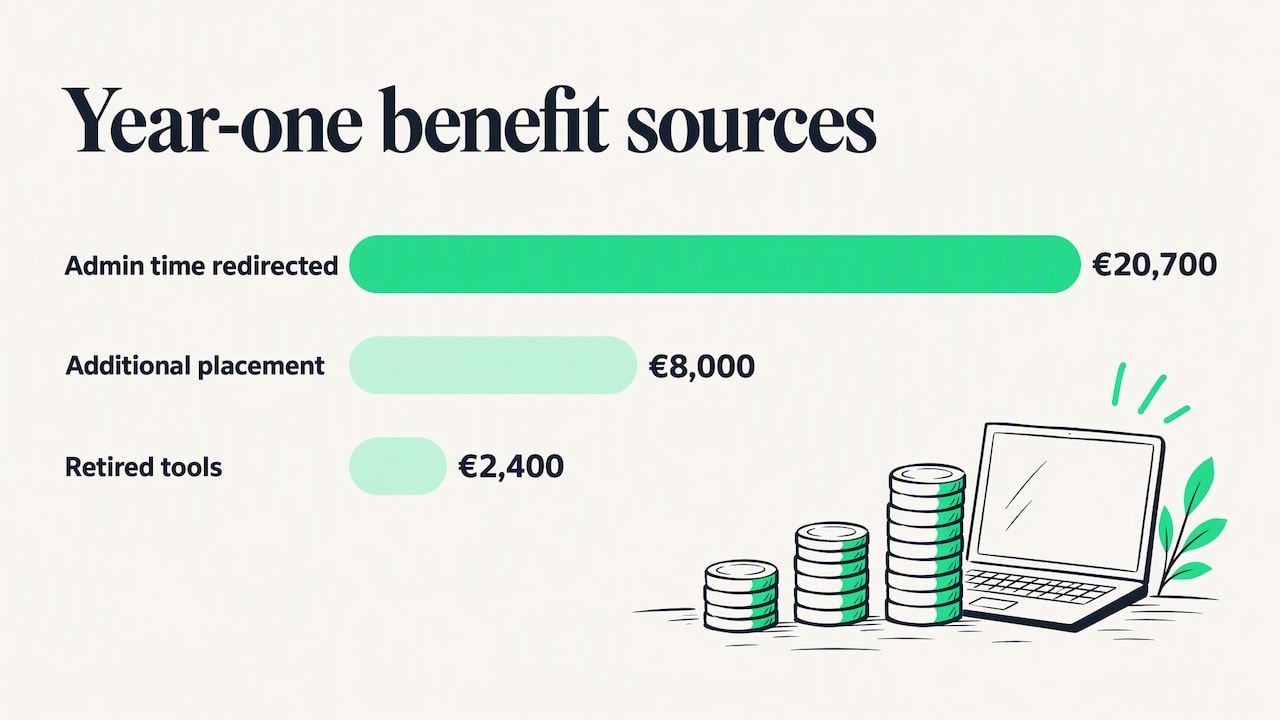
Admin time redirected | 3 hours per week × 5 recruiters × 46 weeks = 690 hours, valued at €30 loaded cost per hour | €20,700 |
One additional placement from the reactivated database | Net fee of €8,000 | €8,000 |
Retired tools | Two licenses cancelled | €2,400 |
Total benefit | €31,100 |
Result: (€31,100 - €7,320) / €7,320 × 100 = 324.9% ROI in year one.
Now stress the model. A skeptical finance director will say the 690 hours never became revenue. Remove that line entirely and keep only the retired tools and the single placement: benefits of €10,400 against costs of €7,320 give (€10,400 - €7,320) / €7,320 × 100 = 42.1% ROI. The case still holds, which is exactly the test a business case should pass. If it only works with the softest assumption included, it is not a safe purchase.
In year two, the one-time costs (€3,300 in this example) disappear, so cost drops to the subscription alone while benefits can continue. This is why ROI should be reported by period rather than as one permanent figure.
How to measure ATS ROI from recruiter efficiency, outcomes and retention
A calculation is only as good as the baseline behind it. Capture these numbers for the three months before go-live, then compare.
Recruiter efficiency
Open requisitions per recruiter. A statement such as “each recruiter now handles more roles” is far more persuasive to a hiring manager than “we save a few hours a week”.
Time spent per application on data entry, parsing corrections and duplicate handling.
Share of the working week on administration versus candidate and client conversations. Recruitify’s guide to recruiter productivity metrics explains three measures that expose where a funnel leaks.
Hiring outcomes
Time to fill and time to shortlist.
Submission-to-interview and interview-to-offer ratios. If shortlists are more relevant, these should improve.
Placements per recruiter per quarter for agencies, or offer acceptance rate for in-house teams.
Candidates reactivated from the database, counted by placement, not by contact.
Retention and quality
Early attrition, meaning departures within the first year of hire, for in-house teams and for contract placements with guarantee periods.
Hiring manager satisfaction with shortlists, collected consistently on the same scale.
Retention effects take a year or more to show, so treat them as a later review item rather than a reason to buy.
Metrics and review periods that keep the number honest
A single post-purchase calculation drifts out of date. A simple review rhythm works better:
Before purchase: record the baseline metrics above and a full cost list for the current setup, including the hidden effort of spreadsheets and manual handoffs.
At 30 days: check adoption only. How many recruiters log in daily? Are records being created in the system rather than in side files? Low adoption is the most common reason a tool underdelivers.
At 90 days: compare efficiency metrics against the baseline. Expect a learning dip before gains.
At 6 months: compare outcome metrics such as placements, time to fill and ratios.
At 12 months: run the full ROI and TCO calculation over the same year for both, and decide on renewal or plan changes.
A tool can be installed and still not change how work gets done. Recruitify has written about why having an ATS is not the same as having a recruitment system, and the distinction affects ROI directly: the benefits come from workflow changes, not from licensing the software.
Where the return comes from in practice
When teams do see a clear return, it typically traces to four capabilities working together.
Less manual data handling. Automated CV parsing with OCR reads PDFs, DOCX files, scans and photos and builds a structured profile, with duplicate detection so the same person is not entered twice. Every minute removed from data entry is a minute available for candidate contact. See how this fits into recruitment workflow automation for agencies.
Better shortlists. Contextual matching and scoring compare applications with project requirements and produce a percentage match, rather than relying on keyword hits alone. The benefit shows in the submission-to-interview ratio, not in the score itself.
A database that earns money. Candidates who were not placed last year are often the best fit this year. Searchable, indexed records let an agency return to them before paying for a new external license.
One system for sales and recruiting. When the sales pipeline and the recruitment pipeline sit in the same place, a new client requirement can be matched against known candidates the same day. Separate tools create the delay that slows hiring even when AI is added.
For a broader view of the same topic, see Recruitify’s article on the actual return from a recruitment system.
Our perspective: measure the workflow, not the license
We build Recruitify for IT recruitment agencies and headhunters, and the pattern we see in ROI discussions is consistent: teams compare license prices when they should compare how many steps sit between a candidate’s CV and a shortlist in a client’s inbox.
We state a target of reducing administrative work by around 70% through automation, from the first lead contact and candidate categorization to the generation of B2B contracts. We encourage every buyer to treat that figure as a hypothesis to test against their own baseline during a trial, not as a promise to copy into a spreadsheet. Your mix of roles, volumes and existing tools decides the real number.
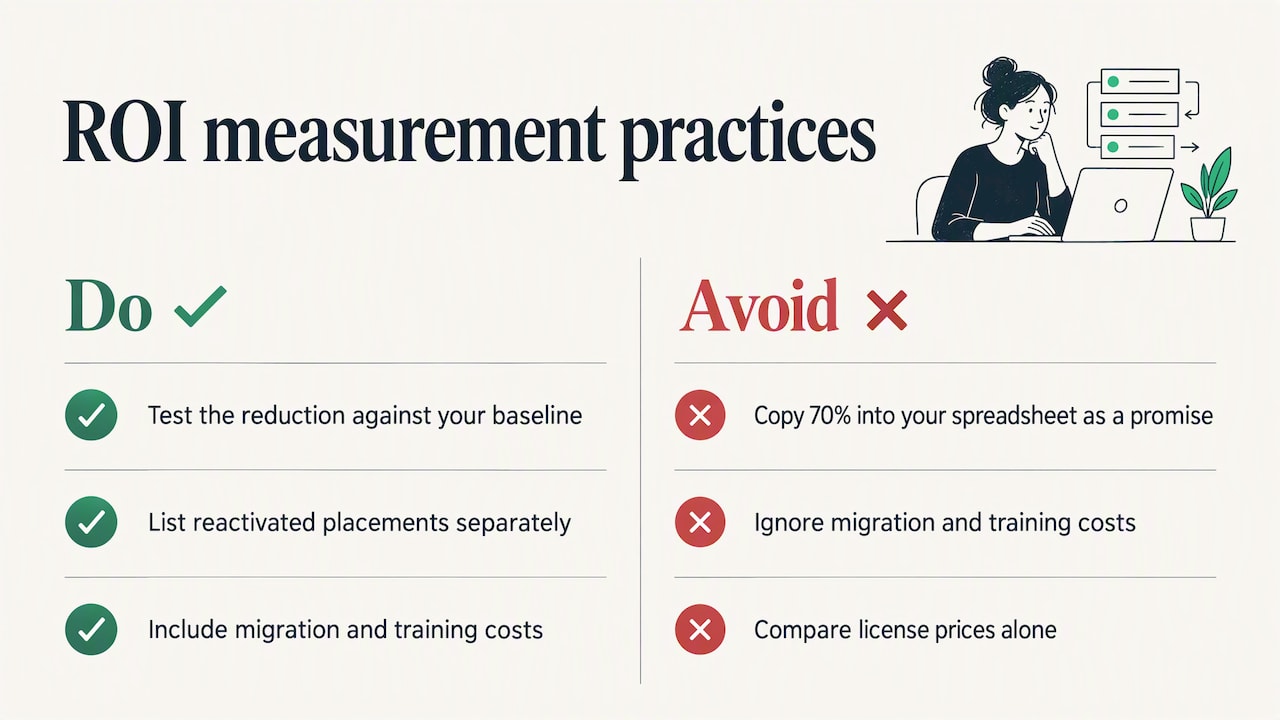
We also think agencies undervalue their databases. An indexed database with consent records and an audit trail is an asset, and recovering lost candidates is often the quickest route to revenue that does not need extra recruiters. For that reason we advise agencies to put reactivated placements on a separate line in the ROI model, so the effect can be seen and verified.
Finally, we suggest keeping the cost side complete. A model that ignores migration and training will flatter every vendor, including us, and disappoint you later.
- Recruitify Team
Common mistakes that distort the result
Counting hours as dollars. Saved time is only value when it is redirected, as the worked example shows.
Comparing different periods. Three years of benefits against one year of costs always looks good.
Ignoring the overlap. Running the old and new systems in parallel costs money for weeks or months.
Skipping the baseline. Without before-and-after data, any gain is a guess.
Using vendor averages as your forecast. Published ROI percentages depend on the customer’s size, volume and starting point. Use them as prompts for what to measure, not as your result.
Forgetting adoption. A recruiter who keeps a private spreadsheet is a cost without a benefit.
Putting the numbers to the test with Recruitify
If you run an agency or an in-house team and want to test the model above with your own volumes, the quickest route is to compare plans against your recruiter count. The HR Team plan is €61 per month per user and the Agency plan is €67 per month per user, with Enterprise available on request. You can review the plans on the Recruitify pricing page, then see how the AI recruitment features and sales reports support the metrics discussed here, including margins and revenue by pipeline stage.
FAQ
What is a good ROI for recruitment software?
There is no universal benchmark, because ROI depends on team size, hiring volume and what you count. A more useful standard is whether the case stays positive after you remove the softest benefits, as in the worked example above. If it does, the investment is resilient.
Is ATS ROI the same as total cost of ownership?
No. ROI compares benefits with costs for a measured period, while TCO adds up everything the system costs to buy, run and support. NetSuite notes that ROI is a snapshot and is not a TCO calculation, so calculate both over the same period.
How long does it take to see a return?
Most of the cost lands in the first months, through implementation, migration and training, while benefits build as adoption grows. Review at 90 days for efficiency, at 6 months for outcomes and at 12 months for the full ROI. Retention effects need longer.
Which costs do teams forget most often?
Training, data migration, internal IT time and the overlap period with the old system. Include them from the start, because leaving them out makes year-one ROI look better than it will be.
Sources
Recommended
Maximising ROI: How Recruitment Software Can Optimise Your Hiring Process
Recruiter Productivity Metrics: 3 Measures That Expose Funnel Leaks
Track 5 Recruitment Funnel Metrics That Predict Hires for TA Teams
7 Tactics to Optimize the Recruitment Process for TA Leaders


News & Updates
Stay up-to-date with the latest innovations, features, and tips about Recruitify!
By providing your email address within the newsletter sign-up form, you confirm its processing to send marketing information regarding the Administrator’s products and services. The Administrator of your personal data processed for the abovementioned purposes is Recruitify Spółka z o.o., based in Warsaw, Poland (KRS 0000709889). For more information on the principles of personal data processing and the rights of data subjects, please check the Privacy Policy.

Last updated:
Recruitment Software ROI: How to Calculate It and What to Count
Recruitment Process
The Recruitify Team
Recruitment software ROI is the value an ATS, CRM or automation platform returns compared with what it costs, expressed as a percentage over a fixed period. The formula is simple. The difficult part is deciding which costs and benefits belong in it, and being honest about which gains are real money and which are only hours that never turn into revenue. This guide walks through the calculation step by step, with a worked example for a small agency, a list of metrics to track, and the errors that make most business cases look better, or worse, than they should.
Key takeaways
ROI is a snapshot for one period: ROI (%) = (benefits - costs) / costs × 100. It is not the same as total cost of ownership (TCO), so measure both over the same window.
Count every cost, not only the subscription: implementation, training, data migration, internal IT time and the running cost of the system you are replacing.
Time saved only becomes return when it is converted into something measurable: more placements, fewer external licenses, or avoided hires.
Track a baseline before you buy, then review at 90 days, 6 months and 12 months.
Agencies and in-house HR teams should weight benefits differently: agencies chase revenue per recruiter, HR teams chase time-to-fill and quality of hire.
Table of Contents
What recruitment software ROI actually measures
HR software ROI measures the value a system provides relative to what it costs. Oracle NetSuite describes the main reasons organizations calculate it: to justify a purchase, to guide resource allocation, and to assess the effect on operations and strategic goals. The same source also warns that although the formula is simple, many HR-software benefits are intangible and hard to quantify objectively.
That warning matters more in recruitment than in most functions, because two different readers use the same phrase for different things:
Recruitment agencies and headhunters treat software as a revenue tool. The question is whether the same team can close more placements, bill more contractors or reactivate more of the candidates already in the database.
In-house HR and talent acquisition teams treat software as a cost and quality tool. The question is whether roles are filled faster, with less manual screening, and whether hires stay.
Both need the same arithmetic, but they put different items on the benefit side. Decide which group you belong to before opening a spreadsheet.
The ROI formula and a sanity-check example
The standard formula is:
ROI (%) = [(benefits - investment cost) / investment cost] × 100
NetSuite’s own illustration uses $225,000 of benefits over three years against $175,000 of costs. The net gain is $50,000, and $50,000 divided by $175,000 gives an ROI of 28.6%, as shown in their guide. A positive number means the system paid for itself over that period. It does not mean the money arrived evenly, or that the same result will repeat next year.
Two rules keep the calculation honest:
Use the same period on both sides. If benefits are annual, costs must be annual too. Mixing a three-year benefit estimate with first-year costs inflates the result.
Do not confuse ROI with TCO. NetSuite stresses that ROI is a snapshot up to the date of calculation and is not a total cost of ownership calculation. TCO answers “what will this cost us over its life?” ROI answers “what did we get back for it?” You need both.
What belongs in total cost of ownership
A vendor’s price page shows the subscription. A realistic ATS total cost of ownership is wider. Based on the cost categories NetSuite lists for HR software, plan for:
Cost category | One-time or recurring | Often forgotten? |
|---|---|---|
Subscription or per-user fees | Recurring | No |
Implementation and configuration | One-time | Sometimes |
Training for recruiters and managers | One-time, then for new hires | Yes |
Data transfer from the old system or spreadsheets | One-time | Yes |
Internal IT time and vendor support | Recurring | Yes |
Maintenance of the old system during the overlap | Temporary | Yes |
Integrations with job boards, email, calendars | One-time and recurring | Sometimes |
For subscription tools priced per user, the arithmetic is easy to model. Recruitify publishes its pricing as €61 per month per user on the HR Team plan and €67 per month per user on the Agency plan, while Enterprise has no published price. Over twelve months, one Agency seat costs €804 and one HR Team seat costs €732 before any one-time items.
One point is easy to miss: the per-user model means TCO scales with headcount, but so do the benefits. Compare cost per recruiter with output per recruiter, not total spend with total output.
Which benefits count, and how to put a value on them
Benefits fall into three groups, from easiest to hardest to defend in front of a finance director.
Hard savings
These appear in an invoice or a budget line:
Job board, sourcing or database licenses you cancel because the new platform covers them.
Spreadsheet tools, standalone CRM seats or parsing services you retire.
Agency fees you stop paying because roles are filled internally (for in-house teams).
Capacity gains that convert into revenue or avoided hiring
This is where most of the value sits, and where most claims are inflated. Hours saved are only worth money when they are redirected:
A recruiter who spends fewer hours on CV entry, duplicate checks and status emails can run more open roles. The value is the extra placements or the hire you did not need to make.
An agency that re-engages candidates already in its database produces placements without sourcing cost. The value is the fee on those placements minus the recruiter time spent.
Quality and risk benefits
These are real but harder to price: better shortlist relevance, fewer early departures, cleaner GDPR consent records and an audit trail if a candidate or client asks how data was handled. Include them as a separate line, and keep them out of the headline ROI unless you can attach a defensible number.
A worked example: a five-recruiter agency
The figures below are illustrative assumptions, not benchmarks or customer results. Replace each one with your own data.
Setup: an IT recruitment agency with five recruiters on the Agency plan (€67 per month per user), measured over the first 12 months.
Costs (year one):
Item | Assumption | Amount |
|---|---|---|
Subscription | 5 users × €67 × 12 months | €4,020 |
Implementation and configuration | Internal and vendor time, estimated | €1,500 |
Training | Five recruiters, estimated | €1,000 |
Data migration | Cleaning and importing old records, estimated | €800 |
Total cost | €7,320 |
Benefits (year one):
Item | Assumption | Amount |
|---|---|---|
Admin time redirected | 3 hours per week × 5 recruiters × 46 weeks = 690 hours, valued at €30 loaded cost per hour | €20,700 |
One additional placement from the reactivated database | Net fee of €8,000 | €8,000 |
Retired tools | Two licenses cancelled | €2,400 |
Total benefit | €31,100 |
Result: (€31,100 - €7,320) / €7,320 × 100 = 324.9% ROI in year one.
Now stress the model. A skeptical finance director will say the 690 hours never became revenue. Remove that line entirely and keep only the retired tools and the single placement: benefits of €10,400 against costs of €7,320 give (€10,400 - €7,320) / €7,320 × 100 = 42.1% ROI. The case still holds, which is exactly the test a business case should pass. If it only works with the softest assumption included, it is not a safe purchase.
In year two, the one-time costs (€3,300 in this example) disappear, so cost drops to the subscription alone while benefits can continue. This is why ROI should be reported by period rather than as one permanent figure.
How to measure ATS ROI from recruiter efficiency, outcomes and retention
A calculation is only as good as the baseline behind it. Capture these numbers for the three months before go-live, then compare.
Recruiter efficiency
Open requisitions per recruiter. A statement such as “each recruiter now handles more roles” is far more persuasive to a hiring manager than “we save a few hours a week”.
Time spent per application on data entry, parsing corrections and duplicate handling.
Share of the working week on administration versus candidate and client conversations. Recruitify’s guide to recruiter productivity metrics explains three measures that expose where a funnel leaks.
Hiring outcomes
Time to fill and time to shortlist.
Submission-to-interview and interview-to-offer ratios. If shortlists are more relevant, these should improve.
Placements per recruiter per quarter for agencies, or offer acceptance rate for in-house teams.
Candidates reactivated from the database, counted by placement, not by contact.
Retention and quality
Early attrition, meaning departures within the first year of hire, for in-house teams and for contract placements with guarantee periods.
Hiring manager satisfaction with shortlists, collected consistently on the same scale.
Retention effects take a year or more to show, so treat them as a later review item rather than a reason to buy.
Metrics and review periods that keep the number honest
A single post-purchase calculation drifts out of date. A simple review rhythm works better:
Before purchase: record the baseline metrics above and a full cost list for the current setup, including the hidden effort of spreadsheets and manual handoffs.
At 30 days: check adoption only. How many recruiters log in daily? Are records being created in the system rather than in side files? Low adoption is the most common reason a tool underdelivers.
At 90 days: compare efficiency metrics against the baseline. Expect a learning dip before gains.
At 6 months: compare outcome metrics such as placements, time to fill and ratios.
At 12 months: run the full ROI and TCO calculation over the same year for both, and decide on renewal or plan changes.
A tool can be installed and still not change how work gets done. Recruitify has written about why having an ATS is not the same as having a recruitment system, and the distinction affects ROI directly: the benefits come from workflow changes, not from licensing the software.
Where the return comes from in practice
When teams do see a clear return, it typically traces to four capabilities working together.
Less manual data handling. Automated CV parsing with OCR reads PDFs, DOCX files, scans and photos and builds a structured profile, with duplicate detection so the same person is not entered twice. Every minute removed from data entry is a minute available for candidate contact. See how this fits into recruitment workflow automation for agencies.
Better shortlists. Contextual matching and scoring compare applications with project requirements and produce a percentage match, rather than relying on keyword hits alone. The benefit shows in the submission-to-interview ratio, not in the score itself.
A database that earns money. Candidates who were not placed last year are often the best fit this year. Searchable, indexed records let an agency return to them before paying for a new external license.
One system for sales and recruiting. When the sales pipeline and the recruitment pipeline sit in the same place, a new client requirement can be matched against known candidates the same day. Separate tools create the delay that slows hiring even when AI is added.
For a broader view of the same topic, see Recruitify’s article on the actual return from a recruitment system.
Our perspective: measure the workflow, not the license
We build Recruitify for IT recruitment agencies and headhunters, and the pattern we see in ROI discussions is consistent: teams compare license prices when they should compare how many steps sit between a candidate’s CV and a shortlist in a client’s inbox.
We state a target of reducing administrative work by around 70% through automation, from the first lead contact and candidate categorization to the generation of B2B contracts. We encourage every buyer to treat that figure as a hypothesis to test against their own baseline during a trial, not as a promise to copy into a spreadsheet. Your mix of roles, volumes and existing tools decides the real number.
We also think agencies undervalue their databases. An indexed database with consent records and an audit trail is an asset, and recovering lost candidates is often the quickest route to revenue that does not need extra recruiters. For that reason we advise agencies to put reactivated placements on a separate line in the ROI model, so the effect can be seen and verified.
Finally, we suggest keeping the cost side complete. A model that ignores migration and training will flatter every vendor, including us, and disappoint you later.
- Recruitify Team
Common mistakes that distort the result
Counting hours as dollars. Saved time is only value when it is redirected, as the worked example shows.
Comparing different periods. Three years of benefits against one year of costs always looks good.
Ignoring the overlap. Running the old and new systems in parallel costs money for weeks or months.
Skipping the baseline. Without before-and-after data, any gain is a guess.
Using vendor averages as your forecast. Published ROI percentages depend on the customer’s size, volume and starting point. Use them as prompts for what to measure, not as your result.
Forgetting adoption. A recruiter who keeps a private spreadsheet is a cost without a benefit.
Putting the numbers to the test with Recruitify
If you run an agency or an in-house team and want to test the model above with your own volumes, the quickest route is to compare plans against your recruiter count. The HR Team plan is €61 per month per user and the Agency plan is €67 per month per user, with Enterprise available on request. You can review the plans on the Recruitify pricing page, then see how the AI recruitment features and sales reports support the metrics discussed here, including margins and revenue by pipeline stage.
FAQ
What is a good ROI for recruitment software?
There is no universal benchmark, because ROI depends on team size, hiring volume and what you count. A more useful standard is whether the case stays positive after you remove the softest benefits, as in the worked example above. If it does, the investment is resilient.
Is ATS ROI the same as total cost of ownership?
No. ROI compares benefits with costs for a measured period, while TCO adds up everything the system costs to buy, run and support. NetSuite notes that ROI is a snapshot and is not a TCO calculation, so calculate both over the same period.
How long does it take to see a return?
Most of the cost lands in the first months, through implementation, migration and training, while benefits build as adoption grows. Review at 90 days for efficiency, at 6 months for outcomes and at 12 months for the full ROI. Retention effects need longer.
Which costs do teams forget most often?
Training, data migration, internal IT time and the overlap period with the old system. Include them from the start, because leaving them out makes year-one ROI look better than it will be.
Sources
Recommended
Maximising ROI: How Recruitment Software Can Optimise Your Hiring Process
Recruiter Productivity Metrics: 3 Measures That Expose Funnel Leaks
Track 5 Recruitment Funnel Metrics That Predict Hires for TA Teams
7 Tactics to Optimize the Recruitment Process for TA Leaders
News & Updates
Stay up-to-date with the latest innovations, features, and tips about Recruitify!
By providing your email address within the newsletter sign-up form, you confirm its processing to send marketing information regarding the Administrator’s products and services. The Administrator of your personal data processed for the abovementioned purposes is Recruitify Spółka z o.o., based in Warsaw, Poland (KRS 0000709889). For more information on the principles of personal data processing and the rights of data subjects, please check the Privacy Policy.
Last updated:
Recruitment Software ROI: How to Calculate It and What to Count
Recruitment Process
The Recruitify Team
Recruitment software ROI is the value an ATS, CRM or automation platform returns compared with what it costs, expressed as a percentage over a fixed period. The formula is simple. The difficult part is deciding which costs and benefits belong in it, and being honest about which gains are real money and which are only hours that never turn into revenue. This guide walks through the calculation step by step, with a worked example for a small agency, a list of metrics to track, and the errors that make most business cases look better, or worse, than they should.
Key takeaways
ROI is a snapshot for one period: ROI (%) = (benefits - costs) / costs × 100. It is not the same as total cost of ownership (TCO), so measure both over the same window.
Count every cost, not only the subscription: implementation, training, data migration, internal IT time and the running cost of the system you are replacing.
Time saved only becomes return when it is converted into something measurable: more placements, fewer external licenses, or avoided hires.
Track a baseline before you buy, then review at 90 days, 6 months and 12 months.
Agencies and in-house HR teams should weight benefits differently: agencies chase revenue per recruiter, HR teams chase time-to-fill and quality of hire.
Table of Contents
What recruitment software ROI actually measures
HR software ROI measures the value a system provides relative to what it costs. Oracle NetSuite describes the main reasons organizations calculate it: to justify a purchase, to guide resource allocation, and to assess the effect on operations and strategic goals. The same source also warns that although the formula is simple, many HR-software benefits are intangible and hard to quantify objectively.
That warning matters more in recruitment than in most functions, because two different readers use the same phrase for different things:
Recruitment agencies and headhunters treat software as a revenue tool. The question is whether the same team can close more placements, bill more contractors or reactivate more of the candidates already in the database.
In-house HR and talent acquisition teams treat software as a cost and quality tool. The question is whether roles are filled faster, with less manual screening, and whether hires stay.
Both need the same arithmetic, but they put different items on the benefit side. Decide which group you belong to before opening a spreadsheet.
The ROI formula and a sanity-check example
The standard formula is:
ROI (%) = [(benefits - investment cost) / investment cost] × 100
NetSuite’s own illustration uses $225,000 of benefits over three years against $175,000 of costs. The net gain is $50,000, and $50,000 divided by $175,000 gives an ROI of 28.6%, as shown in their guide. A positive number means the system paid for itself over that period. It does not mean the money arrived evenly, or that the same result will repeat next year.
Two rules keep the calculation honest:
Use the same period on both sides. If benefits are annual, costs must be annual too. Mixing a three-year benefit estimate with first-year costs inflates the result.
Do not confuse ROI with TCO. NetSuite stresses that ROI is a snapshot up to the date of calculation and is not a total cost of ownership calculation. TCO answers “what will this cost us over its life?” ROI answers “what did we get back for it?” You need both.
What belongs in total cost of ownership
A vendor’s price page shows the subscription. A realistic ATS total cost of ownership is wider. Based on the cost categories NetSuite lists for HR software, plan for:
Cost category | One-time or recurring | Often forgotten? |
|---|---|---|
Subscription or per-user fees | Recurring | No |
Implementation and configuration | One-time | Sometimes |
Training for recruiters and managers | One-time, then for new hires | Yes |
Data transfer from the old system or spreadsheets | One-time | Yes |
Internal IT time and vendor support | Recurring | Yes |
Maintenance of the old system during the overlap | Temporary | Yes |
Integrations with job boards, email, calendars | One-time and recurring | Sometimes |
For subscription tools priced per user, the arithmetic is easy to model. Recruitify publishes its pricing as €61 per month per user on the HR Team plan and €67 per month per user on the Agency plan, while Enterprise has no published price. Over twelve months, one Agency seat costs €804 and one HR Team seat costs €732 before any one-time items.
One point is easy to miss: the per-user model means TCO scales with headcount, but so do the benefits. Compare cost per recruiter with output per recruiter, not total spend with total output.
Which benefits count, and how to put a value on them
Benefits fall into three groups, from easiest to hardest to defend in front of a finance director.
Hard savings
These appear in an invoice or a budget line:
Job board, sourcing or database licenses you cancel because the new platform covers them.
Spreadsheet tools, standalone CRM seats or parsing services you retire.
Agency fees you stop paying because roles are filled internally (for in-house teams).
Capacity gains that convert into revenue or avoided hiring
This is where most of the value sits, and where most claims are inflated. Hours saved are only worth money when they are redirected:
A recruiter who spends fewer hours on CV entry, duplicate checks and status emails can run more open roles. The value is the extra placements or the hire you did not need to make.
An agency that re-engages candidates already in its database produces placements without sourcing cost. The value is the fee on those placements minus the recruiter time spent.
Quality and risk benefits
These are real but harder to price: better shortlist relevance, fewer early departures, cleaner GDPR consent records and an audit trail if a candidate or client asks how data was handled. Include them as a separate line, and keep them out of the headline ROI unless you can attach a defensible number.
A worked example: a five-recruiter agency
The figures below are illustrative assumptions, not benchmarks or customer results. Replace each one with your own data.
Setup: an IT recruitment agency with five recruiters on the Agency plan (€67 per month per user), measured over the first 12 months.
Costs (year one):
Item | Assumption | Amount |
|---|---|---|
Subscription | 5 users × €67 × 12 months | €4,020 |
Implementation and configuration | Internal and vendor time, estimated | €1,500 |
Training | Five recruiters, estimated | €1,000 |
Data migration | Cleaning and importing old records, estimated | €800 |
Total cost | €7,320 |
Benefits (year one):
Item | Assumption | Amount |
|---|---|---|
Admin time redirected | 3 hours per week × 5 recruiters × 46 weeks = 690 hours, valued at €30 loaded cost per hour | €20,700 |
One additional placement from the reactivated database | Net fee of €8,000 | €8,000 |
Retired tools | Two licenses cancelled | €2,400 |
Total benefit | €31,100 |
Result: (€31,100 - €7,320) / €7,320 × 100 = 324.9% ROI in year one.
Now stress the model. A skeptical finance director will say the 690 hours never became revenue. Remove that line entirely and keep only the retired tools and the single placement: benefits of €10,400 against costs of €7,320 give (€10,400 - €7,320) / €7,320 × 100 = 42.1% ROI. The case still holds, which is exactly the test a business case should pass. If it only works with the softest assumption included, it is not a safe purchase.
In year two, the one-time costs (€3,300 in this example) disappear, so cost drops to the subscription alone while benefits can continue. This is why ROI should be reported by period rather than as one permanent figure.
How to measure ATS ROI from recruiter efficiency, outcomes and retention
A calculation is only as good as the baseline behind it. Capture these numbers for the three months before go-live, then compare.
Recruiter efficiency
Open requisitions per recruiter. A statement such as “each recruiter now handles more roles” is far more persuasive to a hiring manager than “we save a few hours a week”.
Time spent per application on data entry, parsing corrections and duplicate handling.
Share of the working week on administration versus candidate and client conversations. Recruitify’s guide to recruiter productivity metrics explains three measures that expose where a funnel leaks.
Hiring outcomes
Time to fill and time to shortlist.
Submission-to-interview and interview-to-offer ratios. If shortlists are more relevant, these should improve.
Placements per recruiter per quarter for agencies, or offer acceptance rate for in-house teams.
Candidates reactivated from the database, counted by placement, not by contact.
Retention and quality
Early attrition, meaning departures within the first year of hire, for in-house teams and for contract placements with guarantee periods.
Hiring manager satisfaction with shortlists, collected consistently on the same scale.
Retention effects take a year or more to show, so treat them as a later review item rather than a reason to buy.
Metrics and review periods that keep the number honest
A single post-purchase calculation drifts out of date. A simple review rhythm works better:
Before purchase: record the baseline metrics above and a full cost list for the current setup, including the hidden effort of spreadsheets and manual handoffs.
At 30 days: check adoption only. How many recruiters log in daily? Are records being created in the system rather than in side files? Low adoption is the most common reason a tool underdelivers.
At 90 days: compare efficiency metrics against the baseline. Expect a learning dip before gains.
At 6 months: compare outcome metrics such as placements, time to fill and ratios.
At 12 months: run the full ROI and TCO calculation over the same year for both, and decide on renewal or plan changes.
A tool can be installed and still not change how work gets done. Recruitify has written about why having an ATS is not the same as having a recruitment system, and the distinction affects ROI directly: the benefits come from workflow changes, not from licensing the software.
Where the return comes from in practice
When teams do see a clear return, it typically traces to four capabilities working together.
Less manual data handling. Automated CV parsing with OCR reads PDFs, DOCX files, scans and photos and builds a structured profile, with duplicate detection so the same person is not entered twice. Every minute removed from data entry is a minute available for candidate contact. See how this fits into recruitment workflow automation for agencies.
Better shortlists. Contextual matching and scoring compare applications with project requirements and produce a percentage match, rather than relying on keyword hits alone. The benefit shows in the submission-to-interview ratio, not in the score itself.
A database that earns money. Candidates who were not placed last year are often the best fit this year. Searchable, indexed records let an agency return to them before paying for a new external license.
One system for sales and recruiting. When the sales pipeline and the recruitment pipeline sit in the same place, a new client requirement can be matched against known candidates the same day. Separate tools create the delay that slows hiring even when AI is added.
For a broader view of the same topic, see Recruitify’s article on the actual return from a recruitment system.
Our perspective: measure the workflow, not the license
We build Recruitify for IT recruitment agencies and headhunters, and the pattern we see in ROI discussions is consistent: teams compare license prices when they should compare how many steps sit between a candidate’s CV and a shortlist in a client’s inbox.
We state a target of reducing administrative work by around 70% through automation, from the first lead contact and candidate categorization to the generation of B2B contracts. We encourage every buyer to treat that figure as a hypothesis to test against their own baseline during a trial, not as a promise to copy into a spreadsheet. Your mix of roles, volumes and existing tools decides the real number.
We also think agencies undervalue their databases. An indexed database with consent records and an audit trail is an asset, and recovering lost candidates is often the quickest route to revenue that does not need extra recruiters. For that reason we advise agencies to put reactivated placements on a separate line in the ROI model, so the effect can be seen and verified.
Finally, we suggest keeping the cost side complete. A model that ignores migration and training will flatter every vendor, including us, and disappoint you later.
- Recruitify Team
Common mistakes that distort the result
Counting hours as dollars. Saved time is only value when it is redirected, as the worked example shows.
Comparing different periods. Three years of benefits against one year of costs always looks good.
Ignoring the overlap. Running the old and new systems in parallel costs money for weeks or months.
Skipping the baseline. Without before-and-after data, any gain is a guess.
Using vendor averages as your forecast. Published ROI percentages depend on the customer’s size, volume and starting point. Use them as prompts for what to measure, not as your result.
Forgetting adoption. A recruiter who keeps a private spreadsheet is a cost without a benefit.
Putting the numbers to the test with Recruitify
If you run an agency or an in-house team and want to test the model above with your own volumes, the quickest route is to compare plans against your recruiter count. The HR Team plan is €61 per month per user and the Agency plan is €67 per month per user, with Enterprise available on request. You can review the plans on the Recruitify pricing page, then see how the AI recruitment features and sales reports support the metrics discussed here, including margins and revenue by pipeline stage.
FAQ
What is a good ROI for recruitment software?
There is no universal benchmark, because ROI depends on team size, hiring volume and what you count. A more useful standard is whether the case stays positive after you remove the softest benefits, as in the worked example above. If it does, the investment is resilient.
Is ATS ROI the same as total cost of ownership?
No. ROI compares benefits with costs for a measured period, while TCO adds up everything the system costs to buy, run and support. NetSuite notes that ROI is a snapshot and is not a TCO calculation, so calculate both over the same period.
How long does it take to see a return?
Most of the cost lands in the first months, through implementation, migration and training, while benefits build as adoption grows. Review at 90 days for efficiency, at 6 months for outcomes and at 12 months for the full ROI. Retention effects need longer.
Which costs do teams forget most often?
Training, data migration, internal IT time and the overlap period with the old system. Include them from the start, because leaving them out makes year-one ROI look better than it will be.
Sources
Recommended
Maximising ROI: How Recruitment Software Can Optimise Your Hiring Process
Recruiter Productivity Metrics: 3 Measures That Expose Funnel Leaks
Track 5 Recruitment Funnel Metrics That Predict Hires for TA Teams
7 Tactics to Optimize the Recruitment Process for TA Leaders
News & Updates
Stay up-to-date with the latest innovations, features, and tips about Recruitify!
By providing your email address within the newsletter sign-up form, you confirm its processing to send marketing information regarding the Administrator’s products and services. The Administrator of your personal data processed for the abovementioned purposes is Recruitify Spółka z o.o., based in Warsaw, Poland (KRS 0000709889). For more information on the principles of personal data processing and the rights of data subjects, please check the Privacy Policy.

Discover More

Recruitment Process
Shortlisting Criteria in Recruiting: How to Build a Fair Shortlist
Learn which shortlisting criteria to define before you review applications, how to score candidates consistently, and how many to put forward for interview.
29 Oct 2026
Discover More

Recruitment Process
Full Desk Recruiting: How the 360 Model Works and What It Takes
Full desk recruiting explained: what a 360 recruiter does, how many reqs one person can carry, and how to plan capacity so the model scales without burnout.
27 Oct 2026
Discover More

Recruitment Process
Resume Ranking Algorithms: How They Score and Rank Candidates
How a resume ranking algorithm works, which criteria and weights to use, how to validate scores, and how to pair them with interview scorecards and rubrics.
26 Oct 2026
Discover More
Recruitment Process
Shortlisting Criteria in Recruiting: How to Build a Fair Shortlist
Learn which shortlisting criteria to define before you review applications, how to score candidates consistently, and how many to put forward for interview.
29 Oct 2026
Discover More
Recruitment Process
Full Desk Recruiting: How the 360 Model Works and What It Takes
Full desk recruiting explained: what a 360 recruiter does, how many reqs one person can carry, and how to plan capacity so the model scales without burnout.
27 Oct 2026
Discover More

