
Last updated:
For Agencies: Orchestrate Stages with Recruitment Workflow Automation

Recruitment Process

The Recruitify Team
Recruitment workflow automation is the end-to-end orchestration of a hiring pipeline, moving candidates between intake, screening, outreach, interviews, and offer stages automatically while preserving context at every handoff. The payoff is a faster time-to-shortlist, far less manual admin, and pipelines that keep moving even when recruiters are heads-down on other requisitions. The rule that separates good automation from reckless automation is simple: automate assembly and routine tasks, and keep offers, sensitive rejections, and executive outreach locked to a human decision.
Automated workflows should ensure seamless candidate progression with triggers based on events and persist context through every stage to maintain process continuity.
Full automation is appropriate for repetitive, volume-driven tasks like sourcing, scheduling, and resume parsing, while high-judgment steps such as offers should remain human-only.
Setting clear human gates for irreversible decisions, maintaining detailed audit trails, and applying strict governance are essential for trust and compliance in automated hiring.
Pilot programs targeting high-volume requisitions prevent widespread errors, with regular sampling reviews and rollback plans to refine automation before scaling.
Key metrics to monitor include time-to-shortlist, time-to-hire, reply rate, false-reject rate, and onboarding readiness to evaluate automation effectiveness continuously.
RecruitifyOrchestrate Your Recruitment WorkflowRecruitify brings ATS, Sales CRM, and IT contracting into one ecosystem, helping agencies automate workflows and reduce administrative work.Explore Recruitify
Table of Contents
What Recruitment Workflow Automation Actually Means
Mapping the Automated Hiring Funnel Stage by Stage
The Technology Stack Behind Automated Hiring
Piloting Automated Hiring Workflows Without Breaking Anything
Where Automation Pays Off Immediately
Measuring Whether Your Automated Workflow Is Actually Working
Governance and the Human Gates You Cannot Automate Away
What Actually Breaks Automated Hiring Pipelines
Getting Recruitment Workflow Automation Running With Recruitify
Sources
FAQ
What Recruitment Workflow Automation Actually Means
Most teams that say they have “automated hiring” have really just automated a handful of tasks. Auto-scheduling an interview or running an AI resume parser on inbound applications is task automation. It handles one job well, then stops and waits for a human to pick up the next step. Recruitment workflow automation is different: it advances a candidate automatically from one stage to the next, carries forward the context that stage generated, and only pauses at points the team has deliberately marked as a human gate.
IBM defines recruitment automation as using technology to streamline talent acquisition and make hiring more data-driven, but the real dividing line inside that definition is continuity. A workflow that truly automates the process rather than just a task includes:
Triggers that fire on an event (a parsed resume clears a score threshold, an interview is confirmed) rather than waiting for someone to click a button
Persisted context, so a candidate’s scorecard notes, source channel, and prior touchpoints travel with them into every downstream stage
Defined handoffs between systems, such as an applicant tracking system and a calendar connector, that do not require re-entering data
Exception handling, so a candidate who does not fit the standard path (an internal referral, a re-engaged prior applicant) gets routed to a person instead of silently falling through
Recruitment process automation research frames this as a shift from task automation to process continuity, and that framing matters because it changes what you buy and how you measure it. A stack of disconnected point tools looks productive on a demo call. It rarely survives contact with a real requisition load.
Mapping the Automated Hiring Funnel Stage by Stage
An automated hiring workflow only works if every stage has an assigned automation mode: full automation, decision-support (the system recommends, a person decides), or human-only. Without that assignment, teams either over-automate sensitive decisions or under-automate routine ones, and both mistakes are expensive.
The i10X Funnel Map lays out a practical version of this model that scales from intake through onboarding:
Intake - decision-support. A recruiter and hiring manager still sign off on the requisition, but the system drafts the job description and success profile. System of record: ATS. KPI: intake-to-live time.
Sourcing - automation. Boolean and semantic search sweeps internal databases and open channels continuously. System of record: ATS/CRM talent pool. KPI: qualified sourced candidates per requisition.
Screening - decision-support. AI scoring ranks and shortlists, but a recruiter reviews borderline scores before rejection. System of record: ATS. KPI: time-to-shortlist.
Outreach - automation with human override. Sequenced messaging goes out automatically, with reply routing to a person. System of record: CRM. KPI: reply rate.
Interview scheduling - automation. Calendar connectors handle availability matching and reminders. System of record: calendar/ATS integration. KPI: time-to-interview.
Offer - human-only. No system generates or extends an offer without explicit approval. System of record: ATS/HRIS. KPI: offer accept rate.
Onboarding - decision-support. Document packets and task lists generate automatically; HR confirms completeness. System of record: HRIS. KPI: day-1 readiness.
Reporting - automation. Dashboards refresh continuously from pipeline data. System of record: analytics layer. KPI: pipeline velocity by stage.
Statistic to anchor your business case: SHRM’s benchmarking research puts average cost-per-hire at a level that makes even modest gains in time-to-shortlist and time-to-interview worth tracking closely, since every day a requisition sits open adds to that cost.
The short rule for deciding a stage’s mode: if the outcome is reversible and volume-driven, automate it. If it is high-judgment but low-risk, use decision-support. If it is irreversible or legally sensitive, keep it human-only.
The Technology Stack Behind Automated Hiring
Recruitment workflow automation depends on a handful of components working together, not on any single tool doing everything. Understanding the stack helps you evaluate vendors on capability, not on feature-list length.
A single source-of-truth ATS. Every stage needs to read and write against the same candidate record, or context breaks the moment a candidate moves systems.
An orchestration engine or sequencer. This is the piece that actually moves candidates between stages based on triggers. Gartner’s review data on integration platforms points to orchestration and connector depth as the real differentiator in HR tech stacks, more than any single point feature.
Connectors for email, calendar, and HRIS systems, so scheduling and onboarding data flow without manual re-entry.
AI CV parsers with OCR, which convert scanned resumes, PDFs, and photos into structured candidate profiles in seconds rather than minutes.
Contextual matching engines that score candidates against role requirements using relationships within a skill set, not just keyword overlap.
A reporting store that aggregates stage-by-stage data for dashboards without recruiters exporting spreadsheets by hand.
Consent management and audit trails sit underneath all of this. Every automated action that touches a candidate record, from a parsed resume to an auto-sent message, needs a timestamped log showing what happened, when, and under what consent basis. That is not a compliance afterthought. It is the difference between a defensible process and a liability.
Pro Tip: Before adding a new connector or automation rule, ask whether it creates a two-way sync or a one-way batch job. Two-way syncs keep systems consistent in real time; batch jobs are cheaper but introduce lag that can cause a candidate to be contacted twice from two different systems.
Piloting Automated Hiring Workflows Without Breaking Anything
Rolling out automated hiring workflows across every requisition on day one is how teams end up with auto-rejected qualified candidates and no idea why. A staged pilot, borrowed from the funnel map’s own pilot methodology, catches problems while the stakes are still low.
Pick one requisition type. Choose something high-volume or high-friction, not your hardest executive search. A recurring role like a support engineer or a junior developer position gives you enough data quickly.
Ship a signed intake scorecard within 48 hours. The hiring manager and recruiter agree in writing on must-haves, nice-to-haves, and disqualifiers before any automation touches the requisition.
Map systems of record and ownership. Decide which system holds the canonical candidate record, and assign a RACI so it is clear who approves what.
Set human gates and approval thresholds. Define exactly which score range triggers automatic advancement versus manual review, and write it down.
Automate drafting and scheduling first. Job description drafts, outreach sequences, and interview scheduling are the lowest-risk starting points, consistent with the industry pattern of starting with decision-support before higher-autonomy orchestration.
Run weekly sample audits. Pull a random sample of low-score rejects and have a recruiter manually review them for false rejects.
Set a rollback plan and a timebox. Give the pilot four to six weeks, with a defined trigger for reverting a stage to fully manual if the false-reject rate climbs.
A few anti-patterns show up in nearly every failed rollout:
Letting a score threshold auto-reject candidates with no sampling review, which quietly filters out qualified people
Skipping the scorecard step, so different reviewers apply inconsistent standards to the same requisition
Automating outreach without a human override, so a candidate who replies gets no response for days
Scaling orchestration to every requisition type before the pilot’s KPIs have stabilized for even one
Once the pilot’s numbers hold steady for two or three cycles, extend the same automation mode to adjacent requisition types before touching anything with legal or executive sensitivity.
Where Automation Pays Off Immediately
Some automations return value within the first week of use. Others need volume before the benefit shows up. Knowing which is which helps you sequence a rollout instead of automating everything at once.
Job description drafting from intake notes turns a 45-minute writing task into a five-minute review, since the draft comes from the scorecard fields already captured.
Resume parsing with first-pass scoring cuts the time a recruiter spends triaging a stack of applications, particularly for high-volume roles where hundreds of resumes arrive per posting.
Scheduling and reminders removes the back-and-forth email chain entirely, which is often where candidates go cold. Workato’s documented recruiting automation examples show scheduling as one of the fastest wins teams report after adopting connector-based automation.
Talent rediscovery from an existing database resurfaces candidates who applied months ago and were never fully evaluated, turning a sunk sourcing cost into a live pipeline.
Offer package drafting assembles compensation details and terms into a template a hiring manager reviews and signs off on, rather than starting from a blank document.
Onboarding packet generation prepares day-one paperwork and task lists the moment an offer is accepted, so HR is not scrambling the night before a start date.
Add a human sampling step wherever a false rejection is costly, meaning any stage where the model is doing the filtering rather than just the ranking. Screening and scoring deserve the closest attention here, since early adopter data on high-volume screening automation consistently flags the need for audits to catch bias or drift before it compounds across hundreds of candidates.
Measuring Whether Your Automated Workflow Is Actually Working
An automated pipeline without measurement is just a faster way to make the same mistakes. Six metrics tell you whether the system is helping or quietly causing harm.
Time-to-shortlist - how long from application to a ranked shortlist reaching a recruiter
Time-to-hire - the full cycle from requisition open to offer accepted
Reply rate - the percentage of automated outreach messages that get a response
False-reject rate - the share of automatically rejected candidates who, on manual review, should have advanced
Offer accept rate - whether faster processing is translating into stronger candidate experience
Day-1 readiness - whether onboarding automation is producing complete, on-time paperwork
The audit habit that catches problems early: pull a weekly random sample of candidates scored below your advancement threshold and have a recruiter review them by hand. This sampling practice is the single most reliable signal for catching model drift or bias before it shows up as a pattern of qualified candidates disappearing from the pipeline.
A minimal dashboard for stakeholders needs only these six figures updated weekly, broken out by requisition type. Monthly, roll them up for leadership alongside cost-per-hire trends so the automation’s return on investment stays visible, not assumed.
Governance and the Human Gates You Cannot Automate Away
Automation earns trust only when it operates inside controls that a recruiter, a candidate, or an auditor can inspect after the fact. Skipping governance to move faster tends to cost more time later, usually in the form of a compliance review or a candidate complaint that could have been prevented.
Human gates on irreversible outcomes. Offers, sensitive rejections, and any adverse action require sign-off from a named person, never a system alone.
Role-based approval thresholds. Define who can approve what, and log every approval with a timestamp.
Consent capture at the point of data collection. Candidates need to know how their data is used before it enters an automated scoring pipeline.
A full audit trail. Every automated action, from a parsed resume to an auto-generated rejection email, needs a record showing what happened and why.
Secure anonymization options for sensitive fields, so reporting and analytics can run without exposing personal data unnecessarily.
Change logs and model update policies. When a scoring model or matching algorithm changes, document what changed and re-validate against your false-reject baseline.
The i10X Funnel Map’s design principle of documenting whether AI is allowed to act, only advise, or is prohibited at each stage is worth adopting as a written policy, not just a mental model. Put it in a document every hiring manager can read.
Pro Tip: Treat every automation rule change like a code deployment. Version it, log who approved it, and keep a rollback path. Recruiting workflows touch people’s livelihoods, so the same discipline you’d apply to production software belongs here too.
What Actually Breaks Automated Hiring Pipelines
Most vendor pitches sell recruitment workflow automation as a straight line from slow to fast. The reality is messier, and the biggest failure mode isn’t a bad algorithm. It’s a team that automates the wrong stage first.
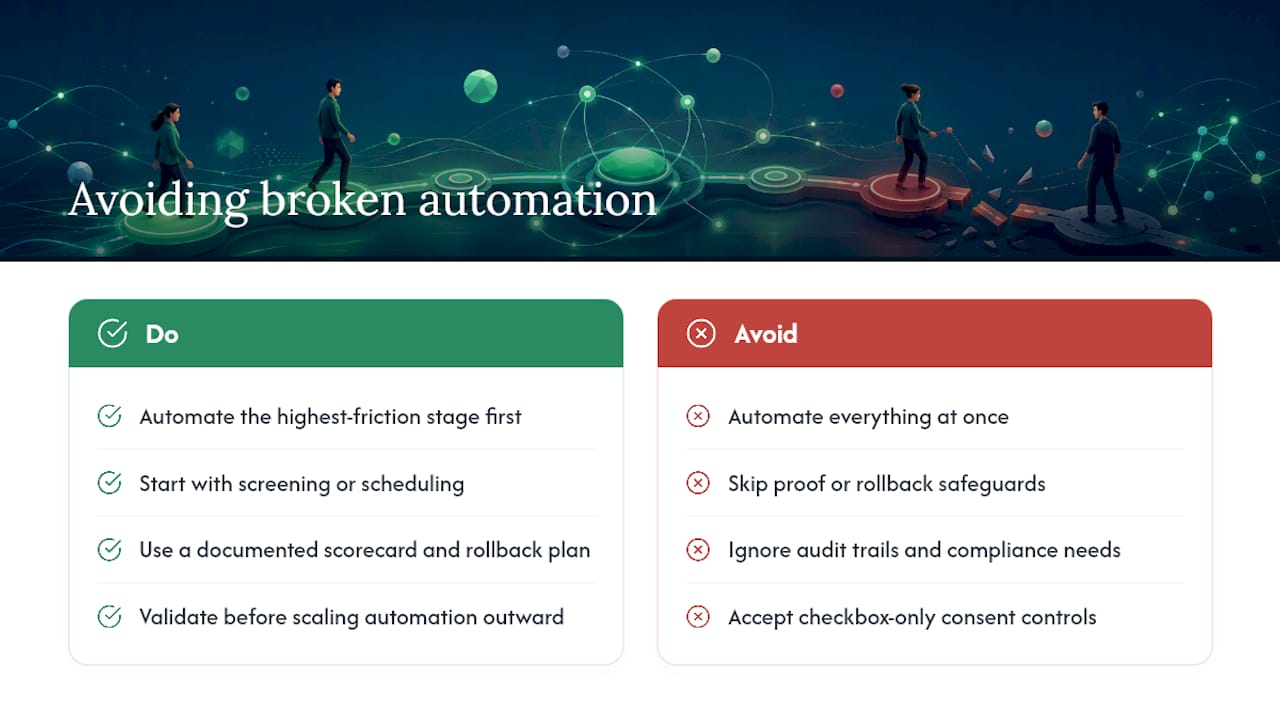
The teams that get real results tend to resist the urge to automate everything at once. They pick the stage causing the most friction, usually screening or scheduling, prove it out with a documented scorecard and a rollback plan, and only then extend automation outward. Skipping straight to full orchestration without that discipline is how a promising pilot turns into a pattern of quietly rejected qualified candidates nobody notices until a hiring manager asks why the pipeline looks thin.
Recruitify’s own product data reflects this staged approach in practice: agencies using its consolidated automation module report cutting administrative tasks by 70% by automating everything from initial lead contact through final contract generation, while its Contextual Matching AI and 3-second OCR parser handle the assembly work that used to eat a recruiter’s morning. None of that replaces the human gates this article has walked through. It just makes the gates faster to reach.
Before choosing any platform, run it against four questions: Can it orchestrate across stages, not just automate isolated tasks? Does it produce an audit trail you could hand to a compliance officer without editing it first? Does it give you real consent and privacy controls, not just a checkbox? And does its connector breadth match the systems your team already uses daily?
- Recruitify Team
Getting Recruitment Workflow Automation Running With Recruitify
Recruitify consolidates the ATS, CRM, and contracting modules into one workspace, so you are not stitching together separate tools to get the process continuity that moves the needle on time-to-shortlist.

The platform’s Contextual Matching AI scores applications against project requirements and returns ranked shortlists automatically, while the CV parser with OCR builds a structured candidate profile from a resume, scan, or photo in about 3 seconds and flags duplicates before they clutter your pipeline. Every action, from a parsed resume to a sent offer, writes to a GDPR-aligned audit trail, so the automation and governance controls this article recommends come built into the platform rather than bolted on afterward. Agencies also get database monetization tools that resurface candidates already sitting in an existing ATS, turning old sourcing spend into live pipeline instead of a sunk cost.
A platform subscription fits teams ready to own their workflow end-to-end; a managed service makes more sense if you lack the internal bandwidth to run the pilot process this article describes. For agencies and internal teams ready to own it, Recruitment Agencies pricing starts at 79 EUR per month per user, and the HR Team plan runs 69 EUR per month per user, with Enterprise pricing available on request. Book a demo through the pricing page to see the automation module against your own requisition data before committing.
Sources
FAQ
What Are the 7 Stages of the Recruitment Process?
The typical automated funnel runs intake, sourcing, screening, outreach, interview scheduling, offer, and onboarding, with reporting running continuously alongside every stage.
What Is the 80/20 Rule in Recruiting?
In an automation context, it means roughly 80% of routine, high-volume tasks like scheduling and first-pass parsing can run automatically, while the 20% involving judgment calls, like offers and sensitive rejections, stays human-only.
What Is the 70/30 Rule in Hiring?
There is no single standardized definition of a 70/30 rule in hiring; the number that matters more in an automation context is Recruitify’s own data point that full workflow automation can cut administrative tasks by 70%, freeing recruiter time for judgment-heavy stages.
What Are the 5 C’s of Recruitment?
Definitions vary across sources, but most versions center on competency, character, culture fit, communication, and commitment as the qualities structured screening and scorecards are designed to surface consistently.
How Much Does Recruitify Cost?
Recruitify’s HR Team plan is 69 EUR per month per user, the Recruitment Agencies plan is 79 EUR per month per user, and Enterprise pricing is available on request through the pricing page.
Recommended


News & Updates
Stay up-to-date with the latest innovations, features, and tips about Recruitify!
By providing your email address within the newsletter sign-up form, you confirm its processing to send marketing information regarding the Administrator’s products and services. The Administrator of your personal data processed for the abovementioned purposes is Recruitify Spółka z o.o., based in Warsaw, Poland (KRS 0000709889). For more information on the principles of personal data processing and the rights of data subjects, please check the Privacy Policy.

Last updated:
For Agencies: Orchestrate Stages with Recruitment Workflow Automation
Recruitment Process
The Recruitify Team
Recruitment workflow automation is the end-to-end orchestration of a hiring pipeline, moving candidates between intake, screening, outreach, interviews, and offer stages automatically while preserving context at every handoff. The payoff is a faster time-to-shortlist, far less manual admin, and pipelines that keep moving even when recruiters are heads-down on other requisitions. The rule that separates good automation from reckless automation is simple: automate assembly and routine tasks, and keep offers, sensitive rejections, and executive outreach locked to a human decision.
Automated workflows should ensure seamless candidate progression with triggers based on events and persist context through every stage to maintain process continuity.
Full automation is appropriate for repetitive, volume-driven tasks like sourcing, scheduling, and resume parsing, while high-judgment steps such as offers should remain human-only.
Setting clear human gates for irreversible decisions, maintaining detailed audit trails, and applying strict governance are essential for trust and compliance in automated hiring.
Pilot programs targeting high-volume requisitions prevent widespread errors, with regular sampling reviews and rollback plans to refine automation before scaling.
Key metrics to monitor include time-to-shortlist, time-to-hire, reply rate, false-reject rate, and onboarding readiness to evaluate automation effectiveness continuously.
RecruitifyOrchestrate Your Recruitment WorkflowRecruitify brings ATS, Sales CRM, and IT contracting into one ecosystem, helping agencies automate workflows and reduce administrative work.Explore Recruitify
Table of Contents
What Recruitment Workflow Automation Actually Means
Mapping the Automated Hiring Funnel Stage by Stage
The Technology Stack Behind Automated Hiring
Piloting Automated Hiring Workflows Without Breaking Anything
Where Automation Pays Off Immediately
Measuring Whether Your Automated Workflow Is Actually Working
Governance and the Human Gates You Cannot Automate Away
What Actually Breaks Automated Hiring Pipelines
Getting Recruitment Workflow Automation Running With Recruitify
Sources
FAQ
What Recruitment Workflow Automation Actually Means
Most teams that say they have “automated hiring” have really just automated a handful of tasks. Auto-scheduling an interview or running an AI resume parser on inbound applications is task automation. It handles one job well, then stops and waits for a human to pick up the next step. Recruitment workflow automation is different: it advances a candidate automatically from one stage to the next, carries forward the context that stage generated, and only pauses at points the team has deliberately marked as a human gate.
IBM defines recruitment automation as using technology to streamline talent acquisition and make hiring more data-driven, but the real dividing line inside that definition is continuity. A workflow that truly automates the process rather than just a task includes:
Triggers that fire on an event (a parsed resume clears a score threshold, an interview is confirmed) rather than waiting for someone to click a button
Persisted context, so a candidate’s scorecard notes, source channel, and prior touchpoints travel with them into every downstream stage
Defined handoffs between systems, such as an applicant tracking system and a calendar connector, that do not require re-entering data
Exception handling, so a candidate who does not fit the standard path (an internal referral, a re-engaged prior applicant) gets routed to a person instead of silently falling through
Recruitment process automation research frames this as a shift from task automation to process continuity, and that framing matters because it changes what you buy and how you measure it. A stack of disconnected point tools looks productive on a demo call. It rarely survives contact with a real requisition load.
Mapping the Automated Hiring Funnel Stage by Stage
An automated hiring workflow only works if every stage has an assigned automation mode: full automation, decision-support (the system recommends, a person decides), or human-only. Without that assignment, teams either over-automate sensitive decisions or under-automate routine ones, and both mistakes are expensive.
The i10X Funnel Map lays out a practical version of this model that scales from intake through onboarding:
Intake - decision-support. A recruiter and hiring manager still sign off on the requisition, but the system drafts the job description and success profile. System of record: ATS. KPI: intake-to-live time.
Sourcing - automation. Boolean and semantic search sweeps internal databases and open channels continuously. System of record: ATS/CRM talent pool. KPI: qualified sourced candidates per requisition.
Screening - decision-support. AI scoring ranks and shortlists, but a recruiter reviews borderline scores before rejection. System of record: ATS. KPI: time-to-shortlist.
Outreach - automation with human override. Sequenced messaging goes out automatically, with reply routing to a person. System of record: CRM. KPI: reply rate.
Interview scheduling - automation. Calendar connectors handle availability matching and reminders. System of record: calendar/ATS integration. KPI: time-to-interview.
Offer - human-only. No system generates or extends an offer without explicit approval. System of record: ATS/HRIS. KPI: offer accept rate.
Onboarding - decision-support. Document packets and task lists generate automatically; HR confirms completeness. System of record: HRIS. KPI: day-1 readiness.
Reporting - automation. Dashboards refresh continuously from pipeline data. System of record: analytics layer. KPI: pipeline velocity by stage.
Statistic to anchor your business case: SHRM’s benchmarking research puts average cost-per-hire at a level that makes even modest gains in time-to-shortlist and time-to-interview worth tracking closely, since every day a requisition sits open adds to that cost.
The short rule for deciding a stage’s mode: if the outcome is reversible and volume-driven, automate it. If it is high-judgment but low-risk, use decision-support. If it is irreversible or legally sensitive, keep it human-only.
The Technology Stack Behind Automated Hiring
Recruitment workflow automation depends on a handful of components working together, not on any single tool doing everything. Understanding the stack helps you evaluate vendors on capability, not on feature-list length.
A single source-of-truth ATS. Every stage needs to read and write against the same candidate record, or context breaks the moment a candidate moves systems.
An orchestration engine or sequencer. This is the piece that actually moves candidates between stages based on triggers. Gartner’s review data on integration platforms points to orchestration and connector depth as the real differentiator in HR tech stacks, more than any single point feature.
Connectors for email, calendar, and HRIS systems, so scheduling and onboarding data flow without manual re-entry.
AI CV parsers with OCR, which convert scanned resumes, PDFs, and photos into structured candidate profiles in seconds rather than minutes.
Contextual matching engines that score candidates against role requirements using relationships within a skill set, not just keyword overlap.
A reporting store that aggregates stage-by-stage data for dashboards without recruiters exporting spreadsheets by hand.
Consent management and audit trails sit underneath all of this. Every automated action that touches a candidate record, from a parsed resume to an auto-sent message, needs a timestamped log showing what happened, when, and under what consent basis. That is not a compliance afterthought. It is the difference between a defensible process and a liability.
Pro Tip: Before adding a new connector or automation rule, ask whether it creates a two-way sync or a one-way batch job. Two-way syncs keep systems consistent in real time; batch jobs are cheaper but introduce lag that can cause a candidate to be contacted twice from two different systems.
Piloting Automated Hiring Workflows Without Breaking Anything
Rolling out automated hiring workflows across every requisition on day one is how teams end up with auto-rejected qualified candidates and no idea why. A staged pilot, borrowed from the funnel map’s own pilot methodology, catches problems while the stakes are still low.
Pick one requisition type. Choose something high-volume or high-friction, not your hardest executive search. A recurring role like a support engineer or a junior developer position gives you enough data quickly.
Ship a signed intake scorecard within 48 hours. The hiring manager and recruiter agree in writing on must-haves, nice-to-haves, and disqualifiers before any automation touches the requisition.
Map systems of record and ownership. Decide which system holds the canonical candidate record, and assign a RACI so it is clear who approves what.
Set human gates and approval thresholds. Define exactly which score range triggers automatic advancement versus manual review, and write it down.
Automate drafting and scheduling first. Job description drafts, outreach sequences, and interview scheduling are the lowest-risk starting points, consistent with the industry pattern of starting with decision-support before higher-autonomy orchestration.
Run weekly sample audits. Pull a random sample of low-score rejects and have a recruiter manually review them for false rejects.
Set a rollback plan and a timebox. Give the pilot four to six weeks, with a defined trigger for reverting a stage to fully manual if the false-reject rate climbs.
A few anti-patterns show up in nearly every failed rollout:
Letting a score threshold auto-reject candidates with no sampling review, which quietly filters out qualified people
Skipping the scorecard step, so different reviewers apply inconsistent standards to the same requisition
Automating outreach without a human override, so a candidate who replies gets no response for days
Scaling orchestration to every requisition type before the pilot’s KPIs have stabilized for even one
Once the pilot’s numbers hold steady for two or three cycles, extend the same automation mode to adjacent requisition types before touching anything with legal or executive sensitivity.
Where Automation Pays Off Immediately
Some automations return value within the first week of use. Others need volume before the benefit shows up. Knowing which is which helps you sequence a rollout instead of automating everything at once.
Job description drafting from intake notes turns a 45-minute writing task into a five-minute review, since the draft comes from the scorecard fields already captured.
Resume parsing with first-pass scoring cuts the time a recruiter spends triaging a stack of applications, particularly for high-volume roles where hundreds of resumes arrive per posting.
Scheduling and reminders removes the back-and-forth email chain entirely, which is often where candidates go cold. Workato’s documented recruiting automation examples show scheduling as one of the fastest wins teams report after adopting connector-based automation.
Talent rediscovery from an existing database resurfaces candidates who applied months ago and were never fully evaluated, turning a sunk sourcing cost into a live pipeline.
Offer package drafting assembles compensation details and terms into a template a hiring manager reviews and signs off on, rather than starting from a blank document.
Onboarding packet generation prepares day-one paperwork and task lists the moment an offer is accepted, so HR is not scrambling the night before a start date.
Add a human sampling step wherever a false rejection is costly, meaning any stage where the model is doing the filtering rather than just the ranking. Screening and scoring deserve the closest attention here, since early adopter data on high-volume screening automation consistently flags the need for audits to catch bias or drift before it compounds across hundreds of candidates.
Measuring Whether Your Automated Workflow Is Actually Working
An automated pipeline without measurement is just a faster way to make the same mistakes. Six metrics tell you whether the system is helping or quietly causing harm.
Time-to-shortlist - how long from application to a ranked shortlist reaching a recruiter
Time-to-hire - the full cycle from requisition open to offer accepted
Reply rate - the percentage of automated outreach messages that get a response
False-reject rate - the share of automatically rejected candidates who, on manual review, should have advanced
Offer accept rate - whether faster processing is translating into stronger candidate experience
Day-1 readiness - whether onboarding automation is producing complete, on-time paperwork
The audit habit that catches problems early: pull a weekly random sample of candidates scored below your advancement threshold and have a recruiter review them by hand. This sampling practice is the single most reliable signal for catching model drift or bias before it shows up as a pattern of qualified candidates disappearing from the pipeline.
A minimal dashboard for stakeholders needs only these six figures updated weekly, broken out by requisition type. Monthly, roll them up for leadership alongside cost-per-hire trends so the automation’s return on investment stays visible, not assumed.
Governance and the Human Gates You Cannot Automate Away
Automation earns trust only when it operates inside controls that a recruiter, a candidate, or an auditor can inspect after the fact. Skipping governance to move faster tends to cost more time later, usually in the form of a compliance review or a candidate complaint that could have been prevented.
Human gates on irreversible outcomes. Offers, sensitive rejections, and any adverse action require sign-off from a named person, never a system alone.
Role-based approval thresholds. Define who can approve what, and log every approval with a timestamp.
Consent capture at the point of data collection. Candidates need to know how their data is used before it enters an automated scoring pipeline.
A full audit trail. Every automated action, from a parsed resume to an auto-generated rejection email, needs a record showing what happened and why.
Secure anonymization options for sensitive fields, so reporting and analytics can run without exposing personal data unnecessarily.
Change logs and model update policies. When a scoring model or matching algorithm changes, document what changed and re-validate against your false-reject baseline.
The i10X Funnel Map’s design principle of documenting whether AI is allowed to act, only advise, or is prohibited at each stage is worth adopting as a written policy, not just a mental model. Put it in a document every hiring manager can read.
Pro Tip: Treat every automation rule change like a code deployment. Version it, log who approved it, and keep a rollback path. Recruiting workflows touch people’s livelihoods, so the same discipline you’d apply to production software belongs here too.
What Actually Breaks Automated Hiring Pipelines
Most vendor pitches sell recruitment workflow automation as a straight line from slow to fast. The reality is messier, and the biggest failure mode isn’t a bad algorithm. It’s a team that automates the wrong stage first.
The teams that get real results tend to resist the urge to automate everything at once. They pick the stage causing the most friction, usually screening or scheduling, prove it out with a documented scorecard and a rollback plan, and only then extend automation outward. Skipping straight to full orchestration without that discipline is how a promising pilot turns into a pattern of quietly rejected qualified candidates nobody notices until a hiring manager asks why the pipeline looks thin.
Recruitify’s own product data reflects this staged approach in practice: agencies using its consolidated automation module report cutting administrative tasks by 70% by automating everything from initial lead contact through final contract generation, while its Contextual Matching AI and 3-second OCR parser handle the assembly work that used to eat a recruiter’s morning. None of that replaces the human gates this article has walked through. It just makes the gates faster to reach.
Before choosing any platform, run it against four questions: Can it orchestrate across stages, not just automate isolated tasks? Does it produce an audit trail you could hand to a compliance officer without editing it first? Does it give you real consent and privacy controls, not just a checkbox? And does its connector breadth match the systems your team already uses daily?
- Recruitify Team
Getting Recruitment Workflow Automation Running With Recruitify
Recruitify consolidates the ATS, CRM, and contracting modules into one workspace, so you are not stitching together separate tools to get the process continuity that moves the needle on time-to-shortlist.
The platform’s Contextual Matching AI scores applications against project requirements and returns ranked shortlists automatically, while the CV parser with OCR builds a structured candidate profile from a resume, scan, or photo in about 3 seconds and flags duplicates before they clutter your pipeline. Every action, from a parsed resume to a sent offer, writes to a GDPR-aligned audit trail, so the automation and governance controls this article recommends come built into the platform rather than bolted on afterward. Agencies also get database monetization tools that resurface candidates already sitting in an existing ATS, turning old sourcing spend into live pipeline instead of a sunk cost.
A platform subscription fits teams ready to own their workflow end-to-end; a managed service makes more sense if you lack the internal bandwidth to run the pilot process this article describes. For agencies and internal teams ready to own it, Recruitment Agencies pricing starts at 79 EUR per month per user, and the HR Team plan runs 69 EUR per month per user, with Enterprise pricing available on request. Book a demo through the pricing page to see the automation module against your own requisition data before committing.
Sources
FAQ
What Are the 7 Stages of the Recruitment Process?
The typical automated funnel runs intake, sourcing, screening, outreach, interview scheduling, offer, and onboarding, with reporting running continuously alongside every stage.
What Is the 80/20 Rule in Recruiting?
In an automation context, it means roughly 80% of routine, high-volume tasks like scheduling and first-pass parsing can run automatically, while the 20% involving judgment calls, like offers and sensitive rejections, stays human-only.
What Is the 70/30 Rule in Hiring?
There is no single standardized definition of a 70/30 rule in hiring; the number that matters more in an automation context is Recruitify’s own data point that full workflow automation can cut administrative tasks by 70%, freeing recruiter time for judgment-heavy stages.
What Are the 5 C’s of Recruitment?
Definitions vary across sources, but most versions center on competency, character, culture fit, communication, and commitment as the qualities structured screening and scorecards are designed to surface consistently.
How Much Does Recruitify Cost?
Recruitify’s HR Team plan is 69 EUR per month per user, the Recruitment Agencies plan is 79 EUR per month per user, and Enterprise pricing is available on request through the pricing page.
Recommended
News & Updates
Stay up-to-date with the latest innovations, features, and tips about Recruitify!
By providing your email address within the newsletter sign-up form, you confirm its processing to send marketing information regarding the Administrator’s products and services. The Administrator of your personal data processed for the abovementioned purposes is Recruitify Spółka z o.o., based in Warsaw, Poland (KRS 0000709889). For more information on the principles of personal data processing and the rights of data subjects, please check the Privacy Policy.
Last updated:
For Agencies: Orchestrate Stages with Recruitment Workflow Automation
Recruitment Process
The Recruitify Team
Recruitment workflow automation is the end-to-end orchestration of a hiring pipeline, moving candidates between intake, screening, outreach, interviews, and offer stages automatically while preserving context at every handoff. The payoff is a faster time-to-shortlist, far less manual admin, and pipelines that keep moving even when recruiters are heads-down on other requisitions. The rule that separates good automation from reckless automation is simple: automate assembly and routine tasks, and keep offers, sensitive rejections, and executive outreach locked to a human decision.
Automated workflows should ensure seamless candidate progression with triggers based on events and persist context through every stage to maintain process continuity.
Full automation is appropriate for repetitive, volume-driven tasks like sourcing, scheduling, and resume parsing, while high-judgment steps such as offers should remain human-only.
Setting clear human gates for irreversible decisions, maintaining detailed audit trails, and applying strict governance are essential for trust and compliance in automated hiring.
Pilot programs targeting high-volume requisitions prevent widespread errors, with regular sampling reviews and rollback plans to refine automation before scaling.
Key metrics to monitor include time-to-shortlist, time-to-hire, reply rate, false-reject rate, and onboarding readiness to evaluate automation effectiveness continuously.
RecruitifyOrchestrate Your Recruitment WorkflowRecruitify brings ATS, Sales CRM, and IT contracting into one ecosystem, helping agencies automate workflows and reduce administrative work.Explore Recruitify
Table of Contents
What Recruitment Workflow Automation Actually Means
Mapping the Automated Hiring Funnel Stage by Stage
The Technology Stack Behind Automated Hiring
Piloting Automated Hiring Workflows Without Breaking Anything
Where Automation Pays Off Immediately
Measuring Whether Your Automated Workflow Is Actually Working
Governance and the Human Gates You Cannot Automate Away
What Actually Breaks Automated Hiring Pipelines
Getting Recruitment Workflow Automation Running With Recruitify
Sources
FAQ
What Recruitment Workflow Automation Actually Means
Most teams that say they have “automated hiring” have really just automated a handful of tasks. Auto-scheduling an interview or running an AI resume parser on inbound applications is task automation. It handles one job well, then stops and waits for a human to pick up the next step. Recruitment workflow automation is different: it advances a candidate automatically from one stage to the next, carries forward the context that stage generated, and only pauses at points the team has deliberately marked as a human gate.
IBM defines recruitment automation as using technology to streamline talent acquisition and make hiring more data-driven, but the real dividing line inside that definition is continuity. A workflow that truly automates the process rather than just a task includes:
Triggers that fire on an event (a parsed resume clears a score threshold, an interview is confirmed) rather than waiting for someone to click a button
Persisted context, so a candidate’s scorecard notes, source channel, and prior touchpoints travel with them into every downstream stage
Defined handoffs between systems, such as an applicant tracking system and a calendar connector, that do not require re-entering data
Exception handling, so a candidate who does not fit the standard path (an internal referral, a re-engaged prior applicant) gets routed to a person instead of silently falling through
Recruitment process automation research frames this as a shift from task automation to process continuity, and that framing matters because it changes what you buy and how you measure it. A stack of disconnected point tools looks productive on a demo call. It rarely survives contact with a real requisition load.
Mapping the Automated Hiring Funnel Stage by Stage
An automated hiring workflow only works if every stage has an assigned automation mode: full automation, decision-support (the system recommends, a person decides), or human-only. Without that assignment, teams either over-automate sensitive decisions or under-automate routine ones, and both mistakes are expensive.
The i10X Funnel Map lays out a practical version of this model that scales from intake through onboarding:
Intake - decision-support. A recruiter and hiring manager still sign off on the requisition, but the system drafts the job description and success profile. System of record: ATS. KPI: intake-to-live time.
Sourcing - automation. Boolean and semantic search sweeps internal databases and open channels continuously. System of record: ATS/CRM talent pool. KPI: qualified sourced candidates per requisition.
Screening - decision-support. AI scoring ranks and shortlists, but a recruiter reviews borderline scores before rejection. System of record: ATS. KPI: time-to-shortlist.
Outreach - automation with human override. Sequenced messaging goes out automatically, with reply routing to a person. System of record: CRM. KPI: reply rate.
Interview scheduling - automation. Calendar connectors handle availability matching and reminders. System of record: calendar/ATS integration. KPI: time-to-interview.
Offer - human-only. No system generates or extends an offer without explicit approval. System of record: ATS/HRIS. KPI: offer accept rate.
Onboarding - decision-support. Document packets and task lists generate automatically; HR confirms completeness. System of record: HRIS. KPI: day-1 readiness.
Reporting - automation. Dashboards refresh continuously from pipeline data. System of record: analytics layer. KPI: pipeline velocity by stage.
Statistic to anchor your business case: SHRM’s benchmarking research puts average cost-per-hire at a level that makes even modest gains in time-to-shortlist and time-to-interview worth tracking closely, since every day a requisition sits open adds to that cost.
The short rule for deciding a stage’s mode: if the outcome is reversible and volume-driven, automate it. If it is high-judgment but low-risk, use decision-support. If it is irreversible or legally sensitive, keep it human-only.
The Technology Stack Behind Automated Hiring
Recruitment workflow automation depends on a handful of components working together, not on any single tool doing everything. Understanding the stack helps you evaluate vendors on capability, not on feature-list length.
A single source-of-truth ATS. Every stage needs to read and write against the same candidate record, or context breaks the moment a candidate moves systems.
An orchestration engine or sequencer. This is the piece that actually moves candidates between stages based on triggers. Gartner’s review data on integration platforms points to orchestration and connector depth as the real differentiator in HR tech stacks, more than any single point feature.
Connectors for email, calendar, and HRIS systems, so scheduling and onboarding data flow without manual re-entry.
AI CV parsers with OCR, which convert scanned resumes, PDFs, and photos into structured candidate profiles in seconds rather than minutes.
Contextual matching engines that score candidates against role requirements using relationships within a skill set, not just keyword overlap.
A reporting store that aggregates stage-by-stage data for dashboards without recruiters exporting spreadsheets by hand.
Consent management and audit trails sit underneath all of this. Every automated action that touches a candidate record, from a parsed resume to an auto-sent message, needs a timestamped log showing what happened, when, and under what consent basis. That is not a compliance afterthought. It is the difference between a defensible process and a liability.
Pro Tip: Before adding a new connector or automation rule, ask whether it creates a two-way sync or a one-way batch job. Two-way syncs keep systems consistent in real time; batch jobs are cheaper but introduce lag that can cause a candidate to be contacted twice from two different systems.
Piloting Automated Hiring Workflows Without Breaking Anything
Rolling out automated hiring workflows across every requisition on day one is how teams end up with auto-rejected qualified candidates and no idea why. A staged pilot, borrowed from the funnel map’s own pilot methodology, catches problems while the stakes are still low.
Pick one requisition type. Choose something high-volume or high-friction, not your hardest executive search. A recurring role like a support engineer or a junior developer position gives you enough data quickly.
Ship a signed intake scorecard within 48 hours. The hiring manager and recruiter agree in writing on must-haves, nice-to-haves, and disqualifiers before any automation touches the requisition.
Map systems of record and ownership. Decide which system holds the canonical candidate record, and assign a RACI so it is clear who approves what.
Set human gates and approval thresholds. Define exactly which score range triggers automatic advancement versus manual review, and write it down.
Automate drafting and scheduling first. Job description drafts, outreach sequences, and interview scheduling are the lowest-risk starting points, consistent with the industry pattern of starting with decision-support before higher-autonomy orchestration.
Run weekly sample audits. Pull a random sample of low-score rejects and have a recruiter manually review them for false rejects.
Set a rollback plan and a timebox. Give the pilot four to six weeks, with a defined trigger for reverting a stage to fully manual if the false-reject rate climbs.
A few anti-patterns show up in nearly every failed rollout:
Letting a score threshold auto-reject candidates with no sampling review, which quietly filters out qualified people
Skipping the scorecard step, so different reviewers apply inconsistent standards to the same requisition
Automating outreach without a human override, so a candidate who replies gets no response for days
Scaling orchestration to every requisition type before the pilot’s KPIs have stabilized for even one
Once the pilot’s numbers hold steady for two or three cycles, extend the same automation mode to adjacent requisition types before touching anything with legal or executive sensitivity.
Where Automation Pays Off Immediately
Some automations return value within the first week of use. Others need volume before the benefit shows up. Knowing which is which helps you sequence a rollout instead of automating everything at once.
Job description drafting from intake notes turns a 45-minute writing task into a five-minute review, since the draft comes from the scorecard fields already captured.
Resume parsing with first-pass scoring cuts the time a recruiter spends triaging a stack of applications, particularly for high-volume roles where hundreds of resumes arrive per posting.
Scheduling and reminders removes the back-and-forth email chain entirely, which is often where candidates go cold. Workato’s documented recruiting automation examples show scheduling as one of the fastest wins teams report after adopting connector-based automation.
Talent rediscovery from an existing database resurfaces candidates who applied months ago and were never fully evaluated, turning a sunk sourcing cost into a live pipeline.
Offer package drafting assembles compensation details and terms into a template a hiring manager reviews and signs off on, rather than starting from a blank document.
Onboarding packet generation prepares day-one paperwork and task lists the moment an offer is accepted, so HR is not scrambling the night before a start date.
Add a human sampling step wherever a false rejection is costly, meaning any stage where the model is doing the filtering rather than just the ranking. Screening and scoring deserve the closest attention here, since early adopter data on high-volume screening automation consistently flags the need for audits to catch bias or drift before it compounds across hundreds of candidates.
Measuring Whether Your Automated Workflow Is Actually Working
An automated pipeline without measurement is just a faster way to make the same mistakes. Six metrics tell you whether the system is helping or quietly causing harm.
Time-to-shortlist - how long from application to a ranked shortlist reaching a recruiter
Time-to-hire - the full cycle from requisition open to offer accepted
Reply rate - the percentage of automated outreach messages that get a response
False-reject rate - the share of automatically rejected candidates who, on manual review, should have advanced
Offer accept rate - whether faster processing is translating into stronger candidate experience
Day-1 readiness - whether onboarding automation is producing complete, on-time paperwork
The audit habit that catches problems early: pull a weekly random sample of candidates scored below your advancement threshold and have a recruiter review them by hand. This sampling practice is the single most reliable signal for catching model drift or bias before it shows up as a pattern of qualified candidates disappearing from the pipeline.
A minimal dashboard for stakeholders needs only these six figures updated weekly, broken out by requisition type. Monthly, roll them up for leadership alongside cost-per-hire trends so the automation’s return on investment stays visible, not assumed.
Governance and the Human Gates You Cannot Automate Away
Automation earns trust only when it operates inside controls that a recruiter, a candidate, or an auditor can inspect after the fact. Skipping governance to move faster tends to cost more time later, usually in the form of a compliance review or a candidate complaint that could have been prevented.
Human gates on irreversible outcomes. Offers, sensitive rejections, and any adverse action require sign-off from a named person, never a system alone.
Role-based approval thresholds. Define who can approve what, and log every approval with a timestamp.
Consent capture at the point of data collection. Candidates need to know how their data is used before it enters an automated scoring pipeline.
A full audit trail. Every automated action, from a parsed resume to an auto-generated rejection email, needs a record showing what happened and why.
Secure anonymization options for sensitive fields, so reporting and analytics can run without exposing personal data unnecessarily.
Change logs and model update policies. When a scoring model or matching algorithm changes, document what changed and re-validate against your false-reject baseline.
The i10X Funnel Map’s design principle of documenting whether AI is allowed to act, only advise, or is prohibited at each stage is worth adopting as a written policy, not just a mental model. Put it in a document every hiring manager can read.
Pro Tip: Treat every automation rule change like a code deployment. Version it, log who approved it, and keep a rollback path. Recruiting workflows touch people’s livelihoods, so the same discipline you’d apply to production software belongs here too.
What Actually Breaks Automated Hiring Pipelines
Most vendor pitches sell recruitment workflow automation as a straight line from slow to fast. The reality is messier, and the biggest failure mode isn’t a bad algorithm. It’s a team that automates the wrong stage first.
The teams that get real results tend to resist the urge to automate everything at once. They pick the stage causing the most friction, usually screening or scheduling, prove it out with a documented scorecard and a rollback plan, and only then extend automation outward. Skipping straight to full orchestration without that discipline is how a promising pilot turns into a pattern of quietly rejected qualified candidates nobody notices until a hiring manager asks why the pipeline looks thin.
Recruitify’s own product data reflects this staged approach in practice: agencies using its consolidated automation module report cutting administrative tasks by 70% by automating everything from initial lead contact through final contract generation, while its Contextual Matching AI and 3-second OCR parser handle the assembly work that used to eat a recruiter’s morning. None of that replaces the human gates this article has walked through. It just makes the gates faster to reach.
Before choosing any platform, run it against four questions: Can it orchestrate across stages, not just automate isolated tasks? Does it produce an audit trail you could hand to a compliance officer without editing it first? Does it give you real consent and privacy controls, not just a checkbox? And does its connector breadth match the systems your team already uses daily?
- Recruitify Team
Getting Recruitment Workflow Automation Running With Recruitify
Recruitify consolidates the ATS, CRM, and contracting modules into one workspace, so you are not stitching together separate tools to get the process continuity that moves the needle on time-to-shortlist.
The platform’s Contextual Matching AI scores applications against project requirements and returns ranked shortlists automatically, while the CV parser with OCR builds a structured candidate profile from a resume, scan, or photo in about 3 seconds and flags duplicates before they clutter your pipeline. Every action, from a parsed resume to a sent offer, writes to a GDPR-aligned audit trail, so the automation and governance controls this article recommends come built into the platform rather than bolted on afterward. Agencies also get database monetization tools that resurface candidates already sitting in an existing ATS, turning old sourcing spend into live pipeline instead of a sunk cost.
A platform subscription fits teams ready to own their workflow end-to-end; a managed service makes more sense if you lack the internal bandwidth to run the pilot process this article describes. For agencies and internal teams ready to own it, Recruitment Agencies pricing starts at 79 EUR per month per user, and the HR Team plan runs 69 EUR per month per user, with Enterprise pricing available on request. Book a demo through the pricing page to see the automation module against your own requisition data before committing.
Sources
FAQ
What Are the 7 Stages of the Recruitment Process?
The typical automated funnel runs intake, sourcing, screening, outreach, interview scheduling, offer, and onboarding, with reporting running continuously alongside every stage.
What Is the 80/20 Rule in Recruiting?
In an automation context, it means roughly 80% of routine, high-volume tasks like scheduling and first-pass parsing can run automatically, while the 20% involving judgment calls, like offers and sensitive rejections, stays human-only.
What Is the 70/30 Rule in Hiring?
There is no single standardized definition of a 70/30 rule in hiring; the number that matters more in an automation context is Recruitify’s own data point that full workflow automation can cut administrative tasks by 70%, freeing recruiter time for judgment-heavy stages.
What Are the 5 C’s of Recruitment?
Definitions vary across sources, but most versions center on competency, character, culture fit, communication, and commitment as the qualities structured screening and scorecards are designed to surface consistently.
How Much Does Recruitify Cost?
Recruitify’s HR Team plan is 69 EUR per month per user, the Recruitment Agencies plan is 79 EUR per month per user, and Enterprise pricing is available on request through the pricing page.
Recommended
News & Updates
Stay up-to-date with the latest innovations, features, and tips about Recruitify!
By providing your email address within the newsletter sign-up form, you confirm its processing to send marketing information regarding the Administrator’s products and services. The Administrator of your personal data processed for the abovementioned purposes is Recruitify Spółka z o.o., based in Warsaw, Poland (KRS 0000709889). For more information on the principles of personal data processing and the rights of data subjects, please check the Privacy Policy.

Discover More

HR Analytics
7 Tactics to Optimize the Recruitment Process for TA Leaders
A metrics-first playbook for TA leaders: shorten time-to-decision, improve shortlist quality, and use AI as decision support rather than a replacement.
16 Sept 2026
Discover More

Applicant Tracking System
HR Leaders: Predictive Recruitment Forecasts That Turn Plans Into Hires
Practical steps for HR leaders to build predictive, data-driven recruitment forecasts, link them to finance and ops, and convert projections into hires...
15 Sept 2026
Discover More

Applicant Tracking System
Skills Based Hiring: Launch a 3–5 Competency Pilot for HR Teams
Practical roadmap for HR: pilot skills based hiring, pick 3–5 competencies, use 30–90 minute work samples, run a measured pilot, and track core KPIs.
14 Sept 2026
Discover More
HR Analytics
7 Tactics to Optimize the Recruitment Process for TA Leaders
A metrics-first playbook for TA leaders: shorten time-to-decision, improve shortlist quality, and use AI as decision support rather than a replacement.
16 Sept 2026
Discover More
Applicant Tracking System
HR Leaders: Predictive Recruitment Forecasts That Turn Plans Into Hires
Practical steps for HR leaders to build predictive, data-driven recruitment forecasts, link them to finance and ops, and convert projections into hires...
15 Sept 2026
Discover More

