
Last updated:
Recruiters: Stage Organized Recruiting Email Templates You Can Automate

Applicant Tracking System

The Recruitify Team
This page gives you copy-ready recruiting email templates organized by hiring stage, from first outreach through offer and rejection, along with the benchmarks that make them work. Keep subject lines to 3–5 words, aim for 101–150 words per message, and plan a four-message follow-up sequence spaced 3–5 days apart. Jump to the template index below to find the exact message you need and swap in two personal details before you hit send.
TL;DR:
Personalized outreach with at least two specific details about the candidate significantly increases reply rates over generic messages.
A four-message follow-up sequence spaced 3 to 5 days apart can roughly double responses compared to a single message.
Short subject lines of 3 to 5 words and email lengths of 101 to 150 words optimize open and reply rates.
Automating sequence timing and tracking via recruitment platforms like Recruitify saves up to 70% of administrative effort while maintaining personalization.
Clear, specific scheduling and prompt communication during interview coordination reduce candidate no-shows and improve overall engagement.
RecruitifyAutomate More Recruiting WorkRecruitify brings sales, recruitment, and contracting workflows together, helping IT recruitment agencies reduce administrative tasks without expanding their teams.Explore Recruitify
Table of Contents
Recruiting Email Templates: A Quick-Reference Index
Cold Outreach Templates That Get Opened and Answered
The Four-Message Follow-Up Sequence That Doubles Replies
Interview Scheduling Templates That Cut No-Shows
Offer and Rejection Templates That Protect Your Pipeline
What Makes a Recruiting Email Actually Get a Reply?
Customizing and Automating Templates Without Losing the Human Touch
Where Recruitment Automation Fits Into Template-Driven Outreach
What Actually Separates Templates That Work From Templates That Don’t
Scale Personalized Outreach Without Losing the Details That Work
Sources
FAQ
Recruiting Email Templates: A Quick-Reference Index
Twelve template types cover nearly every candidate touchpoint an agency or in-house recruiter handles in a typical search. Knowing which one to grab, and when, saves you from rewriting the same message from scratch every time a new requisition lands.
Here’s the full lineup, organized by where a candidate sits in your pipeline:
Cold outreach (first touch): Send when you spot a candidate through sourcing or a talent pool search, ideally within the first day of identifying them.
SOBO / hiring manager send: Reserve for senior or hard-to-fill roles where a message “sent on behalf of” the hiring manager carries more weight than a recruiter’s name alone.
Referral intro: Use immediately after a warm introduction from an employee or industry contact, while the connection is still fresh.
First follow-up: Send 3–5 days after the initial message goes unanswered.
Value-add follow-up: Send at day 7-10, adding a detail the first message didn’t include (project scope, team size, compensation range).
Final nudge: Send around day 14, framed as a last check-in before you move on to other candidates.
Re-engagement: Use months later, when a role reopens or a new opening matches a candidate who went quiet.
Interview invite: Send as soon as a candidate clears screening, with three time options built in.
Interview reminder: Send 24 hours before the scheduled interview.
Reschedule request: Send the moment a conflict arises, with alternative slots already attached.
Verbal offer follow-up: Send within hours of a verbal “yes” to lock details in writing.
Formal offer: Send once compensation and start date are confirmed internally.
Rejection with nurture: Send promptly after a final decision, whether the candidate reached the final round or not.
Every template on this page works as a starting point, not a finished product. Before you copy and paste, swap in at least two specific details unique to the candidate: a project they worked on, a skill mentioned on their profile, a mutual connection, or a detail from their current employer. Generic templates get generic reply rates. The research on personalized recruiting emails backs this up directly, and you’ll see the exact numbers in the sections that follow.
Bookmark this index. When a requisition opens, you’ll spend less time deciding which message to write and more time actually sourcing candidates.
Cold Outreach Templates That Get Opened and Answered
First-touch messages carry the heaviest lift in recruiting communication. You’re asking a stranger, often someone who isn’t job hunting, to take five minutes out of their day. The templates below work because they respect that reality: short, specific, and easy to say yes to.
1. Standard cold outreach
Subject line options (pick one, 3-5 words): “Quick question, [First Name]” / “[Company] + your background” / “Loved your work on [Project]”
Hi [First Name],
I came across your work on [specific project or skill] and wanted to reach out directly. I’m working with [Company Name] on a [Job Title] role that looks like a strong match for your background in [specific skill area].
Would you be open to a short call this week to hear more? No pressure either way, just figured it was worth asking.
[Your Name]
This works because it names something specific about the candidate before asking for anything. Recruiters who skip that step and lead with the job description get skimmed and ignored.
2. SOBO (hiring manager) send
Subject line: “[Hiring Manager Name] wanted to connect”
Hi [First Name],
[Hiring Manager Name], who leads [Team/Department] at [Company], asked me to reach out. Your experience with [specific skill] caught their attention, and they’re building out the team behind [specific initiative].
Would you have 15 minutes for a call with [Hiring Manager Name] this week?
[Your Name], on behalf of [Hiring Manager Name]
Messages sent on behalf of the hiring manager tend to outperform standard recruiter outreach for senior or specialized roles, since they signal that a decision-maker, not just a sourcer, is paying attention.
3. Referral intro
Subject line: “[Mutual Contact] suggested I reach out”
Hi [First Name],
[Mutual Contact Name] mentioned you might be a great fit for a [Job Title] opening I’m working on at [Company]. They spoke highly of your work on [specific project].
Open to a quick conversation this week?
[Your Name]
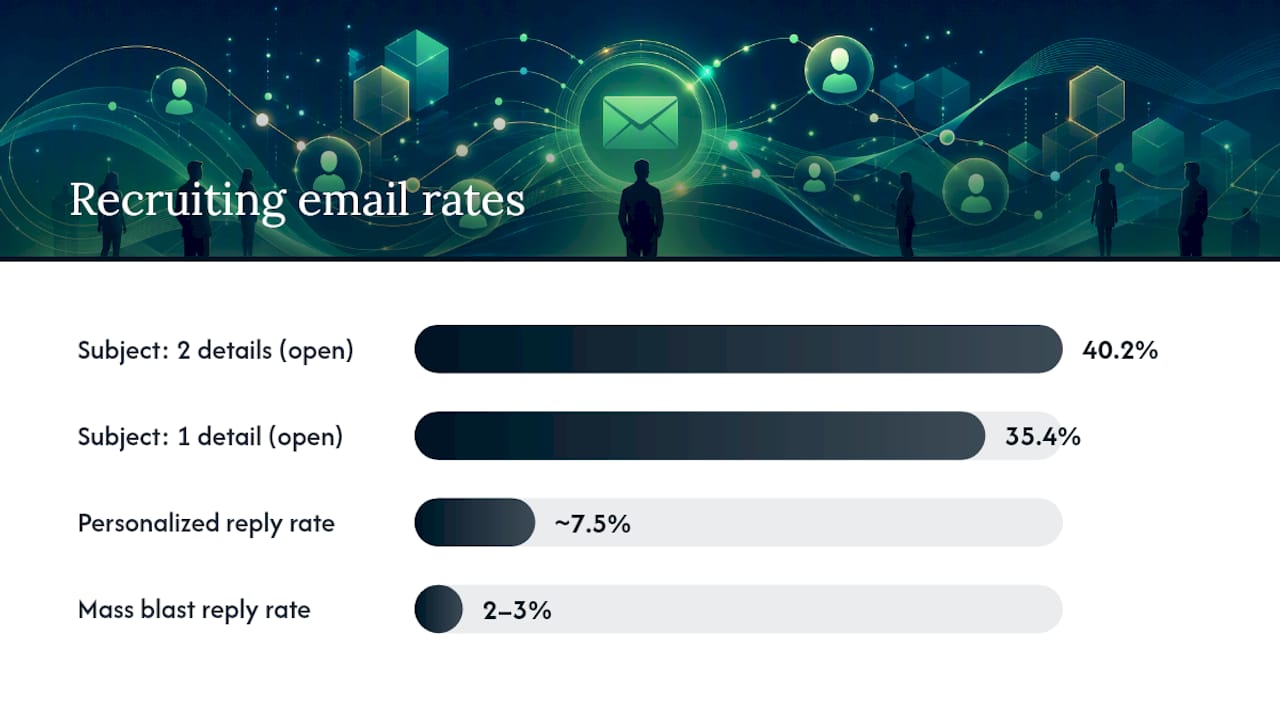
Benchmark to know: targeted, personalized recruiting emails average a 7.5% reply rate, compared to just 2-3% for generic mass blasts, according to Hunter.io’s analysis of 31 million emails.
The Four-Message Follow-Up Sequence That Doubles Replies
Silence after a first outreach message doesn’t mean no. It usually means the candidate was busy, distracted, or meant to reply and forgot. A four-message sequence spaced 3-5 days apart produces roughly twice as many replies as a single send, and candidates who do respond show a 68% higher “interested” rate compared to one-and-done outreach, per pin-com’s follow-up analysis.
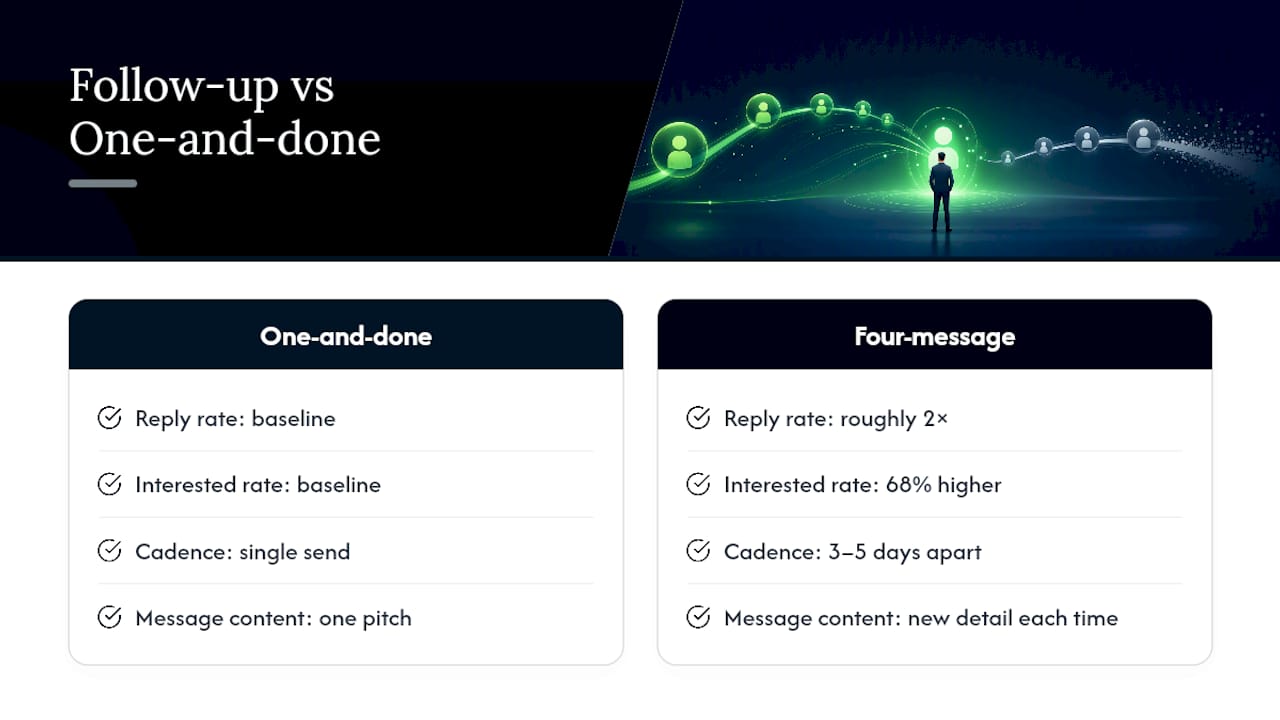
Each message in the sequence should add something new. Repeating the same pitch four times reads as nagging; adding a fresh detail each time reads as genuine interest.
1. Gentle follow-up (day 3-5)
Hi [First Name],
Wanted to bump this to the top of your inbox in case it got buried. Still think the [Job Title] role at [Company] could be a strong fit given your background in [specific skill].
Any interest in a quick chat?
[Your Name]
2. Value-add follow-up (day 7-10)
Hi [First Name],
Following up with a bit more context: the team is currently working on [specific project/initiative], and the role would give you ownership over [specific responsibility]. Compensation lands in the [range] band depending on experience.
Worth a 15-minute call?
[Your Name]
3. Final nudge (day 14)
Hi [First Name],
I don’t want to keep filling your inbox, so this will be my last note on this specific role. If the timing isn’t right, no worries at all. If you’d like to stay on my radar for future openings, just let me know.
[Your Name]
4. Re-engagement (weeks or months later)
Hi [First Name],
It’s been a while since we last connected about [Company]. A new [Job Title] role just opened up that lines up even more closely with your background in [specific skill]. Would you like to hear more?
[Your Name]
Pro Tip: Track opens and link clicks separately from replies. A candidate who opens every follow-up but never responds is still warm; a candidate who stops opening entirely after message two is telling you to stop. Read that signal instead of pushing to message four automatically.
Interview Scheduling Templates That Cut No-Shows
Once a candidate agrees to talk, the logistics matter more than the pitch. Confusing scheduling emails are one of the most avoidable ways agencies lose candidates between “interested” and “interviewed.”
Interview invite: Offer three specific time slots up front rather than asking “when works for you?” Include the interviewer’s name and title so the candidate knows who to expect. Example line: “[Interviewer Name], our [Title], has openings Tuesday at 10 AM, Wednesday at 2 PM, or Thursday at 11 AM ET. Which works best?”
24-hour reminder: Send a short note the day before with the meeting link, dial-in details, and a one-line reschedule path. Example: “Quick reminder: your interview with [Interviewer Name] is tomorrow at [Time]. Here’s the link: [Meeting Link]. Need to move it? Just reply here.”
Reschedule request: When a conflict comes up on your end, own it plainly and offer two or three new options immediately rather than making the candidate wait for a follow-up. Example: “Something came up on our end and we need to shift your interview. Would Thursday at 1 PM or Friday at 10 AM work instead?”
Timely, clear communication at this stage does more for candidate experience than almost anything else in the process. Workable’s guidance on recruiter emails points to fast, transparent responses as a core driver of candidates staying engaged through the funnel rather than ghosting after round one.
Offer and Rejection Templates That Protect Your Pipeline
The final stretch of a hiring process is where candidate experience either gets cemented or falls apart. These messages matter whether the news is good or not.
Verbal offer follow-up: Send within hours of a verbal yes to confirm compensation, start date, and next steps in writing before excitement fades or a competing offer shows up. Keep it short: “Great talking today. To confirm in writing: the offer is [Salary] with a start date of [Date]. Formal paperwork will follow by [Date]. Let me know if anything needs clarifying in the meantime.”
Formal offer email: Attach the signed offer letter, state the acceptance deadline clearly, and give a direct contact for questions. Don’t bury the deadline in paragraph three. State it in its own line.
Rejection with nurture: Name one specific strength the candidate showed, rather than sending a form rejection with no detail. Invite them to stay in your pipeline for future roles. Example: “While we’re moving forward with another candidate, your experience with [specific skill] stood out, and we’d like to keep you in mind for upcoming openings. Would that be okay?”
A professional rejection that names something real about the candidate does more for your employer brand than most agencies realize, and it keeps the door open for a role that fits better down the line, a point Built In’s recruiting email guide makes clear when it comes to preserving future pipeline value.
What Makes a Recruiting Email Actually Get a Reply?
Templates only work when the fundamentals behind them are right. Four rules show up again and again across the data on recruiting email performance.
Subject lines: keep them short and specific. Three to five words outperforms longer, vaguer lines. Subject lines that include two custom attributes, like a candidate’s name plus a specific skill, reach a 40.2% open rate, compared to 35.4% for subject lines with only one personalized detail, according to pin-com’s analysis. That’s a meaningful gap for a change that takes ten extra seconds to make.
Length: 101-150 words is the sweet spot. A 2024 analysis of 4 million recruiting emails found this range produces the highest engagement, well short of what most recruiters instinctively write. Longer emails that try to cover the full job description tend to underperform because candidates skim rather than read.
Personalization needs at least two specific details. One generic compliment (“your background looks impressive”) doesn’t move the needle. Two specifics, a named project plus a named skill, or a mutual connection plus a company detail, consistently outperform single-point personalization. Place them in the first two sentences, not buried at the bottom.
Sequence length: cap it at four messages. Beyond that, replies drop off sharply and the risk of feeling like spam goes up. Spacing matters just as much as count: 3-5 days between each follow-up keeps you visible without becoming annoying.
Multi-channel adds real lift. Pairing an email sequence with a LinkedIn message or a short SMS at one touchpoint (usually the second or third follow-up) tends to boost response rates beyond what email alone achieves, since it reaches candidates who don’t check their inbox as often as their phone.
Benchmark | Recommended standard |
|---|---|
Subject line length | 3-5 words |
Ideal email length | 101-150 words |
Personalization details | 2 or more specifics |
Follow-up spacing | 3-5 days between messages |
Max sequence length | 4 messages |
Personalized reply rate | ~7.5% average |
Mass blast reply rate | 2-3% |
Customizing and Automating Templates Without Losing the Human Touch
Templates are a starting point, not a script to run verbatim. Before any message goes out, run through a short checklist:
Replace every bracketed token: name, company, project, skill, mutual contact.
Confirm the role details (title, comp range, location) are current, not copied from an older requisition.
Read the message once out loud. If it sounds robotic, it will read that way too.
If you can’t find a direct contact email, search LinkedIn for “recruiter [Company]” or the hiring manager directly. Messaging a real person there tends to beat generic portal submissions, a workaround TailorCV’s follow-up guide recommends when application portals hide contact details.
A/B test subject lines on your highest-volume outreach and track which version gets more opens.
Log consent when you add a new contact to any automated sequence, particularly if your outreach touches candidates covered under GDPR or similar regional privacy rules.
Pro Tip: Automation raises how many messages you send, but it doesn’t raise reply rates on its own. Keep at least two personalization tokens live in every automated template, or you’ll trade a modest reply rate for an even smaller one at higher volume.
Where Recruitment Automation Fits Into Template-Driven Outreach
Running a four-message sequence by hand across dozens of open roles gets unmanageable fast. This is where a platform like Recruitify’s automation tools changes the math, cutting the administrative load tied to sending, tracking, and timing follow-ups by an estimated 70%.
A few ways this shows up in practice:
Follow-up messages queue automatically on a 3-5 day cadence instead of relying on a recruiter’s memory.
Contextual matching AI surfaces a percentage match score you can reference directly in a personalization line.
A built-in GDPR consent module logs an audit trail every time a candidate is added to an outreach sequence.
None of this replaces the two specific personalization details every template needs. Automation handles the sending and tracking; the human judgment about what to say still sits with you.
What Actually Separates Templates That Work From Templates That Don’t
Most recruiters treat templates as finished products instead of starting drafts, and that’s the gap that quietly kills reply rates. A template filled out completely, with two real details and a subject line under five words, will consistently outperform a “perfect” template sent to fifty people unchanged.
The other pattern worth watching: recruiters give up too early or push too hard, rarely landing in the middle. Four messages, spaced correctly, beats both a single cold email and an aggressive six-touch sequence that starts to feel like harassment. Test the templates on this page against your own audience, track which subject lines actually open, and adjust the tone until it sounds like you, not a script.
- Recruitify Team
Scale Personalized Outreach Without Losing the Details That Work
Every template on this page works best when someone actually customizes it, tracks whether it lands, and follows up on schedule. That’s easy for one requisition and nearly impossible across twenty open roles running at once.

The platform automates sequence sending and follow-up timing while its contextual matching AI supplies the match percentage and candidate details that make personalization fast instead of manual, and its GDPR consent module keeps a full audit trail as candidates move through your outreach. You get the reply-rate benefits of a personalized four-message sequence without rebuilding it from scratch for every role.
If you’re managing candidate communication across multiple open requisitions right now, take a look at how recruitment project workflows handle templated outreach alongside your broader pipeline, and start a trial to see how much of your follow-up workload it can take off your plate this week.
Sources
FAQ
How do you write a recruiting email?
Lead with something specific about the candidate, state the opportunity in one or two sentences, and close with a low-pressure ask like a 15-minute call. Keep the whole message between 101 and 150 words and the subject line to 3-5 words.
What is an example of a recruitment message?
A strong example opens with a specific detail (“I came across your work on [Project]”), names the role and company briefly, and ends with a clear, easy yes-or-no question rather than a long pitch. The cold outreach template above follows this structure directly.
What is the two-day rule of recruiting?
The two-day rule advises recruiters to respond to candidates within two days at every stage of the process, since fast responses correlate with candidates moving further through the hiring funnel and staying engaged, according to Workable.
How do I send my availability in an email to a recruiter?
List two or three specific time windows with dates and time zones rather than a vague “I’m flexible,” and confirm the format (phone, video, in person) if it wasn’t already stated. Recruiters using the interview-invite template above are structured to make this reply quick for candidates.
How many follow-up emails should a recruiter send?
Four messages spaced 3-5 days apart is the recommended maximum. Sequences of this length produce roughly double the replies of a single send, while going beyond four tends to reduce responses and risks feeling repetitive.
Recommended


News & Updates
Stay up-to-date with the latest innovations, features, and tips about Recruitify!
By providing your email address within the newsletter sign-up form, you confirm its processing to send marketing information regarding the Administrator’s products and services. The Administrator of your personal data processed for the abovementioned purposes is Recruitify Spółka z o.o., based in Warsaw, Poland (KRS 0000709889). For more information on the principles of personal data processing and the rights of data subjects, please check the Privacy Policy.

Last updated:
Recruiters: Stage Organized Recruiting Email Templates You Can Automate
Applicant Tracking System
The Recruitify Team
This page gives you copy-ready recruiting email templates organized by hiring stage, from first outreach through offer and rejection, along with the benchmarks that make them work. Keep subject lines to 3–5 words, aim for 101–150 words per message, and plan a four-message follow-up sequence spaced 3–5 days apart. Jump to the template index below to find the exact message you need and swap in two personal details before you hit send.
TL;DR:
Personalized outreach with at least two specific details about the candidate significantly increases reply rates over generic messages.
A four-message follow-up sequence spaced 3 to 5 days apart can roughly double responses compared to a single message.
Short subject lines of 3 to 5 words and email lengths of 101 to 150 words optimize open and reply rates.
Automating sequence timing and tracking via recruitment platforms like Recruitify saves up to 70% of administrative effort while maintaining personalization.
Clear, specific scheduling and prompt communication during interview coordination reduce candidate no-shows and improve overall engagement.
RecruitifyAutomate More Recruiting WorkRecruitify brings sales, recruitment, and contracting workflows together, helping IT recruitment agencies reduce administrative tasks without expanding their teams.Explore Recruitify
Table of Contents
Recruiting Email Templates: A Quick-Reference Index
Cold Outreach Templates That Get Opened and Answered
The Four-Message Follow-Up Sequence That Doubles Replies
Interview Scheduling Templates That Cut No-Shows
Offer and Rejection Templates That Protect Your Pipeline
What Makes a Recruiting Email Actually Get a Reply?
Customizing and Automating Templates Without Losing the Human Touch
Where Recruitment Automation Fits Into Template-Driven Outreach
What Actually Separates Templates That Work From Templates That Don’t
Scale Personalized Outreach Without Losing the Details That Work
Sources
FAQ
Recruiting Email Templates: A Quick-Reference Index
Twelve template types cover nearly every candidate touchpoint an agency or in-house recruiter handles in a typical search. Knowing which one to grab, and when, saves you from rewriting the same message from scratch every time a new requisition lands.
Here’s the full lineup, organized by where a candidate sits in your pipeline:
Cold outreach (first touch): Send when you spot a candidate through sourcing or a talent pool search, ideally within the first day of identifying them.
SOBO / hiring manager send: Reserve for senior or hard-to-fill roles where a message “sent on behalf of” the hiring manager carries more weight than a recruiter’s name alone.
Referral intro: Use immediately after a warm introduction from an employee or industry contact, while the connection is still fresh.
First follow-up: Send 3–5 days after the initial message goes unanswered.
Value-add follow-up: Send at day 7-10, adding a detail the first message didn’t include (project scope, team size, compensation range).
Final nudge: Send around day 14, framed as a last check-in before you move on to other candidates.
Re-engagement: Use months later, when a role reopens or a new opening matches a candidate who went quiet.
Interview invite: Send as soon as a candidate clears screening, with three time options built in.
Interview reminder: Send 24 hours before the scheduled interview.
Reschedule request: Send the moment a conflict arises, with alternative slots already attached.
Verbal offer follow-up: Send within hours of a verbal “yes” to lock details in writing.
Formal offer: Send once compensation and start date are confirmed internally.
Rejection with nurture: Send promptly after a final decision, whether the candidate reached the final round or not.
Every template on this page works as a starting point, not a finished product. Before you copy and paste, swap in at least two specific details unique to the candidate: a project they worked on, a skill mentioned on their profile, a mutual connection, or a detail from their current employer. Generic templates get generic reply rates. The research on personalized recruiting emails backs this up directly, and you’ll see the exact numbers in the sections that follow.
Bookmark this index. When a requisition opens, you’ll spend less time deciding which message to write and more time actually sourcing candidates.
Cold Outreach Templates That Get Opened and Answered
First-touch messages carry the heaviest lift in recruiting communication. You’re asking a stranger, often someone who isn’t job hunting, to take five minutes out of their day. The templates below work because they respect that reality: short, specific, and easy to say yes to.
1. Standard cold outreach
Subject line options (pick one, 3-5 words): “Quick question, [First Name]” / “[Company] + your background” / “Loved your work on [Project]”
Hi [First Name],
I came across your work on [specific project or skill] and wanted to reach out directly. I’m working with [Company Name] on a [Job Title] role that looks like a strong match for your background in [specific skill area].
Would you be open to a short call this week to hear more? No pressure either way, just figured it was worth asking.
[Your Name]
This works because it names something specific about the candidate before asking for anything. Recruiters who skip that step and lead with the job description get skimmed and ignored.
2. SOBO (hiring manager) send
Subject line: “[Hiring Manager Name] wanted to connect”
Hi [First Name],
[Hiring Manager Name], who leads [Team/Department] at [Company], asked me to reach out. Your experience with [specific skill] caught their attention, and they’re building out the team behind [specific initiative].
Would you have 15 minutes for a call with [Hiring Manager Name] this week?
[Your Name], on behalf of [Hiring Manager Name]
Messages sent on behalf of the hiring manager tend to outperform standard recruiter outreach for senior or specialized roles, since they signal that a decision-maker, not just a sourcer, is paying attention.
3. Referral intro
Subject line: “[Mutual Contact] suggested I reach out”
Hi [First Name],
[Mutual Contact Name] mentioned you might be a great fit for a [Job Title] opening I’m working on at [Company]. They spoke highly of your work on [specific project].
Open to a quick conversation this week?
[Your Name]
Benchmark to know: targeted, personalized recruiting emails average a 7.5% reply rate, compared to just 2-3% for generic mass blasts, according to Hunter.io’s analysis of 31 million emails.
The Four-Message Follow-Up Sequence That Doubles Replies
Silence after a first outreach message doesn’t mean no. It usually means the candidate was busy, distracted, or meant to reply and forgot. A four-message sequence spaced 3-5 days apart produces roughly twice as many replies as a single send, and candidates who do respond show a 68% higher “interested” rate compared to one-and-done outreach, per pin-com’s follow-up analysis.
Each message in the sequence should add something new. Repeating the same pitch four times reads as nagging; adding a fresh detail each time reads as genuine interest.
1. Gentle follow-up (day 3-5)
Hi [First Name],
Wanted to bump this to the top of your inbox in case it got buried. Still think the [Job Title] role at [Company] could be a strong fit given your background in [specific skill].
Any interest in a quick chat?
[Your Name]
2. Value-add follow-up (day 7-10)
Hi [First Name],
Following up with a bit more context: the team is currently working on [specific project/initiative], and the role would give you ownership over [specific responsibility]. Compensation lands in the [range] band depending on experience.
Worth a 15-minute call?
[Your Name]
3. Final nudge (day 14)
Hi [First Name],
I don’t want to keep filling your inbox, so this will be my last note on this specific role. If the timing isn’t right, no worries at all. If you’d like to stay on my radar for future openings, just let me know.
[Your Name]
4. Re-engagement (weeks or months later)
Hi [First Name],
It’s been a while since we last connected about [Company]. A new [Job Title] role just opened up that lines up even more closely with your background in [specific skill]. Would you like to hear more?
[Your Name]
Pro Tip: Track opens and link clicks separately from replies. A candidate who opens every follow-up but never responds is still warm; a candidate who stops opening entirely after message two is telling you to stop. Read that signal instead of pushing to message four automatically.
Interview Scheduling Templates That Cut No-Shows
Once a candidate agrees to talk, the logistics matter more than the pitch. Confusing scheduling emails are one of the most avoidable ways agencies lose candidates between “interested” and “interviewed.”
Interview invite: Offer three specific time slots up front rather than asking “when works for you?” Include the interviewer’s name and title so the candidate knows who to expect. Example line: “[Interviewer Name], our [Title], has openings Tuesday at 10 AM, Wednesday at 2 PM, or Thursday at 11 AM ET. Which works best?”
24-hour reminder: Send a short note the day before with the meeting link, dial-in details, and a one-line reschedule path. Example: “Quick reminder: your interview with [Interviewer Name] is tomorrow at [Time]. Here’s the link: [Meeting Link]. Need to move it? Just reply here.”
Reschedule request: When a conflict comes up on your end, own it plainly and offer two or three new options immediately rather than making the candidate wait for a follow-up. Example: “Something came up on our end and we need to shift your interview. Would Thursday at 1 PM or Friday at 10 AM work instead?”
Timely, clear communication at this stage does more for candidate experience than almost anything else in the process. Workable’s guidance on recruiter emails points to fast, transparent responses as a core driver of candidates staying engaged through the funnel rather than ghosting after round one.
Offer and Rejection Templates That Protect Your Pipeline
The final stretch of a hiring process is where candidate experience either gets cemented or falls apart. These messages matter whether the news is good or not.
Verbal offer follow-up: Send within hours of a verbal yes to confirm compensation, start date, and next steps in writing before excitement fades or a competing offer shows up. Keep it short: “Great talking today. To confirm in writing: the offer is [Salary] with a start date of [Date]. Formal paperwork will follow by [Date]. Let me know if anything needs clarifying in the meantime.”
Formal offer email: Attach the signed offer letter, state the acceptance deadline clearly, and give a direct contact for questions. Don’t bury the deadline in paragraph three. State it in its own line.
Rejection with nurture: Name one specific strength the candidate showed, rather than sending a form rejection with no detail. Invite them to stay in your pipeline for future roles. Example: “While we’re moving forward with another candidate, your experience with [specific skill] stood out, and we’d like to keep you in mind for upcoming openings. Would that be okay?”
A professional rejection that names something real about the candidate does more for your employer brand than most agencies realize, and it keeps the door open for a role that fits better down the line, a point Built In’s recruiting email guide makes clear when it comes to preserving future pipeline value.
What Makes a Recruiting Email Actually Get a Reply?
Templates only work when the fundamentals behind them are right. Four rules show up again and again across the data on recruiting email performance.
Subject lines: keep them short and specific. Three to five words outperforms longer, vaguer lines. Subject lines that include two custom attributes, like a candidate’s name plus a specific skill, reach a 40.2% open rate, compared to 35.4% for subject lines with only one personalized detail, according to pin-com’s analysis. That’s a meaningful gap for a change that takes ten extra seconds to make.
Length: 101-150 words is the sweet spot. A 2024 analysis of 4 million recruiting emails found this range produces the highest engagement, well short of what most recruiters instinctively write. Longer emails that try to cover the full job description tend to underperform because candidates skim rather than read.
Personalization needs at least two specific details. One generic compliment (“your background looks impressive”) doesn’t move the needle. Two specifics, a named project plus a named skill, or a mutual connection plus a company detail, consistently outperform single-point personalization. Place them in the first two sentences, not buried at the bottom.
Sequence length: cap it at four messages. Beyond that, replies drop off sharply and the risk of feeling like spam goes up. Spacing matters just as much as count: 3-5 days between each follow-up keeps you visible without becoming annoying.
Multi-channel adds real lift. Pairing an email sequence with a LinkedIn message or a short SMS at one touchpoint (usually the second or third follow-up) tends to boost response rates beyond what email alone achieves, since it reaches candidates who don’t check their inbox as often as their phone.
Benchmark | Recommended standard |
|---|---|
Subject line length | 3-5 words |
Ideal email length | 101-150 words |
Personalization details | 2 or more specifics |
Follow-up spacing | 3-5 days between messages |
Max sequence length | 4 messages |
Personalized reply rate | ~7.5% average |
Mass blast reply rate | 2-3% |
Customizing and Automating Templates Without Losing the Human Touch
Templates are a starting point, not a script to run verbatim. Before any message goes out, run through a short checklist:
Replace every bracketed token: name, company, project, skill, mutual contact.
Confirm the role details (title, comp range, location) are current, not copied from an older requisition.
Read the message once out loud. If it sounds robotic, it will read that way too.
If you can’t find a direct contact email, search LinkedIn for “recruiter [Company]” or the hiring manager directly. Messaging a real person there tends to beat generic portal submissions, a workaround TailorCV’s follow-up guide recommends when application portals hide contact details.
A/B test subject lines on your highest-volume outreach and track which version gets more opens.
Log consent when you add a new contact to any automated sequence, particularly if your outreach touches candidates covered under GDPR or similar regional privacy rules.
Pro Tip: Automation raises how many messages you send, but it doesn’t raise reply rates on its own. Keep at least two personalization tokens live in every automated template, or you’ll trade a modest reply rate for an even smaller one at higher volume.
Where Recruitment Automation Fits Into Template-Driven Outreach
Running a four-message sequence by hand across dozens of open roles gets unmanageable fast. This is where a platform like Recruitify’s automation tools changes the math, cutting the administrative load tied to sending, tracking, and timing follow-ups by an estimated 70%.
A few ways this shows up in practice:
Follow-up messages queue automatically on a 3-5 day cadence instead of relying on a recruiter’s memory.
Contextual matching AI surfaces a percentage match score you can reference directly in a personalization line.
A built-in GDPR consent module logs an audit trail every time a candidate is added to an outreach sequence.
None of this replaces the two specific personalization details every template needs. Automation handles the sending and tracking; the human judgment about what to say still sits with you.
What Actually Separates Templates That Work From Templates That Don’t
Most recruiters treat templates as finished products instead of starting drafts, and that’s the gap that quietly kills reply rates. A template filled out completely, with two real details and a subject line under five words, will consistently outperform a “perfect” template sent to fifty people unchanged.
The other pattern worth watching: recruiters give up too early or push too hard, rarely landing in the middle. Four messages, spaced correctly, beats both a single cold email and an aggressive six-touch sequence that starts to feel like harassment. Test the templates on this page against your own audience, track which subject lines actually open, and adjust the tone until it sounds like you, not a script.
- Recruitify Team
Scale Personalized Outreach Without Losing the Details That Work
Every template on this page works best when someone actually customizes it, tracks whether it lands, and follows up on schedule. That’s easy for one requisition and nearly impossible across twenty open roles running at once.
The platform automates sequence sending and follow-up timing while its contextual matching AI supplies the match percentage and candidate details that make personalization fast instead of manual, and its GDPR consent module keeps a full audit trail as candidates move through your outreach. You get the reply-rate benefits of a personalized four-message sequence without rebuilding it from scratch for every role.
If you’re managing candidate communication across multiple open requisitions right now, take a look at how recruitment project workflows handle templated outreach alongside your broader pipeline, and start a trial to see how much of your follow-up workload it can take off your plate this week.
Sources
FAQ
How do you write a recruiting email?
Lead with something specific about the candidate, state the opportunity in one or two sentences, and close with a low-pressure ask like a 15-minute call. Keep the whole message between 101 and 150 words and the subject line to 3-5 words.
What is an example of a recruitment message?
A strong example opens with a specific detail (“I came across your work on [Project]”), names the role and company briefly, and ends with a clear, easy yes-or-no question rather than a long pitch. The cold outreach template above follows this structure directly.
What is the two-day rule of recruiting?
The two-day rule advises recruiters to respond to candidates within two days at every stage of the process, since fast responses correlate with candidates moving further through the hiring funnel and staying engaged, according to Workable.
How do I send my availability in an email to a recruiter?
List two or three specific time windows with dates and time zones rather than a vague “I’m flexible,” and confirm the format (phone, video, in person) if it wasn’t already stated. Recruiters using the interview-invite template above are structured to make this reply quick for candidates.
How many follow-up emails should a recruiter send?
Four messages spaced 3-5 days apart is the recommended maximum. Sequences of this length produce roughly double the replies of a single send, while going beyond four tends to reduce responses and risks feeling repetitive.
Recommended
News & Updates
Stay up-to-date with the latest innovations, features, and tips about Recruitify!
By providing your email address within the newsletter sign-up form, you confirm its processing to send marketing information regarding the Administrator’s products and services. The Administrator of your personal data processed for the abovementioned purposes is Recruitify Spółka z o.o., based in Warsaw, Poland (KRS 0000709889). For more information on the principles of personal data processing and the rights of data subjects, please check the Privacy Policy.
Last updated:
Recruiters: Stage Organized Recruiting Email Templates You Can Automate
Applicant Tracking System
The Recruitify Team
This page gives you copy-ready recruiting email templates organized by hiring stage, from first outreach through offer and rejection, along with the benchmarks that make them work. Keep subject lines to 3–5 words, aim for 101–150 words per message, and plan a four-message follow-up sequence spaced 3–5 days apart. Jump to the template index below to find the exact message you need and swap in two personal details before you hit send.
TL;DR:
Personalized outreach with at least two specific details about the candidate significantly increases reply rates over generic messages.
A four-message follow-up sequence spaced 3 to 5 days apart can roughly double responses compared to a single message.
Short subject lines of 3 to 5 words and email lengths of 101 to 150 words optimize open and reply rates.
Automating sequence timing and tracking via recruitment platforms like Recruitify saves up to 70% of administrative effort while maintaining personalization.
Clear, specific scheduling and prompt communication during interview coordination reduce candidate no-shows and improve overall engagement.
RecruitifyAutomate More Recruiting WorkRecruitify brings sales, recruitment, and contracting workflows together, helping IT recruitment agencies reduce administrative tasks without expanding their teams.Explore Recruitify
Table of Contents
Recruiting Email Templates: A Quick-Reference Index
Cold Outreach Templates That Get Opened and Answered
The Four-Message Follow-Up Sequence That Doubles Replies
Interview Scheduling Templates That Cut No-Shows
Offer and Rejection Templates That Protect Your Pipeline
What Makes a Recruiting Email Actually Get a Reply?
Customizing and Automating Templates Without Losing the Human Touch
Where Recruitment Automation Fits Into Template-Driven Outreach
What Actually Separates Templates That Work From Templates That Don’t
Scale Personalized Outreach Without Losing the Details That Work
Sources
FAQ
Recruiting Email Templates: A Quick-Reference Index
Twelve template types cover nearly every candidate touchpoint an agency or in-house recruiter handles in a typical search. Knowing which one to grab, and when, saves you from rewriting the same message from scratch every time a new requisition lands.
Here’s the full lineup, organized by where a candidate sits in your pipeline:
Cold outreach (first touch): Send when you spot a candidate through sourcing or a talent pool search, ideally within the first day of identifying them.
SOBO / hiring manager send: Reserve for senior or hard-to-fill roles where a message “sent on behalf of” the hiring manager carries more weight than a recruiter’s name alone.
Referral intro: Use immediately after a warm introduction from an employee or industry contact, while the connection is still fresh.
First follow-up: Send 3–5 days after the initial message goes unanswered.
Value-add follow-up: Send at day 7-10, adding a detail the first message didn’t include (project scope, team size, compensation range).
Final nudge: Send around day 14, framed as a last check-in before you move on to other candidates.
Re-engagement: Use months later, when a role reopens or a new opening matches a candidate who went quiet.
Interview invite: Send as soon as a candidate clears screening, with three time options built in.
Interview reminder: Send 24 hours before the scheduled interview.
Reschedule request: Send the moment a conflict arises, with alternative slots already attached.
Verbal offer follow-up: Send within hours of a verbal “yes” to lock details in writing.
Formal offer: Send once compensation and start date are confirmed internally.
Rejection with nurture: Send promptly after a final decision, whether the candidate reached the final round or not.
Every template on this page works as a starting point, not a finished product. Before you copy and paste, swap in at least two specific details unique to the candidate: a project they worked on, a skill mentioned on their profile, a mutual connection, or a detail from their current employer. Generic templates get generic reply rates. The research on personalized recruiting emails backs this up directly, and you’ll see the exact numbers in the sections that follow.
Bookmark this index. When a requisition opens, you’ll spend less time deciding which message to write and more time actually sourcing candidates.
Cold Outreach Templates That Get Opened and Answered
First-touch messages carry the heaviest lift in recruiting communication. You’re asking a stranger, often someone who isn’t job hunting, to take five minutes out of their day. The templates below work because they respect that reality: short, specific, and easy to say yes to.
1. Standard cold outreach
Subject line options (pick one, 3-5 words): “Quick question, [First Name]” / “[Company] + your background” / “Loved your work on [Project]”
Hi [First Name],
I came across your work on [specific project or skill] and wanted to reach out directly. I’m working with [Company Name] on a [Job Title] role that looks like a strong match for your background in [specific skill area].
Would you be open to a short call this week to hear more? No pressure either way, just figured it was worth asking.
[Your Name]
This works because it names something specific about the candidate before asking for anything. Recruiters who skip that step and lead with the job description get skimmed and ignored.
2. SOBO (hiring manager) send
Subject line: “[Hiring Manager Name] wanted to connect”
Hi [First Name],
[Hiring Manager Name], who leads [Team/Department] at [Company], asked me to reach out. Your experience with [specific skill] caught their attention, and they’re building out the team behind [specific initiative].
Would you have 15 minutes for a call with [Hiring Manager Name] this week?
[Your Name], on behalf of [Hiring Manager Name]
Messages sent on behalf of the hiring manager tend to outperform standard recruiter outreach for senior or specialized roles, since they signal that a decision-maker, not just a sourcer, is paying attention.
3. Referral intro
Subject line: “[Mutual Contact] suggested I reach out”
Hi [First Name],
[Mutual Contact Name] mentioned you might be a great fit for a [Job Title] opening I’m working on at [Company]. They spoke highly of your work on [specific project].
Open to a quick conversation this week?
[Your Name]
Benchmark to know: targeted, personalized recruiting emails average a 7.5% reply rate, compared to just 2-3% for generic mass blasts, according to Hunter.io’s analysis of 31 million emails.
The Four-Message Follow-Up Sequence That Doubles Replies
Silence after a first outreach message doesn’t mean no. It usually means the candidate was busy, distracted, or meant to reply and forgot. A four-message sequence spaced 3-5 days apart produces roughly twice as many replies as a single send, and candidates who do respond show a 68% higher “interested” rate compared to one-and-done outreach, per pin-com’s follow-up analysis.
Each message in the sequence should add something new. Repeating the same pitch four times reads as nagging; adding a fresh detail each time reads as genuine interest.
1. Gentle follow-up (day 3-5)
Hi [First Name],
Wanted to bump this to the top of your inbox in case it got buried. Still think the [Job Title] role at [Company] could be a strong fit given your background in [specific skill].
Any interest in a quick chat?
[Your Name]
2. Value-add follow-up (day 7-10)
Hi [First Name],
Following up with a bit more context: the team is currently working on [specific project/initiative], and the role would give you ownership over [specific responsibility]. Compensation lands in the [range] band depending on experience.
Worth a 15-minute call?
[Your Name]
3. Final nudge (day 14)
Hi [First Name],
I don’t want to keep filling your inbox, so this will be my last note on this specific role. If the timing isn’t right, no worries at all. If you’d like to stay on my radar for future openings, just let me know.
[Your Name]
4. Re-engagement (weeks or months later)
Hi [First Name],
It’s been a while since we last connected about [Company]. A new [Job Title] role just opened up that lines up even more closely with your background in [specific skill]. Would you like to hear more?
[Your Name]
Pro Tip: Track opens and link clicks separately from replies. A candidate who opens every follow-up but never responds is still warm; a candidate who stops opening entirely after message two is telling you to stop. Read that signal instead of pushing to message four automatically.
Interview Scheduling Templates That Cut No-Shows
Once a candidate agrees to talk, the logistics matter more than the pitch. Confusing scheduling emails are one of the most avoidable ways agencies lose candidates between “interested” and “interviewed.”
Interview invite: Offer three specific time slots up front rather than asking “when works for you?” Include the interviewer’s name and title so the candidate knows who to expect. Example line: “[Interviewer Name], our [Title], has openings Tuesday at 10 AM, Wednesday at 2 PM, or Thursday at 11 AM ET. Which works best?”
24-hour reminder: Send a short note the day before with the meeting link, dial-in details, and a one-line reschedule path. Example: “Quick reminder: your interview with [Interviewer Name] is tomorrow at [Time]. Here’s the link: [Meeting Link]. Need to move it? Just reply here.”
Reschedule request: When a conflict comes up on your end, own it plainly and offer two or three new options immediately rather than making the candidate wait for a follow-up. Example: “Something came up on our end and we need to shift your interview. Would Thursday at 1 PM or Friday at 10 AM work instead?”
Timely, clear communication at this stage does more for candidate experience than almost anything else in the process. Workable’s guidance on recruiter emails points to fast, transparent responses as a core driver of candidates staying engaged through the funnel rather than ghosting after round one.
Offer and Rejection Templates That Protect Your Pipeline
The final stretch of a hiring process is where candidate experience either gets cemented or falls apart. These messages matter whether the news is good or not.
Verbal offer follow-up: Send within hours of a verbal yes to confirm compensation, start date, and next steps in writing before excitement fades or a competing offer shows up. Keep it short: “Great talking today. To confirm in writing: the offer is [Salary] with a start date of [Date]. Formal paperwork will follow by [Date]. Let me know if anything needs clarifying in the meantime.”
Formal offer email: Attach the signed offer letter, state the acceptance deadline clearly, and give a direct contact for questions. Don’t bury the deadline in paragraph three. State it in its own line.
Rejection with nurture: Name one specific strength the candidate showed, rather than sending a form rejection with no detail. Invite them to stay in your pipeline for future roles. Example: “While we’re moving forward with another candidate, your experience with [specific skill] stood out, and we’d like to keep you in mind for upcoming openings. Would that be okay?”
A professional rejection that names something real about the candidate does more for your employer brand than most agencies realize, and it keeps the door open for a role that fits better down the line, a point Built In’s recruiting email guide makes clear when it comes to preserving future pipeline value.
What Makes a Recruiting Email Actually Get a Reply?
Templates only work when the fundamentals behind them are right. Four rules show up again and again across the data on recruiting email performance.
Subject lines: keep them short and specific. Three to five words outperforms longer, vaguer lines. Subject lines that include two custom attributes, like a candidate’s name plus a specific skill, reach a 40.2% open rate, compared to 35.4% for subject lines with only one personalized detail, according to pin-com’s analysis. That’s a meaningful gap for a change that takes ten extra seconds to make.
Length: 101-150 words is the sweet spot. A 2024 analysis of 4 million recruiting emails found this range produces the highest engagement, well short of what most recruiters instinctively write. Longer emails that try to cover the full job description tend to underperform because candidates skim rather than read.
Personalization needs at least two specific details. One generic compliment (“your background looks impressive”) doesn’t move the needle. Two specifics, a named project plus a named skill, or a mutual connection plus a company detail, consistently outperform single-point personalization. Place them in the first two sentences, not buried at the bottom.
Sequence length: cap it at four messages. Beyond that, replies drop off sharply and the risk of feeling like spam goes up. Spacing matters just as much as count: 3-5 days between each follow-up keeps you visible without becoming annoying.
Multi-channel adds real lift. Pairing an email sequence with a LinkedIn message or a short SMS at one touchpoint (usually the second or third follow-up) tends to boost response rates beyond what email alone achieves, since it reaches candidates who don’t check their inbox as often as their phone.
Benchmark | Recommended standard |
|---|---|
Subject line length | 3-5 words |
Ideal email length | 101-150 words |
Personalization details | 2 or more specifics |
Follow-up spacing | 3-5 days between messages |
Max sequence length | 4 messages |
Personalized reply rate | ~7.5% average |
Mass blast reply rate | 2-3% |
Customizing and Automating Templates Without Losing the Human Touch
Templates are a starting point, not a script to run verbatim. Before any message goes out, run through a short checklist:
Replace every bracketed token: name, company, project, skill, mutual contact.
Confirm the role details (title, comp range, location) are current, not copied from an older requisition.
Read the message once out loud. If it sounds robotic, it will read that way too.
If you can’t find a direct contact email, search LinkedIn for “recruiter [Company]” or the hiring manager directly. Messaging a real person there tends to beat generic portal submissions, a workaround TailorCV’s follow-up guide recommends when application portals hide contact details.
A/B test subject lines on your highest-volume outreach and track which version gets more opens.
Log consent when you add a new contact to any automated sequence, particularly if your outreach touches candidates covered under GDPR or similar regional privacy rules.
Pro Tip: Automation raises how many messages you send, but it doesn’t raise reply rates on its own. Keep at least two personalization tokens live in every automated template, or you’ll trade a modest reply rate for an even smaller one at higher volume.
Where Recruitment Automation Fits Into Template-Driven Outreach
Running a four-message sequence by hand across dozens of open roles gets unmanageable fast. This is where a platform like Recruitify’s automation tools changes the math, cutting the administrative load tied to sending, tracking, and timing follow-ups by an estimated 70%.
A few ways this shows up in practice:
Follow-up messages queue automatically on a 3-5 day cadence instead of relying on a recruiter’s memory.
Contextual matching AI surfaces a percentage match score you can reference directly in a personalization line.
A built-in GDPR consent module logs an audit trail every time a candidate is added to an outreach sequence.
None of this replaces the two specific personalization details every template needs. Automation handles the sending and tracking; the human judgment about what to say still sits with you.
What Actually Separates Templates That Work From Templates That Don’t
Most recruiters treat templates as finished products instead of starting drafts, and that’s the gap that quietly kills reply rates. A template filled out completely, with two real details and a subject line under five words, will consistently outperform a “perfect” template sent to fifty people unchanged.
The other pattern worth watching: recruiters give up too early or push too hard, rarely landing in the middle. Four messages, spaced correctly, beats both a single cold email and an aggressive six-touch sequence that starts to feel like harassment. Test the templates on this page against your own audience, track which subject lines actually open, and adjust the tone until it sounds like you, not a script.
- Recruitify Team
Scale Personalized Outreach Without Losing the Details That Work
Every template on this page works best when someone actually customizes it, tracks whether it lands, and follows up on schedule. That’s easy for one requisition and nearly impossible across twenty open roles running at once.
The platform automates sequence sending and follow-up timing while its contextual matching AI supplies the match percentage and candidate details that make personalization fast instead of manual, and its GDPR consent module keeps a full audit trail as candidates move through your outreach. You get the reply-rate benefits of a personalized four-message sequence without rebuilding it from scratch for every role.
If you’re managing candidate communication across multiple open requisitions right now, take a look at how recruitment project workflows handle templated outreach alongside your broader pipeline, and start a trial to see how much of your follow-up workload it can take off your plate this week.
Sources
FAQ
How do you write a recruiting email?
Lead with something specific about the candidate, state the opportunity in one or two sentences, and close with a low-pressure ask like a 15-minute call. Keep the whole message between 101 and 150 words and the subject line to 3-5 words.
What is an example of a recruitment message?
A strong example opens with a specific detail (“I came across your work on [Project]”), names the role and company briefly, and ends with a clear, easy yes-or-no question rather than a long pitch. The cold outreach template above follows this structure directly.
What is the two-day rule of recruiting?
The two-day rule advises recruiters to respond to candidates within two days at every stage of the process, since fast responses correlate with candidates moving further through the hiring funnel and staying engaged, according to Workable.
How do I send my availability in an email to a recruiter?
List two or three specific time windows with dates and time zones rather than a vague “I’m flexible,” and confirm the format (phone, video, in person) if it wasn’t already stated. Recruiters using the interview-invite template above are structured to make this reply quick for candidates.
How many follow-up emails should a recruiter send?
Four messages spaced 3-5 days apart is the recommended maximum. Sequences of this length produce roughly double the replies of a single send, while going beyond four tends to reduce responses and risks feeling repetitive.
Recommended
News & Updates
Stay up-to-date with the latest innovations, features, and tips about Recruitify!
By providing your email address within the newsletter sign-up form, you confirm its processing to send marketing information regarding the Administrator’s products and services. The Administrator of your personal data processed for the abovementioned purposes is Recruitify Spółka z o.o., based in Warsaw, Poland (KRS 0000709889). For more information on the principles of personal data processing and the rights of data subjects, please check the Privacy Policy.

Discover More

Applicant Tracking System
Contractor Onboarding Checklist for IT Staffing Agencies
A contractor onboarding checklist for agencies and HR teams: classification, US tax forms, GDPR, least-privilege access and gates that stop work before approval.
20 Oct 2026
Discover More

Acquiring Talent
Boolean Search Strings: Operators, Examples and Templates
Learn how to write Boolean search strings for recruiting: operators, LinkedIn and Google X-ray examples, developer templates and mistakes to avoid.
19 Oct 2026
Discover More

Recruitment Process
Recruiter Productivity Metrics: 3 Measures That Expose Funnel Leaks
Choose recruiter productivity metrics that expose funnel leaks, track hiring quality and candidate experience, and show where stage delays hurt results.
18 Oct 2026
Discover More
Applicant Tracking System
Contractor Onboarding Checklist for IT Staffing Agencies
A contractor onboarding checklist for agencies and HR teams: classification, US tax forms, GDPR, least-privilege access and gates that stop work before approval.
20 Oct 2026
Discover More
Acquiring Talent
Boolean Search Strings: Operators, Examples and Templates
Learn how to write Boolean search strings for recruiting: operators, LinkedIn and Google X-ray examples, developer templates and mistakes to avoid.
19 Oct 2026
Discover More

