
Last updated:
Boolean Search Strings: Operators, Examples and Templates

Acquiring Talent

The Recruitify Team
A Boolean search string is a query that joins keywords with the operators AND, OR and NOT, plus quotation marks and parentheses, so that a database or search engine returns only the profiles that match your logic. For recruiters, it is the most direct way to turn a vague job brief into a precise candidate list. This guide explains each operator, shows tested patterns for LinkedIn, Google X-ray and internal databases, gives templates for developer roles, and lists the mistakes that quietly ruin results.
Recruitify’s X-RAY Search scans the open web and your internal database, with an integrated Boolean engine to speed up sourcing.
Key takeaways
Three operators do most of the work: AND narrows, OR broadens, NOT excludes. Parentheses and quotation marks control how they combine.
Build two versions of every string, one narrow and one broad, and read the first 25 results before you refine.
Boolean behaves differently by platform: structured databases and LinkedIn follow the logic closely, while Google uses its own operators such as site: and filetype:.
For developer roles, group synonyms and related technologies with OR, and use NOT to remove noise such as interns, students and unrelated job titles.
Strings are only as good as the database they run on, so saving, indexing and reusing them matters as much as writing them.
Table of Contents
What a Boolean search string is
Boolean logic describes relationships between sets of results. As university library guidance puts it, the three basic operators are AND, OR and NOT, and they connect search words to narrow or broaden a set of results. EBSCO's documentation describes the same three operators and notes that they let you create a very broad or a very narrow search.
A Boolean string is that logic written as a single line. In recruiting, the line usually has three parts:
A role block: the job titles and their variants.
A skills block: the technologies, certifications or methods that prove the person can do the work.
An exclusion block: the terms that signal a poor fit.
A Boolean search is not the same as a keyword search. A plain keyword search treats your words as a loose bag, whereas a Boolean string states exactly which words must appear, which are interchangeable and which must be absent.
The operators you need
Element | What it does | Example | Effect |
|---|---|---|---|
AND | Requires both terms | Python AND Django | Narrows the results |
OR | Accepts either term | "software engineer" OR "software developer" | Broadens the results |
NOT | Excludes a term | NOT intern | Removes noise |
" " (quotation marks) | Matches an exact phrase | "data engineer" | Keeps words together |
( ) (parentheses) | Groups terms and sets the order of logic | (Java OR Kotlin) AND Android | Controls how operators combine |
* (wildcard) | Replaces the end of a word, where the platform supports it | develop* | Matches developer, developers, development |
Two habits prevent most errors. First, type operators in capital letters, because many platforms only read them as logic when capitalized. Second, never mix OR and AND in the same bracket-free line. The string Java OR Kotlin AND Android can be read in more than one way, so write (Java OR Kotlin) AND Android and remove the doubt.
Why NOT deserves more use
Recruiters often underuse NOT. Excluding terms such as intern or student is a cheap way to cut false positives, and practitioners in healthcare sourcing point to it as a way to reduce manual review time on high-volume roles. Use it carefully, though: excluding "manager" from a search for engineers will also drop "engineering manager" candidates you may want.
How to build a string, step by step
Start from the brief, not from a template. List the must-have skills, the acceptable titles and the location. Drop anything that is merely nice to have.
Write the title block. Collect every title a real person might use for the role and join them with OR inside quotation marks and parentheses.
Add one or two must-have skills with AND. Each extra AND shrinks the pool, so keep the list short at first.
Group synonyms and related technologies with OR. For example, (AWS OR Azure OR GCP) accepts any major cloud.
Exclude the noise. Add NOT terms only after you have seen what the noise looks like.
Run a narrow and a broad version side by side. Experienced sourcers recommend reviewing the first 25 results of each and adjusting the logic, instead of spending hours on one perfect query.
Save the winner. A string that worked for a backend role is the base for the next one.
A worked example for a senior backend engineer:
Narrow: ("backend engineer" OR "backend developer" OR "software engineer") AND (Java OR Kotlin) AND ("Spring Boot" OR Spring) AND (AWS OR Azure) NOT (intern OR junior OR student)
Broad: (backend OR "back-end" OR "software engineer") AND (Java OR Kotlin OR Scala)
If the narrow version returns too few profiles, relax the cloud block first. If the broad version returns mostly frontend or QA profiles, tighten the title block.
Boolean search on LinkedIn
LinkedIn's keyword search accepts AND, OR, NOT, quotation marks and parentheses, so the patterns above carry over directly. The practical points are these:
Put the logic in the keyword field, and use the structured filters (location, current company, industry) for what they do well. Boolean does not apply to picklist filters.
Keep strings readable. A long string with many nested brackets is hard to debug, and it is easy to place one bracket wrongly.
Run the title block alone first, to see how many people hold the title, then add skills one at a time.
Example for a DevOps engineer in a hybrid market:
("DevOps engineer" OR "site reliability engineer" OR SRE OR "platform engineer") AND (Kubernetes OR Docker) AND (Terraform OR Ansible) NOT (recruiter OR sales OR consultant)
The NOT block here removes recruiters and salespeople who list DevOps keywords in their profiles, a common source of noise.
How platform behavior can change the picture
Practitioners note that Boolean works best on structured data such as LinkedIn or an internal database, whereas many open-web search engines now lean on semantic interpretation and machine learning. In practice: expect strict logic from databases, and expect a looser, more interpretive answer from general web search.
Google X-ray search
X-ray search uses Google to look inside a single site. The standard use is searching public LinkedIn profiles with the site: operator. Google's own documentation on refining searches states that you should not put a space between an operator and its term: site:nytimes.com works, whereas site: nytimes.com does not. The same page covers filetype: and the minus sign for exclusion.
A typical X-ray string:
site:linkedin.com/in ("data engineer" OR "analytics engineer") (Snowflake OR BigQuery) (Warsaw OR Poland) -recruiter
And one that finds CVs published as PDFs:
filetype:pdf ("data engineer" OR "ETL developer") (Airflow OR dbt) resume
Three cautions apply. Results depend on what Google has indexed, so a profile can be missing. Public profiles show only what the owner chose to make public. And you should handle any personal data you collect in line with the data protection law that applies to you, for example the GDPR for candidates in the EU, which means recording a lawful basis and being ready to answer access and deletion requests.
If you would rather not hand-write these strings, our X-ray search tool generates them for you and runs across the open web.
Boolean strings for developers
Technical sourcing rewards strings that understand how a tech stack fits together. Candidates rarely write the same words as the job ad, so group each concept.
Role | Example string |
|---|---|
Frontend |
|
Mobile |
|
Data |
|
Security |
|
QA automation |
|
The examples above are patterns to adapt, not guaranteed recipes: titles and tool names change quickly, so review the first results each time. A few rules make developer strings stronger:
Pair a language with its ecosystem. Java alone is vague, while Java with Spring or Maven signals commercial experience.
Use OR for abbreviations. Include both "Kubernetes" and "k8s", and both "JavaScript" and "JS".
Keep a separate string per seniority level, instead of stuffing every level term into one query.
Do not rely on one platform. Developers may be more visible on code-hosting sites or in community forums than on a professional network.
Boolean also helps when access to premium platform licenses is limited, because manual control lets you capture specific stack relationships precisely.
Boolean strings for recruiters in agencies and HR teams
The logic is identical for non-technical roles, but the vocabulary changes. For a sales role:
("account executive" OR "enterprise sales" OR "business development manager") AND (SaaS OR software) AND (quota OR "pipeline") NOT (intern OR "sales assistant")
For a licensed healthcare role, the credential does the filtering, as seen in the healthcare sourcing guidance from a UAE recruiter, where licensing bodies and certifications are part of the string itself. The same principle works in any regulated field: put the license, certification or clearance in the AND block.
High-volume hiring needs a different approach. When hundreds of people apply, strings work best on your own database, where you can search CVs that already reached you. That is the focus of our guide to resume database search.
Common mistakes that wreck results
Too many AND terms. Every added requirement removes candidates, including good ones whose profiles are brief.
Missing synonyms. If you search only for "software engineer", you miss "developer", "programmer" and "SWE".
Unbalanced parentheses. One missing bracket changes the logic or produces an error.
Mixing straight and curly quotation marks. Some systems reject or misread them. One publisher's search help advises against mixing straight and curly double quotes, and against very long queries that can trigger security tools.
Spaces after operators on Google. As noted,
site: linkedin.comfails wheresite:linkedin.comworks.Treating the first string as final. Strings are hypotheses. Test, read, adjust.
Excluding too aggressively with NOT. Check a sample of what you are removing before you commit.
Where Boolean stops being enough
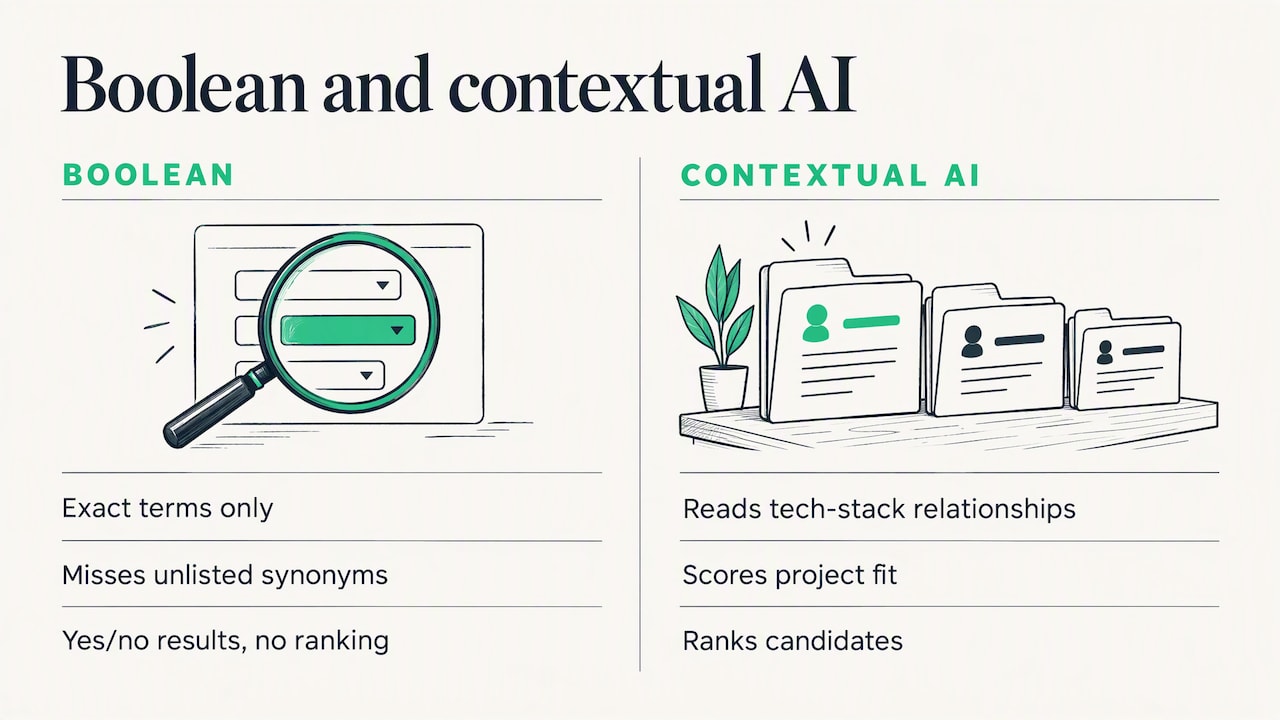
Boolean is exact, which is both its strength and its limit. It finds only what you thought to type. A candidate who writes "built payment services in Go" will not match a string that demands "Golang" unless you included both. It also cannot tell you how good a match someone is: every result is simply a yes.
That is why many teams now combine Boolean with contextual AI matching, which reads relationships inside a tech stack and scores candidates against project requirements. Our article on how AI is changing recruitment looks at what is real in that shift and what is hype. The sensible position is not Boolean versus AI: use Boolean where you need control, and scoring where you need ranking.
Our perspective
We build Recruitify for IT recruitment agencies and headhunters, and the pattern we see is consistent: the string is rarely the bottleneck. The bottleneck is what happens around it. A recruiter writes a good string, finds forty people, and then copies them into a spreadsheet, retypes details from PDFs, and loses track of who was contacted for which project.
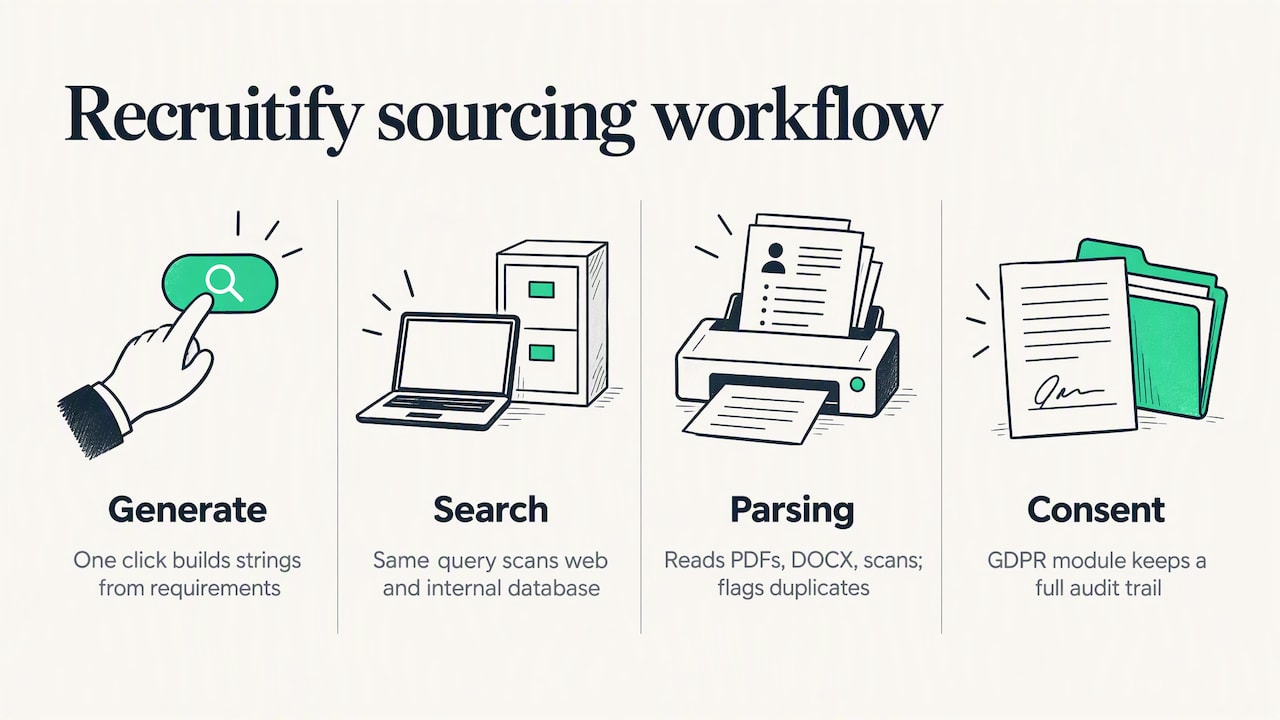
For that reason we put a Boolean and X-ray engine inside the same system as the ATS and CRM. One click generates a Boolean string from the requirements, and the same query can scan both the open web and your internal database. The Boolean search engine is built for that workflow. Profiles you find are parsed by the AI CV parser, which reads PDFs, DOCX files, scans and photos and flags duplicates, so a candidate does not enter your records twice.
We also believe the most overlooked sourcing channel is the database you already own. Agencies pay for external licenses while thousands of past applicants sit unsearched. Indexing that data, and running well-built strings against it, turns old applications into placements. We tell that story in The Candidate Was Already in the Database.
Finally, we think consent and traceability should not be an afterthought. Sourcing generates personal data, and a GDPR consent module with a full audit trail keeps that work defensible.
- Recruitify Team
From string to shortlist with Recruitify
If you spend your day rewriting strings and moving candidates between tabs, Recruitify combines Boolean and X-ray search, CV parsing, AI scoring, an ATS and a sales CRM in one platform. Two plans are published on the pricing page: HR Team at €69 per month per user, and Recruitment Agencies at €79 per month per user. An Enterprise plan is also available, without a published price. You can also see how the AI recruitment features fit together before you decide.
A reusable checklist
Before you run any string, check it against this list:
Are all titles and abbreviations inside one OR block?
Is every OR block wrapped in parentheses?
Are exact phrases in straight quotation marks?
Does each AND term describe a true requirement?
Have you tried a narrow and a broad version?
Have you read the first 25 results and noted what to add or exclude?
Is the winning string saved with the role it belongs to?
FAQ
What is an example of a Boolean search string?
("project manager" OR "program manager") AND (Agile OR Scrum) NOT (intern OR assistant) is a simple one. It accepts either title, requires an Agile method and removes junior or assistant profiles. Adapt each block to your own role and location.
How do you write a Boolean search string for LinkedIn?
Start with a title block in parentheses joined by OR, then add one or two skills with AND, and finish with NOT terms for noise. Keep exact phrases in quotation marks. Run it, read the first results and adjust the logic, because the first version is rarely the best.
What does * mean in a Boolean search?
The asterisk is a wildcard that stands for the rest of a word on platforms that support it, so develop* can match developer and development. Support differs between systems, and LinkedIn and Google may not treat it the same way. Test it on a small search before relying on it.
Do Boolean strings still work with AI search?
Yes, particularly on structured databases and LinkedIn, where they give you precise control. General web search relies more on semantic interpretation, so strict logic is less decisive there. Many recruiters use Boolean to define the pool and AI scoring to rank it.
Is Boolean searching the same on Google as on other platforms?
Not entirely. Google uses operators such as site:, filetype: and the minus sign, and they must sit directly in front of the term with no space, as Google's help page explains. Other platforms use AND, OR and NOT as the main logic.
Sources
Recommended


News & Updates
Stay up-to-date with the latest innovations, features, and tips about Recruitify!
By providing your email address within the newsletter sign-up form, you confirm its processing to send marketing information regarding the Administrator’s products and services. The Administrator of your personal data processed for the abovementioned purposes is Recruitify Spółka z o.o., based in Warsaw, Poland (KRS 0000709889). For more information on the principles of personal data processing and the rights of data subjects, please check the Privacy Policy.

Last updated:
Boolean Search Strings: Operators, Examples and Templates
Acquiring Talent
The Recruitify Team
A Boolean search string is a query that joins keywords with the operators AND, OR and NOT, plus quotation marks and parentheses, so that a database or search engine returns only the profiles that match your logic. For recruiters, it is the most direct way to turn a vague job brief into a precise candidate list. This guide explains each operator, shows tested patterns for LinkedIn, Google X-ray and internal databases, gives templates for developer roles, and lists the mistakes that quietly ruin results.
Recruitify’s X-RAY Search scans the open web and your internal database, with an integrated Boolean engine to speed up sourcing.
Key takeaways
Three operators do most of the work: AND narrows, OR broadens, NOT excludes. Parentheses and quotation marks control how they combine.
Build two versions of every string, one narrow and one broad, and read the first 25 results before you refine.
Boolean behaves differently by platform: structured databases and LinkedIn follow the logic closely, while Google uses its own operators such as site: and filetype:.
For developer roles, group synonyms and related technologies with OR, and use NOT to remove noise such as interns, students and unrelated job titles.
Strings are only as good as the database they run on, so saving, indexing and reusing them matters as much as writing them.
Table of Contents
What a Boolean search string is
Boolean logic describes relationships between sets of results. As university library guidance puts it, the three basic operators are AND, OR and NOT, and they connect search words to narrow or broaden a set of results. EBSCO's documentation describes the same three operators and notes that they let you create a very broad or a very narrow search.
A Boolean string is that logic written as a single line. In recruiting, the line usually has three parts:
A role block: the job titles and their variants.
A skills block: the technologies, certifications or methods that prove the person can do the work.
An exclusion block: the terms that signal a poor fit.
A Boolean search is not the same as a keyword search. A plain keyword search treats your words as a loose bag, whereas a Boolean string states exactly which words must appear, which are interchangeable and which must be absent.
The operators you need
Element | What it does | Example | Effect |
|---|---|---|---|
AND | Requires both terms | Python AND Django | Narrows the results |
OR | Accepts either term | "software engineer" OR "software developer" | Broadens the results |
NOT | Excludes a term | NOT intern | Removes noise |
" " (quotation marks) | Matches an exact phrase | "data engineer" | Keeps words together |
( ) (parentheses) | Groups terms and sets the order of logic | (Java OR Kotlin) AND Android | Controls how operators combine |
* (wildcard) | Replaces the end of a word, where the platform supports it | develop* | Matches developer, developers, development |
Two habits prevent most errors. First, type operators in capital letters, because many platforms only read them as logic when capitalized. Second, never mix OR and AND in the same bracket-free line. The string Java OR Kotlin AND Android can be read in more than one way, so write (Java OR Kotlin) AND Android and remove the doubt.
Why NOT deserves more use
Recruiters often underuse NOT. Excluding terms such as intern or student is a cheap way to cut false positives, and practitioners in healthcare sourcing point to it as a way to reduce manual review time on high-volume roles. Use it carefully, though: excluding "manager" from a search for engineers will also drop "engineering manager" candidates you may want.
How to build a string, step by step
Start from the brief, not from a template. List the must-have skills, the acceptable titles and the location. Drop anything that is merely nice to have.
Write the title block. Collect every title a real person might use for the role and join them with OR inside quotation marks and parentheses.
Add one or two must-have skills with AND. Each extra AND shrinks the pool, so keep the list short at first.
Group synonyms and related technologies with OR. For example, (AWS OR Azure OR GCP) accepts any major cloud.
Exclude the noise. Add NOT terms only after you have seen what the noise looks like.
Run a narrow and a broad version side by side. Experienced sourcers recommend reviewing the first 25 results of each and adjusting the logic, instead of spending hours on one perfect query.
Save the winner. A string that worked for a backend role is the base for the next one.
A worked example for a senior backend engineer:
Narrow: ("backend engineer" OR "backend developer" OR "software engineer") AND (Java OR Kotlin) AND ("Spring Boot" OR Spring) AND (AWS OR Azure) NOT (intern OR junior OR student)
Broad: (backend OR "back-end" OR "software engineer") AND (Java OR Kotlin OR Scala)
If the narrow version returns too few profiles, relax the cloud block first. If the broad version returns mostly frontend or QA profiles, tighten the title block.
Boolean search on LinkedIn
LinkedIn's keyword search accepts AND, OR, NOT, quotation marks and parentheses, so the patterns above carry over directly. The practical points are these:
Put the logic in the keyword field, and use the structured filters (location, current company, industry) for what they do well. Boolean does not apply to picklist filters.
Keep strings readable. A long string with many nested brackets is hard to debug, and it is easy to place one bracket wrongly.
Run the title block alone first, to see how many people hold the title, then add skills one at a time.
Example for a DevOps engineer in a hybrid market:
("DevOps engineer" OR "site reliability engineer" OR SRE OR "platform engineer") AND (Kubernetes OR Docker) AND (Terraform OR Ansible) NOT (recruiter OR sales OR consultant)
The NOT block here removes recruiters and salespeople who list DevOps keywords in their profiles, a common source of noise.
How platform behavior can change the picture
Practitioners note that Boolean works best on structured data such as LinkedIn or an internal database, whereas many open-web search engines now lean on semantic interpretation and machine learning. In practice: expect strict logic from databases, and expect a looser, more interpretive answer from general web search.
Google X-ray search
X-ray search uses Google to look inside a single site. The standard use is searching public LinkedIn profiles with the site: operator. Google's own documentation on refining searches states that you should not put a space between an operator and its term: site:nytimes.com works, whereas site: nytimes.com does not. The same page covers filetype: and the minus sign for exclusion.
A typical X-ray string:
site:linkedin.com/in ("data engineer" OR "analytics engineer") (Snowflake OR BigQuery) (Warsaw OR Poland) -recruiter
And one that finds CVs published as PDFs:
filetype:pdf ("data engineer" OR "ETL developer") (Airflow OR dbt) resume
Three cautions apply. Results depend on what Google has indexed, so a profile can be missing. Public profiles show only what the owner chose to make public. And you should handle any personal data you collect in line with the data protection law that applies to you, for example the GDPR for candidates in the EU, which means recording a lawful basis and being ready to answer access and deletion requests.
If you would rather not hand-write these strings, our X-ray search tool generates them for you and runs across the open web.
Boolean strings for developers
Technical sourcing rewards strings that understand how a tech stack fits together. Candidates rarely write the same words as the job ad, so group each concept.
Role | Example string |
|---|---|
Frontend |
|
Mobile |
|
Data |
|
Security |
|
QA automation |
|
The examples above are patterns to adapt, not guaranteed recipes: titles and tool names change quickly, so review the first results each time. A few rules make developer strings stronger:
Pair a language with its ecosystem. Java alone is vague, while Java with Spring or Maven signals commercial experience.
Use OR for abbreviations. Include both "Kubernetes" and "k8s", and both "JavaScript" and "JS".
Keep a separate string per seniority level, instead of stuffing every level term into one query.
Do not rely on one platform. Developers may be more visible on code-hosting sites or in community forums than on a professional network.
Boolean also helps when access to premium platform licenses is limited, because manual control lets you capture specific stack relationships precisely.
Boolean strings for recruiters in agencies and HR teams
The logic is identical for non-technical roles, but the vocabulary changes. For a sales role:
("account executive" OR "enterprise sales" OR "business development manager") AND (SaaS OR software) AND (quota OR "pipeline") NOT (intern OR "sales assistant")
For a licensed healthcare role, the credential does the filtering, as seen in the healthcare sourcing guidance from a UAE recruiter, where licensing bodies and certifications are part of the string itself. The same principle works in any regulated field: put the license, certification or clearance in the AND block.
High-volume hiring needs a different approach. When hundreds of people apply, strings work best on your own database, where you can search CVs that already reached you. That is the focus of our guide to resume database search.
Common mistakes that wreck results
Too many AND terms. Every added requirement removes candidates, including good ones whose profiles are brief.
Missing synonyms. If you search only for "software engineer", you miss "developer", "programmer" and "SWE".
Unbalanced parentheses. One missing bracket changes the logic or produces an error.
Mixing straight and curly quotation marks. Some systems reject or misread them. One publisher's search help advises against mixing straight and curly double quotes, and against very long queries that can trigger security tools.
Spaces after operators on Google. As noted,
site: linkedin.comfails wheresite:linkedin.comworks.Treating the first string as final. Strings are hypotheses. Test, read, adjust.
Excluding too aggressively with NOT. Check a sample of what you are removing before you commit.
Where Boolean stops being enough
Boolean is exact, which is both its strength and its limit. It finds only what you thought to type. A candidate who writes "built payment services in Go" will not match a string that demands "Golang" unless you included both. It also cannot tell you how good a match someone is: every result is simply a yes.
That is why many teams now combine Boolean with contextual AI matching, which reads relationships inside a tech stack and scores candidates against project requirements. Our article on how AI is changing recruitment looks at what is real in that shift and what is hype. The sensible position is not Boolean versus AI: use Boolean where you need control, and scoring where you need ranking.
Our perspective
We build Recruitify for IT recruitment agencies and headhunters, and the pattern we see is consistent: the string is rarely the bottleneck. The bottleneck is what happens around it. A recruiter writes a good string, finds forty people, and then copies them into a spreadsheet, retypes details from PDFs, and loses track of who was contacted for which project.
For that reason we put a Boolean and X-ray engine inside the same system as the ATS and CRM. One click generates a Boolean string from the requirements, and the same query can scan both the open web and your internal database. The Boolean search engine is built for that workflow. Profiles you find are parsed by the AI CV parser, which reads PDFs, DOCX files, scans and photos and flags duplicates, so a candidate does not enter your records twice.
We also believe the most overlooked sourcing channel is the database you already own. Agencies pay for external licenses while thousands of past applicants sit unsearched. Indexing that data, and running well-built strings against it, turns old applications into placements. We tell that story in The Candidate Was Already in the Database.
Finally, we think consent and traceability should not be an afterthought. Sourcing generates personal data, and a GDPR consent module with a full audit trail keeps that work defensible.
- Recruitify Team
From string to shortlist with Recruitify
If you spend your day rewriting strings and moving candidates between tabs, Recruitify combines Boolean and X-ray search, CV parsing, AI scoring, an ATS and a sales CRM in one platform. Two plans are published on the pricing page: HR Team at €69 per month per user, and Recruitment Agencies at €79 per month per user. An Enterprise plan is also available, without a published price. You can also see how the AI recruitment features fit together before you decide.
A reusable checklist
Before you run any string, check it against this list:
Are all titles and abbreviations inside one OR block?
Is every OR block wrapped in parentheses?
Are exact phrases in straight quotation marks?
Does each AND term describe a true requirement?
Have you tried a narrow and a broad version?
Have you read the first 25 results and noted what to add or exclude?
Is the winning string saved with the role it belongs to?
FAQ
What is an example of a Boolean search string?
("project manager" OR "program manager") AND (Agile OR Scrum) NOT (intern OR assistant) is a simple one. It accepts either title, requires an Agile method and removes junior or assistant profiles. Adapt each block to your own role and location.
How do you write a Boolean search string for LinkedIn?
Start with a title block in parentheses joined by OR, then add one or two skills with AND, and finish with NOT terms for noise. Keep exact phrases in quotation marks. Run it, read the first results and adjust the logic, because the first version is rarely the best.
What does * mean in a Boolean search?
The asterisk is a wildcard that stands for the rest of a word on platforms that support it, so develop* can match developer and development. Support differs between systems, and LinkedIn and Google may not treat it the same way. Test it on a small search before relying on it.
Do Boolean strings still work with AI search?
Yes, particularly on structured databases and LinkedIn, where they give you precise control. General web search relies more on semantic interpretation, so strict logic is less decisive there. Many recruiters use Boolean to define the pool and AI scoring to rank it.
Is Boolean searching the same on Google as on other platforms?
Not entirely. Google uses operators such as site:, filetype: and the minus sign, and they must sit directly in front of the term with no space, as Google's help page explains. Other platforms use AND, OR and NOT as the main logic.
Sources
Recommended
News & Updates
Stay up-to-date with the latest innovations, features, and tips about Recruitify!
By providing your email address within the newsletter sign-up form, you confirm its processing to send marketing information regarding the Administrator’s products and services. The Administrator of your personal data processed for the abovementioned purposes is Recruitify Spółka z o.o., based in Warsaw, Poland (KRS 0000709889). For more information on the principles of personal data processing and the rights of data subjects, please check the Privacy Policy.
Last updated:
Boolean Search Strings: Operators, Examples and Templates
Acquiring Talent
The Recruitify Team
A Boolean search string is a query that joins keywords with the operators AND, OR and NOT, plus quotation marks and parentheses, so that a database or search engine returns only the profiles that match your logic. For recruiters, it is the most direct way to turn a vague job brief into a precise candidate list. This guide explains each operator, shows tested patterns for LinkedIn, Google X-ray and internal databases, gives templates for developer roles, and lists the mistakes that quietly ruin results.
Recruitify’s X-RAY Search scans the open web and your internal database, with an integrated Boolean engine to speed up sourcing.
Key takeaways
Three operators do most of the work: AND narrows, OR broadens, NOT excludes. Parentheses and quotation marks control how they combine.
Build two versions of every string, one narrow and one broad, and read the first 25 results before you refine.
Boolean behaves differently by platform: structured databases and LinkedIn follow the logic closely, while Google uses its own operators such as site: and filetype:.
For developer roles, group synonyms and related technologies with OR, and use NOT to remove noise such as interns, students and unrelated job titles.
Strings are only as good as the database they run on, so saving, indexing and reusing them matters as much as writing them.
Table of Contents
What a Boolean search string is
Boolean logic describes relationships between sets of results. As university library guidance puts it, the three basic operators are AND, OR and NOT, and they connect search words to narrow or broaden a set of results. EBSCO's documentation describes the same three operators and notes that they let you create a very broad or a very narrow search.
A Boolean string is that logic written as a single line. In recruiting, the line usually has three parts:
A role block: the job titles and their variants.
A skills block: the technologies, certifications or methods that prove the person can do the work.
An exclusion block: the terms that signal a poor fit.
A Boolean search is not the same as a keyword search. A plain keyword search treats your words as a loose bag, whereas a Boolean string states exactly which words must appear, which are interchangeable and which must be absent.
The operators you need
Element | What it does | Example | Effect |
|---|---|---|---|
AND | Requires both terms | Python AND Django | Narrows the results |
OR | Accepts either term | "software engineer" OR "software developer" | Broadens the results |
NOT | Excludes a term | NOT intern | Removes noise |
" " (quotation marks) | Matches an exact phrase | "data engineer" | Keeps words together |
( ) (parentheses) | Groups terms and sets the order of logic | (Java OR Kotlin) AND Android | Controls how operators combine |
* (wildcard) | Replaces the end of a word, where the platform supports it | develop* | Matches developer, developers, development |
Two habits prevent most errors. First, type operators in capital letters, because many platforms only read them as logic when capitalized. Second, never mix OR and AND in the same bracket-free line. The string Java OR Kotlin AND Android can be read in more than one way, so write (Java OR Kotlin) AND Android and remove the doubt.
Why NOT deserves more use
Recruiters often underuse NOT. Excluding terms such as intern or student is a cheap way to cut false positives, and practitioners in healthcare sourcing point to it as a way to reduce manual review time on high-volume roles. Use it carefully, though: excluding "manager" from a search for engineers will also drop "engineering manager" candidates you may want.
How to build a string, step by step
Start from the brief, not from a template. List the must-have skills, the acceptable titles and the location. Drop anything that is merely nice to have.
Write the title block. Collect every title a real person might use for the role and join them with OR inside quotation marks and parentheses.
Add one or two must-have skills with AND. Each extra AND shrinks the pool, so keep the list short at first.
Group synonyms and related technologies with OR. For example, (AWS OR Azure OR GCP) accepts any major cloud.
Exclude the noise. Add NOT terms only after you have seen what the noise looks like.
Run a narrow and a broad version side by side. Experienced sourcers recommend reviewing the first 25 results of each and adjusting the logic, instead of spending hours on one perfect query.
Save the winner. A string that worked for a backend role is the base for the next one.
A worked example for a senior backend engineer:
Narrow: ("backend engineer" OR "backend developer" OR "software engineer") AND (Java OR Kotlin) AND ("Spring Boot" OR Spring) AND (AWS OR Azure) NOT (intern OR junior OR student)
Broad: (backend OR "back-end" OR "software engineer") AND (Java OR Kotlin OR Scala)
If the narrow version returns too few profiles, relax the cloud block first. If the broad version returns mostly frontend or QA profiles, tighten the title block.
Boolean search on LinkedIn
LinkedIn's keyword search accepts AND, OR, NOT, quotation marks and parentheses, so the patterns above carry over directly. The practical points are these:
Put the logic in the keyword field, and use the structured filters (location, current company, industry) for what they do well. Boolean does not apply to picklist filters.
Keep strings readable. A long string with many nested brackets is hard to debug, and it is easy to place one bracket wrongly.
Run the title block alone first, to see how many people hold the title, then add skills one at a time.
Example for a DevOps engineer in a hybrid market:
("DevOps engineer" OR "site reliability engineer" OR SRE OR "platform engineer") AND (Kubernetes OR Docker) AND (Terraform OR Ansible) NOT (recruiter OR sales OR consultant)
The NOT block here removes recruiters and salespeople who list DevOps keywords in their profiles, a common source of noise.
How platform behavior can change the picture
Practitioners note that Boolean works best on structured data such as LinkedIn or an internal database, whereas many open-web search engines now lean on semantic interpretation and machine learning. In practice: expect strict logic from databases, and expect a looser, more interpretive answer from general web search.
Google X-ray search
X-ray search uses Google to look inside a single site. The standard use is searching public LinkedIn profiles with the site: operator. Google's own documentation on refining searches states that you should not put a space between an operator and its term: site:nytimes.com works, whereas site: nytimes.com does not. The same page covers filetype: and the minus sign for exclusion.
A typical X-ray string:
site:linkedin.com/in ("data engineer" OR "analytics engineer") (Snowflake OR BigQuery) (Warsaw OR Poland) -recruiter
And one that finds CVs published as PDFs:
filetype:pdf ("data engineer" OR "ETL developer") (Airflow OR dbt) resume
Three cautions apply. Results depend on what Google has indexed, so a profile can be missing. Public profiles show only what the owner chose to make public. And you should handle any personal data you collect in line with the data protection law that applies to you, for example the GDPR for candidates in the EU, which means recording a lawful basis and being ready to answer access and deletion requests.
If you would rather not hand-write these strings, our X-ray search tool generates them for you and runs across the open web.
Boolean strings for developers
Technical sourcing rewards strings that understand how a tech stack fits together. Candidates rarely write the same words as the job ad, so group each concept.
Role | Example string |
|---|---|
Frontend |
|
Mobile |
|
Data |
|
Security |
|
QA automation |
|
The examples above are patterns to adapt, not guaranteed recipes: titles and tool names change quickly, so review the first results each time. A few rules make developer strings stronger:
Pair a language with its ecosystem. Java alone is vague, while Java with Spring or Maven signals commercial experience.
Use OR for abbreviations. Include both "Kubernetes" and "k8s", and both "JavaScript" and "JS".
Keep a separate string per seniority level, instead of stuffing every level term into one query.
Do not rely on one platform. Developers may be more visible on code-hosting sites or in community forums than on a professional network.
Boolean also helps when access to premium platform licenses is limited, because manual control lets you capture specific stack relationships precisely.
Boolean strings for recruiters in agencies and HR teams
The logic is identical for non-technical roles, but the vocabulary changes. For a sales role:
("account executive" OR "enterprise sales" OR "business development manager") AND (SaaS OR software) AND (quota OR "pipeline") NOT (intern OR "sales assistant")
For a licensed healthcare role, the credential does the filtering, as seen in the healthcare sourcing guidance from a UAE recruiter, where licensing bodies and certifications are part of the string itself. The same principle works in any regulated field: put the license, certification or clearance in the AND block.
High-volume hiring needs a different approach. When hundreds of people apply, strings work best on your own database, where you can search CVs that already reached you. That is the focus of our guide to resume database search.
Common mistakes that wreck results
Too many AND terms. Every added requirement removes candidates, including good ones whose profiles are brief.
Missing synonyms. If you search only for "software engineer", you miss "developer", "programmer" and "SWE".
Unbalanced parentheses. One missing bracket changes the logic or produces an error.
Mixing straight and curly quotation marks. Some systems reject or misread them. One publisher's search help advises against mixing straight and curly double quotes, and against very long queries that can trigger security tools.
Spaces after operators on Google. As noted,
site: linkedin.comfails wheresite:linkedin.comworks.Treating the first string as final. Strings are hypotheses. Test, read, adjust.
Excluding too aggressively with NOT. Check a sample of what you are removing before you commit.
Where Boolean stops being enough
Boolean is exact, which is both its strength and its limit. It finds only what you thought to type. A candidate who writes "built payment services in Go" will not match a string that demands "Golang" unless you included both. It also cannot tell you how good a match someone is: every result is simply a yes.
That is why many teams now combine Boolean with contextual AI matching, which reads relationships inside a tech stack and scores candidates against project requirements. Our article on how AI is changing recruitment looks at what is real in that shift and what is hype. The sensible position is not Boolean versus AI: use Boolean where you need control, and scoring where you need ranking.
Our perspective
We build Recruitify for IT recruitment agencies and headhunters, and the pattern we see is consistent: the string is rarely the bottleneck. The bottleneck is what happens around it. A recruiter writes a good string, finds forty people, and then copies them into a spreadsheet, retypes details from PDFs, and loses track of who was contacted for which project.
For that reason we put a Boolean and X-ray engine inside the same system as the ATS and CRM. One click generates a Boolean string from the requirements, and the same query can scan both the open web and your internal database. The Boolean search engine is built for that workflow. Profiles you find are parsed by the AI CV parser, which reads PDFs, DOCX files, scans and photos and flags duplicates, so a candidate does not enter your records twice.
We also believe the most overlooked sourcing channel is the database you already own. Agencies pay for external licenses while thousands of past applicants sit unsearched. Indexing that data, and running well-built strings against it, turns old applications into placements. We tell that story in The Candidate Was Already in the Database.
Finally, we think consent and traceability should not be an afterthought. Sourcing generates personal data, and a GDPR consent module with a full audit trail keeps that work defensible.
- Recruitify Team
From string to shortlist with Recruitify
If you spend your day rewriting strings and moving candidates between tabs, Recruitify combines Boolean and X-ray search, CV parsing, AI scoring, an ATS and a sales CRM in one platform. Two plans are published on the pricing page: HR Team at €69 per month per user, and Recruitment Agencies at €79 per month per user. An Enterprise plan is also available, without a published price. You can also see how the AI recruitment features fit together before you decide.
A reusable checklist
Before you run any string, check it against this list:
Are all titles and abbreviations inside one OR block?
Is every OR block wrapped in parentheses?
Are exact phrases in straight quotation marks?
Does each AND term describe a true requirement?
Have you tried a narrow and a broad version?
Have you read the first 25 results and noted what to add or exclude?
Is the winning string saved with the role it belongs to?
FAQ
What is an example of a Boolean search string?
("project manager" OR "program manager") AND (Agile OR Scrum) NOT (intern OR assistant) is a simple one. It accepts either title, requires an Agile method and removes junior or assistant profiles. Adapt each block to your own role and location.
How do you write a Boolean search string for LinkedIn?
Start with a title block in parentheses joined by OR, then add one or two skills with AND, and finish with NOT terms for noise. Keep exact phrases in quotation marks. Run it, read the first results and adjust the logic, because the first version is rarely the best.
What does * mean in a Boolean search?
The asterisk is a wildcard that stands for the rest of a word on platforms that support it, so develop* can match developer and development. Support differs between systems, and LinkedIn and Google may not treat it the same way. Test it on a small search before relying on it.
Do Boolean strings still work with AI search?
Yes, particularly on structured databases and LinkedIn, where they give you precise control. General web search relies more on semantic interpretation, so strict logic is less decisive there. Many recruiters use Boolean to define the pool and AI scoring to rank it.
Is Boolean searching the same on Google as on other platforms?
Not entirely. Google uses operators such as site:, filetype: and the minus sign, and they must sit directly in front of the term with no space, as Google's help page explains. Other platforms use AND, OR and NOT as the main logic.
Sources
Recommended
News & Updates
Stay up-to-date with the latest innovations, features, and tips about Recruitify!
By providing your email address within the newsletter sign-up form, you confirm its processing to send marketing information regarding the Administrator’s products and services. The Administrator of your personal data processed for the abovementioned purposes is Recruitify Spółka z o.o., based in Warsaw, Poland (KRS 0000709889). For more information on the principles of personal data processing and the rights of data subjects, please check the Privacy Policy.

Discover More

Applicant Tracking System
Contractor Onboarding Checklist for IT Staffing Agencies
A contractor onboarding checklist for agencies and HR teams: classification, US tax forms, GDPR, least-privilege access and gates that stop work before approval.
20 Oct 2026
Discover More

Recruitment Process
Recruiter Productivity Metrics: 3 Measures That Expose Funnel Leaks
Choose recruiter productivity metrics that expose funnel leaks, track hiring quality and candidate experience, and show where stage delays hurt results.
18 Oct 2026
Discover More

Acquiring Talent
Recruitment Process Mapping for Recruiters: Fix Handoffs With SLAs
Map hiring handoffs, assign clear SLAs, and apply APQC's recommended recruiting KPIs to find delays, reduce candidate drop off, and keep the process current.
17 Oct 2026
Discover More
Applicant Tracking System
Contractor Onboarding Checklist for IT Staffing Agencies
A contractor onboarding checklist for agencies and HR teams: classification, US tax forms, GDPR, least-privilege access and gates that stop work before approval.
20 Oct 2026
Discover More
Recruitment Process
Recruiter Productivity Metrics: 3 Measures That Expose Funnel Leaks
Choose recruiter productivity metrics that expose funnel leaks, track hiring quality and candidate experience, and show where stage delays hurt results.
18 Oct 2026
Discover More

