
Last updated:
Recruiters: Save Up to 70% Admin Time with Resume Database Search

Recruitment Process

The Recruitify Team
The fastest resume database search combines a targeted Boolean or X‑Ray query with a recent-activity filter, then gets saved as a running alert. Run one Boolean string tonight, save it as an alert, and pipe the top matches into your ATS by morning. For volume roles, layer in AI semantic search to rank fit before you read a single resume. Both Gartner and platforms like Recruitify point the same direction: hybrid sourcing, not either/or.
TL;DR:
Using advanced filters like last active date and AI fit scores significantly increases the relevance and response rate of candidate searches.
Combining Boolean logic with proximity, field, fuzzy, and boosting operators helps narrow or expand results efficiently, but syntax varies across platforms.
Maintaining structured, tagged, and deduplicated search results and syncing directly into ATS systems boosts pipeline quality and reduces manual work.
Prioritizing recency filters, accurate match scoring, and essential filters like clearance and contactability improves sourcing effectiveness.
Continuously refining searches based on hiring manager feedback minimizes irrelevant results and quickly converges on the ideal candidate profile.
Table of Contents
Boolean Search Fundamentals and Ready-to-Use Strings
Advanced Operators for When Boolean Isn’t Enough
Which Filters and Activity Signals Actually Predict a Response?
Turning Search Results Into an Actual Pipeline
Privacy, Consent, and Anonymization in Resume Database Search
Recruitify Team: When to Choose Automation and AI for Resume Database Search
What Does Resume Database Access Actually Cost?
How to Evaluate a Resume Database Platform Before You Buy
How Should You Rank and Score Candidate Matches?
Refining Searches Based on Hiring Manager Feedback
Common Pitfalls in Resume Database Search
Connecting Resume Database Search to Your ATS and HR Stack
Recruitify Team Perspective: A Workflow Worth Copying
How Recruitify Puts This Workflow Into Practice
Where to Go Deeper on Search Syntax and Compliance
Sources
FAQ
Boolean Search Fundamentals and Ready-to-Use Strings
Boolean logic still does most of the heavy lifting in resume database search, and it works the same way across nearly every platform. AND requires both terms, OR accepts either, and NOT (or a minus sign) excludes a word entirely. Quotation marks lock in an exact phrase like “project manager,” and parentheses group logic so the engine reads your intent correctly instead of guessing. Get the operator order wrong and a query that should return 40 strong candidates returns 4,000 irrelevant ones, or zero.
The five core operators cover roughly 95% of what recruiters actually need, so mastering this short list matters more than chasing exotic syntax.
Here are starter strings you can adapt right now:
("java developer" OR "java engineer") AND (spring OR hibernate) AND "Denver" NOT recruiter("registered nurse" OR RN) AND (ICU OR "critical care") AND ("5 years" OR "5+ years")(CPA OR "certified public accountant") AND ("financial reporting" OR audit) NOT studenttitle:"product manager" AND (SaaS OR "B2B software") AND ("Austin" OR remote)("data scientist" OR "machine learning engineer") AND (python OR pytorch) AND PhD("sales executive" OR "account executive") AND ("enterprise sales" OR "SaaS sales") NOT intern
Swap in your city, state, or “remote” for location, and add a phrase like “10 years” or a specific certification to tighten seniority.
X‑Ray search extends the same logic outside a platform’s own search bar. A query like site:linkedin.com/in "product manager" "fintech" -jobs or filetype:pdf "resume" "supply chain manager" "SAP" uses a public search engine to surface indexed profiles the platform’s internal tool might miss. X‑Ray techniques often surface 20 to 35% more unique profiles than native search alone, since they sidestep some algorithmic filtering.
If a query returns too little, drop a specificity term or swap AND for OR. If it returns a flood, add a NOT clause or tighten the phrase match with quotes.
Advanced Operators for When Boolean Isn’t Enough
Boolean strings lose precision once your database gets large or noisy. That’s when proximity, field, and fuzzy operators earn their place, though support for them varies by platform, so check documentation before assuming a symbol works the way it does elsewhere.
Proximity/NEAR:
"project manager" NEAR/5 "healthcare"finds terms within five words of each other, useful for catching phrasing variations without a rigid exact match.Field search:
title:"engineering manager"orcompany:"Salesforce"restricts a search to a specific structured field instead of scanning full text, cutting down false positives dramatically.Wildcards:
develop*catches “developer,” “developing,” and “development” in one pass.Fuzzy matching:
python~orenginer~tolerates typos and spelling variants, which matters more than people expect in scanned or OCR’d resumes.Term boosting:
python^3 javatells the engine python matters three times more than java when ranking results.Minimum-should-match: forces a result to contain a set number of your
ORterms rather than just one, tightening relevance without fullANDrigidity.
Search platforms built on frameworks like Lucene, or purpose-built tools such as LambdaDB, support most of these operators natively, and the exact syntax differs enough between engines that copying a string from one platform into another without checking documentation is a common, avoidable mistake.
Choose structured field queries when you know exactly what you’re looking for, like a job title or company. Reach for full-text queries when the language candidates use to describe their own experience varies more than a rigid field allows.
Pro Tip: Strip boilerplate before you refine anything else. Adding -sample -template -"resume writing" -applicant to a query removes the recruiter noise and template pages that otherwise clog your first page of results, a technique experienced sourcers rely on more than adding extra OR terms.
Which Filters and Activity Signals Actually Predict a Response?
Not every filter carries equal weight. “Last active” or “last updated” beats almost every other signal, because a resume updated two years ago belongs to someone who may have already changed roles, relocated, or stopped checking that inbox entirely.
The filters worth prioritizing, roughly in order of predictive value:
Last active/updated date: recency correlates directly with response rate.
Match score: an AI-generated fit score against your role brief, useful as a first-pass ranking, not a final verdict.
Years of experience and seniority band: filters out obvious mismatches before you read a single line.
Salary expectation: saves everyone time when budgets and expectations don’t align.
Clearance or certification status: critical for regulated or government-adjacent roles, and a hard filter, not a nice-to-have.
Contactability: verified email or phone reduces wasted outreach on stale records.
For active candidates (people who applied recently or updated a profile this month), combine a tight recency filter with a broad skill match; you’re fishing in a smaller, warmer pool. For passive sourcing, loosen recency but tighten the skill and seniority filters, since you’re relying on quality of match rather than timing.
Trust the AI match score as a sorting tool, not gospel. It’s built to surface likely fits fast, but a human still needs to confirm context the model can’t see, like an unusual career pivot or a niche certification buried in a resume’s second page. One more filter that pays for itself: exclude common noise terms like “sample,” “applicant,” and “apply” directly in your search string, which improves precision more than adding another skill keyword ever does.
Turning Search Results Into an Actual Pipeline
A great query that lives in your search history and nowhere else is wasted effort. The difference between a one-time search and a repeatable sourcing engine comes down to four habits.
Name and save every search with structure: something like “Backend Engineer, Chicago, June 2026” beats “search3.” Set an alert cadence, daily for urgent reqs, weekly for pipeline-building, so new matches land in your inbox without a repeat manual run.
Tag results as you go: skill buckets (Python, AWS, clinical), suitability labels (strong fit, maybe, not now), and client-fit tags turn a flat resume list into a searchable talent pool you can reuse for the next similar req.
Dedupe before import: parsing tools that flag duplicate contact info or near-identical resume text prevent the embarrassment of reaching out to the same candidate twice from two different reqs.
Sync to your ATS automatically rather than copy-pasting, which is where most manual error and lost time creeps in.
On cost and cadence: credit-based access charges per profile view or contact reveal, which suits occasional or low-volume sourcing, while subscription access suits agencies running searches weekly or daily across multiple open reqs. Re-running a saved search costs nothing beyond the subscription itself, which is the real argument for setting up alerts instead of manually repeating a query every few days.
Privacy, Consent, and Anonymization in Resume Database Search
Every resume database search touches personal data, and treating that lightly creates legal exposure that outlasts any single placement. Build these habits into your workflow rather than treating compliance as a separate afterthought.
Record timestamped consent and the exact source of every candidate record, not just a generic “database” note.
Retain searchable metadata (skills, experience level, location) while stripping or masking personally identifying details until a recruiter actively engages that candidate.
Generate an anonymized profile view for early-stage screening or client presentation; it preserves the matching data a hiring manager needs while removing name, contact details, and photo.
Maintain a full audit trail of who accessed a record, when, and why, since that history is what actually protects you during a GDPR-style compliance review.
Automation’s real payoff: agencies that automate the workflow from intake to contract report up to a 70% reduction in administrative tasks, according to Recruitify’s internal platform data, freeing recruiters to spend that time sourcing instead of filing paperwork.
Recruitify Team: When to Choose Automation and AI for Resume Database Search
Contextual Matching AI reads relationships within a candidate’s tech stack rather than counting keyword hits, which is why structured profiles from an AI CV parser cut duplicate records and speed up shortlist generation. A typical handoff runs: role brief in, semantic search ranks the pool, boolean refinement tightens edge cases, and a scored shortlist comes out the other end, often in minutes rather than the hours a fully manual pass demands.
What Does Resume Database Access Actually Cost?
Pricing in this category falls into two broad shapes, and picking the wrong one for your search volume wastes money either way. Credit-based models charge per profile unlock or contact reveal, which fits agencies running occasional, high-value searches where paying per candidate makes sense. Subscription models charge a flat monthly or annual fee for a set number of seats and largely unlimited search, which fits agencies or in-house teams running searches daily across multiple open roles.
Enterprise platforms often add tiered access, where seniority of seats or number of concurrent users changes price, and usage caps that reset monthly. A small agency running two or three searches a week may spend far less on a credit model than a subscription would cost, while a high-volume in-house team recruiting across a dozen roles at once almost always comes out ahead on a flat subscription, since credit costs scale directly with every profile view.
Timeline expectations matter just as much as sticker price. Most platforms grant immediate access after signup or a demo call, but building a genuinely productive workflow, saved searches, tags, ATS sync, alert cadence, typically takes one to two weeks of active use before it runs itself. Vendors offering a trial period let you test actual response rates and database freshness against your specific roles before committing to an annual contract, which matters more than any feature list, since a database that looks large but returns stale contacts wastes both the subscription and the recruiter’s time.
How to Evaluate a Resume Database Platform Before You Buy
Database size gets the marketing attention, and platforms advertising hundreds of millions of indexed profiles sound impressive on a sales call. Raw scale means little without precise filters and dedupe logic behind it, since a massive but stale or duplicate-heavy database wastes as much recruiter time as a small one.
Four criteria matter more than headline size when comparing platforms:
Update frequency tells you whether “active” filters mean anything. A database refreshed quarterly makes recency filters close to useless; one refreshed daily or weekly makes them the single most valuable filter you have.
Interface and query flexibility determine how fast your team actually gets results. A clean boolean builder with visible syntax beats a black-box search bar that hides how it’s interpreting your query, especially when you need to troubleshoot a search returning zero results.
Filter depth separates platforms built for casual job posting from ones built for serious sourcing. Look for combinable filters (location plus recency plus skill plus salary band) rather than one filter at a time.
Integration support decides whether results become pipeline or sit in a browser tab. A platform with native ATS sync saves the dedupe and re-entry work that eats hours every week without it.
How Should You Rank and Score Candidate Matches?
A raw keyword hit count is a poor proxy for fit, which is why match scoring has moved toward weighted, context-aware ranking. The strongest approach blends three inputs: hard-skill overlap with the role brief, recency and relevance of experience (a five-year-old skill weighs less than one used last quarter), and a contextual layer that understands relationships between technologies, industries, or certifications rather than treating them as isolated keywords.
Weight your criteria to match the role. A compliance-heavy position should weight certifications and clearance status heavily, while a fast-scaling startup role might weight adaptability signals like breadth of stack over years of tenure. Build a simple internal rubric, must-have, strong-to-have, nice-to-have, and score against it consistently across every candidate in a search, since inconsistent manual scoring is where good candidates slip through the cracks unnoticed.
Treat an AI-generated match percentage as a starting rank, not a hiring decision.
Refining Searches Based on Hiring Manager Feedback
The first version of any search string is a hypothesis, not a final answer, and the fastest sourcing teams treat every round of hiring manager feedback as a query adjustment, not just a note in a spreadsheet. If a hiring manager rejects three candidates for lacking a specific tool experience, that tool becomes a required AND term in the next run, not a nice-to-have OR.
Track rejection reasons systematically rather than relying on memory. “Too junior,” “wrong industry background,” and “salary mismatch” each point to a different filter adjustment, seniority band, industry keyword, or compensation range, and conflating them leads to overcorrecting on the wrong variable. A search that gets refined after every hiring manager round converges on the right candidate profile within two or three iterations; one that never gets revisited keeps producing the same mismatched results indefinitely.

Common Pitfalls in Resume Database Search
Overly broad boolean strings are the most common failure point, returning thousands of loosely related profiles that no recruiter has time to review properly. The fix is almost always the same: add a NOT clause for obvious noise, or tighten a loose OR group into a required AND term.
Stale data creates a second, sneakier problem. A candidate who looks perfect on paper but hasn’t updated their profile in three years may already be settled somewhere else, which is why skipping the recency filter to widen a search often backfires. Duplicate records across a database and an ATS waste outreach and create an awkward moment when the same recruiter contacts a candidate twice from two different systems, which dedupe tooling before import largely prevents.
Over-reliance on a single AI match score, without spot-checking a few results manually, misses context the model can’t weigh, like a career gap explained by caregiving or further study. And ignoring consent or source tracking during a fast-moving search creates compliance debt that surfaces later, usually during an audit rather than during the search itself.
Connecting Resume Database Search to Your ATS and HR Stack
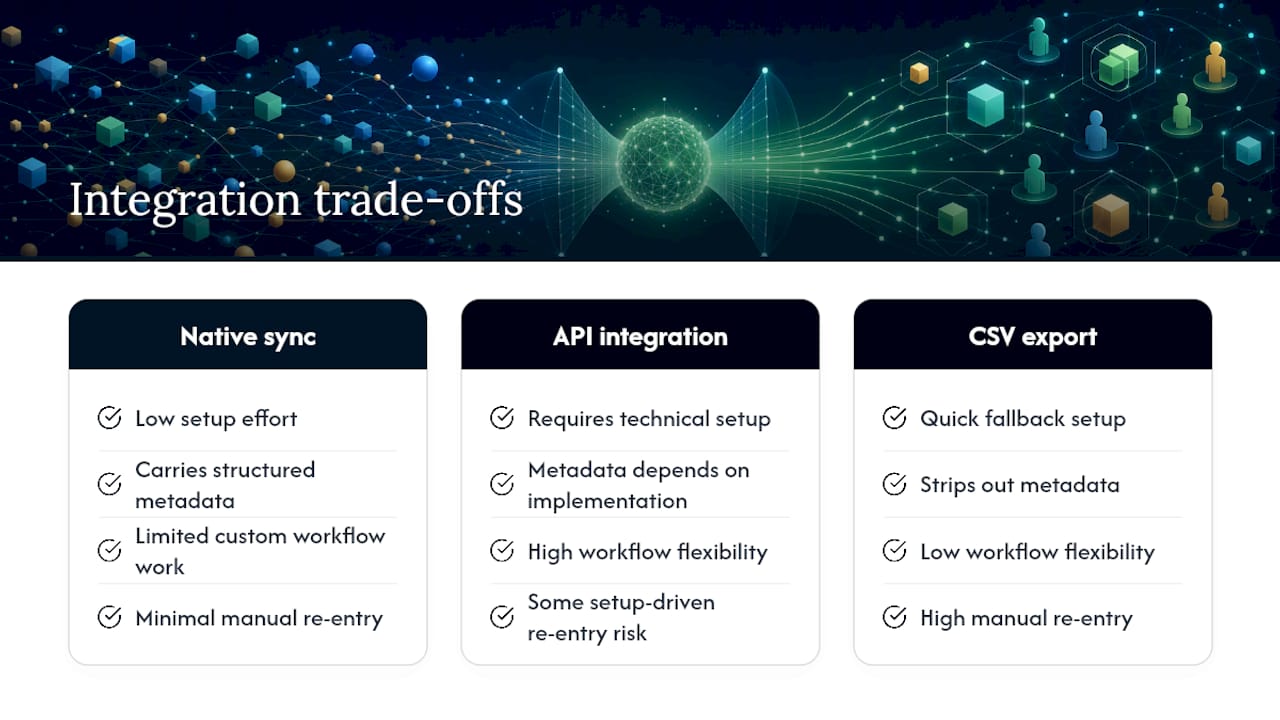
A search that doesn’t flow into your existing systems creates rework, and rework is where recruiter hours quietly disappear. Most modern platforms offer native ATS sync, direct API connections, or CSV export as fallback, in roughly that order of convenience.
Native sync matters most for ATS integration because it carries structured data, tags, match scores, source, consent timestamp, straight into the candidate record without manual re-entry. API-based integration gives more flexibility for custom workflows but usually requires technical setup time upfront. CSV export works in a pinch but strips out the metadata that makes a search reusable later, turning a rich, tagged record into a flat spreadsheet row.
Beyond the ATS itself, look for integration with calendar tools for scheduling, email or messaging platforms for outreach sequencing, and reporting dashboards that track source-to-placement ratios. A platform that combines sourcing, ATS, and reporting into a single interface removes the handoff points where candidate data usually gets lost or duplicated across separate logins and spreadsheets.
Recruitify Team Perspective: A Workflow Worth Copying
The workflow that actually holds up under volume runs like this: start with a role brief, let semantic search generate a ranked shortlist, refine the edges with a targeted boolean string, apply recency and clearance filters, tag and save the search with an alert, then sync results straight to the ATS. The one change most teams should prioritize isn’t a new tool, it’s centralizing talent metadata and automating consent and audit logging from the first search, not after a compliance scare. Teams that wait until an audit to organize consent records always find the cleanup more expensive than building it in from the start. If that workflow sounds like where your team should be, a demo is the fastest way to see it running against your own database.
- Recruitify Team
How Recruitify Puts This Workflow Into Practice
Recruitify is the alternative to juggling three separate logins for search, ATS, and outreach: one platform runs Contextual Matching AI, an AI CV parser with OCR that builds a structured profile in seconds, and a built-in boolean/X‑Ray engine that generates advanced strings with one click.

Search results sync directly into recruitment pipelines rather than sitting in a separate tab, and a GDPR consent module keeps a full audit trail on every record you touch. Agencies using the automated workflow report up to a 70% cut in administrative tasks, time that goes straight back into sourcing and closing. If you manage both candidate pipelines and client contracts, the contracting and body-leasing module keeps talent pools and B2B agreements in the same system. Start a recruitment automation trial, or explore how recruitment projects run end to end inside a single dashboard, and book a demo to see your own database searched this way.
Where to Go Deeper on Search Syntax and Compliance
For hands-on syntax practice or a compliance refresher, these references are worth bookmarking:
Boolean cheat sheet and operator reference for the full operator list and example strings.
Boolean and X‑Ray guide for recruiters for hybrid sourcing strategy and platform limits.
LambdaDB query string documentation for engine-specific advanced operator syntax.
Gartner’s talent acquisition trend research for the broader AI adoption context shaping sourcing budgets.
SHRM’s research on AI in HR for benchmarking data on adoption and responsible use.
Sources
Boolean and X-Ray Search for Recruiters | Full Stack Recruiter
Gartner: AI revolution and cost pressures driving talent acquisition trends
Boolean Searches for Recruiters: The Complete Cheat Sheet for 2026 | GoPerfect
FAQ
Is There a Free Resume Database Available?
Some platforms offer limited free tiers or trial access with capped searches, but full-scale, regularly updated resume database search almost always requires a paid subscription or credit purchase once you go beyond a handful of queries.
Which Resume Database Is the Best?
The right choice depends on your search volume, industry, and whether you need boolean control, AI ranking, or both. Platforms like Recruitify that combine AI matching, boolean and X‑Ray search, and ATS sync in one system reduce the tool-switching that slows down high-volume sourcing.
How Can I Find an Old Resume in a Database?
Search by the candidate’s name in quotes combined with a known employer or skill, and check the “last updated” filter set to a wider date range, since old resumes are often excluded by default recency filters.
What Is a Resume Database?
A resume database is a searchable collection of candidate profiles and resumes, often indexed with skills, contact details, and activity history, that recruiters query using boolean operators, filters, or AI-driven semantic search to find qualified candidates for open roles.
Recommended


News & Updates
Stay up-to-date with the latest innovations, features, and tips about Recruitify!
By providing your email address within the newsletter sign-up form, you confirm its processing to send marketing information regarding the Administrator’s products and services. The Administrator of your personal data processed for the abovementioned purposes is Recruitify Spółka z o.o., based in Warsaw, Poland (KRS 0000709889). For more information on the principles of personal data processing and the rights of data subjects, please check the Privacy Policy.

Last updated:
Recruiters: Save Up to 70% Admin Time with Resume Database Search
Recruitment Process
The Recruitify Team
The fastest resume database search combines a targeted Boolean or X‑Ray query with a recent-activity filter, then gets saved as a running alert. Run one Boolean string tonight, save it as an alert, and pipe the top matches into your ATS by morning. For volume roles, layer in AI semantic search to rank fit before you read a single resume. Both Gartner and platforms like Recruitify point the same direction: hybrid sourcing, not either/or.
TL;DR:
Using advanced filters like last active date and AI fit scores significantly increases the relevance and response rate of candidate searches.
Combining Boolean logic with proximity, field, fuzzy, and boosting operators helps narrow or expand results efficiently, but syntax varies across platforms.
Maintaining structured, tagged, and deduplicated search results and syncing directly into ATS systems boosts pipeline quality and reduces manual work.
Prioritizing recency filters, accurate match scoring, and essential filters like clearance and contactability improves sourcing effectiveness.
Continuously refining searches based on hiring manager feedback minimizes irrelevant results and quickly converges on the ideal candidate profile.
Table of Contents
Boolean Search Fundamentals and Ready-to-Use Strings
Advanced Operators for When Boolean Isn’t Enough
Which Filters and Activity Signals Actually Predict a Response?
Turning Search Results Into an Actual Pipeline
Privacy, Consent, and Anonymization in Resume Database Search
Recruitify Team: When to Choose Automation and AI for Resume Database Search
What Does Resume Database Access Actually Cost?
How to Evaluate a Resume Database Platform Before You Buy
How Should You Rank and Score Candidate Matches?
Refining Searches Based on Hiring Manager Feedback
Common Pitfalls in Resume Database Search
Connecting Resume Database Search to Your ATS and HR Stack
Recruitify Team Perspective: A Workflow Worth Copying
How Recruitify Puts This Workflow Into Practice
Where to Go Deeper on Search Syntax and Compliance
Sources
FAQ
Boolean Search Fundamentals and Ready-to-Use Strings
Boolean logic still does most of the heavy lifting in resume database search, and it works the same way across nearly every platform. AND requires both terms, OR accepts either, and NOT (or a minus sign) excludes a word entirely. Quotation marks lock in an exact phrase like “project manager,” and parentheses group logic so the engine reads your intent correctly instead of guessing. Get the operator order wrong and a query that should return 40 strong candidates returns 4,000 irrelevant ones, or zero.
The five core operators cover roughly 95% of what recruiters actually need, so mastering this short list matters more than chasing exotic syntax.
Here are starter strings you can adapt right now:
("java developer" OR "java engineer") AND (spring OR hibernate) AND "Denver" NOT recruiter("registered nurse" OR RN) AND (ICU OR "critical care") AND ("5 years" OR "5+ years")(CPA OR "certified public accountant") AND ("financial reporting" OR audit) NOT studenttitle:"product manager" AND (SaaS OR "B2B software") AND ("Austin" OR remote)("data scientist" OR "machine learning engineer") AND (python OR pytorch) AND PhD("sales executive" OR "account executive") AND ("enterprise sales" OR "SaaS sales") NOT intern
Swap in your city, state, or “remote” for location, and add a phrase like “10 years” or a specific certification to tighten seniority.
X‑Ray search extends the same logic outside a platform’s own search bar. A query like site:linkedin.com/in "product manager" "fintech" -jobs or filetype:pdf "resume" "supply chain manager" "SAP" uses a public search engine to surface indexed profiles the platform’s internal tool might miss. X‑Ray techniques often surface 20 to 35% more unique profiles than native search alone, since they sidestep some algorithmic filtering.
If a query returns too little, drop a specificity term or swap AND for OR. If it returns a flood, add a NOT clause or tighten the phrase match with quotes.
Advanced Operators for When Boolean Isn’t Enough
Boolean strings lose precision once your database gets large or noisy. That’s when proximity, field, and fuzzy operators earn their place, though support for them varies by platform, so check documentation before assuming a symbol works the way it does elsewhere.
Proximity/NEAR:
"project manager" NEAR/5 "healthcare"finds terms within five words of each other, useful for catching phrasing variations without a rigid exact match.Field search:
title:"engineering manager"orcompany:"Salesforce"restricts a search to a specific structured field instead of scanning full text, cutting down false positives dramatically.Wildcards:
develop*catches “developer,” “developing,” and “development” in one pass.Fuzzy matching:
python~orenginer~tolerates typos and spelling variants, which matters more than people expect in scanned or OCR’d resumes.Term boosting:
python^3 javatells the engine python matters three times more than java when ranking results.Minimum-should-match: forces a result to contain a set number of your
ORterms rather than just one, tightening relevance without fullANDrigidity.
Search platforms built on frameworks like Lucene, or purpose-built tools such as LambdaDB, support most of these operators natively, and the exact syntax differs enough between engines that copying a string from one platform into another without checking documentation is a common, avoidable mistake.
Choose structured field queries when you know exactly what you’re looking for, like a job title or company. Reach for full-text queries when the language candidates use to describe their own experience varies more than a rigid field allows.
Pro Tip: Strip boilerplate before you refine anything else. Adding -sample -template -"resume writing" -applicant to a query removes the recruiter noise and template pages that otherwise clog your first page of results, a technique experienced sourcers rely on more than adding extra OR terms.
Which Filters and Activity Signals Actually Predict a Response?
Not every filter carries equal weight. “Last active” or “last updated” beats almost every other signal, because a resume updated two years ago belongs to someone who may have already changed roles, relocated, or stopped checking that inbox entirely.
The filters worth prioritizing, roughly in order of predictive value:
Last active/updated date: recency correlates directly with response rate.
Match score: an AI-generated fit score against your role brief, useful as a first-pass ranking, not a final verdict.
Years of experience and seniority band: filters out obvious mismatches before you read a single line.
Salary expectation: saves everyone time when budgets and expectations don’t align.
Clearance or certification status: critical for regulated or government-adjacent roles, and a hard filter, not a nice-to-have.
Contactability: verified email or phone reduces wasted outreach on stale records.
For active candidates (people who applied recently or updated a profile this month), combine a tight recency filter with a broad skill match; you’re fishing in a smaller, warmer pool. For passive sourcing, loosen recency but tighten the skill and seniority filters, since you’re relying on quality of match rather than timing.
Trust the AI match score as a sorting tool, not gospel. It’s built to surface likely fits fast, but a human still needs to confirm context the model can’t see, like an unusual career pivot or a niche certification buried in a resume’s second page. One more filter that pays for itself: exclude common noise terms like “sample,” “applicant,” and “apply” directly in your search string, which improves precision more than adding another skill keyword ever does.
Turning Search Results Into an Actual Pipeline
A great query that lives in your search history and nowhere else is wasted effort. The difference between a one-time search and a repeatable sourcing engine comes down to four habits.
Name and save every search with structure: something like “Backend Engineer, Chicago, June 2026” beats “search3.” Set an alert cadence, daily for urgent reqs, weekly for pipeline-building, so new matches land in your inbox without a repeat manual run.
Tag results as you go: skill buckets (Python, AWS, clinical), suitability labels (strong fit, maybe, not now), and client-fit tags turn a flat resume list into a searchable talent pool you can reuse for the next similar req.
Dedupe before import: parsing tools that flag duplicate contact info or near-identical resume text prevent the embarrassment of reaching out to the same candidate twice from two different reqs.
Sync to your ATS automatically rather than copy-pasting, which is where most manual error and lost time creeps in.
On cost and cadence: credit-based access charges per profile view or contact reveal, which suits occasional or low-volume sourcing, while subscription access suits agencies running searches weekly or daily across multiple open reqs. Re-running a saved search costs nothing beyond the subscription itself, which is the real argument for setting up alerts instead of manually repeating a query every few days.
Privacy, Consent, and Anonymization in Resume Database Search
Every resume database search touches personal data, and treating that lightly creates legal exposure that outlasts any single placement. Build these habits into your workflow rather than treating compliance as a separate afterthought.
Record timestamped consent and the exact source of every candidate record, not just a generic “database” note.
Retain searchable metadata (skills, experience level, location) while stripping or masking personally identifying details until a recruiter actively engages that candidate.
Generate an anonymized profile view for early-stage screening or client presentation; it preserves the matching data a hiring manager needs while removing name, contact details, and photo.
Maintain a full audit trail of who accessed a record, when, and why, since that history is what actually protects you during a GDPR-style compliance review.
Automation’s real payoff: agencies that automate the workflow from intake to contract report up to a 70% reduction in administrative tasks, according to Recruitify’s internal platform data, freeing recruiters to spend that time sourcing instead of filing paperwork.
Recruitify Team: When to Choose Automation and AI for Resume Database Search
Contextual Matching AI reads relationships within a candidate’s tech stack rather than counting keyword hits, which is why structured profiles from an AI CV parser cut duplicate records and speed up shortlist generation. A typical handoff runs: role brief in, semantic search ranks the pool, boolean refinement tightens edge cases, and a scored shortlist comes out the other end, often in minutes rather than the hours a fully manual pass demands.
What Does Resume Database Access Actually Cost?
Pricing in this category falls into two broad shapes, and picking the wrong one for your search volume wastes money either way. Credit-based models charge per profile unlock or contact reveal, which fits agencies running occasional, high-value searches where paying per candidate makes sense. Subscription models charge a flat monthly or annual fee for a set number of seats and largely unlimited search, which fits agencies or in-house teams running searches daily across multiple open roles.
Enterprise platforms often add tiered access, where seniority of seats or number of concurrent users changes price, and usage caps that reset monthly. A small agency running two or three searches a week may spend far less on a credit model than a subscription would cost, while a high-volume in-house team recruiting across a dozen roles at once almost always comes out ahead on a flat subscription, since credit costs scale directly with every profile view.
Timeline expectations matter just as much as sticker price. Most platforms grant immediate access after signup or a demo call, but building a genuinely productive workflow, saved searches, tags, ATS sync, alert cadence, typically takes one to two weeks of active use before it runs itself. Vendors offering a trial period let you test actual response rates and database freshness against your specific roles before committing to an annual contract, which matters more than any feature list, since a database that looks large but returns stale contacts wastes both the subscription and the recruiter’s time.
How to Evaluate a Resume Database Platform Before You Buy
Database size gets the marketing attention, and platforms advertising hundreds of millions of indexed profiles sound impressive on a sales call. Raw scale means little without precise filters and dedupe logic behind it, since a massive but stale or duplicate-heavy database wastes as much recruiter time as a small one.
Four criteria matter more than headline size when comparing platforms:
Update frequency tells you whether “active” filters mean anything. A database refreshed quarterly makes recency filters close to useless; one refreshed daily or weekly makes them the single most valuable filter you have.
Interface and query flexibility determine how fast your team actually gets results. A clean boolean builder with visible syntax beats a black-box search bar that hides how it’s interpreting your query, especially when you need to troubleshoot a search returning zero results.
Filter depth separates platforms built for casual job posting from ones built for serious sourcing. Look for combinable filters (location plus recency plus skill plus salary band) rather than one filter at a time.
Integration support decides whether results become pipeline or sit in a browser tab. A platform with native ATS sync saves the dedupe and re-entry work that eats hours every week without it.
How Should You Rank and Score Candidate Matches?
A raw keyword hit count is a poor proxy for fit, which is why match scoring has moved toward weighted, context-aware ranking. The strongest approach blends three inputs: hard-skill overlap with the role brief, recency and relevance of experience (a five-year-old skill weighs less than one used last quarter), and a contextual layer that understands relationships between technologies, industries, or certifications rather than treating them as isolated keywords.
Weight your criteria to match the role. A compliance-heavy position should weight certifications and clearance status heavily, while a fast-scaling startup role might weight adaptability signals like breadth of stack over years of tenure. Build a simple internal rubric, must-have, strong-to-have, nice-to-have, and score against it consistently across every candidate in a search, since inconsistent manual scoring is where good candidates slip through the cracks unnoticed.
Treat an AI-generated match percentage as a starting rank, not a hiring decision.
Refining Searches Based on Hiring Manager Feedback
The first version of any search string is a hypothesis, not a final answer, and the fastest sourcing teams treat every round of hiring manager feedback as a query adjustment, not just a note in a spreadsheet. If a hiring manager rejects three candidates for lacking a specific tool experience, that tool becomes a required AND term in the next run, not a nice-to-have OR.
Track rejection reasons systematically rather than relying on memory. “Too junior,” “wrong industry background,” and “salary mismatch” each point to a different filter adjustment, seniority band, industry keyword, or compensation range, and conflating them leads to overcorrecting on the wrong variable. A search that gets refined after every hiring manager round converges on the right candidate profile within two or three iterations; one that never gets revisited keeps producing the same mismatched results indefinitely.
Common Pitfalls in Resume Database Search
Overly broad boolean strings are the most common failure point, returning thousands of loosely related profiles that no recruiter has time to review properly. The fix is almost always the same: add a NOT clause for obvious noise, or tighten a loose OR group into a required AND term.
Stale data creates a second, sneakier problem. A candidate who looks perfect on paper but hasn’t updated their profile in three years may already be settled somewhere else, which is why skipping the recency filter to widen a search often backfires. Duplicate records across a database and an ATS waste outreach and create an awkward moment when the same recruiter contacts a candidate twice from two different systems, which dedupe tooling before import largely prevents.
Over-reliance on a single AI match score, without spot-checking a few results manually, misses context the model can’t weigh, like a career gap explained by caregiving or further study. And ignoring consent or source tracking during a fast-moving search creates compliance debt that surfaces later, usually during an audit rather than during the search itself.
Connecting Resume Database Search to Your ATS and HR Stack
A search that doesn’t flow into your existing systems creates rework, and rework is where recruiter hours quietly disappear. Most modern platforms offer native ATS sync, direct API connections, or CSV export as fallback, in roughly that order of convenience.
Native sync matters most for ATS integration because it carries structured data, tags, match scores, source, consent timestamp, straight into the candidate record without manual re-entry. API-based integration gives more flexibility for custom workflows but usually requires technical setup time upfront. CSV export works in a pinch but strips out the metadata that makes a search reusable later, turning a rich, tagged record into a flat spreadsheet row.
Beyond the ATS itself, look for integration with calendar tools for scheduling, email or messaging platforms for outreach sequencing, and reporting dashboards that track source-to-placement ratios. A platform that combines sourcing, ATS, and reporting into a single interface removes the handoff points where candidate data usually gets lost or duplicated across separate logins and spreadsheets.
Recruitify Team Perspective: A Workflow Worth Copying
The workflow that actually holds up under volume runs like this: start with a role brief, let semantic search generate a ranked shortlist, refine the edges with a targeted boolean string, apply recency and clearance filters, tag and save the search with an alert, then sync results straight to the ATS. The one change most teams should prioritize isn’t a new tool, it’s centralizing talent metadata and automating consent and audit logging from the first search, not after a compliance scare. Teams that wait until an audit to organize consent records always find the cleanup more expensive than building it in from the start. If that workflow sounds like where your team should be, a demo is the fastest way to see it running against your own database.
- Recruitify Team
How Recruitify Puts This Workflow Into Practice
Recruitify is the alternative to juggling three separate logins for search, ATS, and outreach: one platform runs Contextual Matching AI, an AI CV parser with OCR that builds a structured profile in seconds, and a built-in boolean/X‑Ray engine that generates advanced strings with one click.
Search results sync directly into recruitment pipelines rather than sitting in a separate tab, and a GDPR consent module keeps a full audit trail on every record you touch. Agencies using the automated workflow report up to a 70% cut in administrative tasks, time that goes straight back into sourcing and closing. If you manage both candidate pipelines and client contracts, the contracting and body-leasing module keeps talent pools and B2B agreements in the same system. Start a recruitment automation trial, or explore how recruitment projects run end to end inside a single dashboard, and book a demo to see your own database searched this way.
Where to Go Deeper on Search Syntax and Compliance
For hands-on syntax practice or a compliance refresher, these references are worth bookmarking:
Boolean cheat sheet and operator reference for the full operator list and example strings.
Boolean and X‑Ray guide for recruiters for hybrid sourcing strategy and platform limits.
LambdaDB query string documentation for engine-specific advanced operator syntax.
Gartner’s talent acquisition trend research for the broader AI adoption context shaping sourcing budgets.
SHRM’s research on AI in HR for benchmarking data on adoption and responsible use.
Sources
Boolean and X-Ray Search for Recruiters | Full Stack Recruiter
Gartner: AI revolution and cost pressures driving talent acquisition trends
Boolean Searches for Recruiters: The Complete Cheat Sheet for 2026 | GoPerfect
FAQ
Is There a Free Resume Database Available?
Some platforms offer limited free tiers or trial access with capped searches, but full-scale, regularly updated resume database search almost always requires a paid subscription or credit purchase once you go beyond a handful of queries.
Which Resume Database Is the Best?
The right choice depends on your search volume, industry, and whether you need boolean control, AI ranking, or both. Platforms like Recruitify that combine AI matching, boolean and X‑Ray search, and ATS sync in one system reduce the tool-switching that slows down high-volume sourcing.
How Can I Find an Old Resume in a Database?
Search by the candidate’s name in quotes combined with a known employer or skill, and check the “last updated” filter set to a wider date range, since old resumes are often excluded by default recency filters.
What Is a Resume Database?
A resume database is a searchable collection of candidate profiles and resumes, often indexed with skills, contact details, and activity history, that recruiters query using boolean operators, filters, or AI-driven semantic search to find qualified candidates for open roles.
Recommended
News & Updates
Stay up-to-date with the latest innovations, features, and tips about Recruitify!
By providing your email address within the newsletter sign-up form, you confirm its processing to send marketing information regarding the Administrator’s products and services. The Administrator of your personal data processed for the abovementioned purposes is Recruitify Spółka z o.o., based in Warsaw, Poland (KRS 0000709889). For more information on the principles of personal data processing and the rights of data subjects, please check the Privacy Policy.
Last updated:
Recruiters: Save Up to 70% Admin Time with Resume Database Search
Recruitment Process
The Recruitify Team
The fastest resume database search combines a targeted Boolean or X‑Ray query with a recent-activity filter, then gets saved as a running alert. Run one Boolean string tonight, save it as an alert, and pipe the top matches into your ATS by morning. For volume roles, layer in AI semantic search to rank fit before you read a single resume. Both Gartner and platforms like Recruitify point the same direction: hybrid sourcing, not either/or.
TL;DR:
Using advanced filters like last active date and AI fit scores significantly increases the relevance and response rate of candidate searches.
Combining Boolean logic with proximity, field, fuzzy, and boosting operators helps narrow or expand results efficiently, but syntax varies across platforms.
Maintaining structured, tagged, and deduplicated search results and syncing directly into ATS systems boosts pipeline quality and reduces manual work.
Prioritizing recency filters, accurate match scoring, and essential filters like clearance and contactability improves sourcing effectiveness.
Continuously refining searches based on hiring manager feedback minimizes irrelevant results and quickly converges on the ideal candidate profile.
Table of Contents
Boolean Search Fundamentals and Ready-to-Use Strings
Advanced Operators for When Boolean Isn’t Enough
Which Filters and Activity Signals Actually Predict a Response?
Turning Search Results Into an Actual Pipeline
Privacy, Consent, and Anonymization in Resume Database Search
Recruitify Team: When to Choose Automation and AI for Resume Database Search
What Does Resume Database Access Actually Cost?
How to Evaluate a Resume Database Platform Before You Buy
How Should You Rank and Score Candidate Matches?
Refining Searches Based on Hiring Manager Feedback
Common Pitfalls in Resume Database Search
Connecting Resume Database Search to Your ATS and HR Stack
Recruitify Team Perspective: A Workflow Worth Copying
How Recruitify Puts This Workflow Into Practice
Where to Go Deeper on Search Syntax and Compliance
Sources
FAQ
Boolean Search Fundamentals and Ready-to-Use Strings
Boolean logic still does most of the heavy lifting in resume database search, and it works the same way across nearly every platform. AND requires both terms, OR accepts either, and NOT (or a minus sign) excludes a word entirely. Quotation marks lock in an exact phrase like “project manager,” and parentheses group logic so the engine reads your intent correctly instead of guessing. Get the operator order wrong and a query that should return 40 strong candidates returns 4,000 irrelevant ones, or zero.
The five core operators cover roughly 95% of what recruiters actually need, so mastering this short list matters more than chasing exotic syntax.
Here are starter strings you can adapt right now:
("java developer" OR "java engineer") AND (spring OR hibernate) AND "Denver" NOT recruiter("registered nurse" OR RN) AND (ICU OR "critical care") AND ("5 years" OR "5+ years")(CPA OR "certified public accountant") AND ("financial reporting" OR audit) NOT studenttitle:"product manager" AND (SaaS OR "B2B software") AND ("Austin" OR remote)("data scientist" OR "machine learning engineer") AND (python OR pytorch) AND PhD("sales executive" OR "account executive") AND ("enterprise sales" OR "SaaS sales") NOT intern
Swap in your city, state, or “remote” for location, and add a phrase like “10 years” or a specific certification to tighten seniority.
X‑Ray search extends the same logic outside a platform’s own search bar. A query like site:linkedin.com/in "product manager" "fintech" -jobs or filetype:pdf "resume" "supply chain manager" "SAP" uses a public search engine to surface indexed profiles the platform’s internal tool might miss. X‑Ray techniques often surface 20 to 35% more unique profiles than native search alone, since they sidestep some algorithmic filtering.
If a query returns too little, drop a specificity term or swap AND for OR. If it returns a flood, add a NOT clause or tighten the phrase match with quotes.
Advanced Operators for When Boolean Isn’t Enough
Boolean strings lose precision once your database gets large or noisy. That’s when proximity, field, and fuzzy operators earn their place, though support for them varies by platform, so check documentation before assuming a symbol works the way it does elsewhere.
Proximity/NEAR:
"project manager" NEAR/5 "healthcare"finds terms within five words of each other, useful for catching phrasing variations without a rigid exact match.Field search:
title:"engineering manager"orcompany:"Salesforce"restricts a search to a specific structured field instead of scanning full text, cutting down false positives dramatically.Wildcards:
develop*catches “developer,” “developing,” and “development” in one pass.Fuzzy matching:
python~orenginer~tolerates typos and spelling variants, which matters more than people expect in scanned or OCR’d resumes.Term boosting:
python^3 javatells the engine python matters three times more than java when ranking results.Minimum-should-match: forces a result to contain a set number of your
ORterms rather than just one, tightening relevance without fullANDrigidity.
Search platforms built on frameworks like Lucene, or purpose-built tools such as LambdaDB, support most of these operators natively, and the exact syntax differs enough between engines that copying a string from one platform into another without checking documentation is a common, avoidable mistake.
Choose structured field queries when you know exactly what you’re looking for, like a job title or company. Reach for full-text queries when the language candidates use to describe their own experience varies more than a rigid field allows.
Pro Tip: Strip boilerplate before you refine anything else. Adding -sample -template -"resume writing" -applicant to a query removes the recruiter noise and template pages that otherwise clog your first page of results, a technique experienced sourcers rely on more than adding extra OR terms.
Which Filters and Activity Signals Actually Predict a Response?
Not every filter carries equal weight. “Last active” or “last updated” beats almost every other signal, because a resume updated two years ago belongs to someone who may have already changed roles, relocated, or stopped checking that inbox entirely.
The filters worth prioritizing, roughly in order of predictive value:
Last active/updated date: recency correlates directly with response rate.
Match score: an AI-generated fit score against your role brief, useful as a first-pass ranking, not a final verdict.
Years of experience and seniority band: filters out obvious mismatches before you read a single line.
Salary expectation: saves everyone time when budgets and expectations don’t align.
Clearance or certification status: critical for regulated or government-adjacent roles, and a hard filter, not a nice-to-have.
Contactability: verified email or phone reduces wasted outreach on stale records.
For active candidates (people who applied recently or updated a profile this month), combine a tight recency filter with a broad skill match; you’re fishing in a smaller, warmer pool. For passive sourcing, loosen recency but tighten the skill and seniority filters, since you’re relying on quality of match rather than timing.
Trust the AI match score as a sorting tool, not gospel. It’s built to surface likely fits fast, but a human still needs to confirm context the model can’t see, like an unusual career pivot or a niche certification buried in a resume’s second page. One more filter that pays for itself: exclude common noise terms like “sample,” “applicant,” and “apply” directly in your search string, which improves precision more than adding another skill keyword ever does.
Turning Search Results Into an Actual Pipeline
A great query that lives in your search history and nowhere else is wasted effort. The difference between a one-time search and a repeatable sourcing engine comes down to four habits.
Name and save every search with structure: something like “Backend Engineer, Chicago, June 2026” beats “search3.” Set an alert cadence, daily for urgent reqs, weekly for pipeline-building, so new matches land in your inbox without a repeat manual run.
Tag results as you go: skill buckets (Python, AWS, clinical), suitability labels (strong fit, maybe, not now), and client-fit tags turn a flat resume list into a searchable talent pool you can reuse for the next similar req.
Dedupe before import: parsing tools that flag duplicate contact info or near-identical resume text prevent the embarrassment of reaching out to the same candidate twice from two different reqs.
Sync to your ATS automatically rather than copy-pasting, which is where most manual error and lost time creeps in.
On cost and cadence: credit-based access charges per profile view or contact reveal, which suits occasional or low-volume sourcing, while subscription access suits agencies running searches weekly or daily across multiple open reqs. Re-running a saved search costs nothing beyond the subscription itself, which is the real argument for setting up alerts instead of manually repeating a query every few days.
Privacy, Consent, and Anonymization in Resume Database Search
Every resume database search touches personal data, and treating that lightly creates legal exposure that outlasts any single placement. Build these habits into your workflow rather than treating compliance as a separate afterthought.
Record timestamped consent and the exact source of every candidate record, not just a generic “database” note.
Retain searchable metadata (skills, experience level, location) while stripping or masking personally identifying details until a recruiter actively engages that candidate.
Generate an anonymized profile view for early-stage screening or client presentation; it preserves the matching data a hiring manager needs while removing name, contact details, and photo.
Maintain a full audit trail of who accessed a record, when, and why, since that history is what actually protects you during a GDPR-style compliance review.
Automation’s real payoff: agencies that automate the workflow from intake to contract report up to a 70% reduction in administrative tasks, according to Recruitify’s internal platform data, freeing recruiters to spend that time sourcing instead of filing paperwork.
Recruitify Team: When to Choose Automation and AI for Resume Database Search
Contextual Matching AI reads relationships within a candidate’s tech stack rather than counting keyword hits, which is why structured profiles from an AI CV parser cut duplicate records and speed up shortlist generation. A typical handoff runs: role brief in, semantic search ranks the pool, boolean refinement tightens edge cases, and a scored shortlist comes out the other end, often in minutes rather than the hours a fully manual pass demands.
What Does Resume Database Access Actually Cost?
Pricing in this category falls into two broad shapes, and picking the wrong one for your search volume wastes money either way. Credit-based models charge per profile unlock or contact reveal, which fits agencies running occasional, high-value searches where paying per candidate makes sense. Subscription models charge a flat monthly or annual fee for a set number of seats and largely unlimited search, which fits agencies or in-house teams running searches daily across multiple open roles.
Enterprise platforms often add tiered access, where seniority of seats or number of concurrent users changes price, and usage caps that reset monthly. A small agency running two or three searches a week may spend far less on a credit model than a subscription would cost, while a high-volume in-house team recruiting across a dozen roles at once almost always comes out ahead on a flat subscription, since credit costs scale directly with every profile view.
Timeline expectations matter just as much as sticker price. Most platforms grant immediate access after signup or a demo call, but building a genuinely productive workflow, saved searches, tags, ATS sync, alert cadence, typically takes one to two weeks of active use before it runs itself. Vendors offering a trial period let you test actual response rates and database freshness against your specific roles before committing to an annual contract, which matters more than any feature list, since a database that looks large but returns stale contacts wastes both the subscription and the recruiter’s time.
How to Evaluate a Resume Database Platform Before You Buy
Database size gets the marketing attention, and platforms advertising hundreds of millions of indexed profiles sound impressive on a sales call. Raw scale means little without precise filters and dedupe logic behind it, since a massive but stale or duplicate-heavy database wastes as much recruiter time as a small one.
Four criteria matter more than headline size when comparing platforms:
Update frequency tells you whether “active” filters mean anything. A database refreshed quarterly makes recency filters close to useless; one refreshed daily or weekly makes them the single most valuable filter you have.
Interface and query flexibility determine how fast your team actually gets results. A clean boolean builder with visible syntax beats a black-box search bar that hides how it’s interpreting your query, especially when you need to troubleshoot a search returning zero results.
Filter depth separates platforms built for casual job posting from ones built for serious sourcing. Look for combinable filters (location plus recency plus skill plus salary band) rather than one filter at a time.
Integration support decides whether results become pipeline or sit in a browser tab. A platform with native ATS sync saves the dedupe and re-entry work that eats hours every week without it.
How Should You Rank and Score Candidate Matches?
A raw keyword hit count is a poor proxy for fit, which is why match scoring has moved toward weighted, context-aware ranking. The strongest approach blends three inputs: hard-skill overlap with the role brief, recency and relevance of experience (a five-year-old skill weighs less than one used last quarter), and a contextual layer that understands relationships between technologies, industries, or certifications rather than treating them as isolated keywords.
Weight your criteria to match the role. A compliance-heavy position should weight certifications and clearance status heavily, while a fast-scaling startup role might weight adaptability signals like breadth of stack over years of tenure. Build a simple internal rubric, must-have, strong-to-have, nice-to-have, and score against it consistently across every candidate in a search, since inconsistent manual scoring is where good candidates slip through the cracks unnoticed.
Treat an AI-generated match percentage as a starting rank, not a hiring decision.
Refining Searches Based on Hiring Manager Feedback
The first version of any search string is a hypothesis, not a final answer, and the fastest sourcing teams treat every round of hiring manager feedback as a query adjustment, not just a note in a spreadsheet. If a hiring manager rejects three candidates for lacking a specific tool experience, that tool becomes a required AND term in the next run, not a nice-to-have OR.
Track rejection reasons systematically rather than relying on memory. “Too junior,” “wrong industry background,” and “salary mismatch” each point to a different filter adjustment, seniority band, industry keyword, or compensation range, and conflating them leads to overcorrecting on the wrong variable. A search that gets refined after every hiring manager round converges on the right candidate profile within two or three iterations; one that never gets revisited keeps producing the same mismatched results indefinitely.
Common Pitfalls in Resume Database Search
Overly broad boolean strings are the most common failure point, returning thousands of loosely related profiles that no recruiter has time to review properly. The fix is almost always the same: add a NOT clause for obvious noise, or tighten a loose OR group into a required AND term.
Stale data creates a second, sneakier problem. A candidate who looks perfect on paper but hasn’t updated their profile in three years may already be settled somewhere else, which is why skipping the recency filter to widen a search often backfires. Duplicate records across a database and an ATS waste outreach and create an awkward moment when the same recruiter contacts a candidate twice from two different systems, which dedupe tooling before import largely prevents.
Over-reliance on a single AI match score, without spot-checking a few results manually, misses context the model can’t weigh, like a career gap explained by caregiving or further study. And ignoring consent or source tracking during a fast-moving search creates compliance debt that surfaces later, usually during an audit rather than during the search itself.
Connecting Resume Database Search to Your ATS and HR Stack
A search that doesn’t flow into your existing systems creates rework, and rework is where recruiter hours quietly disappear. Most modern platforms offer native ATS sync, direct API connections, or CSV export as fallback, in roughly that order of convenience.
Native sync matters most for ATS integration because it carries structured data, tags, match scores, source, consent timestamp, straight into the candidate record without manual re-entry. API-based integration gives more flexibility for custom workflows but usually requires technical setup time upfront. CSV export works in a pinch but strips out the metadata that makes a search reusable later, turning a rich, tagged record into a flat spreadsheet row.
Beyond the ATS itself, look for integration with calendar tools for scheduling, email or messaging platforms for outreach sequencing, and reporting dashboards that track source-to-placement ratios. A platform that combines sourcing, ATS, and reporting into a single interface removes the handoff points where candidate data usually gets lost or duplicated across separate logins and spreadsheets.
Recruitify Team Perspective: A Workflow Worth Copying
The workflow that actually holds up under volume runs like this: start with a role brief, let semantic search generate a ranked shortlist, refine the edges with a targeted boolean string, apply recency and clearance filters, tag and save the search with an alert, then sync results straight to the ATS. The one change most teams should prioritize isn’t a new tool, it’s centralizing talent metadata and automating consent and audit logging from the first search, not after a compliance scare. Teams that wait until an audit to organize consent records always find the cleanup more expensive than building it in from the start. If that workflow sounds like where your team should be, a demo is the fastest way to see it running against your own database.
- Recruitify Team
How Recruitify Puts This Workflow Into Practice
Recruitify is the alternative to juggling three separate logins for search, ATS, and outreach: one platform runs Contextual Matching AI, an AI CV parser with OCR that builds a structured profile in seconds, and a built-in boolean/X‑Ray engine that generates advanced strings with one click.
Search results sync directly into recruitment pipelines rather than sitting in a separate tab, and a GDPR consent module keeps a full audit trail on every record you touch. Agencies using the automated workflow report up to a 70% cut in administrative tasks, time that goes straight back into sourcing and closing. If you manage both candidate pipelines and client contracts, the contracting and body-leasing module keeps talent pools and B2B agreements in the same system. Start a recruitment automation trial, or explore how recruitment projects run end to end inside a single dashboard, and book a demo to see your own database searched this way.
Where to Go Deeper on Search Syntax and Compliance
For hands-on syntax practice or a compliance refresher, these references are worth bookmarking:
Boolean cheat sheet and operator reference for the full operator list and example strings.
Boolean and X‑Ray guide for recruiters for hybrid sourcing strategy and platform limits.
LambdaDB query string documentation for engine-specific advanced operator syntax.
Gartner’s talent acquisition trend research for the broader AI adoption context shaping sourcing budgets.
SHRM’s research on AI in HR for benchmarking data on adoption and responsible use.
Sources
Boolean and X-Ray Search for Recruiters | Full Stack Recruiter
Gartner: AI revolution and cost pressures driving talent acquisition trends
Boolean Searches for Recruiters: The Complete Cheat Sheet for 2026 | GoPerfect
FAQ
Is There a Free Resume Database Available?
Some platforms offer limited free tiers or trial access with capped searches, but full-scale, regularly updated resume database search almost always requires a paid subscription or credit purchase once you go beyond a handful of queries.
Which Resume Database Is the Best?
The right choice depends on your search volume, industry, and whether you need boolean control, AI ranking, or both. Platforms like Recruitify that combine AI matching, boolean and X‑Ray search, and ATS sync in one system reduce the tool-switching that slows down high-volume sourcing.
How Can I Find an Old Resume in a Database?
Search by the candidate’s name in quotes combined with a known employer or skill, and check the “last updated” filter set to a wider date range, since old resumes are often excluded by default recency filters.
What Is a Resume Database?
A resume database is a searchable collection of candidate profiles and resumes, often indexed with skills, contact details, and activity history, that recruiters query using boolean operators, filters, or AI-driven semantic search to find qualified candidates for open roles.
Recommended
News & Updates
Stay up-to-date with the latest innovations, features, and tips about Recruitify!
By providing your email address within the newsletter sign-up form, you confirm its processing to send marketing information regarding the Administrator’s products and services. The Administrator of your personal data processed for the abovementioned purposes is Recruitify Spółka z o.o., based in Warsaw, Poland (KRS 0000709889). For more information on the principles of personal data processing and the rights of data subjects, please check the Privacy Policy.

Discover More

Applicant Tracking System
Contractor Onboarding Checklist for IT Staffing Agencies
A contractor onboarding checklist for agencies and HR teams: classification, US tax forms, GDPR, least-privilege access and gates that stop work before approval.
20 Oct 2026
Discover More

Acquiring Talent
Boolean Search Strings: Operators, Examples and Templates
Learn how to write Boolean search strings for recruiting: operators, LinkedIn and Google X-ray examples, developer templates and mistakes to avoid.
19 Oct 2026
Discover More

Recruitment Process
Recruiter Productivity Metrics: 3 Measures That Expose Funnel Leaks
Choose recruiter productivity metrics that expose funnel leaks, track hiring quality and candidate experience, and show where stage delays hurt results.
18 Oct 2026
Discover More
Applicant Tracking System
Contractor Onboarding Checklist for IT Staffing Agencies
A contractor onboarding checklist for agencies and HR teams: classification, US tax forms, GDPR, least-privilege access and gates that stop work before approval.
20 Oct 2026
Discover More
Acquiring Talent
Boolean Search Strings: Operators, Examples and Templates
Learn how to write Boolean search strings for recruiting: operators, LinkedIn and Google X-ray examples, developer templates and mistakes to avoid.
19 Oct 2026
Discover More

