
Last updated:
LinkedIn X Ray Search: 3 Queries to Verified CRM Records

Recruitment Process

The Recruitify Team
X-ray search uses Google’s site: operator to surface public LinkedIn profiles for discovery, not as a replacement for LinkedIn’s own filters. Use it to widen a candidate pool, test wording before running a paid search, or reach profiles outside your existing network. The one firm rule: Google’s index is not exhaustive, so every result still needs a manual check against the live profile before outreach.
Recruitifyrecruitify.aiSpeed Up Candidate SourcingRecruitify’s integrated X-RAY Search and Boolean Engine scans the open web and your internal database to accelerate sourcing.Explore Recruitify
Key Takeaways
X-ray search on Google effectively broadens candidate discovery for recruiters, but results require manual verification and should complement native LinkedIn filters.
Point | Details |
|---|---|
Use precise operators | Start with ‘site:www.linkedin.com/in/’ and avoid spaces after operators for accurate Google searches. |
Layer search criteria effectively | Combine role synonyms, skills, and locations using quotation marks, OR, and parentheses to narrow results. |
Verify candidate profiles carefully | Always check each profile directly to confirm current titles, employers, and relevance before outreach. |
Leverage automated tools | Platforms like Recruitify automate Boolean string generation, profile import, and scoring, speeding up sourcing workflows. |
Integrate internal and public data | Run searches against both LinkedIn profiles and your internal database to maximize candidate coverage. |
Table of Contents
Operators Cheat Sheet and Quick Rules You Need to Memorize
Step-by-Step Query Building With Three Copy-Paste Examples
Indexing, Reliability, and Troubleshooting: Why Results Vary
Verify Candidates and Prepare Outreach Responsibly
Recruitify Perspective: Integrating X-Ray Discovery Into an Automated Sourcing Workflow
Advanced X-Ray Techniques With an Integrated Boolean Engine
Combining Internal Database Searches With Public LinkedIn Discovery
Turning X-Ray Results Into a Unified ATS and CRM Workflow
Building Custom Boolean Strings for IT Recruitment Niches
Automating Repetitive X-Ray Tasks With AI Modules
GDPR Compliance When Using External X-Ray Tools
When to Use X-Ray and When to Switch to Native Tools
Turn X-Ray Discoveries Into Verified Shortlists Faster
FAQ
Sources
Operators Cheat Sheet and Quick Rules You Need to Memorize
A working X-ray query starts with one anchor: site:www.linkedin.com/in/. Pinning to the www host rather than the bare site:linkedin.com/in/ matters because LinkedIn serves localized copies of profiles on several country subdomains, and the www prefix tends to reduce duplicate listings in your results, according to Google’s own search operator guidance.
From there, four operators do almost all the work:
Quotes force an exact phrase, so
"Site Reliability Engineer"only matches that wording.OR (capitalized) lets you catch synonyms in one pass, as in
(OR "Site Reliability" "Platform Engineer").A minus sign excludes noise terms, such as
-jobs -intitle:jobsto drop job postings.intitle:andinurl:narrow results to words in the page title or URL, useful when a role name tends to appear in a profile’s headline.
A handful of formatting habits separate a working query from an empty results page. Don’t put a space after an operator (site:www.linkedin.com/in/, never site: www.linkedin.com), since Google treats the extra space as a broken operator, a rule confirmed in Google’s Search Help documentation. Keep quoted phrases short, because a six-word exact match rarely occurs twice. Group alternatives in parentheses so OR applies to the right set of words.
Pro Tip: Run several small, focused queries instead of one long string. The highest-leverage sourcing skill is decomposition, not query length, per the same Google guidance on refining searches.
Step-by-Step Query Building With Three Copy-Paste Examples
Building a usable X-ray string is a decomposition exercise more than a writing exercise. Break the role into fragments, test each fragment, then assemble.
Pick 2 to 4 short role synonyms and join them with OR, such as
("Backend Engineer" OR "Backend Developer").Add one or two quoted must-have skills rather than a sentence of requirements, for example
"Kubernetes"or"Node.js".Express geography as keywords, grouping metro-area variants in parentheses since people list location inconsistently, as practitioner testing on X-ray syntax shows in the SourcingNav X-ray guide.
Exclude obvious noise with a trailing
-jobs -intitle:jobs.Run it, then iterate: swap a synonym, drop an exclusion, or split a long query into two shorter ones if results look thin.
Three ready-to-run starting points:
Engineer:
site:www.linkedin.com/in/ ("Backend Engineer" OR "Backend Developer") "Kubernetes" (Austin OR "Austin, Texas") -jobsDesigner:
site:www.linkedin.com/in/ ("Product Designer" OR "UX Designer") (Figma OR Sketch) Berlin -jobsSales leader:
site:www.linkedin.com/in/ ("Sales Director" OR "VP of Sales") "SaaS" (Chicago OR "Chicago, Illinois") -jobs -intern
Vary each by swapping the skill term, widening the location group, or dropping the exclusion entirely when a query returns too few profiles. A query that returns zero results is usually over-specified, not a sign the candidates don’t exist.
Indexing, Reliability, and Troubleshooting: Why Results Vary
Google’s site: operator is not exhaustive. A missing profile in your results does not prove the page is absent from Google’s index. Google Search Central notes that more specific URL prefixes can sometimes surface results that a broader prefix misses, which is why running several narrower queries beats relying on one broad one.
Common causes of weak results include:
Quoted phrases that are too long to match natural variation in how people write their headlines.
Lowercase “or” instead of capitalized OR, which Google reads as a plain word rather than an operator.
Stacking too many minus exclusions, which can silently remove relevant profiles along with noise.
Expecting Google to return structured filters, like years of experience or company size, that only LinkedIn’s own search can apply.
Pro Tip: When a query returns zero results, remove the most recent addition first, usually an exclusion or a narrow location term, and rerun before rewriting the whole string.
To bias results toward a specific region, add the metro area as a bracketed OR group rather than tightening quotes further; location is a keyword problem, not a filter problem, in X-ray search.
Verify Candidates and Prepare Outreach Responsibly
A profile surfacing in search results confirms discovery, not current employment. Open each profile and check the listed role, employer, and any recent activity that corroborates it before treating the match as current.
Confirm the current title and employer directly on the profile, not from the search snippet text.
Record the profile URL and the date you checked it as part of your sourcing evidence.
Avoid harvesting private contact details that are not part of the public profile; Google provides a removal process for personal information that surfaces in search results, which signals that visibility is not the same as permission to collect.
Note that profile visibility settings affect what search engines see at all, and changes to those settings can take several weeks to propagate in search results.
Before sending a message, confirm fit against your actual requirement, note one genuine detail from the profile, and draft an opener of one or two lines. A verified, specific message outperforms a templated one sent to an unverified match.
Recruitify Perspective: Integrating X-Ray Discovery Into an Automated Sourcing Workflow
Manual X-ray search finds candidates one query at a time. Our X-ray Search Tool generates Boolean strings automatically and scans the open web alongside your own database, so the query-building steps above happen in one pass rather than through repeated trial and error.
Once a profile is discovered, our platform’s workflow carries it further:
Automatic Boolean string generation replaces manual operator assembly.
An AI CV parser with OCR builds a structured profile from a PDF, DOCX, or scanned document in roughly three seconds.
Contextual matching AI scores the candidate against open requirements rather than a flat keyword match.
There can be a significant reduction in administrative tasks across workflows, from first contact to contract generation, which frees sourcing time for outreach rather than data entry. A practical sequence looks like: discover with X-ray, import the URL into your sourcing pipeline, let contextual matching score the fit, then shortlist and reach out.
Advanced X-Ray Techniques With an Integrated Boolean Engine
Writing a Boolean string by hand works for a handful of searches a week. It becomes a bottleneck once a sourcing desk runs dozens of role variations across multiple clients. An integrated Boolean engine, like the one built into our X-ray Search Tool, takes the role, skills, and location inputs a sourcer would normally type manually and assembles the operator syntax automatically, including the site: anchor, quoted phrases, and OR groupings covered earlier.
This matters most on niche or hard-to-fill roles, where the difference between a working query and an empty one often comes down to a single synonym or an over-restrictive exclusion. Automated generation lets a sourcer test several phrasing variants in the time it would take to type one by hand, then feed the resulting URLs straight into a shortlist rather than copying them into a spreadsheet.
The practical gain is speed of iteration, not a different search engine underneath. The same rules from the operators cheat sheet still apply: short quoted phrases, capitalized OR, geography as a keyword. What changes is who assembles the string and how fast the next variant gets tested once the first one underperforms.
Combining Internal Database Searches With Public LinkedIn Discovery
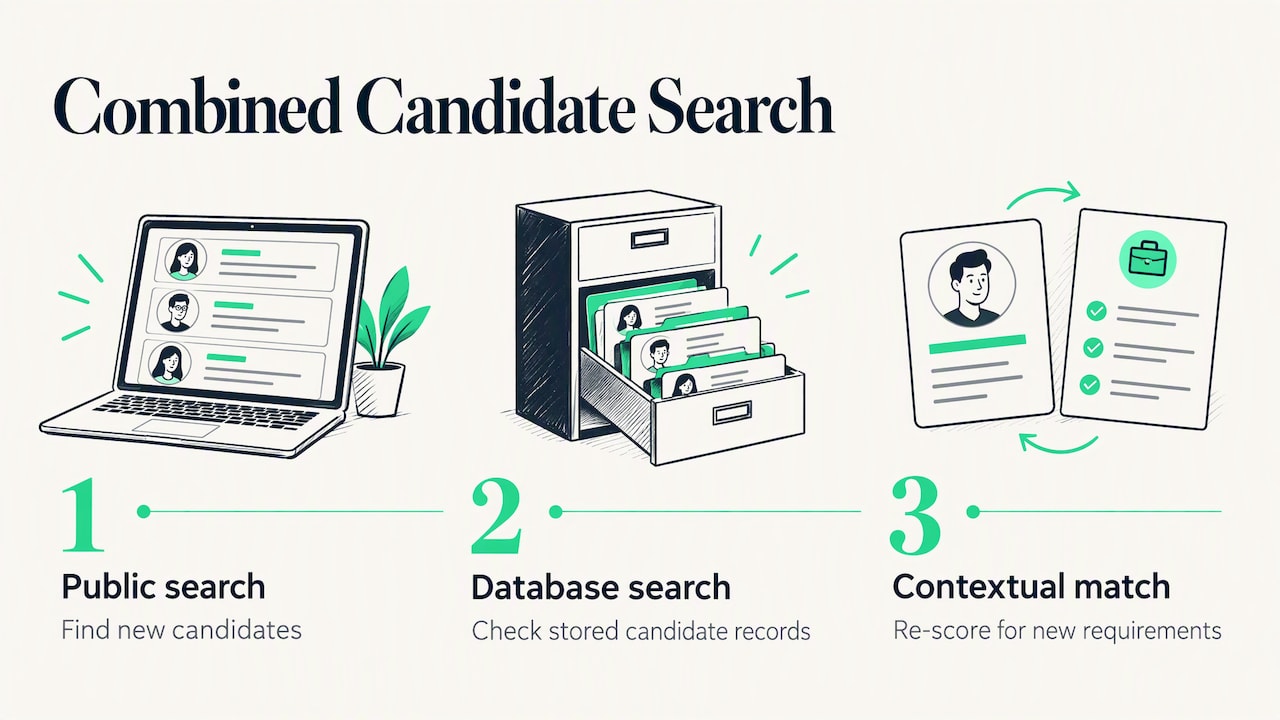
Public X-ray search finds candidates you have never contacted. An internal database search finds candidates you may have already sourced, interviewed, or placed somewhere else, information a public LinkedIn query cannot see. Treating the two as a single step misses one side of the pool.
A workflow that covers both looks like this: run the X-ray query for new discovery, then run an equivalent Boolean search against your own stored candidate records to check for an existing match before starting fresh outreach. Our platform’s X-ray Search Tool is built to deep-scan both the open web and an agency’s internal database with the same query logic, so a sourcer is not switching between two different search syntaxes to cover the two sources.
This combined approach also supports database monetization: candidates sourced months ago for a different role often resurface as a strong match once contextual matching re-scores them against a new requirement, instead of sitting unused while a new public search starts from zero. Running internal and public searches side by side turns a one-time discovery into a standing asset rather than a disposable list of links.
Turning X-Ray Results Into a Unified ATS and CRM Workflow
A list of LinkedIn URLs is a starting point, not a shortlist. The step that actually moves a candidate toward a placement is turning that list into a structured record a recruiter and a salesperson can both act on.
Within our platform, a discovered profile URL becomes a candidate record through the sourcing extension, which imports the profile data directly rather than requiring manual copy and paste. From there, the AI CV parser structures any attached document, contextual matching scores the candidate against open requirements, and the resulting shortlist sits in the same tab as the client’s sales pipeline. A recruiter working the candidate side and a salesperson working the client side see the same record instead of reconciling two spreadsheets.
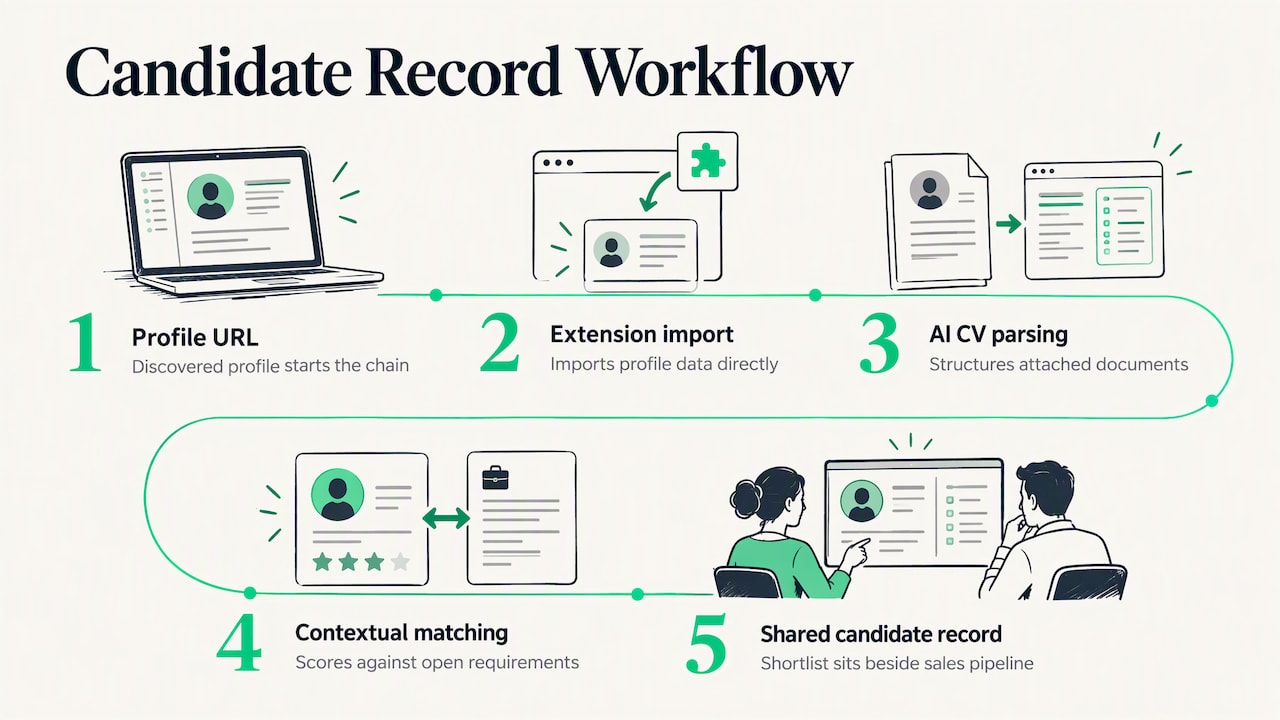
That single-tab structure is the practical payoff of X-ray discovery: a query that took thirty seconds to run feeds directly into a system that tracks the candidate from first contact through to contract, without a separate export step breaking the chain between sourcing and placement.
Building Custom Boolean Strings for IT Recruitment Niches
IT roles rarely map to one clean job title. A “DevOps Engineer” search misses candidates who list themselves as “Site Reliability Engineer” or “Platform Engineer,” and a query built for generic sourcing will under-return on a specialized stack.
Start with the role synonym group from the step-by-step section, then layer in the specific toolchain rather than a generic skill word. For a cloud infrastructure search, "Terraform" or "AWS" narrows meaningfully more than "cloud". For a security-focused search, a certification name like "CISSP" in quotes often outperforms a job title alone, since certifications are listed consistently while titles vary.
Niche IT searches also benefit more than most from the exclusion operator, since terms like -bootcamp or -student filter out training profiles that otherwise share keywords with the experienced candidates you want. Building one query per niche, rather than one broad query covering several adjacent roles, keeps the string short enough to stay reliable and makes it easier to tell which fragment is underperforming when results run thin.
Automating Repetitive X-Ray Tasks With AI Modules
The operators themselves do not change from search to search, but assembling them by hand, every time, for every role variant, is where sourcing time disappears. Repetitive query construction is exactly the kind of task that benefits from automation rather than manual repetition.
Our Boolean engine inside the X-ray Search Tool generates the operator string from role, skill, and location inputs with a single click, removing the manual assembly step for each new variant. Once a batch of profiles is discovered, the AI CV parser with OCR extracts structured data from any attached document in roughly three seconds and automatically flags duplicates, which matters most on high-volume IT desks where the same candidate surfaces across multiple searches.
Contextual matching then scores each imported candidate against open requirements automatically, producing a ranked shortlist instead of a flat list of links to review one by one.
GDPR Compliance When Using External X-Ray Tools
X-ray search only surfaces data a profile owner has already made public, but handling that data still falls under data protection obligations once it enters your own systems. The public visibility of a profile does not exempt an agency from its own compliance responsibilities.
A few practices keep an X-ray-based sourcing workflow on solid ground:
Record a lawful basis and a consent trail for any candidate data moved into your database, not just a saved URL.
Avoid storing sensitive personal data that was not needed for the search in the first place.
Respect a candidate’s visibility settings and any removal request, consistent with Google’s own removal process for personal information in search results.
Keep an audit trail of when and how each candidate record was created, which matters if a candidate later asks what data you hold.
Our platform’s GDPR consent management module is built to maintain this audit trail automatically, supporting secure anonymization of sensitive fields while retaining the metadata needed for reporting, so a discovered profile enters the system with its compliance trail intact rather than as a loose spreadsheet row.
When to Use X-Ray and When to Switch to Native Tools
X-ray search earns its place at the discovery stage: widening a candidate pool, testing how a role title is actually worded in the wild, or reaching profiles a paid LinkedIn seat would otherwise gate. It is a poor substitute for native filters once you need structured criteria like years of experience or a confirmed current employer. Treat an X-ray result as an input to your sourcing pipeline, never as the final word on who a candidate is today.
- Recruitify Team
Turn X-Ray Discoveries Into Verified Shortlists Faster
Running X-ray queries by hand gets you a list of links. Turning that list into a scored, verified shortlist without adding headcount is the harder part, and it’s the part our platform is built around. The X-ray Search Tool generates the Boolean string for you, the sourcing extension imports the profile straight into your pipeline, and contextual matching scores it against your open requirement before a recruiter even opens the tab.

One-click Boolean generation replaces manual operator syntax for every new role variant.
Imported profiles land directly in the same tab as your sales pipeline, no spreadsheet export required.
GDPR consent tracking applies automatically to every record the moment it enters the system.
See current plans, including HR Team at €69 per user per month and Recruitment Agencies at €79 per user per month, or check Enterprise pricing on request.
FAQ
What is X-ray search on LinkedIn?
X-ray search on LinkedIn means using a search engine’s site: operator, typically Google’s, to find public LinkedIn profiles that match specific keywords without using LinkedIn’s own search bar. It works by restricting results to linkedin.com/in/ pages and layering operators like quotes and OR to narrow the match, as described in Google’s search operator guidance.
What is an X-ray search?
An X-ray search is a general technique for searching a specific website’s indexed pages through a public search engine rather than that site’s internal search tool. Recruiters apply it most often to LinkedIn, but the same site: approach works on any domain that a search engine has indexed.
What are the differences between Boolean search and X-ray search?
Boolean search refers to the logic of combining terms with AND, OR, and NOT, and it can run inside LinkedIn’s own search bar or inside Google. X-ray search specifically means running that Boolean logic through an external search engine’s site: operator to reach profiles outside a platform’s native search, as outlined in Google Search Central’s operator documentation.
How do I run a Google X-ray search?
Start with site:www.linkedin.com/in/, then add quoted role synonyms joined by capitalized OR, one or two quoted must-have skills, and a location keyword grouped in parentheses for metro-area variants. Exclude noise with a minus sign, such as -jobs, and run the string directly in Google’s search bar, following the no-space-after-operator rule confirmed in Google’s Search Help pages.
Sources
Recommended


News & Updates
Stay up-to-date with the latest innovations, features, and tips about Recruitify!
By providing your email address within the newsletter sign-up form, you confirm its processing to send marketing information regarding the Administrator’s products and services. The Administrator of your personal data processed for the abovementioned purposes is Recruitify Spółka z o.o., based in Warsaw, Poland (KRS 0000709889). For more information on the principles of personal data processing and the rights of data subjects, please check the Privacy Policy.

Last updated:
LinkedIn X Ray Search: 3 Queries to Verified CRM Records
Recruitment Process
The Recruitify Team
X-ray search uses Google’s site: operator to surface public LinkedIn profiles for discovery, not as a replacement for LinkedIn’s own filters. Use it to widen a candidate pool, test wording before running a paid search, or reach profiles outside your existing network. The one firm rule: Google’s index is not exhaustive, so every result still needs a manual check against the live profile before outreach.
Recruitifyrecruitify.aiSpeed Up Candidate SourcingRecruitify’s integrated X-RAY Search and Boolean Engine scans the open web and your internal database to accelerate sourcing.Explore Recruitify
Key Takeaways
X-ray search on Google effectively broadens candidate discovery for recruiters, but results require manual verification and should complement native LinkedIn filters.
Point | Details |
|---|---|
Use precise operators | Start with ‘site:www.linkedin.com/in/’ and avoid spaces after operators for accurate Google searches. |
Layer search criteria effectively | Combine role synonyms, skills, and locations using quotation marks, OR, and parentheses to narrow results. |
Verify candidate profiles carefully | Always check each profile directly to confirm current titles, employers, and relevance before outreach. |
Leverage automated tools | Platforms like Recruitify automate Boolean string generation, profile import, and scoring, speeding up sourcing workflows. |
Integrate internal and public data | Run searches against both LinkedIn profiles and your internal database to maximize candidate coverage. |
Table of Contents
Operators Cheat Sheet and Quick Rules You Need to Memorize
Step-by-Step Query Building With Three Copy-Paste Examples
Indexing, Reliability, and Troubleshooting: Why Results Vary
Verify Candidates and Prepare Outreach Responsibly
Recruitify Perspective: Integrating X-Ray Discovery Into an Automated Sourcing Workflow
Advanced X-Ray Techniques With an Integrated Boolean Engine
Combining Internal Database Searches With Public LinkedIn Discovery
Turning X-Ray Results Into a Unified ATS and CRM Workflow
Building Custom Boolean Strings for IT Recruitment Niches
Automating Repetitive X-Ray Tasks With AI Modules
GDPR Compliance When Using External X-Ray Tools
When to Use X-Ray and When to Switch to Native Tools
Turn X-Ray Discoveries Into Verified Shortlists Faster
FAQ
Sources
Operators Cheat Sheet and Quick Rules You Need to Memorize
A working X-ray query starts with one anchor: site:www.linkedin.com/in/. Pinning to the www host rather than the bare site:linkedin.com/in/ matters because LinkedIn serves localized copies of profiles on several country subdomains, and the www prefix tends to reduce duplicate listings in your results, according to Google’s own search operator guidance.
From there, four operators do almost all the work:
Quotes force an exact phrase, so
"Site Reliability Engineer"only matches that wording.OR (capitalized) lets you catch synonyms in one pass, as in
(OR "Site Reliability" "Platform Engineer").A minus sign excludes noise terms, such as
-jobs -intitle:jobsto drop job postings.intitle:andinurl:narrow results to words in the page title or URL, useful when a role name tends to appear in a profile’s headline.
A handful of formatting habits separate a working query from an empty results page. Don’t put a space after an operator (site:www.linkedin.com/in/, never site: www.linkedin.com), since Google treats the extra space as a broken operator, a rule confirmed in Google’s Search Help documentation. Keep quoted phrases short, because a six-word exact match rarely occurs twice. Group alternatives in parentheses so OR applies to the right set of words.
Pro Tip: Run several small, focused queries instead of one long string. The highest-leverage sourcing skill is decomposition, not query length, per the same Google guidance on refining searches.
Step-by-Step Query Building With Three Copy-Paste Examples
Building a usable X-ray string is a decomposition exercise more than a writing exercise. Break the role into fragments, test each fragment, then assemble.
Pick 2 to 4 short role synonyms and join them with OR, such as
("Backend Engineer" OR "Backend Developer").Add one or two quoted must-have skills rather than a sentence of requirements, for example
"Kubernetes"or"Node.js".Express geography as keywords, grouping metro-area variants in parentheses since people list location inconsistently, as practitioner testing on X-ray syntax shows in the SourcingNav X-ray guide.
Exclude obvious noise with a trailing
-jobs -intitle:jobs.Run it, then iterate: swap a synonym, drop an exclusion, or split a long query into two shorter ones if results look thin.
Three ready-to-run starting points:
Engineer:
site:www.linkedin.com/in/ ("Backend Engineer" OR "Backend Developer") "Kubernetes" (Austin OR "Austin, Texas") -jobsDesigner:
site:www.linkedin.com/in/ ("Product Designer" OR "UX Designer") (Figma OR Sketch) Berlin -jobsSales leader:
site:www.linkedin.com/in/ ("Sales Director" OR "VP of Sales") "SaaS" (Chicago OR "Chicago, Illinois") -jobs -intern
Vary each by swapping the skill term, widening the location group, or dropping the exclusion entirely when a query returns too few profiles. A query that returns zero results is usually over-specified, not a sign the candidates don’t exist.
Indexing, Reliability, and Troubleshooting: Why Results Vary
Google’s site: operator is not exhaustive. A missing profile in your results does not prove the page is absent from Google’s index. Google Search Central notes that more specific URL prefixes can sometimes surface results that a broader prefix misses, which is why running several narrower queries beats relying on one broad one.
Common causes of weak results include:
Quoted phrases that are too long to match natural variation in how people write their headlines.
Lowercase “or” instead of capitalized OR, which Google reads as a plain word rather than an operator.
Stacking too many minus exclusions, which can silently remove relevant profiles along with noise.
Expecting Google to return structured filters, like years of experience or company size, that only LinkedIn’s own search can apply.
Pro Tip: When a query returns zero results, remove the most recent addition first, usually an exclusion or a narrow location term, and rerun before rewriting the whole string.
To bias results toward a specific region, add the metro area as a bracketed OR group rather than tightening quotes further; location is a keyword problem, not a filter problem, in X-ray search.
Verify Candidates and Prepare Outreach Responsibly
A profile surfacing in search results confirms discovery, not current employment. Open each profile and check the listed role, employer, and any recent activity that corroborates it before treating the match as current.
Confirm the current title and employer directly on the profile, not from the search snippet text.
Record the profile URL and the date you checked it as part of your sourcing evidence.
Avoid harvesting private contact details that are not part of the public profile; Google provides a removal process for personal information that surfaces in search results, which signals that visibility is not the same as permission to collect.
Note that profile visibility settings affect what search engines see at all, and changes to those settings can take several weeks to propagate in search results.
Before sending a message, confirm fit against your actual requirement, note one genuine detail from the profile, and draft an opener of one or two lines. A verified, specific message outperforms a templated one sent to an unverified match.
Recruitify Perspective: Integrating X-Ray Discovery Into an Automated Sourcing Workflow
Manual X-ray search finds candidates one query at a time. Our X-ray Search Tool generates Boolean strings automatically and scans the open web alongside your own database, so the query-building steps above happen in one pass rather than through repeated trial and error.
Once a profile is discovered, our platform’s workflow carries it further:
Automatic Boolean string generation replaces manual operator assembly.
An AI CV parser with OCR builds a structured profile from a PDF, DOCX, or scanned document in roughly three seconds.
Contextual matching AI scores the candidate against open requirements rather than a flat keyword match.
There can be a significant reduction in administrative tasks across workflows, from first contact to contract generation, which frees sourcing time for outreach rather than data entry. A practical sequence looks like: discover with X-ray, import the URL into your sourcing pipeline, let contextual matching score the fit, then shortlist and reach out.
Advanced X-Ray Techniques With an Integrated Boolean Engine
Writing a Boolean string by hand works for a handful of searches a week. It becomes a bottleneck once a sourcing desk runs dozens of role variations across multiple clients. An integrated Boolean engine, like the one built into our X-ray Search Tool, takes the role, skills, and location inputs a sourcer would normally type manually and assembles the operator syntax automatically, including the site: anchor, quoted phrases, and OR groupings covered earlier.
This matters most on niche or hard-to-fill roles, where the difference between a working query and an empty one often comes down to a single synonym or an over-restrictive exclusion. Automated generation lets a sourcer test several phrasing variants in the time it would take to type one by hand, then feed the resulting URLs straight into a shortlist rather than copying them into a spreadsheet.
The practical gain is speed of iteration, not a different search engine underneath. The same rules from the operators cheat sheet still apply: short quoted phrases, capitalized OR, geography as a keyword. What changes is who assembles the string and how fast the next variant gets tested once the first one underperforms.
Combining Internal Database Searches With Public LinkedIn Discovery
Public X-ray search finds candidates you have never contacted. An internal database search finds candidates you may have already sourced, interviewed, or placed somewhere else, information a public LinkedIn query cannot see. Treating the two as a single step misses one side of the pool.
A workflow that covers both looks like this: run the X-ray query for new discovery, then run an equivalent Boolean search against your own stored candidate records to check for an existing match before starting fresh outreach. Our platform’s X-ray Search Tool is built to deep-scan both the open web and an agency’s internal database with the same query logic, so a sourcer is not switching between two different search syntaxes to cover the two sources.
This combined approach also supports database monetization: candidates sourced months ago for a different role often resurface as a strong match once contextual matching re-scores them against a new requirement, instead of sitting unused while a new public search starts from zero. Running internal and public searches side by side turns a one-time discovery into a standing asset rather than a disposable list of links.
Turning X-Ray Results Into a Unified ATS and CRM Workflow
A list of LinkedIn URLs is a starting point, not a shortlist. The step that actually moves a candidate toward a placement is turning that list into a structured record a recruiter and a salesperson can both act on.
Within our platform, a discovered profile URL becomes a candidate record through the sourcing extension, which imports the profile data directly rather than requiring manual copy and paste. From there, the AI CV parser structures any attached document, contextual matching scores the candidate against open requirements, and the resulting shortlist sits in the same tab as the client’s sales pipeline. A recruiter working the candidate side and a salesperson working the client side see the same record instead of reconciling two spreadsheets.
That single-tab structure is the practical payoff of X-ray discovery: a query that took thirty seconds to run feeds directly into a system that tracks the candidate from first contact through to contract, without a separate export step breaking the chain between sourcing and placement.
Building Custom Boolean Strings for IT Recruitment Niches
IT roles rarely map to one clean job title. A “DevOps Engineer” search misses candidates who list themselves as “Site Reliability Engineer” or “Platform Engineer,” and a query built for generic sourcing will under-return on a specialized stack.
Start with the role synonym group from the step-by-step section, then layer in the specific toolchain rather than a generic skill word. For a cloud infrastructure search, "Terraform" or "AWS" narrows meaningfully more than "cloud". For a security-focused search, a certification name like "CISSP" in quotes often outperforms a job title alone, since certifications are listed consistently while titles vary.
Niche IT searches also benefit more than most from the exclusion operator, since terms like -bootcamp or -student filter out training profiles that otherwise share keywords with the experienced candidates you want. Building one query per niche, rather than one broad query covering several adjacent roles, keeps the string short enough to stay reliable and makes it easier to tell which fragment is underperforming when results run thin.
Automating Repetitive X-Ray Tasks With AI Modules
The operators themselves do not change from search to search, but assembling them by hand, every time, for every role variant, is where sourcing time disappears. Repetitive query construction is exactly the kind of task that benefits from automation rather than manual repetition.
Our Boolean engine inside the X-ray Search Tool generates the operator string from role, skill, and location inputs with a single click, removing the manual assembly step for each new variant. Once a batch of profiles is discovered, the AI CV parser with OCR extracts structured data from any attached document in roughly three seconds and automatically flags duplicates, which matters most on high-volume IT desks where the same candidate surfaces across multiple searches.
Contextual matching then scores each imported candidate against open requirements automatically, producing a ranked shortlist instead of a flat list of links to review one by one.
GDPR Compliance When Using External X-Ray Tools
X-ray search only surfaces data a profile owner has already made public, but handling that data still falls under data protection obligations once it enters your own systems. The public visibility of a profile does not exempt an agency from its own compliance responsibilities.
A few practices keep an X-ray-based sourcing workflow on solid ground:
Record a lawful basis and a consent trail for any candidate data moved into your database, not just a saved URL.
Avoid storing sensitive personal data that was not needed for the search in the first place.
Respect a candidate’s visibility settings and any removal request, consistent with Google’s own removal process for personal information in search results.
Keep an audit trail of when and how each candidate record was created, which matters if a candidate later asks what data you hold.
Our platform’s GDPR consent management module is built to maintain this audit trail automatically, supporting secure anonymization of sensitive fields while retaining the metadata needed for reporting, so a discovered profile enters the system with its compliance trail intact rather than as a loose spreadsheet row.
When to Use X-Ray and When to Switch to Native Tools
X-ray search earns its place at the discovery stage: widening a candidate pool, testing how a role title is actually worded in the wild, or reaching profiles a paid LinkedIn seat would otherwise gate. It is a poor substitute for native filters once you need structured criteria like years of experience or a confirmed current employer. Treat an X-ray result as an input to your sourcing pipeline, never as the final word on who a candidate is today.
- Recruitify Team
Turn X-Ray Discoveries Into Verified Shortlists Faster
Running X-ray queries by hand gets you a list of links. Turning that list into a scored, verified shortlist without adding headcount is the harder part, and it’s the part our platform is built around. The X-ray Search Tool generates the Boolean string for you, the sourcing extension imports the profile straight into your pipeline, and contextual matching scores it against your open requirement before a recruiter even opens the tab.
One-click Boolean generation replaces manual operator syntax for every new role variant.
Imported profiles land directly in the same tab as your sales pipeline, no spreadsheet export required.
GDPR consent tracking applies automatically to every record the moment it enters the system.
See current plans, including HR Team at €69 per user per month and Recruitment Agencies at €79 per user per month, or check Enterprise pricing on request.
FAQ
What is X-ray search on LinkedIn?
X-ray search on LinkedIn means using a search engine’s site: operator, typically Google’s, to find public LinkedIn profiles that match specific keywords without using LinkedIn’s own search bar. It works by restricting results to linkedin.com/in/ pages and layering operators like quotes and OR to narrow the match, as described in Google’s search operator guidance.
What is an X-ray search?
An X-ray search is a general technique for searching a specific website’s indexed pages through a public search engine rather than that site’s internal search tool. Recruiters apply it most often to LinkedIn, but the same site: approach works on any domain that a search engine has indexed.
What are the differences between Boolean search and X-ray search?
Boolean search refers to the logic of combining terms with AND, OR, and NOT, and it can run inside LinkedIn’s own search bar or inside Google. X-ray search specifically means running that Boolean logic through an external search engine’s site: operator to reach profiles outside a platform’s native search, as outlined in Google Search Central’s operator documentation.
How do I run a Google X-ray search?
Start with site:www.linkedin.com/in/, then add quoted role synonyms joined by capitalized OR, one or two quoted must-have skills, and a location keyword grouped in parentheses for metro-area variants. Exclude noise with a minus sign, such as -jobs, and run the string directly in Google’s search bar, following the no-space-after-operator rule confirmed in Google’s Search Help pages.
Sources
Recommended
News & Updates
Stay up-to-date with the latest innovations, features, and tips about Recruitify!
By providing your email address within the newsletter sign-up form, you confirm its processing to send marketing information regarding the Administrator’s products and services. The Administrator of your personal data processed for the abovementioned purposes is Recruitify Spółka z o.o., based in Warsaw, Poland (KRS 0000709889). For more information on the principles of personal data processing and the rights of data subjects, please check the Privacy Policy.
Last updated:
LinkedIn X Ray Search: 3 Queries to Verified CRM Records
Recruitment Process
The Recruitify Team
X-ray search uses Google’s site: operator to surface public LinkedIn profiles for discovery, not as a replacement for LinkedIn’s own filters. Use it to widen a candidate pool, test wording before running a paid search, or reach profiles outside your existing network. The one firm rule: Google’s index is not exhaustive, so every result still needs a manual check against the live profile before outreach.
Recruitifyrecruitify.aiSpeed Up Candidate SourcingRecruitify’s integrated X-RAY Search and Boolean Engine scans the open web and your internal database to accelerate sourcing.Explore Recruitify
Key Takeaways
X-ray search on Google effectively broadens candidate discovery for recruiters, but results require manual verification and should complement native LinkedIn filters.
Point | Details |
|---|---|
Use precise operators | Start with ‘site:www.linkedin.com/in/’ and avoid spaces after operators for accurate Google searches. |
Layer search criteria effectively | Combine role synonyms, skills, and locations using quotation marks, OR, and parentheses to narrow results. |
Verify candidate profiles carefully | Always check each profile directly to confirm current titles, employers, and relevance before outreach. |
Leverage automated tools | Platforms like Recruitify automate Boolean string generation, profile import, and scoring, speeding up sourcing workflows. |
Integrate internal and public data | Run searches against both LinkedIn profiles and your internal database to maximize candidate coverage. |
Table of Contents
Operators Cheat Sheet and Quick Rules You Need to Memorize
Step-by-Step Query Building With Three Copy-Paste Examples
Indexing, Reliability, and Troubleshooting: Why Results Vary
Verify Candidates and Prepare Outreach Responsibly
Recruitify Perspective: Integrating X-Ray Discovery Into an Automated Sourcing Workflow
Advanced X-Ray Techniques With an Integrated Boolean Engine
Combining Internal Database Searches With Public LinkedIn Discovery
Turning X-Ray Results Into a Unified ATS and CRM Workflow
Building Custom Boolean Strings for IT Recruitment Niches
Automating Repetitive X-Ray Tasks With AI Modules
GDPR Compliance When Using External X-Ray Tools
When to Use X-Ray and When to Switch to Native Tools
Turn X-Ray Discoveries Into Verified Shortlists Faster
FAQ
Sources
Operators Cheat Sheet and Quick Rules You Need to Memorize
A working X-ray query starts with one anchor: site:www.linkedin.com/in/. Pinning to the www host rather than the bare site:linkedin.com/in/ matters because LinkedIn serves localized copies of profiles on several country subdomains, and the www prefix tends to reduce duplicate listings in your results, according to Google’s own search operator guidance.
From there, four operators do almost all the work:
Quotes force an exact phrase, so
"Site Reliability Engineer"only matches that wording.OR (capitalized) lets you catch synonyms in one pass, as in
(OR "Site Reliability" "Platform Engineer").A minus sign excludes noise terms, such as
-jobs -intitle:jobsto drop job postings.intitle:andinurl:narrow results to words in the page title or URL, useful when a role name tends to appear in a profile’s headline.
A handful of formatting habits separate a working query from an empty results page. Don’t put a space after an operator (site:www.linkedin.com/in/, never site: www.linkedin.com), since Google treats the extra space as a broken operator, a rule confirmed in Google’s Search Help documentation. Keep quoted phrases short, because a six-word exact match rarely occurs twice. Group alternatives in parentheses so OR applies to the right set of words.
Pro Tip: Run several small, focused queries instead of one long string. The highest-leverage sourcing skill is decomposition, not query length, per the same Google guidance on refining searches.
Step-by-Step Query Building With Three Copy-Paste Examples
Building a usable X-ray string is a decomposition exercise more than a writing exercise. Break the role into fragments, test each fragment, then assemble.
Pick 2 to 4 short role synonyms and join them with OR, such as
("Backend Engineer" OR "Backend Developer").Add one or two quoted must-have skills rather than a sentence of requirements, for example
"Kubernetes"or"Node.js".Express geography as keywords, grouping metro-area variants in parentheses since people list location inconsistently, as practitioner testing on X-ray syntax shows in the SourcingNav X-ray guide.
Exclude obvious noise with a trailing
-jobs -intitle:jobs.Run it, then iterate: swap a synonym, drop an exclusion, or split a long query into two shorter ones if results look thin.
Three ready-to-run starting points:
Engineer:
site:www.linkedin.com/in/ ("Backend Engineer" OR "Backend Developer") "Kubernetes" (Austin OR "Austin, Texas") -jobsDesigner:
site:www.linkedin.com/in/ ("Product Designer" OR "UX Designer") (Figma OR Sketch) Berlin -jobsSales leader:
site:www.linkedin.com/in/ ("Sales Director" OR "VP of Sales") "SaaS" (Chicago OR "Chicago, Illinois") -jobs -intern
Vary each by swapping the skill term, widening the location group, or dropping the exclusion entirely when a query returns too few profiles. A query that returns zero results is usually over-specified, not a sign the candidates don’t exist.
Indexing, Reliability, and Troubleshooting: Why Results Vary
Google’s site: operator is not exhaustive. A missing profile in your results does not prove the page is absent from Google’s index. Google Search Central notes that more specific URL prefixes can sometimes surface results that a broader prefix misses, which is why running several narrower queries beats relying on one broad one.
Common causes of weak results include:
Quoted phrases that are too long to match natural variation in how people write their headlines.
Lowercase “or” instead of capitalized OR, which Google reads as a plain word rather than an operator.
Stacking too many minus exclusions, which can silently remove relevant profiles along with noise.
Expecting Google to return structured filters, like years of experience or company size, that only LinkedIn’s own search can apply.
Pro Tip: When a query returns zero results, remove the most recent addition first, usually an exclusion or a narrow location term, and rerun before rewriting the whole string.
To bias results toward a specific region, add the metro area as a bracketed OR group rather than tightening quotes further; location is a keyword problem, not a filter problem, in X-ray search.
Verify Candidates and Prepare Outreach Responsibly
A profile surfacing in search results confirms discovery, not current employment. Open each profile and check the listed role, employer, and any recent activity that corroborates it before treating the match as current.
Confirm the current title and employer directly on the profile, not from the search snippet text.
Record the profile URL and the date you checked it as part of your sourcing evidence.
Avoid harvesting private contact details that are not part of the public profile; Google provides a removal process for personal information that surfaces in search results, which signals that visibility is not the same as permission to collect.
Note that profile visibility settings affect what search engines see at all, and changes to those settings can take several weeks to propagate in search results.
Before sending a message, confirm fit against your actual requirement, note one genuine detail from the profile, and draft an opener of one or two lines. A verified, specific message outperforms a templated one sent to an unverified match.
Recruitify Perspective: Integrating X-Ray Discovery Into an Automated Sourcing Workflow
Manual X-ray search finds candidates one query at a time. Our X-ray Search Tool generates Boolean strings automatically and scans the open web alongside your own database, so the query-building steps above happen in one pass rather than through repeated trial and error.
Once a profile is discovered, our platform’s workflow carries it further:
Automatic Boolean string generation replaces manual operator assembly.
An AI CV parser with OCR builds a structured profile from a PDF, DOCX, or scanned document in roughly three seconds.
Contextual matching AI scores the candidate against open requirements rather than a flat keyword match.
There can be a significant reduction in administrative tasks across workflows, from first contact to contract generation, which frees sourcing time for outreach rather than data entry. A practical sequence looks like: discover with X-ray, import the URL into your sourcing pipeline, let contextual matching score the fit, then shortlist and reach out.
Advanced X-Ray Techniques With an Integrated Boolean Engine
Writing a Boolean string by hand works for a handful of searches a week. It becomes a bottleneck once a sourcing desk runs dozens of role variations across multiple clients. An integrated Boolean engine, like the one built into our X-ray Search Tool, takes the role, skills, and location inputs a sourcer would normally type manually and assembles the operator syntax automatically, including the site: anchor, quoted phrases, and OR groupings covered earlier.
This matters most on niche or hard-to-fill roles, where the difference between a working query and an empty one often comes down to a single synonym or an over-restrictive exclusion. Automated generation lets a sourcer test several phrasing variants in the time it would take to type one by hand, then feed the resulting URLs straight into a shortlist rather than copying them into a spreadsheet.
The practical gain is speed of iteration, not a different search engine underneath. The same rules from the operators cheat sheet still apply: short quoted phrases, capitalized OR, geography as a keyword. What changes is who assembles the string and how fast the next variant gets tested once the first one underperforms.
Combining Internal Database Searches With Public LinkedIn Discovery
Public X-ray search finds candidates you have never contacted. An internal database search finds candidates you may have already sourced, interviewed, or placed somewhere else, information a public LinkedIn query cannot see. Treating the two as a single step misses one side of the pool.
A workflow that covers both looks like this: run the X-ray query for new discovery, then run an equivalent Boolean search against your own stored candidate records to check for an existing match before starting fresh outreach. Our platform’s X-ray Search Tool is built to deep-scan both the open web and an agency’s internal database with the same query logic, so a sourcer is not switching between two different search syntaxes to cover the two sources.
This combined approach also supports database monetization: candidates sourced months ago for a different role often resurface as a strong match once contextual matching re-scores them against a new requirement, instead of sitting unused while a new public search starts from zero. Running internal and public searches side by side turns a one-time discovery into a standing asset rather than a disposable list of links.
Turning X-Ray Results Into a Unified ATS and CRM Workflow
A list of LinkedIn URLs is a starting point, not a shortlist. The step that actually moves a candidate toward a placement is turning that list into a structured record a recruiter and a salesperson can both act on.
Within our platform, a discovered profile URL becomes a candidate record through the sourcing extension, which imports the profile data directly rather than requiring manual copy and paste. From there, the AI CV parser structures any attached document, contextual matching scores the candidate against open requirements, and the resulting shortlist sits in the same tab as the client’s sales pipeline. A recruiter working the candidate side and a salesperson working the client side see the same record instead of reconciling two spreadsheets.
That single-tab structure is the practical payoff of X-ray discovery: a query that took thirty seconds to run feeds directly into a system that tracks the candidate from first contact through to contract, without a separate export step breaking the chain between sourcing and placement.
Building Custom Boolean Strings for IT Recruitment Niches
IT roles rarely map to one clean job title. A “DevOps Engineer” search misses candidates who list themselves as “Site Reliability Engineer” or “Platform Engineer,” and a query built for generic sourcing will under-return on a specialized stack.
Start with the role synonym group from the step-by-step section, then layer in the specific toolchain rather than a generic skill word. For a cloud infrastructure search, "Terraform" or "AWS" narrows meaningfully more than "cloud". For a security-focused search, a certification name like "CISSP" in quotes often outperforms a job title alone, since certifications are listed consistently while titles vary.
Niche IT searches also benefit more than most from the exclusion operator, since terms like -bootcamp or -student filter out training profiles that otherwise share keywords with the experienced candidates you want. Building one query per niche, rather than one broad query covering several adjacent roles, keeps the string short enough to stay reliable and makes it easier to tell which fragment is underperforming when results run thin.
Automating Repetitive X-Ray Tasks With AI Modules
The operators themselves do not change from search to search, but assembling them by hand, every time, for every role variant, is where sourcing time disappears. Repetitive query construction is exactly the kind of task that benefits from automation rather than manual repetition.
Our Boolean engine inside the X-ray Search Tool generates the operator string from role, skill, and location inputs with a single click, removing the manual assembly step for each new variant. Once a batch of profiles is discovered, the AI CV parser with OCR extracts structured data from any attached document in roughly three seconds and automatically flags duplicates, which matters most on high-volume IT desks where the same candidate surfaces across multiple searches.
Contextual matching then scores each imported candidate against open requirements automatically, producing a ranked shortlist instead of a flat list of links to review one by one.
GDPR Compliance When Using External X-Ray Tools
X-ray search only surfaces data a profile owner has already made public, but handling that data still falls under data protection obligations once it enters your own systems. The public visibility of a profile does not exempt an agency from its own compliance responsibilities.
A few practices keep an X-ray-based sourcing workflow on solid ground:
Record a lawful basis and a consent trail for any candidate data moved into your database, not just a saved URL.
Avoid storing sensitive personal data that was not needed for the search in the first place.
Respect a candidate’s visibility settings and any removal request, consistent with Google’s own removal process for personal information in search results.
Keep an audit trail of when and how each candidate record was created, which matters if a candidate later asks what data you hold.
Our platform’s GDPR consent management module is built to maintain this audit trail automatically, supporting secure anonymization of sensitive fields while retaining the metadata needed for reporting, so a discovered profile enters the system with its compliance trail intact rather than as a loose spreadsheet row.
When to Use X-Ray and When to Switch to Native Tools
X-ray search earns its place at the discovery stage: widening a candidate pool, testing how a role title is actually worded in the wild, or reaching profiles a paid LinkedIn seat would otherwise gate. It is a poor substitute for native filters once you need structured criteria like years of experience or a confirmed current employer. Treat an X-ray result as an input to your sourcing pipeline, never as the final word on who a candidate is today.
- Recruitify Team
Turn X-Ray Discoveries Into Verified Shortlists Faster
Running X-ray queries by hand gets you a list of links. Turning that list into a scored, verified shortlist without adding headcount is the harder part, and it’s the part our platform is built around. The X-ray Search Tool generates the Boolean string for you, the sourcing extension imports the profile straight into your pipeline, and contextual matching scores it against your open requirement before a recruiter even opens the tab.
One-click Boolean generation replaces manual operator syntax for every new role variant.
Imported profiles land directly in the same tab as your sales pipeline, no spreadsheet export required.
GDPR consent tracking applies automatically to every record the moment it enters the system.
See current plans, including HR Team at €69 per user per month and Recruitment Agencies at €79 per user per month, or check Enterprise pricing on request.
FAQ
What is X-ray search on LinkedIn?
X-ray search on LinkedIn means using a search engine’s site: operator, typically Google’s, to find public LinkedIn profiles that match specific keywords without using LinkedIn’s own search bar. It works by restricting results to linkedin.com/in/ pages and layering operators like quotes and OR to narrow the match, as described in Google’s search operator guidance.
What is an X-ray search?
An X-ray search is a general technique for searching a specific website’s indexed pages through a public search engine rather than that site’s internal search tool. Recruiters apply it most often to LinkedIn, but the same site: approach works on any domain that a search engine has indexed.
What are the differences between Boolean search and X-ray search?
Boolean search refers to the logic of combining terms with AND, OR, and NOT, and it can run inside LinkedIn’s own search bar or inside Google. X-ray search specifically means running that Boolean logic through an external search engine’s site: operator to reach profiles outside a platform’s native search, as outlined in Google Search Central’s operator documentation.
How do I run a Google X-ray search?
Start with site:www.linkedin.com/in/, then add quoted role synonyms joined by capitalized OR, one or two quoted must-have skills, and a location keyword grouped in parentheses for metro-area variants. Exclude noise with a minus sign, such as -jobs, and run the string directly in Google’s search bar, following the no-space-after-operator rule confirmed in Google’s Search Help pages.
Sources
Recommended
News & Updates
Stay up-to-date with the latest innovations, features, and tips about Recruitify!
By providing your email address within the newsletter sign-up form, you confirm its processing to send marketing information regarding the Administrator’s products and services. The Administrator of your personal data processed for the abovementioned purposes is Recruitify Spółka z o.o., based in Warsaw, Poland (KRS 0000709889). For more information on the principles of personal data processing and the rights of data subjects, please check the Privacy Policy.

Discover More

Recruitment Process
Rate Card Staffing: How to Build, Price and Manage One
A practical guide to staffing rate cards: how bill rates are built from pay rates, which methodology to use, how to review rates, and how to manage them.
25 Oct 2026
Discover More

Innovations
Application Conversion Rate: Formula, Benchmarks, Fixes
Application conversion rate explained for recruiters: the formula, stage-by-stage math, real benchmarks, and the fixes that move the number. Includes app-store rates.
24 Oct 2026
Discover More

Recruitment Process
GDPR-Compliant Analytics for Recruitment Teams
What makes analytics GDPR compliant, from cookies to candidate data: a practical framework for recruitment agencies and HR teams, including US firms hiring in the EU.
23 Oct 2026
Discover More
Recruitment Process
Rate Card Staffing: How to Build, Price and Manage One
A practical guide to staffing rate cards: how bill rates are built from pay rates, which methodology to use, how to review rates, and how to manage them.
25 Oct 2026
Discover More
Innovations
Application Conversion Rate: Formula, Benchmarks, Fixes
Application conversion rate explained for recruiters: the formula, stage-by-stage math, real benchmarks, and the fixes that move the number. Includes app-store rates.
24 Oct 2026
Discover More

