
Last updated:
3 Guardrails for Recruiters Using Automated Rejection Emails

HR Analytics

The Recruitify Team
Yes, automate rejection emails to stop candidate ghosting, but only with three guardrails in place: stage-based templates that match the depth of the relationship, timing SLAs that respect research on candidate fairness, and human sign-off for anyone rejected after an interview. Skip any one of those three and automation turns into the exact employer-brand liability recruiters fear.
Automated rejection emails work best when they are stage-specific, timely, and reviewed by a human for final-stage rejections.
Sending acknowledgment emails within 3 days and interview rejections within 24 to 48 hours significantly improves candidate perception and reapplication likelihood.
Sign-off approval is essential for post-interview rejections to ensure accuracy, with initial stages requiring less oversight and final decisions needing managerial validation.
Personalization through interview notes and specific observations increases candidate engagement and prevents messages from feeling impersonal or robotic.
Tracking delivery, open, reply rates, and reapplication metrics helps measure the ROI and effectiveness of rejection automation efforts.
RecruitifyAutomate Recruitment With More ControlRecruitify brings ATS, Sales CRM, and IT contracting workflows together, helping recruitment agencies manage processes and candidate data in one ecosystem.Explore Recruitify
Table of Contents
What Are Automated Rejection Emails?
Quick Checklist: Day-One Setup To Stop Ghosting
Stage-By-Stage Templates: What To Say and How Long To Write
When Should You Send a Rejection Email?
Who Should Approve Automated Rejection Emails?
What Should You Do With Candidate Replies?
How Do You Roll Out Automated Rejection Emails in Your ATS?
How Do You Measure the ROI of Rejection Email Automation?
How Recruitify Builds These Controls Into the Platform
A Note From the Recruitify Team
Automate Rejections Without Losing the Human Touch
Sources
FAQ
What Are Automated Rejection Emails?
Automated rejection emails are pre-built, trigger-based messages your applicant tracking system sends when a candidate’s status changes to “not selected.” They range from a one-line acknowledgment after an online application to a detailed, manager-reviewed note after a final-round interview. The mechanism is simple. The judgment about when, how, and to whom you send them is where most teams get it wrong.
The mistake isn’t automation itself. It’s treating every rejection the same way, regardless of how much time and hope the candidate invested. A candidate who spent an hour submitting a resume does not need the same message as one who took a half-day off work for a final interview. Recruiters who understand that distinction, and build their workflows around it, get the upside of automation (speed, consistency, zero ghosting) without the downside (a candidate who felt like a number).
Quick Checklist: Day-One Setup To Stop Ghosting
You don’t need a six-month project to fix rejection communication. Most of the groundwork can happen in a single working session if you tackle it in the right order.
Map your pipeline stages first. List every stage in your process (applied, screened, phone interview, in-person interview, final round, offer) and decide how much template depth each one deserves.
Set your SLAs before you write a single template. Acknowledgment emails should go out within 3 business days, interview-stage decisions within 24 to 72 hours, and final decisions within 24 to 48 hours after the decision is made.
Assign sign-off owners. Decide, in writing, who approves a rejection at each stage. Early-stage emails can go out with zero human review. Anything post-interview needs a name attached.
Turn on basic analytics from day one. Track delivery rate, open rate, and reply rate for every template so you have a baseline before you start optimizing.
The point of this checklist isn’t perfection. It’s closing the biggest gap first: candidates who apply and never hear anything again. That single fix, an automated acknowledgment with a realistic timeline, eliminates most of the “black hole” complaints that damage employer review scores before you’ve touched anything else.
Stage-By-Stage Templates: What To Say and How Long To Write
Template length should track emotional investment, not administrative convenience. A candidate who submitted an application five minutes ago has a different relationship with your company than one who just left a 45-minute interview with your hiring manager. Automated rejections that ignore this gradient are the ones that generate angry LinkedIn posts.
Application acknowledgment (40 to 80 words). This isn’t a rejection at all, it’s a receipt. Confirm the application arrived, state a realistic timeline for next steps, and stop. No feedback, no filler.
Resume screen rejection (60 to 100 words). This is the first true “no.” Keep it brief but give one directional reason or point to another open role if one fits. Candidates at this stage rarely expect a detailed explanation, but they do expect the response to feel like it was written for a real job, not a form letter.
Phone screen rejection (150 to 200 words). Once someone has spoken to a recruiter, a generic template feels like a downgrade. Include one specific, honest observation from the call, even a small one, because that single detail is what separates a form rejection from a message that reads as considered.
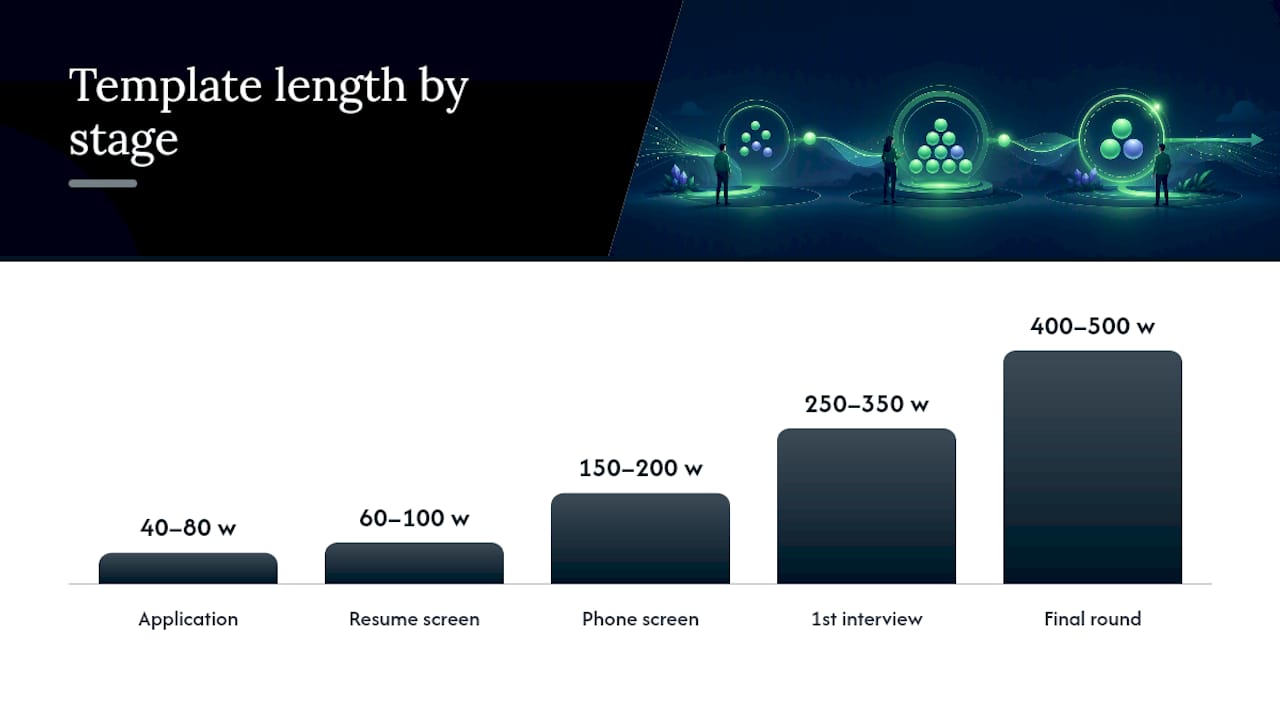
First interview rejection (250 to 350 words). At this stage, candidates have met your team and invested real time. The message should reference at least one competency area discussed in the interview and explain, at a high level, why another candidate was a closer match.
Final round rejection (400 to 500 words). This is the highest-stakes message you’ll send. It should be checked by the hiring manager before it goes out, reference specifics from the interview, and, where possible, offer a scheduling link for a short call. Talent Board data cited in industry research shows candidates rate phone rejections far more positively than emails at this stage, so pairing the email with a call option closes that gap without requiring a call for every candidate.
Stage | Word count | Core content | Human review required |
|---|---|---|---|
Application acknowledgment | 40 to 80 | Confirmation, timeline | No |
Resume screen | 60 to 100 | Brief reason or redirect | No |
Phone screen | 150 to 200 | One specific observation | Spot check |
First interview | 250 to 350 | Competency feedback | Recommended |
Final round | 400 to 500 | Manager-checked note, call option | Mandatory |
Every template, regardless of stage, needs a minimum set of personalization fields: candidate name, role title, and at least one competency or observation specific to that person. Beyond that, follow what’s sometimes called the two-line personalization habit: one sentence pulled from actual interview notes, plus one sincere closing line that isn’t boilerplate. That combination is often enough to make an automated message read as genuinely written, without adding meaningful time to the process. Industry case data backs this up directly: platforms that inject scorecard data and interviewer notes into templates see candidates report the message felt personally written far more often than plain-template messages.
When Should You Send a Rejection Email?
Speed matters more than most recruiters assume, and the research on this is specific. A study published through Cambridge found that candidates who waited one week for a rejection reported significantly better outcomes across the board compared to those who waited two weeks. The effect sizes were large: fairness perception improved with an effect size of d = 1.01, satisfaction by d = .78, and intention to reapply by d = .84, all favoring the shorter one-week delay.
The takeaway on timing: waiting an extra week to reject a candidate doesn’t just feel worse to them, it measurably damages your chance of ever hiring them later. Intention to reapply drops with every added day of silence.
That data lines up with what candidates say they expect. Jobvite’s Job-Seeker Nation research found that 57% of candidates expect to hear back within three days if they haven’t been selected. Build your SLAs around that expectation, not around what’s convenient for your recruiting team’s workload.
Recommended windows, by stage:
Application acknowledgment: within a few business days of submission.
Resume screen rejections: promptly, often within days, or faster for high-volume roles using automated screening.
Post-interview rejections: sent as quickly as possible after the decision is finalized.
Final-round decisions: always after a human check and sent promptly.
Exceptions happen, and pretending they won’t just creates silent SLA violations. If a hiring manager delays a decision, tell the candidate that a timeline has shifted rather than letting the deadline pass with no message at all. If an offer gets rescinded after being extended, that communication should never be automated. It goes through a recruiter or hiring manager directly, by phone if possible.
Who Should Approve Automated Rejection Emails?
Automation should scale confidently at the top of the funnel and slow down deliberately at the bottom. That’s the entire logic of a human-in-the-loop policy, and it’s worth writing down as a formal rule rather than leaving it to individual recruiter judgment.
No sign-off required: application acknowledgments and resume-screen rejections can go out automatically, with periodic spot checks rather than case-by-case review.
Recruiter sign-off required: phone screen and first-interview rejections should get a quick recruiter glance before sending, mainly to catch missing or wrong variable data.
Hiring manager sign-off required: final-round rejections need explicit approval from whoever ran the interview, since they’re the only person who can confirm the feedback is accurate.
Fallback text is mandatory: when interviewer notes or scorecard data are missing, the template needs a graceful fallback sentence rather than a blank field or an awkward gap.
Quality assurance runs continuously: shadow-mode testing (generating emails without sending them) catches tone drift and variable errors before candidates ever see them, and periodic template reviews catch drift that creeps in over months of edits.
Pro Tip: Run every new or edited template through shadow mode for at least 20 real candidate records before it goes live. You’ll catch broken variable fields (a missing name, a blank competency slot) that no amount of proofreading in the template editor will reveal.
The sign-off checklist itself should be short enough that hiring managers actually use it: does the feedback match what was discussed in the interview, is the tone appropriate, and is the call-to-action (if any) correct.
What Should You Do With Candidate Replies?
A reply to a rejection email is one of the few unsolicited pieces of feedback recruiting teams get, and most organizations either ignore it or route it into a general inbox where it dies. That’s a wasted signal.
Sort incoming replies into three buckets the moment they arrive. Positive replies (a candidate thanking you, asking to be considered for future roles) can be auto-acknowledged and logged for future sourcing. Question replies (asking for more specific feedback, or clarification on the decision) should route to the original recruiter with a defined response window. Negative replies (frustration, a dispute over the decision, anything with legal risk language) need to escalate to a senior recruiter or HR lead fast, ideally within a few hours rather than sitting in a queue overnight.
Simple sentiment flagging, even rule-based rather than fully automated, helps prioritize which replies need attention first. A reply containing words like “unfair” or “discriminat” should never wait behind a routine thank-you note.
Replies also function as a free audit of your hiring process, if you bother to read them in aggregate:
Repeated confusion about a role’s responsibilities points to a poorly written job description.
Multiple candidates mentioning a long gap between interview and rejection flags a bottleneck in manager decision-making.
Candidates asking why they weren’t told about a skills gap earlier suggests your screening stage needs a clearer rejection reason.
None of that intelligence shows up in a delivery-rate dashboard. It only shows up if someone actually reads what candidates write back.
How Do You Roll Out Automated Rejection Emails in Your ATS?
Implementation fails most often because teams try to automate everything at once instead of proving the system works on a narrow slice of hiring first.
Map your stage-transition triggers. Identify every point in your ATS where a status change should fire a rejection email, and attach a specific rejection reason code to each one rather than a single generic “not selected” flag.
Connect variable sources. Link scorecard fields and interviewer notes into your template variables, and build a fallback sentence for every field that might come back empty.
Run shadow mode for at least a week. Generate the emails your triggers would send without actually sending them, and have a recruiter review a sample for tone, accuracy, and broken variables.
Launch in phases. Start with one role family, typically the highest-volume one, confirm delivery and reply metrics look healthy, then expand to the rest of your open roles.
A platform like Recruitify’s automation module handles the trigger-mapping and variable-injection layer natively, which removes most of the manual webhook work teams otherwise build by hand. Whatever system you use, the sequence matters more than the tool: triggers first, variables second, shadow testing third, phased launch last. Skipping shadow mode is the single most common cause of an embarrassing mass-send error.
How Do You Measure the ROI of Rejection Email Automation?
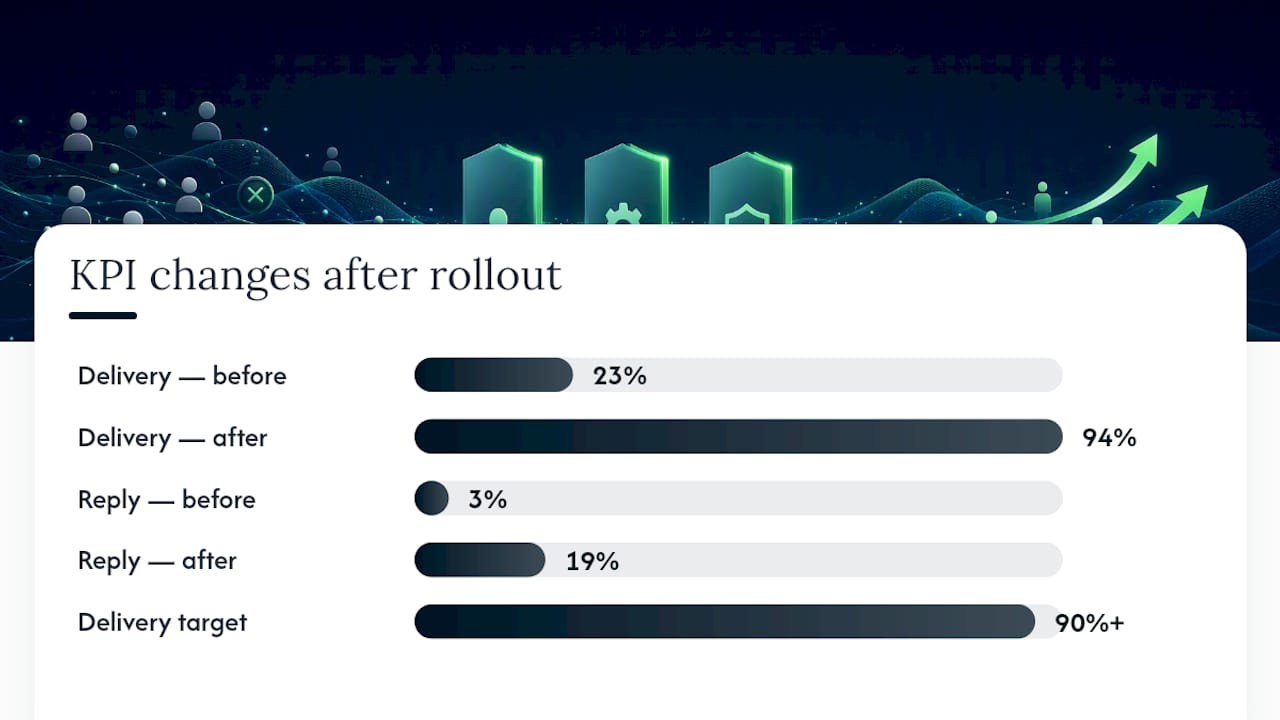
Track a small set of numbers consistently rather than a large dashboard nobody checks. Delivery rate tells you if candidates are getting anything at all. Open rate and reply rate tell you if the message is landing. Positive reply share and reapplication rate tell you whether your employer brand is intact or eroding. Interview and Glassdoor ratings tell you whether the pattern is visible externally.
One mid-market case study gives a useful benchmark for what’s achievable. A company that rolled out stage-specific automated rejection workflows raised its feedback delivery rate from 23% to 94% within 60 days, while candidate reply rates climbed from 3% to 19%.
Delivery rate: aim for 90%+ within the first quarter of rollout.
Reply rate: even a modest increase (from low single digits to double digits) signals candidates feel the message is worth responding to.
Cost-per-hire: track quarter over quarter, since automation’s savings compound as recruiter hours get reallocated to sourcing and interviewing.
Reapplication rate: a leading indicator of employer-brand health that most teams never measure at all.
When you report these numbers to talent leadership, frame them against recruiter time saved, not just candidate sentiment.
How Recruitify Builds These Controls Into the Platform
Recruitify was built around the idea that stage-based communication should be a default setting, not a custom project every agency has to engineer from scratch. The platform’s automation workflows map directly to the pipeline stages described throughout this playbook, from initial application through final-round decisions, and each stage can carry its own template depth, SLA timer, and sign-off requirement.
The GDPR consent management module logs a full audit trail for every automated message sent, which matters when a candidate later asks what was communicated and when. Variable mapping pulls from contextual matching and scoring data already stored on the candidate record, so recruiters aren’t manually typing competency notes into every rejection.
Recruitify states that agencies using its full automation suite see a 70% reduction in administrative tasks, a claim the platform ties directly to workflows like the ones this article describes: acknowledgment emails, screening decisions, and interview-stage communication running without manual recruiter intervention at every step.
A Note From the Recruitify Team
We built our automation tools around a simple conviction: speed and empathy aren’t in conflict, they just require different levels of human attention at different pipeline stages. The guardrails in this playbook, stage-based templates, timing SLAs, mandatory sign-off past the interview, aren’t theoretical. They reflect the same architecture we’ve put into our own platform. If you want to see how stage-specific templates and variable mapping might work for your team, we’re glad to walk through a pilot.
- Recruitify Team
Automate Rejections Without Losing the Human Touch
Recruitify is built for exactly the workflow this playbook describes: stage-triggered templates, variable injection from scorecards, sign-off routing for late-stage rejections, and a full GDPR audit trail so nothing about a candidate’s rejection history disappears into a spreadsheet.

Instead of stitching together your ATS, a mail tool, and a manual approval chain in Slack, the automation module handles trigger mapping and template branching in one place, and the recruitment projects view keeps every pipeline stage visible so nobody misses an SLA. Recruitify’s Recruitment Agencies plan runs 79 EUR per month per user, and the HR Team plan runs 69 EUR per month per user, both billed monthly. If you’re managing hiring at enterprise scale, pricing for the Enterprise plan is available on request. Check current plan details on the pricing page or request a demo to see how stage-based rejection automation would map onto your existing pipeline.
Sources
The timing and fairness findings in this guide come from a peer-reviewed study on candidate reactions to rejection delays published through Cambridge, which measured fairness, satisfaction, and reapplication intent across different rejection delays.
The ROI figures and implementation steps draw on two US Tech Automations publications covering a real candidate-experience automation case study and a broader workflow guide for rejection feedback automation. Candidate expectation data comes from Jobvite’s Job-Seeker Nation Report.
FAQ
Should I Reply to an Automated Rejection Email?
Replying rarely changes an already-finalized decision, but it can help if you want specific feedback or want to stay on the recruiter’s radar for future roles. Recruiters increasingly route these replies into triage systems, so a polite, specific reply is more likely to get read than a generic one.
Why Am I Getting Immediate Rejection Emails to Job Applications?
Immediate rejections usually mean an applicant tracking system screened your resume against required qualifications, like a specific certification or years of experience, and it didn’t match before a human ever saw the application. This is standard for high-volume roles, where automated resume screens using AI scoring filter applications within minutes or hours of submission.
How Do You Politely Reject a Candidate in an Email?
Keep the message honest, brief, and specific to the stage the candidate reached. Include the role name and at least one specific detail from the interaction, thank them for their time, and avoid vague language that suggests more feedback than you’re actually providing.
Why Do I Keep Getting Auto-Rejected From Jobs?
Repeated automated rejections usually point to a mismatch between your resume’s stated qualifications and the specific keywords or requirements the applicant tracking system is scanning for, rather than anything wrong with your background. Tailoring your resume’s language to match the job posting’s specific terms, rather than submitting one generic version everywhere, tends to reduce this pattern.
Recommended


News & Updates
Stay up-to-date with the latest innovations, features, and tips about Recruitify!
By providing your email address within the newsletter sign-up form, you confirm its processing to send marketing information regarding the Administrator’s products and services. The Administrator of your personal data processed for the abovementioned purposes is Recruitify Spółka z o.o., based in Warsaw, Poland (KRS 0000709889). For more information on the principles of personal data processing and the rights of data subjects, please check the Privacy Policy.

Last updated:
3 Guardrails for Recruiters Using Automated Rejection Emails
HR Analytics
The Recruitify Team
Yes, automate rejection emails to stop candidate ghosting, but only with three guardrails in place: stage-based templates that match the depth of the relationship, timing SLAs that respect research on candidate fairness, and human sign-off for anyone rejected after an interview. Skip any one of those three and automation turns into the exact employer-brand liability recruiters fear.
Automated rejection emails work best when they are stage-specific, timely, and reviewed by a human for final-stage rejections.
Sending acknowledgment emails within 3 days and interview rejections within 24 to 48 hours significantly improves candidate perception and reapplication likelihood.
Sign-off approval is essential for post-interview rejections to ensure accuracy, with initial stages requiring less oversight and final decisions needing managerial validation.
Personalization through interview notes and specific observations increases candidate engagement and prevents messages from feeling impersonal or robotic.
Tracking delivery, open, reply rates, and reapplication metrics helps measure the ROI and effectiveness of rejection automation efforts.
RecruitifyAutomate Recruitment With More ControlRecruitify brings ATS, Sales CRM, and IT contracting workflows together, helping recruitment agencies manage processes and candidate data in one ecosystem.Explore Recruitify
Table of Contents
What Are Automated Rejection Emails?
Quick Checklist: Day-One Setup To Stop Ghosting
Stage-By-Stage Templates: What To Say and How Long To Write
When Should You Send a Rejection Email?
Who Should Approve Automated Rejection Emails?
What Should You Do With Candidate Replies?
How Do You Roll Out Automated Rejection Emails in Your ATS?
How Do You Measure the ROI of Rejection Email Automation?
How Recruitify Builds These Controls Into the Platform
A Note From the Recruitify Team
Automate Rejections Without Losing the Human Touch
Sources
FAQ
What Are Automated Rejection Emails?
Automated rejection emails are pre-built, trigger-based messages your applicant tracking system sends when a candidate’s status changes to “not selected.” They range from a one-line acknowledgment after an online application to a detailed, manager-reviewed note after a final-round interview. The mechanism is simple. The judgment about when, how, and to whom you send them is where most teams get it wrong.
The mistake isn’t automation itself. It’s treating every rejection the same way, regardless of how much time and hope the candidate invested. A candidate who spent an hour submitting a resume does not need the same message as one who took a half-day off work for a final interview. Recruiters who understand that distinction, and build their workflows around it, get the upside of automation (speed, consistency, zero ghosting) without the downside (a candidate who felt like a number).
Quick Checklist: Day-One Setup To Stop Ghosting
You don’t need a six-month project to fix rejection communication. Most of the groundwork can happen in a single working session if you tackle it in the right order.
Map your pipeline stages first. List every stage in your process (applied, screened, phone interview, in-person interview, final round, offer) and decide how much template depth each one deserves.
Set your SLAs before you write a single template. Acknowledgment emails should go out within 3 business days, interview-stage decisions within 24 to 72 hours, and final decisions within 24 to 48 hours after the decision is made.
Assign sign-off owners. Decide, in writing, who approves a rejection at each stage. Early-stage emails can go out with zero human review. Anything post-interview needs a name attached.
Turn on basic analytics from day one. Track delivery rate, open rate, and reply rate for every template so you have a baseline before you start optimizing.
The point of this checklist isn’t perfection. It’s closing the biggest gap first: candidates who apply and never hear anything again. That single fix, an automated acknowledgment with a realistic timeline, eliminates most of the “black hole” complaints that damage employer review scores before you’ve touched anything else.
Stage-By-Stage Templates: What To Say and How Long To Write
Template length should track emotional investment, not administrative convenience. A candidate who submitted an application five minutes ago has a different relationship with your company than one who just left a 45-minute interview with your hiring manager. Automated rejections that ignore this gradient are the ones that generate angry LinkedIn posts.
Application acknowledgment (40 to 80 words). This isn’t a rejection at all, it’s a receipt. Confirm the application arrived, state a realistic timeline for next steps, and stop. No feedback, no filler.
Resume screen rejection (60 to 100 words). This is the first true “no.” Keep it brief but give one directional reason or point to another open role if one fits. Candidates at this stage rarely expect a detailed explanation, but they do expect the response to feel like it was written for a real job, not a form letter.
Phone screen rejection (150 to 200 words). Once someone has spoken to a recruiter, a generic template feels like a downgrade. Include one specific, honest observation from the call, even a small one, because that single detail is what separates a form rejection from a message that reads as considered.
First interview rejection (250 to 350 words). At this stage, candidates have met your team and invested real time. The message should reference at least one competency area discussed in the interview and explain, at a high level, why another candidate was a closer match.
Final round rejection (400 to 500 words). This is the highest-stakes message you’ll send. It should be checked by the hiring manager before it goes out, reference specifics from the interview, and, where possible, offer a scheduling link for a short call. Talent Board data cited in industry research shows candidates rate phone rejections far more positively than emails at this stage, so pairing the email with a call option closes that gap without requiring a call for every candidate.
Stage | Word count | Core content | Human review required |
|---|---|---|---|
Application acknowledgment | 40 to 80 | Confirmation, timeline | No |
Resume screen | 60 to 100 | Brief reason or redirect | No |
Phone screen | 150 to 200 | One specific observation | Spot check |
First interview | 250 to 350 | Competency feedback | Recommended |
Final round | 400 to 500 | Manager-checked note, call option | Mandatory |
Every template, regardless of stage, needs a minimum set of personalization fields: candidate name, role title, and at least one competency or observation specific to that person. Beyond that, follow what’s sometimes called the two-line personalization habit: one sentence pulled from actual interview notes, plus one sincere closing line that isn’t boilerplate. That combination is often enough to make an automated message read as genuinely written, without adding meaningful time to the process. Industry case data backs this up directly: platforms that inject scorecard data and interviewer notes into templates see candidates report the message felt personally written far more often than plain-template messages.
When Should You Send a Rejection Email?
Speed matters more than most recruiters assume, and the research on this is specific. A study published through Cambridge found that candidates who waited one week for a rejection reported significantly better outcomes across the board compared to those who waited two weeks. The effect sizes were large: fairness perception improved with an effect size of d = 1.01, satisfaction by d = .78, and intention to reapply by d = .84, all favoring the shorter one-week delay.
The takeaway on timing: waiting an extra week to reject a candidate doesn’t just feel worse to them, it measurably damages your chance of ever hiring them later. Intention to reapply drops with every added day of silence.
That data lines up with what candidates say they expect. Jobvite’s Job-Seeker Nation research found that 57% of candidates expect to hear back within three days if they haven’t been selected. Build your SLAs around that expectation, not around what’s convenient for your recruiting team’s workload.
Recommended windows, by stage:
Application acknowledgment: within a few business days of submission.
Resume screen rejections: promptly, often within days, or faster for high-volume roles using automated screening.
Post-interview rejections: sent as quickly as possible after the decision is finalized.
Final-round decisions: always after a human check and sent promptly.
Exceptions happen, and pretending they won’t just creates silent SLA violations. If a hiring manager delays a decision, tell the candidate that a timeline has shifted rather than letting the deadline pass with no message at all. If an offer gets rescinded after being extended, that communication should never be automated. It goes through a recruiter or hiring manager directly, by phone if possible.
Who Should Approve Automated Rejection Emails?
Automation should scale confidently at the top of the funnel and slow down deliberately at the bottom. That’s the entire logic of a human-in-the-loop policy, and it’s worth writing down as a formal rule rather than leaving it to individual recruiter judgment.
No sign-off required: application acknowledgments and resume-screen rejections can go out automatically, with periodic spot checks rather than case-by-case review.
Recruiter sign-off required: phone screen and first-interview rejections should get a quick recruiter glance before sending, mainly to catch missing or wrong variable data.
Hiring manager sign-off required: final-round rejections need explicit approval from whoever ran the interview, since they’re the only person who can confirm the feedback is accurate.
Fallback text is mandatory: when interviewer notes or scorecard data are missing, the template needs a graceful fallback sentence rather than a blank field or an awkward gap.
Quality assurance runs continuously: shadow-mode testing (generating emails without sending them) catches tone drift and variable errors before candidates ever see them, and periodic template reviews catch drift that creeps in over months of edits.
Pro Tip: Run every new or edited template through shadow mode for at least 20 real candidate records before it goes live. You’ll catch broken variable fields (a missing name, a blank competency slot) that no amount of proofreading in the template editor will reveal.
The sign-off checklist itself should be short enough that hiring managers actually use it: does the feedback match what was discussed in the interview, is the tone appropriate, and is the call-to-action (if any) correct.
What Should You Do With Candidate Replies?
A reply to a rejection email is one of the few unsolicited pieces of feedback recruiting teams get, and most organizations either ignore it or route it into a general inbox where it dies. That’s a wasted signal.
Sort incoming replies into three buckets the moment they arrive. Positive replies (a candidate thanking you, asking to be considered for future roles) can be auto-acknowledged and logged for future sourcing. Question replies (asking for more specific feedback, or clarification on the decision) should route to the original recruiter with a defined response window. Negative replies (frustration, a dispute over the decision, anything with legal risk language) need to escalate to a senior recruiter or HR lead fast, ideally within a few hours rather than sitting in a queue overnight.
Simple sentiment flagging, even rule-based rather than fully automated, helps prioritize which replies need attention first. A reply containing words like “unfair” or “discriminat” should never wait behind a routine thank-you note.
Replies also function as a free audit of your hiring process, if you bother to read them in aggregate:
Repeated confusion about a role’s responsibilities points to a poorly written job description.
Multiple candidates mentioning a long gap between interview and rejection flags a bottleneck in manager decision-making.
Candidates asking why they weren’t told about a skills gap earlier suggests your screening stage needs a clearer rejection reason.
None of that intelligence shows up in a delivery-rate dashboard. It only shows up if someone actually reads what candidates write back.
How Do You Roll Out Automated Rejection Emails in Your ATS?
Implementation fails most often because teams try to automate everything at once instead of proving the system works on a narrow slice of hiring first.
Map your stage-transition triggers. Identify every point in your ATS where a status change should fire a rejection email, and attach a specific rejection reason code to each one rather than a single generic “not selected” flag.
Connect variable sources. Link scorecard fields and interviewer notes into your template variables, and build a fallback sentence for every field that might come back empty.
Run shadow mode for at least a week. Generate the emails your triggers would send without actually sending them, and have a recruiter review a sample for tone, accuracy, and broken variables.
Launch in phases. Start with one role family, typically the highest-volume one, confirm delivery and reply metrics look healthy, then expand to the rest of your open roles.
A platform like Recruitify’s automation module handles the trigger-mapping and variable-injection layer natively, which removes most of the manual webhook work teams otherwise build by hand. Whatever system you use, the sequence matters more than the tool: triggers first, variables second, shadow testing third, phased launch last. Skipping shadow mode is the single most common cause of an embarrassing mass-send error.
How Do You Measure the ROI of Rejection Email Automation?
Track a small set of numbers consistently rather than a large dashboard nobody checks. Delivery rate tells you if candidates are getting anything at all. Open rate and reply rate tell you if the message is landing. Positive reply share and reapplication rate tell you whether your employer brand is intact or eroding. Interview and Glassdoor ratings tell you whether the pattern is visible externally.
One mid-market case study gives a useful benchmark for what’s achievable. A company that rolled out stage-specific automated rejection workflows raised its feedback delivery rate from 23% to 94% within 60 days, while candidate reply rates climbed from 3% to 19%.
Delivery rate: aim for 90%+ within the first quarter of rollout.
Reply rate: even a modest increase (from low single digits to double digits) signals candidates feel the message is worth responding to.
Cost-per-hire: track quarter over quarter, since automation’s savings compound as recruiter hours get reallocated to sourcing and interviewing.
Reapplication rate: a leading indicator of employer-brand health that most teams never measure at all.
When you report these numbers to talent leadership, frame them against recruiter time saved, not just candidate sentiment.
How Recruitify Builds These Controls Into the Platform
Recruitify was built around the idea that stage-based communication should be a default setting, not a custom project every agency has to engineer from scratch. The platform’s automation workflows map directly to the pipeline stages described throughout this playbook, from initial application through final-round decisions, and each stage can carry its own template depth, SLA timer, and sign-off requirement.
The GDPR consent management module logs a full audit trail for every automated message sent, which matters when a candidate later asks what was communicated and when. Variable mapping pulls from contextual matching and scoring data already stored on the candidate record, so recruiters aren’t manually typing competency notes into every rejection.
Recruitify states that agencies using its full automation suite see a 70% reduction in administrative tasks, a claim the platform ties directly to workflows like the ones this article describes: acknowledgment emails, screening decisions, and interview-stage communication running without manual recruiter intervention at every step.
A Note From the Recruitify Team
We built our automation tools around a simple conviction: speed and empathy aren’t in conflict, they just require different levels of human attention at different pipeline stages. The guardrails in this playbook, stage-based templates, timing SLAs, mandatory sign-off past the interview, aren’t theoretical. They reflect the same architecture we’ve put into our own platform. If you want to see how stage-specific templates and variable mapping might work for your team, we’re glad to walk through a pilot.
- Recruitify Team
Automate Rejections Without Losing the Human Touch
Recruitify is built for exactly the workflow this playbook describes: stage-triggered templates, variable injection from scorecards, sign-off routing for late-stage rejections, and a full GDPR audit trail so nothing about a candidate’s rejection history disappears into a spreadsheet.
Instead of stitching together your ATS, a mail tool, and a manual approval chain in Slack, the automation module handles trigger mapping and template branching in one place, and the recruitment projects view keeps every pipeline stage visible so nobody misses an SLA. Recruitify’s Recruitment Agencies plan runs 79 EUR per month per user, and the HR Team plan runs 69 EUR per month per user, both billed monthly. If you’re managing hiring at enterprise scale, pricing for the Enterprise plan is available on request. Check current plan details on the pricing page or request a demo to see how stage-based rejection automation would map onto your existing pipeline.
Sources
The timing and fairness findings in this guide come from a peer-reviewed study on candidate reactions to rejection delays published through Cambridge, which measured fairness, satisfaction, and reapplication intent across different rejection delays.
The ROI figures and implementation steps draw on two US Tech Automations publications covering a real candidate-experience automation case study and a broader workflow guide for rejection feedback automation. Candidate expectation data comes from Jobvite’s Job-Seeker Nation Report.
FAQ
Should I Reply to an Automated Rejection Email?
Replying rarely changes an already-finalized decision, but it can help if you want specific feedback or want to stay on the recruiter’s radar for future roles. Recruiters increasingly route these replies into triage systems, so a polite, specific reply is more likely to get read than a generic one.
Why Am I Getting Immediate Rejection Emails to Job Applications?
Immediate rejections usually mean an applicant tracking system screened your resume against required qualifications, like a specific certification or years of experience, and it didn’t match before a human ever saw the application. This is standard for high-volume roles, where automated resume screens using AI scoring filter applications within minutes or hours of submission.
How Do You Politely Reject a Candidate in an Email?
Keep the message honest, brief, and specific to the stage the candidate reached. Include the role name and at least one specific detail from the interaction, thank them for their time, and avoid vague language that suggests more feedback than you’re actually providing.
Why Do I Keep Getting Auto-Rejected From Jobs?
Repeated automated rejections usually point to a mismatch between your resume’s stated qualifications and the specific keywords or requirements the applicant tracking system is scanning for, rather than anything wrong with your background. Tailoring your resume’s language to match the job posting’s specific terms, rather than submitting one generic version everywhere, tends to reduce this pattern.
Recommended
News & Updates
Stay up-to-date with the latest innovations, features, and tips about Recruitify!
By providing your email address within the newsletter sign-up form, you confirm its processing to send marketing information regarding the Administrator’s products and services. The Administrator of your personal data processed for the abovementioned purposes is Recruitify Spółka z o.o., based in Warsaw, Poland (KRS 0000709889). For more information on the principles of personal data processing and the rights of data subjects, please check the Privacy Policy.
Last updated:
3 Guardrails for Recruiters Using Automated Rejection Emails
HR Analytics
The Recruitify Team
Yes, automate rejection emails to stop candidate ghosting, but only with three guardrails in place: stage-based templates that match the depth of the relationship, timing SLAs that respect research on candidate fairness, and human sign-off for anyone rejected after an interview. Skip any one of those three and automation turns into the exact employer-brand liability recruiters fear.
Automated rejection emails work best when they are stage-specific, timely, and reviewed by a human for final-stage rejections.
Sending acknowledgment emails within 3 days and interview rejections within 24 to 48 hours significantly improves candidate perception and reapplication likelihood.
Sign-off approval is essential for post-interview rejections to ensure accuracy, with initial stages requiring less oversight and final decisions needing managerial validation.
Personalization through interview notes and specific observations increases candidate engagement and prevents messages from feeling impersonal or robotic.
Tracking delivery, open, reply rates, and reapplication metrics helps measure the ROI and effectiveness of rejection automation efforts.
RecruitifyAutomate Recruitment With More ControlRecruitify brings ATS, Sales CRM, and IT contracting workflows together, helping recruitment agencies manage processes and candidate data in one ecosystem.Explore Recruitify
Table of Contents
What Are Automated Rejection Emails?
Quick Checklist: Day-One Setup To Stop Ghosting
Stage-By-Stage Templates: What To Say and How Long To Write
When Should You Send a Rejection Email?
Who Should Approve Automated Rejection Emails?
What Should You Do With Candidate Replies?
How Do You Roll Out Automated Rejection Emails in Your ATS?
How Do You Measure the ROI of Rejection Email Automation?
How Recruitify Builds These Controls Into the Platform
A Note From the Recruitify Team
Automate Rejections Without Losing the Human Touch
Sources
FAQ
What Are Automated Rejection Emails?
Automated rejection emails are pre-built, trigger-based messages your applicant tracking system sends when a candidate’s status changes to “not selected.” They range from a one-line acknowledgment after an online application to a detailed, manager-reviewed note after a final-round interview. The mechanism is simple. The judgment about when, how, and to whom you send them is where most teams get it wrong.
The mistake isn’t automation itself. It’s treating every rejection the same way, regardless of how much time and hope the candidate invested. A candidate who spent an hour submitting a resume does not need the same message as one who took a half-day off work for a final interview. Recruiters who understand that distinction, and build their workflows around it, get the upside of automation (speed, consistency, zero ghosting) without the downside (a candidate who felt like a number).
Quick Checklist: Day-One Setup To Stop Ghosting
You don’t need a six-month project to fix rejection communication. Most of the groundwork can happen in a single working session if you tackle it in the right order.
Map your pipeline stages first. List every stage in your process (applied, screened, phone interview, in-person interview, final round, offer) and decide how much template depth each one deserves.
Set your SLAs before you write a single template. Acknowledgment emails should go out within 3 business days, interview-stage decisions within 24 to 72 hours, and final decisions within 24 to 48 hours after the decision is made.
Assign sign-off owners. Decide, in writing, who approves a rejection at each stage. Early-stage emails can go out with zero human review. Anything post-interview needs a name attached.
Turn on basic analytics from day one. Track delivery rate, open rate, and reply rate for every template so you have a baseline before you start optimizing.
The point of this checklist isn’t perfection. It’s closing the biggest gap first: candidates who apply and never hear anything again. That single fix, an automated acknowledgment with a realistic timeline, eliminates most of the “black hole” complaints that damage employer review scores before you’ve touched anything else.
Stage-By-Stage Templates: What To Say and How Long To Write
Template length should track emotional investment, not administrative convenience. A candidate who submitted an application five minutes ago has a different relationship with your company than one who just left a 45-minute interview with your hiring manager. Automated rejections that ignore this gradient are the ones that generate angry LinkedIn posts.
Application acknowledgment (40 to 80 words). This isn’t a rejection at all, it’s a receipt. Confirm the application arrived, state a realistic timeline for next steps, and stop. No feedback, no filler.
Resume screen rejection (60 to 100 words). This is the first true “no.” Keep it brief but give one directional reason or point to another open role if one fits. Candidates at this stage rarely expect a detailed explanation, but they do expect the response to feel like it was written for a real job, not a form letter.
Phone screen rejection (150 to 200 words). Once someone has spoken to a recruiter, a generic template feels like a downgrade. Include one specific, honest observation from the call, even a small one, because that single detail is what separates a form rejection from a message that reads as considered.
First interview rejection (250 to 350 words). At this stage, candidates have met your team and invested real time. The message should reference at least one competency area discussed in the interview and explain, at a high level, why another candidate was a closer match.
Final round rejection (400 to 500 words). This is the highest-stakes message you’ll send. It should be checked by the hiring manager before it goes out, reference specifics from the interview, and, where possible, offer a scheduling link for a short call. Talent Board data cited in industry research shows candidates rate phone rejections far more positively than emails at this stage, so pairing the email with a call option closes that gap without requiring a call for every candidate.
Stage | Word count | Core content | Human review required |
|---|---|---|---|
Application acknowledgment | 40 to 80 | Confirmation, timeline | No |
Resume screen | 60 to 100 | Brief reason or redirect | No |
Phone screen | 150 to 200 | One specific observation | Spot check |
First interview | 250 to 350 | Competency feedback | Recommended |
Final round | 400 to 500 | Manager-checked note, call option | Mandatory |
Every template, regardless of stage, needs a minimum set of personalization fields: candidate name, role title, and at least one competency or observation specific to that person. Beyond that, follow what’s sometimes called the two-line personalization habit: one sentence pulled from actual interview notes, plus one sincere closing line that isn’t boilerplate. That combination is often enough to make an automated message read as genuinely written, without adding meaningful time to the process. Industry case data backs this up directly: platforms that inject scorecard data and interviewer notes into templates see candidates report the message felt personally written far more often than plain-template messages.
When Should You Send a Rejection Email?
Speed matters more than most recruiters assume, and the research on this is specific. A study published through Cambridge found that candidates who waited one week for a rejection reported significantly better outcomes across the board compared to those who waited two weeks. The effect sizes were large: fairness perception improved with an effect size of d = 1.01, satisfaction by d = .78, and intention to reapply by d = .84, all favoring the shorter one-week delay.
The takeaway on timing: waiting an extra week to reject a candidate doesn’t just feel worse to them, it measurably damages your chance of ever hiring them later. Intention to reapply drops with every added day of silence.
That data lines up with what candidates say they expect. Jobvite’s Job-Seeker Nation research found that 57% of candidates expect to hear back within three days if they haven’t been selected. Build your SLAs around that expectation, not around what’s convenient for your recruiting team’s workload.
Recommended windows, by stage:
Application acknowledgment: within a few business days of submission.
Resume screen rejections: promptly, often within days, or faster for high-volume roles using automated screening.
Post-interview rejections: sent as quickly as possible after the decision is finalized.
Final-round decisions: always after a human check and sent promptly.
Exceptions happen, and pretending they won’t just creates silent SLA violations. If a hiring manager delays a decision, tell the candidate that a timeline has shifted rather than letting the deadline pass with no message at all. If an offer gets rescinded after being extended, that communication should never be automated. It goes through a recruiter or hiring manager directly, by phone if possible.
Who Should Approve Automated Rejection Emails?
Automation should scale confidently at the top of the funnel and slow down deliberately at the bottom. That’s the entire logic of a human-in-the-loop policy, and it’s worth writing down as a formal rule rather than leaving it to individual recruiter judgment.
No sign-off required: application acknowledgments and resume-screen rejections can go out automatically, with periodic spot checks rather than case-by-case review.
Recruiter sign-off required: phone screen and first-interview rejections should get a quick recruiter glance before sending, mainly to catch missing or wrong variable data.
Hiring manager sign-off required: final-round rejections need explicit approval from whoever ran the interview, since they’re the only person who can confirm the feedback is accurate.
Fallback text is mandatory: when interviewer notes or scorecard data are missing, the template needs a graceful fallback sentence rather than a blank field or an awkward gap.
Quality assurance runs continuously: shadow-mode testing (generating emails without sending them) catches tone drift and variable errors before candidates ever see them, and periodic template reviews catch drift that creeps in over months of edits.
Pro Tip: Run every new or edited template through shadow mode for at least 20 real candidate records before it goes live. You’ll catch broken variable fields (a missing name, a blank competency slot) that no amount of proofreading in the template editor will reveal.
The sign-off checklist itself should be short enough that hiring managers actually use it: does the feedback match what was discussed in the interview, is the tone appropriate, and is the call-to-action (if any) correct.
What Should You Do With Candidate Replies?
A reply to a rejection email is one of the few unsolicited pieces of feedback recruiting teams get, and most organizations either ignore it or route it into a general inbox where it dies. That’s a wasted signal.
Sort incoming replies into three buckets the moment they arrive. Positive replies (a candidate thanking you, asking to be considered for future roles) can be auto-acknowledged and logged for future sourcing. Question replies (asking for more specific feedback, or clarification on the decision) should route to the original recruiter with a defined response window. Negative replies (frustration, a dispute over the decision, anything with legal risk language) need to escalate to a senior recruiter or HR lead fast, ideally within a few hours rather than sitting in a queue overnight.
Simple sentiment flagging, even rule-based rather than fully automated, helps prioritize which replies need attention first. A reply containing words like “unfair” or “discriminat” should never wait behind a routine thank-you note.
Replies also function as a free audit of your hiring process, if you bother to read them in aggregate:
Repeated confusion about a role’s responsibilities points to a poorly written job description.
Multiple candidates mentioning a long gap between interview and rejection flags a bottleneck in manager decision-making.
Candidates asking why they weren’t told about a skills gap earlier suggests your screening stage needs a clearer rejection reason.
None of that intelligence shows up in a delivery-rate dashboard. It only shows up if someone actually reads what candidates write back.
How Do You Roll Out Automated Rejection Emails in Your ATS?
Implementation fails most often because teams try to automate everything at once instead of proving the system works on a narrow slice of hiring first.
Map your stage-transition triggers. Identify every point in your ATS where a status change should fire a rejection email, and attach a specific rejection reason code to each one rather than a single generic “not selected” flag.
Connect variable sources. Link scorecard fields and interviewer notes into your template variables, and build a fallback sentence for every field that might come back empty.
Run shadow mode for at least a week. Generate the emails your triggers would send without actually sending them, and have a recruiter review a sample for tone, accuracy, and broken variables.
Launch in phases. Start with one role family, typically the highest-volume one, confirm delivery and reply metrics look healthy, then expand to the rest of your open roles.
A platform like Recruitify’s automation module handles the trigger-mapping and variable-injection layer natively, which removes most of the manual webhook work teams otherwise build by hand. Whatever system you use, the sequence matters more than the tool: triggers first, variables second, shadow testing third, phased launch last. Skipping shadow mode is the single most common cause of an embarrassing mass-send error.
How Do You Measure the ROI of Rejection Email Automation?
Track a small set of numbers consistently rather than a large dashboard nobody checks. Delivery rate tells you if candidates are getting anything at all. Open rate and reply rate tell you if the message is landing. Positive reply share and reapplication rate tell you whether your employer brand is intact or eroding. Interview and Glassdoor ratings tell you whether the pattern is visible externally.
One mid-market case study gives a useful benchmark for what’s achievable. A company that rolled out stage-specific automated rejection workflows raised its feedback delivery rate from 23% to 94% within 60 days, while candidate reply rates climbed from 3% to 19%.
Delivery rate: aim for 90%+ within the first quarter of rollout.
Reply rate: even a modest increase (from low single digits to double digits) signals candidates feel the message is worth responding to.
Cost-per-hire: track quarter over quarter, since automation’s savings compound as recruiter hours get reallocated to sourcing and interviewing.
Reapplication rate: a leading indicator of employer-brand health that most teams never measure at all.
When you report these numbers to talent leadership, frame them against recruiter time saved, not just candidate sentiment.
How Recruitify Builds These Controls Into the Platform
Recruitify was built around the idea that stage-based communication should be a default setting, not a custom project every agency has to engineer from scratch. The platform’s automation workflows map directly to the pipeline stages described throughout this playbook, from initial application through final-round decisions, and each stage can carry its own template depth, SLA timer, and sign-off requirement.
The GDPR consent management module logs a full audit trail for every automated message sent, which matters when a candidate later asks what was communicated and when. Variable mapping pulls from contextual matching and scoring data already stored on the candidate record, so recruiters aren’t manually typing competency notes into every rejection.
Recruitify states that agencies using its full automation suite see a 70% reduction in administrative tasks, a claim the platform ties directly to workflows like the ones this article describes: acknowledgment emails, screening decisions, and interview-stage communication running without manual recruiter intervention at every step.
A Note From the Recruitify Team
We built our automation tools around a simple conviction: speed and empathy aren’t in conflict, they just require different levels of human attention at different pipeline stages. The guardrails in this playbook, stage-based templates, timing SLAs, mandatory sign-off past the interview, aren’t theoretical. They reflect the same architecture we’ve put into our own platform. If you want to see how stage-specific templates and variable mapping might work for your team, we’re glad to walk through a pilot.
- Recruitify Team
Automate Rejections Without Losing the Human Touch
Recruitify is built for exactly the workflow this playbook describes: stage-triggered templates, variable injection from scorecards, sign-off routing for late-stage rejections, and a full GDPR audit trail so nothing about a candidate’s rejection history disappears into a spreadsheet.
Instead of stitching together your ATS, a mail tool, and a manual approval chain in Slack, the automation module handles trigger mapping and template branching in one place, and the recruitment projects view keeps every pipeline stage visible so nobody misses an SLA. Recruitify’s Recruitment Agencies plan runs 79 EUR per month per user, and the HR Team plan runs 69 EUR per month per user, both billed monthly. If you’re managing hiring at enterprise scale, pricing for the Enterprise plan is available on request. Check current plan details on the pricing page or request a demo to see how stage-based rejection automation would map onto your existing pipeline.
Sources
The timing and fairness findings in this guide come from a peer-reviewed study on candidate reactions to rejection delays published through Cambridge, which measured fairness, satisfaction, and reapplication intent across different rejection delays.
The ROI figures and implementation steps draw on two US Tech Automations publications covering a real candidate-experience automation case study and a broader workflow guide for rejection feedback automation. Candidate expectation data comes from Jobvite’s Job-Seeker Nation Report.
FAQ
Should I Reply to an Automated Rejection Email?
Replying rarely changes an already-finalized decision, but it can help if you want specific feedback or want to stay on the recruiter’s radar for future roles. Recruiters increasingly route these replies into triage systems, so a polite, specific reply is more likely to get read than a generic one.
Why Am I Getting Immediate Rejection Emails to Job Applications?
Immediate rejections usually mean an applicant tracking system screened your resume against required qualifications, like a specific certification or years of experience, and it didn’t match before a human ever saw the application. This is standard for high-volume roles, where automated resume screens using AI scoring filter applications within minutes or hours of submission.
How Do You Politely Reject a Candidate in an Email?
Keep the message honest, brief, and specific to the stage the candidate reached. Include the role name and at least one specific detail from the interaction, thank them for their time, and avoid vague language that suggests more feedback than you’re actually providing.
Why Do I Keep Getting Auto-Rejected From Jobs?
Repeated automated rejections usually point to a mismatch between your resume’s stated qualifications and the specific keywords or requirements the applicant tracking system is scanning for, rather than anything wrong with your background. Tailoring your resume’s language to match the job posting’s specific terms, rather than submitting one generic version everywhere, tends to reduce this pattern.
Recommended
News & Updates
Stay up-to-date with the latest innovations, features, and tips about Recruitify!
By providing your email address within the newsletter sign-up form, you confirm its processing to send marketing information regarding the Administrator’s products and services. The Administrator of your personal data processed for the abovementioned purposes is Recruitify Spółka z o.o., based in Warsaw, Poland (KRS 0000709889). For more information on the principles of personal data processing and the rights of data subjects, please check the Privacy Policy.

Discover More

Applicant Tracking System
Copy These Interview Feedback Forms Recruiters Can Use in Their ATS
Copyable, stage-specific interview feedback forms Recruiters can paste into Google Forms or an ATS. Pilot a template, then review results after five...
21 Sept 2026
Discover More

Recruitment Process
Recruiters: Job Posting Automation, Safe Pilot and No Duplicate Posts
Guide for recruiters and agencies to implement job posting automation, get 60–90 day payback, prevent duplicate posts, and run a safe pilot.
19 Sept 2026
Discover More

Recruitment Process
Win Renewals With 7–10 KPIs: Client Reporting for Agencies
Automate client reporting for agencies around a focused 7 to 10 KPI set, white labeled dashboards, and a vendor agnostic checklist that proves ROI and...
18 Sept 2026
Discover More
Applicant Tracking System
Copy These Interview Feedback Forms Recruiters Can Use in Their ATS
Copyable, stage-specific interview feedback forms Recruiters can paste into Google Forms or an ATS. Pilot a template, then review results after five...
21 Sept 2026
Discover More
Recruitment Process
Recruiters: Job Posting Automation, Safe Pilot and No Duplicate Posts
Guide for recruiters and agencies to implement job posting automation, get 60–90 day payback, prevent duplicate posts, and run a safe pilot.
19 Sept 2026
Discover More

