
Last updated:
HR Teams: 3 Priorities and an RFP Checklist for Branded Career Portals

Recruitment Process

The Recruitify Team
A branded career portal is your organization’s customer-grade hiring front door, designed to convert qualified candidates through search, personalized content, and a low-friction apply flow. Aptitude Research finds that career sites now function as strategic assets rather than static branding pages, and accessibility guidance from the ILO/ITU treats inclusive design as a core requirement, not an afterthought. Start with a quick audit of your current apply flow, then prioritize three improvements before touching anything else.
TL;DR:
Prioritizing search, personalization, and accessibility in career portals improves candidate experience and reduces application drop-off rates.
Implementing staged apply flows and WCAG 2.1 Level AA accessibility standards can significantly enhance conversion rates.
Tailoring content and automation based on candidate segmentation and role interest increases relevance and shortlisting efficiency.
Ensuring technical SEO, fast loading times, and structured metadata makes job pages more discoverable and rank higher in search results.
Focusing on apply flow optimization, role-based landing pages, and analytics setup provides the best returns for resource-limited HR teams.
RecruitifyStreamline Recruitment OperationsRecruitify brings ATS, Sales CRM, and IT contracting workflows together, helping recruitment teams manage candidates, clients, and contracts in one ecosystem.Visit Recruitify
Table of Contents
Core features every branded career portal must provide
How do progressive disclosure and accessibility reduce drop-off?
Where should personalization and automation fit in the candidate journey?
What content actually converts candidates, and how should it be structured?
What technical settings keep job pages findable and fast?
Which KPIs prove a branded career portal is working?
What belongs on your implementation checklist before you buy?
How does a consolidated platform support this playbook?
What should resource-constrained HR teams prioritize first?
Recruitify: matching your checklist to a single platform
FAQ
Sources
Core features every branded career portal must provide
A career portal earns its name when its back end matches the polish of its front end. HR teams drafting an RFP should treat the following as baseline requirements, not nice-to-haves.
Structured job data with skills-first labels so search and filters return relevant roles instead of keyword noise.
Fast, mobile-first search with filters for location, function, and experience level.
A single-page or progressive disclosure apply flow that collects only what screening actually requires at each step.
Dedicated content areas for employer branding and role-based landing pages, separate from generic corporate pages.
Integrations with your applicant tracking system, single sign-on, analytics, and job multiposting tools.
GDPR-aligned consent capture with a full audit trail for every candidate record.
Aptitude Research notes that enterprise organizations increasingly build these portals around search and personalization rather than around a static “about us” page with a job board bolted on. That shift changes what counts as a minimum viable feature set: a portal without real search and segmentation is already behind.
How do progressive disclosure and accessibility reduce drop-off?
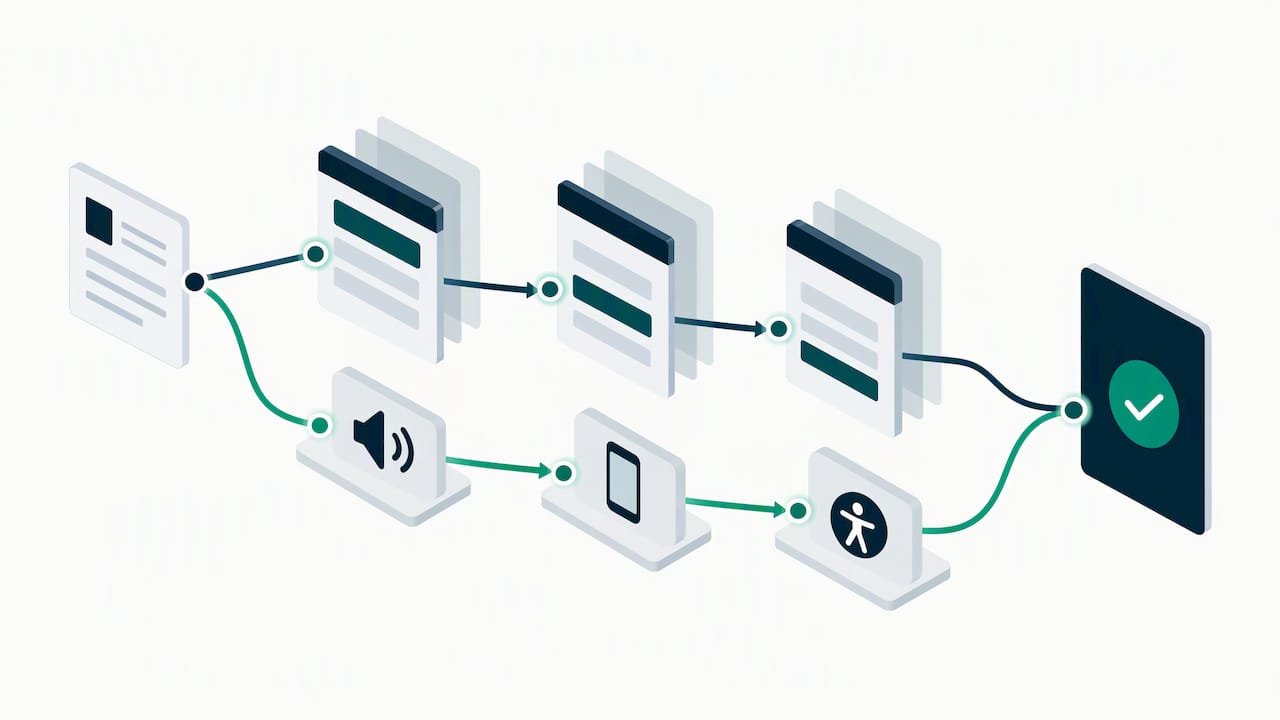
Candidates abandon applications when a form demands too much too soon. Progressive disclosure solves this by revealing fields in stages: a candidate first sees the role summary and a short interest form, then moves to work history, then to screening questions, only after committing to the first step. Aptitude Research identifies this pattern as a conversion-improving design choice, since it lowers the cognitive load of a long form presented all at once.
Accessibility should sit alongside this, not after it. The ILO/ITU guidebook recommends remediation aligned to WCAG 2.1 Level AA, which in practice means:
Full keyboard navigation for every interactive element, including filters and the apply flow.
Semantic HTML structure so screen readers can parse headings, forms, and buttons correctly.
Descriptive alt text on images and captions on any embedded video.
No critical text embedded only inside images, since that text becomes invisible to assistive technology and to search engines.
Mobile performance belongs in this same category: a slow-loading page is an accessibility barrier as much as a conversion one.
Pro Tip: Run your apply flow through a screen reader once a quarter. What breaks for assistive technology usually breaks for mobile users too.
Where should personalization and automation fit in the candidate journey?
Personalization works best when it is segmented, not generic: content and job recommendations should shift based on the candidate’s role interest, skill set, and traffic source. Contextual matching and scoring reduce the manual work of building shortlists, since the system evaluates applications against role requirements automatically rather than relying on keyword search alone.
Conversational tools, including chatbots, help with early-stage discovery and scheduling, letting candidates get quick answers without waiting on a recruiter. Automation extends further into the back office: OCR-based CV parsing, automatic shortlist generation, and workflow triggers that move a candidate between stages without manual re-entry. An example of this kind of automated sourcing shows how a persistent sourcing process can keep a talent pipeline active between active requisitions.
Despite the available tooling, adoption lags. Phenom’s 2025 benchmarks found that 87% of Fortune 500 companies fail to apply AI and automation effectively for hyper-personalization, and 83% had no chatbot at all. That gap is a genuine opening for any employer willing to close it.
Segment content by role, skill cluster, and traffic source rather than showing every visitor the same homepage.
Use contextual matching to generate shortlists instead of manually screening every resume.
Deploy a chatbot for basic discovery questions and interview scheduling.
Automate CV parsing and stage transitions to cut repetitive administrative work.
What content actually converts candidates, and how should it be structured?
Your employer value proposition should not live on a single “why work here” page. It needs to repeat, in different forms, across the journey: in job descriptions, on role landing pages, and in the apply confirmation itself. Phenom’s benchmarks found that 74% of organizations fail to clearly articulate their EVP across the candidate journey, which means most competitors are leaving this easy win unclaimed.
Build role- and skills-based landing pages for your highest-volume job families instead of relying on one generic careers page.
Use employee stories and day-in-the-life content to make abstract claims about culture concrete.
Add a skills matrix or clear qualification snapshot so candidates can self-select before applying.
Assign content owners and a review cadence, with templates and metadata standards so pages do not drift out of date.
Recruitment marketing itself is shifting toward more specific, human-centered messaging rather than broad employer branding slogans, and career portal content should follow that same direction.
What technical settings keep job pages findable and fast?
Discoverability depends on technical details that are easy to overlook. SAP’s career site guidance recommends structured metadata and job schema markup, along with including “job” naturally in titles and URLs where it fits the role.
Build stable category pages, since these hold long-term SEO value better than individual job postings that disappear once filled.
Control indexing and canonicalization for ephemeral search and filter result pages so search engines do not index thin duplicate content.
Avoid embedding brand copy only inside images; use accessible HTML text instead, which also helps search rankings.
Monitor page load time and Core Web Vitals, since slow pages suppress both rankings and apply completion.
Job multiposting tools can help distribute postings widely while keeping your own career portal as the canonical source candidates return to.
Which KPIs prove a branded career portal is working?
Four metrics matter most: apply conversion rate, time-to-fill, candidate satisfaction (often tracked as an NPS-style score), and quality-of-hire proxies such as offer-acceptance rate. Track them against a consistent event taxonomy so dashboards stay comparable month over month.
Instrument search, filter use, apply-start, apply-complete, and content-engagement events separately.
Test apply flow length, role landing page variants, and chatbot prompt wording through structured experiments.
Review results on a monthly cadence with a shared dashboard for recruiting, HR leadership, and hiring managers.
Recruitment automation tools that log these events automatically remove the manual reporting burden that often causes measurement programs to stall.
What belongs on your implementation checklist before you buy?
Turn every section above into a working checklist before you sit through a single vendor demo.
Confirm integrations: ATS connection, single sign-on, analytics, CMS, and multiposting support.
Verify AI matching accuracy claims and ask for a live demo on your own job requisitions, not a canned example.
Check GDPR consent handling and whether the platform maintains an audit trail for every candidate record.
Map internal readiness: who owns content, who handles data migration, and who runs QA before launch.
Plan a phased rollout: pilot on two or three roles, then scale, then optimize personalization based on early data.
Pro Tip: Ask every vendor the same acceptance-criteria question: what happens to candidate data and consent records if we cancel the contract?
How does a consolidated platform support this playbook?
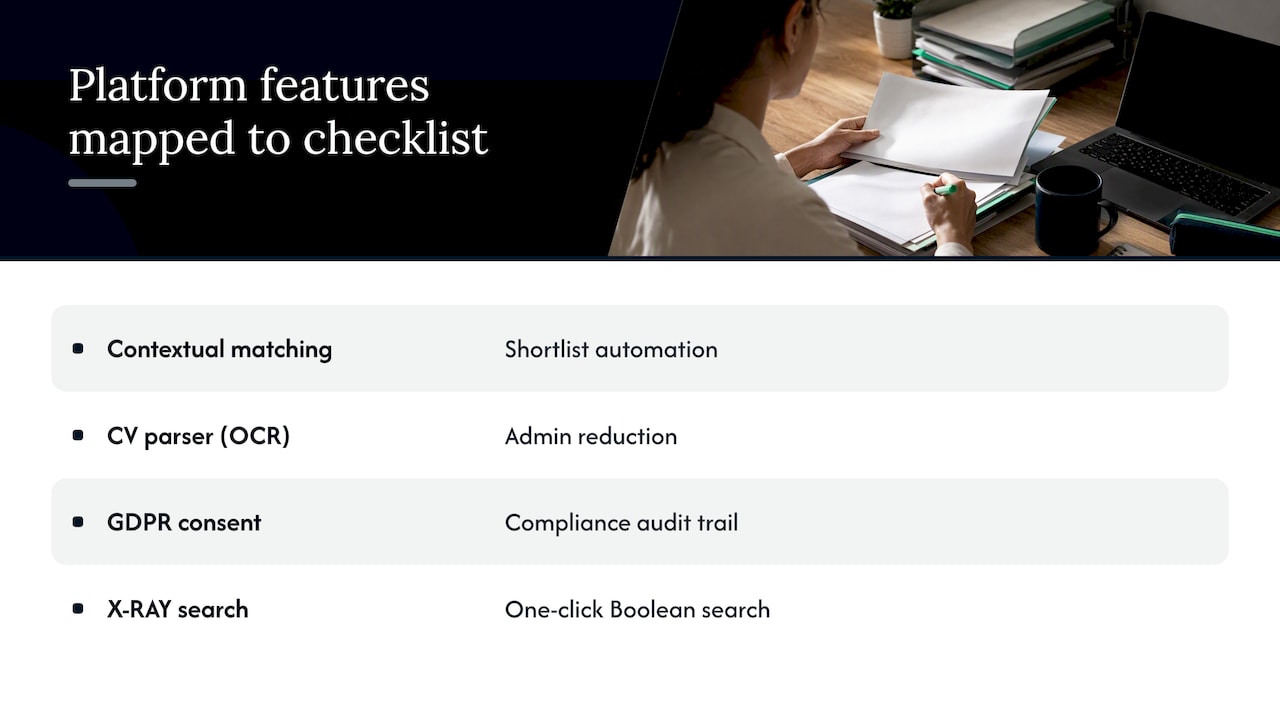
We built our own platform around the checklist above rather than around isolated features. Contextual matching AI scores applications against role requirements instead of relying on keyword search, and AI CV parsers can use OCR to build structured candidate profiles quickly while flagging duplicates. GDPR consent modules can maintain a full audit trail for every record, and X-RAY search tools can generate Boolean strings against the open web and databases with one click. Each of these maps directly to a checklist item above: matching to shortlist automation, OCR parsing to admin reduction, and consent management to compliance.
What should resource-constrained HR teams prioritize first?
If your team can only tackle three things this quarter, pick apply-flow optimization, role-based landing pages, and proper analytics instrumentation. Heavy branding without accessibility or performance work is wasted effort, since a slow or inaccessible page loses candidates before the branding even registers. A turnkey platform usually beats a custom build for teams without dedicated engineering capacity to maintain integrations and compliance long-term.
- Recruitify Team
Recruitify: matching your checklist to a single platform
We consolidate the ATS, CRM, and contracting functions that most career portal checklists treat as separate line items, which means fewer integrations to maintain and fewer handoffs between systems. Our contextual matching AI, OCR-based CV parser, GDPR audit trail, and X-RAY search tool address the matching, parsing, compliance, and sourcing items from the checklist above within one workspace.

Request a live demo against your own open roles, not a sample dataset.
Pilot the platform on two or three active requisitions before committing to a wider rollout.
Ask for reference conversations with current users in your industry segment.
Review our HR Team, Recruitment Agencies, and Enterprise plans to see which tier fits your team size, with HR Team priced from €69 per month per user and Recruitment Agencies from €79 per month per user.
FAQ
What is a career portal?
A career portal is a dedicated website or section of a company’s site where job seekers browse open roles, learn about the employer, and submit applications. A branded career portal extends this with custom visual identity, personalized content, and a streamlined apply flow designed to convert visitors into applicants.
What is the 70/30 rule in hiring?
This phrase is not a standardized industry framework with one agreed definition, and no source in this guide defines it. If your organization uses an internal sourcing or budget allocation rule, treat it as a company-specific policy rather than a universal hiring standard.
Is career.com a legit site?
We do not have firsthand information about that specific site’s operations or standing, so we cannot verify its legitimacy here. Evaluate any job site the way you would evaluate a career portal vendor: check for clear company information, transparent data practices, and verifiable employer listings before sharing personal data.
What is the best job recruiting website?
There is no single best recruiting website, since the right choice depends on your industry, candidate volume, and whether you need a job board, an owned career portal, or both. Many organizations combine a branded career portal for owned traffic with job multiposting to extend reach across external boards.
Sources
Recommended


News & Updates
Stay up-to-date with the latest innovations, features, and tips about Recruitify!
By providing your email address within the newsletter sign-up form, you confirm its processing to send marketing information regarding the Administrator’s products and services. The Administrator of your personal data processed for the abovementioned purposes is Recruitify Spółka z o.o., based in Warsaw, Poland (KRS 0000709889). For more information on the principles of personal data processing and the rights of data subjects, please check the Privacy Policy.

Last updated:
HR Teams: 3 Priorities and an RFP Checklist for Branded Career Portals
Recruitment Process
The Recruitify Team
A branded career portal is your organization’s customer-grade hiring front door, designed to convert qualified candidates through search, personalized content, and a low-friction apply flow. Aptitude Research finds that career sites now function as strategic assets rather than static branding pages, and accessibility guidance from the ILO/ITU treats inclusive design as a core requirement, not an afterthought. Start with a quick audit of your current apply flow, then prioritize three improvements before touching anything else.
TL;DR:
Prioritizing search, personalization, and accessibility in career portals improves candidate experience and reduces application drop-off rates.
Implementing staged apply flows and WCAG 2.1 Level AA accessibility standards can significantly enhance conversion rates.
Tailoring content and automation based on candidate segmentation and role interest increases relevance and shortlisting efficiency.
Ensuring technical SEO, fast loading times, and structured metadata makes job pages more discoverable and rank higher in search results.
Focusing on apply flow optimization, role-based landing pages, and analytics setup provides the best returns for resource-limited HR teams.
RecruitifyStreamline Recruitment OperationsRecruitify brings ATS, Sales CRM, and IT contracting workflows together, helping recruitment teams manage candidates, clients, and contracts in one ecosystem.Visit Recruitify
Table of Contents
Core features every branded career portal must provide
How do progressive disclosure and accessibility reduce drop-off?
Where should personalization and automation fit in the candidate journey?
What content actually converts candidates, and how should it be structured?
What technical settings keep job pages findable and fast?
Which KPIs prove a branded career portal is working?
What belongs on your implementation checklist before you buy?
How does a consolidated platform support this playbook?
What should resource-constrained HR teams prioritize first?
Recruitify: matching your checklist to a single platform
FAQ
Sources
Core features every branded career portal must provide
A career portal earns its name when its back end matches the polish of its front end. HR teams drafting an RFP should treat the following as baseline requirements, not nice-to-haves.
Structured job data with skills-first labels so search and filters return relevant roles instead of keyword noise.
Fast, mobile-first search with filters for location, function, and experience level.
A single-page or progressive disclosure apply flow that collects only what screening actually requires at each step.
Dedicated content areas for employer branding and role-based landing pages, separate from generic corporate pages.
Integrations with your applicant tracking system, single sign-on, analytics, and job multiposting tools.
GDPR-aligned consent capture with a full audit trail for every candidate record.
Aptitude Research notes that enterprise organizations increasingly build these portals around search and personalization rather than around a static “about us” page with a job board bolted on. That shift changes what counts as a minimum viable feature set: a portal without real search and segmentation is already behind.
How do progressive disclosure and accessibility reduce drop-off?
Candidates abandon applications when a form demands too much too soon. Progressive disclosure solves this by revealing fields in stages: a candidate first sees the role summary and a short interest form, then moves to work history, then to screening questions, only after committing to the first step. Aptitude Research identifies this pattern as a conversion-improving design choice, since it lowers the cognitive load of a long form presented all at once.
Accessibility should sit alongside this, not after it. The ILO/ITU guidebook recommends remediation aligned to WCAG 2.1 Level AA, which in practice means:
Full keyboard navigation for every interactive element, including filters and the apply flow.
Semantic HTML structure so screen readers can parse headings, forms, and buttons correctly.
Descriptive alt text on images and captions on any embedded video.
No critical text embedded only inside images, since that text becomes invisible to assistive technology and to search engines.
Mobile performance belongs in this same category: a slow-loading page is an accessibility barrier as much as a conversion one.
Pro Tip: Run your apply flow through a screen reader once a quarter. What breaks for assistive technology usually breaks for mobile users too.
Where should personalization and automation fit in the candidate journey?
Personalization works best when it is segmented, not generic: content and job recommendations should shift based on the candidate’s role interest, skill set, and traffic source. Contextual matching and scoring reduce the manual work of building shortlists, since the system evaluates applications against role requirements automatically rather than relying on keyword search alone.
Conversational tools, including chatbots, help with early-stage discovery and scheduling, letting candidates get quick answers without waiting on a recruiter. Automation extends further into the back office: OCR-based CV parsing, automatic shortlist generation, and workflow triggers that move a candidate between stages without manual re-entry. An example of this kind of automated sourcing shows how a persistent sourcing process can keep a talent pipeline active between active requisitions.
Despite the available tooling, adoption lags. Phenom’s 2025 benchmarks found that 87% of Fortune 500 companies fail to apply AI and automation effectively for hyper-personalization, and 83% had no chatbot at all. That gap is a genuine opening for any employer willing to close it.
Segment content by role, skill cluster, and traffic source rather than showing every visitor the same homepage.
Use contextual matching to generate shortlists instead of manually screening every resume.
Deploy a chatbot for basic discovery questions and interview scheduling.
Automate CV parsing and stage transitions to cut repetitive administrative work.
What content actually converts candidates, and how should it be structured?
Your employer value proposition should not live on a single “why work here” page. It needs to repeat, in different forms, across the journey: in job descriptions, on role landing pages, and in the apply confirmation itself. Phenom’s benchmarks found that 74% of organizations fail to clearly articulate their EVP across the candidate journey, which means most competitors are leaving this easy win unclaimed.
Build role- and skills-based landing pages for your highest-volume job families instead of relying on one generic careers page.
Use employee stories and day-in-the-life content to make abstract claims about culture concrete.
Add a skills matrix or clear qualification snapshot so candidates can self-select before applying.
Assign content owners and a review cadence, with templates and metadata standards so pages do not drift out of date.
Recruitment marketing itself is shifting toward more specific, human-centered messaging rather than broad employer branding slogans, and career portal content should follow that same direction.
What technical settings keep job pages findable and fast?
Discoverability depends on technical details that are easy to overlook. SAP’s career site guidance recommends structured metadata and job schema markup, along with including “job” naturally in titles and URLs where it fits the role.
Build stable category pages, since these hold long-term SEO value better than individual job postings that disappear once filled.
Control indexing and canonicalization for ephemeral search and filter result pages so search engines do not index thin duplicate content.
Avoid embedding brand copy only inside images; use accessible HTML text instead, which also helps search rankings.
Monitor page load time and Core Web Vitals, since slow pages suppress both rankings and apply completion.
Job multiposting tools can help distribute postings widely while keeping your own career portal as the canonical source candidates return to.
Which KPIs prove a branded career portal is working?
Four metrics matter most: apply conversion rate, time-to-fill, candidate satisfaction (often tracked as an NPS-style score), and quality-of-hire proxies such as offer-acceptance rate. Track them against a consistent event taxonomy so dashboards stay comparable month over month.
Instrument search, filter use, apply-start, apply-complete, and content-engagement events separately.
Test apply flow length, role landing page variants, and chatbot prompt wording through structured experiments.
Review results on a monthly cadence with a shared dashboard for recruiting, HR leadership, and hiring managers.
Recruitment automation tools that log these events automatically remove the manual reporting burden that often causes measurement programs to stall.
What belongs on your implementation checklist before you buy?
Turn every section above into a working checklist before you sit through a single vendor demo.
Confirm integrations: ATS connection, single sign-on, analytics, CMS, and multiposting support.
Verify AI matching accuracy claims and ask for a live demo on your own job requisitions, not a canned example.
Check GDPR consent handling and whether the platform maintains an audit trail for every candidate record.
Map internal readiness: who owns content, who handles data migration, and who runs QA before launch.
Plan a phased rollout: pilot on two or three roles, then scale, then optimize personalization based on early data.
Pro Tip: Ask every vendor the same acceptance-criteria question: what happens to candidate data and consent records if we cancel the contract?
How does a consolidated platform support this playbook?
We built our own platform around the checklist above rather than around isolated features. Contextual matching AI scores applications against role requirements instead of relying on keyword search, and AI CV parsers can use OCR to build structured candidate profiles quickly while flagging duplicates. GDPR consent modules can maintain a full audit trail for every record, and X-RAY search tools can generate Boolean strings against the open web and databases with one click. Each of these maps directly to a checklist item above: matching to shortlist automation, OCR parsing to admin reduction, and consent management to compliance.
What should resource-constrained HR teams prioritize first?
If your team can only tackle three things this quarter, pick apply-flow optimization, role-based landing pages, and proper analytics instrumentation. Heavy branding without accessibility or performance work is wasted effort, since a slow or inaccessible page loses candidates before the branding even registers. A turnkey platform usually beats a custom build for teams without dedicated engineering capacity to maintain integrations and compliance long-term.
- Recruitify Team
Recruitify: matching your checklist to a single platform
We consolidate the ATS, CRM, and contracting functions that most career portal checklists treat as separate line items, which means fewer integrations to maintain and fewer handoffs between systems. Our contextual matching AI, OCR-based CV parser, GDPR audit trail, and X-RAY search tool address the matching, parsing, compliance, and sourcing items from the checklist above within one workspace.
Request a live demo against your own open roles, not a sample dataset.
Pilot the platform on two or three active requisitions before committing to a wider rollout.
Ask for reference conversations with current users in your industry segment.
Review our HR Team, Recruitment Agencies, and Enterprise plans to see which tier fits your team size, with HR Team priced from €69 per month per user and Recruitment Agencies from €79 per month per user.
FAQ
What is a career portal?
A career portal is a dedicated website or section of a company’s site where job seekers browse open roles, learn about the employer, and submit applications. A branded career portal extends this with custom visual identity, personalized content, and a streamlined apply flow designed to convert visitors into applicants.
What is the 70/30 rule in hiring?
This phrase is not a standardized industry framework with one agreed definition, and no source in this guide defines it. If your organization uses an internal sourcing or budget allocation rule, treat it as a company-specific policy rather than a universal hiring standard.
Is career.com a legit site?
We do not have firsthand information about that specific site’s operations or standing, so we cannot verify its legitimacy here. Evaluate any job site the way you would evaluate a career portal vendor: check for clear company information, transparent data practices, and verifiable employer listings before sharing personal data.
What is the best job recruiting website?
There is no single best recruiting website, since the right choice depends on your industry, candidate volume, and whether you need a job board, an owned career portal, or both. Many organizations combine a branded career portal for owned traffic with job multiposting to extend reach across external boards.
Sources
Recommended
News & Updates
Stay up-to-date with the latest innovations, features, and tips about Recruitify!
By providing your email address within the newsletter sign-up form, you confirm its processing to send marketing information regarding the Administrator’s products and services. The Administrator of your personal data processed for the abovementioned purposes is Recruitify Spółka z o.o., based in Warsaw, Poland (KRS 0000709889). For more information on the principles of personal data processing and the rights of data subjects, please check the Privacy Policy.
Last updated:
HR Teams: 3 Priorities and an RFP Checklist for Branded Career Portals
Recruitment Process
The Recruitify Team
A branded career portal is your organization’s customer-grade hiring front door, designed to convert qualified candidates through search, personalized content, and a low-friction apply flow. Aptitude Research finds that career sites now function as strategic assets rather than static branding pages, and accessibility guidance from the ILO/ITU treats inclusive design as a core requirement, not an afterthought. Start with a quick audit of your current apply flow, then prioritize three improvements before touching anything else.
TL;DR:
Prioritizing search, personalization, and accessibility in career portals improves candidate experience and reduces application drop-off rates.
Implementing staged apply flows and WCAG 2.1 Level AA accessibility standards can significantly enhance conversion rates.
Tailoring content and automation based on candidate segmentation and role interest increases relevance and shortlisting efficiency.
Ensuring technical SEO, fast loading times, and structured metadata makes job pages more discoverable and rank higher in search results.
Focusing on apply flow optimization, role-based landing pages, and analytics setup provides the best returns for resource-limited HR teams.
RecruitifyStreamline Recruitment OperationsRecruitify brings ATS, Sales CRM, and IT contracting workflows together, helping recruitment teams manage candidates, clients, and contracts in one ecosystem.Visit Recruitify
Table of Contents
Core features every branded career portal must provide
How do progressive disclosure and accessibility reduce drop-off?
Where should personalization and automation fit in the candidate journey?
What content actually converts candidates, and how should it be structured?
What technical settings keep job pages findable and fast?
Which KPIs prove a branded career portal is working?
What belongs on your implementation checklist before you buy?
How does a consolidated platform support this playbook?
What should resource-constrained HR teams prioritize first?
Recruitify: matching your checklist to a single platform
FAQ
Sources
Core features every branded career portal must provide
A career portal earns its name when its back end matches the polish of its front end. HR teams drafting an RFP should treat the following as baseline requirements, not nice-to-haves.
Structured job data with skills-first labels so search and filters return relevant roles instead of keyword noise.
Fast, mobile-first search with filters for location, function, and experience level.
A single-page or progressive disclosure apply flow that collects only what screening actually requires at each step.
Dedicated content areas for employer branding and role-based landing pages, separate from generic corporate pages.
Integrations with your applicant tracking system, single sign-on, analytics, and job multiposting tools.
GDPR-aligned consent capture with a full audit trail for every candidate record.
Aptitude Research notes that enterprise organizations increasingly build these portals around search and personalization rather than around a static “about us” page with a job board bolted on. That shift changes what counts as a minimum viable feature set: a portal without real search and segmentation is already behind.
How do progressive disclosure and accessibility reduce drop-off?
Candidates abandon applications when a form demands too much too soon. Progressive disclosure solves this by revealing fields in stages: a candidate first sees the role summary and a short interest form, then moves to work history, then to screening questions, only after committing to the first step. Aptitude Research identifies this pattern as a conversion-improving design choice, since it lowers the cognitive load of a long form presented all at once.
Accessibility should sit alongside this, not after it. The ILO/ITU guidebook recommends remediation aligned to WCAG 2.1 Level AA, which in practice means:
Full keyboard navigation for every interactive element, including filters and the apply flow.
Semantic HTML structure so screen readers can parse headings, forms, and buttons correctly.
Descriptive alt text on images and captions on any embedded video.
No critical text embedded only inside images, since that text becomes invisible to assistive technology and to search engines.
Mobile performance belongs in this same category: a slow-loading page is an accessibility barrier as much as a conversion one.
Pro Tip: Run your apply flow through a screen reader once a quarter. What breaks for assistive technology usually breaks for mobile users too.
Where should personalization and automation fit in the candidate journey?
Personalization works best when it is segmented, not generic: content and job recommendations should shift based on the candidate’s role interest, skill set, and traffic source. Contextual matching and scoring reduce the manual work of building shortlists, since the system evaluates applications against role requirements automatically rather than relying on keyword search alone.
Conversational tools, including chatbots, help with early-stage discovery and scheduling, letting candidates get quick answers without waiting on a recruiter. Automation extends further into the back office: OCR-based CV parsing, automatic shortlist generation, and workflow triggers that move a candidate between stages without manual re-entry. An example of this kind of automated sourcing shows how a persistent sourcing process can keep a talent pipeline active between active requisitions.
Despite the available tooling, adoption lags. Phenom’s 2025 benchmarks found that 87% of Fortune 500 companies fail to apply AI and automation effectively for hyper-personalization, and 83% had no chatbot at all. That gap is a genuine opening for any employer willing to close it.
Segment content by role, skill cluster, and traffic source rather than showing every visitor the same homepage.
Use contextual matching to generate shortlists instead of manually screening every resume.
Deploy a chatbot for basic discovery questions and interview scheduling.
Automate CV parsing and stage transitions to cut repetitive administrative work.
What content actually converts candidates, and how should it be structured?
Your employer value proposition should not live on a single “why work here” page. It needs to repeat, in different forms, across the journey: in job descriptions, on role landing pages, and in the apply confirmation itself. Phenom’s benchmarks found that 74% of organizations fail to clearly articulate their EVP across the candidate journey, which means most competitors are leaving this easy win unclaimed.
Build role- and skills-based landing pages for your highest-volume job families instead of relying on one generic careers page.
Use employee stories and day-in-the-life content to make abstract claims about culture concrete.
Add a skills matrix or clear qualification snapshot so candidates can self-select before applying.
Assign content owners and a review cadence, with templates and metadata standards so pages do not drift out of date.
Recruitment marketing itself is shifting toward more specific, human-centered messaging rather than broad employer branding slogans, and career portal content should follow that same direction.
What technical settings keep job pages findable and fast?
Discoverability depends on technical details that are easy to overlook. SAP’s career site guidance recommends structured metadata and job schema markup, along with including “job” naturally in titles and URLs where it fits the role.
Build stable category pages, since these hold long-term SEO value better than individual job postings that disappear once filled.
Control indexing and canonicalization for ephemeral search and filter result pages so search engines do not index thin duplicate content.
Avoid embedding brand copy only inside images; use accessible HTML text instead, which also helps search rankings.
Monitor page load time and Core Web Vitals, since slow pages suppress both rankings and apply completion.
Job multiposting tools can help distribute postings widely while keeping your own career portal as the canonical source candidates return to.
Which KPIs prove a branded career portal is working?
Four metrics matter most: apply conversion rate, time-to-fill, candidate satisfaction (often tracked as an NPS-style score), and quality-of-hire proxies such as offer-acceptance rate. Track them against a consistent event taxonomy so dashboards stay comparable month over month.
Instrument search, filter use, apply-start, apply-complete, and content-engagement events separately.
Test apply flow length, role landing page variants, and chatbot prompt wording through structured experiments.
Review results on a monthly cadence with a shared dashboard for recruiting, HR leadership, and hiring managers.
Recruitment automation tools that log these events automatically remove the manual reporting burden that often causes measurement programs to stall.
What belongs on your implementation checklist before you buy?
Turn every section above into a working checklist before you sit through a single vendor demo.
Confirm integrations: ATS connection, single sign-on, analytics, CMS, and multiposting support.
Verify AI matching accuracy claims and ask for a live demo on your own job requisitions, not a canned example.
Check GDPR consent handling and whether the platform maintains an audit trail for every candidate record.
Map internal readiness: who owns content, who handles data migration, and who runs QA before launch.
Plan a phased rollout: pilot on two or three roles, then scale, then optimize personalization based on early data.
Pro Tip: Ask every vendor the same acceptance-criteria question: what happens to candidate data and consent records if we cancel the contract?
How does a consolidated platform support this playbook?
We built our own platform around the checklist above rather than around isolated features. Contextual matching AI scores applications against role requirements instead of relying on keyword search, and AI CV parsers can use OCR to build structured candidate profiles quickly while flagging duplicates. GDPR consent modules can maintain a full audit trail for every record, and X-RAY search tools can generate Boolean strings against the open web and databases with one click. Each of these maps directly to a checklist item above: matching to shortlist automation, OCR parsing to admin reduction, and consent management to compliance.
What should resource-constrained HR teams prioritize first?
If your team can only tackle three things this quarter, pick apply-flow optimization, role-based landing pages, and proper analytics instrumentation. Heavy branding without accessibility or performance work is wasted effort, since a slow or inaccessible page loses candidates before the branding even registers. A turnkey platform usually beats a custom build for teams without dedicated engineering capacity to maintain integrations and compliance long-term.
- Recruitify Team
Recruitify: matching your checklist to a single platform
We consolidate the ATS, CRM, and contracting functions that most career portal checklists treat as separate line items, which means fewer integrations to maintain and fewer handoffs between systems. Our contextual matching AI, OCR-based CV parser, GDPR audit trail, and X-RAY search tool address the matching, parsing, compliance, and sourcing items from the checklist above within one workspace.
Request a live demo against your own open roles, not a sample dataset.
Pilot the platform on two or three active requisitions before committing to a wider rollout.
Ask for reference conversations with current users in your industry segment.
Review our HR Team, Recruitment Agencies, and Enterprise plans to see which tier fits your team size, with HR Team priced from €69 per month per user and Recruitment Agencies from €79 per month per user.
FAQ
What is a career portal?
A career portal is a dedicated website or section of a company’s site where job seekers browse open roles, learn about the employer, and submit applications. A branded career portal extends this with custom visual identity, personalized content, and a streamlined apply flow designed to convert visitors into applicants.
What is the 70/30 rule in hiring?
This phrase is not a standardized industry framework with one agreed definition, and no source in this guide defines it. If your organization uses an internal sourcing or budget allocation rule, treat it as a company-specific policy rather than a universal hiring standard.
Is career.com a legit site?
We do not have firsthand information about that specific site’s operations or standing, so we cannot verify its legitimacy here. Evaluate any job site the way you would evaluate a career portal vendor: check for clear company information, transparent data practices, and verifiable employer listings before sharing personal data.
What is the best job recruiting website?
There is no single best recruiting website, since the right choice depends on your industry, candidate volume, and whether you need a job board, an owned career portal, or both. Many organizations combine a branded career portal for owned traffic with job multiposting to extend reach across external boards.
Sources
Recommended
News & Updates
Stay up-to-date with the latest innovations, features, and tips about Recruitify!
By providing your email address within the newsletter sign-up form, you confirm its processing to send marketing information regarding the Administrator’s products and services. The Administrator of your personal data processed for the abovementioned purposes is Recruitify Spółka z o.o., based in Warsaw, Poland (KRS 0000709889). For more information on the principles of personal data processing and the rights of data subjects, please check the Privacy Policy.

Discover More

Recruitment Process
Pipeline Forecasting for Recruiting: 8 Steps to Trust the Numbers
Recruiting pipeline forecasting predicts fill dates and hiring odds from pipeline data. See the inputs, limits, and eight steps for a reliable forecast.
10 Oct 2026
Discover More

Innovations
60 - 90 Day Pilot to Turn Hiring Signals Into Staffing Lead Generation
Run a 60 - 90 day pilot to convert hiring signals into qualified conversations. Use LinkedIn, targeted outbound, and ATS/CRM automation to measure cost per...
9 Oct 2026
Discover More

Recruitment Process
Stop Syncing Files: ATS and HRIS Integration for HR Teams & Agencies
Implementation steps to sync ATS and HRIS at offer acceptance. Learn field mapping, governance, a 5 phase rollout, and Recruitify's practitioner perspective.
7 Oct 2026
Discover More
Recruitment Process
Pipeline Forecasting for Recruiting: 8 Steps to Trust the Numbers
Recruiting pipeline forecasting predicts fill dates and hiring odds from pipeline data. See the inputs, limits, and eight steps for a reliable forecast.
10 Oct 2026
Discover More
Innovations
60 - 90 Day Pilot to Turn Hiring Signals Into Staffing Lead Generation
Run a 60 - 90 day pilot to convert hiring signals into qualified conversations. Use LinkedIn, targeted outbound, and ATS/CRM automation to measure cost per...
9 Oct 2026
Discover More

