
Last updated:
Candidate Reactivation for Agencies: Compliant Templates That Scale

Recruitment Process

The Recruitify Team
Candidate reactivation is purposeful outreach to previously known candidates to match them to new roles, and it typically cuts time-to-fill and cost per hire when done correctly. We built this guide around the assets that make it work in practice: the trigger moments that earn replies, templates that convert, automation steps that scale outreach, and a compliance checklist that keeps every message lawful.
TL;DR:
Contact finalists first when a closely matched role opens; treat general profile updates as weaker signals and send a gentler note.
Tag finalists, applicants, contractors, and prior placements with stage, rejection reason, consent status, and last contact; review cohort sizes quarterly.
Tie outreach to a clear trigger, cap automated sequences at three touches, and route replies to recruiters within the same business day.
Before outreach, document consent or a legitimate interest balancing test, check retention limits, name your agency, provide an opt out, and keep records.
A fresh search took 35 days and cost $3,000 in one example; reactivation took 12 days and cost $400, so test your own results.
Recruitifyrecruitify.aiBring Dormant Candidates Back Into ReachRecruitify’s intelligent database indexing helps agencies recover existing candidates, while GDPR consent management keeps compliance records available.Explore Recruitify
Table of Contents
What candidate reactivation means and why it matters for agencies
When to reactivate: trigger moments that actually get replies
Segmentation and tagging: who to target first and how to keep pools actionable
Outreach templates and sequence patterns that work
Automation and tech: running reactivation at scale without sounding robotic
Measuring success: the metrics and benchmarks to track
Compliance and eligibility checklist for contacting dormant candidates
How Recruitify operationalizes candidate reactivation
Strategic takeaways for agency leaders
Run compliant reactivation at scale with Recruitify
FAQ
Sources
What candidate reactivation means and why it matters for agencies
Candidate reactivation means systematically re-contacting people already in your database, whether they applied before, reached final interviews, or simply registered interest, and matching them against current openings instead of starting every search from zero. SHRM’s guidance on rediscovering talent frames this as treating recruitment like a sales pipeline: a resource you nurture continuously rather than a list you discard after one unsuccessful placement.
The business case is straightforward once you see the pattern. Agencies that reactivate instead of resourcing from scratch tend to save on job board licenses, cut the weeks normally spent screening unknown applicants, and place candidates who already understand the agency relationship and the type of roles it handles.
Sourcing cost drops because the candidate record, skills, and prior assessment already exist.
Time-to-fill shortens because reactivated candidates skip early-stage screening.
Placement quality often improves because these candidates have already cleared a client-facing bar once before.
Among dormant records, silver medalists, the candidates who reached final rounds but lost out narrowly, deserve first attention. SHRM notes these candidates are high-value pipeline assets precisely because they already cleared late-stage assessments and tend to convert quickly once the right role appears.
When to reactivate: trigger moments that actually get replies
Timing determines whether reactivation outreach lands as relevant or as noise. A message sent because a database refresh date arrived rarely performs as well as one sent because something changed in the candidate’s situation.
New role match: a fresh requisition lines up closely with a dormant candidate’s skill profile, title history, or past interview feedback.
Job-change signals: a candidate updates their title, employer, or availability status on a professional network, suggesting they may be open to conversation.
Past-finalist re-approach: someone who reached a final client interview for a prior role becomes newly relevant as a similar position opens.
Contracting availability: a candidate who previously declined a permanent offer may be ready for interim or contract work, particularly near contract end dates.
Prioritize in roughly that order: a precise role match justifies immediate outreach, while a general profile update warrants a lighter, lower-pressure note.
Pro Tip: Pair external signal monitoring, like LinkedIn job-change alerts, with internal date-based refresh reminders. Signals catch the moment; date triggers catch everyone the signals miss.
Segmentation and tagging: who to target first and how to keep pools actionable
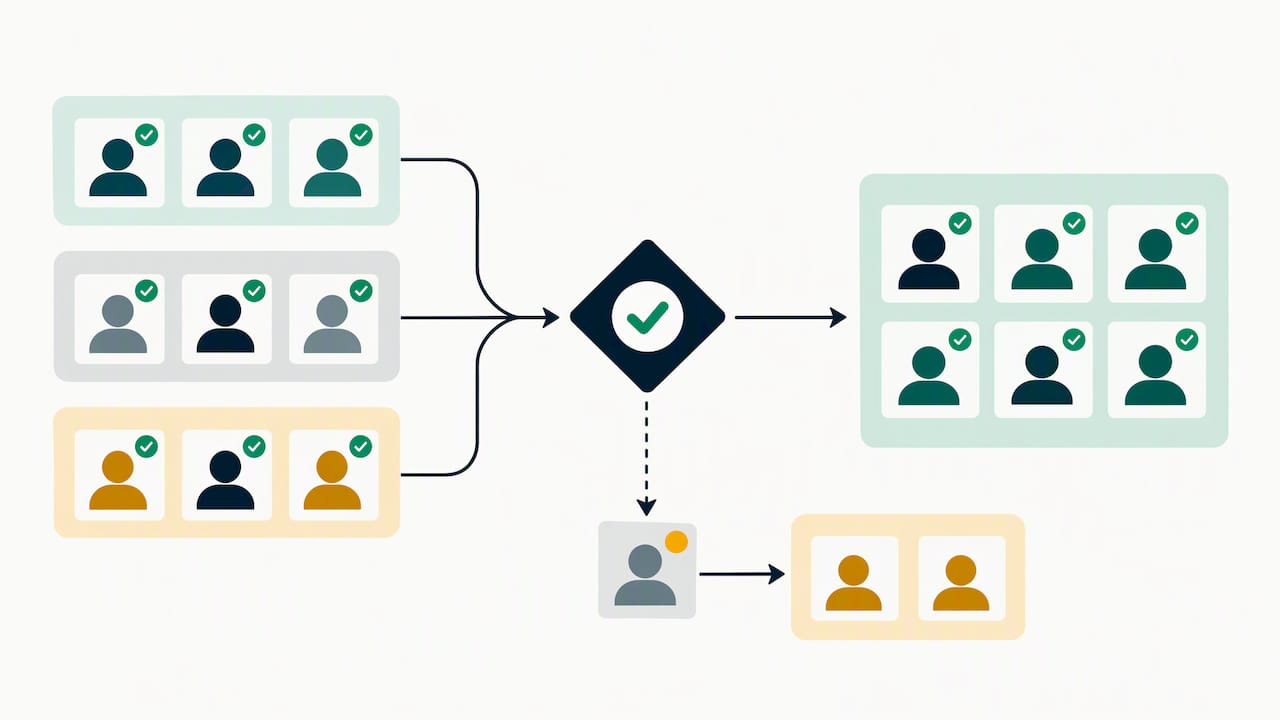
A dormant database only becomes useful when it is searchable by more than name and resume date. Four segments cover most agency use cases.
Silver medalists: finalists who lost narrowly, tagged with the role they interviewed for and the specific rejection reason.
Past applicants: earlier-stage candidates who never reached interview but matched a different skill set than the original req required.
Contractors: candidates open to or currently working contract assignments, tagged with current end-of-contract dates.
Prior placements: candidates you placed previously, tagged with placement date and contract or employment length, since they may be back on the market.
At the record level, store last contact date, stage reached, specific rejection reason, and consent status as standard metadata fields. These fields let you filter instantly for “finalists rejected on skills fit in the last 12 months” rather than scrolling resumes manually.
Review cohort sizes quarterly. A silver medalist pool that never shrinks because no one is converting signals a nurture problem, not a sourcing success, and a consent-status field left blank is a compliance gap, not a minor omission.
Outreach templates and sequence patterns that work
Different triggers call for different messages. We recommend four sequence patterns, each tied to a specific trigger from the earlier section.
Job-change trigger sequence: a two-touch sequence starting with a congratulatory, low-pressure note referencing the update, followed by a role-specific message five to seven days later if no reply.
Role-match re-intro sequence: a single, detailed email describing the specific opening and why their background fits, followed by a short SMS nudge if unopened after three days.
Past-finalist re-approach sequence: a personal note referencing the prior process by name, acknowledging the earlier outcome honestly, then a follow-up call if they reply with interest.
Warm check-in sequence: a low-stakes quarterly message with no specific role attached, simply asking about current availability and interests.
Subject lines work best when they are specific rather than generic. Useful formulas include “[Role title] at [Client industry], thought of you” or “Following up on your [Month/Year] interview”, both of which outperform vague openers like “Checking in.”
Personalization tokens worth automating: candidate first name, prior role title, interview date, and specific skill matched to the new requirement.
Reserve phone calls for silver medalists and anyone who replies positively to email or SMS; a call converts warm interest into a scheduled conversation faster than another email round.
When a candidate replies with interest, move them out of the automated sequence within one business day; a bot-like delay after a human reply undoes the personalization the message promised. Clear, timely communication at this stage shapes whether a candidate stays engaged through the rest of the process.
Automation and tech: running reactivation at scale without sounding robotic
Scaling reactivation past a handful of manual emails requires a minimum automation architecture, not a fully hands-off system. Four components matter most.
Triggers: rules that fire outreach based on job-change signals, contract end dates, or new requisition matches.
Dynamic fields: personalization tokens pulled automatically from the candidate record rather than typed by hand each time.
Consent flags: a visible status per candidate showing whether they can be legally contacted and through which channel.
Escalation rules: logic that routes a reply, especially a positive one, to a human recruiter immediately rather than letting it sit in a queue.
Contextual matching AI and CV parsing reduce the manual work of resurfacing the right candidates in the first place. Rather than keyword search alone, contextual matching evaluates how a candidate’s tech stack or project history relates to a new requirement, surfacing dormant records a basic search would miss.
Pro Tip: Cap automated touches at two or three per candidate per sequence, and route any reply, positive or negative, to a human within the same business day.
Measuring success: the metrics and benchmarks to track
Reactivation campaigns need the same rigor as any sourcing channel. Track open rate, reply rate, conversion to interview, conversion to hire, cost per reactivated hire, and time to fill, then compare each against your standard sourcing metrics.
Open rate tells you whether subject lines and sender reputation are working.
Reply rate separates genuinely relevant outreach from noise.
Conversion to interview and hire measures whether reactivation actually fills roles, not just generates replies.
Cost per reactivated hire compares the labor and tooling cost of reactivation against a fresh search for the same role.
Illustrative example: say a fresh search costs $3,000 in sourcing time and job board fees and takes 35 days, while reactivating a silver medalist from the same requisition category costs $400 in recruiter time and takes 12 days. That gap, not a universal industry figure, is the comparison worth running on your own data each quarter.
Run A/B tests on one variable at a time, typically subject line or cadence length, and let each test run long enough to collect a meaningful reply count before drawing conclusions.
Compliance and eligibility checklist for contacting dormant candidates
Before any reactivation message goes out, confirm the legal basis for contact. This sequence keeps outreach defensible.
Identify the lawful basis for processing the candidate’s data under the EU GDPR, typically legitimate interest or consent.
If relying on legitimate interest, document a balancing test weighing the agency’s interest against the candidate’s rights, as APSCo’s GDPR guidance recommends.
If relying on consent, confirm it is current and remove anyone who has not responded or has withdrawn consent.
Check your data retention policy to confirm the record has not exceeded its lawful retention window.
For US-based SMS or automated calling, review FCC rules on robocalls and robotexts, which govern consent and opt-out handling for automated outreach.
Include minimal disclosure language in outreach, such as identifying your agency by name and offering a clear opt-out in the first message.
Keep a timestamped audit trail of consent status, contact history, and any balancing test documentation for each record. EDPB’s practical guidance for SMEs outlines the recordkeeping expectations that make this documentation defensible during a review.
How Recruitify operationalizes candidate reactivation
We use contextual matching AI and CV parsing specifically to resurface dormant candidates against new requirements without manual re-screening, cutting the hours agencies typically spend rebuilding shortlists from scratch. A GDPR consent management module tracks consent status per record and maintains a full audit trail, so the documentation the compliance checklist above requires can be generated automatically rather than tracked in a spreadsheet alongside recruiter notes.
Strategic takeaways for agency leaders
The agencies that win with reactivation treat it as a discipline, not a one-time cleanup project. Three moves matter most: tag silver medalists and standardize what gets recorded at every rejection, run a 90-day automation pilot that still routes replies to a human, and document lawful basis before the first message goes out. Each one compounds with the others, and skipping the compliance step undermines the value of the other two.
- Recruitify Team
Run compliant reactivation at scale with Recruitify
This system is designed to carry the reactivation playbook above into daily practice: contextual matching AI resurfaces dormant candidates against new roles automatically, CV parsing keeps records current without manual re-entry, and a consent management module maintains the audit trail your compliance checklist requires.

Automated triggers and dynamic fields can run the sequence patterns above without manual list-building.
Consent flags and audit trails help keep every reactivation message inside documented lawful basis.
A shared CRM and ATS view can keep reactivated candidates and open requisitions in the same pipeline.
Review our pricing for agency teams to see which plan fits the size of your database and the scale of your reactivation goals.
FAQ
What do you mean by reactivation?
Reactivation means re-contacting candidates already in your database, whether past applicants, finalists, or prior placements, and matching them against current open roles instead of sourcing new candidates from scratch. The goal is to convert existing relationships into interviews and hires faster than a fresh search would allow.
What is an active candidate?
An active candidate is someone currently engaged in your pipeline: applying, interviewing, or awaiting a decision on a specific open role. A dormant or inactive candidate, by contrast, is someone in your database with no current activity, which is the group candidate reactivation targets.
How can you reactivate?
Start by segmenting your database into cohorts like silver medalists and past applicants, then reach out based on a specific trigger such as a new role match or a job-change signal rather than a generic check-in. Use a short, personalized sequence across email and SMS, escalate to a phone call once someone replies with interest, and confirm lawful basis for contact under GDPR before sending.
How often should agencies reactivate the same candidate?
Frequency should follow triggers rather than a fixed calendar: a strong role match justifies immediate outreach, while a general check-in works best on a quarterly cadence at most. Capping automated touches at two or three per sequence keeps messages from feeling repetitive or robotic.
Is legitimate interest or consent the right basis for reactivation outreach?
Both can work, and the right choice depends on your data and relationship with the candidate. APSCo’s GDPR guidance notes that legitimate interest is often appropriate for agencies provided a documented balancing test exists, while consent-based systems require prompt removal of anyone who has not responded or has withdrawn permission.
Sources
Recommended


News & Updates
Stay up-to-date with the latest innovations, features, and tips about Recruitify!
By providing your email address within the newsletter sign-up form, you confirm its processing to send marketing information regarding the Administrator’s products and services. The Administrator of your personal data processed for the abovementioned purposes is Recruitify Spółka z o.o., based in Warsaw, Poland (KRS 0000709889). For more information on the principles of personal data processing and the rights of data subjects, please check the Privacy Policy.

Last updated:
Candidate Reactivation for Agencies: Compliant Templates That Scale
Recruitment Process
The Recruitify Team
Candidate reactivation is purposeful outreach to previously known candidates to match them to new roles, and it typically cuts time-to-fill and cost per hire when done correctly. We built this guide around the assets that make it work in practice: the trigger moments that earn replies, templates that convert, automation steps that scale outreach, and a compliance checklist that keeps every message lawful.
TL;DR:
Contact finalists first when a closely matched role opens; treat general profile updates as weaker signals and send a gentler note.
Tag finalists, applicants, contractors, and prior placements with stage, rejection reason, consent status, and last contact; review cohort sizes quarterly.
Tie outreach to a clear trigger, cap automated sequences at three touches, and route replies to recruiters within the same business day.
Before outreach, document consent or a legitimate interest balancing test, check retention limits, name your agency, provide an opt out, and keep records.
A fresh search took 35 days and cost $3,000 in one example; reactivation took 12 days and cost $400, so test your own results.
Recruitifyrecruitify.aiBring Dormant Candidates Back Into ReachRecruitify’s intelligent database indexing helps agencies recover existing candidates, while GDPR consent management keeps compliance records available.Explore Recruitify
Table of Contents
What candidate reactivation means and why it matters for agencies
When to reactivate: trigger moments that actually get replies
Segmentation and tagging: who to target first and how to keep pools actionable
Outreach templates and sequence patterns that work
Automation and tech: running reactivation at scale without sounding robotic
Measuring success: the metrics and benchmarks to track
Compliance and eligibility checklist for contacting dormant candidates
How Recruitify operationalizes candidate reactivation
Strategic takeaways for agency leaders
Run compliant reactivation at scale with Recruitify
FAQ
Sources
What candidate reactivation means and why it matters for agencies
Candidate reactivation means systematically re-contacting people already in your database, whether they applied before, reached final interviews, or simply registered interest, and matching them against current openings instead of starting every search from zero. SHRM’s guidance on rediscovering talent frames this as treating recruitment like a sales pipeline: a resource you nurture continuously rather than a list you discard after one unsuccessful placement.
The business case is straightforward once you see the pattern. Agencies that reactivate instead of resourcing from scratch tend to save on job board licenses, cut the weeks normally spent screening unknown applicants, and place candidates who already understand the agency relationship and the type of roles it handles.
Sourcing cost drops because the candidate record, skills, and prior assessment already exist.
Time-to-fill shortens because reactivated candidates skip early-stage screening.
Placement quality often improves because these candidates have already cleared a client-facing bar once before.
Among dormant records, silver medalists, the candidates who reached final rounds but lost out narrowly, deserve first attention. SHRM notes these candidates are high-value pipeline assets precisely because they already cleared late-stage assessments and tend to convert quickly once the right role appears.
When to reactivate: trigger moments that actually get replies
Timing determines whether reactivation outreach lands as relevant or as noise. A message sent because a database refresh date arrived rarely performs as well as one sent because something changed in the candidate’s situation.
New role match: a fresh requisition lines up closely with a dormant candidate’s skill profile, title history, or past interview feedback.
Job-change signals: a candidate updates their title, employer, or availability status on a professional network, suggesting they may be open to conversation.
Past-finalist re-approach: someone who reached a final client interview for a prior role becomes newly relevant as a similar position opens.
Contracting availability: a candidate who previously declined a permanent offer may be ready for interim or contract work, particularly near contract end dates.
Prioritize in roughly that order: a precise role match justifies immediate outreach, while a general profile update warrants a lighter, lower-pressure note.
Pro Tip: Pair external signal monitoring, like LinkedIn job-change alerts, with internal date-based refresh reminders. Signals catch the moment; date triggers catch everyone the signals miss.
Segmentation and tagging: who to target first and how to keep pools actionable
A dormant database only becomes useful when it is searchable by more than name and resume date. Four segments cover most agency use cases.
Silver medalists: finalists who lost narrowly, tagged with the role they interviewed for and the specific rejection reason.
Past applicants: earlier-stage candidates who never reached interview but matched a different skill set than the original req required.
Contractors: candidates open to or currently working contract assignments, tagged with current end-of-contract dates.
Prior placements: candidates you placed previously, tagged with placement date and contract or employment length, since they may be back on the market.
At the record level, store last contact date, stage reached, specific rejection reason, and consent status as standard metadata fields. These fields let you filter instantly for “finalists rejected on skills fit in the last 12 months” rather than scrolling resumes manually.
Review cohort sizes quarterly. A silver medalist pool that never shrinks because no one is converting signals a nurture problem, not a sourcing success, and a consent-status field left blank is a compliance gap, not a minor omission.
Outreach templates and sequence patterns that work
Different triggers call for different messages. We recommend four sequence patterns, each tied to a specific trigger from the earlier section.
Job-change trigger sequence: a two-touch sequence starting with a congratulatory, low-pressure note referencing the update, followed by a role-specific message five to seven days later if no reply.
Role-match re-intro sequence: a single, detailed email describing the specific opening and why their background fits, followed by a short SMS nudge if unopened after three days.
Past-finalist re-approach sequence: a personal note referencing the prior process by name, acknowledging the earlier outcome honestly, then a follow-up call if they reply with interest.
Warm check-in sequence: a low-stakes quarterly message with no specific role attached, simply asking about current availability and interests.
Subject lines work best when they are specific rather than generic. Useful formulas include “[Role title] at [Client industry], thought of you” or “Following up on your [Month/Year] interview”, both of which outperform vague openers like “Checking in.”
Personalization tokens worth automating: candidate first name, prior role title, interview date, and specific skill matched to the new requirement.
Reserve phone calls for silver medalists and anyone who replies positively to email or SMS; a call converts warm interest into a scheduled conversation faster than another email round.
When a candidate replies with interest, move them out of the automated sequence within one business day; a bot-like delay after a human reply undoes the personalization the message promised. Clear, timely communication at this stage shapes whether a candidate stays engaged through the rest of the process.
Automation and tech: running reactivation at scale without sounding robotic
Scaling reactivation past a handful of manual emails requires a minimum automation architecture, not a fully hands-off system. Four components matter most.
Triggers: rules that fire outreach based on job-change signals, contract end dates, or new requisition matches.
Dynamic fields: personalization tokens pulled automatically from the candidate record rather than typed by hand each time.
Consent flags: a visible status per candidate showing whether they can be legally contacted and through which channel.
Escalation rules: logic that routes a reply, especially a positive one, to a human recruiter immediately rather than letting it sit in a queue.
Contextual matching AI and CV parsing reduce the manual work of resurfacing the right candidates in the first place. Rather than keyword search alone, contextual matching evaluates how a candidate’s tech stack or project history relates to a new requirement, surfacing dormant records a basic search would miss.
Pro Tip: Cap automated touches at two or three per candidate per sequence, and route any reply, positive or negative, to a human within the same business day.
Measuring success: the metrics and benchmarks to track
Reactivation campaigns need the same rigor as any sourcing channel. Track open rate, reply rate, conversion to interview, conversion to hire, cost per reactivated hire, and time to fill, then compare each against your standard sourcing metrics.
Open rate tells you whether subject lines and sender reputation are working.
Reply rate separates genuinely relevant outreach from noise.
Conversion to interview and hire measures whether reactivation actually fills roles, not just generates replies.
Cost per reactivated hire compares the labor and tooling cost of reactivation against a fresh search for the same role.
Illustrative example: say a fresh search costs $3,000 in sourcing time and job board fees and takes 35 days, while reactivating a silver medalist from the same requisition category costs $400 in recruiter time and takes 12 days. That gap, not a universal industry figure, is the comparison worth running on your own data each quarter.
Run A/B tests on one variable at a time, typically subject line or cadence length, and let each test run long enough to collect a meaningful reply count before drawing conclusions.
Compliance and eligibility checklist for contacting dormant candidates
Before any reactivation message goes out, confirm the legal basis for contact. This sequence keeps outreach defensible.
Identify the lawful basis for processing the candidate’s data under the EU GDPR, typically legitimate interest or consent.
If relying on legitimate interest, document a balancing test weighing the agency’s interest against the candidate’s rights, as APSCo’s GDPR guidance recommends.
If relying on consent, confirm it is current and remove anyone who has not responded or has withdrawn consent.
Check your data retention policy to confirm the record has not exceeded its lawful retention window.
For US-based SMS or automated calling, review FCC rules on robocalls and robotexts, which govern consent and opt-out handling for automated outreach.
Include minimal disclosure language in outreach, such as identifying your agency by name and offering a clear opt-out in the first message.
Keep a timestamped audit trail of consent status, contact history, and any balancing test documentation for each record. EDPB’s practical guidance for SMEs outlines the recordkeeping expectations that make this documentation defensible during a review.
How Recruitify operationalizes candidate reactivation
We use contextual matching AI and CV parsing specifically to resurface dormant candidates against new requirements without manual re-screening, cutting the hours agencies typically spend rebuilding shortlists from scratch. A GDPR consent management module tracks consent status per record and maintains a full audit trail, so the documentation the compliance checklist above requires can be generated automatically rather than tracked in a spreadsheet alongside recruiter notes.
Strategic takeaways for agency leaders
The agencies that win with reactivation treat it as a discipline, not a one-time cleanup project. Three moves matter most: tag silver medalists and standardize what gets recorded at every rejection, run a 90-day automation pilot that still routes replies to a human, and document lawful basis before the first message goes out. Each one compounds with the others, and skipping the compliance step undermines the value of the other two.
- Recruitify Team
Run compliant reactivation at scale with Recruitify
This system is designed to carry the reactivation playbook above into daily practice: contextual matching AI resurfaces dormant candidates against new roles automatically, CV parsing keeps records current without manual re-entry, and a consent management module maintains the audit trail your compliance checklist requires.
Automated triggers and dynamic fields can run the sequence patterns above without manual list-building.
Consent flags and audit trails help keep every reactivation message inside documented lawful basis.
A shared CRM and ATS view can keep reactivated candidates and open requisitions in the same pipeline.
Review our pricing for agency teams to see which plan fits the size of your database and the scale of your reactivation goals.
FAQ
What do you mean by reactivation?
Reactivation means re-contacting candidates already in your database, whether past applicants, finalists, or prior placements, and matching them against current open roles instead of sourcing new candidates from scratch. The goal is to convert existing relationships into interviews and hires faster than a fresh search would allow.
What is an active candidate?
An active candidate is someone currently engaged in your pipeline: applying, interviewing, or awaiting a decision on a specific open role. A dormant or inactive candidate, by contrast, is someone in your database with no current activity, which is the group candidate reactivation targets.
How can you reactivate?
Start by segmenting your database into cohorts like silver medalists and past applicants, then reach out based on a specific trigger such as a new role match or a job-change signal rather than a generic check-in. Use a short, personalized sequence across email and SMS, escalate to a phone call once someone replies with interest, and confirm lawful basis for contact under GDPR before sending.
How often should agencies reactivate the same candidate?
Frequency should follow triggers rather than a fixed calendar: a strong role match justifies immediate outreach, while a general check-in works best on a quarterly cadence at most. Capping automated touches at two or three per sequence keeps messages from feeling repetitive or robotic.
Is legitimate interest or consent the right basis for reactivation outreach?
Both can work, and the right choice depends on your data and relationship with the candidate. APSCo’s GDPR guidance notes that legitimate interest is often appropriate for agencies provided a documented balancing test exists, while consent-based systems require prompt removal of anyone who has not responded or has withdrawn permission.
Sources
Recommended
News & Updates
Stay up-to-date with the latest innovations, features, and tips about Recruitify!
By providing your email address within the newsletter sign-up form, you confirm its processing to send marketing information regarding the Administrator’s products and services. The Administrator of your personal data processed for the abovementioned purposes is Recruitify Spółka z o.o., based in Warsaw, Poland (KRS 0000709889). For more information on the principles of personal data processing and the rights of data subjects, please check the Privacy Policy.
Last updated:
Candidate Reactivation for Agencies: Compliant Templates That Scale
Recruitment Process
The Recruitify Team
Candidate reactivation is purposeful outreach to previously known candidates to match them to new roles, and it typically cuts time-to-fill and cost per hire when done correctly. We built this guide around the assets that make it work in practice: the trigger moments that earn replies, templates that convert, automation steps that scale outreach, and a compliance checklist that keeps every message lawful.
TL;DR:
Contact finalists first when a closely matched role opens; treat general profile updates as weaker signals and send a gentler note.
Tag finalists, applicants, contractors, and prior placements with stage, rejection reason, consent status, and last contact; review cohort sizes quarterly.
Tie outreach to a clear trigger, cap automated sequences at three touches, and route replies to recruiters within the same business day.
Before outreach, document consent or a legitimate interest balancing test, check retention limits, name your agency, provide an opt out, and keep records.
A fresh search took 35 days and cost $3,000 in one example; reactivation took 12 days and cost $400, so test your own results.
Recruitifyrecruitify.aiBring Dormant Candidates Back Into ReachRecruitify’s intelligent database indexing helps agencies recover existing candidates, while GDPR consent management keeps compliance records available.Explore Recruitify
Table of Contents
What candidate reactivation means and why it matters for agencies
When to reactivate: trigger moments that actually get replies
Segmentation and tagging: who to target first and how to keep pools actionable
Outreach templates and sequence patterns that work
Automation and tech: running reactivation at scale without sounding robotic
Measuring success: the metrics and benchmarks to track
Compliance and eligibility checklist for contacting dormant candidates
How Recruitify operationalizes candidate reactivation
Strategic takeaways for agency leaders
Run compliant reactivation at scale with Recruitify
FAQ
Sources
What candidate reactivation means and why it matters for agencies
Candidate reactivation means systematically re-contacting people already in your database, whether they applied before, reached final interviews, or simply registered interest, and matching them against current openings instead of starting every search from zero. SHRM’s guidance on rediscovering talent frames this as treating recruitment like a sales pipeline: a resource you nurture continuously rather than a list you discard after one unsuccessful placement.
The business case is straightforward once you see the pattern. Agencies that reactivate instead of resourcing from scratch tend to save on job board licenses, cut the weeks normally spent screening unknown applicants, and place candidates who already understand the agency relationship and the type of roles it handles.
Sourcing cost drops because the candidate record, skills, and prior assessment already exist.
Time-to-fill shortens because reactivated candidates skip early-stage screening.
Placement quality often improves because these candidates have already cleared a client-facing bar once before.
Among dormant records, silver medalists, the candidates who reached final rounds but lost out narrowly, deserve first attention. SHRM notes these candidates are high-value pipeline assets precisely because they already cleared late-stage assessments and tend to convert quickly once the right role appears.
When to reactivate: trigger moments that actually get replies
Timing determines whether reactivation outreach lands as relevant or as noise. A message sent because a database refresh date arrived rarely performs as well as one sent because something changed in the candidate’s situation.
New role match: a fresh requisition lines up closely with a dormant candidate’s skill profile, title history, or past interview feedback.
Job-change signals: a candidate updates their title, employer, or availability status on a professional network, suggesting they may be open to conversation.
Past-finalist re-approach: someone who reached a final client interview for a prior role becomes newly relevant as a similar position opens.
Contracting availability: a candidate who previously declined a permanent offer may be ready for interim or contract work, particularly near contract end dates.
Prioritize in roughly that order: a precise role match justifies immediate outreach, while a general profile update warrants a lighter, lower-pressure note.
Pro Tip: Pair external signal monitoring, like LinkedIn job-change alerts, with internal date-based refresh reminders. Signals catch the moment; date triggers catch everyone the signals miss.
Segmentation and tagging: who to target first and how to keep pools actionable
A dormant database only becomes useful when it is searchable by more than name and resume date. Four segments cover most agency use cases.
Silver medalists: finalists who lost narrowly, tagged with the role they interviewed for and the specific rejection reason.
Past applicants: earlier-stage candidates who never reached interview but matched a different skill set than the original req required.
Contractors: candidates open to or currently working contract assignments, tagged with current end-of-contract dates.
Prior placements: candidates you placed previously, tagged with placement date and contract or employment length, since they may be back on the market.
At the record level, store last contact date, stage reached, specific rejection reason, and consent status as standard metadata fields. These fields let you filter instantly for “finalists rejected on skills fit in the last 12 months” rather than scrolling resumes manually.
Review cohort sizes quarterly. A silver medalist pool that never shrinks because no one is converting signals a nurture problem, not a sourcing success, and a consent-status field left blank is a compliance gap, not a minor omission.
Outreach templates and sequence patterns that work
Different triggers call for different messages. We recommend four sequence patterns, each tied to a specific trigger from the earlier section.
Job-change trigger sequence: a two-touch sequence starting with a congratulatory, low-pressure note referencing the update, followed by a role-specific message five to seven days later if no reply.
Role-match re-intro sequence: a single, detailed email describing the specific opening and why their background fits, followed by a short SMS nudge if unopened after three days.
Past-finalist re-approach sequence: a personal note referencing the prior process by name, acknowledging the earlier outcome honestly, then a follow-up call if they reply with interest.
Warm check-in sequence: a low-stakes quarterly message with no specific role attached, simply asking about current availability and interests.
Subject lines work best when they are specific rather than generic. Useful formulas include “[Role title] at [Client industry], thought of you” or “Following up on your [Month/Year] interview”, both of which outperform vague openers like “Checking in.”
Personalization tokens worth automating: candidate first name, prior role title, interview date, and specific skill matched to the new requirement.
Reserve phone calls for silver medalists and anyone who replies positively to email or SMS; a call converts warm interest into a scheduled conversation faster than another email round.
When a candidate replies with interest, move them out of the automated sequence within one business day; a bot-like delay after a human reply undoes the personalization the message promised. Clear, timely communication at this stage shapes whether a candidate stays engaged through the rest of the process.
Automation and tech: running reactivation at scale without sounding robotic
Scaling reactivation past a handful of manual emails requires a minimum automation architecture, not a fully hands-off system. Four components matter most.
Triggers: rules that fire outreach based on job-change signals, contract end dates, or new requisition matches.
Dynamic fields: personalization tokens pulled automatically from the candidate record rather than typed by hand each time.
Consent flags: a visible status per candidate showing whether they can be legally contacted and through which channel.
Escalation rules: logic that routes a reply, especially a positive one, to a human recruiter immediately rather than letting it sit in a queue.
Contextual matching AI and CV parsing reduce the manual work of resurfacing the right candidates in the first place. Rather than keyword search alone, contextual matching evaluates how a candidate’s tech stack or project history relates to a new requirement, surfacing dormant records a basic search would miss.
Pro Tip: Cap automated touches at two or three per candidate per sequence, and route any reply, positive or negative, to a human within the same business day.
Measuring success: the metrics and benchmarks to track
Reactivation campaigns need the same rigor as any sourcing channel. Track open rate, reply rate, conversion to interview, conversion to hire, cost per reactivated hire, and time to fill, then compare each against your standard sourcing metrics.
Open rate tells you whether subject lines and sender reputation are working.
Reply rate separates genuinely relevant outreach from noise.
Conversion to interview and hire measures whether reactivation actually fills roles, not just generates replies.
Cost per reactivated hire compares the labor and tooling cost of reactivation against a fresh search for the same role.
Illustrative example: say a fresh search costs $3,000 in sourcing time and job board fees and takes 35 days, while reactivating a silver medalist from the same requisition category costs $400 in recruiter time and takes 12 days. That gap, not a universal industry figure, is the comparison worth running on your own data each quarter.
Run A/B tests on one variable at a time, typically subject line or cadence length, and let each test run long enough to collect a meaningful reply count before drawing conclusions.
Compliance and eligibility checklist for contacting dormant candidates
Before any reactivation message goes out, confirm the legal basis for contact. This sequence keeps outreach defensible.
Identify the lawful basis for processing the candidate’s data under the EU GDPR, typically legitimate interest or consent.
If relying on legitimate interest, document a balancing test weighing the agency’s interest against the candidate’s rights, as APSCo’s GDPR guidance recommends.
If relying on consent, confirm it is current and remove anyone who has not responded or has withdrawn consent.
Check your data retention policy to confirm the record has not exceeded its lawful retention window.
For US-based SMS or automated calling, review FCC rules on robocalls and robotexts, which govern consent and opt-out handling for automated outreach.
Include minimal disclosure language in outreach, such as identifying your agency by name and offering a clear opt-out in the first message.
Keep a timestamped audit trail of consent status, contact history, and any balancing test documentation for each record. EDPB’s practical guidance for SMEs outlines the recordkeeping expectations that make this documentation defensible during a review.
How Recruitify operationalizes candidate reactivation
We use contextual matching AI and CV parsing specifically to resurface dormant candidates against new requirements without manual re-screening, cutting the hours agencies typically spend rebuilding shortlists from scratch. A GDPR consent management module tracks consent status per record and maintains a full audit trail, so the documentation the compliance checklist above requires can be generated automatically rather than tracked in a spreadsheet alongside recruiter notes.
Strategic takeaways for agency leaders
The agencies that win with reactivation treat it as a discipline, not a one-time cleanup project. Three moves matter most: tag silver medalists and standardize what gets recorded at every rejection, run a 90-day automation pilot that still routes replies to a human, and document lawful basis before the first message goes out. Each one compounds with the others, and skipping the compliance step undermines the value of the other two.
- Recruitify Team
Run compliant reactivation at scale with Recruitify
This system is designed to carry the reactivation playbook above into daily practice: contextual matching AI resurfaces dormant candidates against new roles automatically, CV parsing keeps records current without manual re-entry, and a consent management module maintains the audit trail your compliance checklist requires.
Automated triggers and dynamic fields can run the sequence patterns above without manual list-building.
Consent flags and audit trails help keep every reactivation message inside documented lawful basis.
A shared CRM and ATS view can keep reactivated candidates and open requisitions in the same pipeline.
Review our pricing for agency teams to see which plan fits the size of your database and the scale of your reactivation goals.
FAQ
What do you mean by reactivation?
Reactivation means re-contacting candidates already in your database, whether past applicants, finalists, or prior placements, and matching them against current open roles instead of sourcing new candidates from scratch. The goal is to convert existing relationships into interviews and hires faster than a fresh search would allow.
What is an active candidate?
An active candidate is someone currently engaged in your pipeline: applying, interviewing, or awaiting a decision on a specific open role. A dormant or inactive candidate, by contrast, is someone in your database with no current activity, which is the group candidate reactivation targets.
How can you reactivate?
Start by segmenting your database into cohorts like silver medalists and past applicants, then reach out based on a specific trigger such as a new role match or a job-change signal rather than a generic check-in. Use a short, personalized sequence across email and SMS, escalate to a phone call once someone replies with interest, and confirm lawful basis for contact under GDPR before sending.
How often should agencies reactivate the same candidate?
Frequency should follow triggers rather than a fixed calendar: a strong role match justifies immediate outreach, while a general check-in works best on a quarterly cadence at most. Capping automated touches at two or three per sequence keeps messages from feeling repetitive or robotic.
Is legitimate interest or consent the right basis for reactivation outreach?
Both can work, and the right choice depends on your data and relationship with the candidate. APSCo’s GDPR guidance notes that legitimate interest is often appropriate for agencies provided a documented balancing test exists, while consent-based systems require prompt removal of anyone who has not responded or has withdrawn permission.
Sources
Recommended
News & Updates
Stay up-to-date with the latest innovations, features, and tips about Recruitify!
By providing your email address within the newsletter sign-up form, you confirm its processing to send marketing information regarding the Administrator’s products and services. The Administrator of your personal data processed for the abovementioned purposes is Recruitify Spółka z o.o., based in Warsaw, Poland (KRS 0000709889). For more information on the principles of personal data processing and the rights of data subjects, please check the Privacy Policy.

Discover More

Recruitment Process
Stack Overflow Sourcing: 3 Steps Recruiters Use to Qualify Developers
Assess developer skills through Stack Overflow tags, answers, and GitHub activity, then follow three steps to qualify candidates and scale outreach.
12 Oct 2026
Discover More

Recruitment Process
Pipeline Forecasting for Recruiting: 8 Steps to Trust the Numbers
Recruiting pipeline forecasting predicts fill dates and hiring odds from pipeline data. See the inputs, limits, and eight steps for a reliable forecast.
10 Oct 2026
Discover More

Innovations
60 - 90 Day Pilot to Turn Hiring Signals Into Staffing Lead Generation
Run a 60 - 90 day pilot to convert hiring signals into qualified conversations. Use LinkedIn, targeted outbound, and ATS/CRM automation to measure cost per...
9 Oct 2026
Discover More
Recruitment Process
Stack Overflow Sourcing: 3 Steps Recruiters Use to Qualify Developers
Assess developer skills through Stack Overflow tags, answers, and GitHub activity, then follow three steps to qualify candidates and scale outreach.
12 Oct 2026
Discover More
Recruitment Process
Pipeline Forecasting for Recruiting: 8 Steps to Trust the Numbers
Recruiting pipeline forecasting predicts fill dates and hiring odds from pipeline data. See the inputs, limits, and eight steps for a reliable forecast.
10 Oct 2026
Discover More

