
Last updated:
Cut 70% Admin Time With AI Interview Scheduling for Enterprise HR

Recruitment Process

The Recruitify Team
Interview scheduling automation is software that coordinates calendars, panel availability, and candidate preferences without a recruiter manually chasing emails. It cuts the time-to-schedule window from days to hours and reduces no-shows through automatic reminders and self-service rescheduling. HR teams handling more than a handful of interviews a week see the clearest gains, especially when panels or multi-stage loops are involved.
TL;DR:
Automated scheduling systems can manage complex panel and multi-day interview loops, avoiding conflicts across multiple calendars and time zones.
Reliable tools should integrate directly with your ATS, support conflict detection, and automatically handle timezone conversions and rule-based constraints.
Automation achieves the fastest ROI in high-volume, standardized hiring processes by reducing scheduling time, decreasing no-shows, and lowering coordinator hours.
Implementing automation requires detailed process mapping, pilot testing on representative scenarios, and clear governance to handle ongoing rule adjustments.
Fully automated solutions are best for routine, repeatable interviews; complex or high-stakes hiring still benefits from human oversight before confirming schedules.
RecruitifyReduce Recruitment AdministrationRecruitify.ai brings ATS, Sales CRM, and IT contracting workflows together, helping recruitment agencies reduce administrative tasks through automation.Explore Recruitify.ai
Table of Contents
What Is Interview Scheduling Automation and How Does It Work?
What Features Should You Expect From a Scheduling Platform?
What ROI Can HR Teams Expect From Scheduling Automation?
How Do You Evaluate and Choose a Scheduling Solution?
How Do You Roll Out Interview Scheduling Automation?
How Does an Enterprise-Grade Platform Handle Scheduling at Scale?
When Should You Automate Scheduling and When Should Humans Stay Involved?
See How Recruitify Handles Interview Coordination
Sources
FAQ
What Is Interview Scheduling Automation and How Does It Work?
Interview scheduling automation connects your applicant tracking system (ATS), calendar platforms, and video conferencing tools into one coordination layer that finds and confirms interview times without a human checking every inbox reply. The core mechanism is straightforward: the system reads real-time availability from connected calendars (Google Calendar, Outlook, or similar), applies scheduling rules you define, and then either books a slot automatically or sends the candidate a set of valid options.
The rules layer is where most of the actual work happens. A rule might say “only schedule technical interviews between 10 AM and 4 PM local interviewer time” or “never book two panelists from the same team within the same hour.” Basic booking links can’t handle that kind of constraint stacking. That’s the distinction between a scheduling link and true automation: a link finds one person’s open slots, while an agent-driven coordination engine can evaluate thousands of possible slot combinations across multiple calendars, factoring in role, seniority, and rotation history before it ever presents an option to a candidate.
This matters more as scheduling complexity increases. Enterprise hiring rarely means one recruiter booking one candidate for one call. It usually means:
One-on-one screens. The simplest case. The system matches a candidate’s stated availability against a single interviewer’s open blocks, applies a buffer, and confirms.
Panel interviews. Multiple interviewers need overlapping availability, and the system has to detect conflicts (double-booked panelists, back-to-back panels without breaks) before a slot ever reaches the candidate.
Interview loops. A candidate moves through four, five, or six interviewers across a single day. The automation sequences each segment, builds in transition time, and reroutes the whole chain automatically if one interviewer cancels.
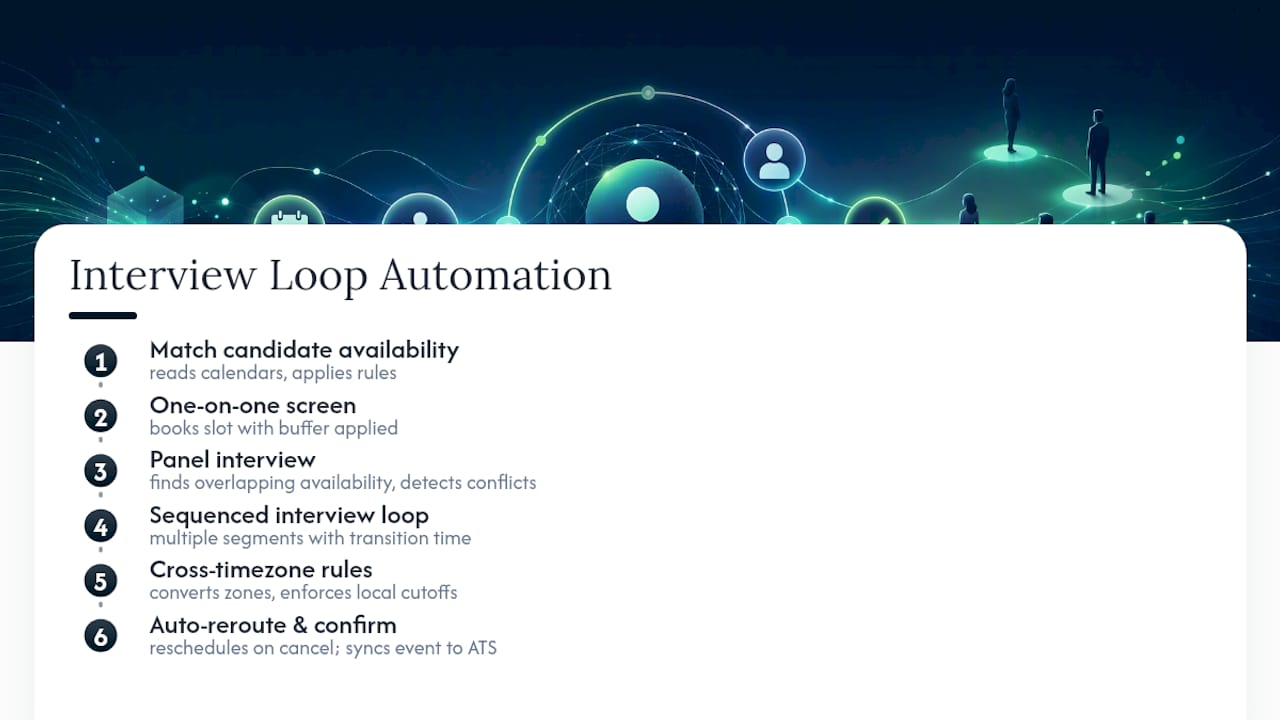
Multi-day or cross-timezone loops. Common in global hiring, where a candidate in Singapore might interview with panelists in Berlin and Austin across two calendar days. Automated timezone conversion and rule enforcement (no interviews after 6 PM local time for candidates, for example) prevent the scheduling errors that plague manual coordination.
The output in every case is the same: a confirmed calendar event, synced to the ATS record, with video links and prep materials attached, and no back-and-forth email thread required to get there.
What Features Should You Expect From a Scheduling Platform?
Not every tool marketed as “AI interview scheduling” actually handles the operational complexity recruiters deal with daily. Enterprise scheduling needs typically go beyond what a basic booking link can offer, particularly once panels, sequencing rules, and timezone logic enter the picture. Here’s what separates a genuinely capable digital interview planner from a glorified calendar link.
Panel scheduling with overlap detection. The system checks every panelist’s calendar simultaneously and flags or auto-resolves conflicts before a time is proposed, rather than letting a recruiter discover a double-booking after the fact.
Self-scheduling links with branded candidate pages. Candidates pick from pre-approved slots on a page that reflects your employer brand, not a generic third-party interface, which reduces the perception of a chaotic hiring process.
Automatic rescheduling and conflict resolution. When an interviewer cancels or a candidate requests a change, the system re-runs the availability check and proposes new slots without a recruiter starting from zero.
Reminders and no-show prevention. Automated email and SMS reminders sent at set intervals (typically 24 hours and one hour before) directly address the single biggest source of wasted recruiter time: candidates or interviewers forgetting the meeting.
Timezone handling. The system converts and displays times correctly for every participant regardless of location, which sounds basic until you’ve dealt with a candidate who showed up an hour early because of a daylight saving miscalculation.
Buffer and travel-time rules. Automatic gaps between back-to-back interviews prevent interviewer burnout and give panelists time to write feedback before the next conversation starts.
Prep material distribution. Interview guides, scorecards, and candidate resumes get attached to the calendar invite automatically, so interviewers aren’t scrambling for context five minutes before a call.
The features that matter most depend on your hiring volume and structure. A boutique agency running mostly one-on-one screens has different priorities than an enterprise talent acquisition team coordinating five-person panels across three offices. What’s consistent across both is that manual scheduling scales poorly. Every added interviewer roughly multiplies the number of email threads needed to find a mutual slot, which is exactly the kind of combinatorial problem that rules-based automation solves and human coordination doesn’t.
Vendor review platforms are worth checking before you commit, since independent user reviews often surface exactly the operational gaps that vendor demos gloss over, particularly around calendar sync reliability and how gracefully a tool handles last-minute panel changes.
What ROI Can HR Teams Expect From Scheduling Automation?
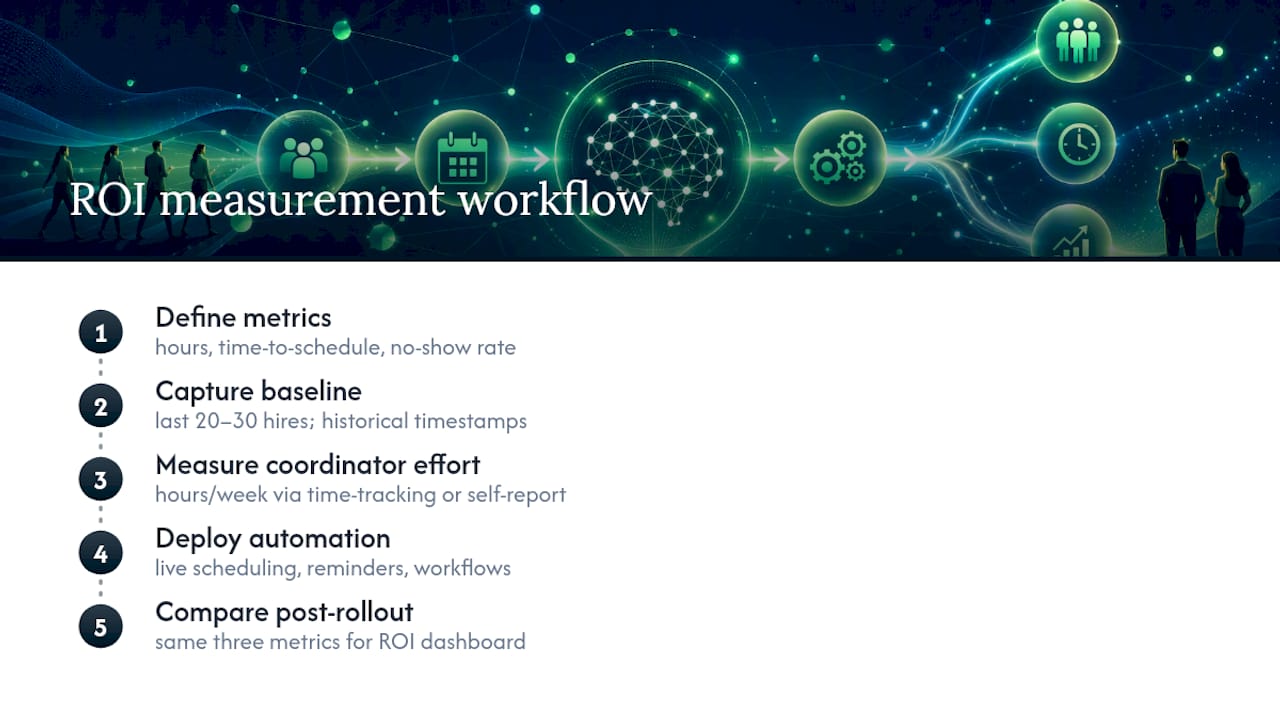
The measurable case for interview scheduling automation rests on three metrics: hours of recruiter and coordinator time saved, the reduction in time-to-schedule (the gap between “interview requested” and “interview confirmed”), and the drop in candidate no-show rates once automated reminders replace manual follow-up.
The efficiency case in one line: Recruitify’s own automation platform reports a 70% reduction in administrative tasks when scheduling, categorization, and contract workflows run through a single automated system rather than manual coordination across spreadsheets and email.
Vendor case studies across the HR tech category commonly cite large percentage reductions in scheduling time after automation goes live, though the exact figures vary widely by tool and hiring volume, so treat any single vendor’s headline number as a starting point for your own pilot rather than a guarantee. The more reliable approach is instrumenting your own baseline before you switch anything.
Here’s how that instrumentation actually works in practice. Before rollout, track the average number of calendar days between “interview stage triggered” and “interview confirmed” for your last 20 to 30 hires. Track your current no-show rate as a percentage of scheduled interviews. Track how many hours per week your coordinators or recruiters spend on scheduling logistics specifically, separate from sourcing or screening work. Most ATS platforms can pull the first two numbers directly from historical stage-change timestamps; the third usually requires a short time-tracking exercise or a coordinator self-report over a two-week window.
Once automation is live, the same three numbers become your ROI dashboard. A realistic benchmark range across the industry shows time-to-schedule dropping from several days to same-day or next-day confirmation for standard roles, no-show rates falling meaningfully once automated reminders replace manual email follow-up, and coordinator hours reallocating from scheduling logistics toward higher-value work like candidate experience or pipeline analysis.
The use cases where ROI shows up fastest are high-volume, repeatable hiring: retail seasonal hiring, call center staffing, campus recruiting, and any role where the interview structure (screen, then panel, then offer) is standardized across dozens or hundreds of candidates. Specialized executive searches or highly technical panel loops still benefit, but the time savings are smaller in absolute terms because the volume is lower to begin with.
How Do You Evaluate and Choose a Scheduling Solution?
Choosing among interview coordination tools comes down to matching the platform’s rule engine and integrations to how your organization actually hires, not to whichever vendor has the flashiest demo. The market is mature enough that software directories list dozens of scheduling and pre-employment tools, which makes a structured evaluation checklist essential rather than optional.
Start with these criteria, roughly in order of how often they eliminate a vendor from contention:
Integration depth with your existing ATS. Confirm the tool reads and writes directly to your ATS records, not just to a calendar. A scheduling tool that lives outside your ATS creates a second system of record and defeats much of the point.
Panel and loop support. Ask for a live demo of a five-person panel scenario, not a slide. Watch how the system handles a conflict it discovers mid-scheduling.
Timezone and multi-office logic. If you hire across regions, test how the tool displays and converts times for every participant, and confirm it enforces working-hours rules per location.
Admin controls and rule customization. Can your team set rules without vendor support tickets? Rigid, vendor-configured rule sets age poorly as your hiring process evolves.
Security and compliance posture. Ask specifically about GDPR consent management, audit trails, and data residency. Checking a vendor’s Cloud Security Alliance STAR registry entry, where one exists, is a fast way to verify security attestations before a deeper procurement review.
Beyond the checklist, ask vendors direct operational questions: How long does implementation actually take, from contract signature to first live interview scheduled? Who owns the candidate and scheduling data if you cancel the contract? What’s the support response SLA for a scheduling outage during active interview loops? Directories and review sites are a reasonable starting point for long-listing vendors, but they don’t replace a hands-on pilot against your own calendar and ATS setup.
Watch for a few red flags during evaluation. Vendors who can’t demo panel scheduling live, only in a recorded video, often have a weaker rule engine than their marketing suggests. Vendors who are vague about data ownership or won’t discuss audit trail capabilities in detail deserve extra scrutiny, especially if you operate under GDPR or similar regimes. And any tool that requires manual re-entry of interview data back into your ATS hasn’t actually solved the coordination problem, it’s just moved the busywork.
Pro Tip: Run your evaluation pilot against your hardest scheduling scenario, not your easiest one. A tool that handles a single screen call well tells you almost nothing about how it performs on a six-person panel across three timezones.
How Do You Roll Out Interview Scheduling Automation?
A successful rollout depends less on the software itself and more on how thoroughly you map your existing process before flipping the switch. Skipping this step is the single most common reason automation projects stall or get quietly abandoned after a few frustrating weeks.
Pre-launch preparation comes first and shouldn’t be rushed:
Map your current scheduling workflow end to end, including every exception case (last-minute panelist swaps, candidate reschedule requests, holiday blackout periods).
Define panel rules explicitly in writing before configuring the tool. What overlap is required? What buffer time is non-negotiable?
Secure ATS and calendar admin access early. Integration delays caused by IT approval bottlenecks are a common and avoidable source of rollout slippage.
Identify who owns rule changes going forward, so the system doesn’t quietly drift out of sync with how your team actually hires six months from now.
Pilot phase should be deliberately narrow. Choose one team or one role type, ideally something with moderate volume and a standardized process, and run the automation alongside your existing manual process for two to four weeks. Collect the same three KPIs discussed earlier: time-to-schedule, no-show rate, and coordinator hours. Compare directly against your historical baseline rather than against a vendor’s marketing claim.
Scaling comes only after the pilot proves out. Train the broader recruiting team on the rule engine and admin panel, not just the candidate-facing booking flow. Establish clear governance: who can change panel rules, who monitors for scheduling errors, and what the escalation path looks like when the automation hits an edge case it can’t resolve on its own. Build in a quarterly review of your KPI dashboard so the system’s performance doesn’t just get set up once and forgotten.
How Does an Enterprise-Grade Platform Handle Scheduling at Scale?
The gap between a basic scheduling link and a genuinely enterprise-ready system shows up in how much of the surrounding hiring workflow it actually touches. Recruitify’s recruitment automation engine, for example, reports a 70% reduction in administrative tasks when scheduling, candidate categorization, and contract generation all run through one connected workflow instead of scattered spreadsheets and disconnected tools.
That kind of reduction matters most when scheduling doesn’t happen in isolation. Recruitify’s Contextual Matching AI scores candidates against role requirements before they ever reach the interview stage, which means the scheduling layer is coordinating calendars for a shortlist that’s already been filtered for fit. An AI CV Parser extracts structured candidate data in seconds, feeding directly into the same record the scheduling engine reads from, so there’s no duplicate data entry between screening and booking.
On the compliance side, a GDPR consent management module maintains a full audit trail for every scheduling and candidate record, which matters directly to the security criteria covered in the evaluation checklist above. For HR teams weighing whether a platform can genuinely replace fragmented scheduling tools and spreadsheets, that combination of AI screening, structured data capture, and built-in compliance is the practical test.
When Should You Automate Scheduling and When Should Humans Stay Involved?
Full automation makes sense for high-volume, repeatable hiring: standardized screens, campus recruiting, retail and seasonal roles where the interview structure barely changes between candidates. The rules are stable, the volume justifies the setup effort, and edge cases are rare enough to handle by exception.
Specialized or executive-level interviews call for a hybrid model instead. Let automation handle the calendar mechanics, availability checks, timezone conversion, and reminders, but keep a coordinator reviewing the proposed slots before they go to a senior candidate or a particularly complex panel. The signal that you’re ready to shift more toward automation isn’t company size, it’s process consistency. If your interview stages already follow a repeatable structure with clearly defined panels, automation will fit cleanly. If every hire is scheduled differently depending on who’s involved, fix the process first, then automate it.
- Recruitify Team
See How Recruitify Handles Interview Coordination
Every evaluation criterion covered above, ATS integration depth, panel rule flexibility, timezone handling, and GDPR-grade audit trails, maps directly to how Recruitify’s project workflows connect scheduling to the rest of your recruitment pipeline. Instead of running scheduling as a bolt-on tool next to your ATS, Recruitify keeps candidate scoring, CV parsing, scheduling, and contract generation inside a single tab, which is the structural reason the platform can claim a 70% reduction in administrative workload.

If you’re currently juggling a scheduling tool, a separate ATS, and a spreadsheet to track panel availability, that fragmentation is exactly what drives up coordinator hours. Some systems consolidate that into one platform built specifically for recruitment agencies and internal talent acquisition teams handling real hiring volume, not generic meeting-booking software adapted for recruiting. Request a demo of Recruitify’s recruitment projects module to see how scheduling automation fits into the full hiring workflow before you commit to a standalone point solution.
Sources
Verify vendor claims independently before signing a contract. Capterra’s pre-employment testing shortlist is a reasonable starting point for long-listing tools, while G2’s product reviews surface real user feedback on calendar sync and panel coordination issues. For security posture, check a vendor’s Cloud Security Alliance STAR registry entry, and see Recruitify’s own ATS overview for background on how scheduling fits into broader recruitment software.
FAQ
What is a good scheduling tool for interviews?
A good tool integrates directly with your ATS and calendar platforms, supports panel and loop scheduling with conflict detection, and handles timezone conversion automatically rather than relying on manual coordination for anything beyond a single one-on-one call.
What is the 30-60-90 rule in an interview?
The 30-60-90 rule typically refers to a new hire’s performance plan outlining goals for early milestones on the job, rather than a scheduling or interviewing framework. It occasionally comes up during interviews when candidates are asked to outline their own plan for the role.
What is the 80/20 rule in interviewing?
The 80/20 rule in interviewing generally suggests the interviewer should spend roughly 20% of the time talking and 80% listening to the candidate, ensuring the conversation surfaces the candidate’s own responses rather than the interviewer’s opinions.
What are the 5 C’s of interviewing?
Definitions of the “5 C’s” vary by source and aren’t standardized across the recruiting industry, so treat any specific list you encounter as one framework among several rather than a fixed industry standard.
Does interview scheduling automation work for panel interviews?
Yes, and panel coordination is where automation delivers the clearest time savings, since the system checks every panelist’s calendar simultaneously and flags conflicts before a time reaches the candidate, a task that scales poorly when done manually across four or five schedules.
Recommended


News & Updates
Stay up-to-date with the latest innovations, features, and tips about Recruitify!
By providing your email address within the newsletter sign-up form, you confirm its processing to send marketing information regarding the Administrator’s products and services. The Administrator of your personal data processed for the abovementioned purposes is Recruitify Spółka z o.o., based in Warsaw, Poland (KRS 0000709889). For more information on the principles of personal data processing and the rights of data subjects, please check the Privacy Policy.

Last updated:
Cut 70% Admin Time With AI Interview Scheduling for Enterprise HR
Recruitment Process
The Recruitify Team
Interview scheduling automation is software that coordinates calendars, panel availability, and candidate preferences without a recruiter manually chasing emails. It cuts the time-to-schedule window from days to hours and reduces no-shows through automatic reminders and self-service rescheduling. HR teams handling more than a handful of interviews a week see the clearest gains, especially when panels or multi-stage loops are involved.
TL;DR:
Automated scheduling systems can manage complex panel and multi-day interview loops, avoiding conflicts across multiple calendars and time zones.
Reliable tools should integrate directly with your ATS, support conflict detection, and automatically handle timezone conversions and rule-based constraints.
Automation achieves the fastest ROI in high-volume, standardized hiring processes by reducing scheduling time, decreasing no-shows, and lowering coordinator hours.
Implementing automation requires detailed process mapping, pilot testing on representative scenarios, and clear governance to handle ongoing rule adjustments.
Fully automated solutions are best for routine, repeatable interviews; complex or high-stakes hiring still benefits from human oversight before confirming schedules.
RecruitifyReduce Recruitment AdministrationRecruitify.ai brings ATS, Sales CRM, and IT contracting workflows together, helping recruitment agencies reduce administrative tasks through automation.Explore Recruitify.ai
Table of Contents
What Is Interview Scheduling Automation and How Does It Work?
What Features Should You Expect From a Scheduling Platform?
What ROI Can HR Teams Expect From Scheduling Automation?
How Do You Evaluate and Choose a Scheduling Solution?
How Do You Roll Out Interview Scheduling Automation?
How Does an Enterprise-Grade Platform Handle Scheduling at Scale?
When Should You Automate Scheduling and When Should Humans Stay Involved?
See How Recruitify Handles Interview Coordination
Sources
FAQ
What Is Interview Scheduling Automation and How Does It Work?
Interview scheduling automation connects your applicant tracking system (ATS), calendar platforms, and video conferencing tools into one coordination layer that finds and confirms interview times without a human checking every inbox reply. The core mechanism is straightforward: the system reads real-time availability from connected calendars (Google Calendar, Outlook, or similar), applies scheduling rules you define, and then either books a slot automatically or sends the candidate a set of valid options.
The rules layer is where most of the actual work happens. A rule might say “only schedule technical interviews between 10 AM and 4 PM local interviewer time” or “never book two panelists from the same team within the same hour.” Basic booking links can’t handle that kind of constraint stacking. That’s the distinction between a scheduling link and true automation: a link finds one person’s open slots, while an agent-driven coordination engine can evaluate thousands of possible slot combinations across multiple calendars, factoring in role, seniority, and rotation history before it ever presents an option to a candidate.
This matters more as scheduling complexity increases. Enterprise hiring rarely means one recruiter booking one candidate for one call. It usually means:
One-on-one screens. The simplest case. The system matches a candidate’s stated availability against a single interviewer’s open blocks, applies a buffer, and confirms.
Panel interviews. Multiple interviewers need overlapping availability, and the system has to detect conflicts (double-booked panelists, back-to-back panels without breaks) before a slot ever reaches the candidate.
Interview loops. A candidate moves through four, five, or six interviewers across a single day. The automation sequences each segment, builds in transition time, and reroutes the whole chain automatically if one interviewer cancels.
Multi-day or cross-timezone loops. Common in global hiring, where a candidate in Singapore might interview with panelists in Berlin and Austin across two calendar days. Automated timezone conversion and rule enforcement (no interviews after 6 PM local time for candidates, for example) prevent the scheduling errors that plague manual coordination.
The output in every case is the same: a confirmed calendar event, synced to the ATS record, with video links and prep materials attached, and no back-and-forth email thread required to get there.
What Features Should You Expect From a Scheduling Platform?
Not every tool marketed as “AI interview scheduling” actually handles the operational complexity recruiters deal with daily. Enterprise scheduling needs typically go beyond what a basic booking link can offer, particularly once panels, sequencing rules, and timezone logic enter the picture. Here’s what separates a genuinely capable digital interview planner from a glorified calendar link.
Panel scheduling with overlap detection. The system checks every panelist’s calendar simultaneously and flags or auto-resolves conflicts before a time is proposed, rather than letting a recruiter discover a double-booking after the fact.
Self-scheduling links with branded candidate pages. Candidates pick from pre-approved slots on a page that reflects your employer brand, not a generic third-party interface, which reduces the perception of a chaotic hiring process.
Automatic rescheduling and conflict resolution. When an interviewer cancels or a candidate requests a change, the system re-runs the availability check and proposes new slots without a recruiter starting from zero.
Reminders and no-show prevention. Automated email and SMS reminders sent at set intervals (typically 24 hours and one hour before) directly address the single biggest source of wasted recruiter time: candidates or interviewers forgetting the meeting.
Timezone handling. The system converts and displays times correctly for every participant regardless of location, which sounds basic until you’ve dealt with a candidate who showed up an hour early because of a daylight saving miscalculation.
Buffer and travel-time rules. Automatic gaps between back-to-back interviews prevent interviewer burnout and give panelists time to write feedback before the next conversation starts.
Prep material distribution. Interview guides, scorecards, and candidate resumes get attached to the calendar invite automatically, so interviewers aren’t scrambling for context five minutes before a call.
The features that matter most depend on your hiring volume and structure. A boutique agency running mostly one-on-one screens has different priorities than an enterprise talent acquisition team coordinating five-person panels across three offices. What’s consistent across both is that manual scheduling scales poorly. Every added interviewer roughly multiplies the number of email threads needed to find a mutual slot, which is exactly the kind of combinatorial problem that rules-based automation solves and human coordination doesn’t.
Vendor review platforms are worth checking before you commit, since independent user reviews often surface exactly the operational gaps that vendor demos gloss over, particularly around calendar sync reliability and how gracefully a tool handles last-minute panel changes.
What ROI Can HR Teams Expect From Scheduling Automation?
The measurable case for interview scheduling automation rests on three metrics: hours of recruiter and coordinator time saved, the reduction in time-to-schedule (the gap between “interview requested” and “interview confirmed”), and the drop in candidate no-show rates once automated reminders replace manual follow-up.
The efficiency case in one line: Recruitify’s own automation platform reports a 70% reduction in administrative tasks when scheduling, categorization, and contract workflows run through a single automated system rather than manual coordination across spreadsheets and email.
Vendor case studies across the HR tech category commonly cite large percentage reductions in scheduling time after automation goes live, though the exact figures vary widely by tool and hiring volume, so treat any single vendor’s headline number as a starting point for your own pilot rather than a guarantee. The more reliable approach is instrumenting your own baseline before you switch anything.
Here’s how that instrumentation actually works in practice. Before rollout, track the average number of calendar days between “interview stage triggered” and “interview confirmed” for your last 20 to 30 hires. Track your current no-show rate as a percentage of scheduled interviews. Track how many hours per week your coordinators or recruiters spend on scheduling logistics specifically, separate from sourcing or screening work. Most ATS platforms can pull the first two numbers directly from historical stage-change timestamps; the third usually requires a short time-tracking exercise or a coordinator self-report over a two-week window.
Once automation is live, the same three numbers become your ROI dashboard. A realistic benchmark range across the industry shows time-to-schedule dropping from several days to same-day or next-day confirmation for standard roles, no-show rates falling meaningfully once automated reminders replace manual email follow-up, and coordinator hours reallocating from scheduling logistics toward higher-value work like candidate experience or pipeline analysis.
The use cases where ROI shows up fastest are high-volume, repeatable hiring: retail seasonal hiring, call center staffing, campus recruiting, and any role where the interview structure (screen, then panel, then offer) is standardized across dozens or hundreds of candidates. Specialized executive searches or highly technical panel loops still benefit, but the time savings are smaller in absolute terms because the volume is lower to begin with.
How Do You Evaluate and Choose a Scheduling Solution?
Choosing among interview coordination tools comes down to matching the platform’s rule engine and integrations to how your organization actually hires, not to whichever vendor has the flashiest demo. The market is mature enough that software directories list dozens of scheduling and pre-employment tools, which makes a structured evaluation checklist essential rather than optional.
Start with these criteria, roughly in order of how often they eliminate a vendor from contention:
Integration depth with your existing ATS. Confirm the tool reads and writes directly to your ATS records, not just to a calendar. A scheduling tool that lives outside your ATS creates a second system of record and defeats much of the point.
Panel and loop support. Ask for a live demo of a five-person panel scenario, not a slide. Watch how the system handles a conflict it discovers mid-scheduling.
Timezone and multi-office logic. If you hire across regions, test how the tool displays and converts times for every participant, and confirm it enforces working-hours rules per location.
Admin controls and rule customization. Can your team set rules without vendor support tickets? Rigid, vendor-configured rule sets age poorly as your hiring process evolves.
Security and compliance posture. Ask specifically about GDPR consent management, audit trails, and data residency. Checking a vendor’s Cloud Security Alliance STAR registry entry, where one exists, is a fast way to verify security attestations before a deeper procurement review.
Beyond the checklist, ask vendors direct operational questions: How long does implementation actually take, from contract signature to first live interview scheduled? Who owns the candidate and scheduling data if you cancel the contract? What’s the support response SLA for a scheduling outage during active interview loops? Directories and review sites are a reasonable starting point for long-listing vendors, but they don’t replace a hands-on pilot against your own calendar and ATS setup.
Watch for a few red flags during evaluation. Vendors who can’t demo panel scheduling live, only in a recorded video, often have a weaker rule engine than their marketing suggests. Vendors who are vague about data ownership or won’t discuss audit trail capabilities in detail deserve extra scrutiny, especially if you operate under GDPR or similar regimes. And any tool that requires manual re-entry of interview data back into your ATS hasn’t actually solved the coordination problem, it’s just moved the busywork.
Pro Tip: Run your evaluation pilot against your hardest scheduling scenario, not your easiest one. A tool that handles a single screen call well tells you almost nothing about how it performs on a six-person panel across three timezones.
How Do You Roll Out Interview Scheduling Automation?
A successful rollout depends less on the software itself and more on how thoroughly you map your existing process before flipping the switch. Skipping this step is the single most common reason automation projects stall or get quietly abandoned after a few frustrating weeks.
Pre-launch preparation comes first and shouldn’t be rushed:
Map your current scheduling workflow end to end, including every exception case (last-minute panelist swaps, candidate reschedule requests, holiday blackout periods).
Define panel rules explicitly in writing before configuring the tool. What overlap is required? What buffer time is non-negotiable?
Secure ATS and calendar admin access early. Integration delays caused by IT approval bottlenecks are a common and avoidable source of rollout slippage.
Identify who owns rule changes going forward, so the system doesn’t quietly drift out of sync with how your team actually hires six months from now.
Pilot phase should be deliberately narrow. Choose one team or one role type, ideally something with moderate volume and a standardized process, and run the automation alongside your existing manual process for two to four weeks. Collect the same three KPIs discussed earlier: time-to-schedule, no-show rate, and coordinator hours. Compare directly against your historical baseline rather than against a vendor’s marketing claim.
Scaling comes only after the pilot proves out. Train the broader recruiting team on the rule engine and admin panel, not just the candidate-facing booking flow. Establish clear governance: who can change panel rules, who monitors for scheduling errors, and what the escalation path looks like when the automation hits an edge case it can’t resolve on its own. Build in a quarterly review of your KPI dashboard so the system’s performance doesn’t just get set up once and forgotten.
How Does an Enterprise-Grade Platform Handle Scheduling at Scale?
The gap between a basic scheduling link and a genuinely enterprise-ready system shows up in how much of the surrounding hiring workflow it actually touches. Recruitify’s recruitment automation engine, for example, reports a 70% reduction in administrative tasks when scheduling, candidate categorization, and contract generation all run through one connected workflow instead of scattered spreadsheets and disconnected tools.
That kind of reduction matters most when scheduling doesn’t happen in isolation. Recruitify’s Contextual Matching AI scores candidates against role requirements before they ever reach the interview stage, which means the scheduling layer is coordinating calendars for a shortlist that’s already been filtered for fit. An AI CV Parser extracts structured candidate data in seconds, feeding directly into the same record the scheduling engine reads from, so there’s no duplicate data entry between screening and booking.
On the compliance side, a GDPR consent management module maintains a full audit trail for every scheduling and candidate record, which matters directly to the security criteria covered in the evaluation checklist above. For HR teams weighing whether a platform can genuinely replace fragmented scheduling tools and spreadsheets, that combination of AI screening, structured data capture, and built-in compliance is the practical test.
When Should You Automate Scheduling and When Should Humans Stay Involved?
Full automation makes sense for high-volume, repeatable hiring: standardized screens, campus recruiting, retail and seasonal roles where the interview structure barely changes between candidates. The rules are stable, the volume justifies the setup effort, and edge cases are rare enough to handle by exception.
Specialized or executive-level interviews call for a hybrid model instead. Let automation handle the calendar mechanics, availability checks, timezone conversion, and reminders, but keep a coordinator reviewing the proposed slots before they go to a senior candidate or a particularly complex panel. The signal that you’re ready to shift more toward automation isn’t company size, it’s process consistency. If your interview stages already follow a repeatable structure with clearly defined panels, automation will fit cleanly. If every hire is scheduled differently depending on who’s involved, fix the process first, then automate it.
- Recruitify Team
See How Recruitify Handles Interview Coordination
Every evaluation criterion covered above, ATS integration depth, panel rule flexibility, timezone handling, and GDPR-grade audit trails, maps directly to how Recruitify’s project workflows connect scheduling to the rest of your recruitment pipeline. Instead of running scheduling as a bolt-on tool next to your ATS, Recruitify keeps candidate scoring, CV parsing, scheduling, and contract generation inside a single tab, which is the structural reason the platform can claim a 70% reduction in administrative workload.
If you’re currently juggling a scheduling tool, a separate ATS, and a spreadsheet to track panel availability, that fragmentation is exactly what drives up coordinator hours. Some systems consolidate that into one platform built specifically for recruitment agencies and internal talent acquisition teams handling real hiring volume, not generic meeting-booking software adapted for recruiting. Request a demo of Recruitify’s recruitment projects module to see how scheduling automation fits into the full hiring workflow before you commit to a standalone point solution.
Sources
Verify vendor claims independently before signing a contract. Capterra’s pre-employment testing shortlist is a reasonable starting point for long-listing tools, while G2’s product reviews surface real user feedback on calendar sync and panel coordination issues. For security posture, check a vendor’s Cloud Security Alliance STAR registry entry, and see Recruitify’s own ATS overview for background on how scheduling fits into broader recruitment software.
FAQ
What is a good scheduling tool for interviews?
A good tool integrates directly with your ATS and calendar platforms, supports panel and loop scheduling with conflict detection, and handles timezone conversion automatically rather than relying on manual coordination for anything beyond a single one-on-one call.
What is the 30-60-90 rule in an interview?
The 30-60-90 rule typically refers to a new hire’s performance plan outlining goals for early milestones on the job, rather than a scheduling or interviewing framework. It occasionally comes up during interviews when candidates are asked to outline their own plan for the role.
What is the 80/20 rule in interviewing?
The 80/20 rule in interviewing generally suggests the interviewer should spend roughly 20% of the time talking and 80% listening to the candidate, ensuring the conversation surfaces the candidate’s own responses rather than the interviewer’s opinions.
What are the 5 C’s of interviewing?
Definitions of the “5 C’s” vary by source and aren’t standardized across the recruiting industry, so treat any specific list you encounter as one framework among several rather than a fixed industry standard.
Does interview scheduling automation work for panel interviews?
Yes, and panel coordination is where automation delivers the clearest time savings, since the system checks every panelist’s calendar simultaneously and flags conflicts before a time reaches the candidate, a task that scales poorly when done manually across four or five schedules.
Recommended
News & Updates
Stay up-to-date with the latest innovations, features, and tips about Recruitify!
By providing your email address within the newsletter sign-up form, you confirm its processing to send marketing information regarding the Administrator’s products and services. The Administrator of your personal data processed for the abovementioned purposes is Recruitify Spółka z o.o., based in Warsaw, Poland (KRS 0000709889). For more information on the principles of personal data processing and the rights of data subjects, please check the Privacy Policy.
Last updated:
Cut 70% Admin Time With AI Interview Scheduling for Enterprise HR
Recruitment Process
The Recruitify Team
Interview scheduling automation is software that coordinates calendars, panel availability, and candidate preferences without a recruiter manually chasing emails. It cuts the time-to-schedule window from days to hours and reduces no-shows through automatic reminders and self-service rescheduling. HR teams handling more than a handful of interviews a week see the clearest gains, especially when panels or multi-stage loops are involved.
TL;DR:
Automated scheduling systems can manage complex panel and multi-day interview loops, avoiding conflicts across multiple calendars and time zones.
Reliable tools should integrate directly with your ATS, support conflict detection, and automatically handle timezone conversions and rule-based constraints.
Automation achieves the fastest ROI in high-volume, standardized hiring processes by reducing scheduling time, decreasing no-shows, and lowering coordinator hours.
Implementing automation requires detailed process mapping, pilot testing on representative scenarios, and clear governance to handle ongoing rule adjustments.
Fully automated solutions are best for routine, repeatable interviews; complex or high-stakes hiring still benefits from human oversight before confirming schedules.
RecruitifyReduce Recruitment AdministrationRecruitify.ai brings ATS, Sales CRM, and IT contracting workflows together, helping recruitment agencies reduce administrative tasks through automation.Explore Recruitify.ai
Table of Contents
What Is Interview Scheduling Automation and How Does It Work?
What Features Should You Expect From a Scheduling Platform?
What ROI Can HR Teams Expect From Scheduling Automation?
How Do You Evaluate and Choose a Scheduling Solution?
How Do You Roll Out Interview Scheduling Automation?
How Does an Enterprise-Grade Platform Handle Scheduling at Scale?
When Should You Automate Scheduling and When Should Humans Stay Involved?
See How Recruitify Handles Interview Coordination
Sources
FAQ
What Is Interview Scheduling Automation and How Does It Work?
Interview scheduling automation connects your applicant tracking system (ATS), calendar platforms, and video conferencing tools into one coordination layer that finds and confirms interview times without a human checking every inbox reply. The core mechanism is straightforward: the system reads real-time availability from connected calendars (Google Calendar, Outlook, or similar), applies scheduling rules you define, and then either books a slot automatically or sends the candidate a set of valid options.
The rules layer is where most of the actual work happens. A rule might say “only schedule technical interviews between 10 AM and 4 PM local interviewer time” or “never book two panelists from the same team within the same hour.” Basic booking links can’t handle that kind of constraint stacking. That’s the distinction between a scheduling link and true automation: a link finds one person’s open slots, while an agent-driven coordination engine can evaluate thousands of possible slot combinations across multiple calendars, factoring in role, seniority, and rotation history before it ever presents an option to a candidate.
This matters more as scheduling complexity increases. Enterprise hiring rarely means one recruiter booking one candidate for one call. It usually means:
One-on-one screens. The simplest case. The system matches a candidate’s stated availability against a single interviewer’s open blocks, applies a buffer, and confirms.
Panel interviews. Multiple interviewers need overlapping availability, and the system has to detect conflicts (double-booked panelists, back-to-back panels without breaks) before a slot ever reaches the candidate.
Interview loops. A candidate moves through four, five, or six interviewers across a single day. The automation sequences each segment, builds in transition time, and reroutes the whole chain automatically if one interviewer cancels.
Multi-day or cross-timezone loops. Common in global hiring, where a candidate in Singapore might interview with panelists in Berlin and Austin across two calendar days. Automated timezone conversion and rule enforcement (no interviews after 6 PM local time for candidates, for example) prevent the scheduling errors that plague manual coordination.
The output in every case is the same: a confirmed calendar event, synced to the ATS record, with video links and prep materials attached, and no back-and-forth email thread required to get there.
What Features Should You Expect From a Scheduling Platform?
Not every tool marketed as “AI interview scheduling” actually handles the operational complexity recruiters deal with daily. Enterprise scheduling needs typically go beyond what a basic booking link can offer, particularly once panels, sequencing rules, and timezone logic enter the picture. Here’s what separates a genuinely capable digital interview planner from a glorified calendar link.
Panel scheduling with overlap detection. The system checks every panelist’s calendar simultaneously and flags or auto-resolves conflicts before a time is proposed, rather than letting a recruiter discover a double-booking after the fact.
Self-scheduling links with branded candidate pages. Candidates pick from pre-approved slots on a page that reflects your employer brand, not a generic third-party interface, which reduces the perception of a chaotic hiring process.
Automatic rescheduling and conflict resolution. When an interviewer cancels or a candidate requests a change, the system re-runs the availability check and proposes new slots without a recruiter starting from zero.
Reminders and no-show prevention. Automated email and SMS reminders sent at set intervals (typically 24 hours and one hour before) directly address the single biggest source of wasted recruiter time: candidates or interviewers forgetting the meeting.
Timezone handling. The system converts and displays times correctly for every participant regardless of location, which sounds basic until you’ve dealt with a candidate who showed up an hour early because of a daylight saving miscalculation.
Buffer and travel-time rules. Automatic gaps between back-to-back interviews prevent interviewer burnout and give panelists time to write feedback before the next conversation starts.
Prep material distribution. Interview guides, scorecards, and candidate resumes get attached to the calendar invite automatically, so interviewers aren’t scrambling for context five minutes before a call.
The features that matter most depend on your hiring volume and structure. A boutique agency running mostly one-on-one screens has different priorities than an enterprise talent acquisition team coordinating five-person panels across three offices. What’s consistent across both is that manual scheduling scales poorly. Every added interviewer roughly multiplies the number of email threads needed to find a mutual slot, which is exactly the kind of combinatorial problem that rules-based automation solves and human coordination doesn’t.
Vendor review platforms are worth checking before you commit, since independent user reviews often surface exactly the operational gaps that vendor demos gloss over, particularly around calendar sync reliability and how gracefully a tool handles last-minute panel changes.
What ROI Can HR Teams Expect From Scheduling Automation?
The measurable case for interview scheduling automation rests on three metrics: hours of recruiter and coordinator time saved, the reduction in time-to-schedule (the gap between “interview requested” and “interview confirmed”), and the drop in candidate no-show rates once automated reminders replace manual follow-up.
The efficiency case in one line: Recruitify’s own automation platform reports a 70% reduction in administrative tasks when scheduling, categorization, and contract workflows run through a single automated system rather than manual coordination across spreadsheets and email.
Vendor case studies across the HR tech category commonly cite large percentage reductions in scheduling time after automation goes live, though the exact figures vary widely by tool and hiring volume, so treat any single vendor’s headline number as a starting point for your own pilot rather than a guarantee. The more reliable approach is instrumenting your own baseline before you switch anything.
Here’s how that instrumentation actually works in practice. Before rollout, track the average number of calendar days between “interview stage triggered” and “interview confirmed” for your last 20 to 30 hires. Track your current no-show rate as a percentage of scheduled interviews. Track how many hours per week your coordinators or recruiters spend on scheduling logistics specifically, separate from sourcing or screening work. Most ATS platforms can pull the first two numbers directly from historical stage-change timestamps; the third usually requires a short time-tracking exercise or a coordinator self-report over a two-week window.
Once automation is live, the same three numbers become your ROI dashboard. A realistic benchmark range across the industry shows time-to-schedule dropping from several days to same-day or next-day confirmation for standard roles, no-show rates falling meaningfully once automated reminders replace manual email follow-up, and coordinator hours reallocating from scheduling logistics toward higher-value work like candidate experience or pipeline analysis.
The use cases where ROI shows up fastest are high-volume, repeatable hiring: retail seasonal hiring, call center staffing, campus recruiting, and any role where the interview structure (screen, then panel, then offer) is standardized across dozens or hundreds of candidates. Specialized executive searches or highly technical panel loops still benefit, but the time savings are smaller in absolute terms because the volume is lower to begin with.
How Do You Evaluate and Choose a Scheduling Solution?
Choosing among interview coordination tools comes down to matching the platform’s rule engine and integrations to how your organization actually hires, not to whichever vendor has the flashiest demo. The market is mature enough that software directories list dozens of scheduling and pre-employment tools, which makes a structured evaluation checklist essential rather than optional.
Start with these criteria, roughly in order of how often they eliminate a vendor from contention:
Integration depth with your existing ATS. Confirm the tool reads and writes directly to your ATS records, not just to a calendar. A scheduling tool that lives outside your ATS creates a second system of record and defeats much of the point.
Panel and loop support. Ask for a live demo of a five-person panel scenario, not a slide. Watch how the system handles a conflict it discovers mid-scheduling.
Timezone and multi-office logic. If you hire across regions, test how the tool displays and converts times for every participant, and confirm it enforces working-hours rules per location.
Admin controls and rule customization. Can your team set rules without vendor support tickets? Rigid, vendor-configured rule sets age poorly as your hiring process evolves.
Security and compliance posture. Ask specifically about GDPR consent management, audit trails, and data residency. Checking a vendor’s Cloud Security Alliance STAR registry entry, where one exists, is a fast way to verify security attestations before a deeper procurement review.
Beyond the checklist, ask vendors direct operational questions: How long does implementation actually take, from contract signature to first live interview scheduled? Who owns the candidate and scheduling data if you cancel the contract? What’s the support response SLA for a scheduling outage during active interview loops? Directories and review sites are a reasonable starting point for long-listing vendors, but they don’t replace a hands-on pilot against your own calendar and ATS setup.
Watch for a few red flags during evaluation. Vendors who can’t demo panel scheduling live, only in a recorded video, often have a weaker rule engine than their marketing suggests. Vendors who are vague about data ownership or won’t discuss audit trail capabilities in detail deserve extra scrutiny, especially if you operate under GDPR or similar regimes. And any tool that requires manual re-entry of interview data back into your ATS hasn’t actually solved the coordination problem, it’s just moved the busywork.
Pro Tip: Run your evaluation pilot against your hardest scheduling scenario, not your easiest one. A tool that handles a single screen call well tells you almost nothing about how it performs on a six-person panel across three timezones.
How Do You Roll Out Interview Scheduling Automation?
A successful rollout depends less on the software itself and more on how thoroughly you map your existing process before flipping the switch. Skipping this step is the single most common reason automation projects stall or get quietly abandoned after a few frustrating weeks.
Pre-launch preparation comes first and shouldn’t be rushed:
Map your current scheduling workflow end to end, including every exception case (last-minute panelist swaps, candidate reschedule requests, holiday blackout periods).
Define panel rules explicitly in writing before configuring the tool. What overlap is required? What buffer time is non-negotiable?
Secure ATS and calendar admin access early. Integration delays caused by IT approval bottlenecks are a common and avoidable source of rollout slippage.
Identify who owns rule changes going forward, so the system doesn’t quietly drift out of sync with how your team actually hires six months from now.
Pilot phase should be deliberately narrow. Choose one team or one role type, ideally something with moderate volume and a standardized process, and run the automation alongside your existing manual process for two to four weeks. Collect the same three KPIs discussed earlier: time-to-schedule, no-show rate, and coordinator hours. Compare directly against your historical baseline rather than against a vendor’s marketing claim.
Scaling comes only after the pilot proves out. Train the broader recruiting team on the rule engine and admin panel, not just the candidate-facing booking flow. Establish clear governance: who can change panel rules, who monitors for scheduling errors, and what the escalation path looks like when the automation hits an edge case it can’t resolve on its own. Build in a quarterly review of your KPI dashboard so the system’s performance doesn’t just get set up once and forgotten.
How Does an Enterprise-Grade Platform Handle Scheduling at Scale?
The gap between a basic scheduling link and a genuinely enterprise-ready system shows up in how much of the surrounding hiring workflow it actually touches. Recruitify’s recruitment automation engine, for example, reports a 70% reduction in administrative tasks when scheduling, candidate categorization, and contract generation all run through one connected workflow instead of scattered spreadsheets and disconnected tools.
That kind of reduction matters most when scheduling doesn’t happen in isolation. Recruitify’s Contextual Matching AI scores candidates against role requirements before they ever reach the interview stage, which means the scheduling layer is coordinating calendars for a shortlist that’s already been filtered for fit. An AI CV Parser extracts structured candidate data in seconds, feeding directly into the same record the scheduling engine reads from, so there’s no duplicate data entry between screening and booking.
On the compliance side, a GDPR consent management module maintains a full audit trail for every scheduling and candidate record, which matters directly to the security criteria covered in the evaluation checklist above. For HR teams weighing whether a platform can genuinely replace fragmented scheduling tools and spreadsheets, that combination of AI screening, structured data capture, and built-in compliance is the practical test.
When Should You Automate Scheduling and When Should Humans Stay Involved?
Full automation makes sense for high-volume, repeatable hiring: standardized screens, campus recruiting, retail and seasonal roles where the interview structure barely changes between candidates. The rules are stable, the volume justifies the setup effort, and edge cases are rare enough to handle by exception.
Specialized or executive-level interviews call for a hybrid model instead. Let automation handle the calendar mechanics, availability checks, timezone conversion, and reminders, but keep a coordinator reviewing the proposed slots before they go to a senior candidate or a particularly complex panel. The signal that you’re ready to shift more toward automation isn’t company size, it’s process consistency. If your interview stages already follow a repeatable structure with clearly defined panels, automation will fit cleanly. If every hire is scheduled differently depending on who’s involved, fix the process first, then automate it.
- Recruitify Team
See How Recruitify Handles Interview Coordination
Every evaluation criterion covered above, ATS integration depth, panel rule flexibility, timezone handling, and GDPR-grade audit trails, maps directly to how Recruitify’s project workflows connect scheduling to the rest of your recruitment pipeline. Instead of running scheduling as a bolt-on tool next to your ATS, Recruitify keeps candidate scoring, CV parsing, scheduling, and contract generation inside a single tab, which is the structural reason the platform can claim a 70% reduction in administrative workload.
If you’re currently juggling a scheduling tool, a separate ATS, and a spreadsheet to track panel availability, that fragmentation is exactly what drives up coordinator hours. Some systems consolidate that into one platform built specifically for recruitment agencies and internal talent acquisition teams handling real hiring volume, not generic meeting-booking software adapted for recruiting. Request a demo of Recruitify’s recruitment projects module to see how scheduling automation fits into the full hiring workflow before you commit to a standalone point solution.
Sources
Verify vendor claims independently before signing a contract. Capterra’s pre-employment testing shortlist is a reasonable starting point for long-listing tools, while G2’s product reviews surface real user feedback on calendar sync and panel coordination issues. For security posture, check a vendor’s Cloud Security Alliance STAR registry entry, and see Recruitify’s own ATS overview for background on how scheduling fits into broader recruitment software.
FAQ
What is a good scheduling tool for interviews?
A good tool integrates directly with your ATS and calendar platforms, supports panel and loop scheduling with conflict detection, and handles timezone conversion automatically rather than relying on manual coordination for anything beyond a single one-on-one call.
What is the 30-60-90 rule in an interview?
The 30-60-90 rule typically refers to a new hire’s performance plan outlining goals for early milestones on the job, rather than a scheduling or interviewing framework. It occasionally comes up during interviews when candidates are asked to outline their own plan for the role.
What is the 80/20 rule in interviewing?
The 80/20 rule in interviewing generally suggests the interviewer should spend roughly 20% of the time talking and 80% listening to the candidate, ensuring the conversation surfaces the candidate’s own responses rather than the interviewer’s opinions.
What are the 5 C’s of interviewing?
Definitions of the “5 C’s” vary by source and aren’t standardized across the recruiting industry, so treat any specific list you encounter as one framework among several rather than a fixed industry standard.
Does interview scheduling automation work for panel interviews?
Yes, and panel coordination is where automation delivers the clearest time savings, since the system checks every panelist’s calendar simultaneously and flags conflicts before a time reaches the candidate, a task that scales poorly when done manually across four or five schedules.
Recommended
News & Updates
Stay up-to-date with the latest innovations, features, and tips about Recruitify!
By providing your email address within the newsletter sign-up form, you confirm its processing to send marketing information regarding the Administrator’s products and services. The Administrator of your personal data processed for the abovementioned purposes is Recruitify Spółka z o.o., based in Warsaw, Poland (KRS 0000709889). For more information on the principles of personal data processing and the rights of data subjects, please check the Privacy Policy.

Discover More

Applicant Tracking System
Skills Based Hiring: Launch a 3–5 Competency Pilot for HR Teams
Practical roadmap for HR: pilot skills based hiring, pick 3–5 competencies, use 30–90 minute work samples, run a measured pilot, and track core KPIs.
14 Sept 2026
Discover More

Recruitment Process
Start With 3 Recruitment KPIs That Actually Drive Agency Growth
Focus on three starter KPIs—time to fill, fill rate, gross margin. Use a stage aware cadence and unified reporting to close handoffs and boost accuracy.
12 Sept 2026
Discover More

Recruitment Process
90 Day Recruitment Marketing Strategy With Funnel Math for Recruiters
For recruiters: build always on pipelines with role level funnel math, a 3–5 KPI scorecard, and automation to cut admin.
11 Sept 2026
Discover More
Applicant Tracking System
Skills Based Hiring: Launch a 3–5 Competency Pilot for HR Teams
Practical roadmap for HR: pilot skills based hiring, pick 3–5 competencies, use 30–90 minute work samples, run a measured pilot, and track core KPIs.
14 Sept 2026
Discover More
Recruitment Process
Start With 3 Recruitment KPIs That Actually Drive Agency Growth
Focus on three starter KPIs—time to fill, fill rate, gross margin. Use a stage aware cadence and unified reporting to close handoffs and boost accuracy.
12 Sept 2026
Discover More

