Last updated:
Recruiting Automation Examples: 10 Workflows That Work

Recruitment Process

The Recruitify Team
The most useful recruiting automation examples are the repetitive tasks that sit between a candidate and a decision: sourcing, CV parsing, screening, outreach, interview scheduling, status updates, job posting, and pipeline reporting. Automation handles the mechanical steps in each of them, while recruiters keep the judgment calls. This guide walks through ten concrete workflows, shows what each one replaces, and explains where human review should stay in place.
Key Takeaways
Automation works best on high-volume, rule-based tasks such as data entry, scheduling, confirmations, and duplicate detection.
Anything that ranks, scores, or filters people carries more risk than messaging or scheduling, so it needs human review and regular checks.
Start with one stage, measure it, and then connect the next, rather than automating the whole funnel at once.
A single system that holds the ATS, the CRM, and the contracting data removes the manual copying that causes most errors.
Track time-to-fill, response rates, and shortlist-to-interview ratios before and after each change.
Table of Contents
What recruiting automation actually covers
Recruiting automation is software, with or without AI, that performs recruiting tasks without a person clicking through each step. IBM describes the main categories as sourcing, screening, scheduling, and candidate communication, with algorithmic matching of profiles to job requisitions as a core capability.
It helps to separate two kinds of automation, because they carry different levels of risk:
Administrative automation: data entry, reminders, confirmations, calendar checks, document generation. Errors are easy to spot and cheap to fix.
Decision-support automation: ranking, scoring, and shortlisting. Errors can affect real people’s access to jobs, so these steps need oversight.
Rework’s guidance on candidate experience makes the same split: questions, scheduling, and status messages are low risk, while anything that ranks, scores, or filters people needs more care. The examples below follow that order, from lower to higher risk.
Ten recruiting automation examples
1. Automated CV parsing and profile creation
Manual data entry is the most obvious place to begin. Every CV that arrives as a PDF, a Word file, a scan, or a phone photo has to become a structured profile with name, contact details, skills, employers, and dates.
An AI CV parser with OCR does this on upload. In Recruitify, the parser extracts data from PDFs, DOCX files, scans, and photos, builds a structured candidate profile in about 3 seconds, and flags duplicates automatically. That last step matters more than it seems: duplicate records split a candidate’s history across two profiles and lead to two recruiters contacting the same person. You can see how this works on the CV parser page.
What it replaces: retyping, copy-pasting from attachments, and manual duplicate checks.
2. Automated job posting to multiple channels
Posting the same role to several boards and a career page by hand means re-entering the description each time and tracking where each application came from. Multi-channel posting publishes once and routes every application into the same pipeline, so you can compare channels on the number of qualified applicants rather than the number of clicks.
A branded career portal fed by the same system keeps the job description on your own domain consistent with what appears on external boards.
What it replaces: repeated posting and a separate spreadsheet of sources.
3. Automated sourcing across the web and your database
IBM notes that sourcing platforms can scan job boards, social profiles, internal talent pools, career sites, and alumni networks, then match candidate profiles to open requisitions. That widens the funnel and can surface passive candidates who never applied.
For technical hiring, two features save the most time:
Boolean string generation. Instead of writing complex search strings by hand, the recruiter generates one with a click. Recruitify’s X-RAY and Boolean engine scans the open web and the internal database this way.
Sourcing agents with approval gates. An agent proposes candidates and drafts, and the recruiter approves before anything is sent. We describe this model in our article on sourcing automation with human approval gates and in the profile of the sourcing agent.
What it replaces: hours of manual searching and string tuning.
4. Rediscovering candidates already in your database
Most agencies hold thousands of profiles they paid to acquire, and most of those profiles are never searched again. Intelligent indexing of the existing database turns a new vacancy into a first search of your own records before any external spend.
The practical workflow looks like this:
A new job is created with its required stack and seniority.
The system searches the internal database and returns profiles ranked by match percentage.
The recruiter reviews the top results, including candidates who were rejected for a different role a year ago.
Approved candidates enter an outreach sequence.
For agencies, this is the most direct route to revenue from assets they already own, and it reduces reliance on external platform licenses.
What it replaces: paying again for candidates you already know.
5. Contextual matching and scoring
Keyword matching misses the relationships between technologies. A developer who lists a framework built on a particular language is, in practice, a match for that language even if the exact word is missing from the CV. Contextual matching reads the candidate’s stack as a connected whole and compares it with project requirements.
IBM explains that automated screening uses natural language processing and machine learning to parse candidate profiles and rank them against requirements such as skills and experience. Recruitify’s matching engine is designed to deliver ready-made shortlists with a percentage match score, which gives the recruiter a starting order instead of a pile.
Because this is a decision-support step, it needs the safeguards covered in the next section. You can read more about AI features in the platform.
What it replaces: reading every application in full before deciding who to call.

6. Compliant automated outreach sequences
A first message, a follow-up, and a final nudge, each triggered by silence rather than by memory, is one of the simplest automations with the clearest payoff. A sequence of three or four touches, personalized with the candidate’s stack and the role, keeps response rates up without turning into spam. Our guide to compliant automated candidate outreach covers the structure in detail.
Two practical rules apply: stop the sequence the moment a candidate replies, and record the lawful basis for contacting them.
What it replaces: follow-up reminders in a recruiter’s notebook.
7. Chatbots and automated candidate updates
Rework describes a retrieval-based assistant that answers candidate questions from approved sources such as career pages, benefits summaries, and process documents. The same workflow can send application confirmations, stage updates, and recruiter nudges when someone has waited too long.
The design rule is simple: the assistant uses approved content only and hands the conversation to a person when the answer is not in its sources.
What it replaces: the “any update?” emails that fill a recruiter’s inbox.
8. Interview scheduling
Scheduling is the clearest example of administrative waste. IBM lists the tasks automation can take over: real-time calendar checks, proposing and confirming slots, reminders, and rescheduling alerts, with candidate-status updates triggered along the way. It also links this to better time-to-hire and fewer candidates dropping out.
In practice, the candidate picks from available slots, the interviewers’ calendars update, and a video link is generated. Recruitify connects with Microsoft Teams for video calls, and we explain the wider approach in our piece on interview scheduling automation.
What it replaces: the back-and-forth of proposing times by email.
9. Anonymized candidate profiles for clients
Agencies spend a surprising amount of time reformatting CVs into a client-ready presentation. A blind CV module generates an anonymized, consistently formatted profile from the structured data already in the system. This removes both the formatting work and the risk of accidentally leaking contact details before a placement is agreed.
What it replaces: manual template editing for every submission.
10. Contracts, pipeline movement, and reporting
Once a candidate is approved, the remaining steps are largely mechanical: moving the record to the next stage, generating the B2B contract, notifying the client, and updating the sales pipeline. For IT contracting and body leasing, linking these stages avoids retyping the same rates and dates in several tools. See our overview of recruitment workflow automation for agencies and the contracting and body leasing module.
Reporting is the by-product. When every action happens inside one system, metrics such as time-to-fill, stage conversion, and source quality are available without anyone building a spreadsheet.
What it replaces: copying data between an ATS, a CRM, and a contract template.
Which examples to automate first
Not every team needs all ten at once. The order below follows risk and payoff.
Priority | Workflow | Risk level | Typical payoff |
|---|---|---|---|
1 | CV parsing and duplicate detection | Low | Less data entry, cleaner database |
2 | Interview scheduling | Low | Faster time-to-interview |
3 | Candidate updates and confirmations | Low | Fewer inbound status questions |
4 | Outreach sequences | Medium | Consistent follow-up |
5 | Database rediscovery and sourcing | Medium | New candidates from existing assets |
6 | Matching and scoring | Higher | Faster shortlists, needs review |
7 | Contracts and reporting | Low to medium | Fewer manual handoffs |
The risk level here is our own judgment, built on the low-risk versus high-risk split described earlier for messaging and scoring. A sensible first project is the top three rows: they remove the most routine work and do not affect who is selected.
Keeping automated screening fair and reviewable
Scoring and shortlisting deserve a separate discussion because they influence outcomes. Three practices come from professional guidance.
Compare machine scores with human judgment. The Recruitment & Employment Confederation in the UK advises that a human reviewer assess samples of high-scoring and low-scoring CVs, and that if the tool’s scores diverge from human scores, the criteria being scored should be revisited. The same guidance warns that candidates can try to manipulate tools with invisible keywords, so a score should never be the only evidence.
Plan for human intervention where GDPR applies. For candidates in the European Union or United Kingdom, Article 22 of the GDPR regulates automated individual decisions. Legal analysis in the European Journal of Risk Regulation context notes that the article does not completely disallow automated decision-making in recruitment, but exceptions such as explicit consent or contractual necessity apply. The REC adds that teams should have a lawful basis, a route to human intervention, and a way for the individual to put their point of view. Reviewing whether a vendor has completed a data protection impact assessment is considered good practice.
Use structured oversight. A 2026 academic proposal, the AI Recruitment Governance Framework, recommends hybrid recruitment models with structured human oversight and clear governance mechanisms.
In the United States, requirements differ by state and city, and some jurisdictions have rules on automated employment decision tools. If you hire in a specific location, ask your employment counsel which rules apply to you.
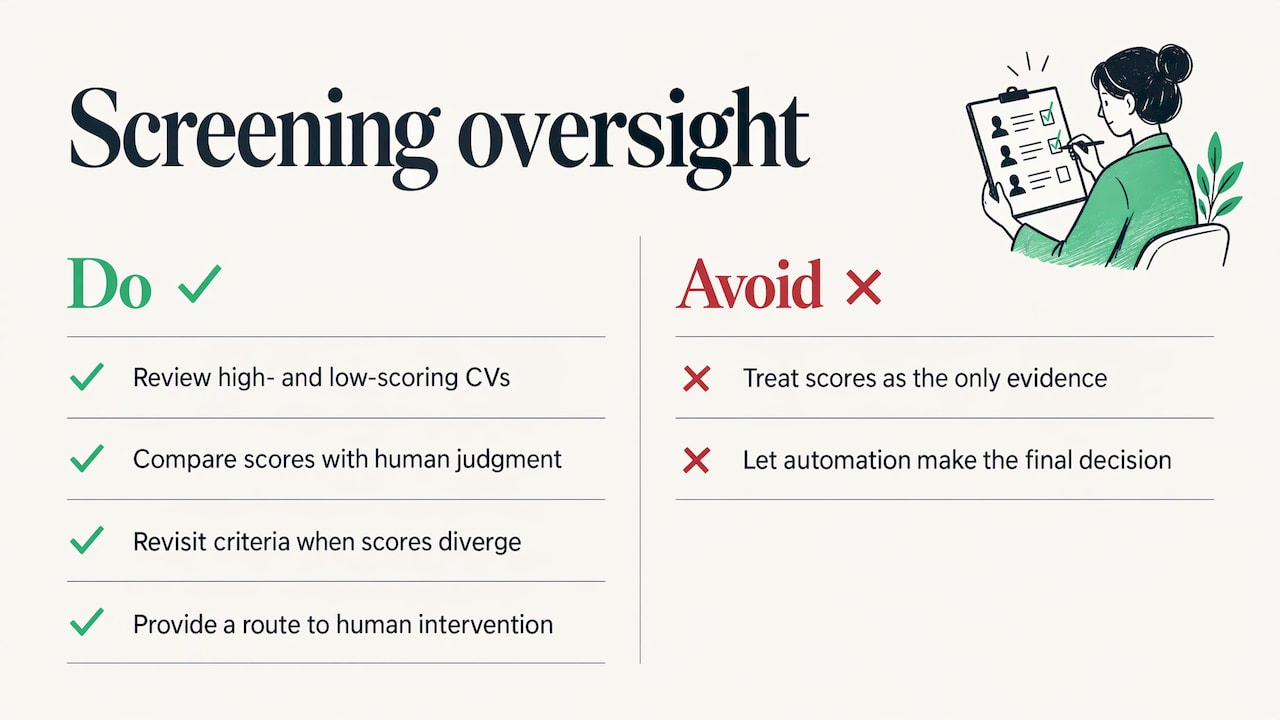
In practical terms, this means the shortlist is a recommendation and a named recruiter makes the decision. Our article on AI in recruitment, hype versus reality discusses where that line sits, and the one on AI-driven candidate fraud covers verification of applications that look too perfect.
How to roll out automation without breaking your process
Map the current process. List every stage and note where a person copies data from one place to another. Those are your candidates for automation.
Pick one stage and set a baseline. Record how long it takes now, for example the days between application and first interview.
Automate the stage and keep a human approval point wherever a message goes to a candidate for the first time or a score influences who moves forward.
Check the results after a few weeks. Compare the baseline with the new numbers and read a sample of automated messages and scores.
Connect the next stage. Chain steps together only after the first one is stable.
The metrics worth tracking are time-to-fill, time-to-first-response, application-to-interview ratio, interview-to-offer ratio, source quality, and candidate drop-off by stage. Our tech tips for modern recruiters offer a lighter starting point for small teams.
Perspective from our team
We build Recruitify around one observation: most recruitment bottlenecks are not caused by a shortage of talent or recruiters, but by information scattered across too many tools. A parser in one place, a spreadsheet of leads in another, and a contract template in a third mean that every placement involves a lot of re-entering and re-checking.
That is why we consolidated the ATS, the sales CRM, and the IT contracting module into one system. When the sales pipeline and the recruitment pipeline share the same data, a vacancy that arrives from a client can be matched against your own database immediately, and a placement can move to contract without anyone copying details across. We design the platform to reduce administrative work by up to 70%, so a team can close more placements without growing headcount.
We also believe the right model is automation with recruiters in control. Matching and scoring produce a ranked shortlist with a percentage score, but the person who knows the client decides. GDPR consent management and a full audit trail are part of the architecture, so every automated action can be traced back.
Recruitify Team
Try these workflows in one system
If you want to see several of these examples working together, Recruitify combines CV parsing, contextual matching, Boolean search, workflow automation, and contracting in a single platform. The HR Team plan costs €61 per month per user and the Agency plan costs €67 per month per user, and Enterprise pricing is available on request. Details are on the pricing page, and you can look at the all-in-one ATS and CRM to see how the pieces fit.
Agencies that want to connect business development with recruiting can also review the agency CRM, and IT-focused teams can look at the ATS for software houses.
FAQ
What is an example of recruiting automation?
The simplest example is automated interview scheduling: the system checks calendars, offers the candidate available slots, confirms the booking, and sends reminders. Other common examples are CV parsing, automatic confirmation emails, outreach sequences, and ranked shortlists based on a match score.
Which recruiting tasks should not be fully automated?
Final hiring decisions, rejections based only on a score, and sensitive conversations with candidates should involve a person. Messaging and scheduling are lower risk, while ranking and filtering people need review, in line with professional guidance such as that from the REC.
Can small agencies and freelancers use recruiting automation?
Yes. Parsing, scheduling, and outreach sequences save time at any size, and they matter most when one person handles everything. Per-user subscription plans mean a small team pays only for the seats it uses.
How do I measure whether automation is working?
Record a baseline before you change a stage, then compare time-to-fill, time-to-first-response, and the application-to-interview ratio after a few weeks. Also read a sample of automated messages and scores to confirm quality has not dropped.
Does automation help with candidates already in my database?
Yes. Indexing existing profiles lets a new vacancy search your own records first, ranked by match, so you can contact people you already know before paying for new sourcing.
Sources
AI and Candidate Experience: Chatbots, Updates and More | Rework
Algorithmic Management in AI-Driven Recruitment | Science Discovery Artificial Intelligence
Recommended
From Manual Processes to Automation: Transitioning to a Modern Recruitment Workflow
For Agencies: Orchestrate Stages with Recruitment Workflow Automation
Recruiters: Compliant Automated Candidate Outreach in 3–4 Touches
Recruiters: Stage Organized Recruiting Email Templates You Can Automate


News & Updates
Stay up-to-date with the latest innovations, features, and tips about Recruitify!
By providing your email address within the newsletter sign-up form, you confirm its processing to send marketing information regarding the Administrator’s products and services. The Administrator of your personal data processed for the abovementioned purposes is Recruitify Spółka z o.o., based in Warsaw, Poland (KRS 0000709889). For more information on the principles of personal data processing and the rights of data subjects, please check the Privacy Policy.

Last updated:
Recruiting Automation Examples: 10 Workflows That Work
Recruitment Process
The Recruitify Team
The most useful recruiting automation examples are the repetitive tasks that sit between a candidate and a decision: sourcing, CV parsing, screening, outreach, interview scheduling, status updates, job posting, and pipeline reporting. Automation handles the mechanical steps in each of them, while recruiters keep the judgment calls. This guide walks through ten concrete workflows, shows what each one replaces, and explains where human review should stay in place.
Key Takeaways
Automation works best on high-volume, rule-based tasks such as data entry, scheduling, confirmations, and duplicate detection.
Anything that ranks, scores, or filters people carries more risk than messaging or scheduling, so it needs human review and regular checks.
Start with one stage, measure it, and then connect the next, rather than automating the whole funnel at once.
A single system that holds the ATS, the CRM, and the contracting data removes the manual copying that causes most errors.
Track time-to-fill, response rates, and shortlist-to-interview ratios before and after each change.
Table of Contents
What recruiting automation actually covers
Recruiting automation is software, with or without AI, that performs recruiting tasks without a person clicking through each step. IBM describes the main categories as sourcing, screening, scheduling, and candidate communication, with algorithmic matching of profiles to job requisitions as a core capability.
It helps to separate two kinds of automation, because they carry different levels of risk:
Administrative automation: data entry, reminders, confirmations, calendar checks, document generation. Errors are easy to spot and cheap to fix.
Decision-support automation: ranking, scoring, and shortlisting. Errors can affect real people’s access to jobs, so these steps need oversight.
Rework’s guidance on candidate experience makes the same split: questions, scheduling, and status messages are low risk, while anything that ranks, scores, or filters people needs more care. The examples below follow that order, from lower to higher risk.
Ten recruiting automation examples
1. Automated CV parsing and profile creation
Manual data entry is the most obvious place to begin. Every CV that arrives as a PDF, a Word file, a scan, or a phone photo has to become a structured profile with name, contact details, skills, employers, and dates.
An AI CV parser with OCR does this on upload. In Recruitify, the parser extracts data from PDFs, DOCX files, scans, and photos, builds a structured candidate profile in about 3 seconds, and flags duplicates automatically. That last step matters more than it seems: duplicate records split a candidate’s history across two profiles and lead to two recruiters contacting the same person. You can see how this works on the CV parser page.
What it replaces: retyping, copy-pasting from attachments, and manual duplicate checks.
2. Automated job posting to multiple channels
Posting the same role to several boards and a career page by hand means re-entering the description each time and tracking where each application came from. Multi-channel posting publishes once and routes every application into the same pipeline, so you can compare channels on the number of qualified applicants rather than the number of clicks.
A branded career portal fed by the same system keeps the job description on your own domain consistent with what appears on external boards.
What it replaces: repeated posting and a separate spreadsheet of sources.
3. Automated sourcing across the web and your database
IBM notes that sourcing platforms can scan job boards, social profiles, internal talent pools, career sites, and alumni networks, then match candidate profiles to open requisitions. That widens the funnel and can surface passive candidates who never applied.
For technical hiring, two features save the most time:
Boolean string generation. Instead of writing complex search strings by hand, the recruiter generates one with a click. Recruitify’s X-RAY and Boolean engine scans the open web and the internal database this way.
Sourcing agents with approval gates. An agent proposes candidates and drafts, and the recruiter approves before anything is sent. We describe this model in our article on sourcing automation with human approval gates and in the profile of the sourcing agent.
What it replaces: hours of manual searching and string tuning.
4. Rediscovering candidates already in your database
Most agencies hold thousands of profiles they paid to acquire, and most of those profiles are never searched again. Intelligent indexing of the existing database turns a new vacancy into a first search of your own records before any external spend.
The practical workflow looks like this:
A new job is created with its required stack and seniority.
The system searches the internal database and returns profiles ranked by match percentage.
The recruiter reviews the top results, including candidates who were rejected for a different role a year ago.
Approved candidates enter an outreach sequence.
For agencies, this is the most direct route to revenue from assets they already own, and it reduces reliance on external platform licenses.
What it replaces: paying again for candidates you already know.
5. Contextual matching and scoring
Keyword matching misses the relationships between technologies. A developer who lists a framework built on a particular language is, in practice, a match for that language even if the exact word is missing from the CV. Contextual matching reads the candidate’s stack as a connected whole and compares it with project requirements.
IBM explains that automated screening uses natural language processing and machine learning to parse candidate profiles and rank them against requirements such as skills and experience. Recruitify’s matching engine is designed to deliver ready-made shortlists with a percentage match score, which gives the recruiter a starting order instead of a pile.
Because this is a decision-support step, it needs the safeguards covered in the next section. You can read more about AI features in the platform.
What it replaces: reading every application in full before deciding who to call.
6. Compliant automated outreach sequences
A first message, a follow-up, and a final nudge, each triggered by silence rather than by memory, is one of the simplest automations with the clearest payoff. A sequence of three or four touches, personalized with the candidate’s stack and the role, keeps response rates up without turning into spam. Our guide to compliant automated candidate outreach covers the structure in detail.
Two practical rules apply: stop the sequence the moment a candidate replies, and record the lawful basis for contacting them.
What it replaces: follow-up reminders in a recruiter’s notebook.
7. Chatbots and automated candidate updates
Rework describes a retrieval-based assistant that answers candidate questions from approved sources such as career pages, benefits summaries, and process documents. The same workflow can send application confirmations, stage updates, and recruiter nudges when someone has waited too long.
The design rule is simple: the assistant uses approved content only and hands the conversation to a person when the answer is not in its sources.
What it replaces: the “any update?” emails that fill a recruiter’s inbox.
8. Interview scheduling
Scheduling is the clearest example of administrative waste. IBM lists the tasks automation can take over: real-time calendar checks, proposing and confirming slots, reminders, and rescheduling alerts, with candidate-status updates triggered along the way. It also links this to better time-to-hire and fewer candidates dropping out.
In practice, the candidate picks from available slots, the interviewers’ calendars update, and a video link is generated. Recruitify connects with Microsoft Teams for video calls, and we explain the wider approach in our piece on interview scheduling automation.
What it replaces: the back-and-forth of proposing times by email.
9. Anonymized candidate profiles for clients
Agencies spend a surprising amount of time reformatting CVs into a client-ready presentation. A blind CV module generates an anonymized, consistently formatted profile from the structured data already in the system. This removes both the formatting work and the risk of accidentally leaking contact details before a placement is agreed.
What it replaces: manual template editing for every submission.
10. Contracts, pipeline movement, and reporting
Once a candidate is approved, the remaining steps are largely mechanical: moving the record to the next stage, generating the B2B contract, notifying the client, and updating the sales pipeline. For IT contracting and body leasing, linking these stages avoids retyping the same rates and dates in several tools. See our overview of recruitment workflow automation for agencies and the contracting and body leasing module.
Reporting is the by-product. When every action happens inside one system, metrics such as time-to-fill, stage conversion, and source quality are available without anyone building a spreadsheet.
What it replaces: copying data between an ATS, a CRM, and a contract template.
Which examples to automate first
Not every team needs all ten at once. The order below follows risk and payoff.
Priority | Workflow | Risk level | Typical payoff |
|---|---|---|---|
1 | CV parsing and duplicate detection | Low | Less data entry, cleaner database |
2 | Interview scheduling | Low | Faster time-to-interview |
3 | Candidate updates and confirmations | Low | Fewer inbound status questions |
4 | Outreach sequences | Medium | Consistent follow-up |
5 | Database rediscovery and sourcing | Medium | New candidates from existing assets |
6 | Matching and scoring | Higher | Faster shortlists, needs review |
7 | Contracts and reporting | Low to medium | Fewer manual handoffs |
The risk level here is our own judgment, built on the low-risk versus high-risk split described earlier for messaging and scoring. A sensible first project is the top three rows: they remove the most routine work and do not affect who is selected.
Keeping automated screening fair and reviewable
Scoring and shortlisting deserve a separate discussion because they influence outcomes. Three practices come from professional guidance.
Compare machine scores with human judgment. The Recruitment & Employment Confederation in the UK advises that a human reviewer assess samples of high-scoring and low-scoring CVs, and that if the tool’s scores diverge from human scores, the criteria being scored should be revisited. The same guidance warns that candidates can try to manipulate tools with invisible keywords, so a score should never be the only evidence.
Plan for human intervention where GDPR applies. For candidates in the European Union or United Kingdom, Article 22 of the GDPR regulates automated individual decisions. Legal analysis in the European Journal of Risk Regulation context notes that the article does not completely disallow automated decision-making in recruitment, but exceptions such as explicit consent or contractual necessity apply. The REC adds that teams should have a lawful basis, a route to human intervention, and a way for the individual to put their point of view. Reviewing whether a vendor has completed a data protection impact assessment is considered good practice.
Use structured oversight. A 2026 academic proposal, the AI Recruitment Governance Framework, recommends hybrid recruitment models with structured human oversight and clear governance mechanisms.
In the United States, requirements differ by state and city, and some jurisdictions have rules on automated employment decision tools. If you hire in a specific location, ask your employment counsel which rules apply to you.
In practical terms, this means the shortlist is a recommendation and a named recruiter makes the decision. Our article on AI in recruitment, hype versus reality discusses where that line sits, and the one on AI-driven candidate fraud covers verification of applications that look too perfect.
How to roll out automation without breaking your process
Map the current process. List every stage and note where a person copies data from one place to another. Those are your candidates for automation.
Pick one stage and set a baseline. Record how long it takes now, for example the days between application and first interview.
Automate the stage and keep a human approval point wherever a message goes to a candidate for the first time or a score influences who moves forward.
Check the results after a few weeks. Compare the baseline with the new numbers and read a sample of automated messages and scores.
Connect the next stage. Chain steps together only after the first one is stable.
The metrics worth tracking are time-to-fill, time-to-first-response, application-to-interview ratio, interview-to-offer ratio, source quality, and candidate drop-off by stage. Our tech tips for modern recruiters offer a lighter starting point for small teams.
Perspective from our team
We build Recruitify around one observation: most recruitment bottlenecks are not caused by a shortage of talent or recruiters, but by information scattered across too many tools. A parser in one place, a spreadsheet of leads in another, and a contract template in a third mean that every placement involves a lot of re-entering and re-checking.
That is why we consolidated the ATS, the sales CRM, and the IT contracting module into one system. When the sales pipeline and the recruitment pipeline share the same data, a vacancy that arrives from a client can be matched against your own database immediately, and a placement can move to contract without anyone copying details across. We design the platform to reduce administrative work by up to 70%, so a team can close more placements without growing headcount.
We also believe the right model is automation with recruiters in control. Matching and scoring produce a ranked shortlist with a percentage score, but the person who knows the client decides. GDPR consent management and a full audit trail are part of the architecture, so every automated action can be traced back.
Recruitify Team
Try these workflows in one system
If you want to see several of these examples working together, Recruitify combines CV parsing, contextual matching, Boolean search, workflow automation, and contracting in a single platform. The HR Team plan costs €61 per month per user and the Agency plan costs €67 per month per user, and Enterprise pricing is available on request. Details are on the pricing page, and you can look at the all-in-one ATS and CRM to see how the pieces fit.
Agencies that want to connect business development with recruiting can also review the agency CRM, and IT-focused teams can look at the ATS for software houses.
FAQ
What is an example of recruiting automation?
The simplest example is automated interview scheduling: the system checks calendars, offers the candidate available slots, confirms the booking, and sends reminders. Other common examples are CV parsing, automatic confirmation emails, outreach sequences, and ranked shortlists based on a match score.
Which recruiting tasks should not be fully automated?
Final hiring decisions, rejections based only on a score, and sensitive conversations with candidates should involve a person. Messaging and scheduling are lower risk, while ranking and filtering people need review, in line with professional guidance such as that from the REC.
Can small agencies and freelancers use recruiting automation?
Yes. Parsing, scheduling, and outreach sequences save time at any size, and they matter most when one person handles everything. Per-user subscription plans mean a small team pays only for the seats it uses.
How do I measure whether automation is working?
Record a baseline before you change a stage, then compare time-to-fill, time-to-first-response, and the application-to-interview ratio after a few weeks. Also read a sample of automated messages and scores to confirm quality has not dropped.
Does automation help with candidates already in my database?
Yes. Indexing existing profiles lets a new vacancy search your own records first, ranked by match, so you can contact people you already know before paying for new sourcing.
Sources
AI and Candidate Experience: Chatbots, Updates and More | Rework
Algorithmic Management in AI-Driven Recruitment | Science Discovery Artificial Intelligence
Recommended
From Manual Processes to Automation: Transitioning to a Modern Recruitment Workflow
For Agencies: Orchestrate Stages with Recruitment Workflow Automation
Recruiters: Compliant Automated Candidate Outreach in 3–4 Touches
Recruiters: Stage Organized Recruiting Email Templates You Can Automate
News & Updates
Stay up-to-date with the latest innovations, features, and tips about Recruitify!
By providing your email address within the newsletter sign-up form, you confirm its processing to send marketing information regarding the Administrator’s products and services. The Administrator of your personal data processed for the abovementioned purposes is Recruitify Spółka z o.o., based in Warsaw, Poland (KRS 0000709889). For more information on the principles of personal data processing and the rights of data subjects, please check the Privacy Policy.

Discover More

Acquiring Talent
Recruiter Workload Planning: A Practical Capacity Guide
Plan recruiter workload with weighted requisitions, hour-based capacity, buffers and a simple demand-versus-supply gap check you can run in a spreadsheet.
11 Nov 2026
Discover More

Recruitment Process
Submittal to Interview Ratio: Formula, Benchmarks, Fixes
Learn how to calculate your submittal to interview ratio, what counts as a good number by role type, and how to improve it without lowering candidate quality.
9 Nov 2026
Discover More

Applicant Tracking System
Staffing Sales Pipeline: Stages, Metrics and Automation
Build a staffing sales pipeline that turns target accounts into active job orders: stages, entry rules, metrics and how ATS and CRM automation keep it moving.
8 Nov 2026
Discover More
Acquiring Talent
Recruiter Workload Planning: A Practical Capacity Guide
Plan recruiter workload with weighted requisitions, hour-based capacity, buffers and a simple demand-versus-supply gap check you can run in a spreadsheet.
11 Nov 2026
Discover More
Recruitment Process
Submittal to Interview Ratio: Formula, Benchmarks, Fixes
Learn how to calculate your submittal to interview ratio, what counts as a good number by role type, and how to improve it without lowering candidate quality.
9 Nov 2026
Discover More