
Last updated:
Stop Duplicate Outreach: 5 ATS vs CRM Questions Recruiters Must Ask

Applicant Tracking System

The Recruitify Team
Stop Duplicate Outreach: 5 ATS vs CRM Questions Recruiters Must Ask
An ATS is built to fill open roles, moving candidates through applications, interviews, and offers. A recruiting CRM is built to nurture relationships with talent you might hire months from now. If most of your hires come from inbound applications, start with an ATS. If you spend your day sourcing passive candidates or building a pipeline for future roles, a CRM matters more. Platforms like Recruitify combine both into a single workflow.
An ATS is designed to manage candidates who have already applied, focusing on moving them through specific hiring stages efficiently.
A CRM focuses on building long-term relationships with passive talent, using segmentation, drip campaigns, and engagement scoring.
When high application volume occurs, an ATS is usually enough, but for sourcing scarce or senior talent, a CRM provides more long-term value.
Integrating both systems is essential for agencies or growing internal teams to prevent data silos and ensure seamless candidate handoffs.
Prioritize platforms with accurate parsing, customizable lead scoring, full data exportability, and strong automation capabilities to meet evolving recruiting needs.
Table of Contents
ATS vs CRM Comparison: Which System Solves Which Problem?
What Does an Applicant Tracking System Actually Do?
What Does a Recruiting CRM Actually Do?
ATS vs CRM Features: What Actually Overlaps?
When Should You Choose ATS, CRM, or Both?
How Do You Integrate an ATS and CRM Without Creating a Mess?
What Should You Ask Vendors Before Buying?
Why an Integrated ATS and CRM Matters More Than Most Teams Realize
How Recruitify Brings ATS and CRM Together in One Platform
Sources
ATS vs CRM Comparison: Which System Solves Which Problem?
The fastest way to tell these two systems apart is to ask what job you’re trying to do at any given moment. An ATS manages candidates who have already applied, moving them through a defined pipeline toward a hire. A CRM manages relationships with people who haven’t applied yet, some of whom may never apply to a specific job but stay warm in your talent pool for the right opening.
Here’s how the two break down across the factors that actually affect your day-to-day work:
Primary purpose: ATS drives candidates toward a hiring decision; CRM builds and maintains a pool of future talent.
Typical users: ATS is run by recruiters and hiring managers filling open reqs; CRM is run by sourcers, agency business developers, and talent acquisition teams building long-term pipelines.
Timeline in the candidate lifecycle: ATS engages someone the moment they apply; CRM engages someone the moment you identify them as a fit, sometimes years before a role opens.
Communication style: ATS communication is transactional (status updates, interview invites, offer letters); CRM communication is relational (newsletters, check-ins, career content, drip sequences).
Outcome each delivers: ATS improves time-to-hire and hiring consistency; CRM improves pipeline health and reduces your dependence on cold sourcing when a role opens suddenly.
Neither system replaces the other, and that’s the point recruiters miss most often when shopping for software. An ATS focuses on filling current positions while a CRM focuses on relationships for future vacancies, which means the “better” system depends entirely on what problem sits in front of you this week.
What Does an Applicant Tracking System Actually Do?
An ATS exists to manage the mechanics of hiring for roles you’re actively trying to fill. It’s the system of record for every application, interview note, and offer letter tied to a specific requisition, and it’s built around structure: defined stages, required approvals, and a paper trail that satisfies both hiring managers and compliance teams.
The features that matter most in an ATS include:
Multi-channel job posting and syndication to job boards
Resume parsing that extracts structured data from unstructured documents
Configurable pipeline stages (applied, screened, interviewing, offer, hired)
Interview scheduling and scorecards for structured evaluation
Offer letter generation and e-signature workflows
Compliance tracking (EEO reporting, audit trails, retention policies)
You know you need an ATS when application volume is high enough that spreadsheets or email threads start dropping candidates, or when your hiring process needs consistent stages across every recruiter on the team. Job posting syndication, parsing, scheduling, and structured scorecards are the baseline expectations for any modern platform, and a deeper look at what an ATS actually includes is worth a read if you’re building your first tech stack.
Where an ATS runs into trouble is when teams try to stretch it into a sourcing tool. Most ATS platforms weren’t designed to segment contacts by skill, send drip content over months, or score engagement from someone who isn’t actively applying. Attempting to use an ATS as a CRM often falls short because the nurture mechanics, drip campaigns, lead scoring, and long-term relationship tracking, simply aren’t built into the data model. Push it too far and you end up with a bloated pipeline full of stale “candidates” who never actually applied.
What Does a Recruiting CRM Actually Do?
A recruiting CRM exists to manage relationships with people before they’re candidates for a specific role. Think of it as the system that keeps your talent pipeline alive between hiring needs, so you’re never starting from zero when a position opens.
Core CRM capabilities typically include:
Talent pools segmented by skill, location, seniority, or availability
Drip email and nurture campaigns that stay relevant over months or years
Lead scoring that flags which passive candidates are warming up
Relationship timelines showing every touchpoint, event, or conversation
Tagging and activity logs that track engagement over the long run
Employer branding content distribution (newsletters, career updates, event invites)
A recruiting CRM’s job is to find and engage passive talent, while an ATS picks up once someone actually applies. That proactive versus reactive split shows up constantly in agency work: a recruiter fills a niche engineering role not by posting a job, but by reaching back into a CRM segment built two years earlier from a conference sponsor list.
You need CRM strength when your hiring model depends on outreach rather than inbound applications, when you’re filling scarce-skill or executive roles that take months to source, or when your brand needs consistent touchpoints with candidates who aren’t ready to move yet. Segmentation, drip emails, and engagement scoring are the differentiators that separate a CRM from a glorified spreadsheet. Agencies juggling multiple clients often lean on CRM tools even harder, since managing the client relationship alongside the candidate pipeline becomes its own discipline.
The candidate experience difference is real. A CRM lets you stay in touch with genuine value (a relevant job alert, a piece of career content, an invite to an event), rather than going silent for a year and reappearing only when you need something.
ATS vs CRM Features: What Actually Overlaps?
Feature comparisons get muddy fast because vendors love to claim their ATS “does CRM too.” Look closely and the overlap is thinner than the marketing suggests.
Parsing and search vs. nurture and scoring. ATS platforms parse resumes to fill structured fields (name, title, years of experience, skills) so recruiters can search and filter applicants quickly. CRM platforms use similar parsing on the front end, but the real work happens afterward: scoring engagement, triggering automated sequences, and flagging when a passive contact becomes sourcing-ready. One is optimized for filtering a known pool; the other is optimized for warming an unknown one.
Data model differences. An ATS record is built around a candidate’s status in a specific pipeline. A CRM record is built around a contact’s full relationship timeline, every email opened, event attended, and tag applied, independent of any single job requisition. That structural difference is why exporting a CRM contact into an ATS often loses context: the receiving system has no field for “engaged with three newsletters and attended a webinar in 2025.”
Here’s where teams should focus their attention when comparing platforms:
Prioritize parsing accuracy if your volume is high and manual review time is your biggest cost.
Prioritize lead scoring and segmentation if your biggest cost is sourcing time for hard-to-fill roles.
Prioritize a unified activity log if multiple recruiters touch the same candidate across both systems.
Prioritize AI-assisted screening if you want scoring that works for both active applicants and passive prospects.
Pro Tip: Parsing quality isn’t standardized across vendors. Parsing and matching behavior differs by configuration, so ask any vendor to run a live demo using your team’s actual resume formats, not a polished sample file, before you sign anything.
When Should You Choose ATS, CRM, or Both?
Matching the tool to the hiring model is where most procurement mistakes happen. Teams buy the trendier platform instead of the one that fits how candidates actually reach them.
High-volume, inbound-heavy roles (retail, hospitality, call centers, seasonal hiring): an ATS alone often covers it. Applications flow in steadily, and your priority is processing speed and consistency, not relationship building.
Scarce-skill or executive search: a CRM carries more weight here. These hires depend on proactive outreach, warm relationships built over months, and pipelines that outlast any single open requisition.
Recruitment agencies managing multiple clients: you almost always need both. ATS handles the active req for Client A; CRM keeps your bench warm for Client B’s role next quarter, and tracks the client relationship itself.
Growing internal TA teams (50 to 500 employees): start with ATS for structure, then add CRM capability once sourcing volume and employer branding start to strain manual outreach.
Enterprise teams with dedicated sourcing functions: a unified platform usually wins, since hiring strategy should dictate the system, and separate tools create data silos exactly where sourcing and hiring teams need shared visibility.
The team signals worth watching are hiring cadence (steady versus spiky), sourcing model (inbound versus outreach), and headcount growth rate. A team hiring 200 warehouse workers a quarter has almost nothing in common, tool-wise, with a boutique agency placing five VP-level candidates a year, even though both technically “recruit.”
How Do You Integrate an ATS and CRM Without Creating a Mess?
Two paths exist here: buy a native platform where ATS and CRM share one data model, or connect separate best-of-breed tools through integrations and middleware. Some vendors now combine both feature sets natively, which reduces the data silo problem but usually raises the price tag and adds evaluation complexity during procurement.

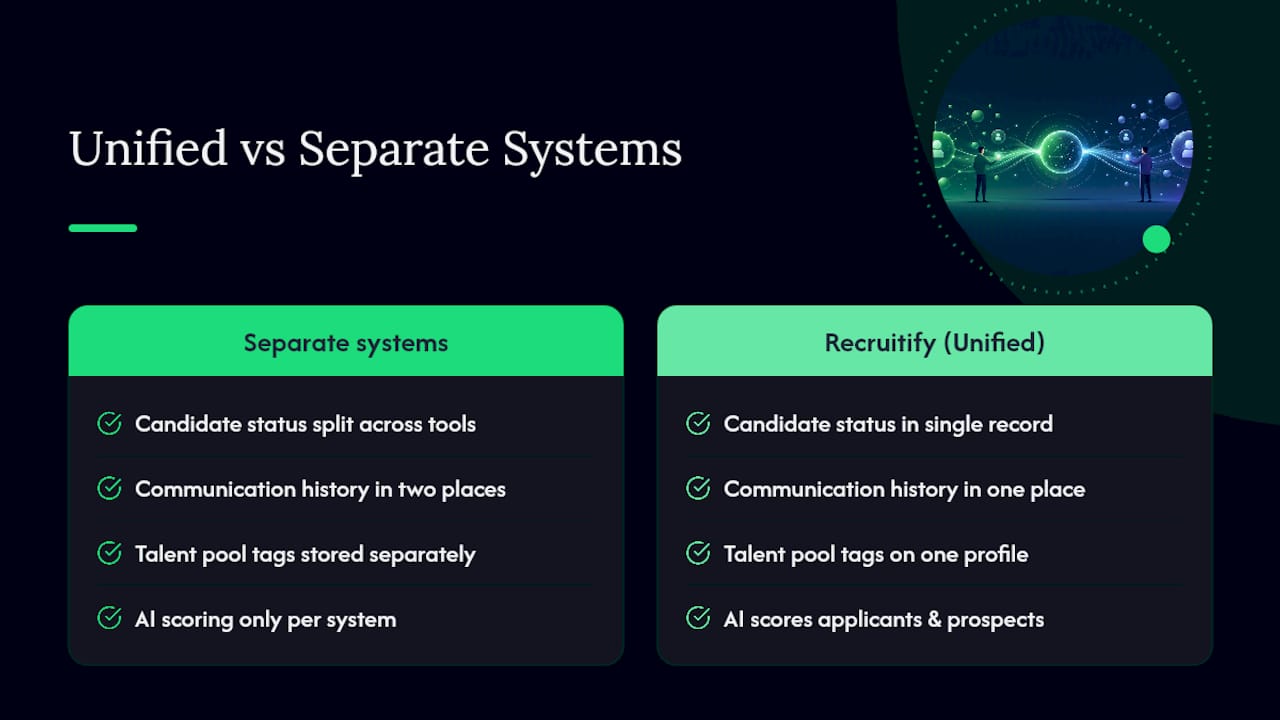
If you’re connecting separate systems, the handoff points are where things break. When a CRM contact applies to a role, that application needs to trigger a clean transfer into the ATS, carrying status, tags, and communication history along with it. Miss that handoff and recruiters end up messaging the same person twice from two different systems, which candidates notice immediately.
Keep these practices in place to avoid the mess:
Sync candidate status bidirectionally so a hire in the ATS updates the CRM record automatically.
Standardize tags across both systems before rollout, not after duplicates pile up.
Maintain one communication history log visible to anyone touching the candidate.
Run a duplicate-detection sweep monthly, especially if candidates re-enter through multiple channels (referral, job board, CRM campaign).
Pro Tip: Before connecting any two systems, map every field you need synced onto a single spreadsheet first: status, source, tags, consent, and communication history. Half of all integration failures trace back to a field that exists in one system and not the other.
Recruitify’s automation features handle this handoff natively, since candidate and contact data live in one model instead of two systems trying to reconcile after the fact.
What Should You Ask Vendors Before Buying?
A demo will tell you more than a spec sheet ever will, provided you ask the right questions. Most vendor pitches gloss over the details that actually determine whether a system fits your workflow six months from now.
Ask for a live parsing demo using your own resume samples, not the vendor’s polished examples, since parsing behavior varies significantly by configuration.
Ask exactly how lead scoring rules work, including whether you can customize the weighting or you’re stuck with a black-box algorithm.
Request API documentation or sample integration code if you’re connecting to existing HR systems, not just a vague “yes, we integrate with that.”
Ask what a full data export looks like before you sign, including format, field completeness, and whether historical activity logs come with it.
Confirm compliance features relevant to your jurisdiction, including EEO reporting, GDPR consent tracking, and data retention controls.
Evaluation should weigh sourcing capability, automation depth, analytics quality, integration options, and how easily you can get your own data back out. Buyer guides consistently recommend prioritizing integration and analytics over flashy feature lists that rarely get used past the demo stage.
Pro Tip: Treat data exportability as a dealbreaker, not a nice-to-have. Any vendor that hedges on giving you a clean export of your own candidate and contact data is telling you something about how hard it’ll be to leave later.
Red flags worth walking away from: vendors who won’t demo with your real data, unclear SLAs on uptime or support response time, and pricing that scales in ways nobody can explain clearly during the sales call.
Why an Integrated ATS and CRM Matters More Than Most Teams Realize
The ATS versus CRM debate often gets framed as an either/or decision, but that framing misses how most recruiting teams actually operate day to day. Recruiters don’t split their attention neatly between “hiring mode” and “sourcing mode.” They toggle between the two dozens of times a day, and every toggle between disconnected systems is a chance for a candidate to fall through a crack or get contacted twice.
Recruitify was built around that reality, serving over 250 companies with a single data model instead of two systems bolted together. AI-driven automation handles the handoff between sourcing and hiring, so a passive contact who applies doesn’t lose their engagement history in the transition. Fewer duplicates, faster handoffs between sourcing and active pipelines, and a nurture history that survives the moment someone finally applies, that’s what an integrated model earns you in practice.
— Recruitify Team
How Recruitify Brings ATS and CRM Together in One Platform
If the feature comparisons above left you weighing a separate ATS purchase against a separate CRM purchase, there’s a simpler path. Recruitify unites both into one system, so candidate status, communication history, and talent pool tags live in a single record instead of two systems you have to keep in sync manually.

That matters most for agencies and internal teams juggling both inbound applications and proactive sourcing at the same time, which, based on the scenarios above, describes most recruiting operations once they scale past a handful of hires a month. Recruitify’s AI candidate scoring works across both active applicants and passive prospects, its CRM tools handle talent pool segmentation and outreach, and its recruitment project controls keep every open requisition organized without a second system to reconcile. Analytics span the full candidate lifecycle instead of stopping at “applied” or starting at “hired.”
If you’re evaluating your next platform, start with a look at Recruitify’s full feature set and request a demo built around your own hiring data, focusing on parsing and scoring performance.
Sources
For readers who want to verify the distinctions covered here or go deeper on procurement decisions, these sources are worth bookmarking: TechTarget’s ATS vs. CRM breakdown for the core definitional split, Workday’s guidance on choosing between systems for decision criteria, Greenhouse’s take on proactive versus reactive recruiting, and Indeed’s feature-level rundown for a practical checklist of what each system should include.
Recommended


News & Updates
Stay up-to-date with the latest innovations, features, and tips about Recruitify!
By providing your email address within the newsletter sign-up form, you confirm its processing to send marketing information regarding the Administrator’s products and services. The Administrator of your personal data processed for the abovementioned purposes is Recruitify Spółka z o.o., based in Warsaw, Poland (KRS 0000709889). For more information on the principles of personal data processing and the rights of data subjects, please check the Privacy Policy.

Last updated:
Stop Duplicate Outreach: 5 ATS vs CRM Questions Recruiters Must Ask
Applicant Tracking System
The Recruitify Team
Stop Duplicate Outreach: 5 ATS vs CRM Questions Recruiters Must Ask
An ATS is built to fill open roles, moving candidates through applications, interviews, and offers. A recruiting CRM is built to nurture relationships with talent you might hire months from now. If most of your hires come from inbound applications, start with an ATS. If you spend your day sourcing passive candidates or building a pipeline for future roles, a CRM matters more. Platforms like Recruitify combine both into a single workflow.
An ATS is designed to manage candidates who have already applied, focusing on moving them through specific hiring stages efficiently.
A CRM focuses on building long-term relationships with passive talent, using segmentation, drip campaigns, and engagement scoring.
When high application volume occurs, an ATS is usually enough, but for sourcing scarce or senior talent, a CRM provides more long-term value.
Integrating both systems is essential for agencies or growing internal teams to prevent data silos and ensure seamless candidate handoffs.
Prioritize platforms with accurate parsing, customizable lead scoring, full data exportability, and strong automation capabilities to meet evolving recruiting needs.
Table of Contents
ATS vs CRM Comparison: Which System Solves Which Problem?
What Does an Applicant Tracking System Actually Do?
What Does a Recruiting CRM Actually Do?
ATS vs CRM Features: What Actually Overlaps?
When Should You Choose ATS, CRM, or Both?
How Do You Integrate an ATS and CRM Without Creating a Mess?
What Should You Ask Vendors Before Buying?
Why an Integrated ATS and CRM Matters More Than Most Teams Realize
How Recruitify Brings ATS and CRM Together in One Platform
Sources
ATS vs CRM Comparison: Which System Solves Which Problem?
The fastest way to tell these two systems apart is to ask what job you’re trying to do at any given moment. An ATS manages candidates who have already applied, moving them through a defined pipeline toward a hire. A CRM manages relationships with people who haven’t applied yet, some of whom may never apply to a specific job but stay warm in your talent pool for the right opening.
Here’s how the two break down across the factors that actually affect your day-to-day work:
Primary purpose: ATS drives candidates toward a hiring decision; CRM builds and maintains a pool of future talent.
Typical users: ATS is run by recruiters and hiring managers filling open reqs; CRM is run by sourcers, agency business developers, and talent acquisition teams building long-term pipelines.
Timeline in the candidate lifecycle: ATS engages someone the moment they apply; CRM engages someone the moment you identify them as a fit, sometimes years before a role opens.
Communication style: ATS communication is transactional (status updates, interview invites, offer letters); CRM communication is relational (newsletters, check-ins, career content, drip sequences).
Outcome each delivers: ATS improves time-to-hire and hiring consistency; CRM improves pipeline health and reduces your dependence on cold sourcing when a role opens suddenly.
Neither system replaces the other, and that’s the point recruiters miss most often when shopping for software. An ATS focuses on filling current positions while a CRM focuses on relationships for future vacancies, which means the “better” system depends entirely on what problem sits in front of you this week.
What Does an Applicant Tracking System Actually Do?
An ATS exists to manage the mechanics of hiring for roles you’re actively trying to fill. It’s the system of record for every application, interview note, and offer letter tied to a specific requisition, and it’s built around structure: defined stages, required approvals, and a paper trail that satisfies both hiring managers and compliance teams.
The features that matter most in an ATS include:
Multi-channel job posting and syndication to job boards
Resume parsing that extracts structured data from unstructured documents
Configurable pipeline stages (applied, screened, interviewing, offer, hired)
Interview scheduling and scorecards for structured evaluation
Offer letter generation and e-signature workflows
Compliance tracking (EEO reporting, audit trails, retention policies)
You know you need an ATS when application volume is high enough that spreadsheets or email threads start dropping candidates, or when your hiring process needs consistent stages across every recruiter on the team. Job posting syndication, parsing, scheduling, and structured scorecards are the baseline expectations for any modern platform, and a deeper look at what an ATS actually includes is worth a read if you’re building your first tech stack.
Where an ATS runs into trouble is when teams try to stretch it into a sourcing tool. Most ATS platforms weren’t designed to segment contacts by skill, send drip content over months, or score engagement from someone who isn’t actively applying. Attempting to use an ATS as a CRM often falls short because the nurture mechanics, drip campaigns, lead scoring, and long-term relationship tracking, simply aren’t built into the data model. Push it too far and you end up with a bloated pipeline full of stale “candidates” who never actually applied.
What Does a Recruiting CRM Actually Do?
A recruiting CRM exists to manage relationships with people before they’re candidates for a specific role. Think of it as the system that keeps your talent pipeline alive between hiring needs, so you’re never starting from zero when a position opens.
Core CRM capabilities typically include:
Talent pools segmented by skill, location, seniority, or availability
Drip email and nurture campaigns that stay relevant over months or years
Lead scoring that flags which passive candidates are warming up
Relationship timelines showing every touchpoint, event, or conversation
Tagging and activity logs that track engagement over the long run
Employer branding content distribution (newsletters, career updates, event invites)
A recruiting CRM’s job is to find and engage passive talent, while an ATS picks up once someone actually applies. That proactive versus reactive split shows up constantly in agency work: a recruiter fills a niche engineering role not by posting a job, but by reaching back into a CRM segment built two years earlier from a conference sponsor list.
You need CRM strength when your hiring model depends on outreach rather than inbound applications, when you’re filling scarce-skill or executive roles that take months to source, or when your brand needs consistent touchpoints with candidates who aren’t ready to move yet. Segmentation, drip emails, and engagement scoring are the differentiators that separate a CRM from a glorified spreadsheet. Agencies juggling multiple clients often lean on CRM tools even harder, since managing the client relationship alongside the candidate pipeline becomes its own discipline.
The candidate experience difference is real. A CRM lets you stay in touch with genuine value (a relevant job alert, a piece of career content, an invite to an event), rather than going silent for a year and reappearing only when you need something.
ATS vs CRM Features: What Actually Overlaps?
Feature comparisons get muddy fast because vendors love to claim their ATS “does CRM too.” Look closely and the overlap is thinner than the marketing suggests.
Parsing and search vs. nurture and scoring. ATS platforms parse resumes to fill structured fields (name, title, years of experience, skills) so recruiters can search and filter applicants quickly. CRM platforms use similar parsing on the front end, but the real work happens afterward: scoring engagement, triggering automated sequences, and flagging when a passive contact becomes sourcing-ready. One is optimized for filtering a known pool; the other is optimized for warming an unknown one.
Data model differences. An ATS record is built around a candidate’s status in a specific pipeline. A CRM record is built around a contact’s full relationship timeline, every email opened, event attended, and tag applied, independent of any single job requisition. That structural difference is why exporting a CRM contact into an ATS often loses context: the receiving system has no field for “engaged with three newsletters and attended a webinar in 2025.”
Here’s where teams should focus their attention when comparing platforms:
Prioritize parsing accuracy if your volume is high and manual review time is your biggest cost.
Prioritize lead scoring and segmentation if your biggest cost is sourcing time for hard-to-fill roles.
Prioritize a unified activity log if multiple recruiters touch the same candidate across both systems.
Prioritize AI-assisted screening if you want scoring that works for both active applicants and passive prospects.
Pro Tip: Parsing quality isn’t standardized across vendors. Parsing and matching behavior differs by configuration, so ask any vendor to run a live demo using your team’s actual resume formats, not a polished sample file, before you sign anything.
When Should You Choose ATS, CRM, or Both?
Matching the tool to the hiring model is where most procurement mistakes happen. Teams buy the trendier platform instead of the one that fits how candidates actually reach them.
High-volume, inbound-heavy roles (retail, hospitality, call centers, seasonal hiring): an ATS alone often covers it. Applications flow in steadily, and your priority is processing speed and consistency, not relationship building.
Scarce-skill or executive search: a CRM carries more weight here. These hires depend on proactive outreach, warm relationships built over months, and pipelines that outlast any single open requisition.
Recruitment agencies managing multiple clients: you almost always need both. ATS handles the active req for Client A; CRM keeps your bench warm for Client B’s role next quarter, and tracks the client relationship itself.
Growing internal TA teams (50 to 500 employees): start with ATS for structure, then add CRM capability once sourcing volume and employer branding start to strain manual outreach.
Enterprise teams with dedicated sourcing functions: a unified platform usually wins, since hiring strategy should dictate the system, and separate tools create data silos exactly where sourcing and hiring teams need shared visibility.
The team signals worth watching are hiring cadence (steady versus spiky), sourcing model (inbound versus outreach), and headcount growth rate. A team hiring 200 warehouse workers a quarter has almost nothing in common, tool-wise, with a boutique agency placing five VP-level candidates a year, even though both technically “recruit.”
How Do You Integrate an ATS and CRM Without Creating a Mess?
Two paths exist here: buy a native platform where ATS and CRM share one data model, or connect separate best-of-breed tools through integrations and middleware. Some vendors now combine both feature sets natively, which reduces the data silo problem but usually raises the price tag and adds evaluation complexity during procurement.
If you’re connecting separate systems, the handoff points are where things break. When a CRM contact applies to a role, that application needs to trigger a clean transfer into the ATS, carrying status, tags, and communication history along with it. Miss that handoff and recruiters end up messaging the same person twice from two different systems, which candidates notice immediately.
Keep these practices in place to avoid the mess:
Sync candidate status bidirectionally so a hire in the ATS updates the CRM record automatically.
Standardize tags across both systems before rollout, not after duplicates pile up.
Maintain one communication history log visible to anyone touching the candidate.
Run a duplicate-detection sweep monthly, especially if candidates re-enter through multiple channels (referral, job board, CRM campaign).
Pro Tip: Before connecting any two systems, map every field you need synced onto a single spreadsheet first: status, source, tags, consent, and communication history. Half of all integration failures trace back to a field that exists in one system and not the other.
Recruitify’s automation features handle this handoff natively, since candidate and contact data live in one model instead of two systems trying to reconcile after the fact.
What Should You Ask Vendors Before Buying?
A demo will tell you more than a spec sheet ever will, provided you ask the right questions. Most vendor pitches gloss over the details that actually determine whether a system fits your workflow six months from now.
Ask for a live parsing demo using your own resume samples, not the vendor’s polished examples, since parsing behavior varies significantly by configuration.
Ask exactly how lead scoring rules work, including whether you can customize the weighting or you’re stuck with a black-box algorithm.
Request API documentation or sample integration code if you’re connecting to existing HR systems, not just a vague “yes, we integrate with that.”
Ask what a full data export looks like before you sign, including format, field completeness, and whether historical activity logs come with it.
Confirm compliance features relevant to your jurisdiction, including EEO reporting, GDPR consent tracking, and data retention controls.
Evaluation should weigh sourcing capability, automation depth, analytics quality, integration options, and how easily you can get your own data back out. Buyer guides consistently recommend prioritizing integration and analytics over flashy feature lists that rarely get used past the demo stage.
Pro Tip: Treat data exportability as a dealbreaker, not a nice-to-have. Any vendor that hedges on giving you a clean export of your own candidate and contact data is telling you something about how hard it’ll be to leave later.
Red flags worth walking away from: vendors who won’t demo with your real data, unclear SLAs on uptime or support response time, and pricing that scales in ways nobody can explain clearly during the sales call.
Why an Integrated ATS and CRM Matters More Than Most Teams Realize
The ATS versus CRM debate often gets framed as an either/or decision, but that framing misses how most recruiting teams actually operate day to day. Recruiters don’t split their attention neatly between “hiring mode” and “sourcing mode.” They toggle between the two dozens of times a day, and every toggle between disconnected systems is a chance for a candidate to fall through a crack or get contacted twice.
Recruitify was built around that reality, serving over 250 companies with a single data model instead of two systems bolted together. AI-driven automation handles the handoff between sourcing and hiring, so a passive contact who applies doesn’t lose their engagement history in the transition. Fewer duplicates, faster handoffs between sourcing and active pipelines, and a nurture history that survives the moment someone finally applies, that’s what an integrated model earns you in practice.
— Recruitify Team
How Recruitify Brings ATS and CRM Together in One Platform
If the feature comparisons above left you weighing a separate ATS purchase against a separate CRM purchase, there’s a simpler path. Recruitify unites both into one system, so candidate status, communication history, and talent pool tags live in a single record instead of two systems you have to keep in sync manually.
That matters most for agencies and internal teams juggling both inbound applications and proactive sourcing at the same time, which, based on the scenarios above, describes most recruiting operations once they scale past a handful of hires a month. Recruitify’s AI candidate scoring works across both active applicants and passive prospects, its CRM tools handle talent pool segmentation and outreach, and its recruitment project controls keep every open requisition organized without a second system to reconcile. Analytics span the full candidate lifecycle instead of stopping at “applied” or starting at “hired.”
If you’re evaluating your next platform, start with a look at Recruitify’s full feature set and request a demo built around your own hiring data, focusing on parsing and scoring performance.
Sources
For readers who want to verify the distinctions covered here or go deeper on procurement decisions, these sources are worth bookmarking: TechTarget’s ATS vs. CRM breakdown for the core definitional split, Workday’s guidance on choosing between systems for decision criteria, Greenhouse’s take on proactive versus reactive recruiting, and Indeed’s feature-level rundown for a practical checklist of what each system should include.
Recommended
News & Updates
Stay up-to-date with the latest innovations, features, and tips about Recruitify!
By providing your email address within the newsletter sign-up form, you confirm its processing to send marketing information regarding the Administrator’s products and services. The Administrator of your personal data processed for the abovementioned purposes is Recruitify Spółka z o.o., based in Warsaw, Poland (KRS 0000709889). For more information on the principles of personal data processing and the rights of data subjects, please check the Privacy Policy.
Last updated:
Stop Duplicate Outreach: 5 ATS vs CRM Questions Recruiters Must Ask
Applicant Tracking System
The Recruitify Team
Stop Duplicate Outreach: 5 ATS vs CRM Questions Recruiters Must Ask
An ATS is built to fill open roles, moving candidates through applications, interviews, and offers. A recruiting CRM is built to nurture relationships with talent you might hire months from now. If most of your hires come from inbound applications, start with an ATS. If you spend your day sourcing passive candidates or building a pipeline for future roles, a CRM matters more. Platforms like Recruitify combine both into a single workflow.
An ATS is designed to manage candidates who have already applied, focusing on moving them through specific hiring stages efficiently.
A CRM focuses on building long-term relationships with passive talent, using segmentation, drip campaigns, and engagement scoring.
When high application volume occurs, an ATS is usually enough, but for sourcing scarce or senior talent, a CRM provides more long-term value.
Integrating both systems is essential for agencies or growing internal teams to prevent data silos and ensure seamless candidate handoffs.
Prioritize platforms with accurate parsing, customizable lead scoring, full data exportability, and strong automation capabilities to meet evolving recruiting needs.
Table of Contents
ATS vs CRM Comparison: Which System Solves Which Problem?
What Does an Applicant Tracking System Actually Do?
What Does a Recruiting CRM Actually Do?
ATS vs CRM Features: What Actually Overlaps?
When Should You Choose ATS, CRM, or Both?
How Do You Integrate an ATS and CRM Without Creating a Mess?
What Should You Ask Vendors Before Buying?
Why an Integrated ATS and CRM Matters More Than Most Teams Realize
How Recruitify Brings ATS and CRM Together in One Platform
Sources
ATS vs CRM Comparison: Which System Solves Which Problem?
The fastest way to tell these two systems apart is to ask what job you’re trying to do at any given moment. An ATS manages candidates who have already applied, moving them through a defined pipeline toward a hire. A CRM manages relationships with people who haven’t applied yet, some of whom may never apply to a specific job but stay warm in your talent pool for the right opening.
Here’s how the two break down across the factors that actually affect your day-to-day work:
Primary purpose: ATS drives candidates toward a hiring decision; CRM builds and maintains a pool of future talent.
Typical users: ATS is run by recruiters and hiring managers filling open reqs; CRM is run by sourcers, agency business developers, and talent acquisition teams building long-term pipelines.
Timeline in the candidate lifecycle: ATS engages someone the moment they apply; CRM engages someone the moment you identify them as a fit, sometimes years before a role opens.
Communication style: ATS communication is transactional (status updates, interview invites, offer letters); CRM communication is relational (newsletters, check-ins, career content, drip sequences).
Outcome each delivers: ATS improves time-to-hire and hiring consistency; CRM improves pipeline health and reduces your dependence on cold sourcing when a role opens suddenly.
Neither system replaces the other, and that’s the point recruiters miss most often when shopping for software. An ATS focuses on filling current positions while a CRM focuses on relationships for future vacancies, which means the “better” system depends entirely on what problem sits in front of you this week.
What Does an Applicant Tracking System Actually Do?
An ATS exists to manage the mechanics of hiring for roles you’re actively trying to fill. It’s the system of record for every application, interview note, and offer letter tied to a specific requisition, and it’s built around structure: defined stages, required approvals, and a paper trail that satisfies both hiring managers and compliance teams.
The features that matter most in an ATS include:
Multi-channel job posting and syndication to job boards
Resume parsing that extracts structured data from unstructured documents
Configurable pipeline stages (applied, screened, interviewing, offer, hired)
Interview scheduling and scorecards for structured evaluation
Offer letter generation and e-signature workflows
Compliance tracking (EEO reporting, audit trails, retention policies)
You know you need an ATS when application volume is high enough that spreadsheets or email threads start dropping candidates, or when your hiring process needs consistent stages across every recruiter on the team. Job posting syndication, parsing, scheduling, and structured scorecards are the baseline expectations for any modern platform, and a deeper look at what an ATS actually includes is worth a read if you’re building your first tech stack.
Where an ATS runs into trouble is when teams try to stretch it into a sourcing tool. Most ATS platforms weren’t designed to segment contacts by skill, send drip content over months, or score engagement from someone who isn’t actively applying. Attempting to use an ATS as a CRM often falls short because the nurture mechanics, drip campaigns, lead scoring, and long-term relationship tracking, simply aren’t built into the data model. Push it too far and you end up with a bloated pipeline full of stale “candidates” who never actually applied.
What Does a Recruiting CRM Actually Do?
A recruiting CRM exists to manage relationships with people before they’re candidates for a specific role. Think of it as the system that keeps your talent pipeline alive between hiring needs, so you’re never starting from zero when a position opens.
Core CRM capabilities typically include:
Talent pools segmented by skill, location, seniority, or availability
Drip email and nurture campaigns that stay relevant over months or years
Lead scoring that flags which passive candidates are warming up
Relationship timelines showing every touchpoint, event, or conversation
Tagging and activity logs that track engagement over the long run
Employer branding content distribution (newsletters, career updates, event invites)
A recruiting CRM’s job is to find and engage passive talent, while an ATS picks up once someone actually applies. That proactive versus reactive split shows up constantly in agency work: a recruiter fills a niche engineering role not by posting a job, but by reaching back into a CRM segment built two years earlier from a conference sponsor list.
You need CRM strength when your hiring model depends on outreach rather than inbound applications, when you’re filling scarce-skill or executive roles that take months to source, or when your brand needs consistent touchpoints with candidates who aren’t ready to move yet. Segmentation, drip emails, and engagement scoring are the differentiators that separate a CRM from a glorified spreadsheet. Agencies juggling multiple clients often lean on CRM tools even harder, since managing the client relationship alongside the candidate pipeline becomes its own discipline.
The candidate experience difference is real. A CRM lets you stay in touch with genuine value (a relevant job alert, a piece of career content, an invite to an event), rather than going silent for a year and reappearing only when you need something.
ATS vs CRM Features: What Actually Overlaps?
Feature comparisons get muddy fast because vendors love to claim their ATS “does CRM too.” Look closely and the overlap is thinner than the marketing suggests.
Parsing and search vs. nurture and scoring. ATS platforms parse resumes to fill structured fields (name, title, years of experience, skills) so recruiters can search and filter applicants quickly. CRM platforms use similar parsing on the front end, but the real work happens afterward: scoring engagement, triggering automated sequences, and flagging when a passive contact becomes sourcing-ready. One is optimized for filtering a known pool; the other is optimized for warming an unknown one.
Data model differences. An ATS record is built around a candidate’s status in a specific pipeline. A CRM record is built around a contact’s full relationship timeline, every email opened, event attended, and tag applied, independent of any single job requisition. That structural difference is why exporting a CRM contact into an ATS often loses context: the receiving system has no field for “engaged with three newsletters and attended a webinar in 2025.”
Here’s where teams should focus their attention when comparing platforms:
Prioritize parsing accuracy if your volume is high and manual review time is your biggest cost.
Prioritize lead scoring and segmentation if your biggest cost is sourcing time for hard-to-fill roles.
Prioritize a unified activity log if multiple recruiters touch the same candidate across both systems.
Prioritize AI-assisted screening if you want scoring that works for both active applicants and passive prospects.
Pro Tip: Parsing quality isn’t standardized across vendors. Parsing and matching behavior differs by configuration, so ask any vendor to run a live demo using your team’s actual resume formats, not a polished sample file, before you sign anything.
When Should You Choose ATS, CRM, or Both?
Matching the tool to the hiring model is where most procurement mistakes happen. Teams buy the trendier platform instead of the one that fits how candidates actually reach them.
High-volume, inbound-heavy roles (retail, hospitality, call centers, seasonal hiring): an ATS alone often covers it. Applications flow in steadily, and your priority is processing speed and consistency, not relationship building.
Scarce-skill or executive search: a CRM carries more weight here. These hires depend on proactive outreach, warm relationships built over months, and pipelines that outlast any single open requisition.
Recruitment agencies managing multiple clients: you almost always need both. ATS handles the active req for Client A; CRM keeps your bench warm for Client B’s role next quarter, and tracks the client relationship itself.
Growing internal TA teams (50 to 500 employees): start with ATS for structure, then add CRM capability once sourcing volume and employer branding start to strain manual outreach.
Enterprise teams with dedicated sourcing functions: a unified platform usually wins, since hiring strategy should dictate the system, and separate tools create data silos exactly where sourcing and hiring teams need shared visibility.
The team signals worth watching are hiring cadence (steady versus spiky), sourcing model (inbound versus outreach), and headcount growth rate. A team hiring 200 warehouse workers a quarter has almost nothing in common, tool-wise, with a boutique agency placing five VP-level candidates a year, even though both technically “recruit.”
How Do You Integrate an ATS and CRM Without Creating a Mess?
Two paths exist here: buy a native platform where ATS and CRM share one data model, or connect separate best-of-breed tools through integrations and middleware. Some vendors now combine both feature sets natively, which reduces the data silo problem but usually raises the price tag and adds evaluation complexity during procurement.
If you’re connecting separate systems, the handoff points are where things break. When a CRM contact applies to a role, that application needs to trigger a clean transfer into the ATS, carrying status, tags, and communication history along with it. Miss that handoff and recruiters end up messaging the same person twice from two different systems, which candidates notice immediately.
Keep these practices in place to avoid the mess:
Sync candidate status bidirectionally so a hire in the ATS updates the CRM record automatically.
Standardize tags across both systems before rollout, not after duplicates pile up.
Maintain one communication history log visible to anyone touching the candidate.
Run a duplicate-detection sweep monthly, especially if candidates re-enter through multiple channels (referral, job board, CRM campaign).
Pro Tip: Before connecting any two systems, map every field you need synced onto a single spreadsheet first: status, source, tags, consent, and communication history. Half of all integration failures trace back to a field that exists in one system and not the other.
Recruitify’s automation features handle this handoff natively, since candidate and contact data live in one model instead of two systems trying to reconcile after the fact.
What Should You Ask Vendors Before Buying?
A demo will tell you more than a spec sheet ever will, provided you ask the right questions. Most vendor pitches gloss over the details that actually determine whether a system fits your workflow six months from now.
Ask for a live parsing demo using your own resume samples, not the vendor’s polished examples, since parsing behavior varies significantly by configuration.
Ask exactly how lead scoring rules work, including whether you can customize the weighting or you’re stuck with a black-box algorithm.
Request API documentation or sample integration code if you’re connecting to existing HR systems, not just a vague “yes, we integrate with that.”
Ask what a full data export looks like before you sign, including format, field completeness, and whether historical activity logs come with it.
Confirm compliance features relevant to your jurisdiction, including EEO reporting, GDPR consent tracking, and data retention controls.
Evaluation should weigh sourcing capability, automation depth, analytics quality, integration options, and how easily you can get your own data back out. Buyer guides consistently recommend prioritizing integration and analytics over flashy feature lists that rarely get used past the demo stage.
Pro Tip: Treat data exportability as a dealbreaker, not a nice-to-have. Any vendor that hedges on giving you a clean export of your own candidate and contact data is telling you something about how hard it’ll be to leave later.
Red flags worth walking away from: vendors who won’t demo with your real data, unclear SLAs on uptime or support response time, and pricing that scales in ways nobody can explain clearly during the sales call.
Why an Integrated ATS and CRM Matters More Than Most Teams Realize
The ATS versus CRM debate often gets framed as an either/or decision, but that framing misses how most recruiting teams actually operate day to day. Recruiters don’t split their attention neatly between “hiring mode” and “sourcing mode.” They toggle between the two dozens of times a day, and every toggle between disconnected systems is a chance for a candidate to fall through a crack or get contacted twice.
Recruitify was built around that reality, serving over 250 companies with a single data model instead of two systems bolted together. AI-driven automation handles the handoff between sourcing and hiring, so a passive contact who applies doesn’t lose their engagement history in the transition. Fewer duplicates, faster handoffs between sourcing and active pipelines, and a nurture history that survives the moment someone finally applies, that’s what an integrated model earns you in practice.
— Recruitify Team
How Recruitify Brings ATS and CRM Together in One Platform
If the feature comparisons above left you weighing a separate ATS purchase against a separate CRM purchase, there’s a simpler path. Recruitify unites both into one system, so candidate status, communication history, and talent pool tags live in a single record instead of two systems you have to keep in sync manually.
That matters most for agencies and internal teams juggling both inbound applications and proactive sourcing at the same time, which, based on the scenarios above, describes most recruiting operations once they scale past a handful of hires a month. Recruitify’s AI candidate scoring works across both active applicants and passive prospects, its CRM tools handle talent pool segmentation and outreach, and its recruitment project controls keep every open requisition organized without a second system to reconcile. Analytics span the full candidate lifecycle instead of stopping at “applied” or starting at “hired.”
If you’re evaluating your next platform, start with a look at Recruitify’s full feature set and request a demo built around your own hiring data, focusing on parsing and scoring performance.
Sources
For readers who want to verify the distinctions covered here or go deeper on procurement decisions, these sources are worth bookmarking: TechTarget’s ATS vs. CRM breakdown for the core definitional split, Workday’s guidance on choosing between systems for decision criteria, Greenhouse’s take on proactive versus reactive recruiting, and Indeed’s feature-level rundown for a practical checklist of what each system should include.
Recommended
News & Updates
Stay up-to-date with the latest innovations, features, and tips about Recruitify!
By providing your email address within the newsletter sign-up form, you confirm its processing to send marketing information regarding the Administrator’s products and services. The Administrator of your personal data processed for the abovementioned purposes is Recruitify Spółka z o.o., based in Warsaw, Poland (KRS 0000709889). For more information on the principles of personal data processing and the rights of data subjects, please check the Privacy Policy.

Discover More

Recruitment Process
Stack Overflow Sourcing: 3 Steps Recruiters Use to Qualify Developers
Assess developer skills through Stack Overflow tags, answers, and GitHub activity, then follow three steps to qualify candidates and scale outreach.
12 Oct 2026
Discover More

Recruitment Process
Candidate Reactivation for Agencies: Compliant Templates That Scale
Candidate reactivation helps agencies reach past candidates through triggers, templates, CRM and ATS automation, and a compliance checklist.
11 Oct 2026
Discover More

Recruitment Process
Pipeline Forecasting for Recruiting: 8 Steps to Trust the Numbers
Recruiting pipeline forecasting predicts fill dates and hiring odds from pipeline data. See the inputs, limits, and eight steps for a reliable forecast.
10 Oct 2026
Discover More
Recruitment Process
Stack Overflow Sourcing: 3 Steps Recruiters Use to Qualify Developers
Assess developer skills through Stack Overflow tags, answers, and GitHub activity, then follow three steps to qualify candidates and scale outreach.
12 Oct 2026
Discover More
Recruitment Process
Candidate Reactivation for Agencies: Compliant Templates That Scale
Candidate reactivation helps agencies reach past candidates through triggers, templates, CRM and ATS automation, and a compliance checklist.
11 Oct 2026
Discover More

