
Last updated:
What is an ATS? The Ultimate Guide to Recruitment Software (2026)

Innovations

Iwo Paliszewski
You type "what is an ATS" into Google and get dozens of articles saying pretty much the same thing: an ATS is an applicant tracking system that stores CVs and helps manage recruitment. The end.
That is a definition from 2010.
In 2026, an ATS is something completely different. It is a cutting-edge recruitment system combining candidate management, automation, artificial intelligence, AI agents, recruitment analytics, sales modules for agencies, and contract management tools. It is the operational hub of recruitment—not just a digital binder for CVs.
This guide answers the questions "what is an ATS" and "what is a recruitment system" the way they should be answered in 2026: comprehensively, practically, and with a focus on what in recruitment systems truly drives value for HR, recruitment agencies, and contracting companies.
Definition in Brief |
ATS (Applicant Tracking System) is the historical name for software designed to manage recruitment processes. Today, the term "recruitment system" reflects reality much better—it includes the ATS, but also automation, AI, Talent Pools, recruitment agency CRM, a contracting module, and analytics.
To put it simply: every modern recruitment system contains an ATS. But not every ATS is a complete recruitment system. |
Table of Contents
1. What is an ATS and a recruitment system? The definition for 2026
2. ATS vs. recruitment system—an important distinction
3. The history of the ATS—from CV binder to AI platform
4. How an ATS works step by step—the 8-stage recruitment process
5. ATS and recruitment system vs. HRMS—two different worlds
6. ATS vs. CRM—where does one end and the other begin?
7. Recruitment systems for HR, agencies, contracting, and Executive Search
8. VMS—Vendor Management System and its relationship with the ATS
9. The key features of a modern ATS in 2026
10. Hiring Manager Portal—the feature that changes recruitment dynamics
11. Candidate Testing and Assessment in an ATS
12. ATS and artificial intelligence—a revolution, not a buzzword
13. ATS and the market of AI-generated applications
14. AI Agents in ATS—the next generation of recruiter support
15. The ATS as a data source for AI agents
16. Recruitment automation—what you can and should not automate
17. Data-Driven Recruitment—hiring backed by data
18. ATS and candidate sourcing—active vs. reactive
19. ATS, careers site, and job board SEO
20. ATS and Candidate Experience—a first impression that lasts
21. ATS and GDPR—securely managing candidate data
22. The most common myths about ATS—debunking misunderstandings
23. How to convince the board to invest in an ATS—ROI and TCO
24. How to choose an ATS—a practical step-by-step guide
25. Common mistakes when choosing and implementing an ATS
26. Data migration to a new ATS
27. How much does an ATS cost? Pricing models and TCO
28. The future of ATS 2026-2030: Talent Intelligence and agents
29. ATS FAQ—30+ most frequently asked questions
1. What is an ATS and a recruitment system? The definition for 2026
ATS stands for Applicant Tracking System, which is software designed to manage recruitment processes. The name originally described the function of the very first systems of this type—they were places where candidate applications were received, sorted, categorised, and "tracked" through the various stages of the hiring pipeline. A recruiter could check at any moment how many applications had been submitted for a vacancy, what stage each candidate was at, and when they last spoke with them.
While the name is still technically accurate today, it is substantively too narrow. Modern recruitment systems are much more than "application tracking". They are integrated platforms where the ATS is just one module—alongside automation, artificial intelligence, analytics, candidate & client relationship management, and, for agencies, sales and contracting modules.
In practice, both terms—"ATS" and "recruitment system"—are used interchangeably because that is how users search for them online. However, for anyone looking to select a tool for their organisation, this distinction has concrete purchasing implications, as detailed in Section 2.
2026 Market Data |
The global ATS market is projected to reach $3.78 billion by 2031 (up from $2.65 billion in 2026), growing at a compound annual growth rate of 7.36%. The main growth driver is the demand for recruitment automation and tools powered by artificial intelligence.
Source: Mordor Intelligence, Applicant Tracking System Market 2026-2031 67% of organisations plan to change their ATS over the next two years—mainly to gain access to AI-driven capabilities.
Source: Fosway Group, HR Realities 2025 |
Five Core Features That Define an ATS
Whether we refer to a classic ATS or a modern recruitment system, every professional tool in this category delivers five fundamental functions that have remained constant since the dawn of recruitment software—only their depth and execution have evolved:
1. Application Collection and Centralisation—a single hub for all applications from various sources: job boards, careers sites, emails, and sourcing. No more CVs scattered across inboxes and local folders.
2. Filtering and Initial Screening—automatic candidate analysis based on pre-set criteria, screening questions, and vacancy requirements. Recruiters focus their attention on pre-qualified talent.
3. Pipeline Tracking and Management—full visibility into which stage of the process each candidate is at, along with action history, decisions, and communication timelines.
4. Team Collaboration—real-time sharing of notes, feedback, and evaluations between recruiters, Hiring Managers, and other key decision-makers.
5. Compliance and Security—managing GDPR consents, data retention periods, audit logs, and protecting candidate personal data throughout the entire hiring lifecycle.
What Else Does a Modern Recruitment System Offer?
Beyond the core five features, sophisticated recruitment systems in 2026 offer a range of capabilities that were either non-existent or restricted to enterprise-level budgets just a decade ago:
• Job Posting (Multiposting)—distribution of vacancies to dozens of portals simultaneously with a single click.
• Custom Careers Sites with employer branding and SEO optimization.
• AI Matching and AI Scoring—semantic candidate-to-role matching with clear reasoning.
• Automically generated AI summaries of CVs and candidate profiles.
• AI-powered Job Description Generator.
Talent Pools—proactive relationship management with candidates outside of active processes.
• Sourcing and Boolean Search—active talent sourcing within your database and external channels.
• Hiring Manager Portal—an intuitive, streamlined interface for business managers.
• AI Agents supporting sourcing, screening, outreach, and analytics.
• CRM Module for recruitment agencies—client and sales management.
• Contracting Module for staffing firms—contract and contingent worker management.
• Advanced reporting and predictive analytics.
Adoption Rate |
98.8% of Fortune 500 companies use an ATS or recruitment software. Source: Jobscan, 2025 94% of recruiters and employers who implemented a professional ATS say it has positively impacted their recruitment process. Source: GetApp Recruiting Survey, 2024 |
2. ATS vs. recruitment system—an important distinction
One of the most common sources of confusion when choosing HR tech is using "ATS" and "recruitment system" as synonyms. While expected in casual conversation, the difference is business-critical and directly impacts what you search for and purchase.
Where the term ATS originated and why it is now too narrow
Applicant Tracking System fully described the first-generation software from the 90s, whose sole purpose was to digitally gather and "track" applicant records. These were essentially electronic document binders that organised incoming CVs, allowed status scoring, and enabled keyword search. Nothing more.
This classic concept of an ATS remains in many minds—especially for those who haven't reviewed modern software or rely on older sources. This leads to the misconception that "an ATS is just a database to collect CVs." True for systems from 15 years ago, but entirely inaccurate for today’s comprehensive platforms.
What is a modern recruitment system?
A modern recruitment system is an ecosystem where the ATS—understood as the application and pipeline management module—is just one of many puzzle pieces. Think of it like a smartphone: early cellular phones only made calls. Today, a smartphone is a high-resolution camera, a navigator, a bank, an e-book reader, and much more. No one says, "I am buying a phone just to make calls."
Similarly, a recruitment system in 2026 is a robust platform that includes:
• ATS Module—application processing, pipelines, hiring stages.
• AI Module—matching, scoring, profile summaries, content generation.
• Automation Module—workflows, automated messaging, alerts.
• CRM Module—candidate relationship management and corporate client pipelines (for agencies).
• Contracting Module—rates, contract terms, legal compliance (for staffing).
• Analytics Module—KPI dashboards, Source-of-Hire, predictive modeling.
• Custom Careers Sites—vacancy pages, SEO optimization, employer branding.
Talent Pools—proactive talent pipeline management.
Each module could easily be separate software. The power of modern recruitment systems lies in how they integrate—data flows seamlessly between them without manual exports or double-data entry, giving recruiters a single, unified source of truth.
What this means practically when selecting a system
When a "classic ATS" is enough | When you need a complete recruitment platform |
You run only a handful of hires a year | You manage dozens or hundreds of processes in parallel |
You recruit strictly internally for one company | You run a recruitment agency or serve multiple clients |
You don't manage contracts or contractor workforces | You offer contracting services or body leasing |
You don't actively build Talent Pools | You build proactive databases and source passive candidates |
Basic KPI reporting is sufficient | You require predictive analytics and business-ready reports |
In this guide, we use both "ATS" and "recruitment system" depending on the context. When referencing the historical timeline or tracking mechanics, we say "ATS". When describing complete ecosystems with advanced capabilities, we say "recruitment system". This is a deliberate distinction designed to help you make the right choice in the marketplace.
3. The history of the ATS—from CV binder to AI platform
To understand what an ATS and a recruitment system are today and why they have grown so rapidly, it is helpful to look back. The history of hiring software is essentially a story of four technological waves—each triggered by changes in how recruiters work.
Generation | Timeline | Key Shift |
1. Digital Archive | The 90s | Replacing paper folders with an electronic CV database. Basic keyword search. Zero automation. |
2. Operating System | 2000-2010 | Recruitment stages, candidate statuses, team collab features. Multiposting. Genesis of KPI reporting. |
3. Cloud Platform | 2010-2020 | SaaS—accessible on any device. Automated emails. CV parsers. Integrations with HRMS and job boards. |
4. AI Recruitment System | 2020-Present | AI Matching, AI Scoring, AI agents, Talent Intelligence, foresight. The ATS as the company's intelligence hub. |
The 90s—born out of necessity
In the 1990s, the internet drastically changed how people looked for work. The arrival of email meant candidates could apply for jobs instantly, without going to the post office or hand-delivering printed CVs. A revolution for candidates—and a logistical nightmare for employers.
Companies that previously received a dozen printed applications suddenly faced hundreds in their inboxes. Recruiters had to open emails, download, print, or save attachment files, and somehow track everything. Binders and Excel sheets quickly buckled under the weight.
The answer was the first ATS software—a simple digital archive of applications with search functionality. It wasn't complex: it saved files, kept them in one place, and let users search for keywords. But that was exactly what was needed back then. Unsurprisingly, the name Applicant Tracking System stuck.
The 2000s—the ATS becomes an operational tool
The rise of dedicated job boards—Monster, StepStone, Reed, and dozens of others—escalated application volume and made recruiting more complex. Recruiters had to manage multiple candidate sources simultaneously. There was a critical need for advanced flow-management—knowing who was at what stage, who was waiting for feedback from a manager, and who was booked for an interview.
During this decade, the ATS matured: it went from a file archive to an operational powerhouse. Recruitment stages with drag-and-drop actions, candidate statuses, early team collaboration features, and multiposting tools emerged. Early reporting enabled tracking of time-to-hire and source metrics. The ATS was no longer just a CV folder; it was a command centre.
The 2010s—cloud, automation, and the ecosystem
Moving to the cloud changed the rules of the game. ATS platforms became accessible on any device without local installation, paving the way for remote collaboration. The rise of SaaS (Software as a Service) reduced deployment times from months to weeks and democratised enterprise-level recruiting tools for smaller businesses.
In this era, the concept of a "recruitment platform" became broader than just an ATS. Platforms integrated seamlessly with wider ecosystems—HRMS systems, calendars, video conferencing tools, and LinkedIn. CV parsing became standard. Automated communication saved recruiters hours of work. Recruiters could manage hundreds of pipelines without drowning in operational chaos.
From 2020 onward—artificial intelligence and agents
The COVID-19 pandemic forced a rapid shift to virtual hiring and accelerated the adoption of recruiting tech by several years. But the real revolution arrived with advanced large language models of AI—and it continues today.
AI Matching analyzes semantic matches between candidate profiles and vacancy requirements—focusing on meaning and experience rather than keyword counts. AI Scoring prioritises applications with transparent, human-readable logic. AI summaries let recruiters assess a profile in 30 seconds rather than 5 minutes. Job descriptions are draft-ready in seconds.
But the most significant shift isn't individual AI features—it is the emergence of AI agents. The system is no longer a reactive database (only acting when clicked) but an active business partner. It monitors pipelines, flags risks, drafts replies, and acts autonomously within set boundaries. Read more about AI agents and their role in Section 14.
4. How an ATS works step by step—the 8-stage recruitment process
Theory is one thing—let's see what recruitment supported by an ATS looks like in practice. Here is a typical 8-stage workflow within a modern recruitment platform. It is worth noting that you can customise these stages to match your exact processes, industry, and role types.
1. Setting up the vacancy
A recruiter or Hiring Manager creates a project within the ATS: naming the role, outlining the job description and criteria, setting up pipeline stages (e.g., CV Review - Phone Screen - Recruiter Interview - Client Interview - Offer), assigning members, and adjusting access permissions. In advanced systems, AI can generate a job spec draft in seconds. Hiring Managers can submit hiring requests directly through a dedicated portal, cutting out long email chains.
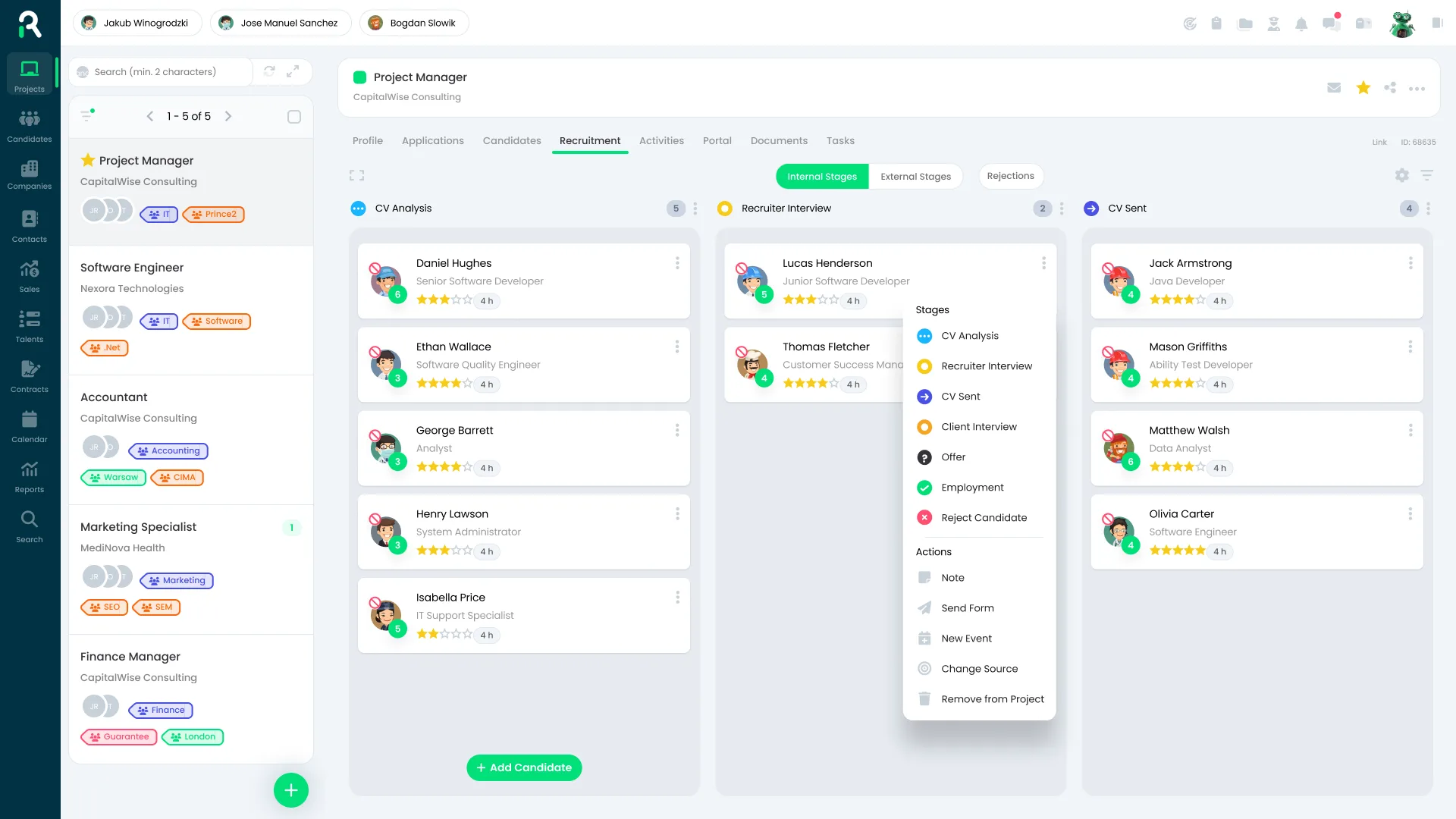
Candidate pipeline view in the Recruitify ATS—stages: CV Review, Recruiter Interview, CV Submitted, Client Interview, Offer
2. Publishing the job—multiposting
With a single click, your job ad is pushed out to multiple job boards (Reed, LinkedIn, Indeed, specialised job boards) and the company careers site. The ATS automatically tracks the source on every single application—it knows whether a candidate came from LinkedIn, a referral, or your passive database. This data is invaluable for assessing which channels deliver the highest-quality hires.
3. Receiving applications and CV parsing
Candidates apply through an online application form. The ATS instantly builds their profile—the AI CV parser breaks down the CV text (regardless of format: PDF, DOCX, copy/paste) into clean, structured data: job titles, employers, core skills, languages, education, and tenure. All profiles land in one centralised hub. No more searching through inbox folders.
4. Screening and AI Scoring
The system grades applicants based on screening question responses, compliance checks, and AI scoring. Deal-breaker questions ("Do you hold a valid UK driving licence?") instantly filter out applicants who fail key requirements. Semantic AI Scoring rates the candidates, showing exactly how well they fit the role requirements. Recruiters get a prioritised shortlist, not a mountain of raw data.
5. Collaborative candidate review
Recruiters and Hiring Managers review applicants through customised user profiles. Recruiters see robust tracking history and candidate notes. Managers see a streamlined view with key milestones and feedback actions. Ratings, feedback, and notes are instantly visible to the whole crew—no more emailing PDFs and asking "what do you think of this profile?".
6. Moving candidates and communication
Candidates migrate through the hiring pipeline. At each stage change, the ATS can trigger automated, highly-personalised messages. Recruiters set up templates once—application receipts, interview bookings, stage progressions, rejections—and let automation deliver them at the exact right moment. Automated alerts ensure Hiring Managers keep the process moving.
7. Offer and decision
The top candidate advances to the offer stage. The platform manages the documentation and tracking of negotiations. The remaining applicants receive personalised rejections—not cold robot replies, but welcoming notes with options to join passive Talent Pools for the future. The runners-up of today are often the ideal candidates for tomorrow.
8. Business intelligence and reporting
Once filled, the system aggregates process metrics: Time-to-Hire, Cost-per-Hire, Source-of-Hire, stage conversion rates, and team activity. This data fuels the agency's business intelligence and helps retrain AI models—meaning the system gets smarter with every hire. This is why a recruitment platform beats Excel: it learns and optimizes continuously.
Efficiency Impact |
Companies using modern ATS platforms reduce Time-to-Hire by 42-60% compared to basic tools or manual spreadsheets. Source: G2 Crowd, Recruitment Software Report 2024 72% of candidates abandon hiring processes due to poor or slow communication. An ATS with workflow automated messages directly eliminates this leakage. Source: SHRM Talent Pulse, 2025 |
5. ATS and recruitment system vs. HRMS—two different worlds
A very common mistake when purchasing HR technology is expecting an ATS and an HRMS (Human Resources Management System) to replace each other. They cannot. They solve entirely different business cases, target different scenarios, and handle separate stages of the candidate-employee lifecycle.
An easy rule of thumb to remember: your recruitment platform (ATS) manages everything PRE-hire—from job spec to contract signature. An HRMS manages everything POST-hire—from onboarding to retirement. Two distinct domains.
ATS / Recruitment Platform—Pre-Hire | HRMS—Post-Hire |
Sourcing and talent attraction | Employee onboarding and payroll info |
Job ads, multiposting, and SEO | Time tracking, leave, and absence |
Hiring pipelines and applicant stages | Salary, benefits, and payroll management |
Semantic scanning and AI Scoring | Performance reviews and appraisals |
Candidate communications | Training, certifications, and learning |
Active and passive Talent Pools | Succession planning and career paths |
Recruiting dashboards: TTH, TTF, metrics | Employee retention and analytics |
Candidate GDPR consensus tracking | Employee contract legal compliance |
Why recruiting modules built into HRMS systems often fall short
Many HRMS software packages offer an add-on recruiting module. Over presentation slide desks, it looks great: list applicants, update pipeline stages, fill the vacancy. For companies doing 3 hires a year, it might do. But once you scale to dozens or hundreds of processes, manage teams of recruiters, and require real data-driven sourcing capabilities—the gaps appear quickly.
Common limitations of recruiting modules inside HRMS tools:
• Basic candidate search—no Boolean logic, no semantic scanning, no X-ray features. You can only search limited fields with exact matches.
• Basic or non-existent CV parsing—making recruiters manually type details or review raw, unformatted documents.
• Poor or missing Talent Pools—preventing proactive database building beyond active roles.
• Employee-centric dashboards rather than recruiting metrics—giving you attrition percentages but no Time-to-Hire or Source-of-Hire analysis.
• Lacking multiposting features or local job board integrations.
• Hiring Managers hate using them—interfaces are too confusing, complex, and require excessive system training.
• No deep AI Matching logic to map candidate competency profiles against job requirements.
The outcome is always the same: recruiters bypass the tool, reverting to spreadsheets, local files, and off-system emails. The business loses data centralization, metrics are lost, and talent historic records vanish when recruiters leave.
The Winning Duo: Recruiting platform ATS + HRMS integration
High-performing companies do not choose between an ATS and an HRMS—they integrate them. When a candidate signs an offer, their data is instantly transferred from the ATS to the HRMS. No manual entry, no compliance errors. Recruiters close the vacancy—HR managers have the employee profile ready for onboarding.
This collaboration expands beyond HR. It benefits finance (recruitment cost data informs budgeting), IT (setting up system permissions for day one), administration (contracts), and directors (unified reporting from ad spend to year-one retention).
6. ATS vs. CRM—where does one end and the other begin?
Another common question, particularly from agencies and staffing firms: what is the difference between an ATS and a CRM? Do I need both?
The answer depends on your business model. For corporate HR, a traditional sales CRM is redundant. For a recruitment agency, the answer to this question determines your entire technological architecture.
What is a CRM in the context of recruitment?
CRM (Customer Relationship Management) traditionally means software for tracking corporate sales—allowing account executives to monitor sales pipelines, commercial outreach, and account history. In recruitment, there are two distinct types:
6. Candidate CRM (Candidate Relationship Management)—building and nurturing relationships with passive talent outside active jobs. A powerhouse for sourcing and communication campaigns. Features commonly found in leading ATS tools.
7. Client CRM for recruitment agencies—managing corporate clients, account histories, prospective vacancies, and sales pipelines. The foundational business hub for any modern agency.
Core Differences Between an ATS and a CRM
Dimension | ATS System | CRM (Recruiting/Sales) |
Primary Goal | Manage active hiring processes | Build talent pipelines or manage corporate client revenue |
Time Horizon | In the moment—weeks or months | Continuous value—months or years |
Core Object | The applicant record in an active vacancy | The relationship history with a candidate or B2B client |
Key Metrics | TTH, TTF, conversion rate, Source-of-Hire | Leads, sales pipelines, client retention, NPS |
Primary Users | Recruiters, Hiring Managers | Recruiters, sales consultants, Account Managers |
Modern recruitment platforms combine both
The leading systems for agencies are no longer just an ATS or just a CRM—they are unified recruitment platforms bringing both worlds into one dashboard. Consultants can simultaneously track candidate history, client accounts, sales opportunities, and email exchanges—without switching tabs.
This drives business output. When candidate data and client opportunities live in siloed software, you face duplication, missed opportunities, and loss of historical knowledge. One platform = one unified view.
7. Recruitment systems for HR, agencies, contracting, and Executive Search
One of the most common pitfalls when buying an ATS is assuming they are all mostly the same. In reality, the operational needs of internal corporate HR, external agencies, staffing firms, and Executive Search headhunters vary dramatically. A system built for corporate HR will fail in a fast-paced agency—and vice versa.
Recruitment platforms for corporate HR
The corporate HR goal is clear: deliver quality talent efficiently and cost-effectively. Recruitment is a cost centre supporting the wider business. The logistics department doesn't generate revenue from hiring; it needs truck drivers and managers to run their operations. This dictates their requirements.
Core priorities for corporate HR:
• Careers sites that showcase employer brand and drive free organic SEO traffic.
Job posting (multiposting) to major job boards and niche sites.
• Hiring Manager Portal—easy feedback capture without complicated software training.
Dashboard reporting of Time-to-Hire, Cost-per-Hire, and Source-of-Hire.
• Core HRMS integration—to automatically onboard successful applicants.
• Candidate Experience—strengthening the corporate employer brand.
GDPR compliance and automated legal consent workflows.
• Job approval workflows (requisition management).
Recruitment systems for recruitment agencies
The goal is fundamentally different: win clients and generate fees. Recruitment is the product. This isn't a minor nuance—it's a chasm that explains why corporate HR systems collapse when placed inside agencies.
Agencies don't just manage applicants. They must manage B2B clients, business relationships, multiple projects across different accounts, sales funnels, consultant performance, and fee structures. A corporate HR ATS doesn't cater to any of these needs.
Core priorities for recruitment agencies:
Full CRM module to manage client accounts, business contacts, and historical communication.
Sales pipeline with opportunities, tracking of BD activities, and forecasting.
• Consultant activity analytics: placement metrics, submission-to-win conversions.
Talent Pools as the agency's primary revenue asset—not one-off job folders.
Active sourcing tools and a helper LinkedIn extension to build the database quickly.
• Multi-project handling—linking the same candidate to multiple roles across clients.
• Swift delivery of CV shortlists and blind profiles to client accounts.
Recruitment systems for Executive Search
Executive Search is highly relationship-focused. Candidates rarely apply—they are identified, cultivated, and convinced to engage through long-term networking. Headhunters build relationships weeks, months, or years before placing them into projects.
This is completely different from job-board-based hiring. The executive recuriter initiates contact and builds trust before discussing a specific vacancy. The hiring tool must support this relationship flow—not force a rigid candidate-applies-and-gets-filtered process.
Core priorities for Executive Search:
• Comprehensive candidate logs spanning years—combining notes, emails, phone calls, and business meetings.
• Secure delivery of private, confidential projects without public vacancies.
Advanced Talent Pools organised by sectors, seniority levels, skills, and regions.
• Reliable LinkedIn integrations and executive database tools.
• Relationship-based workflows rather than active-job pipelines.
• Professional shortlist reports and blind spec profile tools for clients.
Recruitment systems for contracting and body leasing
In contracting, sourcing is merely step one—and typically the quickest. After placment, staffing firms spend months managing terms, hourly rates, margins, end-dates, renewals, future project mapping, and billing. A standard HR ATS is useless here.
Staffing agencies managing 200 contingent workers with corporate HR systems end up with separate spreadsheets for billing, a CRM for clients, and an ATS for applications. Three systems, siloed data, and severe compliance and billing risks when people leave.
Staffing businesses need a unified platform: combining an ATS, CRM, contract billing modules, margins reporting, timesheet tracking, and invoicing into one seamless ecosystem.
8. VMS—Vendor Management System and its relationship with the ATS
While exploring contracting, it is essential to define a tool common in corporate hiring: the VMS (Vendor Management System). This is a vital concept for any agency aiming to win enterprise contracts.
What is a VMS and who uses it?
A Vendor Management System is a platform utilised by large enterprises to centrally manage external talent providers—including staffing agencies, recruitment partners, and independent contractors. Put simply: a VMS is the platform where corporations place talent orders and manage the contingent workforce lifecycle.
VMS users are typically enterprise companies working with dozens or hundreds of agencies. A VMS standardises hiring, controls spend, compares agency performance, and ensures internal compliance. For an agency, the VMS is the portal through which all candidate profiles must pass.
ATS System—Agency View | VMS System—Enterprise Client View |
Tracks candidates and manages active agency pipelines | Manages suppliers and external talent orders |
Builds the agency's owned Talent Pools | Monitors vendor spend, limits, and compliance |
Optimizes sourcing, matching, and selection | Standardises corporate procurement workflows |
Reports consultant metrics and sales outputs | Reports vendor performance and project costs |
Builds candidate and client relationships | Manages relationships with recruitment providers |
Integrating your ATS with a VMS—why it is key for agencies
Cutting-edge recruitment platforms for agencies offer out-of-the-box integrations with key VMS platforms like SAP Fieldglass, Beeline, Coupa Contingent Workforce, and more. This means agency consultants can submit candidate profiles straight to the client's VMS—without manual data entry.
For enterprise-focused agencies, lacking an ATS-VMS integration is a massive operational roadblock. Manual data entry drains hours, invites errors, and frustrates consultants running high-volume pipelines. When choosing an ATS, ask vendors:. What native VMS integrations do you offer, and how does the data flow?
9. The key features of a modern ATS in 2026
For years, ATS reviews focused on: "can I store CVs and update applicant stages?". Today, those questions are obsolete. Every system does that. The real question is: how well does the system support real recruiter activity—juggling 50 active roles, managing demanding hiring managers, and engaging passive candidates?
Below, I break down the key features that set modern recruitment systems apart from basic applicant database tools.
Comprehensive candidate tracking and interaction history
This is the core foundation—but it goes way beyond saving a document. A modern candidate card is a rich timeline: past job metrics, historical roles they applied to (including past rejections), full contact logs (emails, SMS, calls), recruiter notes, interview feedback, certificates, active GDPR approvals, and accurate salary expectations.
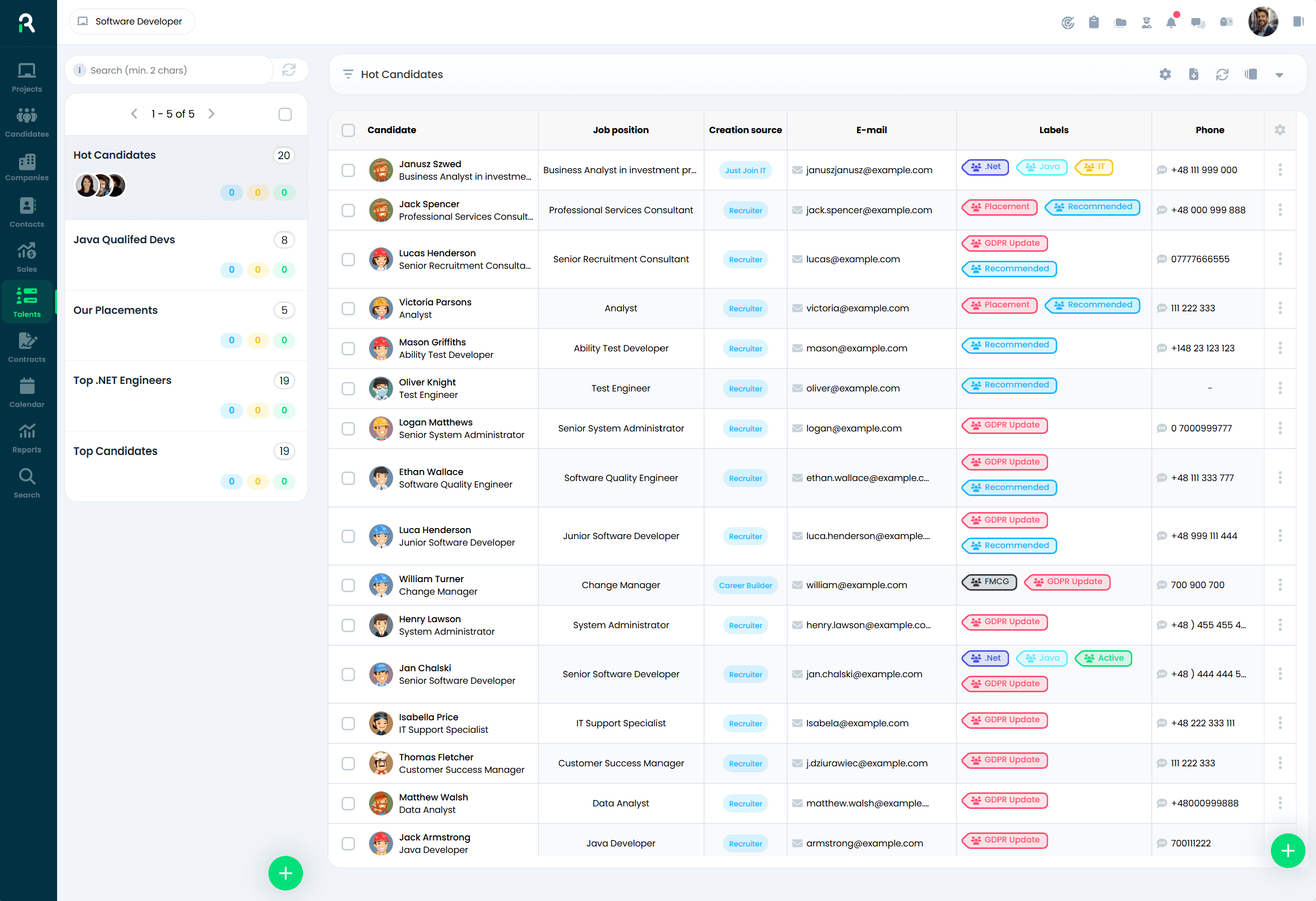
Hot Candidates Talent Pool in Recruitify—candidate database with role detail and acquisition source
This setup protects company knowledge. If a recruiter leaves—as is frequent in the industry—the candidate histories, relationship tracks, and feedback logs remain in the system. This is one of the most valuable, yet overlooked benefits of recruitment systems.
Talent Pools—shifting from reactive to proactive hiring
A Talent Pool is a categorised, nurtured group of candidates an organisation engages with before a vacancy even opens. This shifts the focus from "starting from scratch for every job" to "activating a pre-qualified candidate pool immediately."
Instead of launching every search from zero—paying for ads, waiting for matching applications, and scanning LinkedIn—you tap into talent you already know, have qualified, and keep in touch with. This slashes Time-to-Hire significantly for core roles.
A modern ATS lets you build segmented Talent Pools (e.g., "Senior Java, London, Remote", "Retail Store Managers"), add candidates automatically, run targeted outreach campaigns, and identify active signals—such as when a candidate updates their profile, suggesting they are open to new opportunities.
Advanced CV Parsing—transforming files into data
A CV is an unstructured document—difficult to search, compare, and report on. A CV parser solves this: reading candidate documents (PDF, DOCX, LinkedIn profiles) and transforming them into structured fields.
Advanced AI parsers extract name and contact fields, but also understand career context. They identify industries, assess levels of seniority based on past responsibilities, link technologies, note employment gaps, and flag CV content that shows signs of being completely AI-generated (more on this in Section 13).
Multiposting and source tracking
Recruiters waste valuable time manually uploading vacancies to multiple job boards. Multiposting resolves this: a single job created inside the ATS is blasted out to all selected job portals. For agencies running dozens of vacancies, this saves days of administrative work.
Crucially, the ATS acts as a tracking tool. We don't just see "LinkedIn"—we see "LinkedIn paid promotion, Feb 2026". This informs Source-of-Hire analytics, allowing you to invest your advertising budget where it actually leads to placements, not just clicks.
Boolean Search and semantic scanning
Keyword search is basic. Modern platforms offer more. Boolean Search enables highly targeted queries: "Java AND Spring AND (London OR Manchester OR Remote) NOT Junior". For sourcing experts, Boolean is an essential daily tool.
Semantic AI search goes further: it understands context. Search phrases like "Business Development Manager", "Commercial Director", and "Sales Leader" describe highly similar skillsets—the AI understands this and covers them all. Classic keyword matching does not. As a result, you uncover high-quality talent that traditional search misses.
Workflow Automation—from email templates to multi-stage actions
Automation removes manual tasks that don't require human touch or relationships. A leading ATS lets you build custom rules: "when a candidate is moved to Technical Screen—instantly email them the assessment link, alert the manager, and share scheduling times." It all happens with one click.
Smart workflow automation saves recruiters hours every day—time that can be redirected to active candidate calls, client relationships, and consulting. Staffing businesses that automate administration report recruiter efficiency increases of 30-50%.
Advanced reporting—treating recruitment as a business engine
Recruitment without metrics is guesswork. A modern ATS provides complete clarity: Time-to-Hire, Source-of-Hire, Cost-per-Hire, pipeline conversion, Candidate Drop-off, consultant billings, and shortlist quality.
This data helps you run recruitment like any sales operation: tracking, comparison, and optimization. For directors, it justifies recruitment software ROI. For recruiters, it highlights bottlenecks. The ATS gathers this data automatically—assuming recruiters use it as their single source of truth.
Integrations—the ATS as your core HR Hub
The ROI of a recruitment system grows with every integration. A siloed ATS creates manual admin work wherever data needs to cross platforms. Key integrations include: HRMS (auto-syncing hires), email and calendars (Google Workspace, MS 365), video applications (Teams, Zoom, Google Meet), LinkedIn, multiposting portals, test platforms, and e-signatures (DocuSign, Adobe Sign).
10. Hiring Manager Portal—the feature that changes recruitment dynamics
A massive bottleneck in corporate and agency recruiting is the communication loop between recruiters and Hiring Managers. Recruiters wait for interview feedback—managers are busy or miss the email. Recruiters chase them—emails get lost. Candidates wait, lose interest, and accept offers elsewhere, resulting in lost deals.
A Hiring Manager Portal resolves this communication gap. It gives managers a streamlined, distraction-free dashboard—tailored specifically for their role in the hiring process.
What can a Hiring Manager do in the portal?
The portal is intentionally simplified. Hiring Managers see only what they need to—shortlisted applicants for their vacancies, real-time pipeline status, and pending tasks. No complicated systems, no training required.
• Reviewing shortlist submissions—checking candidate bios and parsed CV details.
• Sharing feedback with one click: "Proceed to interview", "Reject", or "Request more detail".
• Adding notes easily contextually on the candidate's card.
• Checking scheduled interviews and calendar openings.
• Submitting hiring requests (job requisitions) with role requirements.
• Approving job offers or requesting parameter changes.
Efficiency Impact |
Recruiters spend roughly 20-30% of their day chasing Hiring Managers for interview feedback. A well-implemented Hiring Manager Portal integrates with the ATS to cut feedback turnaround times by 50-70%. Source: HR Tech analysts, 2025 |
How to overcome manager objections to new software
Hiring Managers often push back on new tools: "not another system I have to log into." This resistance is natural—managers already juggle dozens of applications. The key is design and accessibility.
The portal must be browser-ready, mobile-friendly, take 2 clicks to action, and bypass login walls via modern SSO (Single Sign-On). If they can log in via Google/Microsoft, see "you have 3 candidates to review", and thumbs up/down—they will use it. If they have to find a URL and reset passwords, they will bypass it.
Our experience shows once managers start using a streamlined portal, they adopt it quickly. They notice their roles get filled faster, candidate quality increases, and their inboxes stop overflowing. They soon become advocates for the tool.
11. Candidate Testing and Assessment in an ATS
Interviews are just one part of candidate evaluation—and they are highly subjective. Research shows unstructured interviews have weak predictive validity. Halo effects, similarity bias, and varying manager standards routinely skew hiring decisions.
Structured assessments supply objective, repeatable data. They help companies hire based on actual capability rather than interview performance. Leading recruitment platforms integrate testing directly into the pipeline workflow.
Types of assessments in the recruitment process
Test Type | What it Measures | When to Apply |
Technical capability tests | Hard skills: coding, SQL, language fluency, advanced Excel | Roles requiring verifiable hard skills |
Psychometric assessments | Work habits, behavioral styles, motives, and values | Cultural alignment and leadership roles |
Situational Judgement Tests (SJT) | Responses in realistic business situations and dilemmas | Customer service, sales, and management roles |
Work Samples | Execution of actual job tasks | When proof of performance is key |
Video Assessments | Verbal communication, presentation, and behavioral answers | Client-facing or customer success roles |
Cognitive Ability Tests | Problem-solving, logic, mathematical, and verbal reasoning | Roles requiring speed-to-learn and data processing |
How an ATS handles candidate testing
Modern recruitment platforms integrate testing in three ways:
8. Native assessment modules—tests built directly inside the ATS and assigned to pipeline stages. Candidates receive a test link and complete it in the platform. Scores populate immediately on their profile.
9. External testing integrations—seamlessly linking toolsets like TestGorilla, Vervoe, HireVue, Codility, and Criteria. Recruiters trigger tests from the ATS, candidates complete them via the vendor, and results sync back to their profile automatically.
10. Application form screening—tailored questions built into the initial application page to screen out unqualified applicants immediately.
EU AI Act and recruitment testing
Businesses operating in the European Union using AI to score applicants must comply with the EU AI Act. AI tools used to "recruit, grade, and filter candidates" are classified as high-risk—imposing strict duties: candidates must be notified they are being evaluated by AI, have recourse to human appeal, and companies must audit systems for bias.
This means recruitment platforms must offer transparent reasons—showing why a score is given (e.g., "82% match: 6 yrs Java experience, London location, missing AWS certification"). Recruiters must always hold override control of AI judgments. Any system lacking transparent AI logic is a major legal risk.
12. ATS and artificial intelligence—a revolution, not a buzzword
Not long ago, "AI in ATS" was a marketing trick. It filled slide decks but meant little in practice beyond simple keyword search. Today, AI is a foundation of modern recruitment platforms, changing how recruiters work and make decisions.
To be clear: AI does not replace recruiters. It takes over manual, analytical, and data-heavy tasks so recruiters can focus on human connection: building relationships, cultural fit, offer negotiations, and strategic advice.
AI Parsing—when the system truly understands CVs
Basic CV parsers only pulled details from set spots in a document. They worked on standard layouts but failed on complex designs, columns, or multiple languages.
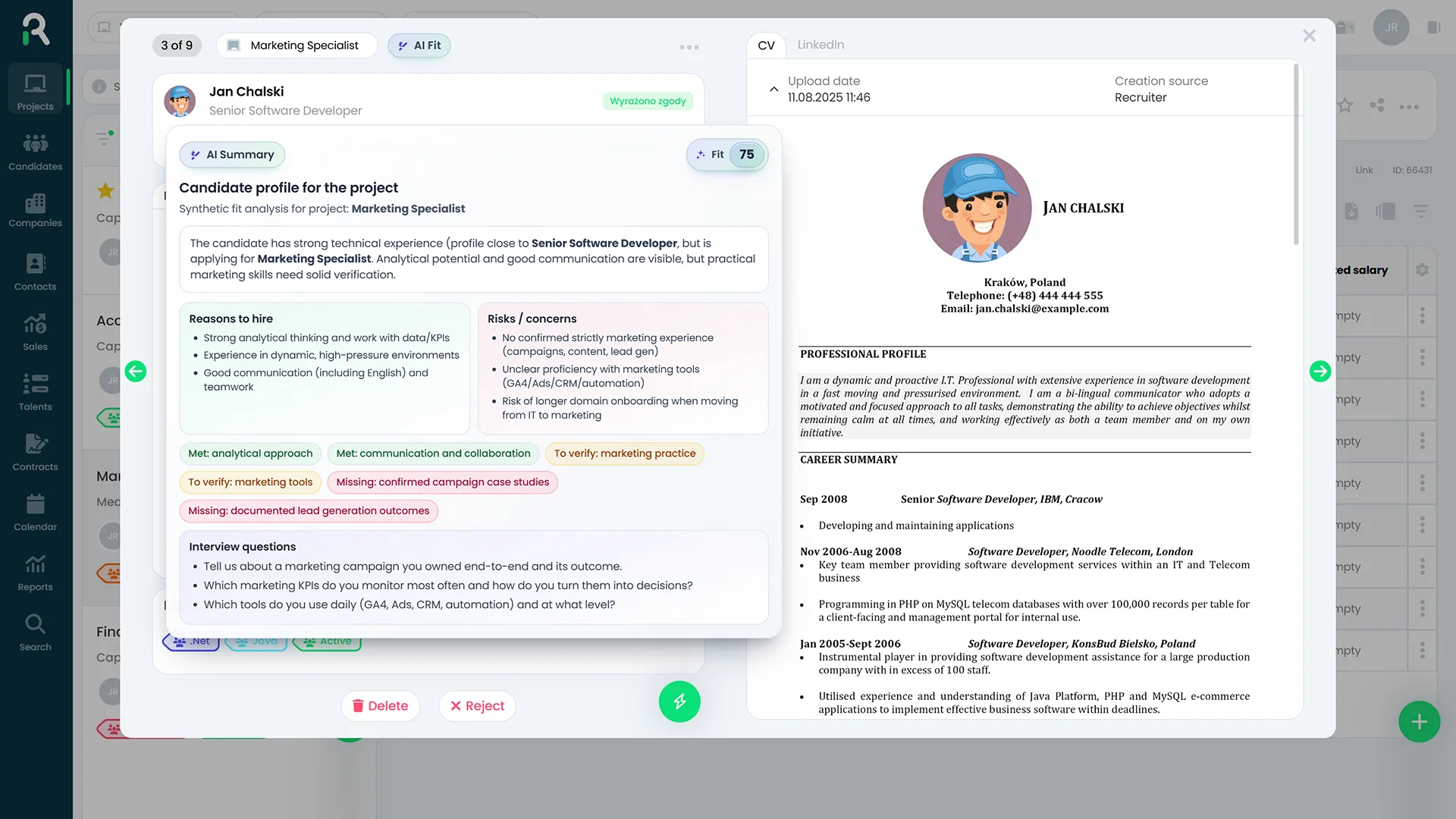
AI Candidate Summary in Recruitify
—automated fit assessment detailing strengths and potential fit risks
AI-powered parsers read CVs like a human, understanding the career story and context. They map industries, identify seniority levels from past duties rather than just years, link relevant tech, note career gaps, and flag content likely generated by AI to match keywords.
AI Matching—moving beyond keyword searches
Older systems relied on basic keyword matches: if a CV had the word "Java" and the job did too, they matched. If not, they missed the candidate, even if they had ten years of relevant experience written differently.
This meant candidates with identical experience got different results based on their wording. AI Matching solves this by matching meaning and context. A profile detailing "building high-throughput financial transaction engines" matches "Java Developer, fintech experience"—even without matching keywords.
This uncovers great candidates that traditional keyword searches would miss because they used different phrasing or worked in adjacent settings.
AI Scoring—transparent ranking, not a black box
AI Scoring takes matching further. The platform ranks candidate fit and—crucially for EU compliance—explains its reasoning clearly.
A quality AI Scoring engine provides context: strengths (e.g., "7 years fintech experience, managed team of 10"), potential risks ("no Kubernetes experience, salary expectations above midpoint"), and tailored interview questions for those areas.
This transparency gives recruiters the context needed to make their own decisions. It also ensures compliance with the EU AI Act by explaining AI reasoning clearly. A system without this transparency is a business risk.
AI Candidate Summary—instantly grasp the profile
With hundreds of applicants per vacancy, recruiters cannot read every word. AI Candidate Summary generates a brief overview of each candidate's profile, tailored to the specific role requirements.
Recruiters see the specialty, key skills, career path, match areas, and risks in 30 seconds. While it doesn't replace reading the CV of shortlisted candidates, it tells you which profiles deserve a closer look. For high-volume vacancies, this cuts screening times from weeks to days.
AI Job Description Generator—drafts in 30 seconds
Writing job ads takes time. You need to attract the right candidates, highlight the value proposition, and optimize for search engines. This usually takes at least an hour per job.
An AI Job Description Generator speeds up this process: creating a detailed draft from a job title, industry, and a few keywords. The recruiter simply edits and refines the draft, saving valuable time. Advanced generators also adjust tone, check for biased language, and translate across multiple languages.
13. ATS and the market of AI-generated applications
This is a critical challenge in modern recruitment, yet it is rarely discussed in industry articles. It changes how recruitment systems must function to support your hiring processes.
The scale of AI-generated applications
Candidates use AI tools to generate CVs, cover letters, and application answers. Tools like ChatGPT, Claude, and Gemini make it easy to optimize a CV for any job, refining the language and including target keywords.
This has led to a paradox: applications look more professional and are tailored to your jobs, but the candidate's actual skills remain the same. This makes screening harder for recruiters, as CVs no longer reflect a candidate's actual writing or communication skills, and application volumes have surged.
What this means for your hiring process
As AI-generated applications rise, traditional screening based only on CV review loses its effectiveness. This brings new challenges for your ATS:
• Basic keyword-based AI Matching becomes less effective since CVs are automatically optimized to match job ads.
• Document-based scoring no longer reliably indicates actual candidate capability.
• The risk of inviting candidates who look great on paper but lack the actual skills increases.
• The recruiter's focus shifts from CV screening to verifying skills through assessments and interviews.
How modern ATS platforms address this challenge
Recruitment platforms are adapting to help you identify the best candidates in an AI-driven market:
11. Better screening questions—asking for specific industry scenarios or situational judgments that basic AI cannot answer convincingly using generic text.
12. AI content detection—implementing tools that flag typical AI structures and patterns within applications. While still developing, this is already helping filter out copied content.
13. Integrated assessments—skills tests and work samples verify capability regardless of how polished the CV is, instantly highlighting any gaps.
14. Standard phone screens—quick phone or video screens (15-20 minutes) verify candidate communication skills, expertise, and logic early in the process.
15. Profiling comparisons—AI tools compare CV details with application answers and screen outcomes to flag and review inconsistencies.
The Recruitment Paradox |
AI helps recruiters screen high volumes of candidates quickly, while helping candidates apply to more jobs easily. Both sides have access to the same technology.
The businesses that succeed will be those using AI to evaluate skill rather than just CV text, design hiring processes resistant to copy-paste applications, and rely on skills assessments and phone screens. |
14. AI Agents in ATS—the next generation of recruiter support
Following the rise of AI Matching and AI Scoring, the next leap in recruitment technology is AI Agents. This is the biggest change in how recruitment software works since the launch of the ATS.
What makes an AI agent different from basic AI?
Traditional AI in an ATS is reactive: a recruiter clicks "find matches", the system returns results, and then waits for the next command. It does not track progress or detect new opportunities on its own.
An AI Agent is proactive and continuous. It does not wait for a click; instead, it works toward an assigned goal, monitors processes, flags risks, and handles repetitive tasks within set boundaries on its own.
To use a comparison: basic AI is like a calculator—fast and accurate, but only when you ask. An AI Agent is like a dedicated assistant—it notices when a candidate hasn't replied, drafts folder follow-ups, and flags it for your review.
Sourcing Agent—your active candidate radar
The Sourcing Agent scans internal databases and external platforms 24/7. It tracks candidate changes (new certifications, promotions), identifies when people are open to new roles, and flags relevant profiles as soon as a vacancy opens.
This means recruiters can start their week with a pre-qualified list of candidates who updated their details over the weekend, eliminating hours spent manual searching on job boards.
Screening Agent—scale your hiring without losing quality
The Screening Agent handles large volumes of applications without increasing recruiter workload. It works in two ways:
Data-driven: it reviews applications and screening answers, groups candidates by fit, and flags items needing attention. Conversation-driven: it runs brief, automated chats to check candidate availability, salary range, and basic requirements, saving recruiters hours on early-stage screening.
Engagement Agent—candidate nurturing made easy
The Engagement Agent tracks communication with candidates throughout the pipeline. It flags when someone has not responded to an invite or when stage times drag, suggesting personalized follow-ups.
This keeps communication consistent across multiple active vacancies. Candidates feel valued because replies are timely, and the agent avoids sending generic spam by referencing historical interactions.
Scheduling Agent—no more scheduling runarounds
Coordinating interviews is one of the most tedious recruitment tasks, requiring endless back-and-forth emails to find a time that works for everyone.
The Scheduling Agent connects with everyone's calendars—recruiter, Hiring Manager, and candidate—and suggests open slots. It manages confirmations, handles cancellations, and sends automated reminder emails, giving recruiters time back for actual conversation.
Analytics Agent—spot issues before they occur
Instead of monthly reports after the fact, the Analytics Agent monitors active vacancies in real time to highlight potential issues.
It flags warnings like: a vacancy is slipping behind schedule due to slow manager feedback, drop-off rates on a stage are higher than normal, or a specific sourcing channel has not produced a hire in six months. This allows you to resolve bottlenecks before they impact results.
Excerpt: Recruitify eBook "AI Agents in Recruitment" |
"AI agents reduce the mental load of remembering what needs to happen next. They limit constant switching between tasks. They take over repetitive actions that consume time but do not require judgment. Instead of executing isolated tasks, they maintain continuity." "The biggest challenges in recruitment are not caused by a lack of knowledge, tools, or effort. They are caused by fragmentation. AI agents are introduced not to replace recruiters, but to remove the conditions that make good recruitment difficult to sustain." |
Are AI agents available today?
Yes—as built-in features within modern recruitment platforms. The gap between businesses using AI agents now and those waiting will be clear in future hiring results. Sourcing and scheduling roles 30% faster gives agencies a major edge in the market.
15. The ATS as a data source for AI agents
This is a major trend in HR Tech. Previously, an ATS was just a database where recruiters stored files. Now, it serves as the data foundation for AI agents and the collective memory of your recruitment operations.
Why your ATS data is critical for AI performance
An AI agent is only as good as the data it accesses. This is a technical reality.
A Sourcing Agent can only suggest the best candidates if your database is clean and complete. If profiles have missing fields or old info, its alerts won't be accurate. A Scoring Agent needs complete, reliable history to grade candidates correctly. An Analytics Agent needs accurate pipeline stages and rejection reasons to spot bottlenecks.
Your ATS is no longer just a recruitment utility; it is the database that powers your AI. This means database hygiene is a key factor in recruitment performance.
The data AI agents use most effectively
ATS Data Type | How AI Leverages It |
Vacancy outcome history (placed, rejected, left) | Learns candidate patterns that lead to success in specific roles |
Source-of-Hire for historical placements | Optimizes sourcing recommendations based on role types |
Rejection reasons and recruiter notes | Builds a complete candidate profile, including soft skills |
Time-to-Hire metrics per pipeline stage | Projects timelines and flags potential delays |
Response histories and contact times | Optimizes follow-up timing and templates |
Salary expectations versus final offers | Helps align salary bands and project offer acceptance rates |
The ATS as your business intelligence hub
When a recruiter leaves, they can take valuable knowledge with them: client connections, candidate nuances, and placement histories. An ATS solves this by retaining everything in a shared database.
A well-managed ATS is the memory of your hiring team. An AI agent uses this data to learn what works for your business over time, improving its recommendations and predicting bottlenecks.
This creates a strong compounding advantage. A company that maintains high-quality ATS data for three years—tracking details, keeping contacts clean, and categorizing candidates—will get far better results from AI than a competitor starting from scratch. It is a business advantage that is hard to copy quickly.
Key Takeaway |
Maintaining clean ATS data is not just an admin task. It is a long-term investment in your AI capabilities. Companies that focus on data quality built the foundation for future recruitment success. |
16. Recruitment automation—what you can and should not automate
Automation gets mixed reactions. Some see it as a major time-saver. Others worry it makes recruitment cold and impersonal. The reality depends on what you choose to automate.
The key is knowing what to automate and where to keep the human touch to protect Candidate Experience and maintain selection quality.
What you should automate
Task to Automate | Benefit to Recruiters and Candidates |
Application receipt notifications | Candidates know they applied successfully, reducing "did you get my CV?" emails |
Initial screening questions | Filters out candidates who don't meet key criteria, saving recruiter time |
Pipeline stage change alerts | Keeps applicants informed of their status automatically |
Hiring Manager feedback alerts | Chases managers for feedback automatically, saving recruiters chasing them |
Assessment invites | Sends skills tests instantly when candidates move to screen stages |
Interview scheduling | Saves days of back-and-forth emails finding a shared meeting time |
Talent Pool assignment after close | Grows your passive database automatically when vacancies close |
Candidate tag assignment | Keeps your database organized without recruiters manually tagging profiles |
Recruitment KPI reports | Sends regular reports to leadership, saving hours of manual prep |
Consent expiration alerts | Monitors GDPR timelines automatically to keep you compliant |
What you should NOT automate
Do not automate tasks that require empathy, understanding, or evaluation. These are the areas where recruiters add true value.
• First interviews—building relationships and making a great first impression requires human connection. Relying on chat bots here suggests you don't value their application.
• Rejections after actual interviews—candidates who invested time in an interview deserve a personal email or phone call. Auto-rejections at this stage harm your reputation.
• Offer negotiations—securing top talent requires understanding their needs and building trust. This cannot be automated.
• Culture fit reviews—AI cannot reliably evaluate cultural alignment; this requires human judgment.
• Tough conversations—delivering rejections after final stages requires human empathy and professional care.
• Final hiring decisions—rely on AI for data, but let a human make the decision.
Our Automation Philosophy |
Automate administration, not relationships. Smart businesses use automation to handle tasks that don't need a human touch, giving recruiters more time to spend with clients and candidates. |
17. Data-Driven Recruitment—hiring backed by data
For decades, recruitment was run on gut feel: "How are we doing?"—"Great, we've got some good candidates." While this works for tiny teams with few hires, scaling businesses need a more metric-driven approach.
Data-Driven Recruitment uses clear metrics to guide hiring decisions—including where to source, process speed, and placement costs. This provides proof to guide a recruiter's expertise, replacing gut feel with clear indicators.
Core hiring KPIs and what they tell you

Analytics Dashboard in Recruitify—recruiter performance metrics and interview funnel statistics
KPI | What it Measures & How to Action It |
Time-to-Hire (TTH) | Days from vacancy launch to candidate offer acceptance. Average UK benchmark: 30-45 days. Long timelines point to slow manager reviews or weak candidate attraction. |
Time-to-Fill (TTF) | Days from hire sign-off to placement. Includes budget approval times. This shows how fast you actually hire, which is critical in competitive markets. |
Source-of-Hire (SOH) | Tracks where your actual placements come from—not just where applications originate. Helps you allocate your sourcing budget to the channels that deliver results. |
Cost-per-Hire (CPH) | Total cost of a placement: ad spend, recruiter hours, HR tools, and onboarding. Helps justify your hiring technology budgets. |
Offer Acceptance Rate (OAR) | Percentage of offers accepted by candidates. Low rates suggest poor offer packages, slow progress, or weak communication on later stages. |
Candidate Drop-off Rate | Logs when and why candidates opt out of your pipeline, helping you spot gaps in application forms, assessments, or interviews. |
Quality of Hire (QoH) | Measures performance post-hire: 90-day retention or manager ratings. A highly valuable metric that requires integrating your ATS with performance management systems. |
From historic dashboards to forecasting
Most brands use an ATS to see what happened in the past month. This is useful, but it means you only react to issues after they have happened, when it is too late to fix them.
Leading recruitment tools are shifting toward prediction. Predictive analytics can estimate Time-to-Hire based on similar past vacancies, alert you when drop-off rates on a stage are higher than normal, suggest the best sourcing channels for specific roles, and help you plan future hiring capacity.
This relies on clean data in your ATS—recruitiers keeping candidate logs up to date so the system can build accurate prediction models.
18. ATS and candidate sourcing—active vs. reactive
A common recruitment myth is that simply posting an ad will attract the best candidates. In highly competitive sectors like tech and leadership, waiting for applicants is rarely successful.
Top performers are rarely searching job boards or applying to random ads. They are open to the right opportunity, but you must reach out to them. Relying only on inbound ads limits you to active job seekers rather than the best talent in the market.
Sourcing models: inbound vs. outbound
Inbound Sourcing | Outbound Sourcing |
Candidates apply to your job ads | Recruiters reach out to candidates directly |
Low cost per application; high screening admin | Higher initial sourcing effort; faster screening |
Limits you to active job seekers | Reaches both active and passive talent |
Scales well for high-volume roles | Effective for niche, specialist, and leadership hiring |
Depends on ad spend and visibility | Depends on sourcing skill and your talent database |
How a modern ATS supports active sourcing
A modern recruitment platform helps you reach out to candidates proactively:
• Primary database search—always check your own database first. Candidates you previously engaged with might be perfect now. Companies with structured databases fill 30-40% of vacancies without posting ads.
• Boolean Search—use complex queries to scan your database: "Java AND (Spring OR Quarkus) AND (London OR Remote) NOT Junior". This works both internally and on external networks via browser helpers.
• X-Ray Search—search external professional databases (LinkedIn, GitHub, Stack Overflow) directly from your recruitment tool.
Sourcing plugins—capture candidate details from LinkedIn with one click, parsing their profile into your ATS without manual data entry.
• AI Sourcing Agent—constantly matches candidate profiles against open roles before you even begin your search.
Talent Pools—highly categorized talent pipelines ready for immediate outreach when a vacancy opens.
Building your talent database as a B2B asset
Every hiring process is an opportunity to expand your database. Consistently saving candidates into your ATS, updating their experience, and building Talent Pools creates a highly valuable business asset over time.
This long-term database building cuts Time-to-Hire significantly for core roles and reduces your reliance on expensive job board ads, lowering your Cost-per-Hire.
19. ATS, portal kariery i SEO ofert pracy
A careers page is often treated as a simple brand asset, but it is actually a vital touchpoint. It is where candidates get their first impression of your business, which frequently determines whether they apply.
A well-optimized careers page also drives organic applicant traffic without ongoing ad spend, saving your business thousands in recruitment advertising costs.
What makes a high-converting careers site?
• Mobile responsiveness—over half of all applicants browse vacancies on their phones. If your page isn't mobile-friendly, you risk losing half of your potential candidates.
• Short, simple application forms—complex, long forms reduce applications. Keeping forms under 5 minutes prevents drop-offs. Modern ATS tools let you customize forms based on the role seniority.
• Easy LinkedIn or CV upload—avoid forcing candidates to type out their entire history manually.
• Clear, searchable job titles—avoid internal jargon. Use clear names like "Recruitment Specialist, London" that match what candidates actually search for.
• Transparent process details—candidates appreciate knowing what to expect. Detail your steps, such as: application, phone screen, technical test, and timeline.
• Employer branding—include team images, company values, and benefits to help candidates make a decision.
• Application tracking—allow candidates to check the progress of their application, reducing "any update?" emails to your team.
SEO for job postings—attract organic candidates for free
Optimizing your careers page lets you capture organic applicants via search. Google for Jobs displays matching vacancies directly in search results, meaning your jobs can show up when someone searches "Java Developer London vacancy" without you paying for the click.
Job posting SEO basics:
16. Standardized job titles—use search-friendly terms like "Senior Java Developer" rather than internal descriptors.
17. Unique, descriptive copy—avoid copying and pasting generic, short role templates.
18. Fast page load speed—Google ranks slower pages lower. Your careers page should load in under 2 seconds.
19. Schema.org JobPosting implementation—this structured code helps Google index your vacancy correctly in Google for Jobs.
20. Non-dynamic URLs—use clean URLs for each role to avoid indexing issues.
A quality ATS automatically takes care of this structural SEO, leaving your team to focus on writing great ads.
20. ATS and Candidate Experience—a first impression that stays
Candidate Experience is now a critical factor in attracting talent. Candidates share their experiences on platforms like Glassdoor, LinkedIn, and online groups, making every recruitment process a direct reflection of your employer brand.
The metrics that matter
Our recent data highlights the importance of the candidate journey:
• Only 26% of candidates rate their hiring experiences as "great". Source: RecruitBPM, 2026
• 72% of candidates leave pipelines due to poor communication timelines. Source: SHRM Talent Pulse, 2025
• 61% of candidates report being "ghosted" after an interview, showing a steady rise. Source: RecruitBPM, 2026
• 78% of candidates view the hiring process as an indicator of how a company treats its workforce. Source: CareerBuilder
• 72% of candidates share poor hiring experiences online or with their professional networks. Source: CareerArc, Candidate Experience Research 2024
How an ATS improves Candidate Experience
Stage | Good CX (with a modern ATS) | Poor CX (without an ATS) |
Apply Process | Fast, mobile-friendly, LinkedIn import ready | Long forms requiring manual history input |
Confirmation | Instant, personalized receipt with timeline info | No confirmation or delayed auto-replies |
Screening | Fast updates within 24-48h, keeping candidates informed | Weeks of silence with no updates |
Pipeline Progress | Regular updates at every transition stage | Total silence; candidate doesn't know their status |
Interview Invite | Automated booking link, details, and prep sent instantly | Chasing emails with incorrect links or missed details |
Rejection Feedback | Polite, prompt, and invites them to join Talent Pools | No feedback or a delayed template months later |
Candidate Experience as an investment, not a cost
Even if they don't get the job, a candidate who has a fast, positive, and respectful hiring experience will likely: refer others, apply for future roles, remain a customer (important for consumer brands), and leave positive reviews online.
Conversely, candidates who are ignored or wait weeks for automated rejections will share that feedback. In niche networks, poor Candidate Experience can limit your access to top talent.
21. ATS and GDPR—securely managing candidate data
Recruitment is built on personal data: CVs, contact details, work history, and feedback. This sensitive information is protected under GDPR, which requires secure management and clear consents.
Storing candidate data in email inbox folders and local spreadsheets poses serious security risks, fails compliance audits, and makes it impossible to respect candidate data rights.
How an ATS keeps you compliant with GDPR
• Centralized consents—track all candidate consents in one place: dates, categories, and scope of use, making audits easy.

GDPR consent dashboard in Recruitify—monitoring active and expiring candidate data consents
• Automated retention tracking—tracks consent lifetimes and warns you when to refresh or delete records, replacing manual calendar trackers.
• Right to be Forgotten—helps you delete or anonymize all candidate records with one click on request, preserving log proofs for compliance checks.
• Role-based access—restricts file access based on team roles: recruiters see CVs, hiring managers see highlights, and executives see final selections.
• Audit logs—tracks who accessed what data and when, helping you address any compliance queries easily.
• Data anonymization—anonymizes personal profiles on expiration while keeping statistical metrics (e.g., "developer candidate, rejected at tech stage") for your reports.
• End-to-end encryption—protects data on servers and during transit, backed by continuous backups and security certificates.
How long can you legally store CVs?
There is no single, universal answer. It depends on your purpose, legal basis, data category, and what you stated in your candidate privacy notice.
Generally, companies process active applicant data during the vacancy process and a few months after for safety. For passive talent who consent to future opportunities, storage limits are usually 1-2 years before requiring verification.
A quality ATS manages these timelines automatically. Storing CVs in shared email folders and spreadsheets risks losing track of data lifetimes. An ATS resolves this, making compliance easy to manage.
22. Most common myths about ATS—debunking misunderstandings
There are many myths around ATS tools. Some were true a decade ago; others are simply misconceptions that don't match how modern software works.
Myth 1: An ATS automatically rejects candidates without human review
Reality: Quality recruitment tools do not make automatic rejections without human oversight. Systems can filter based on key requirements (such as missing certifications), but the final decision is always made by a recruiter.
Myth 2: An ATS cannot read graphical CVs
Reality: Old parsers struggled with columns and visual designs. Today’s AI-powered parsers easily extract details from almost any layout, including columns and graphic templates. However, simple, text-based CVs are still recommended because they are easier for human readers to scan.
Myth 3: Candidates must pack their CVs with keywords to get past the ATS
Reality: This is old advice. Modern AI Matching reads meaning and context rather than counting keywords. CVs stuffed with keywords without context are flagged by AI as unnatural. The best approach is to write a clear, accurate CV.
Myth 4: Implementing an ATS takes months and is highly complex
Reality: For small and medium teams, setting up a modern SaaS ATS takes 1 to 4 weeks. Enterprise projects with custom integrations and data migration take 2-3 months. Modern cloud systems are designed for rapid setup, unlike old local software.
Myth 5: Recruitment software is only for enterprise brands
Reality: Not true. Many platforms offer packages tailored to small teams of 2-5 recruiters at affordable prices. An ATS pays for itself quickly by saving time and organizing candidate data, even with low hiring volumes. 35% of small brands use an ATS today, compared to 20% in 2020. Source: Capterra SMB Hiring Report, 2024.
Myth 6: We have an HRMS, so we don't need a separate ATS
Reality: These systems serve different purposes. HRMS recruiting add-ons often lack active sourcing, Talent Pools, AI Matching, and recruitment analytics. Integrating both platforms is the most effective approach.
Myth 7: AI in an ATS will replace human recruiters
Reality: AI handles admin tasks and data analysis. It cannot replace human empathy, culture reviews, and relationship building. Recruiters are shifting to more consultative roles, but remain critical to the process.
23. How to convince the board to invest in an ATS-ROI and TCO
A common challenge for recruitment leaders is how to justify buy-in for an ATS to the board. Simply saying "it will make work easier" is not enough. You need to focus on the numbers.
Financial arguments—where you find the ROI
The return on investment for recruitment software comes from multiple areas: admin time saved, reduced agency spend, faster hires, and improved quality.
Business Area | Savings Mechanism | Estimated Business Impact |
Recruiter Time | Automated scheduling, templates, and analytics save hours of admin | 5-15 hours saved per recruiter each week |
Job Board Spend | Better database search and Source-of-Hire analytics direct budget where it works | 20-40% reduction in external job board spend |
Time-to-Hire | Faster screening prevents losing talent to competitors, filling roles quicker | 30-50% reduction in Time-to-Hire |
Replacement Costs | Better matching reduces bad hires, which cost 30-200% of an annual salary | Avoiding one bad hire covers the annual software cost |
Compliance Risk | Automated consent tracking eliminates GDPR fine risks | Avoids GDPR fines of up to 4% of global turnover |
Recruiter Onboarding | Shared processes and stored database help new hires start faster | New recruiters reach target productivity 2-3x faster |
ROI calculator sample
ROI projection for a team with 3 recruiters: Assumptions: - Recruiter average rate: £22/hour - Time saved with ATS: 8 hours/week per recruiter - Recruiter team: 3 people - Annual job board ad spend: £15,000 - Annual ATS software cost: £3,000 Recruiter hours saved value: 8 hrs x 3 people x £22 x 48 weeks = £25,344/year Job board savings (better database use): Estimated 25% budget optimization = £3,750/year Total annual business value: £25,344 + £3,750 = £29,094 Annual ATS cost: £3,000 Year-one ROI: (£29,094 - £3,000) / £3,000 = 869% *Excludes savings from avoiding bad hires and GDPR compliance risks. |
24. How to choose an ATS—a practical step-by-step guide
Choosing an ATS requires a structured approach. Avoid the common mistake of comparing long feature lists without first auditing your own processes and hiring goals.
Step 1: Audit your current hiring process
Map out your current hiring journey—from job sign-off to onboarding. Clarify: Who submits hiring requests? How many active roles do you manage? Who is involved in interviews? Where do delays occur? What data do you track? Which current systems need to connect to the ATS? Are you corporate HR, an agency, or contracting?
Step 2: Define "must-haves" vs. "nice-to-haves"
Distinguish between must-have features you need to operate, nice-to-have extras that add value, and deal-breaker missing items. Your must-have list should be focused—no more than 5-10 key items.
Step 3: Platform scorecard criteria
Criteria | Weight (1-5) | Verification Question for Demos |
Recruitment model alignment | 5 | Does the tool fit corporate HR, agencies, or contracting structures? |
Recruiter user ease | 5 | How many clicks are required to manually log a new candidate? |
Hiring Manager Portal | 4 | Can a manager submit interview feedback without training? |
Search capability and matching | 5 | How does Boolean search perform on actual candidate resumes? |
Automated workflow capabilities | 4 | Can you demonstrate a multi-stage automation sequence? |
Reporting dashboards | 4 | Are time-to-hire and source metrics available out of the box? |
AI Features (match/summary) | 4 | Are AI recommendations explained? Can users override them? |
HRMS and job board integrations | 4 | Which integrations are native, and which require API customization? |
Careers page and SEO | 3 | Does the careers page generate clean Schema.org JobPosting tags? |
GDPR and consent tracking | 5 | How are expiring candidate consents flagged and handled? |
Historical data migration | 3 | What is the process for importing candidate data from our current system? |
Scalability | 3 | How do costs scale if we experience a 5x increase in hiring volume? |
Technical support quality | 4 | What are your support SLAs? Is support available during our business hours? |
Step 4: Demo platforms using your own scenarios
Avoid relying solely on the vendor's standard demo. Have a recruiter from your team lead the review, using real scenarios and candidates. Test complex paths: candidate drop-outs, slow manager feedback, data exports, and importing from spreadsheets.
Step 5: Check references
Ask to speak with a current client of the vendor in a similar sector and scale. Ask about user support, implementation, how they handle issues, and how regularly the vendor releases updates.
25. Common mistakes when choosing and implementing an ATS
Selection Pitfalls
• Buying on price alone—the cheapest option can cost you more in terms of manual administration if it doesn't integrate with your other tools.
• Choosing brands purely on popularity—large enterprise packages can be too slow and complex for boutique agencies. Match the tool to your model.
• Excluding recruiters from the decision—if the day-to-day team isn't involved, adoption will suffer, and they may revert to spreadsheets.
• Focusing on feature count over quality—a system with dozens of unused features is less effective than one that does your core tasks exceptionally well.
• Ignoring TCO (Total Cost of Ownership)—compare onboarding, migration, integration, and training costs, not just monthly license fees.
Implementation Pitfalls
• Underestimating data migration—importing old databases often uncovers duplicate records, missing consents, and formatting issues. Focus on database clean-up first.
• Lacking clear database standards—the system relies on good data input. Define team standards for tagging, logs, and updates early on.
• Skipping user onboarding—user training is essential to ensure adoption and correct system usage from day one.
• Assuming software solves process issues—even the best software requires defined workflows, rules, and ownership structure.
• Failing to establish a metrics baseline—track your KPIs before implementation so you can measure post-setup ROI.
26. Data migration to a new ATS
Data migration is a critical step in the setup process, as it preserves years of valuable candidate data. A structured migration is also a great opportunity to clean up your database.
A simple, effective migration plan
21. Audit current data—analyze what records you hold, what fields are complete, and check for duplicate records and expired GDPR consents.
22. Clean and refine—remove duplicates, delete records lacking valid consents under GDPR, and format data fields before migration.
23. Map fields—align your old database or spreadsheet columns with the structures in your new ATS to ensure data is transferred correctly.
24. Run a pilot migration—move a sample of 200-500 candidate files first to verify formatting, history, attachments, and usability.
25. Launch and train—integrate user training with the main migration to help recruiters learn the system using their own active data.
Database Hygiene |
Migration is your chance to clean up your database. Use this opportunity to remove outdated records, standardize tags, and build a clean, accurate database. Clean data ensures your AI matching and agents deliver far better results. |
27. How much does an ATS cost? Pricing models and TCO
Licensing costs are only one part of the equation. Two similarly priced platforms can have very different Total Costs of Ownership (TCO) once you factor in setups, integrations, and the business value they deliver.
Common ATS pricing structures
• SaaS subscription per user/seat—the standard industry model. Highly predictable and scales easily with team size.
• Subscription per active process/vacancy—pricing based on active vacancies and pipeline usage. Great for businesses with stable hiring volumes.
• Setup and onboarding fees—one-off costs for custom setups, layouts, and workspace configuration.
• Migration fees—costs associated with importing historical candidate data, based on database volume and complexity.
• Add-on modules—additional fees for features like advanced AI, executive CRM, or timesheet billing.
• Integration costs—native integrations are typically included, while custom API configurations may incur charges.
UK market hiring systems price brackets (2026 indications)
• Basic packages (up to 5 users): £40 - £120/month
• Mid-tier systems with workflow automation and AI features: £120 - £400/month
• Specialist platforms for agencies or enterprise HR: £400 - £1,600/month
• Enterprise networks with complex integrations: £2,000+/month
TCO vs. simple unit rates |
Consider a platform cost comparison: £600/month vs. £120/month. If the £600 platform saves three recruiters 8 hours of admin time per week (valued at approx. £2,000/month), reduces job board spend by £400/month, and cuts Time-to-Hire to secure top candidates... ...the higher pricing package actually delivers a lower Total Cost of Ownership. Focus on: what is the 3-year Total Cost of Ownership relative to the business value returned? |
28. The future of ATS 2026-2030: Talent Intelligence and agents
Recruitment systems have evolved in response to shifting industry challenges: from managing document volume, to organizing pipelines, to scale, and finally to AI-driven insights. What lies ahead?
From Applicant Tracking to Talent Intelligence
The term "Talent Intelligence" is central to future-proofing conversations. It shifts the system's role from managing active applications to informing strategic planning: identifying database skill strengths, predicting hiring timelines for future projects, and assessing channel ROI.
This elevates the system from an admin utility to a strategic business asset, allowing you to manage talent as a core company resource.
Skills-Based Hiring—prioritizing capability over job titles
Job titles are increasingly unreliable indicators of capability. Future recruitment platforms will focus on mapping actual skills, competencies, project scale, and performance history, helping you find qualified candidates who might not match traditional titles.
Internal Mobility—ATS coverage for internal career tracking
The ideal candidate for a vacant role often already works within your organization. Internal career path mapping reduces retention risks. Integrating your ATS with your HRMS helps you manage employee development, internal vacancies, and mentoring opportunities.
Predictive Hiring—spotting hiring risks early
Recruitment forecasting is moving from an experimental feature to a core standard. Future systems will alert you when a vacancy is at risk of missing deadlines due to slow reviews, helping you adjust your strategy before targets are missed.
Agentic AI—shifting to autonomous pipelines
AI agents will autonomously manage more admin tasks within set parameters, allowing recruiters to focus on strategic advisory, sourcing, and relationship-building tasks.
29. ATS FAQ—most frequently asked questions
Answers to the most common questions about ATS and recruitment platforms, based on user feedback, webinars, and partner discussions.
What is an ATS?
An ATS (Applicant Tracking System) is software used to manage recruitment processes. Today's modern systems go beyond simple tracking, offering a complete platform for automation, candidate relationship management, and data-driven sourcing.
What is a recruitment system and how is it different from an ATS?
A recruitment system is a broader category. It includes core ATS capabilities, but also incorporates features like CRM matching tools, contracting management, and client pipeline tracking.
What does ATS stand for?
Applicant Tracking System, which was coined in the 90s to describe software that tracked candidate applications. While modern tools do much more, ATS remains the most common term in search engines.
How does an ATS work?
Profiles are captured from job ads, careers sites, or automated sourcing. AI tools parse the data, score matching levels, and rank candidates, while automated messaging handles scheduling and updates throughout the process.
What is the difference between an ATS and an HRMS?
An ATS manages the pre-hire stage, while an HRMS handles onboarding, payroll, and benefits after placement. Integrating the two ensures a seamless transition of candidate records into employee profiles.
What is the difference between an ATS and a CRM?
An ATS is designed to manage active candidates through the hiring pipeline. A recruitment CRM manages passive candidate relationships and external client sales funnels.
Does a small team need an ATS?
Yes. Once you manage more than ten vacancies a year, an-on system is essential for maintaining GDPR compliance, scheduling, and collaborating with managers efficiently.
What is the best ATS for a recruitment agency?


News & Updates
Stay up-to-date with the latest innovations, features, and tips about Recruitify!
By providing your email address within the newsletter sign-up form, you confirm its processing to send marketing information regarding the Administrator’s products and services. The Administrator of your personal data processed for the abovementioned purposes is Recruitify Spółka z o.o., based in Warsaw, Poland (KRS 0000709889). For more information on the principles of personal data processing and the rights of data subjects, please check the Privacy Policy.

Last updated:
What is an ATS? The Ultimate Guide to Recruitment Software (2026)
Innovations
Iwo Paliszewski
You type "what is an ATS" into Google and get dozens of articles saying pretty much the same thing: an ATS is an applicant tracking system that stores CVs and helps manage recruitment. The end.
That is a definition from 2010.
In 2026, an ATS is something completely different. It is a cutting-edge recruitment system combining candidate management, automation, artificial intelligence, AI agents, recruitment analytics, sales modules for agencies, and contract management tools. It is the operational hub of recruitment—not just a digital binder for CVs.
This guide answers the questions "what is an ATS" and "what is a recruitment system" the way they should be answered in 2026: comprehensively, practically, and with a focus on what in recruitment systems truly drives value for HR, recruitment agencies, and contracting companies.
Definition in Brief |
ATS (Applicant Tracking System) is the historical name for software designed to manage recruitment processes. Today, the term "recruitment system" reflects reality much better—it includes the ATS, but also automation, AI, Talent Pools, recruitment agency CRM, a contracting module, and analytics.
To put it simply: every modern recruitment system contains an ATS. But not every ATS is a complete recruitment system. |
Table of Contents
1. What is an ATS and a recruitment system? The definition for 2026
2. ATS vs. recruitment system—an important distinction
3. The history of the ATS—from CV binder to AI platform
4. How an ATS works step by step—the 8-stage recruitment process
5. ATS and recruitment system vs. HRMS—two different worlds
6. ATS vs. CRM—where does one end and the other begin?
7. Recruitment systems for HR, agencies, contracting, and Executive Search
8. VMS—Vendor Management System and its relationship with the ATS
9. The key features of a modern ATS in 2026
10. Hiring Manager Portal—the feature that changes recruitment dynamics
11. Candidate Testing and Assessment in an ATS
12. ATS and artificial intelligence—a revolution, not a buzzword
13. ATS and the market of AI-generated applications
14. AI Agents in ATS—the next generation of recruiter support
15. The ATS as a data source for AI agents
16. Recruitment automation—what you can and should not automate
17. Data-Driven Recruitment—hiring backed by data
18. ATS and candidate sourcing—active vs. reactive
19. ATS, careers site, and job board SEO
20. ATS and Candidate Experience—a first impression that lasts
21. ATS and GDPR—securely managing candidate data
22. The most common myths about ATS—debunking misunderstandings
23. How to convince the board to invest in an ATS—ROI and TCO
24. How to choose an ATS—a practical step-by-step guide
25. Common mistakes when choosing and implementing an ATS
26. Data migration to a new ATS
27. How much does an ATS cost? Pricing models and TCO
28. The future of ATS 2026-2030: Talent Intelligence and agents
29. ATS FAQ—30+ most frequently asked questions
1. What is an ATS and a recruitment system? The definition for 2026
ATS stands for Applicant Tracking System, which is software designed to manage recruitment processes. The name originally described the function of the very first systems of this type—they were places where candidate applications were received, sorted, categorised, and "tracked" through the various stages of the hiring pipeline. A recruiter could check at any moment how many applications had been submitted for a vacancy, what stage each candidate was at, and when they last spoke with them.
While the name is still technically accurate today, it is substantively too narrow. Modern recruitment systems are much more than "application tracking". They are integrated platforms where the ATS is just one module—alongside automation, artificial intelligence, analytics, candidate & client relationship management, and, for agencies, sales and contracting modules.
In practice, both terms—"ATS" and "recruitment system"—are used interchangeably because that is how users search for them online. However, for anyone looking to select a tool for their organisation, this distinction has concrete purchasing implications, as detailed in Section 2.
2026 Market Data |
The global ATS market is projected to reach $3.78 billion by 2031 (up from $2.65 billion in 2026), growing at a compound annual growth rate of 7.36%. The main growth driver is the demand for recruitment automation and tools powered by artificial intelligence.
Source: Mordor Intelligence, Applicant Tracking System Market 2026-2031 67% of organisations plan to change their ATS over the next two years—mainly to gain access to AI-driven capabilities.
Source: Fosway Group, HR Realities 2025 |
Five Core Features That Define an ATS
Whether we refer to a classic ATS or a modern recruitment system, every professional tool in this category delivers five fundamental functions that have remained constant since the dawn of recruitment software—only their depth and execution have evolved:
1. Application Collection and Centralisation—a single hub for all applications from various sources: job boards, careers sites, emails, and sourcing. No more CVs scattered across inboxes and local folders.
2. Filtering and Initial Screening—automatic candidate analysis based on pre-set criteria, screening questions, and vacancy requirements. Recruiters focus their attention on pre-qualified talent.
3. Pipeline Tracking and Management—full visibility into which stage of the process each candidate is at, along with action history, decisions, and communication timelines.
4. Team Collaboration—real-time sharing of notes, feedback, and evaluations between recruiters, Hiring Managers, and other key decision-makers.
5. Compliance and Security—managing GDPR consents, data retention periods, audit logs, and protecting candidate personal data throughout the entire hiring lifecycle.
What Else Does a Modern Recruitment System Offer?
Beyond the core five features, sophisticated recruitment systems in 2026 offer a range of capabilities that were either non-existent or restricted to enterprise-level budgets just a decade ago:
• Job Posting (Multiposting)—distribution of vacancies to dozens of portals simultaneously with a single click.
• Custom Careers Sites with employer branding and SEO optimization.
• AI Matching and AI Scoring—semantic candidate-to-role matching with clear reasoning.
• Automically generated AI summaries of CVs and candidate profiles.
• AI-powered Job Description Generator.
Talent Pools—proactive relationship management with candidates outside of active processes.
• Sourcing and Boolean Search—active talent sourcing within your database and external channels.
• Hiring Manager Portal—an intuitive, streamlined interface for business managers.
• AI Agents supporting sourcing, screening, outreach, and analytics.
• CRM Module for recruitment agencies—client and sales management.
• Contracting Module for staffing firms—contract and contingent worker management.
• Advanced reporting and predictive analytics.
Adoption Rate |
98.8% of Fortune 500 companies use an ATS or recruitment software. Source: Jobscan, 2025 94% of recruiters and employers who implemented a professional ATS say it has positively impacted their recruitment process. Source: GetApp Recruiting Survey, 2024 |
2. ATS vs. recruitment system—an important distinction
One of the most common sources of confusion when choosing HR tech is using "ATS" and "recruitment system" as synonyms. While expected in casual conversation, the difference is business-critical and directly impacts what you search for and purchase.
Where the term ATS originated and why it is now too narrow
Applicant Tracking System fully described the first-generation software from the 90s, whose sole purpose was to digitally gather and "track" applicant records. These were essentially electronic document binders that organised incoming CVs, allowed status scoring, and enabled keyword search. Nothing more.
This classic concept of an ATS remains in many minds—especially for those who haven't reviewed modern software or rely on older sources. This leads to the misconception that "an ATS is just a database to collect CVs." True for systems from 15 years ago, but entirely inaccurate for today’s comprehensive platforms.
What is a modern recruitment system?
A modern recruitment system is an ecosystem where the ATS—understood as the application and pipeline management module—is just one of many puzzle pieces. Think of it like a smartphone: early cellular phones only made calls. Today, a smartphone is a high-resolution camera, a navigator, a bank, an e-book reader, and much more. No one says, "I am buying a phone just to make calls."
Similarly, a recruitment system in 2026 is a robust platform that includes:
• ATS Module—application processing, pipelines, hiring stages.
• AI Module—matching, scoring, profile summaries, content generation.
• Automation Module—workflows, automated messaging, alerts.
• CRM Module—candidate relationship management and corporate client pipelines (for agencies).
• Contracting Module—rates, contract terms, legal compliance (for staffing).
• Analytics Module—KPI dashboards, Source-of-Hire, predictive modeling.
• Custom Careers Sites—vacancy pages, SEO optimization, employer branding.
Talent Pools—proactive talent pipeline management.
Each module could easily be separate software. The power of modern recruitment systems lies in how they integrate—data flows seamlessly between them without manual exports or double-data entry, giving recruiters a single, unified source of truth.
What this means practically when selecting a system
When a "classic ATS" is enough | When you need a complete recruitment platform |
You run only a handful of hires a year | You manage dozens or hundreds of processes in parallel |
You recruit strictly internally for one company | You run a recruitment agency or serve multiple clients |
You don't manage contracts or contractor workforces | You offer contracting services or body leasing |
You don't actively build Talent Pools | You build proactive databases and source passive candidates |
Basic KPI reporting is sufficient | You require predictive analytics and business-ready reports |
In this guide, we use both "ATS" and "recruitment system" depending on the context. When referencing the historical timeline or tracking mechanics, we say "ATS". When describing complete ecosystems with advanced capabilities, we say "recruitment system". This is a deliberate distinction designed to help you make the right choice in the marketplace.
3. The history of the ATS—from CV binder to AI platform
To understand what an ATS and a recruitment system are today and why they have grown so rapidly, it is helpful to look back. The history of hiring software is essentially a story of four technological waves—each triggered by changes in how recruiters work.
Generation | Timeline | Key Shift |
1. Digital Archive | The 90s | Replacing paper folders with an electronic CV database. Basic keyword search. Zero automation. |
2. Operating System | 2000-2010 | Recruitment stages, candidate statuses, team collab features. Multiposting. Genesis of KPI reporting. |
3. Cloud Platform | 2010-2020 | SaaS—accessible on any device. Automated emails. CV parsers. Integrations with HRMS and job boards. |
4. AI Recruitment System | 2020-Present | AI Matching, AI Scoring, AI agents, Talent Intelligence, foresight. The ATS as the company's intelligence hub. |
The 90s—born out of necessity
In the 1990s, the internet drastically changed how people looked for work. The arrival of email meant candidates could apply for jobs instantly, without going to the post office or hand-delivering printed CVs. A revolution for candidates—and a logistical nightmare for employers.
Companies that previously received a dozen printed applications suddenly faced hundreds in their inboxes. Recruiters had to open emails, download, print, or save attachment files, and somehow track everything. Binders and Excel sheets quickly buckled under the weight.
The answer was the first ATS software—a simple digital archive of applications with search functionality. It wasn't complex: it saved files, kept them in one place, and let users search for keywords. But that was exactly what was needed back then. Unsurprisingly, the name Applicant Tracking System stuck.
The 2000s—the ATS becomes an operational tool
The rise of dedicated job boards—Monster, StepStone, Reed, and dozens of others—escalated application volume and made recruiting more complex. Recruiters had to manage multiple candidate sources simultaneously. There was a critical need for advanced flow-management—knowing who was at what stage, who was waiting for feedback from a manager, and who was booked for an interview.
During this decade, the ATS matured: it went from a file archive to an operational powerhouse. Recruitment stages with drag-and-drop actions, candidate statuses, early team collaboration features, and multiposting tools emerged. Early reporting enabled tracking of time-to-hire and source metrics. The ATS was no longer just a CV folder; it was a command centre.
The 2010s—cloud, automation, and the ecosystem
Moving to the cloud changed the rules of the game. ATS platforms became accessible on any device without local installation, paving the way for remote collaboration. The rise of SaaS (Software as a Service) reduced deployment times from months to weeks and democratised enterprise-level recruiting tools for smaller businesses.
In this era, the concept of a "recruitment platform" became broader than just an ATS. Platforms integrated seamlessly with wider ecosystems—HRMS systems, calendars, video conferencing tools, and LinkedIn. CV parsing became standard. Automated communication saved recruiters hours of work. Recruiters could manage hundreds of pipelines without drowning in operational chaos.
From 2020 onward—artificial intelligence and agents
The COVID-19 pandemic forced a rapid shift to virtual hiring and accelerated the adoption of recruiting tech by several years. But the real revolution arrived with advanced large language models of AI—and it continues today.
AI Matching analyzes semantic matches between candidate profiles and vacancy requirements—focusing on meaning and experience rather than keyword counts. AI Scoring prioritises applications with transparent, human-readable logic. AI summaries let recruiters assess a profile in 30 seconds rather than 5 minutes. Job descriptions are draft-ready in seconds.
But the most significant shift isn't individual AI features—it is the emergence of AI agents. The system is no longer a reactive database (only acting when clicked) but an active business partner. It monitors pipelines, flags risks, drafts replies, and acts autonomously within set boundaries. Read more about AI agents and their role in Section 14.
4. How an ATS works step by step—the 8-stage recruitment process
Theory is one thing—let's see what recruitment supported by an ATS looks like in practice. Here is a typical 8-stage workflow within a modern recruitment platform. It is worth noting that you can customise these stages to match your exact processes, industry, and role types.
1. Setting up the vacancy
A recruiter or Hiring Manager creates a project within the ATS: naming the role, outlining the job description and criteria, setting up pipeline stages (e.g., CV Review - Phone Screen - Recruiter Interview - Client Interview - Offer), assigning members, and adjusting access permissions. In advanced systems, AI can generate a job spec draft in seconds. Hiring Managers can submit hiring requests directly through a dedicated portal, cutting out long email chains.
Candidate pipeline view in the Recruitify ATS—stages: CV Review, Recruiter Interview, CV Submitted, Client Interview, Offer
2. Publishing the job—multiposting
With a single click, your job ad is pushed out to multiple job boards (Reed, LinkedIn, Indeed, specialised job boards) and the company careers site. The ATS automatically tracks the source on every single application—it knows whether a candidate came from LinkedIn, a referral, or your passive database. This data is invaluable for assessing which channels deliver the highest-quality hires.
3. Receiving applications and CV parsing
Candidates apply through an online application form. The ATS instantly builds their profile—the AI CV parser breaks down the CV text (regardless of format: PDF, DOCX, copy/paste) into clean, structured data: job titles, employers, core skills, languages, education, and tenure. All profiles land in one centralised hub. No more searching through inbox folders.
4. Screening and AI Scoring
The system grades applicants based on screening question responses, compliance checks, and AI scoring. Deal-breaker questions ("Do you hold a valid UK driving licence?") instantly filter out applicants who fail key requirements. Semantic AI Scoring rates the candidates, showing exactly how well they fit the role requirements. Recruiters get a prioritised shortlist, not a mountain of raw data.
5. Collaborative candidate review
Recruiters and Hiring Managers review applicants through customised user profiles. Recruiters see robust tracking history and candidate notes. Managers see a streamlined view with key milestones and feedback actions. Ratings, feedback, and notes are instantly visible to the whole crew—no more emailing PDFs and asking "what do you think of this profile?".
6. Moving candidates and communication
Candidates migrate through the hiring pipeline. At each stage change, the ATS can trigger automated, highly-personalised messages. Recruiters set up templates once—application receipts, interview bookings, stage progressions, rejections—and let automation deliver them at the exact right moment. Automated alerts ensure Hiring Managers keep the process moving.
7. Offer and decision
The top candidate advances to the offer stage. The platform manages the documentation and tracking of negotiations. The remaining applicants receive personalised rejections—not cold robot replies, but welcoming notes with options to join passive Talent Pools for the future. The runners-up of today are often the ideal candidates for tomorrow.
8. Business intelligence and reporting
Once filled, the system aggregates process metrics: Time-to-Hire, Cost-per-Hire, Source-of-Hire, stage conversion rates, and team activity. This data fuels the agency's business intelligence and helps retrain AI models—meaning the system gets smarter with every hire. This is why a recruitment platform beats Excel: it learns and optimizes continuously.
Efficiency Impact |
Companies using modern ATS platforms reduce Time-to-Hire by 42-60% compared to basic tools or manual spreadsheets. Source: G2 Crowd, Recruitment Software Report 2024 72% of candidates abandon hiring processes due to poor or slow communication. An ATS with workflow automated messages directly eliminates this leakage. Source: SHRM Talent Pulse, 2025 |
5. ATS and recruitment system vs. HRMS—two different worlds
A very common mistake when purchasing HR technology is expecting an ATS and an HRMS (Human Resources Management System) to replace each other. They cannot. They solve entirely different business cases, target different scenarios, and handle separate stages of the candidate-employee lifecycle.
An easy rule of thumb to remember: your recruitment platform (ATS) manages everything PRE-hire—from job spec to contract signature. An HRMS manages everything POST-hire—from onboarding to retirement. Two distinct domains.
ATS / Recruitment Platform—Pre-Hire | HRMS—Post-Hire |
Sourcing and talent attraction | Employee onboarding and payroll info |
Job ads, multiposting, and SEO | Time tracking, leave, and absence |
Hiring pipelines and applicant stages | Salary, benefits, and payroll management |
Semantic scanning and AI Scoring | Performance reviews and appraisals |
Candidate communications | Training, certifications, and learning |
Active and passive Talent Pools | Succession planning and career paths |
Recruiting dashboards: TTH, TTF, metrics | Employee retention and analytics |
Candidate GDPR consensus tracking | Employee contract legal compliance |
Why recruiting modules built into HRMS systems often fall short
Many HRMS software packages offer an add-on recruiting module. Over presentation slide desks, it looks great: list applicants, update pipeline stages, fill the vacancy. For companies doing 3 hires a year, it might do. But once you scale to dozens or hundreds of processes, manage teams of recruiters, and require real data-driven sourcing capabilities—the gaps appear quickly.
Common limitations of recruiting modules inside HRMS tools:
• Basic candidate search—no Boolean logic, no semantic scanning, no X-ray features. You can only search limited fields with exact matches.
• Basic or non-existent CV parsing—making recruiters manually type details or review raw, unformatted documents.
• Poor or missing Talent Pools—preventing proactive database building beyond active roles.
• Employee-centric dashboards rather than recruiting metrics—giving you attrition percentages but no Time-to-Hire or Source-of-Hire analysis.
• Lacking multiposting features or local job board integrations.
• Hiring Managers hate using them—interfaces are too confusing, complex, and require excessive system training.
• No deep AI Matching logic to map candidate competency profiles against job requirements.
The outcome is always the same: recruiters bypass the tool, reverting to spreadsheets, local files, and off-system emails. The business loses data centralization, metrics are lost, and talent historic records vanish when recruiters leave.
The Winning Duo: Recruiting platform ATS + HRMS integration
High-performing companies do not choose between an ATS and an HRMS—they integrate them. When a candidate signs an offer, their data is instantly transferred from the ATS to the HRMS. No manual entry, no compliance errors. Recruiters close the vacancy—HR managers have the employee profile ready for onboarding.
This collaboration expands beyond HR. It benefits finance (recruitment cost data informs budgeting), IT (setting up system permissions for day one), administration (contracts), and directors (unified reporting from ad spend to year-one retention).
6. ATS vs. CRM—where does one end and the other begin?
Another common question, particularly from agencies and staffing firms: what is the difference between an ATS and a CRM? Do I need both?
The answer depends on your business model. For corporate HR, a traditional sales CRM is redundant. For a recruitment agency, the answer to this question determines your entire technological architecture.
What is a CRM in the context of recruitment?
CRM (Customer Relationship Management) traditionally means software for tracking corporate sales—allowing account executives to monitor sales pipelines, commercial outreach, and account history. In recruitment, there are two distinct types:
6. Candidate CRM (Candidate Relationship Management)—building and nurturing relationships with passive talent outside active jobs. A powerhouse for sourcing and communication campaigns. Features commonly found in leading ATS tools.
7. Client CRM for recruitment agencies—managing corporate clients, account histories, prospective vacancies, and sales pipelines. The foundational business hub for any modern agency.
Core Differences Between an ATS and a CRM
Dimension | ATS System | CRM (Recruiting/Sales) |
Primary Goal | Manage active hiring processes | Build talent pipelines or manage corporate client revenue |
Time Horizon | In the moment—weeks or months | Continuous value—months or years |
Core Object | The applicant record in an active vacancy | The relationship history with a candidate or B2B client |
Key Metrics | TTH, TTF, conversion rate, Source-of-Hire | Leads, sales pipelines, client retention, NPS |
Primary Users | Recruiters, Hiring Managers | Recruiters, sales consultants, Account Managers |
Modern recruitment platforms combine both
The leading systems for agencies are no longer just an ATS or just a CRM—they are unified recruitment platforms bringing both worlds into one dashboard. Consultants can simultaneously track candidate history, client accounts, sales opportunities, and email exchanges—without switching tabs.
This drives business output. When candidate data and client opportunities live in siloed software, you face duplication, missed opportunities, and loss of historical knowledge. One platform = one unified view.
7. Recruitment systems for HR, agencies, contracting, and Executive Search
One of the most common pitfalls when buying an ATS is assuming they are all mostly the same. In reality, the operational needs of internal corporate HR, external agencies, staffing firms, and Executive Search headhunters vary dramatically. A system built for corporate HR will fail in a fast-paced agency—and vice versa.
Recruitment platforms for corporate HR
The corporate HR goal is clear: deliver quality talent efficiently and cost-effectively. Recruitment is a cost centre supporting the wider business. The logistics department doesn't generate revenue from hiring; it needs truck drivers and managers to run their operations. This dictates their requirements.
Core priorities for corporate HR:
• Careers sites that showcase employer brand and drive free organic SEO traffic.
Job posting (multiposting) to major job boards and niche sites.
• Hiring Manager Portal—easy feedback capture without complicated software training.
Dashboard reporting of Time-to-Hire, Cost-per-Hire, and Source-of-Hire.
• Core HRMS integration—to automatically onboard successful applicants.
• Candidate Experience—strengthening the corporate employer brand.
GDPR compliance and automated legal consent workflows.
• Job approval workflows (requisition management).
Recruitment systems for recruitment agencies
The goal is fundamentally different: win clients and generate fees. Recruitment is the product. This isn't a minor nuance—it's a chasm that explains why corporate HR systems collapse when placed inside agencies.
Agencies don't just manage applicants. They must manage B2B clients, business relationships, multiple projects across different accounts, sales funnels, consultant performance, and fee structures. A corporate HR ATS doesn't cater to any of these needs.
Core priorities for recruitment agencies:
Full CRM module to manage client accounts, business contacts, and historical communication.
Sales pipeline with opportunities, tracking of BD activities, and forecasting.
• Consultant activity analytics: placement metrics, submission-to-win conversions.
Talent Pools as the agency's primary revenue asset—not one-off job folders.
Active sourcing tools and a helper LinkedIn extension to build the database quickly.
• Multi-project handling—linking the same candidate to multiple roles across clients.
• Swift delivery of CV shortlists and blind profiles to client accounts.
Recruitment systems for Executive Search
Executive Search is highly relationship-focused. Candidates rarely apply—they are identified, cultivated, and convinced to engage through long-term networking. Headhunters build relationships weeks, months, or years before placing them into projects.
This is completely different from job-board-based hiring. The executive recuriter initiates contact and builds trust before discussing a specific vacancy. The hiring tool must support this relationship flow—not force a rigid candidate-applies-and-gets-filtered process.
Core priorities for Executive Search:
• Comprehensive candidate logs spanning years—combining notes, emails, phone calls, and business meetings.
• Secure delivery of private, confidential projects without public vacancies.
Advanced Talent Pools organised by sectors, seniority levels, skills, and regions.
• Reliable LinkedIn integrations and executive database tools.
• Relationship-based workflows rather than active-job pipelines.
• Professional shortlist reports and blind spec profile tools for clients.
Recruitment systems for contracting and body leasing
In contracting, sourcing is merely step one—and typically the quickest. After placment, staffing firms spend months managing terms, hourly rates, margins, end-dates, renewals, future project mapping, and billing. A standard HR ATS is useless here.
Staffing agencies managing 200 contingent workers with corporate HR systems end up with separate spreadsheets for billing, a CRM for clients, and an ATS for applications. Three systems, siloed data, and severe compliance and billing risks when people leave.
Staffing businesses need a unified platform: combining an ATS, CRM, contract billing modules, margins reporting, timesheet tracking, and invoicing into one seamless ecosystem.
8. VMS—Vendor Management System and its relationship with the ATS
While exploring contracting, it is essential to define a tool common in corporate hiring: the VMS (Vendor Management System). This is a vital concept for any agency aiming to win enterprise contracts.
What is a VMS and who uses it?
A Vendor Management System is a platform utilised by large enterprises to centrally manage external talent providers—including staffing agencies, recruitment partners, and independent contractors. Put simply: a VMS is the platform where corporations place talent orders and manage the contingent workforce lifecycle.
VMS users are typically enterprise companies working with dozens or hundreds of agencies. A VMS standardises hiring, controls spend, compares agency performance, and ensures internal compliance. For an agency, the VMS is the portal through which all candidate profiles must pass.
ATS System—Agency View | VMS System—Enterprise Client View |
Tracks candidates and manages active agency pipelines | Manages suppliers and external talent orders |
Builds the agency's owned Talent Pools | Monitors vendor spend, limits, and compliance |
Optimizes sourcing, matching, and selection | Standardises corporate procurement workflows |
Reports consultant metrics and sales outputs | Reports vendor performance and project costs |
Builds candidate and client relationships | Manages relationships with recruitment providers |
Integrating your ATS with a VMS—why it is key for agencies
Cutting-edge recruitment platforms for agencies offer out-of-the-box integrations with key VMS platforms like SAP Fieldglass, Beeline, Coupa Contingent Workforce, and more. This means agency consultants can submit candidate profiles straight to the client's VMS—without manual data entry.
For enterprise-focused agencies, lacking an ATS-VMS integration is a massive operational roadblock. Manual data entry drains hours, invites errors, and frustrates consultants running high-volume pipelines. When choosing an ATS, ask vendors:. What native VMS integrations do you offer, and how does the data flow?
9. The key features of a modern ATS in 2026
For years, ATS reviews focused on: "can I store CVs and update applicant stages?". Today, those questions are obsolete. Every system does that. The real question is: how well does the system support real recruiter activity—juggling 50 active roles, managing demanding hiring managers, and engaging passive candidates?
Below, I break down the key features that set modern recruitment systems apart from basic applicant database tools.
Comprehensive candidate tracking and interaction history
This is the core foundation—but it goes way beyond saving a document. A modern candidate card is a rich timeline: past job metrics, historical roles they applied to (including past rejections), full contact logs (emails, SMS, calls), recruiter notes, interview feedback, certificates, active GDPR approvals, and accurate salary expectations.
Hot Candidates Talent Pool in Recruitify—candidate database with role detail and acquisition source
This setup protects company knowledge. If a recruiter leaves—as is frequent in the industry—the candidate histories, relationship tracks, and feedback logs remain in the system. This is one of the most valuable, yet overlooked benefits of recruitment systems.
Talent Pools—shifting from reactive to proactive hiring
A Talent Pool is a categorised, nurtured group of candidates an organisation engages with before a vacancy even opens. This shifts the focus from "starting from scratch for every job" to "activating a pre-qualified candidate pool immediately."
Instead of launching every search from zero—paying for ads, waiting for matching applications, and scanning LinkedIn—you tap into talent you already know, have qualified, and keep in touch with. This slashes Time-to-Hire significantly for core roles.
A modern ATS lets you build segmented Talent Pools (e.g., "Senior Java, London, Remote", "Retail Store Managers"), add candidates automatically, run targeted outreach campaigns, and identify active signals—such as when a candidate updates their profile, suggesting they are open to new opportunities.
Advanced CV Parsing—transforming files into data
A CV is an unstructured document—difficult to search, compare, and report on. A CV parser solves this: reading candidate documents (PDF, DOCX, LinkedIn profiles) and transforming them into structured fields.
Advanced AI parsers extract name and contact fields, but also understand career context. They identify industries, assess levels of seniority based on past responsibilities, link technologies, note employment gaps, and flag CV content that shows signs of being completely AI-generated (more on this in Section 13).
Multiposting and source tracking
Recruiters waste valuable time manually uploading vacancies to multiple job boards. Multiposting resolves this: a single job created inside the ATS is blasted out to all selected job portals. For agencies running dozens of vacancies, this saves days of administrative work.
Crucially, the ATS acts as a tracking tool. We don't just see "LinkedIn"—we see "LinkedIn paid promotion, Feb 2026". This informs Source-of-Hire analytics, allowing you to invest your advertising budget where it actually leads to placements, not just clicks.
Boolean Search and semantic scanning
Keyword search is basic. Modern platforms offer more. Boolean Search enables highly targeted queries: "Java AND Spring AND (London OR Manchester OR Remote) NOT Junior". For sourcing experts, Boolean is an essential daily tool.
Semantic AI search goes further: it understands context. Search phrases like "Business Development Manager", "Commercial Director", and "Sales Leader" describe highly similar skillsets—the AI understands this and covers them all. Classic keyword matching does not. As a result, you uncover high-quality talent that traditional search misses.
Workflow Automation—from email templates to multi-stage actions
Automation removes manual tasks that don't require human touch or relationships. A leading ATS lets you build custom rules: "when a candidate is moved to Technical Screen—instantly email them the assessment link, alert the manager, and share scheduling times." It all happens with one click.
Smart workflow automation saves recruiters hours every day—time that can be redirected to active candidate calls, client relationships, and consulting. Staffing businesses that automate administration report recruiter efficiency increases of 30-50%.
Advanced reporting—treating recruitment as a business engine
Recruitment without metrics is guesswork. A modern ATS provides complete clarity: Time-to-Hire, Source-of-Hire, Cost-per-Hire, pipeline conversion, Candidate Drop-off, consultant billings, and shortlist quality.
This data helps you run recruitment like any sales operation: tracking, comparison, and optimization. For directors, it justifies recruitment software ROI. For recruiters, it highlights bottlenecks. The ATS gathers this data automatically—assuming recruiters use it as their single source of truth.
Integrations—the ATS as your core HR Hub
The ROI of a recruitment system grows with every integration. A siloed ATS creates manual admin work wherever data needs to cross platforms. Key integrations include: HRMS (auto-syncing hires), email and calendars (Google Workspace, MS 365), video applications (Teams, Zoom, Google Meet), LinkedIn, multiposting portals, test platforms, and e-signatures (DocuSign, Adobe Sign).
10. Hiring Manager Portal—the feature that changes recruitment dynamics
A massive bottleneck in corporate and agency recruiting is the communication loop between recruiters and Hiring Managers. Recruiters wait for interview feedback—managers are busy or miss the email. Recruiters chase them—emails get lost. Candidates wait, lose interest, and accept offers elsewhere, resulting in lost deals.
A Hiring Manager Portal resolves this communication gap. It gives managers a streamlined, distraction-free dashboard—tailored specifically for their role in the hiring process.
What can a Hiring Manager do in the portal?
The portal is intentionally simplified. Hiring Managers see only what they need to—shortlisted applicants for their vacancies, real-time pipeline status, and pending tasks. No complicated systems, no training required.
• Reviewing shortlist submissions—checking candidate bios and parsed CV details.
• Sharing feedback with one click: "Proceed to interview", "Reject", or "Request more detail".
• Adding notes easily contextually on the candidate's card.
• Checking scheduled interviews and calendar openings.
• Submitting hiring requests (job requisitions) with role requirements.
• Approving job offers or requesting parameter changes.
Efficiency Impact |
Recruiters spend roughly 20-30% of their day chasing Hiring Managers for interview feedback. A well-implemented Hiring Manager Portal integrates with the ATS to cut feedback turnaround times by 50-70%. Source: HR Tech analysts, 2025 |
How to overcome manager objections to new software
Hiring Managers often push back on new tools: "not another system I have to log into." This resistance is natural—managers already juggle dozens of applications. The key is design and accessibility.
The portal must be browser-ready, mobile-friendly, take 2 clicks to action, and bypass login walls via modern SSO (Single Sign-On). If they can log in via Google/Microsoft, see "you have 3 candidates to review", and thumbs up/down—they will use it. If they have to find a URL and reset passwords, they will bypass it.
Our experience shows once managers start using a streamlined portal, they adopt it quickly. They notice their roles get filled faster, candidate quality increases, and their inboxes stop overflowing. They soon become advocates for the tool.
11. Candidate Testing and Assessment in an ATS
Interviews are just one part of candidate evaluation—and they are highly subjective. Research shows unstructured interviews have weak predictive validity. Halo effects, similarity bias, and varying manager standards routinely skew hiring decisions.
Structured assessments supply objective, repeatable data. They help companies hire based on actual capability rather than interview performance. Leading recruitment platforms integrate testing directly into the pipeline workflow.
Types of assessments in the recruitment process
Test Type | What it Measures | When to Apply |
Technical capability tests | Hard skills: coding, SQL, language fluency, advanced Excel | Roles requiring verifiable hard skills |
Psychometric assessments | Work habits, behavioral styles, motives, and values | Cultural alignment and leadership roles |
Situational Judgement Tests (SJT) | Responses in realistic business situations and dilemmas | Customer service, sales, and management roles |
Work Samples | Execution of actual job tasks | When proof of performance is key |
Video Assessments | Verbal communication, presentation, and behavioral answers | Client-facing or customer success roles |
Cognitive Ability Tests | Problem-solving, logic, mathematical, and verbal reasoning | Roles requiring speed-to-learn and data processing |
How an ATS handles candidate testing
Modern recruitment platforms integrate testing in three ways:
8. Native assessment modules—tests built directly inside the ATS and assigned to pipeline stages. Candidates receive a test link and complete it in the platform. Scores populate immediately on their profile.
9. External testing integrations—seamlessly linking toolsets like TestGorilla, Vervoe, HireVue, Codility, and Criteria. Recruiters trigger tests from the ATS, candidates complete them via the vendor, and results sync back to their profile automatically.
10. Application form screening—tailored questions built into the initial application page to screen out unqualified applicants immediately.
EU AI Act and recruitment testing
Businesses operating in the European Union using AI to score applicants must comply with the EU AI Act. AI tools used to "recruit, grade, and filter candidates" are classified as high-risk—imposing strict duties: candidates must be notified they are being evaluated by AI, have recourse to human appeal, and companies must audit systems for bias.
This means recruitment platforms must offer transparent reasons—showing why a score is given (e.g., "82% match: 6 yrs Java experience, London location, missing AWS certification"). Recruiters must always hold override control of AI judgments. Any system lacking transparent AI logic is a major legal risk.
12. ATS and artificial intelligence—a revolution, not a buzzword
Not long ago, "AI in ATS" was a marketing trick. It filled slide decks but meant little in practice beyond simple keyword search. Today, AI is a foundation of modern recruitment platforms, changing how recruiters work and make decisions.
To be clear: AI does not replace recruiters. It takes over manual, analytical, and data-heavy tasks so recruiters can focus on human connection: building relationships, cultural fit, offer negotiations, and strategic advice.
AI Parsing—when the system truly understands CVs
Basic CV parsers only pulled details from set spots in a document. They worked on standard layouts but failed on complex designs, columns, or multiple languages.
AI Candidate Summary in Recruitify
—automated fit assessment detailing strengths and potential fit risks
AI-powered parsers read CVs like a human, understanding the career story and context. They map industries, identify seniority levels from past duties rather than just years, link relevant tech, note career gaps, and flag content likely generated by AI to match keywords.
AI Matching—moving beyond keyword searches
Older systems relied on basic keyword matches: if a CV had the word "Java" and the job did too, they matched. If not, they missed the candidate, even if they had ten years of relevant experience written differently.
This meant candidates with identical experience got different results based on their wording. AI Matching solves this by matching meaning and context. A profile detailing "building high-throughput financial transaction engines" matches "Java Developer, fintech experience"—even without matching keywords.
This uncovers great candidates that traditional keyword searches would miss because they used different phrasing or worked in adjacent settings.
AI Scoring—transparent ranking, not a black box
AI Scoring takes matching further. The platform ranks candidate fit and—crucially for EU compliance—explains its reasoning clearly.
A quality AI Scoring engine provides context: strengths (e.g., "7 years fintech experience, managed team of 10"), potential risks ("no Kubernetes experience, salary expectations above midpoint"), and tailored interview questions for those areas.
This transparency gives recruiters the context needed to make their own decisions. It also ensures compliance with the EU AI Act by explaining AI reasoning clearly. A system without this transparency is a business risk.
AI Candidate Summary—instantly grasp the profile
With hundreds of applicants per vacancy, recruiters cannot read every word. AI Candidate Summary generates a brief overview of each candidate's profile, tailored to the specific role requirements.
Recruiters see the specialty, key skills, career path, match areas, and risks in 30 seconds. While it doesn't replace reading the CV of shortlisted candidates, it tells you which profiles deserve a closer look. For high-volume vacancies, this cuts screening times from weeks to days.
AI Job Description Generator—drafts in 30 seconds
Writing job ads takes time. You need to attract the right candidates, highlight the value proposition, and optimize for search engines. This usually takes at least an hour per job.
An AI Job Description Generator speeds up this process: creating a detailed draft from a job title, industry, and a few keywords. The recruiter simply edits and refines the draft, saving valuable time. Advanced generators also adjust tone, check for biased language, and translate across multiple languages.
13. ATS and the market of AI-generated applications
This is a critical challenge in modern recruitment, yet it is rarely discussed in industry articles. It changes how recruitment systems must function to support your hiring processes.
The scale of AI-generated applications
Candidates use AI tools to generate CVs, cover letters, and application answers. Tools like ChatGPT, Claude, and Gemini make it easy to optimize a CV for any job, refining the language and including target keywords.
This has led to a paradox: applications look more professional and are tailored to your jobs, but the candidate's actual skills remain the same. This makes screening harder for recruiters, as CVs no longer reflect a candidate's actual writing or communication skills, and application volumes have surged.
What this means for your hiring process
As AI-generated applications rise, traditional screening based only on CV review loses its effectiveness. This brings new challenges for your ATS:
• Basic keyword-based AI Matching becomes less effective since CVs are automatically optimized to match job ads.
• Document-based scoring no longer reliably indicates actual candidate capability.
• The risk of inviting candidates who look great on paper but lack the actual skills increases.
• The recruiter's focus shifts from CV screening to verifying skills through assessments and interviews.
How modern ATS platforms address this challenge
Recruitment platforms are adapting to help you identify the best candidates in an AI-driven market:
11. Better screening questions—asking for specific industry scenarios or situational judgments that basic AI cannot answer convincingly using generic text.
12. AI content detection—implementing tools that flag typical AI structures and patterns within applications. While still developing, this is already helping filter out copied content.
13. Integrated assessments—skills tests and work samples verify capability regardless of how polished the CV is, instantly highlighting any gaps.
14. Standard phone screens—quick phone or video screens (15-20 minutes) verify candidate communication skills, expertise, and logic early in the process.
15. Profiling comparisons—AI tools compare CV details with application answers and screen outcomes to flag and review inconsistencies.
The Recruitment Paradox |
AI helps recruiters screen high volumes of candidates quickly, while helping candidates apply to more jobs easily. Both sides have access to the same technology.
The businesses that succeed will be those using AI to evaluate skill rather than just CV text, design hiring processes resistant to copy-paste applications, and rely on skills assessments and phone screens. |
14. AI Agents in ATS—the next generation of recruiter support
Following the rise of AI Matching and AI Scoring, the next leap in recruitment technology is AI Agents. This is the biggest change in how recruitment software works since the launch of the ATS.
What makes an AI agent different from basic AI?
Traditional AI in an ATS is reactive: a recruiter clicks "find matches", the system returns results, and then waits for the next command. It does not track progress or detect new opportunities on its own.
An AI Agent is proactive and continuous. It does not wait for a click; instead, it works toward an assigned goal, monitors processes, flags risks, and handles repetitive tasks within set boundaries on its own.
To use a comparison: basic AI is like a calculator—fast and accurate, but only when you ask. An AI Agent is like a dedicated assistant—it notices when a candidate hasn't replied, drafts folder follow-ups, and flags it for your review.
Sourcing Agent—your active candidate radar
The Sourcing Agent scans internal databases and external platforms 24/7. It tracks candidate changes (new certifications, promotions), identifies when people are open to new roles, and flags relevant profiles as soon as a vacancy opens.
This means recruiters can start their week with a pre-qualified list of candidates who updated their details over the weekend, eliminating hours spent manual searching on job boards.
Screening Agent—scale your hiring without losing quality
The Screening Agent handles large volumes of applications without increasing recruiter workload. It works in two ways:
Data-driven: it reviews applications and screening answers, groups candidates by fit, and flags items needing attention. Conversation-driven: it runs brief, automated chats to check candidate availability, salary range, and basic requirements, saving recruiters hours on early-stage screening.
Engagement Agent—candidate nurturing made easy
The Engagement Agent tracks communication with candidates throughout the pipeline. It flags when someone has not responded to an invite or when stage times drag, suggesting personalized follow-ups.
This keeps communication consistent across multiple active vacancies. Candidates feel valued because replies are timely, and the agent avoids sending generic spam by referencing historical interactions.
Scheduling Agent—no more scheduling runarounds
Coordinating interviews is one of the most tedious recruitment tasks, requiring endless back-and-forth emails to find a time that works for everyone.
The Scheduling Agent connects with everyone's calendars—recruiter, Hiring Manager, and candidate—and suggests open slots. It manages confirmations, handles cancellations, and sends automated reminder emails, giving recruiters time back for actual conversation.
Analytics Agent—spot issues before they occur
Instead of monthly reports after the fact, the Analytics Agent monitors active vacancies in real time to highlight potential issues.
It flags warnings like: a vacancy is slipping behind schedule due to slow manager feedback, drop-off rates on a stage are higher than normal, or a specific sourcing channel has not produced a hire in six months. This allows you to resolve bottlenecks before they impact results.
Excerpt: Recruitify eBook "AI Agents in Recruitment" |
"AI agents reduce the mental load of remembering what needs to happen next. They limit constant switching between tasks. They take over repetitive actions that consume time but do not require judgment. Instead of executing isolated tasks, they maintain continuity." "The biggest challenges in recruitment are not caused by a lack of knowledge, tools, or effort. They are caused by fragmentation. AI agents are introduced not to replace recruiters, but to remove the conditions that make good recruitment difficult to sustain." |
Are AI agents available today?
Yes—as built-in features within modern recruitment platforms. The gap between businesses using AI agents now and those waiting will be clear in future hiring results. Sourcing and scheduling roles 30% faster gives agencies a major edge in the market.
15. The ATS as a data source for AI agents
This is a major trend in HR Tech. Previously, an ATS was just a database where recruiters stored files. Now, it serves as the data foundation for AI agents and the collective memory of your recruitment operations.
Why your ATS data is critical for AI performance
An AI agent is only as good as the data it accesses. This is a technical reality.
A Sourcing Agent can only suggest the best candidates if your database is clean and complete. If profiles have missing fields or old info, its alerts won't be accurate. A Scoring Agent needs complete, reliable history to grade candidates correctly. An Analytics Agent needs accurate pipeline stages and rejection reasons to spot bottlenecks.
Your ATS is no longer just a recruitment utility; it is the database that powers your AI. This means database hygiene is a key factor in recruitment performance.
The data AI agents use most effectively
ATS Data Type | How AI Leverages It |
Vacancy outcome history (placed, rejected, left) | Learns candidate patterns that lead to success in specific roles |
Source-of-Hire for historical placements | Optimizes sourcing recommendations based on role types |
Rejection reasons and recruiter notes | Builds a complete candidate profile, including soft skills |
Time-to-Hire metrics per pipeline stage | Projects timelines and flags potential delays |
Response histories and contact times | Optimizes follow-up timing and templates |
Salary expectations versus final offers | Helps align salary bands and project offer acceptance rates |
The ATS as your business intelligence hub
When a recruiter leaves, they can take valuable knowledge with them: client connections, candidate nuances, and placement histories. An ATS solves this by retaining everything in a shared database.
A well-managed ATS is the memory of your hiring team. An AI agent uses this data to learn what works for your business over time, improving its recommendations and predicting bottlenecks.
This creates a strong compounding advantage. A company that maintains high-quality ATS data for three years—tracking details, keeping contacts clean, and categorizing candidates—will get far better results from AI than a competitor starting from scratch. It is a business advantage that is hard to copy quickly.
Key Takeaway |
Maintaining clean ATS data is not just an admin task. It is a long-term investment in your AI capabilities. Companies that focus on data quality built the foundation for future recruitment success. |
16. Recruitment automation—what you can and should not automate
Automation gets mixed reactions. Some see it as a major time-saver. Others worry it makes recruitment cold and impersonal. The reality depends on what you choose to automate.
The key is knowing what to automate and where to keep the human touch to protect Candidate Experience and maintain selection quality.
What you should automate
Task to Automate | Benefit to Recruiters and Candidates |
Application receipt notifications | Candidates know they applied successfully, reducing "did you get my CV?" emails |
Initial screening questions | Filters out candidates who don't meet key criteria, saving recruiter time |
Pipeline stage change alerts | Keeps applicants informed of their status automatically |
Hiring Manager feedback alerts | Chases managers for feedback automatically, saving recruiters chasing them |
Assessment invites | Sends skills tests instantly when candidates move to screen stages |
Interview scheduling | Saves days of back-and-forth emails finding a shared meeting time |
Talent Pool assignment after close | Grows your passive database automatically when vacancies close |
Candidate tag assignment | Keeps your database organized without recruiters manually tagging profiles |
Recruitment KPI reports | Sends regular reports to leadership, saving hours of manual prep |
Consent expiration alerts | Monitors GDPR timelines automatically to keep you compliant |
What you should NOT automate
Do not automate tasks that require empathy, understanding, or evaluation. These are the areas where recruiters add true value.
• First interviews—building relationships and making a great first impression requires human connection. Relying on chat bots here suggests you don't value their application.
• Rejections after actual interviews—candidates who invested time in an interview deserve a personal email or phone call. Auto-rejections at this stage harm your reputation.
• Offer negotiations—securing top talent requires understanding their needs and building trust. This cannot be automated.
• Culture fit reviews—AI cannot reliably evaluate cultural alignment; this requires human judgment.
• Tough conversations—delivering rejections after final stages requires human empathy and professional care.
• Final hiring decisions—rely on AI for data, but let a human make the decision.
Our Automation Philosophy |
Automate administration, not relationships. Smart businesses use automation to handle tasks that don't need a human touch, giving recruiters more time to spend with clients and candidates. |
17. Data-Driven Recruitment—hiring backed by data
For decades, recruitment was run on gut feel: "How are we doing?"—"Great, we've got some good candidates." While this works for tiny teams with few hires, scaling businesses need a more metric-driven approach.
Data-Driven Recruitment uses clear metrics to guide hiring decisions—including where to source, process speed, and placement costs. This provides proof to guide a recruiter's expertise, replacing gut feel with clear indicators.
Core hiring KPIs and what they tell you
Analytics Dashboard in Recruitify—recruiter performance metrics and interview funnel statistics
KPI | What it Measures & How to Action It |
Time-to-Hire (TTH) | Days from vacancy launch to candidate offer acceptance. Average UK benchmark: 30-45 days. Long timelines point to slow manager reviews or weak candidate attraction. |
Time-to-Fill (TTF) | Days from hire sign-off to placement. Includes budget approval times. This shows how fast you actually hire, which is critical in competitive markets. |
Source-of-Hire (SOH) | Tracks where your actual placements come from—not just where applications originate. Helps you allocate your sourcing budget to the channels that deliver results. |
Cost-per-Hire (CPH) | Total cost of a placement: ad spend, recruiter hours, HR tools, and onboarding. Helps justify your hiring technology budgets. |
Offer Acceptance Rate (OAR) | Percentage of offers accepted by candidates. Low rates suggest poor offer packages, slow progress, or weak communication on later stages. |
Candidate Drop-off Rate | Logs when and why candidates opt out of your pipeline, helping you spot gaps in application forms, assessments, or interviews. |
Quality of Hire (QoH) | Measures performance post-hire: 90-day retention or manager ratings. A highly valuable metric that requires integrating your ATS with performance management systems. |
From historic dashboards to forecasting
Most brands use an ATS to see what happened in the past month. This is useful, but it means you only react to issues after they have happened, when it is too late to fix them.
Leading recruitment tools are shifting toward prediction. Predictive analytics can estimate Time-to-Hire based on similar past vacancies, alert you when drop-off rates on a stage are higher than normal, suggest the best sourcing channels for specific roles, and help you plan future hiring capacity.
This relies on clean data in your ATS—recruitiers keeping candidate logs up to date so the system can build accurate prediction models.
18. ATS and candidate sourcing—active vs. reactive
A common recruitment myth is that simply posting an ad will attract the best candidates. In highly competitive sectors like tech and leadership, waiting for applicants is rarely successful.
Top performers are rarely searching job boards or applying to random ads. They are open to the right opportunity, but you must reach out to them. Relying only on inbound ads limits you to active job seekers rather than the best talent in the market.
Sourcing models: inbound vs. outbound
Inbound Sourcing | Outbound Sourcing |
Candidates apply to your job ads | Recruiters reach out to candidates directly |
Low cost per application; high screening admin | Higher initial sourcing effort; faster screening |
Limits you to active job seekers | Reaches both active and passive talent |
Scales well for high-volume roles | Effective for niche, specialist, and leadership hiring |
Depends on ad spend and visibility | Depends on sourcing skill and your talent database |
How a modern ATS supports active sourcing
A modern recruitment platform helps you reach out to candidates proactively:
• Primary database search—always check your own database first. Candidates you previously engaged with might be perfect now. Companies with structured databases fill 30-40% of vacancies without posting ads.
• Boolean Search—use complex queries to scan your database: "Java AND (Spring OR Quarkus) AND (London OR Remote) NOT Junior". This works both internally and on external networks via browser helpers.
• X-Ray Search—search external professional databases (LinkedIn, GitHub, Stack Overflow) directly from your recruitment tool.
Sourcing plugins—capture candidate details from LinkedIn with one click, parsing their profile into your ATS without manual data entry.
• AI Sourcing Agent—constantly matches candidate profiles against open roles before you even begin your search.
Talent Pools—highly categorized talent pipelines ready for immediate outreach when a vacancy opens.
Building your talent database as a B2B asset
Every hiring process is an opportunity to expand your database. Consistently saving candidates into your ATS, updating their experience, and building Talent Pools creates a highly valuable business asset over time.
This long-term database building cuts Time-to-Hire significantly for core roles and reduces your reliance on expensive job board ads, lowering your Cost-per-Hire.
19. ATS, portal kariery i SEO ofert pracy
A careers page is often treated as a simple brand asset, but it is actually a vital touchpoint. It is where candidates get their first impression of your business, which frequently determines whether they apply.
A well-optimized careers page also drives organic applicant traffic without ongoing ad spend, saving your business thousands in recruitment advertising costs.
What makes a high-converting careers site?
• Mobile responsiveness—over half of all applicants browse vacancies on their phones. If your page isn't mobile-friendly, you risk losing half of your potential candidates.
• Short, simple application forms—complex, long forms reduce applications. Keeping forms under 5 minutes prevents drop-offs. Modern ATS tools let you customize forms based on the role seniority.
• Easy LinkedIn or CV upload—avoid forcing candidates to type out their entire history manually.
• Clear, searchable job titles—avoid internal jargon. Use clear names like "Recruitment Specialist, London" that match what candidates actually search for.
• Transparent process details—candidates appreciate knowing what to expect. Detail your steps, such as: application, phone screen, technical test, and timeline.
• Employer branding—include team images, company values, and benefits to help candidates make a decision.
• Application tracking—allow candidates to check the progress of their application, reducing "any update?" emails to your team.
SEO for job postings—attract organic candidates for free
Optimizing your careers page lets you capture organic applicants via search. Google for Jobs displays matching vacancies directly in search results, meaning your jobs can show up when someone searches "Java Developer London vacancy" without you paying for the click.
Job posting SEO basics:
16. Standardized job titles—use search-friendly terms like "Senior Java Developer" rather than internal descriptors.
17. Unique, descriptive copy—avoid copying and pasting generic, short role templates.
18. Fast page load speed—Google ranks slower pages lower. Your careers page should load in under 2 seconds.
19. Schema.org JobPosting implementation—this structured code helps Google index your vacancy correctly in Google for Jobs.
20. Non-dynamic URLs—use clean URLs for each role to avoid indexing issues.
A quality ATS automatically takes care of this structural SEO, leaving your team to focus on writing great ads.
20. ATS and Candidate Experience—a first impression that stays
Candidate Experience is now a critical factor in attracting talent. Candidates share their experiences on platforms like Glassdoor, LinkedIn, and online groups, making every recruitment process a direct reflection of your employer brand.
The metrics that matter
Our recent data highlights the importance of the candidate journey:
• Only 26% of candidates rate their hiring experiences as "great". Source: RecruitBPM, 2026
• 72% of candidates leave pipelines due to poor communication timelines. Source: SHRM Talent Pulse, 2025
• 61% of candidates report being "ghosted" after an interview, showing a steady rise. Source: RecruitBPM, 2026
• 78% of candidates view the hiring process as an indicator of how a company treats its workforce. Source: CareerBuilder
• 72% of candidates share poor hiring experiences online or with their professional networks. Source: CareerArc, Candidate Experience Research 2024
How an ATS improves Candidate Experience
Stage | Good CX (with a modern ATS) | Poor CX (without an ATS) |
Apply Process | Fast, mobile-friendly, LinkedIn import ready | Long forms requiring manual history input |
Confirmation | Instant, personalized receipt with timeline info | No confirmation or delayed auto-replies |
Screening | Fast updates within 24-48h, keeping candidates informed | Weeks of silence with no updates |
Pipeline Progress | Regular updates at every transition stage | Total silence; candidate doesn't know their status |
Interview Invite | Automated booking link, details, and prep sent instantly | Chasing emails with incorrect links or missed details |
Rejection Feedback | Polite, prompt, and invites them to join Talent Pools | No feedback or a delayed template months later |
Candidate Experience as an investment, not a cost
Even if they don't get the job, a candidate who has a fast, positive, and respectful hiring experience will likely: refer others, apply for future roles, remain a customer (important for consumer brands), and leave positive reviews online.
Conversely, candidates who are ignored or wait weeks for automated rejections will share that feedback. In niche networks, poor Candidate Experience can limit your access to top talent.
21. ATS and GDPR—securely managing candidate data
Recruitment is built on personal data: CVs, contact details, work history, and feedback. This sensitive information is protected under GDPR, which requires secure management and clear consents.
Storing candidate data in email inbox folders and local spreadsheets poses serious security risks, fails compliance audits, and makes it impossible to respect candidate data rights.
How an ATS keeps you compliant with GDPR
• Centralized consents—track all candidate consents in one place: dates, categories, and scope of use, making audits easy.
GDPR consent dashboard in Recruitify—monitoring active and expiring candidate data consents
• Automated retention tracking—tracks consent lifetimes and warns you when to refresh or delete records, replacing manual calendar trackers.
• Right to be Forgotten—helps you delete or anonymize all candidate records with one click on request, preserving log proofs for compliance checks.
• Role-based access—restricts file access based on team roles: recruiters see CVs, hiring managers see highlights, and executives see final selections.
• Audit logs—tracks who accessed what data and when, helping you address any compliance queries easily.
• Data anonymization—anonymizes personal profiles on expiration while keeping statistical metrics (e.g., "developer candidate, rejected at tech stage") for your reports.
• End-to-end encryption—protects data on servers and during transit, backed by continuous backups and security certificates.
How long can you legally store CVs?
There is no single, universal answer. It depends on your purpose, legal basis, data category, and what you stated in your candidate privacy notice.
Generally, companies process active applicant data during the vacancy process and a few months after for safety. For passive talent who consent to future opportunities, storage limits are usually 1-2 years before requiring verification.
A quality ATS manages these timelines automatically. Storing CVs in shared email folders and spreadsheets risks losing track of data lifetimes. An ATS resolves this, making compliance easy to manage.
22. Most common myths about ATS—debunking misunderstandings
There are many myths around ATS tools. Some were true a decade ago; others are simply misconceptions that don't match how modern software works.
Myth 1: An ATS automatically rejects candidates without human review
Reality: Quality recruitment tools do not make automatic rejections without human oversight. Systems can filter based on key requirements (such as missing certifications), but the final decision is always made by a recruiter.
Myth 2: An ATS cannot read graphical CVs
Reality: Old parsers struggled with columns and visual designs. Today’s AI-powered parsers easily extract details from almost any layout, including columns and graphic templates. However, simple, text-based CVs are still recommended because they are easier for human readers to scan.
Myth 3: Candidates must pack their CVs with keywords to get past the ATS
Reality: This is old advice. Modern AI Matching reads meaning and context rather than counting keywords. CVs stuffed with keywords without context are flagged by AI as unnatural. The best approach is to write a clear, accurate CV.
Myth 4: Implementing an ATS takes months and is highly complex
Reality: For small and medium teams, setting up a modern SaaS ATS takes 1 to 4 weeks. Enterprise projects with custom integrations and data migration take 2-3 months. Modern cloud systems are designed for rapid setup, unlike old local software.
Myth 5: Recruitment software is only for enterprise brands
Reality: Not true. Many platforms offer packages tailored to small teams of 2-5 recruiters at affordable prices. An ATS pays for itself quickly by saving time and organizing candidate data, even with low hiring volumes. 35% of small brands use an ATS today, compared to 20% in 2020. Source: Capterra SMB Hiring Report, 2024.
Myth 6: We have an HRMS, so we don't need a separate ATS
Reality: These systems serve different purposes. HRMS recruiting add-ons often lack active sourcing, Talent Pools, AI Matching, and recruitment analytics. Integrating both platforms is the most effective approach.
Myth 7: AI in an ATS will replace human recruiters
Reality: AI handles admin tasks and data analysis. It cannot replace human empathy, culture reviews, and relationship building. Recruiters are shifting to more consultative roles, but remain critical to the process.
23. How to convince the board to invest in an ATS-ROI and TCO
A common challenge for recruitment leaders is how to justify buy-in for an ATS to the board. Simply saying "it will make work easier" is not enough. You need to focus on the numbers.
Financial arguments—where you find the ROI
The return on investment for recruitment software comes from multiple areas: admin time saved, reduced agency spend, faster hires, and improved quality.
Business Area | Savings Mechanism | Estimated Business Impact |
Recruiter Time | Automated scheduling, templates, and analytics save hours of admin | 5-15 hours saved per recruiter each week |
Job Board Spend | Better database search and Source-of-Hire analytics direct budget where it works | 20-40% reduction in external job board spend |
Time-to-Hire | Faster screening prevents losing talent to competitors, filling roles quicker | 30-50% reduction in Time-to-Hire |
Replacement Costs | Better matching reduces bad hires, which cost 30-200% of an annual salary | Avoiding one bad hire covers the annual software cost |
Compliance Risk | Automated consent tracking eliminates GDPR fine risks | Avoids GDPR fines of up to 4% of global turnover |
Recruiter Onboarding | Shared processes and stored database help new hires start faster | New recruiters reach target productivity 2-3x faster |
ROI calculator sample
ROI projection for a team with 3 recruiters: Assumptions: - Recruiter average rate: £22/hour - Time saved with ATS: 8 hours/week per recruiter - Recruiter team: 3 people - Annual job board ad spend: £15,000 - Annual ATS software cost: £3,000 Recruiter hours saved value: 8 hrs x 3 people x £22 x 48 weeks = £25,344/year Job board savings (better database use): Estimated 25% budget optimization = £3,750/year Total annual business value: £25,344 + £3,750 = £29,094 Annual ATS cost: £3,000 Year-one ROI: (£29,094 - £3,000) / £3,000 = 869% *Excludes savings from avoiding bad hires and GDPR compliance risks. |
24. How to choose an ATS—a practical step-by-step guide
Choosing an ATS requires a structured approach. Avoid the common mistake of comparing long feature lists without first auditing your own processes and hiring goals.
Step 1: Audit your current hiring process
Map out your current hiring journey—from job sign-off to onboarding. Clarify: Who submits hiring requests? How many active roles do you manage? Who is involved in interviews? Where do delays occur? What data do you track? Which current systems need to connect to the ATS? Are you corporate HR, an agency, or contracting?
Step 2: Define "must-haves" vs. "nice-to-haves"
Distinguish between must-have features you need to operate, nice-to-have extras that add value, and deal-breaker missing items. Your must-have list should be focused—no more than 5-10 key items.
Step 3: Platform scorecard criteria
Criteria | Weight (1-5) | Verification Question for Demos |
Recruitment model alignment | 5 | Does the tool fit corporate HR, agencies, or contracting structures? |
Recruiter user ease | 5 | How many clicks are required to manually log a new candidate? |
Hiring Manager Portal | 4 | Can a manager submit interview feedback without training? |
Search capability and matching | 5 | How does Boolean search perform on actual candidate resumes? |
Automated workflow capabilities | 4 | Can you demonstrate a multi-stage automation sequence? |
Reporting dashboards | 4 | Are time-to-hire and source metrics available out of the box? |
AI Features (match/summary) | 4 | Are AI recommendations explained? Can users override them? |
HRMS and job board integrations | 4 | Which integrations are native, and which require API customization? |
Careers page and SEO | 3 | Does the careers page generate clean Schema.org JobPosting tags? |
GDPR and consent tracking | 5 | How are expiring candidate consents flagged and handled? |
Historical data migration | 3 | What is the process for importing candidate data from our current system? |
Scalability | 3 | How do costs scale if we experience a 5x increase in hiring volume? |
Technical support quality | 4 | What are your support SLAs? Is support available during our business hours? |
Step 4: Demo platforms using your own scenarios
Avoid relying solely on the vendor's standard demo. Have a recruiter from your team lead the review, using real scenarios and candidates. Test complex paths: candidate drop-outs, slow manager feedback, data exports, and importing from spreadsheets.
Step 5: Check references
Ask to speak with a current client of the vendor in a similar sector and scale. Ask about user support, implementation, how they handle issues, and how regularly the vendor releases updates.
25. Common mistakes when choosing and implementing an ATS
Selection Pitfalls
• Buying on price alone—the cheapest option can cost you more in terms of manual administration if it doesn't integrate with your other tools.
• Choosing brands purely on popularity—large enterprise packages can be too slow and complex for boutique agencies. Match the tool to your model.
• Excluding recruiters from the decision—if the day-to-day team isn't involved, adoption will suffer, and they may revert to spreadsheets.
• Focusing on feature count over quality—a system with dozens of unused features is less effective than one that does your core tasks exceptionally well.
• Ignoring TCO (Total Cost of Ownership)—compare onboarding, migration, integration, and training costs, not just monthly license fees.
Implementation Pitfalls
• Underestimating data migration—importing old databases often uncovers duplicate records, missing consents, and formatting issues. Focus on database clean-up first.
• Lacking clear database standards—the system relies on good data input. Define team standards for tagging, logs, and updates early on.
• Skipping user onboarding—user training is essential to ensure adoption and correct system usage from day one.
• Assuming software solves process issues—even the best software requires defined workflows, rules, and ownership structure.
• Failing to establish a metrics baseline—track your KPIs before implementation so you can measure post-setup ROI.
26. Data migration to a new ATS
Data migration is a critical step in the setup process, as it preserves years of valuable candidate data. A structured migration is also a great opportunity to clean up your database.
A simple, effective migration plan
21. Audit current data—analyze what records you hold, what fields are complete, and check for duplicate records and expired GDPR consents.
22. Clean and refine—remove duplicates, delete records lacking valid consents under GDPR, and format data fields before migration.
23. Map fields—align your old database or spreadsheet columns with the structures in your new ATS to ensure data is transferred correctly.
24. Run a pilot migration—move a sample of 200-500 candidate files first to verify formatting, history, attachments, and usability.
25. Launch and train—integrate user training with the main migration to help recruiters learn the system using their own active data.
Database Hygiene |
Migration is your chance to clean up your database. Use this opportunity to remove outdated records, standardize tags, and build a clean, accurate database. Clean data ensures your AI matching and agents deliver far better results. |
27. How much does an ATS cost? Pricing models and TCO
Licensing costs are only one part of the equation. Two similarly priced platforms can have very different Total Costs of Ownership (TCO) once you factor in setups, integrations, and the business value they deliver.
Common ATS pricing structures
• SaaS subscription per user/seat—the standard industry model. Highly predictable and scales easily with team size.
• Subscription per active process/vacancy—pricing based on active vacancies and pipeline usage. Great for businesses with stable hiring volumes.
• Setup and onboarding fees—one-off costs for custom setups, layouts, and workspace configuration.
• Migration fees—costs associated with importing historical candidate data, based on database volume and complexity.
• Add-on modules—additional fees for features like advanced AI, executive CRM, or timesheet billing.
• Integration costs—native integrations are typically included, while custom API configurations may incur charges.
UK market hiring systems price brackets (2026 indications)
• Basic packages (up to 5 users): £40 - £120/month
• Mid-tier systems with workflow automation and AI features: £120 - £400/month
• Specialist platforms for agencies or enterprise HR: £400 - £1,600/month
• Enterprise networks with complex integrations: £2,000+/month
TCO vs. simple unit rates |
Consider a platform cost comparison: £600/month vs. £120/month. If the £600 platform saves three recruiters 8 hours of admin time per week (valued at approx. £2,000/month), reduces job board spend by £400/month, and cuts Time-to-Hire to secure top candidates... ...the higher pricing package actually delivers a lower Total Cost of Ownership. Focus on: what is the 3-year Total Cost of Ownership relative to the business value returned? |
28. The future of ATS 2026-2030: Talent Intelligence and agents
Recruitment systems have evolved in response to shifting industry challenges: from managing document volume, to organizing pipelines, to scale, and finally to AI-driven insights. What lies ahead?
From Applicant Tracking to Talent Intelligence
The term "Talent Intelligence" is central to future-proofing conversations. It shifts the system's role from managing active applications to informing strategic planning: identifying database skill strengths, predicting hiring timelines for future projects, and assessing channel ROI.
This elevates the system from an admin utility to a strategic business asset, allowing you to manage talent as a core company resource.
Skills-Based Hiring—prioritizing capability over job titles
Job titles are increasingly unreliable indicators of capability. Future recruitment platforms will focus on mapping actual skills, competencies, project scale, and performance history, helping you find qualified candidates who might not match traditional titles.
Internal Mobility—ATS coverage for internal career tracking
The ideal candidate for a vacant role often already works within your organization. Internal career path mapping reduces retention risks. Integrating your ATS with your HRMS helps you manage employee development, internal vacancies, and mentoring opportunities.
Predictive Hiring—spotting hiring risks early
Recruitment forecasting is moving from an experimental feature to a core standard. Future systems will alert you when a vacancy is at risk of missing deadlines due to slow reviews, helping you adjust your strategy before targets are missed.
Agentic AI—shifting to autonomous pipelines
AI agents will autonomously manage more admin tasks within set parameters, allowing recruiters to focus on strategic advisory, sourcing, and relationship-building tasks.
29. ATS FAQ—most frequently asked questions
Answers to the most common questions about ATS and recruitment platforms, based on user feedback, webinars, and partner discussions.
What is an ATS?
An ATS (Applicant Tracking System) is software used to manage recruitment processes. Today's modern systems go beyond simple tracking, offering a complete platform for automation, candidate relationship management, and data-driven sourcing.
What is a recruitment system and how is it different from an ATS?
A recruitment system is a broader category. It includes core ATS capabilities, but also incorporates features like CRM matching tools, contracting management, and client pipeline tracking.
What does ATS stand for?
Applicant Tracking System, which was coined in the 90s to describe software that tracked candidate applications. While modern tools do much more, ATS remains the most common term in search engines.
How does an ATS work?
Profiles are captured from job ads, careers sites, or automated sourcing. AI tools parse the data, score matching levels, and rank candidates, while automated messaging handles scheduling and updates throughout the process.
What is the difference between an ATS and an HRMS?
An ATS manages the pre-hire stage, while an HRMS handles onboarding, payroll, and benefits after placement. Integrating the two ensures a seamless transition of candidate records into employee profiles.
What is the difference between an ATS and a CRM?
An ATS is designed to manage active candidates through the hiring pipeline. A recruitment CRM manages passive candidate relationships and external client sales funnels.
Does a small team need an ATS?
Yes. Once you manage more than ten vacancies a year, an-on system is essential for maintaining GDPR compliance, scheduling, and collaborating with managers efficiently.
What is the best ATS for a recruitment agency?
News & Updates
Stay up-to-date with the latest innovations, features, and tips about Recruitify!
By providing your email address within the newsletter sign-up form, you confirm its processing to send marketing information regarding the Administrator’s products and services. The Administrator of your personal data processed for the abovementioned purposes is Recruitify Spółka z o.o., based in Warsaw, Poland (KRS 0000709889). For more information on the principles of personal data processing and the rights of data subjects, please check the Privacy Policy.
Last updated:
What is an ATS? The Ultimate Guide to Recruitment Software (2026)
Innovations
Iwo Paliszewski
You type "what is an ATS" into Google and get dozens of articles saying pretty much the same thing: an ATS is an applicant tracking system that stores CVs and helps manage recruitment. The end.
That is a definition from 2010.
In 2026, an ATS is something completely different. It is a cutting-edge recruitment system combining candidate management, automation, artificial intelligence, AI agents, recruitment analytics, sales modules for agencies, and contract management tools. It is the operational hub of recruitment—not just a digital binder for CVs.
This guide answers the questions "what is an ATS" and "what is a recruitment system" the way they should be answered in 2026: comprehensively, practically, and with a focus on what in recruitment systems truly drives value for HR, recruitment agencies, and contracting companies.
Definition in Brief |
ATS (Applicant Tracking System) is the historical name for software designed to manage recruitment processes. Today, the term "recruitment system" reflects reality much better—it includes the ATS, but also automation, AI, Talent Pools, recruitment agency CRM, a contracting module, and analytics.
To put it simply: every modern recruitment system contains an ATS. But not every ATS is a complete recruitment system. |
Table of Contents
1. What is an ATS and a recruitment system? The definition for 2026
2. ATS vs. recruitment system—an important distinction
3. The history of the ATS—from CV binder to AI platform
4. How an ATS works step by step—the 8-stage recruitment process
5. ATS and recruitment system vs. HRMS—two different worlds
6. ATS vs. CRM—where does one end and the other begin?
7. Recruitment systems for HR, agencies, contracting, and Executive Search
8. VMS—Vendor Management System and its relationship with the ATS
9. The key features of a modern ATS in 2026
10. Hiring Manager Portal—the feature that changes recruitment dynamics
11. Candidate Testing and Assessment in an ATS
12. ATS and artificial intelligence—a revolution, not a buzzword
13. ATS and the market of AI-generated applications
14. AI Agents in ATS—the next generation of recruiter support
15. The ATS as a data source for AI agents
16. Recruitment automation—what you can and should not automate
17. Data-Driven Recruitment—hiring backed by data
18. ATS and candidate sourcing—active vs. reactive
19. ATS, careers site, and job board SEO
20. ATS and Candidate Experience—a first impression that lasts
21. ATS and GDPR—securely managing candidate data
22. The most common myths about ATS—debunking misunderstandings
23. How to convince the board to invest in an ATS—ROI and TCO
24. How to choose an ATS—a practical step-by-step guide
25. Common mistakes when choosing and implementing an ATS
26. Data migration to a new ATS
27. How much does an ATS cost? Pricing models and TCO
28. The future of ATS 2026-2030: Talent Intelligence and agents
29. ATS FAQ—30+ most frequently asked questions
1. What is an ATS and a recruitment system? The definition for 2026
ATS stands for Applicant Tracking System, which is software designed to manage recruitment processes. The name originally described the function of the very first systems of this type—they were places where candidate applications were received, sorted, categorised, and "tracked" through the various stages of the hiring pipeline. A recruiter could check at any moment how many applications had been submitted for a vacancy, what stage each candidate was at, and when they last spoke with them.
While the name is still technically accurate today, it is substantively too narrow. Modern recruitment systems are much more than "application tracking". They are integrated platforms where the ATS is just one module—alongside automation, artificial intelligence, analytics, candidate & client relationship management, and, for agencies, sales and contracting modules.
In practice, both terms—"ATS" and "recruitment system"—are used interchangeably because that is how users search for them online. However, for anyone looking to select a tool for their organisation, this distinction has concrete purchasing implications, as detailed in Section 2.
2026 Market Data |
The global ATS market is projected to reach $3.78 billion by 2031 (up from $2.65 billion in 2026), growing at a compound annual growth rate of 7.36%. The main growth driver is the demand for recruitment automation and tools powered by artificial intelligence.
Source: Mordor Intelligence, Applicant Tracking System Market 2026-2031 67% of organisations plan to change their ATS over the next two years—mainly to gain access to AI-driven capabilities.
Source: Fosway Group, HR Realities 2025 |
Five Core Features That Define an ATS
Whether we refer to a classic ATS or a modern recruitment system, every professional tool in this category delivers five fundamental functions that have remained constant since the dawn of recruitment software—only their depth and execution have evolved:
1. Application Collection and Centralisation—a single hub for all applications from various sources: job boards, careers sites, emails, and sourcing. No more CVs scattered across inboxes and local folders.
2. Filtering and Initial Screening—automatic candidate analysis based on pre-set criteria, screening questions, and vacancy requirements. Recruiters focus their attention on pre-qualified talent.
3. Pipeline Tracking and Management—full visibility into which stage of the process each candidate is at, along with action history, decisions, and communication timelines.
4. Team Collaboration—real-time sharing of notes, feedback, and evaluations between recruiters, Hiring Managers, and other key decision-makers.
5. Compliance and Security—managing GDPR consents, data retention periods, audit logs, and protecting candidate personal data throughout the entire hiring lifecycle.
What Else Does a Modern Recruitment System Offer?
Beyond the core five features, sophisticated recruitment systems in 2026 offer a range of capabilities that were either non-existent or restricted to enterprise-level budgets just a decade ago:
• Job Posting (Multiposting)—distribution of vacancies to dozens of portals simultaneously with a single click.
• Custom Careers Sites with employer branding and SEO optimization.
• AI Matching and AI Scoring—semantic candidate-to-role matching with clear reasoning.
• Automically generated AI summaries of CVs and candidate profiles.
• AI-powered Job Description Generator.
Talent Pools—proactive relationship management with candidates outside of active processes.
• Sourcing and Boolean Search—active talent sourcing within your database and external channels.
• Hiring Manager Portal—an intuitive, streamlined interface for business managers.
• AI Agents supporting sourcing, screening, outreach, and analytics.
• CRM Module for recruitment agencies—client and sales management.
• Contracting Module for staffing firms—contract and contingent worker management.
• Advanced reporting and predictive analytics.
Adoption Rate |
98.8% of Fortune 500 companies use an ATS or recruitment software. Source: Jobscan, 2025 94% of recruiters and employers who implemented a professional ATS say it has positively impacted their recruitment process. Source: GetApp Recruiting Survey, 2024 |
2. ATS vs. recruitment system—an important distinction
One of the most common sources of confusion when choosing HR tech is using "ATS" and "recruitment system" as synonyms. While expected in casual conversation, the difference is business-critical and directly impacts what you search for and purchase.
Where the term ATS originated and why it is now too narrow
Applicant Tracking System fully described the first-generation software from the 90s, whose sole purpose was to digitally gather and "track" applicant records. These were essentially electronic document binders that organised incoming CVs, allowed status scoring, and enabled keyword search. Nothing more.
This classic concept of an ATS remains in many minds—especially for those who haven't reviewed modern software or rely on older sources. This leads to the misconception that "an ATS is just a database to collect CVs." True for systems from 15 years ago, but entirely inaccurate for today’s comprehensive platforms.
What is a modern recruitment system?
A modern recruitment system is an ecosystem where the ATS—understood as the application and pipeline management module—is just one of many puzzle pieces. Think of it like a smartphone: early cellular phones only made calls. Today, a smartphone is a high-resolution camera, a navigator, a bank, an e-book reader, and much more. No one says, "I am buying a phone just to make calls."
Similarly, a recruitment system in 2026 is a robust platform that includes:
• ATS Module—application processing, pipelines, hiring stages.
• AI Module—matching, scoring, profile summaries, content generation.
• Automation Module—workflows, automated messaging, alerts.
• CRM Module—candidate relationship management and corporate client pipelines (for agencies).
• Contracting Module—rates, contract terms, legal compliance (for staffing).
• Analytics Module—KPI dashboards, Source-of-Hire, predictive modeling.
• Custom Careers Sites—vacancy pages, SEO optimization, employer branding.
Talent Pools—proactive talent pipeline management.
Each module could easily be separate software. The power of modern recruitment systems lies in how they integrate—data flows seamlessly between them without manual exports or double-data entry, giving recruiters a single, unified source of truth.
What this means practically when selecting a system
When a "classic ATS" is enough | When you need a complete recruitment platform |
You run only a handful of hires a year | You manage dozens or hundreds of processes in parallel |
You recruit strictly internally for one company | You run a recruitment agency or serve multiple clients |
You don't manage contracts or contractor workforces | You offer contracting services or body leasing |
You don't actively build Talent Pools | You build proactive databases and source passive candidates |
Basic KPI reporting is sufficient | You require predictive analytics and business-ready reports |
In this guide, we use both "ATS" and "recruitment system" depending on the context. When referencing the historical timeline or tracking mechanics, we say "ATS". When describing complete ecosystems with advanced capabilities, we say "recruitment system". This is a deliberate distinction designed to help you make the right choice in the marketplace.
3. The history of the ATS—from CV binder to AI platform
To understand what an ATS and a recruitment system are today and why they have grown so rapidly, it is helpful to look back. The history of hiring software is essentially a story of four technological waves—each triggered by changes in how recruiters work.
Generation | Timeline | Key Shift |
1. Digital Archive | The 90s | Replacing paper folders with an electronic CV database. Basic keyword search. Zero automation. |
2. Operating System | 2000-2010 | Recruitment stages, candidate statuses, team collab features. Multiposting. Genesis of KPI reporting. |
3. Cloud Platform | 2010-2020 | SaaS—accessible on any device. Automated emails. CV parsers. Integrations with HRMS and job boards. |
4. AI Recruitment System | 2020-Present | AI Matching, AI Scoring, AI agents, Talent Intelligence, foresight. The ATS as the company's intelligence hub. |
The 90s—born out of necessity
In the 1990s, the internet drastically changed how people looked for work. The arrival of email meant candidates could apply for jobs instantly, without going to the post office or hand-delivering printed CVs. A revolution for candidates—and a logistical nightmare for employers.
Companies that previously received a dozen printed applications suddenly faced hundreds in their inboxes. Recruiters had to open emails, download, print, or save attachment files, and somehow track everything. Binders and Excel sheets quickly buckled under the weight.
The answer was the first ATS software—a simple digital archive of applications with search functionality. It wasn't complex: it saved files, kept them in one place, and let users search for keywords. But that was exactly what was needed back then. Unsurprisingly, the name Applicant Tracking System stuck.
The 2000s—the ATS becomes an operational tool
The rise of dedicated job boards—Monster, StepStone, Reed, and dozens of others—escalated application volume and made recruiting more complex. Recruiters had to manage multiple candidate sources simultaneously. There was a critical need for advanced flow-management—knowing who was at what stage, who was waiting for feedback from a manager, and who was booked for an interview.
During this decade, the ATS matured: it went from a file archive to an operational powerhouse. Recruitment stages with drag-and-drop actions, candidate statuses, early team collaboration features, and multiposting tools emerged. Early reporting enabled tracking of time-to-hire and source metrics. The ATS was no longer just a CV folder; it was a command centre.
The 2010s—cloud, automation, and the ecosystem
Moving to the cloud changed the rules of the game. ATS platforms became accessible on any device without local installation, paving the way for remote collaboration. The rise of SaaS (Software as a Service) reduced deployment times from months to weeks and democratised enterprise-level recruiting tools for smaller businesses.
In this era, the concept of a "recruitment platform" became broader than just an ATS. Platforms integrated seamlessly with wider ecosystems—HRMS systems, calendars, video conferencing tools, and LinkedIn. CV parsing became standard. Automated communication saved recruiters hours of work. Recruiters could manage hundreds of pipelines without drowning in operational chaos.
From 2020 onward—artificial intelligence and agents
The COVID-19 pandemic forced a rapid shift to virtual hiring and accelerated the adoption of recruiting tech by several years. But the real revolution arrived with advanced large language models of AI—and it continues today.
AI Matching analyzes semantic matches between candidate profiles and vacancy requirements—focusing on meaning and experience rather than keyword counts. AI Scoring prioritises applications with transparent, human-readable logic. AI summaries let recruiters assess a profile in 30 seconds rather than 5 minutes. Job descriptions are draft-ready in seconds.
But the most significant shift isn't individual AI features—it is the emergence of AI agents. The system is no longer a reactive database (only acting when clicked) but an active business partner. It monitors pipelines, flags risks, drafts replies, and acts autonomously within set boundaries. Read more about AI agents and their role in Section 14.
4. How an ATS works step by step—the 8-stage recruitment process
Theory is one thing—let's see what recruitment supported by an ATS looks like in practice. Here is a typical 8-stage workflow within a modern recruitment platform. It is worth noting that you can customise these stages to match your exact processes, industry, and role types.
1. Setting up the vacancy
A recruiter or Hiring Manager creates a project within the ATS: naming the role, outlining the job description and criteria, setting up pipeline stages (e.g., CV Review - Phone Screen - Recruiter Interview - Client Interview - Offer), assigning members, and adjusting access permissions. In advanced systems, AI can generate a job spec draft in seconds. Hiring Managers can submit hiring requests directly through a dedicated portal, cutting out long email chains.
Candidate pipeline view in the Recruitify ATS—stages: CV Review, Recruiter Interview, CV Submitted, Client Interview, Offer
2. Publishing the job—multiposting
With a single click, your job ad is pushed out to multiple job boards (Reed, LinkedIn, Indeed, specialised job boards) and the company careers site. The ATS automatically tracks the source on every single application—it knows whether a candidate came from LinkedIn, a referral, or your passive database. This data is invaluable for assessing which channels deliver the highest-quality hires.
3. Receiving applications and CV parsing
Candidates apply through an online application form. The ATS instantly builds their profile—the AI CV parser breaks down the CV text (regardless of format: PDF, DOCX, copy/paste) into clean, structured data: job titles, employers, core skills, languages, education, and tenure. All profiles land in one centralised hub. No more searching through inbox folders.
4. Screening and AI Scoring
The system grades applicants based on screening question responses, compliance checks, and AI scoring. Deal-breaker questions ("Do you hold a valid UK driving licence?") instantly filter out applicants who fail key requirements. Semantic AI Scoring rates the candidates, showing exactly how well they fit the role requirements. Recruiters get a prioritised shortlist, not a mountain of raw data.
5. Collaborative candidate review
Recruiters and Hiring Managers review applicants through customised user profiles. Recruiters see robust tracking history and candidate notes. Managers see a streamlined view with key milestones and feedback actions. Ratings, feedback, and notes are instantly visible to the whole crew—no more emailing PDFs and asking "what do you think of this profile?".
6. Moving candidates and communication
Candidates migrate through the hiring pipeline. At each stage change, the ATS can trigger automated, highly-personalised messages. Recruiters set up templates once—application receipts, interview bookings, stage progressions, rejections—and let automation deliver them at the exact right moment. Automated alerts ensure Hiring Managers keep the process moving.
7. Offer and decision
The top candidate advances to the offer stage. The platform manages the documentation and tracking of negotiations. The remaining applicants receive personalised rejections—not cold robot replies, but welcoming notes with options to join passive Talent Pools for the future. The runners-up of today are often the ideal candidates for tomorrow.
8. Business intelligence and reporting
Once filled, the system aggregates process metrics: Time-to-Hire, Cost-per-Hire, Source-of-Hire, stage conversion rates, and team activity. This data fuels the agency's business intelligence and helps retrain AI models—meaning the system gets smarter with every hire. This is why a recruitment platform beats Excel: it learns and optimizes continuously.
Efficiency Impact |
Companies using modern ATS platforms reduce Time-to-Hire by 42-60% compared to basic tools or manual spreadsheets. Source: G2 Crowd, Recruitment Software Report 2024 72% of candidates abandon hiring processes due to poor or slow communication. An ATS with workflow automated messages directly eliminates this leakage. Source: SHRM Talent Pulse, 2025 |
5. ATS and recruitment system vs. HRMS—two different worlds
A very common mistake when purchasing HR technology is expecting an ATS and an HRMS (Human Resources Management System) to replace each other. They cannot. They solve entirely different business cases, target different scenarios, and handle separate stages of the candidate-employee lifecycle.
An easy rule of thumb to remember: your recruitment platform (ATS) manages everything PRE-hire—from job spec to contract signature. An HRMS manages everything POST-hire—from onboarding to retirement. Two distinct domains.
ATS / Recruitment Platform—Pre-Hire | HRMS—Post-Hire |
Sourcing and talent attraction | Employee onboarding and payroll info |
Job ads, multiposting, and SEO | Time tracking, leave, and absence |
Hiring pipelines and applicant stages | Salary, benefits, and payroll management |
Semantic scanning and AI Scoring | Performance reviews and appraisals |
Candidate communications | Training, certifications, and learning |
Active and passive Talent Pools | Succession planning and career paths |
Recruiting dashboards: TTH, TTF, metrics | Employee retention and analytics |
Candidate GDPR consensus tracking | Employee contract legal compliance |
Why recruiting modules built into HRMS systems often fall short
Many HRMS software packages offer an add-on recruiting module. Over presentation slide desks, it looks great: list applicants, update pipeline stages, fill the vacancy. For companies doing 3 hires a year, it might do. But once you scale to dozens or hundreds of processes, manage teams of recruiters, and require real data-driven sourcing capabilities—the gaps appear quickly.
Common limitations of recruiting modules inside HRMS tools:
• Basic candidate search—no Boolean logic, no semantic scanning, no X-ray features. You can only search limited fields with exact matches.
• Basic or non-existent CV parsing—making recruiters manually type details or review raw, unformatted documents.
• Poor or missing Talent Pools—preventing proactive database building beyond active roles.
• Employee-centric dashboards rather than recruiting metrics—giving you attrition percentages but no Time-to-Hire or Source-of-Hire analysis.
• Lacking multiposting features or local job board integrations.
• Hiring Managers hate using them—interfaces are too confusing, complex, and require excessive system training.
• No deep AI Matching logic to map candidate competency profiles against job requirements.
The outcome is always the same: recruiters bypass the tool, reverting to spreadsheets, local files, and off-system emails. The business loses data centralization, metrics are lost, and talent historic records vanish when recruiters leave.
The Winning Duo: Recruiting platform ATS + HRMS integration
High-performing companies do not choose between an ATS and an HRMS—they integrate them. When a candidate signs an offer, their data is instantly transferred from the ATS to the HRMS. No manual entry, no compliance errors. Recruiters close the vacancy—HR managers have the employee profile ready for onboarding.
This collaboration expands beyond HR. It benefits finance (recruitment cost data informs budgeting), IT (setting up system permissions for day one), administration (contracts), and directors (unified reporting from ad spend to year-one retention).
6. ATS vs. CRM—where does one end and the other begin?
Another common question, particularly from agencies and staffing firms: what is the difference between an ATS and a CRM? Do I need both?
The answer depends on your business model. For corporate HR, a traditional sales CRM is redundant. For a recruitment agency, the answer to this question determines your entire technological architecture.
What is a CRM in the context of recruitment?
CRM (Customer Relationship Management) traditionally means software for tracking corporate sales—allowing account executives to monitor sales pipelines, commercial outreach, and account history. In recruitment, there are two distinct types:
6. Candidate CRM (Candidate Relationship Management)—building and nurturing relationships with passive talent outside active jobs. A powerhouse for sourcing and communication campaigns. Features commonly found in leading ATS tools.
7. Client CRM for recruitment agencies—managing corporate clients, account histories, prospective vacancies, and sales pipelines. The foundational business hub for any modern agency.
Core Differences Between an ATS and a CRM
Dimension | ATS System | CRM (Recruiting/Sales) |
Primary Goal | Manage active hiring processes | Build talent pipelines or manage corporate client revenue |
Time Horizon | In the moment—weeks or months | Continuous value—months or years |
Core Object | The applicant record in an active vacancy | The relationship history with a candidate or B2B client |
Key Metrics | TTH, TTF, conversion rate, Source-of-Hire | Leads, sales pipelines, client retention, NPS |
Primary Users | Recruiters, Hiring Managers | Recruiters, sales consultants, Account Managers |
Modern recruitment platforms combine both
The leading systems for agencies are no longer just an ATS or just a CRM—they are unified recruitment platforms bringing both worlds into one dashboard. Consultants can simultaneously track candidate history, client accounts, sales opportunities, and email exchanges—without switching tabs.
This drives business output. When candidate data and client opportunities live in siloed software, you face duplication, missed opportunities, and loss of historical knowledge. One platform = one unified view.
7. Recruitment systems for HR, agencies, contracting, and Executive Search
One of the most common pitfalls when buying an ATS is assuming they are all mostly the same. In reality, the operational needs of internal corporate HR, external agencies, staffing firms, and Executive Search headhunters vary dramatically. A system built for corporate HR will fail in a fast-paced agency—and vice versa.
Recruitment platforms for corporate HR
The corporate HR goal is clear: deliver quality talent efficiently and cost-effectively. Recruitment is a cost centre supporting the wider business. The logistics department doesn't generate revenue from hiring; it needs truck drivers and managers to run their operations. This dictates their requirements.
Core priorities for corporate HR:
• Careers sites that showcase employer brand and drive free organic SEO traffic.
Job posting (multiposting) to major job boards and niche sites.
• Hiring Manager Portal—easy feedback capture without complicated software training.
Dashboard reporting of Time-to-Hire, Cost-per-Hire, and Source-of-Hire.
• Core HRMS integration—to automatically onboard successful applicants.
• Candidate Experience—strengthening the corporate employer brand.
GDPR compliance and automated legal consent workflows.
• Job approval workflows (requisition management).
Recruitment systems for recruitment agencies
The goal is fundamentally different: win clients and generate fees. Recruitment is the product. This isn't a minor nuance—it's a chasm that explains why corporate HR systems collapse when placed inside agencies.
Agencies don't just manage applicants. They must manage B2B clients, business relationships, multiple projects across different accounts, sales funnels, consultant performance, and fee structures. A corporate HR ATS doesn't cater to any of these needs.
Core priorities for recruitment agencies:
Full CRM module to manage client accounts, business contacts, and historical communication.
Sales pipeline with opportunities, tracking of BD activities, and forecasting.
• Consultant activity analytics: placement metrics, submission-to-win conversions.
Talent Pools as the agency's primary revenue asset—not one-off job folders.
Active sourcing tools and a helper LinkedIn extension to build the database quickly.
• Multi-project handling—linking the same candidate to multiple roles across clients.
• Swift delivery of CV shortlists and blind profiles to client accounts.
Recruitment systems for Executive Search
Executive Search is highly relationship-focused. Candidates rarely apply—they are identified, cultivated, and convinced to engage through long-term networking. Headhunters build relationships weeks, months, or years before placing them into projects.
This is completely different from job-board-based hiring. The executive recuriter initiates contact and builds trust before discussing a specific vacancy. The hiring tool must support this relationship flow—not force a rigid candidate-applies-and-gets-filtered process.
Core priorities for Executive Search:
• Comprehensive candidate logs spanning years—combining notes, emails, phone calls, and business meetings.
• Secure delivery of private, confidential projects without public vacancies.
Advanced Talent Pools organised by sectors, seniority levels, skills, and regions.
• Reliable LinkedIn integrations and executive database tools.
• Relationship-based workflows rather than active-job pipelines.
• Professional shortlist reports and blind spec profile tools for clients.
Recruitment systems for contracting and body leasing
In contracting, sourcing is merely step one—and typically the quickest. After placment, staffing firms spend months managing terms, hourly rates, margins, end-dates, renewals, future project mapping, and billing. A standard HR ATS is useless here.
Staffing agencies managing 200 contingent workers with corporate HR systems end up with separate spreadsheets for billing, a CRM for clients, and an ATS for applications. Three systems, siloed data, and severe compliance and billing risks when people leave.
Staffing businesses need a unified platform: combining an ATS, CRM, contract billing modules, margins reporting, timesheet tracking, and invoicing into one seamless ecosystem.
8. VMS—Vendor Management System and its relationship with the ATS
While exploring contracting, it is essential to define a tool common in corporate hiring: the VMS (Vendor Management System). This is a vital concept for any agency aiming to win enterprise contracts.
What is a VMS and who uses it?
A Vendor Management System is a platform utilised by large enterprises to centrally manage external talent providers—including staffing agencies, recruitment partners, and independent contractors. Put simply: a VMS is the platform where corporations place talent orders and manage the contingent workforce lifecycle.
VMS users are typically enterprise companies working with dozens or hundreds of agencies. A VMS standardises hiring, controls spend, compares agency performance, and ensures internal compliance. For an agency, the VMS is the portal through which all candidate profiles must pass.
ATS System—Agency View | VMS System—Enterprise Client View |
Tracks candidates and manages active agency pipelines | Manages suppliers and external talent orders |
Builds the agency's owned Talent Pools | Monitors vendor spend, limits, and compliance |
Optimizes sourcing, matching, and selection | Standardises corporate procurement workflows |
Reports consultant metrics and sales outputs | Reports vendor performance and project costs |
Builds candidate and client relationships | Manages relationships with recruitment providers |
Integrating your ATS with a VMS—why it is key for agencies
Cutting-edge recruitment platforms for agencies offer out-of-the-box integrations with key VMS platforms like SAP Fieldglass, Beeline, Coupa Contingent Workforce, and more. This means agency consultants can submit candidate profiles straight to the client's VMS—without manual data entry.
For enterprise-focused agencies, lacking an ATS-VMS integration is a massive operational roadblock. Manual data entry drains hours, invites errors, and frustrates consultants running high-volume pipelines. When choosing an ATS, ask vendors:. What native VMS integrations do you offer, and how does the data flow?
9. The key features of a modern ATS in 2026
For years, ATS reviews focused on: "can I store CVs and update applicant stages?". Today, those questions are obsolete. Every system does that. The real question is: how well does the system support real recruiter activity—juggling 50 active roles, managing demanding hiring managers, and engaging passive candidates?
Below, I break down the key features that set modern recruitment systems apart from basic applicant database tools.
Comprehensive candidate tracking and interaction history
This is the core foundation—but it goes way beyond saving a document. A modern candidate card is a rich timeline: past job metrics, historical roles they applied to (including past rejections), full contact logs (emails, SMS, calls), recruiter notes, interview feedback, certificates, active GDPR approvals, and accurate salary expectations.
Hot Candidates Talent Pool in Recruitify—candidate database with role detail and acquisition source
This setup protects company knowledge. If a recruiter leaves—as is frequent in the industry—the candidate histories, relationship tracks, and feedback logs remain in the system. This is one of the most valuable, yet overlooked benefits of recruitment systems.
Talent Pools—shifting from reactive to proactive hiring
A Talent Pool is a categorised, nurtured group of candidates an organisation engages with before a vacancy even opens. This shifts the focus from "starting from scratch for every job" to "activating a pre-qualified candidate pool immediately."
Instead of launching every search from zero—paying for ads, waiting for matching applications, and scanning LinkedIn—you tap into talent you already know, have qualified, and keep in touch with. This slashes Time-to-Hire significantly for core roles.
A modern ATS lets you build segmented Talent Pools (e.g., "Senior Java, London, Remote", "Retail Store Managers"), add candidates automatically, run targeted outreach campaigns, and identify active signals—such as when a candidate updates their profile, suggesting they are open to new opportunities.
Advanced CV Parsing—transforming files into data
A CV is an unstructured document—difficult to search, compare, and report on. A CV parser solves this: reading candidate documents (PDF, DOCX, LinkedIn profiles) and transforming them into structured fields.
Advanced AI parsers extract name and contact fields, but also understand career context. They identify industries, assess levels of seniority based on past responsibilities, link technologies, note employment gaps, and flag CV content that shows signs of being completely AI-generated (more on this in Section 13).
Multiposting and source tracking
Recruiters waste valuable time manually uploading vacancies to multiple job boards. Multiposting resolves this: a single job created inside the ATS is blasted out to all selected job portals. For agencies running dozens of vacancies, this saves days of administrative work.
Crucially, the ATS acts as a tracking tool. We don't just see "LinkedIn"—we see "LinkedIn paid promotion, Feb 2026". This informs Source-of-Hire analytics, allowing you to invest your advertising budget where it actually leads to placements, not just clicks.
Boolean Search and semantic scanning
Keyword search is basic. Modern platforms offer more. Boolean Search enables highly targeted queries: "Java AND Spring AND (London OR Manchester OR Remote) NOT Junior". For sourcing experts, Boolean is an essential daily tool.
Semantic AI search goes further: it understands context. Search phrases like "Business Development Manager", "Commercial Director", and "Sales Leader" describe highly similar skillsets—the AI understands this and covers them all. Classic keyword matching does not. As a result, you uncover high-quality talent that traditional search misses.
Workflow Automation—from email templates to multi-stage actions
Automation removes manual tasks that don't require human touch or relationships. A leading ATS lets you build custom rules: "when a candidate is moved to Technical Screen—instantly email them the assessment link, alert the manager, and share scheduling times." It all happens with one click.
Smart workflow automation saves recruiters hours every day—time that can be redirected to active candidate calls, client relationships, and consulting. Staffing businesses that automate administration report recruiter efficiency increases of 30-50%.
Advanced reporting—treating recruitment as a business engine
Recruitment without metrics is guesswork. A modern ATS provides complete clarity: Time-to-Hire, Source-of-Hire, Cost-per-Hire, pipeline conversion, Candidate Drop-off, consultant billings, and shortlist quality.
This data helps you run recruitment like any sales operation: tracking, comparison, and optimization. For directors, it justifies recruitment software ROI. For recruiters, it highlights bottlenecks. The ATS gathers this data automatically—assuming recruiters use it as their single source of truth.
Integrations—the ATS as your core HR Hub
The ROI of a recruitment system grows with every integration. A siloed ATS creates manual admin work wherever data needs to cross platforms. Key integrations include: HRMS (auto-syncing hires), email and calendars (Google Workspace, MS 365), video applications (Teams, Zoom, Google Meet), LinkedIn, multiposting portals, test platforms, and e-signatures (DocuSign, Adobe Sign).
10. Hiring Manager Portal—the feature that changes recruitment dynamics
A massive bottleneck in corporate and agency recruiting is the communication loop between recruiters and Hiring Managers. Recruiters wait for interview feedback—managers are busy or miss the email. Recruiters chase them—emails get lost. Candidates wait, lose interest, and accept offers elsewhere, resulting in lost deals.
A Hiring Manager Portal resolves this communication gap. It gives managers a streamlined, distraction-free dashboard—tailored specifically for their role in the hiring process.
What can a Hiring Manager do in the portal?
The portal is intentionally simplified. Hiring Managers see only what they need to—shortlisted applicants for their vacancies, real-time pipeline status, and pending tasks. No complicated systems, no training required.
• Reviewing shortlist submissions—checking candidate bios and parsed CV details.
• Sharing feedback with one click: "Proceed to interview", "Reject", or "Request more detail".
• Adding notes easily contextually on the candidate's card.
• Checking scheduled interviews and calendar openings.
• Submitting hiring requests (job requisitions) with role requirements.
• Approving job offers or requesting parameter changes.
Efficiency Impact |
Recruiters spend roughly 20-30% of their day chasing Hiring Managers for interview feedback. A well-implemented Hiring Manager Portal integrates with the ATS to cut feedback turnaround times by 50-70%. Source: HR Tech analysts, 2025 |
How to overcome manager objections to new software
Hiring Managers often push back on new tools: "not another system I have to log into." This resistance is natural—managers already juggle dozens of applications. The key is design and accessibility.
The portal must be browser-ready, mobile-friendly, take 2 clicks to action, and bypass login walls via modern SSO (Single Sign-On). If they can log in via Google/Microsoft, see "you have 3 candidates to review", and thumbs up/down—they will use it. If they have to find a URL and reset passwords, they will bypass it.
Our experience shows once managers start using a streamlined portal, they adopt it quickly. They notice their roles get filled faster, candidate quality increases, and their inboxes stop overflowing. They soon become advocates for the tool.
11. Candidate Testing and Assessment in an ATS
Interviews are just one part of candidate evaluation—and they are highly subjective. Research shows unstructured interviews have weak predictive validity. Halo effects, similarity bias, and varying manager standards routinely skew hiring decisions.
Structured assessments supply objective, repeatable data. They help companies hire based on actual capability rather than interview performance. Leading recruitment platforms integrate testing directly into the pipeline workflow.
Types of assessments in the recruitment process
Test Type | What it Measures | When to Apply |
Technical capability tests | Hard skills: coding, SQL, language fluency, advanced Excel | Roles requiring verifiable hard skills |
Psychometric assessments | Work habits, behavioral styles, motives, and values | Cultural alignment and leadership roles |
Situational Judgement Tests (SJT) | Responses in realistic business situations and dilemmas | Customer service, sales, and management roles |
Work Samples | Execution of actual job tasks | When proof of performance is key |
Video Assessments | Verbal communication, presentation, and behavioral answers | Client-facing or customer success roles |
Cognitive Ability Tests | Problem-solving, logic, mathematical, and verbal reasoning | Roles requiring speed-to-learn and data processing |
How an ATS handles candidate testing
Modern recruitment platforms integrate testing in three ways:
8. Native assessment modules—tests built directly inside the ATS and assigned to pipeline stages. Candidates receive a test link and complete it in the platform. Scores populate immediately on their profile.
9. External testing integrations—seamlessly linking toolsets like TestGorilla, Vervoe, HireVue, Codility, and Criteria. Recruiters trigger tests from the ATS, candidates complete them via the vendor, and results sync back to their profile automatically.
10. Application form screening—tailored questions built into the initial application page to screen out unqualified applicants immediately.
EU AI Act and recruitment testing
Businesses operating in the European Union using AI to score applicants must comply with the EU AI Act. AI tools used to "recruit, grade, and filter candidates" are classified as high-risk—imposing strict duties: candidates must be notified they are being evaluated by AI, have recourse to human appeal, and companies must audit systems for bias.
This means recruitment platforms must offer transparent reasons—showing why a score is given (e.g., "82% match: 6 yrs Java experience, London location, missing AWS certification"). Recruiters must always hold override control of AI judgments. Any system lacking transparent AI logic is a major legal risk.
12. ATS and artificial intelligence—a revolution, not a buzzword
Not long ago, "AI in ATS" was a marketing trick. It filled slide decks but meant little in practice beyond simple keyword search. Today, AI is a foundation of modern recruitment platforms, changing how recruiters work and make decisions.
To be clear: AI does not replace recruiters. It takes over manual, analytical, and data-heavy tasks so recruiters can focus on human connection: building relationships, cultural fit, offer negotiations, and strategic advice.
AI Parsing—when the system truly understands CVs
Basic CV parsers only pulled details from set spots in a document. They worked on standard layouts but failed on complex designs, columns, or multiple languages.
AI Candidate Summary in Recruitify
—automated fit assessment detailing strengths and potential fit risks
AI-powered parsers read CVs like a human, understanding the career story and context. They map industries, identify seniority levels from past duties rather than just years, link relevant tech, note career gaps, and flag content likely generated by AI to match keywords.
AI Matching—moving beyond keyword searches
Older systems relied on basic keyword matches: if a CV had the word "Java" and the job did too, they matched. If not, they missed the candidate, even if they had ten years of relevant experience written differently.
This meant candidates with identical experience got different results based on their wording. AI Matching solves this by matching meaning and context. A profile detailing "building high-throughput financial transaction engines" matches "Java Developer, fintech experience"—even without matching keywords.
This uncovers great candidates that traditional keyword searches would miss because they used different phrasing or worked in adjacent settings.
AI Scoring—transparent ranking, not a black box
AI Scoring takes matching further. The platform ranks candidate fit and—crucially for EU compliance—explains its reasoning clearly.
A quality AI Scoring engine provides context: strengths (e.g., "7 years fintech experience, managed team of 10"), potential risks ("no Kubernetes experience, salary expectations above midpoint"), and tailored interview questions for those areas.
This transparency gives recruiters the context needed to make their own decisions. It also ensures compliance with the EU AI Act by explaining AI reasoning clearly. A system without this transparency is a business risk.
AI Candidate Summary—instantly grasp the profile
With hundreds of applicants per vacancy, recruiters cannot read every word. AI Candidate Summary generates a brief overview of each candidate's profile, tailored to the specific role requirements.
Recruiters see the specialty, key skills, career path, match areas, and risks in 30 seconds. While it doesn't replace reading the CV of shortlisted candidates, it tells you which profiles deserve a closer look. For high-volume vacancies, this cuts screening times from weeks to days.
AI Job Description Generator—drafts in 30 seconds
Writing job ads takes time. You need to attract the right candidates, highlight the value proposition, and optimize for search engines. This usually takes at least an hour per job.
An AI Job Description Generator speeds up this process: creating a detailed draft from a job title, industry, and a few keywords. The recruiter simply edits and refines the draft, saving valuable time. Advanced generators also adjust tone, check for biased language, and translate across multiple languages.
13. ATS and the market of AI-generated applications
This is a critical challenge in modern recruitment, yet it is rarely discussed in industry articles. It changes how recruitment systems must function to support your hiring processes.
The scale of AI-generated applications
Candidates use AI tools to generate CVs, cover letters, and application answers. Tools like ChatGPT, Claude, and Gemini make it easy to optimize a CV for any job, refining the language and including target keywords.
This has led to a paradox: applications look more professional and are tailored to your jobs, but the candidate's actual skills remain the same. This makes screening harder for recruiters, as CVs no longer reflect a candidate's actual writing or communication skills, and application volumes have surged.
What this means for your hiring process
As AI-generated applications rise, traditional screening based only on CV review loses its effectiveness. This brings new challenges for your ATS:
• Basic keyword-based AI Matching becomes less effective since CVs are automatically optimized to match job ads.
• Document-based scoring no longer reliably indicates actual candidate capability.
• The risk of inviting candidates who look great on paper but lack the actual skills increases.
• The recruiter's focus shifts from CV screening to verifying skills through assessments and interviews.
How modern ATS platforms address this challenge
Recruitment platforms are adapting to help you identify the best candidates in an AI-driven market:
11. Better screening questions—asking for specific industry scenarios or situational judgments that basic AI cannot answer convincingly using generic text.
12. AI content detection—implementing tools that flag typical AI structures and patterns within applications. While still developing, this is already helping filter out copied content.
13. Integrated assessments—skills tests and work samples verify capability regardless of how polished the CV is, instantly highlighting any gaps.
14. Standard phone screens—quick phone or video screens (15-20 minutes) verify candidate communication skills, expertise, and logic early in the process.
15. Profiling comparisons—AI tools compare CV details with application answers and screen outcomes to flag and review inconsistencies.
The Recruitment Paradox |
AI helps recruiters screen high volumes of candidates quickly, while helping candidates apply to more jobs easily. Both sides have access to the same technology.
The businesses that succeed will be those using AI to evaluate skill rather than just CV text, design hiring processes resistant to copy-paste applications, and rely on skills assessments and phone screens. |
14. AI Agents in ATS—the next generation of recruiter support
Following the rise of AI Matching and AI Scoring, the next leap in recruitment technology is AI Agents. This is the biggest change in how recruitment software works since the launch of the ATS.
What makes an AI agent different from basic AI?
Traditional AI in an ATS is reactive: a recruiter clicks "find matches", the system returns results, and then waits for the next command. It does not track progress or detect new opportunities on its own.
An AI Agent is proactive and continuous. It does not wait for a click; instead, it works toward an assigned goal, monitors processes, flags risks, and handles repetitive tasks within set boundaries on its own.
To use a comparison: basic AI is like a calculator—fast and accurate, but only when you ask. An AI Agent is like a dedicated assistant—it notices when a candidate hasn't replied, drafts folder follow-ups, and flags it for your review.
Sourcing Agent—your active candidate radar
The Sourcing Agent scans internal databases and external platforms 24/7. It tracks candidate changes (new certifications, promotions), identifies when people are open to new roles, and flags relevant profiles as soon as a vacancy opens.
This means recruiters can start their week with a pre-qualified list of candidates who updated their details over the weekend, eliminating hours spent manual searching on job boards.
Screening Agent—scale your hiring without losing quality
The Screening Agent handles large volumes of applications without increasing recruiter workload. It works in two ways:
Data-driven: it reviews applications and screening answers, groups candidates by fit, and flags items needing attention. Conversation-driven: it runs brief, automated chats to check candidate availability, salary range, and basic requirements, saving recruiters hours on early-stage screening.
Engagement Agent—candidate nurturing made easy
The Engagement Agent tracks communication with candidates throughout the pipeline. It flags when someone has not responded to an invite or when stage times drag, suggesting personalized follow-ups.
This keeps communication consistent across multiple active vacancies. Candidates feel valued because replies are timely, and the agent avoids sending generic spam by referencing historical interactions.
Scheduling Agent—no more scheduling runarounds
Coordinating interviews is one of the most tedious recruitment tasks, requiring endless back-and-forth emails to find a time that works for everyone.
The Scheduling Agent connects with everyone's calendars—recruiter, Hiring Manager, and candidate—and suggests open slots. It manages confirmations, handles cancellations, and sends automated reminder emails, giving recruiters time back for actual conversation.
Analytics Agent—spot issues before they occur
Instead of monthly reports after the fact, the Analytics Agent monitors active vacancies in real time to highlight potential issues.
It flags warnings like: a vacancy is slipping behind schedule due to slow manager feedback, drop-off rates on a stage are higher than normal, or a specific sourcing channel has not produced a hire in six months. This allows you to resolve bottlenecks before they impact results.
Excerpt: Recruitify eBook "AI Agents in Recruitment" |
"AI agents reduce the mental load of remembering what needs to happen next. They limit constant switching between tasks. They take over repetitive actions that consume time but do not require judgment. Instead of executing isolated tasks, they maintain continuity." "The biggest challenges in recruitment are not caused by a lack of knowledge, tools, or effort. They are caused by fragmentation. AI agents are introduced not to replace recruiters, but to remove the conditions that make good recruitment difficult to sustain." |
Are AI agents available today?
Yes—as built-in features within modern recruitment platforms. The gap between businesses using AI agents now and those waiting will be clear in future hiring results. Sourcing and scheduling roles 30% faster gives agencies a major edge in the market.
15. The ATS as a data source for AI agents
This is a major trend in HR Tech. Previously, an ATS was just a database where recruiters stored files. Now, it serves as the data foundation for AI agents and the collective memory of your recruitment operations.
Why your ATS data is critical for AI performance
An AI agent is only as good as the data it accesses. This is a technical reality.
A Sourcing Agent can only suggest the best candidates if your database is clean and complete. If profiles have missing fields or old info, its alerts won't be accurate. A Scoring Agent needs complete, reliable history to grade candidates correctly. An Analytics Agent needs accurate pipeline stages and rejection reasons to spot bottlenecks.
Your ATS is no longer just a recruitment utility; it is the database that powers your AI. This means database hygiene is a key factor in recruitment performance.
The data AI agents use most effectively
ATS Data Type | How AI Leverages It |
Vacancy outcome history (placed, rejected, left) | Learns candidate patterns that lead to success in specific roles |
Source-of-Hire for historical placements | Optimizes sourcing recommendations based on role types |
Rejection reasons and recruiter notes | Builds a complete candidate profile, including soft skills |
Time-to-Hire metrics per pipeline stage | Projects timelines and flags potential delays |
Response histories and contact times | Optimizes follow-up timing and templates |
Salary expectations versus final offers | Helps align salary bands and project offer acceptance rates |
The ATS as your business intelligence hub
When a recruiter leaves, they can take valuable knowledge with them: client connections, candidate nuances, and placement histories. An ATS solves this by retaining everything in a shared database.
A well-managed ATS is the memory of your hiring team. An AI agent uses this data to learn what works for your business over time, improving its recommendations and predicting bottlenecks.
This creates a strong compounding advantage. A company that maintains high-quality ATS data for three years—tracking details, keeping contacts clean, and categorizing candidates—will get far better results from AI than a competitor starting from scratch. It is a business advantage that is hard to copy quickly.
Key Takeaway |
Maintaining clean ATS data is not just an admin task. It is a long-term investment in your AI capabilities. Companies that focus on data quality built the foundation for future recruitment success. |
16. Recruitment automation—what you can and should not automate
Automation gets mixed reactions. Some see it as a major time-saver. Others worry it makes recruitment cold and impersonal. The reality depends on what you choose to automate.
The key is knowing what to automate and where to keep the human touch to protect Candidate Experience and maintain selection quality.
What you should automate
Task to Automate | Benefit to Recruiters and Candidates |
Application receipt notifications | Candidates know they applied successfully, reducing "did you get my CV?" emails |
Initial screening questions | Filters out candidates who don't meet key criteria, saving recruiter time |
Pipeline stage change alerts | Keeps applicants informed of their status automatically |
Hiring Manager feedback alerts | Chases managers for feedback automatically, saving recruiters chasing them |
Assessment invites | Sends skills tests instantly when candidates move to screen stages |
Interview scheduling | Saves days of back-and-forth emails finding a shared meeting time |
Talent Pool assignment after close | Grows your passive database automatically when vacancies close |
Candidate tag assignment | Keeps your database organized without recruiters manually tagging profiles |
Recruitment KPI reports | Sends regular reports to leadership, saving hours of manual prep |
Consent expiration alerts | Monitors GDPR timelines automatically to keep you compliant |
What you should NOT automate
Do not automate tasks that require empathy, understanding, or evaluation. These are the areas where recruiters add true value.
• First interviews—building relationships and making a great first impression requires human connection. Relying on chat bots here suggests you don't value their application.
• Rejections after actual interviews—candidates who invested time in an interview deserve a personal email or phone call. Auto-rejections at this stage harm your reputation.
• Offer negotiations—securing top talent requires understanding their needs and building trust. This cannot be automated.
• Culture fit reviews—AI cannot reliably evaluate cultural alignment; this requires human judgment.
• Tough conversations—delivering rejections after final stages requires human empathy and professional care.
• Final hiring decisions—rely on AI for data, but let a human make the decision.
Our Automation Philosophy |
Automate administration, not relationships. Smart businesses use automation to handle tasks that don't need a human touch, giving recruiters more time to spend with clients and candidates. |
17. Data-Driven Recruitment—hiring backed by data
For decades, recruitment was run on gut feel: "How are we doing?"—"Great, we've got some good candidates." While this works for tiny teams with few hires, scaling businesses need a more metric-driven approach.
Data-Driven Recruitment uses clear metrics to guide hiring decisions—including where to source, process speed, and placement costs. This provides proof to guide a recruiter's expertise, replacing gut feel with clear indicators.
Core hiring KPIs and what they tell you
Analytics Dashboard in Recruitify—recruiter performance metrics and interview funnel statistics
KPI | What it Measures & How to Action It |
Time-to-Hire (TTH) | Days from vacancy launch to candidate offer acceptance. Average UK benchmark: 30-45 days. Long timelines point to slow manager reviews or weak candidate attraction. |
Time-to-Fill (TTF) | Days from hire sign-off to placement. Includes budget approval times. This shows how fast you actually hire, which is critical in competitive markets. |
Source-of-Hire (SOH) | Tracks where your actual placements come from—not just where applications originate. Helps you allocate your sourcing budget to the channels that deliver results. |
Cost-per-Hire (CPH) | Total cost of a placement: ad spend, recruiter hours, HR tools, and onboarding. Helps justify your hiring technology budgets. |
Offer Acceptance Rate (OAR) | Percentage of offers accepted by candidates. Low rates suggest poor offer packages, slow progress, or weak communication on later stages. |
Candidate Drop-off Rate | Logs when and why candidates opt out of your pipeline, helping you spot gaps in application forms, assessments, or interviews. |
Quality of Hire (QoH) | Measures performance post-hire: 90-day retention or manager ratings. A highly valuable metric that requires integrating your ATS with performance management systems. |
From historic dashboards to forecasting
Most brands use an ATS to see what happened in the past month. This is useful, but it means you only react to issues after they have happened, when it is too late to fix them.
Leading recruitment tools are shifting toward prediction. Predictive analytics can estimate Time-to-Hire based on similar past vacancies, alert you when drop-off rates on a stage are higher than normal, suggest the best sourcing channels for specific roles, and help you plan future hiring capacity.
This relies on clean data in your ATS—recruitiers keeping candidate logs up to date so the system can build accurate prediction models.
18. ATS and candidate sourcing—active vs. reactive
A common recruitment myth is that simply posting an ad will attract the best candidates. In highly competitive sectors like tech and leadership, waiting for applicants is rarely successful.
Top performers are rarely searching job boards or applying to random ads. They are open to the right opportunity, but you must reach out to them. Relying only on inbound ads limits you to active job seekers rather than the best talent in the market.
Sourcing models: inbound vs. outbound
Inbound Sourcing | Outbound Sourcing |
Candidates apply to your job ads | Recruiters reach out to candidates directly |
Low cost per application; high screening admin | Higher initial sourcing effort; faster screening |
Limits you to active job seekers | Reaches both active and passive talent |
Scales well for high-volume roles | Effective for niche, specialist, and leadership hiring |
Depends on ad spend and visibility | Depends on sourcing skill and your talent database |
How a modern ATS supports active sourcing
A modern recruitment platform helps you reach out to candidates proactively:
• Primary database search—always check your own database first. Candidates you previously engaged with might be perfect now. Companies with structured databases fill 30-40% of vacancies without posting ads.
• Boolean Search—use complex queries to scan your database: "Java AND (Spring OR Quarkus) AND (London OR Remote) NOT Junior". This works both internally and on external networks via browser helpers.
• X-Ray Search—search external professional databases (LinkedIn, GitHub, Stack Overflow) directly from your recruitment tool.
Sourcing plugins—capture candidate details from LinkedIn with one click, parsing their profile into your ATS without manual data entry.
• AI Sourcing Agent—constantly matches candidate profiles against open roles before you even begin your search.
Talent Pools—highly categorized talent pipelines ready for immediate outreach when a vacancy opens.
Building your talent database as a B2B asset
Every hiring process is an opportunity to expand your database. Consistently saving candidates into your ATS, updating their experience, and building Talent Pools creates a highly valuable business asset over time.
This long-term database building cuts Time-to-Hire significantly for core roles and reduces your reliance on expensive job board ads, lowering your Cost-per-Hire.
19. ATS, portal kariery i SEO ofert pracy
A careers page is often treated as a simple brand asset, but it is actually a vital touchpoint. It is where candidates get their first impression of your business, which frequently determines whether they apply.
A well-optimized careers page also drives organic applicant traffic without ongoing ad spend, saving your business thousands in recruitment advertising costs.
What makes a high-converting careers site?
• Mobile responsiveness—over half of all applicants browse vacancies on their phones. If your page isn't mobile-friendly, you risk losing half of your potential candidates.
• Short, simple application forms—complex, long forms reduce applications. Keeping forms under 5 minutes prevents drop-offs. Modern ATS tools let you customize forms based on the role seniority.
• Easy LinkedIn or CV upload—avoid forcing candidates to type out their entire history manually.
• Clear, searchable job titles—avoid internal jargon. Use clear names like "Recruitment Specialist, London" that match what candidates actually search for.
• Transparent process details—candidates appreciate knowing what to expect. Detail your steps, such as: application, phone screen, technical test, and timeline.
• Employer branding—include team images, company values, and benefits to help candidates make a decision.
• Application tracking—allow candidates to check the progress of their application, reducing "any update?" emails to your team.
SEO for job postings—attract organic candidates for free
Optimizing your careers page lets you capture organic applicants via search. Google for Jobs displays matching vacancies directly in search results, meaning your jobs can show up when someone searches "Java Developer London vacancy" without you paying for the click.
Job posting SEO basics:
16. Standardized job titles—use search-friendly terms like "Senior Java Developer" rather than internal descriptors.
17. Unique, descriptive copy—avoid copying and pasting generic, short role templates.
18. Fast page load speed—Google ranks slower pages lower. Your careers page should load in under 2 seconds.
19. Schema.org JobPosting implementation—this structured code helps Google index your vacancy correctly in Google for Jobs.
20. Non-dynamic URLs—use clean URLs for each role to avoid indexing issues.
A quality ATS automatically takes care of this structural SEO, leaving your team to focus on writing great ads.
20. ATS and Candidate Experience—a first impression that stays
Candidate Experience is now a critical factor in attracting talent. Candidates share their experiences on platforms like Glassdoor, LinkedIn, and online groups, making every recruitment process a direct reflection of your employer brand.
The metrics that matter
Our recent data highlights the importance of the candidate journey:
• Only 26% of candidates rate their hiring experiences as "great". Source: RecruitBPM, 2026
• 72% of candidates leave pipelines due to poor communication timelines. Source: SHRM Talent Pulse, 2025
• 61% of candidates report being "ghosted" after an interview, showing a steady rise. Source: RecruitBPM, 2026
• 78% of candidates view the hiring process as an indicator of how a company treats its workforce. Source: CareerBuilder
• 72% of candidates share poor hiring experiences online or with their professional networks. Source: CareerArc, Candidate Experience Research 2024
How an ATS improves Candidate Experience
Stage | Good CX (with a modern ATS) | Poor CX (without an ATS) |
Apply Process | Fast, mobile-friendly, LinkedIn import ready | Long forms requiring manual history input |
Confirmation | Instant, personalized receipt with timeline info | No confirmation or delayed auto-replies |
Screening | Fast updates within 24-48h, keeping candidates informed | Weeks of silence with no updates |
Pipeline Progress | Regular updates at every transition stage | Total silence; candidate doesn't know their status |
Interview Invite | Automated booking link, details, and prep sent instantly | Chasing emails with incorrect links or missed details |
Rejection Feedback | Polite, prompt, and invites them to join Talent Pools | No feedback or a delayed template months later |
Candidate Experience as an investment, not a cost
Even if they don't get the job, a candidate who has a fast, positive, and respectful hiring experience will likely: refer others, apply for future roles, remain a customer (important for consumer brands), and leave positive reviews online.
Conversely, candidates who are ignored or wait weeks for automated rejections will share that feedback. In niche networks, poor Candidate Experience can limit your access to top talent.
21. ATS and GDPR—securely managing candidate data
Recruitment is built on personal data: CVs, contact details, work history, and feedback. This sensitive information is protected under GDPR, which requires secure management and clear consents.
Storing candidate data in email inbox folders and local spreadsheets poses serious security risks, fails compliance audits, and makes it impossible to respect candidate data rights.
How an ATS keeps you compliant with GDPR
• Centralized consents—track all candidate consents in one place: dates, categories, and scope of use, making audits easy.
GDPR consent dashboard in Recruitify—monitoring active and expiring candidate data consents
• Automated retention tracking—tracks consent lifetimes and warns you when to refresh or delete records, replacing manual calendar trackers.
• Right to be Forgotten—helps you delete or anonymize all candidate records with one click on request, preserving log proofs for compliance checks.
• Role-based access—restricts file access based on team roles: recruiters see CVs, hiring managers see highlights, and executives see final selections.
• Audit logs—tracks who accessed what data and when, helping you address any compliance queries easily.
• Data anonymization—anonymizes personal profiles on expiration while keeping statistical metrics (e.g., "developer candidate, rejected at tech stage") for your reports.
• End-to-end encryption—protects data on servers and during transit, backed by continuous backups and security certificates.
How long can you legally store CVs?
There is no single, universal answer. It depends on your purpose, legal basis, data category, and what you stated in your candidate privacy notice.
Generally, companies process active applicant data during the vacancy process and a few months after for safety. For passive talent who consent to future opportunities, storage limits are usually 1-2 years before requiring verification.
A quality ATS manages these timelines automatically. Storing CVs in shared email folders and spreadsheets risks losing track of data lifetimes. An ATS resolves this, making compliance easy to manage.
22. Most common myths about ATS—debunking misunderstandings
There are many myths around ATS tools. Some were true a decade ago; others are simply misconceptions that don't match how modern software works.
Myth 1: An ATS automatically rejects candidates without human review
Reality: Quality recruitment tools do not make automatic rejections without human oversight. Systems can filter based on key requirements (such as missing certifications), but the final decision is always made by a recruiter.
Myth 2: An ATS cannot read graphical CVs
Reality: Old parsers struggled with columns and visual designs. Today’s AI-powered parsers easily extract details from almost any layout, including columns and graphic templates. However, simple, text-based CVs are still recommended because they are easier for human readers to scan.
Myth 3: Candidates must pack their CVs with keywords to get past the ATS
Reality: This is old advice. Modern AI Matching reads meaning and context rather than counting keywords. CVs stuffed with keywords without context are flagged by AI as unnatural. The best approach is to write a clear, accurate CV.
Myth 4: Implementing an ATS takes months and is highly complex
Reality: For small and medium teams, setting up a modern SaaS ATS takes 1 to 4 weeks. Enterprise projects with custom integrations and data migration take 2-3 months. Modern cloud systems are designed for rapid setup, unlike old local software.
Myth 5: Recruitment software is only for enterprise brands
Reality: Not true. Many platforms offer packages tailored to small teams of 2-5 recruiters at affordable prices. An ATS pays for itself quickly by saving time and organizing candidate data, even with low hiring volumes. 35% of small brands use an ATS today, compared to 20% in 2020. Source: Capterra SMB Hiring Report, 2024.
Myth 6: We have an HRMS, so we don't need a separate ATS
Reality: These systems serve different purposes. HRMS recruiting add-ons often lack active sourcing, Talent Pools, AI Matching, and recruitment analytics. Integrating both platforms is the most effective approach.
Myth 7: AI in an ATS will replace human recruiters
Reality: AI handles admin tasks and data analysis. It cannot replace human empathy, culture reviews, and relationship building. Recruiters are shifting to more consultative roles, but remain critical to the process.
23. How to convince the board to invest in an ATS-ROI and TCO
A common challenge for recruitment leaders is how to justify buy-in for an ATS to the board. Simply saying "it will make work easier" is not enough. You need to focus on the numbers.
Financial arguments—where you find the ROI
The return on investment for recruitment software comes from multiple areas: admin time saved, reduced agency spend, faster hires, and improved quality.
Business Area | Savings Mechanism | Estimated Business Impact |
Recruiter Time | Automated scheduling, templates, and analytics save hours of admin | 5-15 hours saved per recruiter each week |
Job Board Spend | Better database search and Source-of-Hire analytics direct budget where it works | 20-40% reduction in external job board spend |
Time-to-Hire | Faster screening prevents losing talent to competitors, filling roles quicker | 30-50% reduction in Time-to-Hire |
Replacement Costs | Better matching reduces bad hires, which cost 30-200% of an annual salary | Avoiding one bad hire covers the annual software cost |
Compliance Risk | Automated consent tracking eliminates GDPR fine risks | Avoids GDPR fines of up to 4% of global turnover |
Recruiter Onboarding | Shared processes and stored database help new hires start faster | New recruiters reach target productivity 2-3x faster |
ROI calculator sample
ROI projection for a team with 3 recruiters: Assumptions: - Recruiter average rate: £22/hour - Time saved with ATS: 8 hours/week per recruiter - Recruiter team: 3 people - Annual job board ad spend: £15,000 - Annual ATS software cost: £3,000 Recruiter hours saved value: 8 hrs x 3 people x £22 x 48 weeks = £25,344/year Job board savings (better database use): Estimated 25% budget optimization = £3,750/year Total annual business value: £25,344 + £3,750 = £29,094 Annual ATS cost: £3,000 Year-one ROI: (£29,094 - £3,000) / £3,000 = 869% *Excludes savings from avoiding bad hires and GDPR compliance risks. |
24. How to choose an ATS—a practical step-by-step guide
Choosing an ATS requires a structured approach. Avoid the common mistake of comparing long feature lists without first auditing your own processes and hiring goals.
Step 1: Audit your current hiring process
Map out your current hiring journey—from job sign-off to onboarding. Clarify: Who submits hiring requests? How many active roles do you manage? Who is involved in interviews? Where do delays occur? What data do you track? Which current systems need to connect to the ATS? Are you corporate HR, an agency, or contracting?
Step 2: Define "must-haves" vs. "nice-to-haves"
Distinguish between must-have features you need to operate, nice-to-have extras that add value, and deal-breaker missing items. Your must-have list should be focused—no more than 5-10 key items.
Step 3: Platform scorecard criteria
Criteria | Weight (1-5) | Verification Question for Demos |
Recruitment model alignment | 5 | Does the tool fit corporate HR, agencies, or contracting structures? |
Recruiter user ease | 5 | How many clicks are required to manually log a new candidate? |
Hiring Manager Portal | 4 | Can a manager submit interview feedback without training? |
Search capability and matching | 5 | How does Boolean search perform on actual candidate resumes? |
Automated workflow capabilities | 4 | Can you demonstrate a multi-stage automation sequence? |
Reporting dashboards | 4 | Are time-to-hire and source metrics available out of the box? |
AI Features (match/summary) | 4 | Are AI recommendations explained? Can users override them? |
HRMS and job board integrations | 4 | Which integrations are native, and which require API customization? |
Careers page and SEO | 3 | Does the careers page generate clean Schema.org JobPosting tags? |
GDPR and consent tracking | 5 | How are expiring candidate consents flagged and handled? |
Historical data migration | 3 | What is the process for importing candidate data from our current system? |
Scalability | 3 | How do costs scale if we experience a 5x increase in hiring volume? |
Technical support quality | 4 | What are your support SLAs? Is support available during our business hours? |
Step 4: Demo platforms using your own scenarios
Avoid relying solely on the vendor's standard demo. Have a recruiter from your team lead the review, using real scenarios and candidates. Test complex paths: candidate drop-outs, slow manager feedback, data exports, and importing from spreadsheets.
Step 5: Check references
Ask to speak with a current client of the vendor in a similar sector and scale. Ask about user support, implementation, how they handle issues, and how regularly the vendor releases updates.
25. Common mistakes when choosing and implementing an ATS
Selection Pitfalls
• Buying on price alone—the cheapest option can cost you more in terms of manual administration if it doesn't integrate with your other tools.
• Choosing brands purely on popularity—large enterprise packages can be too slow and complex for boutique agencies. Match the tool to your model.
• Excluding recruiters from the decision—if the day-to-day team isn't involved, adoption will suffer, and they may revert to spreadsheets.
• Focusing on feature count over quality—a system with dozens of unused features is less effective than one that does your core tasks exceptionally well.
• Ignoring TCO (Total Cost of Ownership)—compare onboarding, migration, integration, and training costs, not just monthly license fees.
Implementation Pitfalls
• Underestimating data migration—importing old databases often uncovers duplicate records, missing consents, and formatting issues. Focus on database clean-up first.
• Lacking clear database standards—the system relies on good data input. Define team standards for tagging, logs, and updates early on.
• Skipping user onboarding—user training is essential to ensure adoption and correct system usage from day one.
• Assuming software solves process issues—even the best software requires defined workflows, rules, and ownership structure.
• Failing to establish a metrics baseline—track your KPIs before implementation so you can measure post-setup ROI.
26. Data migration to a new ATS
Data migration is a critical step in the setup process, as it preserves years of valuable candidate data. A structured migration is also a great opportunity to clean up your database.
A simple, effective migration plan
21. Audit current data—analyze what records you hold, what fields are complete, and check for duplicate records and expired GDPR consents.
22. Clean and refine—remove duplicates, delete records lacking valid consents under GDPR, and format data fields before migration.
23. Map fields—align your old database or spreadsheet columns with the structures in your new ATS to ensure data is transferred correctly.
24. Run a pilot migration—move a sample of 200-500 candidate files first to verify formatting, history, attachments, and usability.
25. Launch and train—integrate user training with the main migration to help recruiters learn the system using their own active data.
Database Hygiene |
Migration is your chance to clean up your database. Use this opportunity to remove outdated records, standardize tags, and build a clean, accurate database. Clean data ensures your AI matching and agents deliver far better results. |
27. How much does an ATS cost? Pricing models and TCO
Licensing costs are only one part of the equation. Two similarly priced platforms can have very different Total Costs of Ownership (TCO) once you factor in setups, integrations, and the business value they deliver.
Common ATS pricing structures
• SaaS subscription per user/seat—the standard industry model. Highly predictable and scales easily with team size.
• Subscription per active process/vacancy—pricing based on active vacancies and pipeline usage. Great for businesses with stable hiring volumes.
• Setup and onboarding fees—one-off costs for custom setups, layouts, and workspace configuration.
• Migration fees—costs associated with importing historical candidate data, based on database volume and complexity.
• Add-on modules—additional fees for features like advanced AI, executive CRM, or timesheet billing.
• Integration costs—native integrations are typically included, while custom API configurations may incur charges.
UK market hiring systems price brackets (2026 indications)
• Basic packages (up to 5 users): £40 - £120/month
• Mid-tier systems with workflow automation and AI features: £120 - £400/month
• Specialist platforms for agencies or enterprise HR: £400 - £1,600/month
• Enterprise networks with complex integrations: £2,000+/month
TCO vs. simple unit rates |
Consider a platform cost comparison: £600/month vs. £120/month. If the £600 platform saves three recruiters 8 hours of admin time per week (valued at approx. £2,000/month), reduces job board spend by £400/month, and cuts Time-to-Hire to secure top candidates... ...the higher pricing package actually delivers a lower Total Cost of Ownership. Focus on: what is the 3-year Total Cost of Ownership relative to the business value returned? |
28. The future of ATS 2026-2030: Talent Intelligence and agents
Recruitment systems have evolved in response to shifting industry challenges: from managing document volume, to organizing pipelines, to scale, and finally to AI-driven insights. What lies ahead?
From Applicant Tracking to Talent Intelligence
The term "Talent Intelligence" is central to future-proofing conversations. It shifts the system's role from managing active applications to informing strategic planning: identifying database skill strengths, predicting hiring timelines for future projects, and assessing channel ROI.
This elevates the system from an admin utility to a strategic business asset, allowing you to manage talent as a core company resource.
Skills-Based Hiring—prioritizing capability over job titles
Job titles are increasingly unreliable indicators of capability. Future recruitment platforms will focus on mapping actual skills, competencies, project scale, and performance history, helping you find qualified candidates who might not match traditional titles.
Internal Mobility—ATS coverage for internal career tracking
The ideal candidate for a vacant role often already works within your organization. Internal career path mapping reduces retention risks. Integrating your ATS with your HRMS helps you manage employee development, internal vacancies, and mentoring opportunities.
Predictive Hiring—spotting hiring risks early
Recruitment forecasting is moving from an experimental feature to a core standard. Future systems will alert you when a vacancy is at risk of missing deadlines due to slow reviews, helping you adjust your strategy before targets are missed.
Agentic AI—shifting to autonomous pipelines
AI agents will autonomously manage more admin tasks within set parameters, allowing recruiters to focus on strategic advisory, sourcing, and relationship-building tasks.
29. ATS FAQ—most frequently asked questions
Answers to the most common questions about ATS and recruitment platforms, based on user feedback, webinars, and partner discussions.
What is an ATS?
An ATS (Applicant Tracking System) is software used to manage recruitment processes. Today's modern systems go beyond simple tracking, offering a complete platform for automation, candidate relationship management, and data-driven sourcing.
What is a recruitment system and how is it different from an ATS?
A recruitment system is a broader category. It includes core ATS capabilities, but also incorporates features like CRM matching tools, contracting management, and client pipeline tracking.
What does ATS stand for?
Applicant Tracking System, which was coined in the 90s to describe software that tracked candidate applications. While modern tools do much more, ATS remains the most common term in search engines.
How does an ATS work?
Profiles are captured from job ads, careers sites, or automated sourcing. AI tools parse the data, score matching levels, and rank candidates, while automated messaging handles scheduling and updates throughout the process.
What is the difference between an ATS and an HRMS?
An ATS manages the pre-hire stage, while an HRMS handles onboarding, payroll, and benefits after placement. Integrating the two ensures a seamless transition of candidate records into employee profiles.
What is the difference between an ATS and a CRM?
An ATS is designed to manage active candidates through the hiring pipeline. A recruitment CRM manages passive candidate relationships and external client sales funnels.
Does a small team need an ATS?
Yes. Once you manage more than ten vacancies a year, an-on system is essential for maintaining GDPR compliance, scheduling, and collaborating with managers efficiently.
What is the best ATS for a recruitment agency?
News & Updates
Stay up-to-date with the latest innovations, features, and tips about Recruitify!
By providing your email address within the newsletter sign-up form, you confirm its processing to send marketing information regarding the Administrator’s products and services. The Administrator of your personal data processed for the abovementioned purposes is Recruitify Spółka z o.o., based in Warsaw, Poland (KRS 0000709889). For more information on the principles of personal data processing and the rights of data subjects, please check the Privacy Policy.

Discover More

Recruitment Process
Recruiters: Job Posting Automation, Safe Pilot and No Duplicate Posts
Guide for recruiters and agencies to implement job posting automation, get 60–90 day payback, prevent duplicate posts, and run a safe pilot.
19 Sept 2026
Discover More

Recruitment Process
Win Renewals With 7–10 KPIs: Client Reporting for Agencies
Automate client reporting for agencies around a focused 7 to 10 KPI set, white labeled dashboards, and a vendor agnostic checklist that proves ROI and...
18 Sept 2026
Discover More

Recruitment Process
For Agencies: Orchestrate Stages with Recruitment Workflow Automation
Orchestrate recruitment workflow automation with scorecards and human gates. Pilot safely; agencies report 70% fewer admin tasks.
17 Sept 2026
Discover More
Recruitment Process
Recruiters: Job Posting Automation, Safe Pilot and No Duplicate Posts
Guide for recruiters and agencies to implement job posting automation, get 60–90 day payback, prevent duplicate posts, and run a safe pilot.
19 Sept 2026
Discover More
Recruitment Process
Win Renewals With 7–10 KPIs: Client Reporting for Agencies
Automate client reporting for agencies around a focused 7 to 10 KPI set, white labeled dashboards, and a vendor agnostic checklist that proves ROI and...
18 Sept 2026
Discover More